
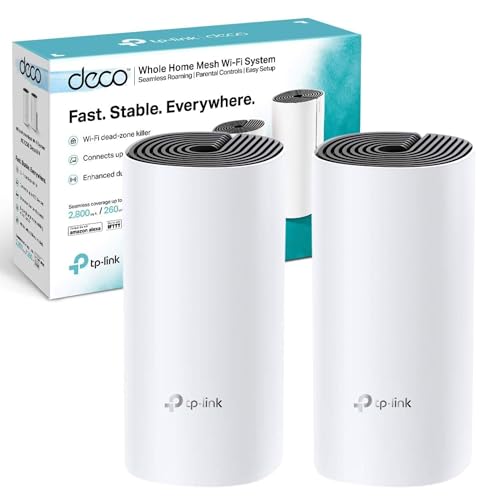
Most people shop for mesh because their current router isn't reaching. The ISP box can't get a signal to the back bedroom, or a single "whole home" router plainly doesn't cover the whole home. The TP-Link Deco X10 2-pack is TP-Link's entry-level Wi-Fi 6 mesh: two units, two Gigabit ports on each, a coverage rating of up to 3,900 square feet and a figure of up to 120 devices.
Most of that holds up on paper. The catch is that the X10 is dual-band, not tri-band, so the two units share their radios between your devices and each other. That's covered properly in the backhaul section, and it's the main reason the faster Deco X55 exists.
Sources: TP-Link UK's product and specification pages for the Deco X10 and for the X20, X55, M5, S7 and PX10 it's compared with, plus TP-Link's own Amazon listing for the X10. We haven't tested a kit, so coverage and speed figures here are TP-Link's ratings, not measurements.
Core Specifications: TP-Link Deco X10 2-Pack AX1500 Mesh Wi-Fi 6 System
AX1500 is the sum of the two bands' top link rates, 1,201 Mbps on 5 GHz and 300 Mbps on 2.4 GHz. No single device gets that total. The 2.4 GHz radio is worth a second look: it's 802.11n, the Wi-Fi 4 standard, so only the 5 GHz band runs Wi-Fi 6.
| Specification | Detail |
|---|---|
| Wi-Fi standard | Wi-Fi 6 (802.11ax) on 5 GHz; 802.11n on 2.4 GHz |
| Band layout | Dual-band (2.4 GHz + 5 GHz) |
| Speed class | AX1500 |
| 5 GHz rate | 1,201 Mbps (802.11ax) |
| 2.4 GHz rate | 300 Mbps (802.11n) |
| Backhaul | Wireless on the shared bands, or optional Ethernet (no dedicated backhaul band) |
| Ethernet ports per unit | 2x Gigabit, WAN/LAN auto-sensing |
| Coverage rating | 2,100 sq ft (1-pack), 3,900 sq ft / 360 m² (2-pack), 5,600 sq ft (3-pack) |
| Devices | Up to 120 |
| Antennas | 2 internal per unit, with beamforming |
| MU-MIMO / OFDMA | Yes |
| Wi-Fi security | WPA, WPA2 and WPA3-Personal |
| Modes | Router or access point |
| Management | TP-Link Deco app (iOS and Android) |
| Size per unit | 110 x 110 x 114 mm |
| Price | £109.99 |

Coverage: What 3,900 Square Feet Means
TP-Link rates the 2-pack at 3,900 square feet, about 360 square metres, and its footnotes are clear that walls, floors and building materials cut into that. It's a best case. TP-Link pitches the 2-pack at two to four-bedroom houses, but construction and layout decide whether two units are enough.
Placement does most of the work. Put the main unit by your router or ONT and the second roughly halfway to the worst dead spot, not in the dead spot itself. Your devices then roam between the two on one network name.
Bigger or older houses are where two units run short. A long detached house or a Victorian terrace with solid brick walls may need a third unit, and TP-Link sells a 3-pack rated at 5,600 square feet. Any Deco will join an existing Deco network, so you can add one later rather than guessing up front.
Deco X10 Speed: Reading the AX1500 Figure
Nobody's laptop sees 1,500 Mbps. That figure adds the two bands' physical link rates together, and TP-Link's own notes say real throughput depends on the device, the distance and the building. What you can compare between systems is the per-band rate, and on 5 GHz the X10's is 1,201 Mbps.
TP-Link's Amazon listing for the X10 pitches it at broadband between 500 Mbps and 900 Mbps, and points full-Gigabit users to the Deco X55 or XE75 instead. The Ethernet ports are Gigabit, though TP-Link notes real network speed also depends on the cable, your ISP and conditions at home. Over Wi-Fi to the far unit it's a different story, because on a dual-band mesh that traffic has to cross the shared backhaul first.
On slower broadband the line itself is usually the limit, not the Wi-Fi, and the X10's Wi-Fi 6 features matter more than its peak rate. OFDMA in particular helps when lots of devices are talking at once.
Mesh Backhaul on the Deco X10
Backhaul is the link between the mesh units. The X10 has two radios, 2.4 GHz and 5 GHz, and uses the same ones to reach your devices and to talk to the other unit. Some tri-band systems can reserve a third band for the link between units, though tri-band alone doesn't guarantee it.
So a device on the second unit can have less airtime to work with than one next to the main unit, because the same radios carry both your traffic and the link between units. How much less depends on the distance between units and how busy the network is. For browsing, streaming and video calls on an ordinary line that's usually acceptable. If you want more wireless capacity at the second unit, cable the units together or look at a tri-band system.
If you can run a cable, TP-Link supports Ethernet backhaul on the X10, which takes the node-to-node link off the radios. Mind the ports, though. With a wired backhaul the main unit's two ports go to your modem and to the cable, leaving one free port on the second unit.
Device Capacity: 120 Devices
The 120-device figure comes from two Wi-Fi 6 features. OFDMA splits a channel so the router can serve several devices in one transmission, and MU-MIMO lets it talk to more than one device at the same time. Both cut the queueing you get on older routers when everyone's online at once.
A family home can easily run to dozens of connected things once you count phones, laptops, TVs, consoles, speakers, cameras and smart plugs. You're unlikely to reach 120. The benefit shows earlier than that, when a houseful of devices are all active in the evening. One catch: OFDMA and MU-MIMO only help devices that support them, and the X10's 2.4 GHz radio is 802.11n, so older smart-home kit on 2.4 GHz won't see Wi-Fi 6 gains.
Deco X10 Wi-Fi 6 Standard and Future-Proofing
For most people buying in 2026, Wi-Fi 6 is still the sensible standard. Wi-Fi 6E adds a 6 GHz band and Wi-Fi 7 goes further, but you only benefit with devices that support them. The X10 works with Wi-Fi 5 and Wi-Fi 4 devices too.
If your current router is Wi-Fi 5 or older, the X10 is a clear step up for a busy household. If you already own Wi-Fi 6E or Wi-Fi 7 phones and laptops, price up a mesh that supports them before you settle.
Features: Parental Controls, QoS and Guest Wi-Fi
Parental controls run through the Deco app. You make a profile for each person, then set time limits, bedtimes and content filters, and pause the internet when dinner's on the table. Because it works at the router, nothing needs installing on the children's devices.
QoS lets you prioritise a device, so a work laptop or a console can jump the queue while someone else downloads. TP-Link's AI-Driven Mesh handles band steering and which unit each device connects to, without you setting anything.
There's a guest network on each band, so visitors get their own Wi-Fi name and password. If keeping them away from your smart-home kit and NAS matters, check the guest isolation settings in the app. For privacy away from home, on public Wi-Fi, see our VPN guides. TP-Link's HomeShield security suite has a free basic plan, and the Pro plan costs extra.
Firmware, App and Security Updates
TP-Link lists over-the-air firmware upgrades for the X10. TP-Link's UK support page is where to check current firmware. Install any available firmware update when you set the system up, and check again now and then.
The app is where you'll do nearly everything. TP-Link also lists an HTTP/HTTPS web server for managing the unit, but if you need particular advanced routing controls, check TP-Link's documentation for your hardware and firmware version before buying.
Setup and Management
Setup is app-led. Plug the first unit into your modem or router, open the Deco app and follow the steps; the second unit is added the same way. There's no IP address to type and nothing to know about DHCP.
Day to day, the app shows what's connected and to which unit, and it's where you manage the guest network, parental controls and QoS.
The X10 works best replacing your ISP router rather than sitting behind it. It can run in access point mode behind an existing router, but you lose some features, and running two routers in series can cause double-NAT problems with some games and apps. If you have to keep the ISP box, set one of the two to bridge or access point mode.

Ports and Connectivity
Each unit has two Gigabit Ethernet ports, and either can be WAN or LAN. With wireless backhaul, one port on the main unit goes to your modem or ONT and the other is free, and both on the second unit are free for a console, desktop or TV. Wire the units together and you give up the spare port on the main unit and one on the second.
Gigabit ports are enough for anything short of a multi-gig broadband package. If your broadband is faster than Gigabit, pick a system with ports to match.
Two ports won't stretch to a home office with a PC, a NAS and a printer. An unmanaged switch plugged into the nearest unit adds the ports you need.
How It Compares: Deco X10 vs X20, X55, M5, S7 and PX10
Every Deco in the table is dual-band, so on each of them client traffic and the link between units share two bands unless you cable the units together. TP-Link also says any Deco works with any other, which matters if you already own older units. The band rates are physical link rates, not speeds you'll see on a phone.
| TP-Link specification | Deco X10 | Deco X20 | Deco X55 | Deco M5 | Deco S7 |
|---|---|---|---|---|---|
| Wi-Fi standard | Wi-Fi 6 | Wi-Fi 6 | Wi-Fi 6 | Wi-Fi 5 | Wi-Fi 5 |
| Class | AX1500 | AX1800 | AX3000 | AC1300 | AC1900 |
| Bands | Dual-band | Dual-band | Dual-band | Dual-band | Dual-band |
| 5 GHz rate | 1,201 Mbps | 1,201 Mbps | 2,402 Mbps (160 MHz) | 867 Mbps | 1,300 Mbps |
| 2.4 GHz rate | 300 Mbps (802.11n) | 574 Mbps (802.11ax) | 574 Mbps (802.11ax) | 400 Mbps (802.11n) | 600 Mbps (802.11n) |
| Gigabit ports per unit | 2 | 2 | 3 | 2 | 3 |
| Devices (TP-Link figure) | Up to 120 | Up to 150 | Over 150 | Over 100 | Over 100 |
| Coverage rating | 2,100 / 3,900 / 5,600 sq ft (1 / 2 / 3-pack) | 2,200 / 4,000 sq ft (1 / 2-pack) | 4,500 / 6,500 sq ft (2 / 3-pack) | 3,800 / 5,500 sq ft (2 / 3-pack) | 2,100 sq ft (1-pack) |
| Backhaul | Wireless or optional Ethernet | Wireless or optional Ethernet | Wireless or optional Ethernet | Wireless or optional Ethernet | Wireless or optional Ethernet |
| Wi-Fi security | WPA, WPA2, WPA3-Personal | WPA, WPA2, WPA3-Personal | WPA, WPA2, WPA3-Personal | WPA and WPA2-Personal | WPA and WPA2-Personal |
| Status on TP-Link UK | No End of Life tag | End of Life (V1 page), no replacement named | No End of Life tag | End of Life | End of Life |
Deco X10 vs X55
The X55 is the step up, though it isn't tri-band. Both are dual-band Wi-Fi 6. The X55 adds a 160 MHz channel on 5 GHz that TP-Link rates at 2,402 Mbps, twice the X10's 1,201 Mbps, and its 2.4 GHz radio is Wi-Fi 6 at 574 Mbps where the X10's is 802.11n at 300 Mbps. Each X55 unit has a third Gigabit port, and a 3-pack is rated for 6,500 square feet against 5,600.
With compatible devices, that 160 MHz mode gives the X55 the higher link rate on paper, and TP-Link notes it isn't available in every region. TP-Link's own X10 listing sends full-Gigabit users to the X55. If that's you, or you want a third wired device at each unit, the X55 is the better match. On a slower package the X10's rates are enough.
Deco S7 vs X10
The S7 is older Wi-Fi 5 (AC1900) kit, and its band rates look better than the X10's: 1,300 Mbps on 5 GHz and 600 Mbps on 2.4 GHz, with three Gigabit ports per unit. What the X10 has instead is Wi-Fi 6, so OFDMA for busy networks, plus WPA3 security, which the S7 doesn't list. TP-Link UK now marks the S7 End of Life. An S7 you already own still works, and X10 units will join its network. If you're buying new, the X10 is the current model of the two.
Deco M5 vs X10
The M5 is an older Wi-Fi 5 AC1300 system with 867 Mbps on 5 GHz, 400 Mbps on 2.4 GHz and two Gigabit ports per unit. The X10 keeps the two ports and brings a faster 5 GHz radio (1,201 Mbps), Wi-Fi 6 and WPA3. Coverage barely changes, at 3,900 square feet for an X10 2-pack against 3,800 for the M5. TP-Link UK lists the M5 as End of Life.
If your phones and laptops are still Wi-Fi 5, moving from an M5 gains less. Once they're Wi-Fi 6 the case gets stronger, and you can add an X10 to an M5 network rather than replacing the lot.
Deco X10 vs X20
The X20 is almost the same box: same size, same two Gigabit ports, same 1,201 Mbps on 5 GHz. The difference is 2.4 GHz, where the X20 has a Wi-Fi 6 radio at 574 Mbps, and TP-Link gives it a 150-device figure against 120. That only helps 2.4 GHz devices that support Wi-Fi 6, so check your smart-home kit before paying more for it. TP-Link UK tags its X20 V1 page End of Life, so check which hardware version a listing is selling.
Deco X10 vs PX10
The PX10 is the X10's powerline cousin. It has the same AX1500 rating, with Wi-Fi 6 on 2.4 GHz as well, and adds AV1000 powerline, so its units can link over your mains wiring as well as by radio. It also has three Gigabit ports per unit and a bigger rating, 4,100 square feet for a 2-pack. TP-Link designed that link to cut the effect of walls, though powerline results also depend on your electrical circuit and interference. The units are taller, at 169 mm against the X10's 114 mm.

Final Verdict: TP-Link Deco X10 2-Pack AX1500 Mesh Wi-Fi 6
On TP-Link's figures the X10 2-pack is a sound buy for a typical two to four-bedroom home on a sub-Gigabit line. TP-Link pitches the 2-pack at exactly that size of home, it has two Gigabit ports on every unit, and the app, parental controls and guest network cost nothing extra.
Its limits are the shared backhaul and the older 2.4 GHz radio. Look at the X55 instead if you're on full Gigabit and want it wirelessly around the house, or a 3-pack if the house is large with thick walls. And if one room is the only problem, one extra Deco or a wired access point may be a simpler fix than a new system.
Rated ★★★★½ (4.5) from 10,519 Amazon ratings.
What works. What doesn’t.
4 + 4What we liked4 reasons
- Wi-Fi 6 on 5 GHz, with OFDMA and MU-MIMO for busy households
- Two Gigabit Ethernet ports on every unit
- App-led setup with no web pages or IP addresses
- Free parental controls with profiles, time limits and content filters
Where it falls4 reasons
- Shared dual-band backhaul can leave less airtime for devices on the second unit
- TP-Link points full-Gigabit users to the Deco X55 instead
- Its 2.4 GHz radio is 802.11n at 300 Mbps, slower than the Wi-Fi 6 2.4 GHz radio in the Deco X20 and X55
- Managed through the Deco app and a web interface; check TP-Link's documentation if you need particular advanced routing controls
Full specifications
9 attributes| Device type | mesh |
|---|---|
| Ethernet ports | 2 |
| Frequency bands | dual-band |
| MAX speed | 1500 |
| Mesh capable | true |
| Ports | 2x Gigabit |
| TOP speed mbps | 1500 |
| Type | mesh_router |
| Wifi standard | Wi-Fi 6 |
If this isn’t right for you
2 options 7.5 / 10
Linksys MR7350 Dual Band Mesh WiFi 6 Router (AX1800) - Works with Velop Whole Home WiFi System - Wireless Internet Gaming Router with MU-MIMO, Parental Controls, Guest Network Via App
£99.99 · Linksys
 7.5 / 10
TP-Link Deco M4(2-pack) AC1200Mbps Whole Home Mesh WiFi System, Seamless & Speedy WiFi Extender Booster, Up to 2800 ft² Coverage, Work with Amazon Alexa, Router and Internet Booster Replacement
£87.00 · TP-Link
Frequently asked
9 questions01Will the TP-Link Deco X10 2-pack cover my whole house?+
TP-Link rates the 2-pack at up to 3,900 square feet (about 360 m²) and pitches it at two to four-bedroom houses. That's a best case, and thick walls, long layouts and extra floors cut into it. Put one unit by your router and the other about halfway to the worst dead spot, and add a third unit if the far rooms still struggle.
02Do I need Wi-Fi 6E or Wi-Fi 7 instead of the Deco X10?+
Only if your devices support them. Wi-Fi 6E adds a 6 GHz band and Wi-Fi 7 goes further, but a phone or laptop without them gains nothing. The X10 runs Wi-Fi 6 on 5 GHz, and works with older Wi-Fi 5 and Wi-Fi 4 devices.
03Is the Deco X10 2-pack worth it over a single router or extender?+
For a home with dead spots, usually yes. The two units form one network with one name, and devices move between them as you walk around. The catch is the shared backhaul. On a dual-band system like this, a device on the second unit can have less airtime than one beside the main unit. In a small, open home a single good router may be enough.
04Is the Deco X10 easy to set up?+
Yes. The Deco app walks you through connecting the first unit to your modem or router and adding the second, with no web pages or IP addresses involved. TP-Link lists over-the-air firmware upgrades, so keep the firmware current once it's running.
05What warranty and returns apply to the Deco X10?+
Check the retailer's current returns policy and TP-Link UK's warranty terms, which set warranty periods by product type, before buying. Your rights against the retailer under the Consumer Rights Act 2015 apply whatever the maker's warranty says.
06Deco X10 vs X55: what is the difference?+
Both are dual-band Wi-Fi 6. TP-Link rates the X55 at AX3000, with a 160 MHz channel giving 2,402 Mbps on 5 GHz against the X10's 1,201 Mbps, a 574 Mbps Wi-Fi 6 radio on 2.4 GHz against 300 Mbps, three Gigabit ports per unit against two, and up to 6,500 sq ft for a 3-pack against 5,600. TP-Link's own X10 listing points full-Gigabit users to the X55.
07Deco S7 vs X10: which is better?+
The S7 is Wi-Fi 5 (AC1900) with higher on-paper band rates and three Gigabit ports per unit. The X10 is Wi-Fi 6 (AX1500), with OFDMA, WPA3 and a higher device figure. TP-Link UK lists the S7 as End of Life, and existing S7 kits can be mixed with X10 units.
08Deco M5 vs X10: is it worth upgrading?+
TP-Link UK lists the M5 as End of Life. The X10 keeps two Gigabit ports per unit and adds Wi-Fi 6, WPA3 and a faster 5 GHz radio (1,201 Mbps against 867 Mbps). The upgrade makes more sense once your main devices are Wi-Fi 6, and you can add X10 units to an M5 network.
09Deco X10 vs PX10: what does the PX10 add?+
The PX10 has the same AX1500 rating but adds AV1000 powerline, so its units can link over your mains wiring as well as by radio. TP-Link gives it three Gigabit ports per unit and rates a 2-pack at 4,100 sq ft against the X10's 3,900. TP-Link designed that link to cut the effect of walls, though powerline results also depend on your electrical circuit. The units are taller, at 169 mm.













