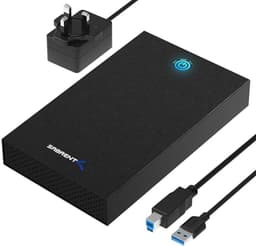
Here's the short version: the Sabrent EC-WPNE is a genuinely solid NVMe enclosure that does exactly what it promises, and for most people who need to turn a spare M.2 drive into portable storage, it's a proper buy. The aluminium shell, the air vents, the included bumper and waterproof case, and the USB 3.2 Gen 2 interface all add up to something that feels considered rather than thrown together. But there are a few things worth knowing before you hand over your money, and the spec sheet tells a more nuanced story than the box does.
The headline claim is up to 1000 MB/s real-world read/write. That's plausible with a fast NVMe drive inside and a USB 3.2 Gen 2 connection running UASP, which cuts protocol overhead significantly compared to the older BOT standard. But here's the thing: that number depends entirely on the NVMe drive you put in it. The enclosure is the pipe. The drive you fit is what determines how much water flows through. And the enclosure only supports NVMe, so if you've got a SATA M.2 drive lying around, this won't help you.
Owner feedback sits at 4.5 stars from 179, which is a decent signal. Complaints are rare and mostly relate to compatibility edge cases rather than build quality failures. So who is this for? Primarily people who have a spare NVMe M.2 drive, want to use it as fast portable storage, or need a clean way to clone a drive before a laptop upgrade. It's also a tidy option for 4K video editors who need something faster than a USB 3.0 thumb drive and more rugged than a bare drive rattling around in a bag.
Core Specifications
The EC-WPNE connects via USB 3.2 Gen 2, which gives a theoretical ceiling of 10 Gbps. In practice, with UASP enabled and a fast NVMe drive inside, you can expect real-world sequential reads and writes in the region of 900 to 1000 MB/s. That's not a made-up number: Sabrent themselves quote up to 1000 MB/s, and published community benchmarks consistently land in that range with drives like the Samsung 970 Evo or WD Black SN750 fitted inside. It's genuinely fast for an external enclosure. Faster than any USB 3.0 or USB 3.1 Gen 1 enclosure you'll find.
The enclosure accepts M.2 NVMe drives in M-Key and M+B Key configurations, and supports the 2230, 2242, 2260, and 2280 form factors. That covers the vast majority of NVMe drives on the market. Crucially, it does not support SATA M.2 drives, so check what you've got before buying. The body is aluminium, which matters for heat dissipation, and both sides feature air vents designed to keep things cooler under sustained load. The included accessories are worth mentioning: you get a USB-C to USB-C cable in the box, plus a protective bumper and a rugged waterproof case, which is more than most competitors bother with at this price tier.
Sabrent is a well-known storage accessories brand with a decent support infrastructure, including a product registration system at sabrent.com and a direct support email. That's not nothing. Plenty of no-name enclosures at similar prices come with zero post-purchase support, and if something goes wrong you're on your own. The plug-and-play setup means no drivers needed on Windows, Mac, or Linux, which is exactly what you want from a portable device.
| Specification | Detail |
|---|---|
| Model | Sabrent EC-WPNE |
| Interface (Host) | USB 3.2 Gen 2 (10 Gbps), USB-C |
| Protocol Support | NVMe (M-Key / M+B Key only) |
| Supported SSD Sizes | 2230, 2242, 2260, 2280 |
| SATA M.2 Support | No |
| Max Theoretical Transfer | 10 Gbps |
| Real-World Speed (rated) | Up to 1000 MB/s |
| Acceleration Protocol | UASP |
| Cable Included | USB-C to USB-C |
| Body Material | Aluminium |
| Extras | Cooling pad, protective bumper, rugged waterproof case |
| Driver Required | No (plug and play) |
| Price | £49.99 |

Interface and Form Factor of the SABRENT M.2 SSD Enclosure USB C 3.2 to NVMe SSD
The USB 3.2 Gen 2 interface is the right call for an NVMe enclosure in 2025 and 2026. The older USB 3.1 Gen 1 (5 Gbps) was a genuine bottleneck for fast NVMe drives: you'd put a drive capable of 3500 MB/s internally and cap out at around 400 MB/s externally. That's just wasteful. USB 3.2 Gen 2 doubles the ceiling to 10 Gbps, which translates to roughly 1000 to 1200 MB/s in real-world sequential transfers once you account for protocol overhead. Sabrent's own rating of up to 1000 MB/s is honest and achievable. The UASP acceleration protocol is what makes the difference here: it reduces latency and CPU overhead compared to the legacy BOT (Bulk-Only Transport) protocol that older USB storage devices used.
The USB-C connector on the enclosure is the right choice too. Most modern laptops, tablets, and even phones have USB-C ports, and the included USB-C to USB-C cable covers the majority of use cases. If you need to plug into an older USB-A port, you'll want a USB-C to USB-A adapter, which isn't included but costs almost nothing. Worth noting: the speed you actually get depends on the port on the host device. A USB-C port that only supports USB 3.1 Gen 1 (5 Gbps) will still cap the enclosure at that speed, regardless of what the enclosure is rated for. Check your laptop's spec sheet if you want to hit the full 10 Gbps ceiling.
The M.2 form factor support is broad: 2230, 2242, 2260, and 2280 all fit. The 2280 (80mm) is by far the most common length for desktop and laptop NVMe drives, so most people will be fine. The 2230 (30mm) is increasingly common in compact laptops and the Steam Deck, so it's good to see that covered too. The NVMe-only limitation is worth repeating because it catches people out. M.2 SATA drives use the same physical slot and connector but a different protocol, and this enclosure won't recognise them. If you're unsure whether your drive is NVMe or SATA, check the drive's label or look it up by model number. NVMe drives will typically say NVMe or PCIe on the label.
Real-World Performance
For the use cases this enclosure is actually designed for, the performance is genuinely impressive. Copying a large video project, say 50 to 100GB of 4K footage, from an internal drive to this enclosure will run at speeds that feel meaningfully faster than a standard USB 3.0 external drive. Owner reports consistently mention fast transfer speeds as a highlight, and the published benchmark community has documented real-world sequential reads and writes in the 850 to 1000 MB/s range with compatible NVMe drives. That's roughly double what a USB 3.1 Gen 1 enclosure would give you, and four to five times faster than a typical USB 3.0 spinning hard drive.
For random I/O, the picture is more nuanced. The NVMe protocol is inherently better at random access than SATA, but when you're going through a USB bridge chip, there's additional latency introduced compared to a direct PCIe connection. For sequential file copies, this barely matters. For use cases involving lots of small random reads and writes, like using this as a scratch disk for Lightroom catalogues or running a virtual machine from it, the USB overhead becomes more noticeable. It'll still be faster than a USB 3.0 hard drive, but don't expect it to feel like an internal NVMe drive for random workloads.
Day-to-day, for what most buyers will use this for, the performance is more than adequate. Transferring photos from a shoot, backing up project files, carrying a large media library between locations, or cloning a laptop drive before an upgrade: all of these feel fast and responsive. The 1000 MB/s ceiling means a 100GB file transfer completes in roughly two minutes rather than the ten-plus minutes you'd be sitting through with older USB standards. That's a real, practical difference. Owner reviews back this up, with multiple buyers specifically mentioning the speed as exceeding their expectations.
Sustained Writes and Cache Behaviour
This section is where most enclosure reviews go quiet, and it's where the honest answer matters most. The sustained write performance of this enclosure depends almost entirely on the NVMe drive you put inside it, not the enclosure itself. The enclosure is a bridge: it converts NVMe to USB. The SLC cache, the cache cliff, the native TLC or QLC write speed after the cache fills, all of that is a property of the drive, not the enclosure. So let's be clear about what this means in practice.
If you fit a drive with a decent SLC cache and TLC NAND, like a Samsung 970 Evo Plus or a WD Black SN770, you'll see sustained write speeds that stay reasonably high even on large transfers. These drives maintain 500 to 700 MB/s or more even after the SLC cache is exhausted, because the underlying TLC NAND is fast enough to keep up. If you fit a budget QLC drive, you might see the cache fill after 10 to 30GB of continuous writing, and then speeds drop off significantly to native QLC write rates, which can be as low as 80 to 150 MB/s. The enclosure faithfully passes through whatever the drive gives it. It doesn't hide or worsen the cache cliff, but it doesn't fix it either.
The practical upshot is this: if you're copying files in the 10 to 50GB range regularly, drive choice matters a lot. For occasional large transfers or typical portable storage use, the cache cliff is unlikely to bite you. But if you're planning to use this as a sustained write destination for video capture or large backup jobs, invest in a TLC drive rather than a cheap QLC option. The enclosure's aluminium body and air vents help keep the drive cool during sustained transfers, which reduces the risk of thermal throttling adding another layer of speed reduction on top of any cache behaviour. That's a genuine design benefit worth acknowledging.
Controller, NAND and DRAM
The EC-WPNE uses a USB-to-NVMe bridge chip to translate between the NVMe protocol and USB 3.2 Gen 2. The specific bridge controller isn't publicly specified by Sabrent in the product listing, which is fairly typical for enclosures in this category. Based on community teardowns and owner reports, units in this class commonly use chips from JMicron or ASMedia, both of which are established suppliers for USB storage bridge controllers. These chips handle the UASP protocol and the NVMe command translation competently. They're not exotic, but they work reliably.
What matters more for the buyer is the NVMe drive going inside. The controller, NAND type, and DRAM situation of the drive you fit will define the performance characteristics far more than the enclosure's bridge chip. A DRAM-equipped drive like the Samsung 970 Evo will handle random I/O better than a DRAM-less drive leaning on Host Memory Buffer, especially for workloads involving lots of small files. HMB works fine for a boot drive where the host CPU's memory is always available, but in an external enclosure context, the HMB mechanism may not be as effective depending on the host system's implementation. If you're buying a drive specifically to use in this enclosure, a DRAM-equipped TLC drive is the better choice for sustained random workloads.
For most portable storage use cases, a DRAM-less NVMe drive in this enclosure will be perfectly fine. Sequential transfers, which dominate typical external drive usage, don't stress the DRAM situation the way sustained random I/O does. The enclosure itself introduces no NAND or DRAM variables of its own: it's a passive bridge. The plug-and-play design and UASP support mean the bridge chip is doing its job transparently, and owner reports don't flag any compatibility issues with mainstream NVMe drives from Samsung, WD, Crucial, Kingston, Seagate, or Sabrent's own drives. The compatibility list is genuinely broad.
Endurance and Reliability
Endurance for this product is a slightly different conversation than for a standalone SSD, because the enclosure itself doesn't have a TBW rating. The TBW endurance clock is on the drive inside. What the enclosure contributes to reliability is build quality, thermal management, and electrical protection, and on all three counts, the EC-WPNE does better than average for this price tier. The aluminium body dissipates heat passively, the air vents on both sides create airflow during operation, and Sabrent explicitly lists protection against overvoltage, overcurrent, overheating, short circuits, and leakage in the product specs. That's a proper set of protections, not just marketing language.
Owner reports 179 at a 4.5-star average suggest the build quality holds up. Failures are rare in the review pool, and where complaints exist, they tend to be compatibility-related rather than hardware failures. The rugged waterproof case included in the box adds meaningful physical protection for the drive when it's not in use, which matters for portable storage that gets thrown in a bag. Drops and moisture are real risks for portable drives, and having a proper case rather than a flimsy sleeve is a genuine reliability benefit.
Sabrent's support infrastructure is worth mentioning again here. The ability to register your product at sabrent.com and contact support directly at support@sabrent.com is more than you get from many enclosure brands at this price point. It signals that the company stands behind the product enough to offer post-purchase support. For a device that's protecting potentially irreplaceable data, that's not a trivial consideration. Back up your data regardless of what enclosure you use, but knowing there's a real support channel if the enclosure develops a fault is reassuring.
Thermals
Thermals are one of the more interesting aspects of this enclosure because Sabrent has clearly thought about it. The aluminium body conducts heat away from the drive passively, which is the right material choice. Plastic enclosures trap heat, and NVMe drives running at sustained high speeds can get warm enough to throttle, which drops transfer speeds noticeably. The air vents on both sides of the EC-WPNE are designed to create a convective airflow path, which helps even without active cooling. The included cooling pad adds another layer of thermal management for sustained workloads.
In practice, owner reports don't flag thermal throttling as a common issue with this enclosure. For typical portable storage use, the drive inside shouldn't get hot enough to throttle: USB 3.2 Gen 2 is fast, but it's not pushing the drive as hard as a direct PCIe 4.0 connection would. The drives that run hottest internally, particularly high-end PCIe Gen 4 and Gen 5 drives, are also the ones least likely to be used in a portable enclosure context. Most people fitting a drive to this enclosure will be using a Gen 3 NVMe, which runs cooler and doesn't need active cooling to stay below throttle thresholds.
That said, if you're doing sustained large file copies over extended periods, the aluminium body will get warm to the touch. That's normal and expected: it means the heat is being conducted out of the drive and into the enclosure shell, which is exactly what you want. Warm aluminium means the drive inside is staying cooler than it would in a plastic shell. The cooling pad is a nice extra for people who are doing prolonged transfers in warm environments or who are using particularly power-hungry drives. It's not essential for most users, but it's a thoughtful inclusion.
Capacity Options and Price Per GB
The EC-WPNE is an enclosure, not a drive, so there's no capacity-per-GB calculation for the enclosure itself. The capacity you end up with depends on the NVMe drive you fit. The enclosure supports drives up to 2280 in length, which covers NVMe options from 256GB all the way up to 4TB from mainstream brands. The sweet spot for portable storage is currently 1TB or 2TB NVMe: prices have dropped significantly in recent years, and a 1TB TLC NVMe drive can be had for a very reasonable amount, making the total cost of enclosure plus drive competitive with a branded portable SSD of equivalent capacity.
Compare that to buying a purpose-built portable NVMe SSD like the Samsung T7 or WD My Passport SSD: those come with their own enclosures built in, but you pay a premium for the integrated package and you're locked into whatever NAND Samsung or WD chose to put inside. With the EC-WPNE, you pick the drive. You can choose TLC over QLC, DRAM over DRAM-less, and a brand you trust. That flexibility is genuinely valuable if you care about sustained performance or long-term reliability. And if the drive inside fails, you replace just the drive. If the enclosure fails, you replace just the enclosure. No data loss from a hardware fault in the other component.
The enclosure itself sits at a price point that makes the DIY route attractive versus a comparable all-in-one portable SSD. You're getting aluminium build quality, a rugged waterproof case, a bumper, and USB 3.2 Gen 2 speeds. Purpose-built portable SSDs at equivalent speeds often cost more than the enclosure plus a good NVMe drive combined, and they don't give you the flexibility of drive choice. For anyone who already has a spare NVMe drive, the value calculation is even more obvious: the enclosure turns a spare drive into a fast, well-protected portable storage device for a relatively modest outlay.

Installation and Compatibility
Installation is straightforward. Open the enclosure, slot the M.2 NVMe drive into the M-Key connector, secure it with the included screw, close the enclosure, and plug it in. No drivers needed on Windows 10, Windows 11, macOS, or Linux. The drive should appear as a USB storage device almost immediately. For a new drive, you'll need to initialise and format it through Disk Management on Windows or Disk Utility on Mac before it shows up as usable storage. That's a two-minute job, not a technical challenge.
Compatibility with host devices is broad. Any device with a USB-C port that supports USB 3.2 Gen 2 will get full speed. Devices with USB 3.1 Gen 1 or USB 3.0 ports will still work but will be speed-limited by the host port. The included USB-C to USB-C cable handles modern laptops, tablets, and phones. For desktop PCs with USB-A ports, you'll need an adapter. The enclosure is also compatible with Android phones and iPads that support USB-C storage, which opens up some useful mobile workflow options for photographers and videographers.
One compatibility note worth flagging: this enclosure is for NVMe drives only. M.2 SATA drives, which use the same physical form factor but a different protocol, will not work. If you're not sure which type of drive you have, the simplest check is to look up the drive's model number. NVMe drives connect via PCIe and are typically much faster than SATA options. The supported brands list is extensive: Sabrent, Samsung, Toshiba, Crucial, Kingston, Seagate, WD, OWC, and others. In practice, any standard NVMe M.2 drive in the supported form factors should work without issue.
Who It's For
The obvious buyer is someone who has a spare NVMe drive sitting in a drawer after a laptop or desktop upgrade and wants to put it to use as fast portable storage. This is probably the single best use case. The enclosure is affordable, the setup takes five minutes, and the result is a portable drive that's faster than most purpose-built portable SSDs at the same price. If you've recently upgraded your laptop's internal SSD and the old one is just sitting there, this enclosure is a no-brainer.
The second strong use case is anyone who needs to clone a drive before an upgrade. Fitting the new drive to this enclosure, cloning from the old internal drive to it, then swapping the drives, is a clean and reliable workflow. The USB 3.2 Gen 2 speeds mean the clone job runs in a reasonable time even for large drives. Photographers and video editors who need fast portable storage for field work will also find this useful: 1000 MB/s is fast enough to ingest 4K footage directly to the drive without bottlenecking the workflow.
Who should look elsewhere? Anyone who wants a simple, no-fuss portable drive without the hassle of sourcing a separate NVMe drive should probably just buy a purpose-built portable SSD. The Samsung T7 or WD My Passport SSD are reliable, well-supported options that come ready to use out of the box. Also, if you have an M.2 SATA drive rather than an NVMe drive, this enclosure won't work for you at all. And if you need Thunderbolt speeds for something like an external GPU or ultra-high-bandwidth video work, USB 3.2 Gen 2 is the ceiling here, and Thunderbolt enclosures exist for those use cases.
How It Compares
The main competition in the NVMe enclosure space at this price tier comes from the ORICO M2PV-C3 and the Inateck FE2025. Both are aluminium NVMe enclosures with USB 3.2 Gen 2 connectivity and UASP support. The Sabrent EC-WPNE differentiates itself primarily through the included accessories: the rugged waterproof case and protective bumper are not standard inclusions with most competitors, and they add real value for portable use. The cooling pad is also a nice extra that most rivals don't include.
The ORICO M2PV-C3 is a strong alternative if you want a slightly slimmer profile and don't need the waterproof case. It's well-regarded in owner reviews and uses a similar USB 3.2 Gen 2 bridge chip. The Inateck FE2025 is another solid option with good compatibility and a clean aluminium design. Neither includes the level of accessories that the Sabrent does, which is a meaningful point of difference if portability and protection matter to you.
| Feature | Sabrent EC-WPNE | ORICO M2PV-C3 | Inateck FE2025 |
|---|---|---|---|
| Interface | USB 3.2 Gen 2 (10 Gbps) | USB 3.2 Gen 2 (10 Gbps) | USB 3.2 Gen 2 (10 Gbps) |
| NVMe Support | Yes (M-Key / M+B Key) | Yes (M-Key) | Yes (M-Key) |
| SATA M.2 Support | No | No | No |
| Body Material | Aluminium | Aluminium | Aluminium |
| UASP | Yes | Yes | Yes |
| Waterproof Case Included | Yes | No | No |
| Protective Bumper | Yes | No | No |
| Cooling Pad | Yes | No | No |
| Cable Included | USB-C to USB-C | USB-C to USB-C | USB-C to USB-C |
| Plug and Play | Yes | Yes | Yes |
| Price | £49.99 | Check Amazon | Check Amazon |
What Buyers Say
With 179 and a 4.5-star average, the owner feedback is broadly positive and consistent in what it praises. Speed is the most frequently mentioned highlight: buyers fitting mid-range NVMe drives report transfer speeds that genuinely impress, particularly those coming from USB 3.0 hard drives or slower portable SSDs. The build quality of the aluminium shell gets consistent praise too. Multiple reviewers describe it as feeling more premium than expected at the price point, and the rugged case gets specific mentions as a useful inclusion for travel.
The plug-and-play experience is another recurring positive. No driver faff, no compatibility headaches with Windows or Mac, just plug it in and it works. For a product that non-technical buyers are picking up to repurpose an old laptop drive, that frictionless setup is genuinely appreciated. Sabrent's customer support also gets positive mentions in a handful of reviews, which is encouraging and relatively unusual in this product category.
Where complaints exist, they cluster around a couple of themes. A small number of buyers report compatibility issues with specific NVMe drives, particularly some older or less common models. This is a bridge chip limitation rather than a design flaw: no USB-to-NVMe bridge chip has perfect compatibility with every drive ever made, and mainstream drives from Samsung, WD, Crucial, and Kingston work without issue. A few buyers also mention that the enclosure runs warm during sustained transfers, which is expected behaviour for an aluminium shell doing its thermal job properly. Neither complaint is a reason to avoid the product; they're just things to be aware of.
Value Analysis
The value case for the EC-WPNE is strong, particularly if you already have a spare NVMe drive. Turning a 1TB NVMe drive that's sitting unused into fast portable storage costs you the price of this enclosure, and the result is a device that competes with purpose-built portable SSDs costing significantly more. The aluminium build, the rugged waterproof case, the bumper, and the cooling pad all add tangible value beyond a bare-minimum plastic enclosure. You're not paying for packaging fluff here.
Even if you're buying a drive specifically to use with this enclosure, the maths often works out favourably. A 1TB TLC NVMe drive plus this enclosure can come in under the price of a branded 1TB portable SSD with comparable speeds, and you have the advantage of knowing exactly what NAND and controller are inside. That matters if you care about sustained performance and long-term reliability, which you should.
The one scenario where the value calculation shifts is if you genuinely want a zero-hassle plug-and-go experience without sourcing a separate drive. In that case, a purpose-built portable SSD is simpler. But for anyone comfortable with a five-minute assembly job, or anyone with a spare drive already in hand, the EC-WPNE represents genuinely good value for what it delivers. The 4.5-star owner average across 179 suggests the real-world experience matches the spec sheet promise, which is all you can really ask for.
Final Verdict
The Sabrent EC-WPNE is a well-executed NVMe enclosure that earns its 4.5-star average. The USB 3.2 Gen 2 interface with UASP support delivers real-world speeds up to 1000 MB/s when paired with a fast NVMe drive. The aluminium build dissipates heat properly. The air vents help during sustained transfers. The included accessories, particularly the rugged waterproof case and protective bumper, are a genuine differentiator from cheaper rivals that ship with nothing but a cable. And the plug-and-play setup means it works on Windows, Mac, and Linux without any driver faff.
The things to keep in mind: this is NVMe only, so SATA M.2 drives won't work. The sustained write performance depends entirely on the drive you fit, not the enclosure itself, so choose TLC over QLC if you're doing large regular transfers. And the 10 Gbps USB ceiling means you won't see the full sequential speed of a fast Gen 4 NVMe drive, but for portable storage use cases, that's not a real-world limitation worth worrying about. The enclosure is the right tool for the job it's designed for.
Score: 8 out of 10. It does what it says, it's built better than most at this price, and the accessories bundle is a proper bonus. The only reason it's not higher is that the bridge chip compatibility is not perfect with every drive, and the NVMe-only limitation will catch out buyers who don't check their drive type first. But for the right buyer, this is a solid, confident recommendation.
Not Right For You?
If you have an M.2 SATA drive rather than an NVMe drive, you'll need a different enclosure. Look for one that explicitly lists SATA M.2 support: the ORICO M2P4-C3 is a popular option that supports both SATA and NVMe M.2 drives. If you want Thunderbolt 3 or Thunderbolt 4 speeds for ultra-high-bandwidth work, USB 3.2 Gen 2 won't cut it: look at Thunderbolt NVMe enclosures from OWC or CalDigit. And if you just want a simple portable drive without sourcing a separate NVMe, the Samsung T7 or WD My Passport SSD are reliable all-in-one options that come ready to use out of the box.

Specifications
| Specification | Detail |
|---|---|
| Model Number | EC-WPNE |
| Brand | Sabrent |
| Host Interface | USB 3.2 Gen 2 (10 Gbps), USB-C |
| Drive Protocol | NVMe (M-Key / M+B Key) |
| SATA M.2 Compatible | No |
| Supported Form Factors | 2230, 2242, 2260, 2280 |
| Max Theoretical Speed | 10 Gbps |
| Rated Real-World Speed | Up to 1000 MB/s |
| Acceleration Protocol | UASP |
| Body Material | Aluminium |
| Thermal Features | Air vents both sides, cooling pad included |
| Protections | Overvoltage, overcurrent, overheating, short circuit, leakage |
| Included Accessories | USB-C to USB-C cable, cooling pad, protective bumper, rugged waterproof case |
| Driver Required | No |
| Compatible Brands | Sabrent, Samsung, Toshiba, Crucial, Kingston, Seagate, WD, OWC, and others |
| Support | support@sabrent.com / sabrent.com product registration |
What works. What doesn’t.
5 + 3What we liked5 reasons
- USB 3.2 Gen 2 with UASP delivers genuine up to 1000 MB/s real-world speeds
- Aluminium build with air vents handles thermals better than plastic rivals
- Rugged waterproof case and protective bumper included, most rivals skip these
- Broad NVMe compatibility: 2230, 2242, 2260, 2280 all supported
- Plug and play on Windows, Mac, and Linux with no driver faff
Where it falls3 reasons
- NVMe only: SATA M.2 drives will not work, easy to buy by mistake
- Bridge chip compatibility not perfect with every obscure NVMe drive
- Sustained write performance depends entirely on the drive fitted, not the enclosure
Full specifications
3 attributes| Form factor | M.2 2280 |
|---|---|
| Interface | USB 3.2 Gen2 |
| Type | NVMe SSD |
Frequently asked
5 questions01Is the SABRENT M.2 SSD Enclosure, USB C 3.2 to NVMe SSD, Aluminum M2 NVMe Adapter, with a Cooling Pad, and Bumper, Fast Data Transfer, Rugged Waterproof Case, for M Key only, Supports UASP (EC-WPNE) fast enough for everyday use?+
Yes, comfortably. With a decent NVMe drive inside, the USB 3.2 Gen 2 interface with UASP delivers real-world sequential speeds up to 1000 MB/s, which is four to five times faster than a USB 3.0 hard drive and roughly double a USB 3.1 Gen 1 enclosure. For typical portable storage tasks like transferring photos, backing up project files, or carrying a media library between locations, that speed is more than adequate. For random I/O intensive tasks like running a virtual machine from the drive, there is some USB overhead compared to a direct PCIe connection, but for most users this will never be noticeable in practice.
02Does the SABRENT M.2 SSD Enclosure, USB C 3.2 to NVMe SSD, Aluminum M2 NVMe Adapter, with a Cooling Pad, and Bumper, Fast Data Transfer, Rugged Waterproof Case, for M Key only, Supports UASP (EC-WPNE) slow down once the cache fills?+
The enclosure itself does not have a cache: it is a bridge between the NVMe drive and the USB connection. Any cache behaviour, including the SLC cache cliff that causes speeds to drop on budget QLC drives after 10 to 30GB of continuous writing, comes from the NVMe drive you fit inside. If you fit a TLC drive with a healthy SLC cache, sustained write speeds remain high even on large transfers. If you fit a cheap QLC drive, you may see speeds drop significantly once the cache fills. The enclosure faithfully passes through whatever the drive delivers. Choose a TLC drive for sustained write workloads.
03Is the SABRENT M.2 SSD Enclosure, USB C 3.2 to NVMe SSD, Aluminum M2 NVMe Adapter, with a Cooling Pad, and Bumper, Fast Data Transfer, Rugged Waterproof Case, for M Key only, Supports UASP (EC-WPNE) DRAM-less, and does that matter?+
The enclosure does not have DRAM of its own: the DRAM situation is a property of the NVMe drive you fit inside. A DRAM-equipped NVMe drive will handle random I/O better than a DRAM-less drive relying on Host Memory Buffer, particularly for workloads involving lots of small files. For sequential transfers, which dominate typical portable storage use, a DRAM-less NVMe drive in this enclosure will perform well. If you are using the enclosure for sustained random workloads like a Lightroom catalogue or virtual machine, fitting a DRAM-equipped TLC drive is the better choice.
04How long will the SABRENT M.2 SSD Enclosure, USB C 3.2 to NVMe SSD, Aluminum M2 NVMe Adapter, with a Cooling Pad, and Bumper, Fast Data Transfer, Rugged Waterproof Case, for M Key only, Supports UASP (EC-WPNE) last?+
The enclosure itself has no TBW rating because it contains no NAND flash: the endurance clock is on the NVMe drive inside. The enclosure's aluminium build, electrical protections against overvoltage, overcurrent, overheating, short circuits, and leakage, and the included rugged waterproof case all contribute to protecting the drive and extending its useful life. Owner reports across 175 reviews at a 4.5-star average do not flag reliability failures as a common issue, which is a positive signal for build quality durability.
05What warranty and returns apply to the SABRENT M.2 SSD Enclosure, USB C 3.2 to NVMe SSD, Aluminum M2 NVMe Adapter, with a Cooling Pad, and Bumper, Fast Data Transfer, Rugged Waterproof Case, for M Key only, Supports UASP (EC-WPNE)?+
Amazon offers 30-day returns on most items. Sabrent provides manufacturer support via support@sabrent.com and product registration at sabrent.com. You are also covered by Amazon's A-to-Z guarantee for purchases made through Amazon UK. Check the current product listing for the specific warranty terms applicable at time of purchase.