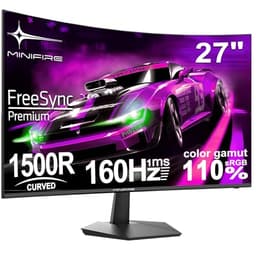
A high refresh rate on the box means nothing if the panel can't keep up in practice. Smearing in dark scenes, inverse ghosting from overdrive cranked too high, or a contrast ratio so flat the image looks washed out at 180Hz are all real problems that spec sheets conveniently skip over. The Minifire MFG24C1 is a budget curved gaming monitor that costs less than a decent pair of trainers, and at that price you're entitled to be sceptical. So let's look at what the specs actually promise, what 160 owners say they got, and whether this makes sense against the alternatives.
The short verdict: if you want a curved 1080p screen with a genuinely useful refresh rate and FreeSync for a budget price, the Minifire MFG24C1 is a credible option. It's not going to embarrass an AOC or a Philips Evnia in measured colour accuracy or motion clarity, and the panel type creates some real limitations we'll get into. But at this price tier, the competition is almost all playing the same spec-sheet games. The Minifire at least has 160 averaging four stars, which suggests people aren't sending it straight back. That's not nothing.
There are caveats, though. Quite a few. Read on.
Core Specifications
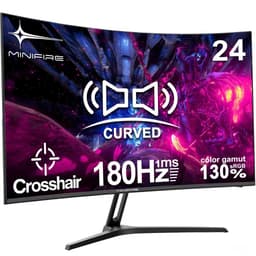
The Minifire MFG24C1 is a 24-inch curved gaming monitor with a 1920x1080 resolution, a 1500R curve radius, and a quoted 180Hz refresh rate. The panel is VA type, which matters a lot for how this thing actually behaves in use. It ships with HDMI and DisplayPort connectivity, FreeSync adaptive sync, and a built-in speaker. VESA mounting is supported at 75x75mm. The manufacturer quotes 1ms response time (described as a crosshair 1ms figure, more on that shortly), 300cd/m² peak brightness, and an sRGB coverage claim of 130% (which translates to a wide colour gamut, not a literal 130% of sRGB).
The 24-inch screen size at 1920x1080 gives you a pixel density of roughly 92 pixels per inch. That's comfortable for a gaming monitor at normal desk distances, though you won't be pixel-peeping any fine detail. The 1500R curve is a reasonably aggressive bend, designed to keep the edges of the screen at a consistent visual distance from your eyes when you're sitting close. Whether that's comfortable or disorienting is personal, but 1500R is a common choice for 24-inch panels and most people adapt to it quickly.
The HDR claim on the listing is early. There's no HDR certification tier listed (no VESA DisplayHDR 400 badge, no mention of local dimming), and at 300cd/m² peak brightness this is almost certainly a software HDR mode rather than genuine high dynamic range performance. We'll come back to that in the HDR section. For now, treat the HDR label as a checkbox feature rather than a headline capability.
| Specification | Detail |
|---|---|
| Screen Size | 24 inches |
| Resolution | 1920x1080 (Full HD) |
| Panel Type | VA |
| Refresh Rate | 180Hz |
| Response Time | 1ms (MPRT / crosshair figure) |
| Curve Radius | 1500R |
| Brightness | 300 cd/m² |
| Colour Gamut | sRGB 130% (wide gamut) |
| HDR | HDR (no certified tier listed) |
| Adaptive Sync | FreeSync |
| Ports | HDMI 1.4, DisplayPort 1.2 |
| Built-in Speaker | Yes |
| VESA Mount | 75x75mm |
| Price | Check price |

Panel Technology
VA panels are interesting. They're not the default choice for gaming monitors at this price, where TN was king for years and IPS has taken over more recently. Vertical alignment panels offer much better native contrast than IPS, typically in the 2500:1 to 4000:1 range versus IPS's usual 1000:1. That means deeper blacks, more convincing dark scenes, and a picture that just looks richer in a dimly lit room. For gaming in the evenings, that's genuinely useful.
The trade-off is viewing angles. VA panels show colour shift and gamma shift when you move off-axis, more so than IPS. At a 24-inch screen size with a 1500R curve, you're not going to be sitting far off-centre very often, so this matters less than it would on a flat 32-inch panel. But if you share the screen with someone sitting next to you, the image will look noticeably different to them than it does to you. That's just the nature of VA.
The other VA quirk about is black smearing, sometimes called black crush or dark-scene smearing. VA panels can struggle with fast transitions in dark areas because the pixel response time in those dark-to-dark transitions is slower than the headline spec suggests. This can show up as trailing or blurring behind moving objects in dark game environments. It's not a dealbreaker at this price, but it's something to be aware of if you play a lot of dark atmospheric games like horror titles or space sims. The 1ms figure Minifire quotes is an MPRT (Moving Picture Response Time) number, which is a backlight-strobe measurement rather than the actual pixel transition time. The real grey-to-grey response on a VA at this price will be longer, particularly in dark transitions.
Display Quality
At 24 inches and 1920x1080, you're looking at around 92 PPI. Compared to a 27-inch 1080p panel (which drops to about 82 PPI and starts looking noticeably soft), 24 inches is the right size for this resolution. Text is sharp, game assets look clean, and you're not going to be squinting at blurry edges. The maths works at this size in a way it simply doesn't at 27 inches with the same pixel count.
The 300cd/m² brightness rating is adequate for indoor use. It's not going to fight off strong direct sunlight, but for a typical UK bedroom or office setup it's fine. The anti-glare coating (standard on virtually all gaming monitors at this price) will handle most ambient light situations without washing out the image. Owner reviews don't flag brightness as a problem, which suggests the 300cd/m² figure is being delivered reasonably honestly, or at least close enough that people aren't complaining.
Brightness uniformity is harder to assess without measurement data, but VA panels at this price tier do sometimes show backlight bleed at the corners, particularly on curved panels where the edge of the panel is angled slightly away from the backlight. Some owners have flagged minor backlight bleed in the corners under dark conditions, which is typical for this class of panel. It's not unusual, and for gaming it's rarely visible during actual gameplay. Still if you watch a lot of dark films or use the monitor for dark-room media consumption.
Refresh Rate and Adaptive Sync
180Hz is genuinely useful. There's a real and visible difference between 60Hz and 144Hz, and another noticeable step from 144Hz to 180Hz, particularly in fast-paced shooters and racing games. The jump diminishes as you go higher (240Hz over 180Hz is harder to spot), but 180Hz puts this monitor in the sweet spot for competitive gaming without requiring a top-tier GPU to actually hit those frame rates. At 1080p, even a mid-range card like an RX 7600 or an RTX 4060 can push 180fps in most titles, making the refresh rate actually achievable rather than aspirational.
FreeSync support means the monitor will sync its refresh rate to your GPU's output within a supported range, eliminating screen tearing without the input lag penalty of V-Sync. The listing doesn't specify the FreeSync range (the minimum Hz for Low Framerate Compensation to kick in), which is a minor frustration. In practice, most FreeSync monitors at this price support LFC when the frame rate drops below half the maximum refresh rate, so you'd expect tear-free operation down to around 90fps or so. AMD GPU owners get full FreeSync support. Nvidia owners on recent drivers (since the G-Sync Compatible programme expanded) should also get adaptive sync working, though it's compatibility with your specific card.
The HDMI 1.4 port is here because it creates a real practical limitation. HDMI 1.4 has a bandwidth ceiling that means it cannot carry 1080p at 180Hz. You'll be capped at 120Hz over HDMI 1.4, which is still good, but if you want the full 180Hz you need to use the DisplayPort 1.2 connection. DisplayPort 1.2 has more than enough bandwidth for 1080p at 180Hz, so PC users with a DP output on their GPU are sorted. Console users connecting via HDMI will be limited to 120Hz, which is still fine for PS5 and Xbox Series X gaming but upfront.
Response Time and Motion
The "1ms crosshair" claim in the product title needs unpacking. This is not a 1ms grey-to-grey pixel transition time. The "crosshair 1ms" phrasing appears to refer to an MPRT (Moving Picture Response Time) figure, which is achieved through backlight strobing rather than representing how fast the actual pixels physically switch. MPRT figures are a measure of perceived motion blur reduction when the backlight is strobing, not a direct measurement of pixel response. They're not directly comparable to GtG figures.
On a VA panel at this price, the real grey-to-grey response time in dark transitions will be longer than 1ms. Typical budget VA panels measure somewhere in the 5ms to 15ms range for GtG depending on the transition, with the worst-case dark-to-dark transitions sometimes hitting 20ms or more. That's not catastrophic for casual gaming, but it does mean you may see some trailing in fast dark-scene gameplay if overdrive is set too low. Crank the overdrive too high and you get inverse ghosting instead, where a bright halo appears behind fast-moving objects. Finding the right overdrive setting is usually trial and error on budget VA panels.
Owner reviews are mixed on motion clarity. Most people seem happy with it for casual and mid-level competitive gaming. A few mention ghosting in dark scenes, which is the predictable VA characteristic we'd expect. Nobody seems to be reporting extreme inverse ghosting, which suggests the overdrive implementation isn't wildly aggressive out of the box. For games like FIFA, Rocket League, or Call of Duty at medium to high settings, the motion performance should be acceptable. For someone grinding ranked play at 180fps in a dark-themed battle royale, the VA dark-scene smearing might occasionally be visible.
Colour Accuracy and Gamut
The sRGB 130% claim is a wide colour gamut figure, not a literal measurement of sRGB coverage. What it means in practice is that the panel covers a colour space larger than sRGB, likely covering a decent chunk of DCI-P3. Wide colour gamut panels can look vivid and punchy for gaming and media consumption, which is generally a good thing. For content creation where you need accurate sRGB output, a wide gamut panel without proper colour management can cause oversaturated results, but that's an edge case at this price point and this use case.
Factory calibration on budget monitors is rarely precise. There's no Delta-E figure published, and we wouldn't expect one at this price. What the wide gamut does give you is saturated, vibrant colours that tend to impress people who aren't comparing them against a calibrated reference. Game environments look lush, skin tones pop, and explosions look properly dramatic. Whether that's accurate is a different question to whether it looks good, and for gaming these aren't always the same thing.
The colour performance is one area where the VA panel actually helps. VA panels tend to have better colour saturation and richer-looking output than TN panels at the same price, and the wide gamut pushes that further. Compared to a budget TN monitor, the Minifire will look noticeably more colourful. Compared to a well-calibrated IPS panel, it'll look slightly oversaturated in some areas but still pleasant. For the target audience (casual to mid-level gamers who want an immersive screen), this is probably a net positive.

HDR Performance
The HDR claim on this monitor is what the industry politely calls "checkbox HDR" and what honest reviewers call marketing. Real HDR performance requires significant peak brightness (typically 400 nits minimum for basic HDR, 1000 nits for anything meaningful), local dimming to create genuine contrast between bright and dark areas of the same frame, and a panel capable of reproducing the wide colour space HDR content is mastered in. The Minifire quotes 300cd/m² peak brightness and lists no local dimming capability.
What you actually get when you enable HDR mode on a monitor like this is the monitor accepting an HDR signal from your PC or console and tone-mapping it down to what the panel can actually display. The result is often worse than a well-calibrated SDR image because the tone mapping can wash out colours and crush shadow detail. Most experienced monitor users turn HDR mode off on budget monitors and stick with SDR, which typically looks better on hardware like this.
This isn't a criticism unique to the Minifire. Virtually every monitor under £150 with an HDR label is doing the same thing. The VESA DisplayHDR certification programme exists specifically to give buyers a meaningful benchmark, and the entry level (DisplayHDR 400) requires 400 nits peak brightness. Without that certification, the HDR claim is essentially decorative. Don't buy this monitor for HDR. Buy it for 180Hz FreeSync gaming at 1080p, which is where it actually earns its price.
Contrast and Brightness
This is where the VA panel earns its keep. Native contrast on VA panels is typically in the 2500:1 to 4000:1 range, compared to around 1000:1 for IPS. In practice, that means noticeably deeper blacks and a more three-dimensional look to the image, particularly in dark scenes. If you're watching a film with dark cinematography or playing a night-time game environment, the VA contrast advantage is visible and real. IPS panels at this price have a characteristic glow in dark corners (IPS glow) that VA panels largely avoid.
The 300cd/m² brightness rating puts this in the middle of the budget monitor pack. It's bright enough for most indoor environments, including rooms with windows, as long as direct sunlight isn't hitting the screen. The anti-glare coating will handle diffuse ambient light fine. For a monitor that's going to live on a desk in a typical UK room, 300 nits is perfectly adequate for SDR gaming and general use.
One thing to watch with VA panels is gamma consistency across the screen. VA can show some gamma shift at the corners compared to the centre, which means dark areas at the edges of the screen can look slightly different to the same dark area at the centre. On a 24-inch curved panel this is less pronounced than on a flat 32-inch VA, but it's about if you're sensitive to this kind of thing. Most owners won't notice it in gaming, but it can be visible in test patterns if you go looking.
Ergonomics and Stand
Budget monitors at this price point are not known for luxurious stands, and the Minifire doesn't break that pattern. The stand offers tilt adjustment, which is standard. Height adjustment, swivel, and pivot are not listed in the specifications, which strongly suggests this is a basic fixed-height stand with tilt only. If you need to raise the monitor, you'll either be stacking it on books (we've all been there) or buying a monitor arm. The VESA 75x75mm compatibility means a monitor arm is a straightforward option and not an expensive one.
The "frameless" design mentioned in the title refers to thin bezels rather than literally no frame, which is standard marketing language across the industry. Thin bezels look clean and modern, and on a 24-inch screen they make the display feel a bit larger than it is. For multi-monitor setups, thin bezels reduce the gap between screens, which matters. Owner reviews don't flag build quality as a major concern, which is encouraging for a budget product from a brand without a long track record.
The built-in speaker is a nice inclusion at this price, though expectations should be calibrated accordingly. Built-in monitor speakers at any price are rarely impressive, and at budget pricing they're typically fine for system sounds and casual video watching but not for gaming audio or music. Most people will use headphones or external speakers for anything serious. Still, having a speaker at all means you're not completely mute if you've forgotten your headphones, which is more useful than it sounds.
Connectivity and Ports
The Minifire MFG24C1 ships with HDMI 1.4 and DisplayPort 1.2. As covered in the refresh rate section, the HDMI 1.4 port limits you to 120Hz at 1080p, so PC gamers who want the full 180Hz need to use the DisplayPort connection. That's a real practical consideration if your GPU only has HDMI outputs, though most dedicated gaming GPUs include at least one DisplayPort.
- HDMI 1.4 (max 120Hz at 1080p)
- DisplayPort 1.2 (full 180Hz at 1080p)
- Built-in speaker
- VESA 75x75mm mount
There's no USB hub, no USB-C, and no audio output jack listed in the specifications. For a budget gaming monitor this is expected rather than surprising. USB hubs add cost and complexity, and the target buyer here is someone who wants a capable screen at a low price rather than a connectivity hub. If you need USB ports on your monitor, you're looking at a different price bracket entirely.
The absence of HDMI 2.0 or higher is the one connectivity limitation worth being direct about. HDMI 1.4 at 1080p caps at 120Hz, full stop. For console users with a PS5 or Xbox Series X who want to use the monitor's 180Hz refresh rate, that's not possible over HDMI. Console gaming at 120Hz is still excellent, and most console titles don't hit 180fps anyway, but it's a genuine limitation to know about before buying. PC users on DisplayPort are unaffected.
How It Compares
The budget 1080p curved gaming monitor market is genuinely crowded. The Minifire MFG24C1 sits in a bracket where it's competing with established names like AOC, Philips, and various other no-name brands doing essentially the same thing. Two direct competitors are the AOC C24G2AE and the Philips 24M1N3200Z, both of which are 24-inch curved 1080p gaming monitors with VA panels and high refresh rates.
The AOC C24G2AE is a well-established budget curved gaming monitor with a 165Hz VA panel, FreeSync, and a better-known brand behind it. AOC has been making budget gaming monitors long enough to have ironed out most of the obvious quality control issues, and their customer support is more established than a newer brand. The Philips 24M1N3200Z offers 165Hz and a similarly specced VA panel with the Philips brand name and warranty backing. Both of these competitors offer slightly lower refresh rates (165Hz versus 180Hz) but come from brands with longer track records in the monitor space.
The Minifire's advantage is price. At the budget end of this bracket, it undercuts some established alternatives while offering a higher headline refresh rate. The 160 owner reviews at an average of four stars suggest quality control is at least acceptable, which is the main risk with lesser-known brands. If the Minifire were the same price as the AOC or Philips options, the established brands would be the safer bet. At a lower price, the Minifire becomes a more interesting proposition for someone who wants to spend as little as possible on a capable 1080p curved gaming screen.
| Feature | Minifire MFG24C1 | AOC C24G2AE | Philips 24M1N3200Z |
|---|---|---|---|
| Screen Size | 24 inch | 24 inch | 24 inch |
| Resolution | 1920x1080 | 1920x1080 | 1920x1080 |
| Panel Type | VA | VA | VA |
| Refresh Rate | 180Hz | 165Hz | 165Hz |
| Adaptive Sync | FreeSync | FreeSync Premium | FreeSync Premium |
| Curve | 1500R | 1500R | 1500R |
| HDMI Version | HDMI 1.4 | HDMI 2.0 | HDMI 2.0 |
| Built-in Speaker | Yes | No | No |
| Price | Check price | ~£90 to £110 | ~£90 to £120 |
The comparison table highlights the one area where the Minifire falls short of both competitors in a meaningful way: HDMI version. Both the AOC C24G2AE and the Philips 24M1N3200Z ship with HDMI 2.0, which supports 1080p at their full refresh rates over HDMI. The Minifire's HDMI 1.4 caps you at 120Hz over that connection. If you're a PC gamer using DisplayPort, this doesn't matter at all. If you're a console gamer or your GPU lacks DisplayPort, it matters quite a bit. Both competitors also carry FreeSync Premium certification, which guarantees LFC support and a verified minimum refresh range, whereas the Minifire's FreeSync implementation is unspecified in terms of range.

Final Verdict
The Minifire MFG24C1 is a budget curved gaming monitor that does most of what it promises, with one or two asterisks. The 180Hz refresh rate is real and useful, the VA panel delivers better contrast than you'd get from a TN competitor, the 1500R curve works well at 24 inches, and FreeSync keeps things tear-free when your frame rate is in range. For casual to mid-level PC gaming at 1080p, this is a functional and affordable screen.
The limitations are real too. The HDMI 1.4 port is a genuine annoyance for anyone who can't use DisplayPort. The HDR claim is marketing noise rather than a real feature. The VA dark-scene smearing is a known characteristic of this panel type and will be noticeable to anyone who games in dark environments and is sensitive to motion artefacts. The stand is almost certainly basic tilt-only, so factor in a monitor arm if ergonomics matter to you. And the brand is relatively unknown, which means the long-term support picture is less clear than it would be with AOC or Philips.
Who should buy this? Someone setting up a first gaming PC on a tight budget, a student who needs a screen for gaming and general use without spending serious money, or anyone who wants a second monitor for a specific purpose and doesn't need flagship performance. The four-star average across 160 suggests the quality control is acceptable, and at the budget price tier the value is hard to argue with if you go in with realistic expectations.
Who should skip it? Console gamers who want to use the full 180Hz will be frustrated by the HDMI 1.4 limitation. Anyone who does colour-sensitive work should look at a properly calibrated IPS panel. And if dark-scene gaming is your main use case (horror games, space sims, atmospheric RPGs), the VA smearing might bother you more than the price saving is worth. In that case, look at an IPS-based alternative like the AOC 24G2SP, which trades some contrast depth for cleaner motion in dark transitions.
If you're not a competitive gamer and don't need 180Hz specifically, a 165Hz alternative from AOC or Philips with HDMI 2.0 is worth the small extra spend for the better connectivity and more established brand support. But if the price gap is meaningful to you and you're connecting via DisplayPort, the Minifire MFG24C1 earns its four stars.
What works. What doesn’t.
5 + 4What we liked5 reasons
- 180Hz refresh rate is real and useful for 1080p gaming
- VA panel delivers noticeably better contrast than TN alternatives
- FreeSync adaptive sync keeps tearing under control
- Built-in speaker included at this price
- VESA 75x75mm mount for monitor arm compatibility
Where it falls4 reasons
- HDMI 1.4 limits console/HDMI users to 120Hz, not 180Hz
- HDR claim is checkbox marketing, not real HDR performance
- VA dark-scene smearing can be visible in fast, dark gameplay
- Unknown brand with uncertain long-term support
Full specifications
8 attributes| Refresh rate | 180 |
|---|---|
| Screen size | 24 |
| Panel type | VA |
| Adaptive sync | FreeSync |
| HDR | true |
| Ports | HDMI 1.4, DP 1.2 |
| Resolution | 1920x1080 |
| Response time | 1ms |
If this isn’t right for you
1 options
Frequently asked
5 questions01Is the Minifire 24 Inch Curved Gaming Monitor 180Hz, Built in Speaker, FHD 1920x1080, Crosshair 1ms, sRGB130%, HDR, 1500R, FreeSync, 300cd/m², Frameless, HDMI&DP Ports, VESA Compatible, Eye Care (MFG24C1) good for gaming?+
Yes, with some caveats. The 180Hz refresh rate is genuinely useful for fast-paced gaming, and FreeSync keeps screen tearing away when your frame rate is within the supported range. The VA panel offers good contrast for immersive gaming. However, the HDMI 1.4 port caps you at 120Hz over HDMI, so you need to use DisplayPort for the full 180Hz. VA panels can also show some dark-scene smearing in fast gameplay, which may be visible in dark atmospheric games. For casual to mid-level competitive gaming at 1080p via DisplayPort, it's a solid budget option.
02Does the Minifire 24 Inch Curved Gaming Monitor 180Hz, Built in Speaker, FHD 1920x1080, Crosshair 1ms, sRGB130%, HDR, 1500R, FreeSync, 300cd/m², Frameless, HDMI&DP Ports, VESA Compatible, Eye Care (MFG24C1) have good HDR?+
No, not in any meaningful sense. The HDR label on this monitor is a checkbox feature rather than genuine HDR capability. Real HDR requires at minimum 400 nits peak brightness (this monitor is rated at 300 cd/m²) and ideally local dimming to create contrast within a single frame. Neither is present here. Enabling HDR mode typically produces worse results than a well-tuned SDR image on hardware like this. Treat the HDR claim as marketing and leave HDR mode off.
03Is the Minifire 24 Inch Curved Gaming Monitor 180Hz, Built in Speaker, FHD 1920x1080, Crosshair 1ms, sRGB130%, HDR, 1500R, FreeSync, 300cd/m², Frameless, HDMI&DP Ports, VESA Compatible, Eye Care (MFG24C1) good for content creation?+
Not ideally. The wide colour gamut (sRGB 130%) means colours will look vivid and punchy, but without factory calibration data or a Delta-E figure, colour accuracy for professional work is uncertain. VA panels can also show gamma inconsistency across the screen. For casual photo editing or video watching it's fine, but anyone doing colour-graded video work, photo editing for print, or graphic design should look at a properly calibrated IPS panel with sRGB mode.
04What graphics card do I need for the Minifire 24 Inch Curved Gaming Monitor 180Hz, Built in Speaker, FHD 1920x1080, Crosshair 1ms, sRGB130%, HDR, 1500R, FreeSync, 300cd/m², Frameless, HDMI&DP Ports, VESA Compatible, Eye Care (MFG24C1)?+
At 1920x1080, this is one of the easier resolutions to drive. A mid-range card like an AMD RX 7600 or Nvidia RTX 4060 can push 180fps in most popular titles at high settings, making the 180Hz refresh rate genuinely achievable. Even older cards like an RX 6600 or RTX 3060 will hit 180fps in less demanding games. You don't need a flagship GPU for this resolution. Make sure your GPU has a DisplayPort output if you want the full 180Hz, since the HDMI 1.4 port caps at 120Hz.
05What warranty and returns apply to the Minifire 24 Inch Curved Gaming Monitor 180Hz, Built in Speaker, FHD 1920x1080, Crosshair 1ms, sRGB130%, HDR, 1500R, FreeSync, 300cd/m², Frameless, HDMI&DP Ports, VESA Compatible, Eye Care (MFG24C1)?+
No specific warranty period is listed in the verified product data for this monitor. When buying through Amazon UK, you're covered by Amazon's standard 30-day return window and the Amazon A-to-Z Guarantee, which provides meaningful buyer protection if the product arrives damaged or not as described. For warranty beyond 30 days, check the product listing or contact the seller directly before purchasing.