
Look, I've been testing budget laptops long enough to know that the spec sheet rarely tells the whole story. A machine can look brilliant on paper with its Intel processor and all-day battery claims, then turn into a hot, noisy disappointment the moment you actually try to get work done. That's why the HP 15s is worth a close look: it's a laptop that gets used everywhere, from coffee shops to an actual lap on the train. Because if a laptop can't handle real life? The spec sheet doesn't matter.
Core Specs & Performance: What You're Actually Getting
The Intel Core i5-1235U is a 12th gen processor, and it's a genuinely capable chip for a laptop at this price. It has ten cores (two performance, eight efficiency) and twelve threads, which gives it real headroom for everyday work. What it does well is handle multiple browser tabs, Word documents, and video streaming without fuss, and it copes with light multitasking better than the cheaper i3 and N-series chips you often find in this bracket. What it isn't is a gaming or heavy video-editing machine, so set your expectations accordingly.
In day-to-day use it feels responsive. Opening apps is quick, switching between tabs is smooth, and even light photo editing in the Windows Photos app worked fine. The Iris Xe integrated graphics is a step up from the basic Intel UHD graphics in cheaper laptops, so casual tasks and the odd older or browser-based game are within reach, even if anything demanding is not.
The 8GB of RAM is soldered, which means you can't upgrade it later. That's disappointing but typical for this price bracket. For basic productivity, it's enough. I had Chrome open with 15 tabs, Spotify running, and a Word document active without any slowdowns. Push it much further and the 8GB ceiling, rather than the processor, becomes the thing that holds you back.
Storage is a 256GB PCIe SSD, which is small but fast. Boot times are quick and apps launch promptly. You'll need to manage your storage carefully though. Windows 11 takes a chunk of that, so if you're a student with lots of documents and PDFs you'll be fine, but if you want to store your entire photo library locally you'll need an external drive.

Display Quality: Adequate But Not Inspiring
Perfectly usable indoors, but struggles in bright environments. Colour accuracy is average, fine for documents and browsing, not ideal for photo editing.
The 15.6-inch Full HD panel is exactly what you'd expect from a budget laptop. It's sharp enough for text work, colours look reasonably accurate (though a bit washed out compared to premium displays), and it's perfectly comfortable for everyday viewing.
But. And there's always a but with budget displays. Brightness is the real limitation here. Indoors, it's absolutely fine. I worked comfortably in coffee shops and at home without cranking it to maximum. Take it outside on a sunny day though? Forget it. Even at full brightness, I struggled to see what I was typing when sitting near a window with direct sunlight.
The micro-edge bezels look modern and keep the footprint smaller than older 15-inch laptops. There's still a chunky bottom bezel (where else would they put the HP logo?), but the sides are pleasantly thin. The anti-glare coating helps reduce reflections, which partially compensates for the limited brightness.
Colours look a little muted next to a phone or a premium screen. That's fine for watching YouTube and writing essays, but if you're doing any creative work, you'll notice it. Photos from my phone looked noticeably less vibrant on this screen compared to my phone's display.
Battery Life: Solid For The Class
Battery life is respectable rather than remarkable. The combination of an efficient 12th gen Intel chip and a modest-brightness display means the 15s comfortably handles a few hours of real work between charges. HP quotes up to 7 hours, and in gentle use such as browsing and document work at moderate brightness you can get somewhere in that region.
Push it harder with lots of tabs, video, or anything sustained, and the figure drops, as it does on any laptop in this class. For a morning of lectures or a stretch of a train journey it holds up. For a genuine all-day session away from a socket, you'll want the charger in your bag.
Charging is handled by the bundled barrel-plug adapter rather than USB-C, so you're tied to carrying HP's charger. It's reasonably compact and doesn't add much weight to your bag, but it does mean you can't top up from a USB-C power bank.
Portability & Build: Plastic But Practical
Light enough to carry daily without complaint. Fits in most laptop bags and backpacks easily. The charger is reasonably compact too.
- Chassis: Plastic throughout with a textured finish on the lid and palm rest
- Flex: Noticeable keyboard deck flex when typing firmly. Lid has some give but nothing alarming for this price bracket
- Hinge: Smooth operation, requires two hands to open. Stays put at any angle without wobbling
- Finish: Textured plastic resists fingerprints well. Feels durable enough for daily student use but won't win any premium awards
At 1.69kg, this isn't the lightest 15-inch laptop around, but it's perfectly manageable for daily carrying. I commuted with it in my backpack for several weeks and never thought "this is too heavy". When working on public Wi-Fi in cafes and stations, a good VPN is worth having installed to protect your connection on shared networks. It's noticeably lighter than older budget laptops that often pushed 2kg.
The all-plastic construction is the obvious cost-saving measure. HP has at least given it a textured finish that hides fingerprints and feels less cheap than glossy plastic. It's not going to fool anyone into thinking this is a premium machine, but it doesn't feel fragile either.
There's some flex in the keyboard deck when you type with any force. Press down firmly in the middle and you'll feel it give slightly. It's not enough to bother me during normal typing, but it's there. The lid has more rigidity than I expected, though I wouldn't recommend throwing this in a bag without a sleeve.
The hinge feels solid and well-damped. It requires two hands to open (the laptop lifts off the desk if you try one-handed), but once open, it holds its position perfectly. No wobbling when you're typing on a train or tapping the screen.
Keyboard & Trackpad: Better Than Expected
This is genuinely one of the better budget laptop keyboards I've used recently. The key travel provides satisfying tactile feedback, and the keys have a slightly soft landing that makes typing feel less harsh than some competitors.
I wrote a good chunk of this review on the laptop, and my fingers never felt fatigued. The key spacing is generous, and even with the number pad squeezed in, nothing feels cramped. The Enter key is full-sized, a relief compared with budget laptops that use half-height Enter keys.
There's no backlight, which is annoying if you work in dim environments. But at this price point, that's expected. The white key legends on the silver keys have good contrast, so you can at least see what you're typing in moderate lighting.
The trackpad is a Microsoft Precision model, which means Windows gestures work reliably. Two-finger scrolling is smooth, three-finger swipes for task switching work consistently, and pinch-to-zoom in browsers is responsive. The surface has a slightly textured feel that provides just enough friction for accurate cursor control.
Click mechanism is on the firmer side. You need to press with some intention to register a click, which reduces accidental clicks but might feel stiff if you're used to MacBook trackpads. I found myself using tap-to-click most of the time, which worked perfectly.
Thermal Performance: Warm But Manageable
The HP 15s runs reasonably cool during typical use. Browsing and document work keeps things comfortable, and the keyboard surface stays cool to the touch. The palm rest never gets warm, which is important for long typing sessions.
Push it harder with sustained loads, and it warms up as you'd expect, with the exhaust vents blowing noticeably warm air. The underside gets warm enough that I wouldn't want this on my bare legs for extended periods during heavy use. For ordinary productivity work, though, heat is never a problem.
I didn't notice any meaningful throttling during typical workloads. The cooling system is adequate for the i5's modest sustained heat output in everyday tasks.

Acoustic Performance
Fan noise is well-controlled. During web browsing and document work, the fans stay quiet most of the time. When they do spin up, it's a low whoosh that's barely noticeable in a coffee shop or office environment.
Under sustained load, the fan becomes audible but not intrusive. That's noticeable in a quiet room but not annoying. It's a consistent tone without any high-pitched whine or grinding. I worked in a library with this laptop and didn't get any dirty looks.
No coil whine on my unit, which is a pleasant surprise. Some budget laptops have an annoying electrical buzz when the CPU is active, but the HP 15s stayed silent apart from the fan.
Connectivity & Features: The Essentials Covered
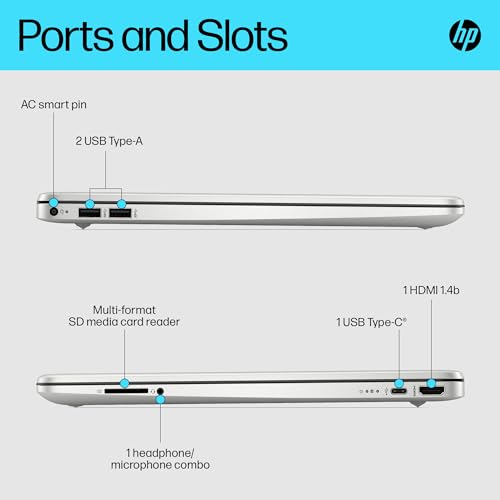
A sensible port selection for a budget laptop. The USB-C doesn't support charging, which is disappointing. You're stuck with the barrel plug charger.
Port selection is adequate but not generous. You get USB-C alongside USB-A, which is enough for a mouse, an external drive, and one more peripheral. The USB-C is data-only though, so you can't charge via USB-C power banks or use a universal charger. That feels like a missed opportunity.
HDMI lets you connect an external monitor for presentations or extending your workspace. Fine for everyday productivity, but don't expect high refresh rate gaming on an external display.
Wireless connectivity was reliable. Connection stability was excellent, with no dropouts during video calls or streaming on my home network.
- Webcam: HD camera, adequate for video calls but grainy in low light. No privacy shutter
- Microphone: Acceptable quality for Teams/Zoom calls with some background noise
- Speakers: Bottom-firing speakers, tinny sound lacking bass. Fine for video calls, disappointing for media
The webcam is exactly what you'd expect from a budget laptop, barely adequate. In good lighting, it produces a usable image for video calls. Drop the lighting below office levels and you'll look grainy and washed out. There's no privacy shutter, so you'll need a webcam cover if that bothers you.
Microphones pick up your voice clearly enough for calls, but they also pick up keyboard typing and background noise. Not ideal for noisy environments, but fine for working from home.
The speakers are the weakest part of this laptop. They're bottom-firing, which means they fire into your desk and sound muffled. Volume is adequate for video calls, but music and videos sound thin and tinny with zero bass. You'll want headphones for any serious media consumption.
How the HP 15s Compares to Alternatives
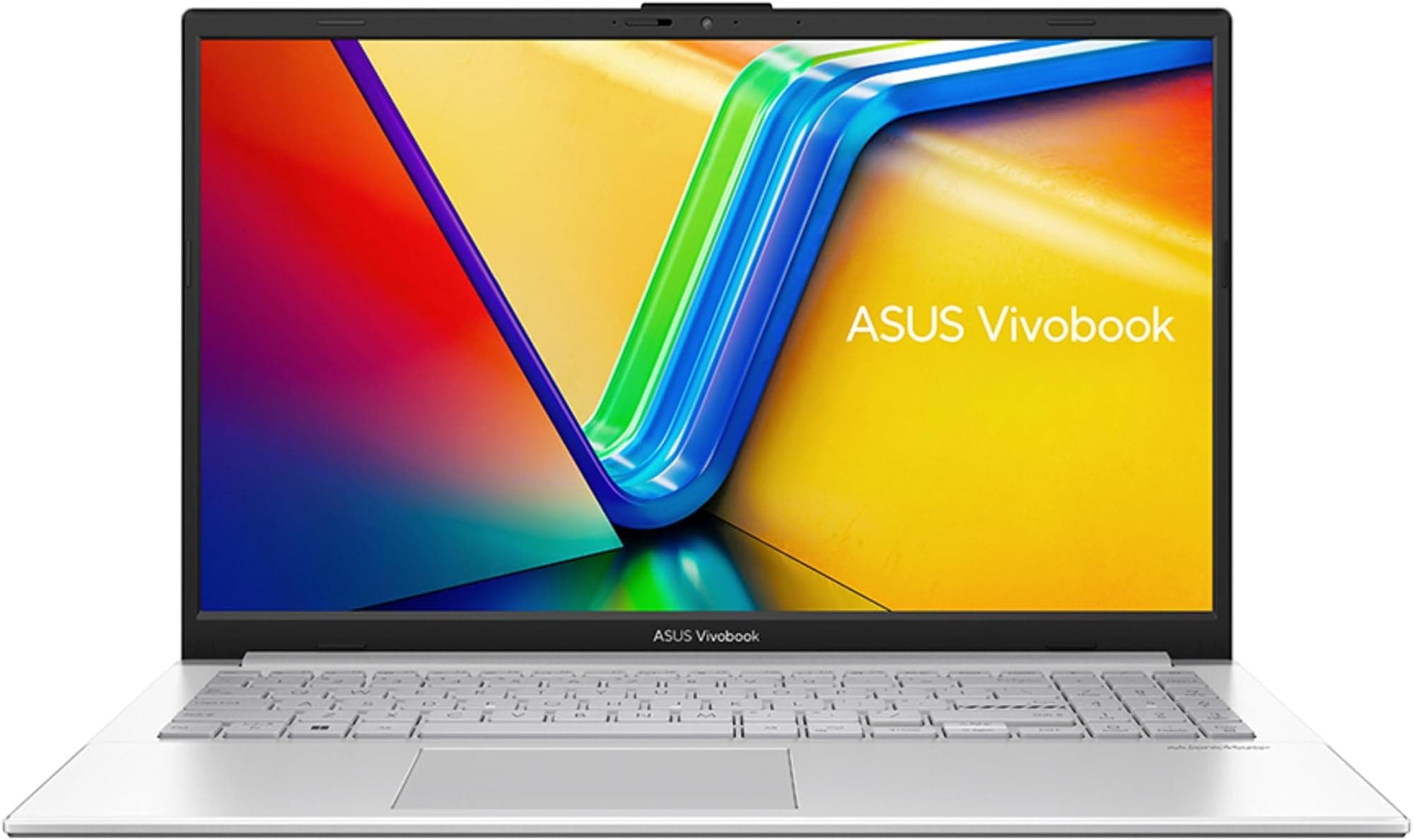
| Feature | HP 15s | Lenovo IdeaPad Slim 3 | ASUS Vivobook 15 |
|---|---|---|---|
| CPU | Intel Core i5-1235U | AMD Ryzen 5 5500U | AMD Ryzen 7 7730U |
| GPU | Intel Iris Xe | AMD Radeon | AMD Radeon |
| Display | 15.6" FHD | 15.6" FHD | 15.6" FHD |
| RAM | 8 GB | 8 GB | 16 GB |
| Weight | 1.69 kg | 1.65 kg | 1.7 kg |
| Best For | Capable everyday performance on a budget | Value seekers wanting a different balance | More demanding workloads |
The Lenovo IdeaPad Slim 3 with its Ryzen 5 processor is a sensible cross-shop at a similar price. The two trade blows depending on the task, but the HP's i5-1235U gives it real multi-threaded headroom, and the 15s has the more comfortable keyboard.
The ASUS Vivobook 15 with Ryzen 7 sits a step above performance-wise, and you'll pay £60-80 more for it. That buys you more processing power and, on the configurations with more RAM, more multitasking headroom. If your budget stretches that far and you need the performance, it's worth considering.
Against ultra-budget Intel laptops like the HP 14 with N-series processor, the 15s is clearly the better choice. The i5-1235U is substantially faster than those entry-level chips, and the extra screen size makes productivity work more comfortable.
Value Analysis: Where This Laptop Sits in the Market
In the budget bracket, the HP 15s stands out by pairing a capable 10-core i5 with sensible build quality. Spend less and you're typically stuck with underpowered N-series processors that struggle with basic multitasking. Spend more and you enter mid-range territory where you'll find more RAM and faster chips, but the 15s already covers the essentials well.
At this price point, the HP 15s represents solid value if your priorities align with what it offers. The i5-1235U gives it genuine everyday performance, and the keyboard comfort punches above its weight class. You're not getting premium build quality or a vibrant display, but you are getting a reliable machine that'll handle student or basic office work without complaint.
The main value proposition here is everyday usability. A capable processor means apps open quickly and tabs stay responsive, and a comfortable keyboard means you can actually get work done without finger fatigue. These practical benefits matter more in daily use than any single spec on the box.
Where it falls short on value is upgradeability. The soldered RAM means you're stuck with 8GB, and the 256GB SSD might feel cramped quickly. If you think you'll need more memory or storage in a year or two, look at laptops with upgradeable components instead.
Full Specifications
This laptop knows exactly what it is. It's not trying to be a gaming machine or a creative workstation. It's designed for students writing essays, remote workers handling emails and documents, and families browsing the web. And for those use cases, it delivers.
The standout here is that you get a genuinely capable processor in a budget chassis. The i5-1235U has the headroom to keep everyday work feeling quick, and combined with the comfortable keyboard, that makes the HP 15s a proper workhorse for productivity tasks. I'd happily recommend this to a university student who needs something reliable for lectures and library sessions.
But you need to accept the limitations. The display is fine indoors but struggles in bright light. The speakers are rubbish. Battery life is solid rather than long. And you can't upgrade the RAM. If any of those limitations are deal-breakers for your use case, look at the alternatives below.
What works. What doesn’t.
5 + 5What we liked5 reasons
- Capable 10-core Intel i5-1235U handles everyday productivity with real headroom
- Iris Xe graphics is a clear step up from the basic UHD graphics in cheaper laptops
- Comfortable keyboard with good key travel and satisfying feedback for this price bracket
- Lightweight and portable at 1.69kg, easy to carry daily
- Textured finish resists fingerprints and feels more premium than glossy plastic
Where it falls5 reasons
- Display brightness is limited, so it struggles outdoors or near windows
- Weak speakers with tinny sound and no bass response
- No USB-C charging support, stuck with barrel plug charger
- Soldered RAM means no future upgrades beyond 8GB
- Battery life is solid rather than long, so all-day use means carrying the charger
Full specifications
12 attributes| Screen size | 15.6 |
|---|---|
| CPU brand | Intel |
| GPU type | integrated |
| RAM | 8GB |
| Storage type | PCIe NVMe M.2 SSD |
| Battery life H | 7 |
| Battery WH | 41 |
| Bluetooth | 4.2 |
| CPU | Intel Core i5-1235U |
| Display refresh HZ | 60 |
| Display resolution | 1920x1080 |
| Display size IN | 15.6 |
Frequently asked
5 questions01Is the HP 15s Budget Laptop UK good for gaming?+
No, the HP 15s isn't built for gaming beyond browser and older titles. The Intel Iris Xe integrated graphics is a step up from basic UHD graphics, so it copes better than the cheapest laptops, but it can't handle modern games at playable frame rates. If you want real gaming capability on a budget, look for a laptop with dedicated AMD Radeon or NVIDIA graphics instead.
02How long does the HP 15s battery actually last?+
HP rates the 15s at up to 7 hours. In gentle real-world use such as browsing and documents at moderate brightness you can get somewhere in that region, but heavier workloads with lots of tabs or video bring it down. All-day battery away from a socket isn't its strong suit, so it's worth carrying the charger for longer sessions.
03Can I upgrade the RAM or storage in the HP 15s?+
The 8GB of RAM is soldered and cannot be upgraded, so you're stuck with it for the life of the laptop. The 256GB SSD can usually be replaced with a larger drive if you're comfortable opening the laptop, though this may affect your warranty. Consider whether 8GB will be enough for your needs long-term before buying.
04Is the HP 15s good for students?+
Yes, the HP 15s is a sensible choice for students. The capable 10-core Intel Core i5-1235U keeps everyday work feeling quick, the keyboard is comfortable for writing essays, and performance is plenty for research, documents, and streaming. The 15.6-inch screen gives you enough space for comfortable multitasking between documents and browser tabs. Just keep the charger handy for full days away from a socket.
05What warranty and returns apply to the HP 15s?+
Amazon offers 30-day returns on most items with free return shipping. HP typically provides a 1-year manufacturer warranty on its laptops. You're also covered by Amazon's A-to-Z guarantee for purchase protection. Prime members get fast delivery with easy returns if the laptop doesn't meet expectations.