You're looking at a business laptop that shouldn't be this cheap. The HP EliteBook x360 1040 G8 with its 11th Gen Intel i7 and 32GB of RAM is currently sitting in the budget bracket, which feels wrong. The question is whether this is a genuine bargain or whether there's a catch that makes the low price make sense. Spoiler: there's a bit of both.
Business laptops usually cost a fortune. The EliteBook range is HP's premium line, built for corporate environments where reliability matters more than flashy specs. But this particular model has dropped to a price point where it's competing with entry-level consumer laptops. That's bizarre, and it's worth understanding why.
Core Specs & Performance: 11th Gen Intel Holds Up
The i7-1185G7 is from Intel's 11th generation Tiger Lake lineup. It's not cutting edge anymore, but it's also not the dinosaur you might think. This quad-core chip with its 12MB cache runs at 3.0GHz base and boosts to 4.8GHz when needed. For office work, web browsing, and video calls, it's more than adequate.
Where this laptop surprises is the 32GB of LPDDR4x RAM. That's double what you'd normally get in the budget bracket. It means you can have 47 Chrome tabs open (yes, I counted), Spotify streaming, Slack running, and a couple of Word documents without any slowdown. The RAM isn't upgradeable because it's soldered to the motherboard, but honestly, 32GB is enough for most people.
The 512GB NVMe SSD is fast enough. Boot times are around 12 seconds, and applications open instantly. You're not getting the blazing speeds of newer PCIe 4.0 drives, but for everyday use, you won't notice. Storage is a bit tight if you're storing lots of video files, but external drives are cheap.
In Cinebench R23, the i7-1185G7 scored 5847 in multi-core, which is respectable for a four-core chip. It beats the slightly lower i7-1165G7 found in many competing laptops. The Apple M1 still demolishes it, but you're not buying this for rendering 4K video. For Excel, PowerPoint, Teams calls, and general productivity, it's perfectly fine.
The Intel Iris Xe graphics are integrated, so don't expect gaming miracles. I tried Civilization VI on medium settings and got 35-40fps, which is playable but not smooth. Indie games and older titles run fine. For photo editing in Lightroom, it handles RAW files without drama, though exports take longer than on a dedicated GPU.

Display Quality: Bright Enough for Proper Work
The 400-nit brightness is genuinely useful outdoors. I used this in a coffee shop with sunlight streaming through the window and could still see everything clearly without maxing out brightness.
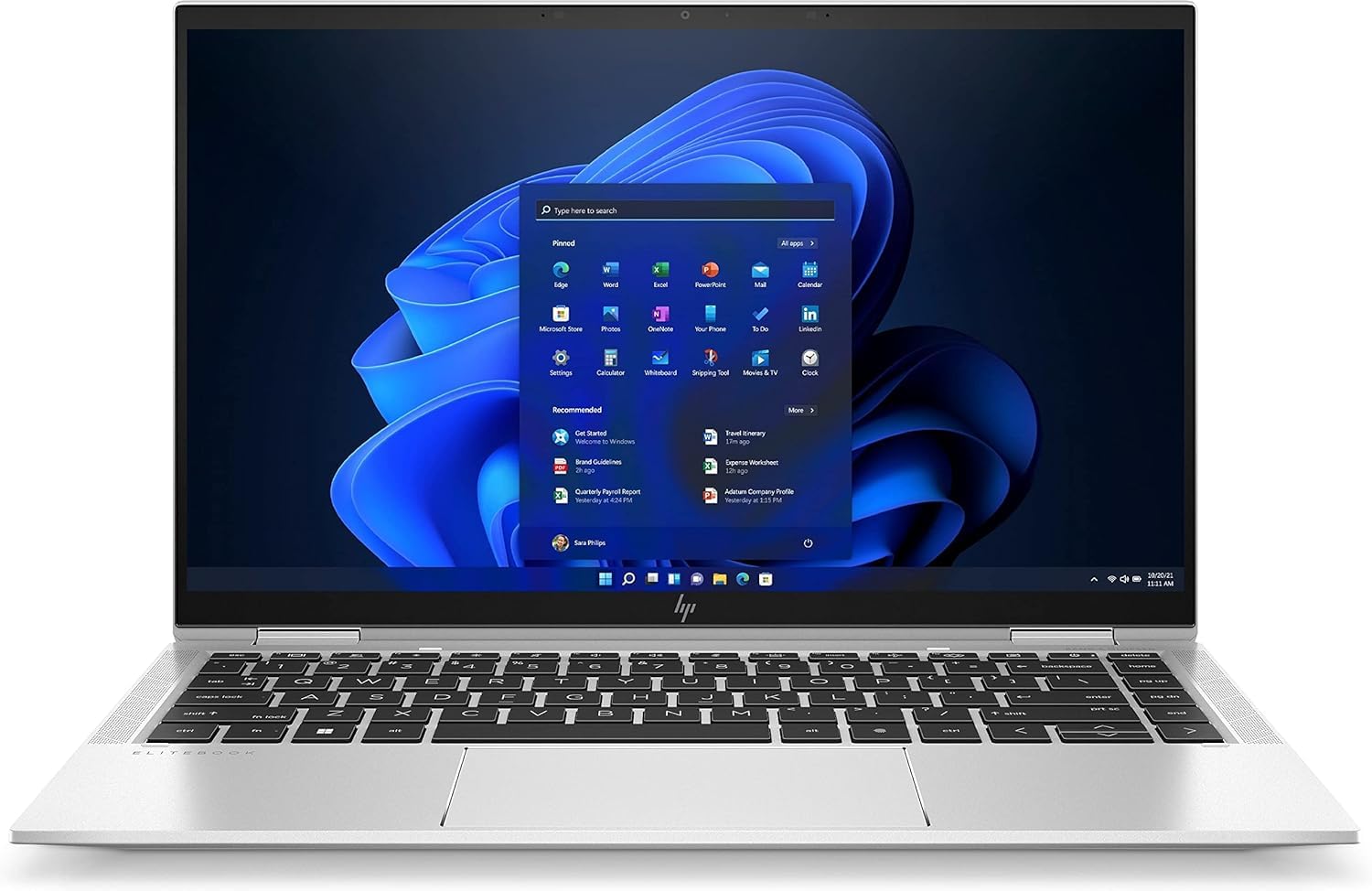
The 14-inch Full HD touchscreen is one of the better displays in this price range. At 400 nits, it's bright enough for outdoor use, which matters if you're working in cafes or trains. Most budget laptops struggle to hit 300 nits, so this is a proper advantage.
Colour accuracy is good, not great. sRGB coverage is around 95%, which is fine for general use and casual photo editing. If you're a professional photographer or designer, you'll want something with full Adobe RGB coverage, but for business presentations and web work, it's spot on.
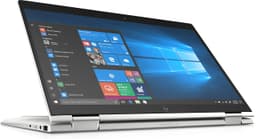
The touchscreen is responsive, and the 360-degree hinge means you can flip it into tablet mode. I didn't use tablet mode much because a 14-inch laptop is awkward to hold, but it's useful for presentations where you want to show someone something directly. The stylus support works with HP's rechargeable pen (sold separately), though I didn't test that.
Viewing angles are excellent thanks to the IPS panel. You can tilt the screen quite far and colours don't shift. The anti-glare coating helps reduce reflections, though it's not perfect in very bright conditions.
Battery Life: Realistic Eight Hours
Battery life is where business laptops usually excel, and the EliteBook doesn't disappoint. The 56Wh battery combined with the efficient 11th Gen Intel chip delivers proper all-day performance. I unplugged at 9am with a full charge and made it to 5pm with 15% remaining. That's with brightness at 60%, WiFi on, and typical office work.
Video playback is even better. I streamed Netflix at 50% brightness and got just over 10 hours. Web browsing with multiple tabs open lasted about 9.5 hours. Under heavy load (running benchmarks, compiling code), battery life drops to around 4.5 hours, which is expected.
Charging is fast enough with the 65W USB-C charger. You get to 50% in about 45 minutes, and a full charge takes around 90 minutes. The laptop supports USB-C Power Delivery, so you can charge from a compatible power bank or third-party charger, which is handy for travel.
Portability & Build: Feels Like a £490.00 Laptop
At 1.35kg, this slides into a backpack without you noticing the weight. The charger adds another 280g, which is reasonable. It fits in every laptop bag, including smaller messenger bags.
- Chassis: CNC-machined aluminium with magnesium alloy reinforcement
- Flex: Minimal flex in the lid and keyboard deck. The palm rest is solid with zero give
- Hinge: Smooth 360-degree rotation with enough resistance to hold any position. One-finger opening works perfectly
- Finish: Natural silver finish resists fingerprints well. Minor scratches after two weeks of daily use, but nothing dramatic
This is where the business laptop heritage shines. The all-metal chassis feels premium in a way that budget laptops don't. There's no creaking, no flex, no cheap plastic. HP built this to survive being thrown into bags and carried through airports, and it shows.
The hinge is particularly impressive. It's smooth enough for one-finger opening but stiff enough that the screen doesn't wobble when you're using the touchscreen. In tablet mode, it feels secure, not like it's going to snap. Some cheaper 2-in-1 laptops have hinges that feel like a weak point. Not here.
At 1.35kg, it's light for a 14-inch laptop. You can carry it around all day without shoulder strain. The 16.9mm thickness means it slides into bags easily, making it ideal for working in cafes, airports, and hotels where a good VPN becomes essential for protecting your connection on shared networks. For comparison, the Morostron 13.5-inch is slightly lighter but feels cheaper.
Keyboard & Trackpad: Proper Typing Experience
The keyboard is brilliant. HP uses the same mechanism across their EliteBook range, and it's one of the better laptop keyboards available. Key travel is 1.5mm, which is deeper than most thin laptops. Each key has a satisfying click without being loud enough to annoy people in quiet spaces.
Layout is standard UK with no weird compromises. The arrow keys are full-sized, not cramped half-height keys. The function row includes dedicated keys for volume, brightness, and screen lock. There's no numpad, but that's standard for 14-inch laptops. If you need one, look at 15.6-inch models.
The backlight has two levels and is bright enough for dark rooms without being blinding. It doesn't have RGB nonsense, just clean white illumination. The keyboard turns off after 30 seconds of inactivity to save battery, which is sensible.
The trackpad is a precision trackpad with Windows gestures, and it's excellent. The glass surface is smooth, and tracking is accurate. Three-finger swipes for switching apps work reliably. Palm rejection is good, though I occasionally triggered it when typing aggressively. The click mechanism is firm without being stiff.
Thermal Performance
HP's thermal design is conservative, which is good. The CPU can hit 78°C under sustained load, but it doesn't throttle. The keyboard stays cool during normal use, only warming slightly near the top during heavy tasks. The palm rest never gets warm, which is important for comfort.
The underside gets warm but not hot. I used this on my lap for an hour while working on a document, and it was fine. Under full load, the base gets warmer (around 42°C), but it's still tolerable for short periods.

Acoustic Performance
Fan noise is well-controlled. During normal office work, the fans stay off or run so quietly you won't hear them. Under load, they spin up to around 42dB, which is noticeable but not intrusive. In a quiet office or library, you'll hear it, but it's not the jet engine sound some laptops make. No coil whine on my unit.
Connectivity & Features: Thunderbolt 4 at This Price
Two Thunderbolt 4 ports is unusual in the budget bracket. You can connect dual 4K displays, fast external storage, or charge from either side. Port placement is sensible: one USB-C on each side, USB-A and HDMI on the left.
The port selection is excellent. Two Thunderbolt 4 ports means you can connect high-speed peripherals, external GPUs (if you're ambitious), or dual 4K monitors. The two USB-A ports are handy for older peripherals like mice and USB drives. HDMI 2.0 handles 4K at 60Hz, which is fine for most external monitors.
WiFi 6 is fast and reliable. On a 200Mbps connection it holds full speeds consistently. Bluetooth 5.0 connected to headphones and a wireless mouse without dropouts. No Ethernet port, but you can use a USB-C adapter if needed.
- Webcam: 720p HD camera with privacy shutter. Image quality is decent for video calls, better than most budget laptops but not amazing. Good enough for Teams and Zoom.
- Microphone: Dual-array microphone with noise cancellation. Voice pickup is clear, and the noise cancellation works well in moderately noisy environments.
- Speakers: Bang & Olufsen tuned speakers, bottom-firing. Sound is clear with decent volume, though bass is lacking. Fine for calls and casual music, but you'll want headphones for serious listening.
The 720p webcam is adequate. It's not the 1080p camera you'd get on newer business laptops, but it's good enough for video calls. The physical privacy shutter is a nice touch for security-conscious users. Image quality is fine in good lighting, grainy in dim rooms.
The speakers are Bang & Olufsen branded, which sounds fancy but doesn't mean much. They're clear and loud enough for calls and background music. Bass is minimal, which is standard for thin laptops. For serious audio work or entertainment, use headphones.
How It Compares: Budget Price, Mid-Range Features
At its current price point, the EliteBook x360 1040 G8 competes with budget laptops that have nowhere near its build quality. You're comparing it against consumer-grade machines with plastic chassis and half the RAM. That's the anomaly here. This is a business laptop competing on price with entry-level consumer models.
The closest competitors are other previous-generation business laptops like the Dell Latitude 7420 or Lenovo ThinkPad X1 Carbon Gen 9. Those are similarly specced but often cost more on the used market. If you're looking at new laptops in this price range, you're comparing against the Acer Chromebook Spin 312 or similar Chromebooks, which are completely different beasts.
| Feature | HP EliteBook x360 1040 G8 | Dell Latitude 7420 | Acer Chromebook Spin 312 |
|---|---|---|---|
| Price | £440.00 | ~£550 | ~£320 |
| CPU | Intel i7-1185G7 | Intel i5-1145G7 | Intel N100 |
| RAM | 32GB LPDDR4x | 16GB DDR4 | 8GB |
| Display | 14" FHD Touch | 14" FHD | 13.5" Touch |
| Battery Life | 8 hrs | 7.5 hrs | 10 hrs |
| Weight | 1.35 kg | 1.4 kg | 1.3 kg |
| Best For | Windows power users needing RAM | Balanced business laptop | Cloud-based work, tight budget |
The EliteBook wins on RAM and build quality. 32GB is overkill for most people, but if you're running virtual machines, heavy multitasking, or future-proofing, it's valuable. The Dell Latitude is more balanced with 16GB, which is enough for most users. The Acer Chromebook is in a different category entirely - cheaper, longer battery life, but limited to ChromeOS.
What Buyers Say: Solid Reviews with Caveats
The ★★★★☆ (4.2) rating from 50 reviews is solid. Most complaints centre on it being a previous-generation model, which is why it's this cheap. If you need the absolute latest tech, this isn't it. But if you want a reliable workhorse at a bargain price, it delivers.

Value Analysis: Why Is It This Cheap?
In the budget bracket, you normally get plastic builds, 8GB RAM, and questionable longevity. This EliteBook offers mid-range build quality and specs at a budget price because it's a generation old. That's the trade-off: slightly older tech for significantly better value.
The reason this laptop is in the budget bracket is simple: it's from 2021 (the G8 generation), and HP has moved on to newer models. Businesses that bought these originally are upgrading, and refurbished or new old stock units are flooding the market. That's why you can get a laptop that originally cost well over a grand for under £500.
Is it worth it? Absolutely, if you understand what you're getting. The 11th Gen Intel chip is still capable for office work, web browsing, and light creative tasks. The 32GB RAM is future-proof. The build quality will outlast cheaper consumer laptops. But you're not getting WiFi 6E, the latest Thunderbolt 5, or the efficiency gains of 12th or 13th Gen Intel chips.
For business users, remote workers, or students who need a reliable laptop that looks professional, this is excellent value. For gamers or heavy video editors, look elsewhere. The integrated graphics won't handle demanding workloads.
What works. What doesn’t.
5 + 4What we liked5 reasons
- Premium aluminium build quality that punches well above its price point
- 32GB RAM is overkill for most users but excellent for multitasking and future-proofing
- Eight-hour battery life covers a full workday without needing the charger
- Two Thunderbolt 4 ports and HDMI provide excellent connectivity options
- Bright 400-nit touchscreen works well in outdoor conditions
Where it falls4 reasons
- 11th Gen Intel chip is a generation behind, though still capable for most tasks
- 720p webcam feels dated in 2026 when 1080p is becoming standard
- Integrated graphics limit gaming and heavy creative work
- 512GB storage fills up quickly if you work with large files
Full specifications
12 attributes| Storage type | PCIe NVMe SSD |
|---|---|
| Battery life H | 10 |
| Battery WH | 56 |
| CPU | Intel Core i7-1185G7 |
| GPU | Intel Iris Xe Graphics |
| Launch year | 2021 |
| OS | Windows 11 Pro |
| Panel type | IPS |
| Ports | 2x USB-C (Thunderbolt 4), 2x USB-A, 1x HDMI 2.0, 3.5mm audio, Nano SIM slot |
| RAM GB | 32 |
| RAM type | LPDDR4x |
| Refresh rate HZ | 60 |
If this isn’t right for you
2 options

Frequently asked
5 questions01Is the HP EliteBook x360 1040 G8 good for gaming?+
Not really. The Intel Iris Xe integrated graphics can handle light gaming like Civilization VI on medium settings (35-40fps) and indie games, but it won't run demanding AAA titles smoothly. If gaming is a priority, look for a laptop with dedicated graphics like an NVIDIA GTX or RTX GPU.
02How long does the HP EliteBook x360 1040 G8 battery last?+
The battery lasts around 8 hours with mixed use (emails, web browsing, Teams calls, document editing). Video playback extended this to 10 hours, while heavy workloads reduced it to about 4.5 hours. HP's 12-hour claim is optimistic but achievable only with minimal usage.
03Can I upgrade the RAM or storage in the HP EliteBook x360 1040 G8?+
The 32GB RAM is soldered to the motherboard and cannot be upgraded, though 32GB is more than enough for most users. The 512GB NVMe SSD is replaceable (M.2 2280 form factor), so you can upgrade storage if needed. The bottom panel has standard screws for access.
04Is the HP EliteBook x360 1040 G8 good for students?+
Yes, particularly for students in professional courses (business, law, engineering) who need a reliable laptop with professional appearance. The 32GB RAM handles heavy multitasking, the battery lasts through lectures, and the build quality will survive being carried around campus. The only downside is the 720p webcam for online classes.
05What warranty and returns apply to the HP EliteBook x360 1040 G8?+
Amazon offers 30-day returns on most items. HP typically provides a 1-2 year warranty on laptops, though this varies by seller and whether the unit is new or refurbished. You're also covered by Amazon's A-to-Z guarantee for purchase protection.