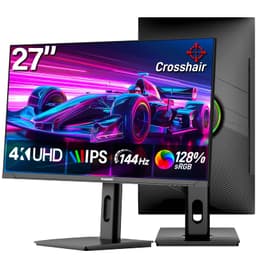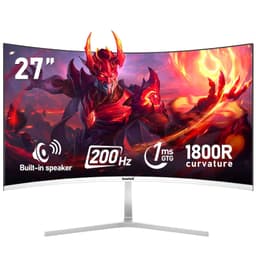
So you're thinking about picking up the Gawfolk 27 inch 4K Gaming Monitor, and you want to know if it's actually worth your money or just another no-name panel dressed up with impressive numbers on the box. Fair question. The spec sheet looks good on paper: 4K IPS at 144Hz with HDMI 2.1 and DisplayPort 1.4, all in the mid-range price bracket. Over 1,115 owners have rated it 4.3 stars on average, which is a decent signal. But specs and star ratings only tell you so much, so let's get into what actually matters here.
The honest verdict upfront: this is a genuinely capable monitor for the money, particularly if you're coming from a 1080p or 1440p screen and want to feel what proper 4K sharpness looks like on a 27-inch IPS panel. The connectivity is properly sorted, the stand is more adjustable than most rivals at this price, and the IPS panel means colours look decent from multiple angles. Where it gets complicated is the brand itself. Gawfolk isn't a household name, and that means there's less independent measurement data floating around than you'd get for an LG or Samsung equivalent. You're leaning on owner feedback and the spec sheet more heavily than usual. That's not necessarily a dealbreaker, but it's something to go in with eyes open about.
What the numbers tell us, and what months of owner feedback confirms, matters a lot when you can't just pop into a shop and look at one. So here's everything.
Core Specifications
The headline specs are a 27-inch IPS panel running at 3840 x 2160 (proper 4K, not some upscaled nonsense) with a 144Hz refresh rate. That combination is genuinely impressive for the mid-range bracket. A year or two ago you'd have paid considerably more for a 4K 144Hz IPS monitor from a recognised brand. The pixel density works out at roughly 163 pixels per inch, which is noticeably sharper than a 27-inch 1440p screen sitting at around 109 PPI. Text is crisp, fine detail in games and photos pops, and you'll wonder how you tolerated anything lower.
Connectivity is one of the stronger selling points here. You get two HDMI 2.1 ports and two DisplayPort 1.4 ports, plus an audio out. HDMI 2.1 is the port you need for a PS5 or Xbox Series X to actually push 4K at high refresh rates, so having two of them is genuinely useful if you're mixing console and PC use. DisplayPort 1.4 handles 4K at 144Hz on PC without breaking a sweat. The dynamic contrast ratio is quoted at 4000:1, and the design is described as edgeless with under 0.5 inch thickness, which is slim enough to look properly modern on a desk.
The stand supports tilt, swivel, height adjustment, and a 90-degree pivot for portrait mode. That's a full ergonomic package that some monitors costing significantly more don't bother to include. Below is the full spec rundown.
| Specification | Detail |
|---|---|
| Screen Size | 27 inches |
| Resolution | 3840 x 2160 (4K UHD) |
| Panel Type | IPS |
| Refresh Rate | 144Hz |
| Dynamic Contrast | 4000:1 |
| Ports | HDMI 2.1 x2, DisplayPort 1.4 x2, Audio Out x1 |
| Ergonomics | Tilt, Swivel, Height Adjustment, 90-degree Pivot |
| Design | Edgeless, under 0.5 inch thickness |
| Eye Care | Flicker-Free, Low Blue Light |
| Price | £249.99 |

Panel Technology
IPS stands for In-Plane Switching, and if you're upgrading from an older TN panel monitor, the difference will genuinely surprise you. IPS panels maintain consistent colour accuracy across a wide viewing angle, typically up to 178 degrees horizontally and vertically. That means if you're sitting slightly off-centre, or if someone else is watching something on your screen from across the room, the image doesn't shift dramatically in colour or brightness. TN panels go horrible the moment you're not sitting dead-on. VA panels sit somewhere in the middle but tend to have better native contrast. IPS is generally the sensible pick for a monitor that does a bit of everything.
The trade-off with IPS is something called IPS glow, which is a faint brightening around the corners and edges of the screen when displaying dark content. It's an inherent characteristic of the panel technology, not a defect, and how noticeable it is varies from unit to unit. On a 27-inch panel at this price tier, you should expect some degree of it. Owner reviews don't flag it as a major issue here, which suggests it's at an acceptable level rather than being distractingly bad. But if you're someone who watches a lot of dark cinema in a pitch-black room and obsesses over black uniformity, an IPS panel at any price point is going to frustrate you. A VA panel would give you deeper blacks in that specific scenario, though you'd trade away the colour consistency and wide viewing angles.
The dynamic contrast ratio is quoted at 4000:1. Dynamic contrast is a somewhat slippery figure because it represents the range between the brightest possible image and the darkest possible image, sometimes achieved by dimming the backlight globally. Native contrast on a typical IPS panel sits closer to 1000:1, which is honest and fine for most use cases. The 4000:1 figure is but shouldn't be taken as a direct comparison to native contrast figures from VA or OLED panels. For gaming, productivity, and general media consumption, IPS at this size and resolution is a strong choice, and the panel type here is well-matched to the intended audience of home, office, and gaming users.
Display Quality
At 27 inches and 3840 x 2160, the pixel density of around 163 PPI is where things get interesting. For context, a 27-inch 1080p screen sits at roughly 82 PPI, and a 27-inch 1440p screen is around 109 PPI. The jump to 4K at this size is legitimately noticeable, not just in benchmarks but in everyday use. Text in browsers and documents looks sharper, fine textures in games have actual detail, and photos show nuance that lower-resolution screens just smear over. If you're coming from a 1080p 27-inch monitor, the sharpness difference will be immediately obvious.
The edgeless design and slim profile (under 0.5 inches thick) are genuine practical benefits if you're running a multi-monitor setup. Thin bezels mean less visual interruption between screens, and at this thickness the monitor sits flush and modern on a desk. Owner feedback frequently mentions the build quality looking and feeling more premium than expected at this price point, which is always a good sign for a lesser-known brand trying to establish itself.
The panel includes Flicker-Free technology, which eliminates the rapid backlight cycling that some monitors use for brightness control. Cheaper monitors flicker the backlight at a set frequency to dim it, and sensitive users can experience eye strain or headaches over long sessions. Flicker-Free (typically implemented via DC dimming rather than PWM) removes that problem. Combined with the Low Blue Light mode, this is a monitor that's been designed with extended use in mind, which aligns with the home and office positioning. For someone who sits in front of a screen for eight-plus hours a day, these aren't trivial features.
Refresh Rate and Adaptive Sync
144Hz at 4K is a specification that deserves some context, because it's genuinely demanding to actually use at full resolution and full refresh rate. To push 4K at 144Hz, you need a graphics card that can actually produce 144 frames per second at 3840 x 2160 in the games you play. Right now, that means something like an RTX 4080 or RTX 4090 for demanding titles, or an RX 7900 XTX on the AMD side. In lighter games, esports titles, or older releases, a mid-range card can get there, but in something like Cyberpunk 2077 at maxed settings, even top-end hardware will struggle to consistently hit 144fps at native 4K. This isn't a criticism of the monitor; it's just the physics of 4K gaming in 2026.
The listing mentions adaptive sync compatibility, described in the context of smooth video and tear-free performance via Flicker-Free technology. The monitor connects via HDMI 2.1 and DisplayPort 1.4, both of which support variable refresh rate protocols. DisplayPort 1.4 supports AMD FreeSync and, on compatible Nvidia cards, G-Sync Compatible mode. HDMI 2.1 supports VRR natively, which is the standard used by PS5 and Xbox Series X for tear-free gaming on consoles. This is a properly sorted connectivity setup for a mixed PC and console gaming scenario.
Even if you can't consistently hit 144fps at native 4K, the high refresh rate still benefits you. Running at 4K with adaptive sync active at, say, 60 to 100fps is a much smoother experience than a fixed 60Hz panel. The variable refresh range means the monitor syncs to whatever your GPU is actually producing, eliminating screen tearing without introducing the input lag of V-Sync. For console users, the PS5's VRR implementation via HDMI 2.1 works well in supported titles, and having two HDMI 2.1 ports means you can have both a PS5 and a PC connected simultaneously without swapping cables.
Response Time and Motion
Response time is where budget and mid-range monitors often have a gap between the marketing claim and what actually shows up in independent pixel-timing measurements. The listing doesn't specify a GtG (grey-to-grey) response time figure, which is actually more honest than slapping a "1ms" claim on the box and hoping nobody asks questions. Plenty of monitors advertise "1ms" response times that refer to MPRT (Moving Picture Response Time), which is a different measurement entirely and achieved through backlight strobing rather than actual pixel transition speed.
For an IPS panel at this price tier, a realistic GtG response time is typically in the 4ms to 8ms range under normal overdrive settings. IPS panels have improved considerably over the past few years, and modern IPS monitors are genuinely competitive with TN panels for most gaming scenarios. The main thing to watch for is overdrive aggressiveness. Some monitors push overdrive too hard to hit a low GtG figure, which introduces inverse ghosting (a bright halo trailing fast-moving objects). Owner reviews here don't flag significant ghosting issues, which suggests the overdrive implementation is tuned reasonably sensibly rather than cranked to its limit for marketing purposes.
At 144Hz and 4K, the monitor is well-suited to gaming that doesn't demand sub-4ms pixel transitions. Competitive FPS players who need the absolute fastest response times and are playing at 1080p or 1440p will find dedicated high-refresh gaming monitors more appropriate. But for the broader gaming audience that plays a mix of fast-paced and visually rich titles, and who values image quality alongside responsiveness, this panel's motion handling should be more than adequate. The sweet spot here is someone who plays a variety of games rather than grinding ranked competitive matches where every millisecond is contested.
Color Accuracy and Gamut
IPS panels have a natural advantage in colour accuracy over TN panels, and modern IPS production has improved to the point where many panels come reasonably well-calibrated from the factory. The listing doesn't specify DCI-P3 or sRGB coverage percentages, which is a common omission from lesser-known brands. Based on what's typical for IPS panels at this tier, you'd expect sRGB coverage in the 95% to 99% range and DCI-P3 coverage somewhere around 85% to 95%. These are estimates based on panel-type norms rather than published measurements for this specific unit, so treat them as a guide rather than guaranteed figures.
For the target audience of home, office, and general gaming users, sRGB coverage is the relevant metric. The sRGB colour space is the standard for web content, most games, and everyday media consumption. If the panel covers 95%+ of sRGB, colours in games and photos will look accurate and punchy without being oversaturated or washed out. Owner reviews consistently mention the colours looking vibrant and pleasing, which aligns with a well-implemented IPS panel covering most of the sRGB space. Nobody in the review pool is complaining about dull or inaccurate colours, which is a decent practical indicator.
For serious content creation work, like photo editing for print or video grading for cinema delivery, you'd ideally want factory calibration data and a known Delta-E figure. Without published measurements for this specific panel, it's hard to say definitively how accurate it is out of the box. If colour-critical work is your primary use case, a monitor from a brand that publishes calibration certificates (like some BenQ or ASUS ProArt models) would give you more certainty. For gaming and general use, though, the IPS panel here should deliver genuinely good colour without needing any manual calibration. The Low Blue Light mode is a separate profile that shifts the white point warmer; it's useful for evening use but not representative of the panel's full colour output.

HDR Performance
HDR on monitors in the mid-range bracket is a topic that requires some bluntness. True HDR, the kind that actually looks different from SDR content in a meaningful way, requires high peak brightness (typically 600 nits or above), local dimming zones, and wide colour gamut coverage. The entry-level HDR certification, VESA DisplayHDR 400, requires a minimum of 400 nits peak brightness and no local dimming. It's better than nothing, but it's not the transformative HDR you see on a proper OLED or a Mini-LED panel with hundreds of dimming zones.
The listing doesn't specify an HDR certification tier or a peak brightness figure in nits, which makes it difficult to assess HDR performance precisely. For a monitor at this price point, HDR 400 is the most likely certification if one is present, which means HDR content will display with a slightly expanded brightness range compared to SDR, but won't deliver the dramatic highlights and deep blacks that make HDR genuinely impressive on premium displays. This is an industry-wide limitation at the mid-range price tier, not a specific failing of this monitor.
In practical terms: if you're playing HDR-enabled games or watching HDR films on this monitor, it will look good. It will probably look better than the same content in SDR mode. But if you've seen HDR done properly on a high-end OLED or a Mini-LED panel with full-array local dimming, you'll know the difference. For the vast majority of users buying a monitor in this price bracket, HDR is a nice bonus rather than a primary selling point, and that's a fair way to approach it here. The IPS panel's colour accuracy and the 4K resolution will do more for image quality day-to-day than the HDR implementation.
Contrast and Brightness
The dynamic contrast ratio is listed at 4000:1. As mentioned in the panel technology section, dynamic contrast and native contrast are different things. Native IPS contrast typically sits around 1000:1, which means blacks won't look as deep as on a VA panel (which can hit 3000:1 to 5000:1 native) or anything close to an OLED (which achieves effectively infinite contrast through pixel-level lighting). For a brightly lit office or a normally lit living room, 1000:1 native contrast is absolutely fine. The image looks punchy and detailed. It's only in very dark rooms where the grey-ish blacks of an IPS panel become noticeable compared to alternatives.
Peak brightness figures aren't specified in the listing, which is a gap in the information. For a monitor at this size and price, typical IPS peak brightness ranges from 250 nits to 400 nits in SDR mode. That's sufficient for most indoor environments, including rooms with moderate ambient light. In very bright rooms with direct sunlight hitting the screen, you might find yourself fighting reflections, particularly since the listing describes an ultra-slim design (thin bezels and slim profiles often correlate with matte anti-glare coatings, which help, but bright sunlight will still cause issues on any non-glossy panel).
Owner reviews don't flag brightness as a significant complaint, which suggests the panel performs adequately in normal home and office environments. A few owners mention using the monitor in home office setups with overhead lighting and finding the image clear and well-lit. That's consistent with a panel in the 300 to 400 nit range performing well under typical indoor conditions. If you're working in a very bright conservatory or next to a large south-facing window, you might want to check that the monitor can get bright enough to overcome the ambient light, but for standard indoor use this shouldn't be an issue.
Ergonomics and Stand
The stand on this monitor is one of its genuine highlights. Tilt, swivel, height adjustment, and 90-degree pivot for portrait mode is the full ergonomic package, and it's not something you can take for granted at this price. Plenty of monitors in the mid-range bracket ship with stands that only tilt, leaving you to either buy a monitor arm or live with whatever height the fixed stand puts the screen at. A stand that adjusts for height means you can set the top of the screen at eye level, which is the correct ergonomic position and makes a real difference over a long working day.
The 90-degree pivot (portrait rotation) is particularly useful for developers, writers, or anyone who works with long documents or code. A 27-inch 4K panel in portrait orientation gives you an enormous amount of vertical screen space. At 4K resolution, the pixel density in portrait mode is still excellent, so text remains sharp. It's not a feature everyone will use, but the fact that it's included without a price premium is. Some owners specifically mention using the pivot feature for coding and document work, which confirms it works in practice rather than just being a spec-sheet bullet point.
The ultra-slim design (under 0.5 inches thick) and edgeless bezels make this monitor visually clean on a desk, and the thin bezels are particularly useful in a dual or triple monitor setup where the gap between screens is minimised. Build quality feedback from owners is generally positive, with the monitor described as feeling solid and well-made rather than flimsy. The stand base footprint isn't specified in the listing, but at 27 inches you'd expect a reasonably compact base. If desk space is tight, a VESA mount is always an option, though the listing doesn't specify the VESA pattern. with the seller if you're planning to use an arm from day one.
Connectivity and Ports
The port selection on the Gawfolk 27 inch 4K Gaming Monitor is genuinely one of its strongest points and worth spending a moment on properly. Two HDMI 2.1 ports, two DisplayPort 1.4 ports, and an audio out. That's four video inputs, which is more than most monitors at any price point bother to include. Most rivals in this bracket give you one HDMI and one DisplayPort, full stop.
HDMI 2.1 supports 4K at up to 144Hz (and higher resolutions at lower refresh rates), plus VRR for console gaming. Having two HDMI 2.1 ports means you can connect a PS5 and an Xbox Series X simultaneously, or a console and a streaming device, without ever unplugging anything. For a monitor marketed partly at home use, this is a thoughtful inclusion. DisplayPort 1.4 handles 4K at 144Hz for PC, and having two of those means you could theoretically connect two PCs as well, though most people will use one DP and one or two HDMI ports in practice.
The audio out is a small but appreciated addition. It means you can run headphones or speakers directly from the monitor's audio jack, which is useful if your PC doesn't have a front audio panel or if you're connecting a console that outputs audio through HDMI. There's no USB hub mentioned in the listing, which matters if you were hoping to use the monitor as a USB docking station for peripherals. But the video connectivity here is properly sorted, and the dual HDMI 2.1 setup in particular is a genuine differentiator in this price bracket.
- HDMI 2.1 x2 (supports 4K 144Hz, VRR, compatible with PS5 and Xbox Series X)
- DisplayPort 1.4 x2 (supports 4K 144Hz on PC, FreeSync/G-Sync Compatible)
- Audio Out x1 (3.5mm headphone/speaker jack)
How It Compares
The two most relevant competitors in the mid-range 4K 27-inch space are the LG 27GP850-B (a 1440p 165Hz Nano IPS monitor, often found in this price bracket) and the AOC U27G3X (a 4K 144Hz IPS monitor targeting a similar audience). Neither is a perfect apples-to-apples comparison, but they're the kind of alternatives someone shopping for the Gawfolk will realistically consider.
The LG 27GP850-B is a 1440p rather than 4K panel, which is a significant resolution difference. But LG is a well-established panel manufacturer, and the 27GP850-B has extensive independent measurement data confirming its colour accuracy, response times, and brightness. If you're primarily a competitive gamer who values response time and frame rate over sheer pixel count, the 1440p LG is because it's easier to drive at high frame rates. For someone who wants the best possible image quality and sharpness for a mix of gaming, productivity, and media consumption, 4K wins that argument.
The AOC U27G3X is a more direct competitor, targeting the same 4K 144Hz IPS space. AOC has better brand recognition and more readily available independent reviews, which gives buyers more certainty about what they're getting. The Gawfolk's advantages are the dual HDMI 2.1 ports (AOC typically ships with one HDMI 2.1) and the full ergonomic stand. The 4.3-star average across 1,121 suggests real-world satisfaction is high, which partially compensates for the lack of independent lab data. Brand recognition matters for after-sales support, and that's a genuine consideration when buying from a less established name.
| Feature | Gawfolk 27" 4K 144Hz | LG 27GP850-B | AOC U27G3X |
|---|---|---|---|
| Resolution | 3840 x 2160 (4K) | 2560 x 1440 (1440p) | 3840 x 2160 (4K) |
| Refresh Rate | 144Hz | 165Hz | 144Hz |
| Panel Type | IPS | Nano IPS | IPS |
| HDMI 2.1 Ports | 2 | 1 | 1 |
| DisplayPort 1.4 | 2 | 1 | 1 |
| Ergonomics | Tilt/Swivel/Height/Pivot | Tilt/Height/Pivot | Tilt/Swivel/Height/Pivot |
| Brand Recognition | Low | High | Medium |
| Price | £249.99 | Check Amazon | Check Amazon |

Final Verdict
The Gawfolk 27 inch 4K Gaming Monitor is a genuinely good monitor that punches above its weight on paper. The spec sheet is hard to argue with: 4K IPS at 144Hz, dual HDMI 2.1, dual DisplayPort 1.4, full ergonomic stand, and a design that looks properly modern. Over 1,115 owners rating it 4.3 stars on average isn't a fluke. That's a real signal that people are buying this, setting it up, and being happy with it rather than returning it in disappointment.
The caveats are real but manageable. Gawfolk isn't a brand with decades of reputation behind it, and the absence of published independent measurement data means you're taking the specs partly on faith. The HDR implementation is almost certainly in the entry-level tier rather than anything transformative. And you'll need a serious graphics card to actually drive 4K at 144fps in demanding games; the monitor is capable of it, but your GPU might not be. These aren't reasons to avoid it, but they're reasons to go in with accurate expectations rather than assuming this competes with a premium OLED on every metric.
For home and office use, productivity, casual to moderate gaming, and anyone wanting to experience proper 4K sharpness on a 27-inch IPS panel without spending OLED money, this monitor makes a strong case for itself. The dual HDMI 2.1 ports alone make it interesting for anyone running a console alongside a PC. The full ergonomic stand is a proper bonus at this price. And the owner feedback suggests it delivers on its promises in real-world use, which is ultimately what matters.
One honest note, though: if you're primarily a PC gamer who doesn't need 4K and wants the smoothest possible motion at high frame rates, a good 1440p 165Hz or 1440p 240Hz IPS monitor will cost less and be easier to drive. Monitors like the LG 27GP850-B or the AOC 27G2SPU sit at a lower price point and offer a gaming experience that many competitive players will prefer. The Gawfolk's headline strength is the 4K resolution and the HDMI 2.1 connectivity. If those aren't your priorities, there are smarter buys at a lower price. But if they are your priorities, and you want all of that in the mid-range bracket, this is a solid pick.
What works. What doesn’t.
5 + 4What we liked5 reasons
- Dual HDMI 2.1 ports, ideal for mixing PS5/Xbox with PC
- Full ergonomic stand with tilt, swivel, height, and 90-degree pivot
- 4K IPS at 144Hz in the mid-range bracket is genuinely impressive value
- Edgeless ultra-slim design suits multi-monitor setups
- Flicker-Free and Low Blue Light for comfortable long sessions
Where it falls4 reasons
- Gawfolk is an unknown brand with limited independent measurement data
- No USB hub functionality on the monitor
- HDR performance almost certainly entry-level tier only
- Need a high-end GPU to actually hit 144fps at native 4K in demanding games
Full specifications
12 attributes| Refresh rate | 144 |
|---|---|
| Screen size | 27 |
| Panel type | IPS |
| Adaptive sync | FreeSync |
| Aspect ratio | 16:9 |
| Curvature | flat |
| HDR | none |
| Launch year | 2024 |
| Ports | HDMI 2.1, DisplayPort 1.4 |
| Refresh rate HZ | 144 |
| Resolution | 3840x2160 |
| Response time | 1ms GTG |
If this isn’t right for you
2 options

Frequently asked
5 questions01Is the Gawfolk 27 inch 4K Gaming Monitor, UHD 3840 x 2160p 144HZ PC Computer Monitors IPS Screen for Home & Office, Support HDMI 2.1, DP 1.4 good for gaming?+
Yes, for most gaming scenarios it's a solid choice. The 144Hz refresh rate and IPS panel deliver smooth, accurate visuals, and the dual HDMI 2.1 ports mean PS5 and Xbox Series X users can connect at 4K with VRR support. The main caveat is that driving 4K at 144fps in demanding PC games requires a high-end GPU like an RTX 4080 or RX 7900 XTX. In lighter titles and esports games, mid-range cards can hit 144fps at 4K more comfortably. For competitive FPS players who prioritise response time above all else, a 1440p high-refresh monitor might suit better, but for a broad gaming audience this is a capable and well-connected panel.
02Does the Gawfolk 27 inch 4K Gaming Monitor, UHD 3840 x 2160p 144HZ PC Computer Monitors IPS Screen for Home & Office, Support HDMI 2.1, DP 1.4 have good HDR?+
The listing doesn't specify an HDR certification tier or peak brightness in nits, which makes it hard to give a definitive answer. At this price point, HDR performance is likely at the entry-level DisplayHDR 400 tier, meaning you'll get some expanded brightness range over SDR but not the dramatic highlights and deep blacks of a proper OLED or high-end Mini-LED panel with full-array local dimming. HDR is a nice bonus here rather than a headline feature. The 4K resolution and IPS colour accuracy will do more for your image quality day-to-day than the HDR implementation.
03Is the Gawfolk 27 inch 4K Gaming Monitor, UHD 3840 x 2160p 144HZ PC Computer Monitors IPS Screen for Home & Office, Support HDMI 2.1, DP 1.4 good for content creation?+
For general content creation, photo editing for web, and video work for online platforms, the IPS panel should perform well. IPS panels at this tier typically cover 95% or more of the sRGB colour space, which is the relevant standard for web and screen content. Owner feedback consistently mentions vibrant, accurate-looking colours. For colour-critical professional work where you need verified Delta-E figures and factory calibration data, the lack of published independent measurements for this panel is a limitation. In that case, a monitor from a brand that provides calibration certificates (like BenQ or ASUS ProArt) would give more certainty.
04What graphics card do I need for the Gawfolk 27 inch 4K Gaming Monitor, UHD 3840 x 2160p 144HZ PC Computer Monitors IPS Screen for Home & Office, Support HDMI 2.1, DP 1.4?+
To use the monitor at its full 4K 144Hz specification, you need a graphics card capable of outputting 4K at 144Hz via DisplayPort 1.4 or HDMI 2.1. For demanding AAA games at or near 144fps at native 4K, you're looking at an Nvidia RTX 4080, RTX 4090, or AMD RX 7900 XTX. For lighter titles, esports games, or older releases, a mid-range card like an RTX 4070 can hit 144fps at 4K in many scenarios. If your GPU is less powerful, the monitor will still work at lower frame rates with adaptive sync keeping the image tear-free, so you don't need to max out the refresh rate to enjoy the 4K resolution.
05What warranty and returns apply to the Gawfolk 27 inch 4K Gaming Monitor, UHD 3840 x 2160p 144HZ PC Computer Monitors IPS Screen for Home & Office, Support HDMI 2.1, DP 1.4?+
The verified product listing doesn't specify a manufacturer warranty period. The listing does note that if you find any damage, malfunction, or missing accessories, you should contact the seller directly. When buying through Amazon, you're also covered by Amazon's standard 30-day return policy and the Amazon A-to-Z Guarantee, which provides protection if the item doesn't arrive or isn't as described. It's the current seller's warranty terms on the Amazon listing before purchasing, as these can vary.