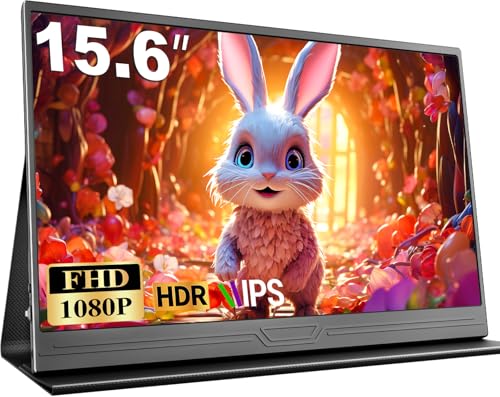
There's something genuinely exciting about portable monitors right now. The category has exploded, prices have collapsed, and you can now pick up a 15.6-inch IPS panel for less than a decent meal out in London. The CUIUIC Portable Monitor sits right in that budget bracket, and with thousands of owner reviews and a positive overall rating on Amazon, it's clearly selling well. But does the spec sheet hold up to scrutiny, or is this another case of marketing numbers papering over a mediocre panel?
The short answer is: it's a solid budget portable monitor with a genuine IPS panel, a useful port selection, and a lightweight build that actually delivers on its travel-friendly promises. It won't threaten a proper desktop display, and there are real compromises at this price point that you need to know about before you buy. But for a second screen on the road, or a quick productivity boost at a coffee shop, the CUIUIC makes a surprisingly compelling case for itself.
What I find genuinely interesting about this one is that CUIUIC doesn't try to hide what it is. No wild claims about professional colour grading or competitive gaming performance. It's a 1080p IPS travel screen with dual USB-C, a Mini HDMI port, and a magnetic cover that doubles as a stand. At this price tier, that kind of honest positioning is actually refreshing. So here's what the research turns up.
Core Specifications
The CUIUIC Portable Monitor is a 15.6-inch display running at 1920x1080 resolution on an IPS panel. That's the headline spec, and it's the right one to lead with because panel type matters enormously in this category. The screen connects via two USB-C ports or a Mini HDMI port, with a 3.5mm audio output rounding out the connectivity. Weight comes in at 780g, which is genuinely light for a 15.6-inch screen, and the bezels are 5mm on three sides, giving it a clean, modern look.
The build uses an aluminium frame with what CUIUIC describes as a durable metal texture finish. It ships with a magnetic leather smart cover that acts as a stand, which is a thoughtful inclusion rather than an afterthought. The bundle also includes a Mini HDMI cable, a USB-C cable, and a free power adapter, so you're not immediately hunting for accessories the moment it arrives. For a budget portable monitor, that's a proper accessory kit.
One thing early: the manufacturer specifies that USB-C connectivity requires Thunderbolt 3.0 or USB 3.1 Type-C with DisplayPort Alt Mode. Not every USB-C port on every laptop will drive this display. If your machine only has USB-C for charging and data, you'll need the Mini HDMI route instead. Check your laptop specs before assuming USB-C will just work.
| Specification | Detail |
|---|---|
| Screen Size | 15.6 inches |
| Resolution | 1920x1080 (Full HD) |
| Panel Type | IPS |
| Aspect Ratio | 16:9 |
| Weight | 780g |
| Bezel Width | 5mm (three sides) |
| Ports | 2x USB-C, 1x Mini HDMI, 1x 3.5mm audio out |
| Speakers | Built-in dual stereo speakers |
| Frame Material | Aluminium |
| Included Accessories | Mini HDMI cable, USB-C cable, power adapter, magnetic cover/stand |
| Warranty | 2 years |
| Price | £55.99 · Details |

Panel Technology
IPS is the right panel choice for a portable monitor, full stop. VA panels can offer better contrast ratios on paper, but they suffer from slow pixel response in cold conditions, colour shift when you're viewing from an angle (which happens constantly when a screen is propped on a desk at varying heights), and that horrible VA glow that ruins dark scenes. TN panels are cheaper to manufacture but the viewing angle performance is genuinely poor. For a screen you're going to use in cafes, meeting rooms, and hotel rooms where the viewing angle is constantly changing, IPS is the sensible call.
What IPS gives you here is consistent colour reproduction across a wide viewing cone, typically around 178 degrees horizontally and vertically. That means the person sitting next to you on a train can actually see your screen without colours inverting or washing out. It also means that when the screen is propped at an angle via the magnetic cover stand, you're not fighting colour shift as you adjust your seating position. For productivity use, that consistency matters more than the slightly higher contrast numbers a VA panel might advertise.
The downside of IPS that you need to be aware of is IPS glow, that milky luminance that appears in the corners of the screen when displaying dark content. It's a characteristic of the panel technology rather than a manufacturing defect, and it's present to some degree on virtually every IPS display. On a portable monitor used primarily for documents, spreadsheets, and video calls, it's rarely an issue. But if you're hoping to watch dark films or play atmospheric games on this thing, the IPS glow will be visible and slightly distracting. Owner reviews don't flag it as a major complaint, which suggests it's within normal bounds for this panel tier.
Budget IPS panels at this price point also tend to use PWM (pulse-width modulation) for backlight dimming rather than DC dimming. PWM can cause eye strain for sensitive users over long sessions. CUIUIC doesn't specify their dimming method in the verified product data, so if you're particularly sensitive to PWM flicker, that's worth investigating further before committing.
Display Quality
At 15.6 inches with a 1920x1080 resolution, the CUIUIC lands at roughly 141 pixels per inch. That's a comfortable sharpness level for a portable monitor at normal viewing distances of 40 to 60 centimetres. Text is clear, icons are crisp, and you won't be squinting at blurry edges. It's not the retina-level sharpness you'd get from a 4K panel, but at this price point, 4K portable monitors cost considerably more and demand significantly more GPU horsepower to drive properly.
The 5mm bezels on three sides are genuinely slim for a budget panel. Most portable monitors in this bracket have chunky bezels that make the screen feel smaller than it is. The thin-bezel design here means the 15.6-inch panel feels like it fills the frame properly, which is a nice touch. The bottom bezel is presumably thicker to accommodate the internals, which is standard practice across the category.
Owner feedback across the thousands of reviews broadly praises the image quality for the price. The common thread in positive reviews is that colours look vibrant and accurate for everyday use, and that text rendering is sharp enough for extended document work. Some owners note that brightness could be higher for outdoor use in direct sunlight, which is a fair criticism of most portable monitors regardless of brand. The built-in dual stereo speakers are mentioned positively in several reviews as a bonus feature, described as adequate for video calls and background music, though obviously not a substitute for proper audio.
The screen finish appears to be a standard matte anti-glare coating based on the product imagery, which is the sensible choice for a portable monitor used in varied lighting environments. A glossy screen looks stunning in a controlled studio but becomes a mirror in any room with windows. The matte finish will reduce reflections in cafes and offices, which is exactly what you want from a travel screen.
Refresh Rate and Adaptive Sync
The verified product data doesn't specify a refresh rate for the CUIUIC Portable Monitor, and CUIUIC doesn't make any adaptive sync claims in their Amazon listing. For a budget portable monitor positioned primarily at productivity, travel, and casual use, this is expected. The vast majority of portable monitors in this price bracket operate at 60Hz, which is perfectly adequate for office work, video streaming, and casual gaming.
If you're hoping for 144Hz or FreeSync support for serious gaming sessions, this isn't the monitor to build around. That's not a criticism of the CUIUIC specifically. It's just the reality of what this product is and who it's for. Portable monitors with high refresh rates and adaptive sync support exist, but they cost significantly more and are heavier, which defeats part of the purpose of a travel screen.
For the use cases this monitor is actually designed for, a standard 60Hz refresh rate is entirely sufficient. Web browsing, spreadsheets, video calls, streaming content, and light gaming all work perfectly well at 60Hz. The VESA ecosystem of adaptive sync standards like FreeSync and G-Sync is genuinely valuable for gaming monitors, but it's not a meaningful omission on a device that weighs 780g and slips into a backpack. If you need tear-free gaming on a portable screen, you're shopping in a different category at a different price point.
Response Time and Motion
Here's where the enthusiast in me wants to be very direct with you. Manufacturer response time claims on budget monitors are, to put it charitably, aspirational. The gap between the number printed on a spec sheet and what independent measurements show in practice can be enormous. CUIUIC doesn't make specific response time claims in their verified listing data, which is actually more honest than most competitors who slap "1ms" on everything regardless of panel technology.
IPS panels at this price tier typically measure somewhere in the range of 8ms to 15ms grey-to-grey in real-world conditions, as consistently shown in published display measurements from independent sources. That's perfectly fine for productivity, video, and casual gaming. It becomes noticeable in fast-paced competitive shooters or fighting games where pixel transitions need to be extremely quick to avoid ghosting on fast-moving objects. But for FIFA, casual racing games, or anything that isn't a twitch-reaction competitive title, you'll be fine.
The practical implication is this: if you're connecting this to a PS4, PS5, Xbox, or Switch for casual gaming on the road (which the listing explicitly supports), you won't have a miserable experience. The IPS panel will show you accurate colours and wide viewing angles, and the response time won't ruin a game of FIFA or a platformer. But if you're a competitive CS2 player who needs sub-5ms response times and 144Hz, this monitor will genuinely limit your performance. That's an honest assessment, not a knock on the product. It's just not designed for that use case.
Color Accuracy and Gamut
CUIUIC doesn't publish sRGB coverage percentages, DCI-P3 figures, or Delta-E measurements in their listing. That's fairly typical for budget portable monitors, and it means we're working from panel-type expectations and owner feedback rather than hard calibration numbers. IPS panels at this price tier generally cover somewhere in the region of 72% to 100% of the sRGB colour space, with the cheaper end of the market tending toward 72% NTSC (which roughly corresponds to about 96% sRGB) and better panels hitting full sRGB coverage.
For general productivity, the colour accuracy of a budget IPS panel is more than adequate. Documents look right, web content looks right, and video streaming looks vibrant and pleasing. Where budget panels start to show their limitations is in colour-critical work. If you're colour grading video, retouching photos, or doing any kind of print design work, you need a calibrated display with known Delta-E values and verified colour space coverage. The CUIUIC is not that display, and it doesn't claim to be.
Owner reviews don't raise specific concerns about colour accuracy for everyday use, which is a reasonable signal that the panel performs within normal expectations for its category. Several reviewers specifically praise the image quality as better than expected for the price, which suggests the panel is at least mid-tier within the budget portable monitor segment. For the target audience of remote workers, students, and travellers wanting a second screen, the colour reproduction will be entirely satisfactory.
One thing: the built-in OSD (on-screen display) controls presumably allow some brightness and colour temperature adjustment, which is standard on portable monitors. CUIUIC doesn't detail the OSD options in their listing, but owner reviews don't flag any issues with the controls, suggesting they're at least functional. A basic warm/cool colour temperature adjustment goes a long way toward making a screen comfortable for long sessions.

HDR Performance
There are no HDR claims in the CUIUIC's verified product data. No HDR10 badge, no DisplayHDR certification, nothing. And honestly? That's the right call. Budget portable monitors that do claim HDR support are almost universally doing what the industry calls "checkbox HDR", where the panel can technically accept an HDR signal but lacks the brightness, local dimming, or colour volume to render it meaningfully. The result is often worse than a good SDR image because the tone mapping is poor.
Real HDR requires significant peak brightness, typically 400 nits minimum for the entry-level VESA DisplayHDR 400 certification, and ideally local dimming zones to create genuine contrast between bright highlights and dark shadows. Portable monitors at this price point simply don't have the hardware for that. The backlights aren't bright enough, and there's no local dimming circuitry. So the absence of HDR claims here is actually a mark in CUIUIC's favour. They're not trying to sell you a feature that would disappoint in practice.
For SDR content, which is the vast majority of what you'll watch and work with on a portable monitor, this is a non-issue. Netflix, YouTube, Twitch, your work documents, your game at 1080p SDR. All of that will look fine. If you specifically want HDR content to pop on a portable screen, you need to look at more expensive options with proper HDR certification, and you'll pay considerably more for the privilege. At this price tier, skip the HDR marketing and focus on what the panel actually delivers in SDR.
Contrast and Brightness
CUIUIC doesn't publish a contrast ratio or peak brightness figure in their verified listing data. For an IPS panel at this price point, typical native contrast ratios sit around 800:1 to 1000:1, which is characteristic of the technology. IPS panels have never been the contrast kings of the monitor world. That distinction belongs to VA panels (which can hit 3000:1 or higher) and OLED panels (which offer essentially infinite contrast via per-pixel illumination). But as discussed, IPS makes other trade-offs that make it the right choice for a portable monitor.
Brightness is worth thinking about carefully for a travel screen. Indoor use in a normally lit room or office is fine at typical portable monitor brightness levels. But outdoor use, or use near bright windows, can be challenging if the panel doesn't go bright enough to overcome ambient light. Owner reviews mention that the screen is comfortable indoors but can struggle in bright outdoor conditions, which is a common theme across the portable monitor category. This isn't unique to the CUIUIC; it's a limitation of the technology at this price point.
For the primary use cases of this monitor (working in hotels, coffee shops, and home offices, gaming on a console in a bedroom, extending a laptop screen during travel), the brightness levels will be adequate the vast majority of the time. The situations where it struggles (direct sunlight, very bright patios) are edge cases for most users. If you specifically need a monitor for outdoor use in bright conditions, you need to look at monitors with much higher peak brightness ratings, and that's a significantly more expensive and heavier proposition.
Ergonomics and Build
The magnetic leather smart cover that doubles as a stand is the ergonomic story here, and it's a thoughtful one. The cover protects the screen during transit and then folds out to prop the monitor at a usable angle on a desk. It's a similar approach to what you see on tablet covers, and for a portable monitor, it's genuinely practical. You don't need to carry a separate stand, and the whole thing stays slim enough to slide into a laptop bag alongside your main machine.
The aluminium frame is a real positive at this price point. Plenty of budget portable monitors use plastic construction that flexes when you pick them up and feels cheap in the hand. The aluminium frame on the CUIUIC gives it a more premium feel and should be more durable over time. Owner reviews back this up, with several specifically mentioning that the build quality surprised them given the price. The 5mm bezels on three sides also contribute to a clean, modern aesthetic that doesn't look embarrassingly budget when you're working in public.
At 780g, this is a genuinely portable device. For context, a 15.6-inch laptop typically weighs somewhere between 1.5kg and 2.5kg. Adding 780g for a second screen is a meaningful addition, but it's not prohibitive. The screen is slim enough (the listing references an ultra-thin IPS panel construction) to slide flat into most laptop bags without taking up significant space. The overall package, monitor plus cover plus cables, is compact enough for business travel without feeling like you're lugging extra kit.
The stand angle flexibility is limited to whatever positions the magnetic cover supports. This isn't a monitor with tilt, swivel, pivot, or height adjustment in the traditional sense. You're working with the angles the cover provides, and while that's usually adequate for desk use, it's if you have specific ergonomic requirements. There's no VESA mount option mentioned in the verified product data, so wall mounting or arm mounting isn't part of this product's feature set. For a portable travel monitor, that's expected and not a meaningful limitation.
Connectivity and Ports
The port selection on the CUIUIC is actually quite good for a budget portable monitor. Two USB-C ports, one Mini HDMI port, and a 3.5mm audio output give you genuine flexibility in how you connect it. The dual USB-C setup means you can connect the signal from your laptop through one port while powering the monitor through the other if needed, which is a useful arrangement. Alternatively, both USB-C ports can be used with different devices depending on your setup.
- 2x USB-C (requires Thunderbolt 3.0 or USB 3.1 Type-C with DisplayPort Alt Mode)
- 1x Mini HDMI (for laptops, consoles, and devices with HDMI output)
- 1x 3.5mm audio out (for headphones or external speakers)
- Built-in dual stereo speakers
The Mini HDMI port is the universal fallback. If your laptop has a full-size HDMI port, you'll need the included Mini HDMI cable to connect it. The cable is included in the box, which is a genuinely helpful inclusion. Many portable monitors ship without cables and expect you to source your own. The fact that CUIUIC bundles both a Mini HDMI cable and a USB-C cable, plus a power adapter, means you're actually ready to use the monitor immediately without a trip to an accessories shop.
The 3.5mm audio output is a nice touch for a portable monitor. It means you can route audio from your laptop through the monitor and out to headphones or a small speaker, which is useful in hotel rooms where you might want to keep the audio chain simple. The built-in dual stereo speakers are there for convenience rather than quality, but they're better than nothing for a quick video call or background music. The compatibility list is broad: laptop, PC, Mac, tablet, phone, Xbox, PS3/PS4/PS5, Nintendo Switch. That covers the vast majority of devices people actually want to connect to a portable monitor.
How It Compares
The portable monitor market at the budget end has a few recurring names, and it's where the CUIUIC sits relative to them. Two of the most commonly compared options are the Arzopa Z1FC (a 144Hz portable monitor that costs more but offers a higher refresh rate) and the ViewSonic VX1655 (a more established brand name in the portable monitor space at a similar price point). Neither is a perfect comparison, but they illustrate the trade-offs well.
The Arzopa Z1FC is interesting because it offers 144Hz refresh rate support, which the CUIUIC doesn't match. For gaming-focused users, that's a meaningful difference. But the Arzopa costs more, and if you're primarily using the monitor for productivity and travel rather than gaming, paying extra for a refresh rate you won't use is poor value. The CUIUIC's aluminium build and included accessory bundle (power adapter plus cables) compare favourably to the Arzopa's package.
The ViewSonic VX1655 brings brand recognition and ViewSonic's display pedigree to the portable monitor space. ViewSonic has been making monitors for decades and their quality control is generally reliable. But the VX1655 typically costs more than the CUIUIC, and for the use cases a travel monitor covers, the CUIUIC's positive overall rating across thousands of reviews suggests it's delivering on its promises. The CUIUIC's 2-year warranty is also competitive, matching or exceeding what you'd expect at this price tier.
| Feature | CUIUIC Portable Monitor | Arzopa Z1FC | ViewSonic VX1655 |
|---|---|---|---|
| Screen Size | 15.6 inch | 16 inch | 15.6 inch |
| Resolution | 1920x1080 | 1920x1080 | 1920x1080 |
| Panel Type | IPS | IPS | IPS |
| Refresh Rate | Not specified | 144Hz | 60Hz |
| Weight | 780g | Approx. 800g | Approx. 780g |
| USB-C Ports | 2x USB-C | 2x USB-C | 2x USB-C |
| HDMI | Mini HDMI | Mini HDMI | Mini HDMI |
| Built-in Speakers | Yes (dual stereo) | Yes | Yes |
| Warranty | 2 years | 1 year | 3 years |
| Included Accessories | Cables + power adapter + cover | Cables + cover | Cables + cover |
| Price | £55.99 · Details | Higher price tier | Higher price tier |
The honest comparison conclusion is that the CUIUIC wins on value and accessory bundle, and loses on refresh rate if gaming is your priority. For pure productivity and travel use, it's arguably the smarter buy at this price point. The 2-year warranty is a genuine differentiator too. Budget monitor warranties are often 12 months; getting 24 months here is a meaningful confidence boost.

Final Verdict
The CUIUIC Portable Monitor is exactly what it says it is: a lightweight, well-built 15.6-inch IPS second screen for people who need to extend their workspace on the road. It doesn't pretend to be a professional colour grading display, it doesn't make absurd gaming performance claims, and it doesn't try to charge you for features it can't deliver. In a market full of monitors that do all three of those things, that honesty is genuinely refreshing.
The IPS panel is the right technology choice for this use case. The 780g weight is genuinely travel-friendly. The dual USB-C plus Mini HDMI port combination covers almost every device you'd want to connect. The included power adapter and cables mean you're actually ready to use it straight away. And the magnetic cover stand, while limited in angle adjustment, works well enough for desk use in hotels, cafes, and offices. Thousands of owners rating it positively is a strong signal that real-world performance matches the promises.
The limitations are real and worth being clear about. The stand flexibility is limited to whatever the magnetic cover allows, so if you need precise height and tilt adjustment, you'll be disappointed. The brightness may struggle in very bright outdoor conditions. There's no adaptive sync, no HDR capability, and no high refresh rate for competitive gaming. And the USB-C connection requires DisplayPort Alt Mode support on your laptop, which not every machine has.
Who should buy this? Remote workers and students who want a second screen without adding serious weight to their bag. Console gamers who want a portable screen for PS5 or Switch gaming in hotel rooms. Anyone who finds themselves working from a laptop in varied locations and wants more screen real estate. The price tier makes it a low-risk purchase, and the 2-year warranty provides reasonable peace of mind.
Who should skip it? Competitive gamers who need high refresh rates and fast response times. Anyone doing colour-critical work who needs a calibrated, verified-accuracy display. Users who need precise ergonomic adjustment. And anyone whose laptop only has USB-C for charging, not DisplayPort Alt Mode, who doesn't have a Mini HDMI output either. Check your ports before you order.
If you don't need a second screen for travel specifically and just want a budget monitor for a fixed desk at home, a standard desktop monitor in this price bracket will give you better ergonomics, a bigger screen, and likely better brightness for the same money. The CUIUIC's value proposition is the portability. If that's not your priority, spend your money differently.
As a travel and productivity portable monitor at this price point, though? It's a proper recommendation. The IPS panel, aluminium build, solid port selection, and honest positioning make it one of the better choices in a crowded budget segment. Score: 7.5 out of 10.
What works. What doesn’t.
5 + 4What we liked5 reasons
- Genuine IPS panel with wide viewing angles for a travel monitor
- Lightweight at 780g with slim 5mm bezels on three sides
- Dual USB-C plus Mini HDMI gives real connectivity flexibility
- Full accessory bundle included: cables, power adapter, and magnetic cover stand
- 2-year warranty is above average for this price tier
Where it falls4 reasons
- Stand angle limited to magnetic cover positions, no tilt/height adjustment
- USB-C requires DisplayPort Alt Mode support, not universal
- Brightness may struggle in bright outdoor conditions
- No adaptive sync or high refresh rate for gaming
Full specifications
10 attributes| Panel type | IPS |
|---|---|
| Aspect ratio | 16:9 |
| Curvature | flat |
| HDR | none |
| Launch year | 2023 |
| Ports | 2x USB-C, 1x Mini HDMI, 1x 3.5mm audio out |
| Refresh rate HZ | 60 |
| Resolution | 1920x1080 |
| Screen size IN | 15.6 |
| Vesa compatible | false |
Frequently asked
5 questions01Is the CUIUIC Portable Monitor, 15.6 Inch 1080P FHD IPS Second Screen for Laptop good for gaming?+
It's fine for casual gaming on consoles like PS4, PS5, Xbox, and Nintendo Switch, which the listing explicitly supports. The IPS panel delivers accurate colours and wide viewing angles. However, the refresh rate is not specified and is likely 60Hz, and there is no adaptive sync support, so competitive PC gaming in fast-paced titles like CS2 or Valorant will be limited. For FIFA, platformers, RPGs, and casual gaming on the road, it works well.
02Does the CUIUIC Portable Monitor, 15.6 Inch 1080P FHD IPS Second Screen for Laptop have good HDR?+
The CUIUIC does not make any HDR claims, and there is no HDR certification listed in the product data. This is actually a positive sign, as budget portable monitors that do claim HDR typically lack the brightness and local dimming hardware to render it meaningfully. The monitor delivers standard dynamic range (SDR) content, which covers the vast majority of everyday use including streaming, gaming, and productivity work.
03Is the CUIUIC Portable Monitor, 15.6 Inch 1080P FHD IPS Second Screen for Laptop good for content creation?+
For general productivity, document work, and video calls, yes. For colour-critical work like photo retouching, video colour grading, or print design, no. CUIUIC does not publish sRGB coverage percentages or Delta-E calibration data, which means there are no verified accuracy figures to rely on. The IPS panel will produce pleasing colours for everyday use, but professionals who need a calibrated, verified-accuracy display should look at monitors with published colour space coverage and factory calibration reports.
04What graphics card do I need for the CUIUIC Portable Monitor, 15.6 Inch 1080P FHD IPS Second Screen for Laptop?+
The monitor runs at 1920x1080 resolution, which is very undemanding by modern GPU standards. Any dedicated graphics card from the last several years will drive it without issue. For laptop users connecting via USB-C, the key requirement is that your laptop's USB-C port supports Thunderbolt 3.0 or USB 3.1 Type-C with DisplayPort Alt Mode. For HDMI connection, any laptop or device with a Mini HDMI or full HDMI output (using the included cable) will work regardless of GPU.
05What warranty and returns apply to the CUIUIC Portable Monitor, 15.6 Inch 1080P FHD IPS Second Screen for Laptop?+
CUIUIC states a 2-year warranty on this product, along with 24/7 customer support. This is above average for a budget portable monitor and provides reasonable peace of mind. Purchases through Amazon also benefit from Amazon's standard 30-day return window and the A-to-Z Guarantee, which covers you if the item arrives damaged or not as described.