Best Overall Value
Price: £29.99 | Rating: ★★★★☆ (4.4)
Under £30 for a proper mechanical keyboard with per-key RGB. That's the Dierya DK61se's pitch, and it delivers. This is the keyboard that proves you don't need to spend £80 or more to get real mechanical switches and decent RGB lighting.
The 60% layout is compact and gaming-focused. Per-key RGB backlighting looks genuinely impressive for the price, with multiple lighting modes that you can cycle through without any software. Some variants of the DK61se also support hot-swap switches, meaning you can pull out the switches and replace them without soldering. That's a feature you'd normally pay significantly more for.
Switch options typically include red (linear), blue (clicky), or brown (tactile), so you can pick the feel that suits your gaming style. For competitive gaming, reds are the popular choice. For a mix of gaming and typing, browns work well.
The compromises are real. No arrow keys without using function layer combinations. The software is basic. Build quality, while decent, doesn't match the Logitech G413 TKL SE's aluminium plate. And the 60% layout takes some getting used to if you're coming from a full-size board.
But as an entry point into proper mechanical gaming keyboards with RGB, the Dierya DK61se is one of the best value picks in the best RGB gaming keyboards under £50 category.
Pros
- Real mechanical switches under £30
- Per-key RGB lighting
- Hot-swap support on some variants
- Multiple switch options available
- Compact 60% layout ideal for gaming
Cons
- No dedicated arrow keys
- Basic software
- Plastic build feels budget
- 60% layout has a learning curve
Buy on Amazon
Best Membrane Option
Price: £23.98 | Rating: ★★★★☆ (4.4)
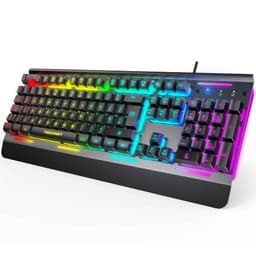
An all-metal panel under £24. That's the TECKNET's headline claim, and it's a legitimate one. Most keyboards at this price use plastic throughout, so the metal top plate is a genuine differentiator that makes the board feel more substantial than its price suggests.
Fifteen-zone RGB illumination looks decent, and IP32 water resistance adds practical protection. The 105-key full-size UK layout covers everything, including the numpad. Anti-ghosting on 25 keys is functional for gaming, though it's worth noting that 25 keys is less than some competitors offer.
The switches are membrane, described as 90% quiet. They're fine for typing and casual gaming but won't satisfy anyone wanting proper mechanical feedback. For the best RGB gaming keyboards under £50 in terms of pure gaming performance, the TECKNET sits in the middle of the pack. But for someone who wants a full-size board with a metal panel and decent RGB at a very low price, it's a solid option.
Pros
- All-metal panel at a very low price
- 15-zone RGB illumination
- IP32 water and dust resistance
- Full-size 105-key UK layout
Cons
- Membrane switches, not mechanical
- Only 25 anti-ghosting keys
- No software customisation
Buy on Amazon£23.98
Best Under £50 Combo
Price: £22.99 | Rating: ★★★★½ (4.5)
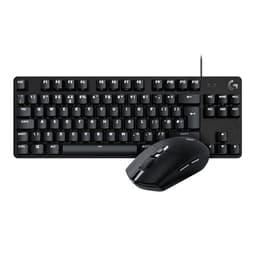
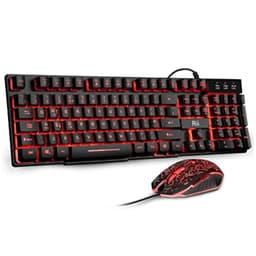
Around £22 for a keyboard and mouse together. The Rii RK108 is the best budget combo in this roundup, and it's the pick we'd recommend for anyone who needs a complete gaming setup on an absolute shoestring.
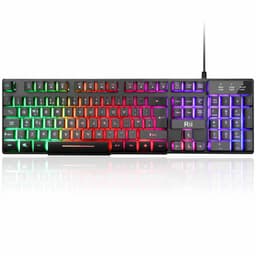
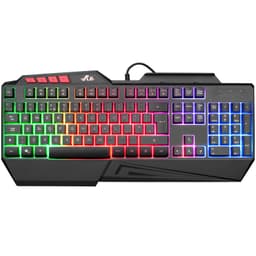
The keyboard offers three-colour backlit lighting (red, purple, and blue) rather than full RGB, which is a compromise worth knowing about upfront. The membrane switches are basic but functional. UK layout is correct, which matters more than you'd think when you're buying budget peripherals (some cheap imports get this wrong). Console compatibility with PS4, PS5, and Xbox One is a bonus for multi-platform gamers.
The included mouse is basic but usable. Don't expect precision sensor performance or adjustable DPI beyond a couple of settings. But for casual gaming, browsing, and general use, it does the job.
Look, nobody is claiming this is a high-performance gaming setup. But as a starter kit for someone who wants to game without spending much, or as a spare setup for a second PC, the Rii RK108 combo delivers genuine value. It's the best budget pick in our best RGB gaming keyboards under £50 roundup.
Pros
- Keyboard and mouse combo under £25
- UK layout correctly implemented
- Console compatible (PS4, PS5, Xbox)
- Three backlit colour options
Cons
- Not full RGB, only three fixed colours
- Basic membrane switches
- Mouse is entry-level quality
- No software customisation
Buy on Amazon£22.99
Cheapest 60% Option
Rating: ★★★★½ (4.7)
Under £18 for a 60% keyboard with backlit keys and free UK tech support. The SUMVISION SEEKER DESTROYER is the cheapest compact option in this roundup, and it's honest about what it is. "Mechanical feel" in the name means it mimics the look of mechanical switches without actually using them. The switches are membrane.
For someone who wants the compact 60% form factor without spending much, it's functional. The backlit lighting adds some visual appeal. Console compatibility with PS5 and Xbox Series X/S is a useful feature. And the free UK tech support is a genuinely reassuring inclusion at this price point, suggesting the brand stands behind the product.
But be clear-eyed about the limitations. This won't perform like a mechanical keyboard. The RGB lighting is basic. And at this price, build quality is what you'd expect. It's a starter board, not a gaming tool you'll use for years. Fine for a child's first gaming keyboard or a very tight budget situation.
Pros
- Very low price for a 60% layout
- Free UK tech support included
- Console compatible
- Compact form factor
Cons
- Membrane switches despite "mechanical feel" branding
- Basic backlighting, not full RGB
- Budget build quality throughout
Check availability
Cheapest Full-Size RGB
Buying Guide: What to Look For in the Best RGB Gaming Keyboards Under £50
Buying a gaming keyboard at this price means making trade-offs. Knowing which trade-offs matter to you will save you from buyer's remorse.
Mechanical vs Membrane Switches
This is the single biggest decision. Mechanical switches use individual physical mechanisms under each key, giving you precise actuation, tactile feedback, and longer lifespan. Membrane switches use a rubber dome layer that's softer, quieter, and cheaper to manufacture. For competitive gaming, mechanical wins. For casual gaming and typing, membrane is perfectly usable. At this price, you can get mechanical. The Dierya DK61se and AULA WIN60 HE both prove that.
Hall Effect Switches
A step above standard mechanical switches, Hall Effect technology uses magnets instead of physical contacts. This enables adjustable actuation points and rapid trigger functionality. The AULA WIN60 HE is the only keyboard in this roundup with Hall Effect switches, and it's a remarkable achievement at under £50. If competitive gaming is your priority, this technology is worth understanding.
Polling Rate
Polling rate measures how often the keyboard reports its state to your PC. Standard is 1,000Hz (1K). The AULA WIN60 HE offers 8,000Hz (8K), meaning eight times more frequent updates. For most gamers, 1K is fine. For competitive players who want every possible advantage, 8K is meaningful.
Layout: 60%, TKL, or Full-Size
60% keyboards remove the numpad, arrow keys, and function row for maximum compactness. Great for gaming, awkward for everyday typing. TKL (tenkeyless) removes just the numpad, keeping arrow keys and function row. Full-size includes everything. For a gaming-focused setup with limited desk space, TKL is usually the sweet spot.
RGB Lighting Quality
Per-key RGB lets you customise each individual key's colour. Zone-based RGB controls groups of keys together. Single-colour backlighting offers one fixed colour. For the best visual customisation, per-key RGB is ideal. The AULA WIN60 HE and Dierya DK61se both offer per-key RGB under £50.
Build Quality Indicators
Look for aluminium top plates (Logitech G413 TKL SE), IP-rated water resistance (SteelSeries Apex 3 TKL, Corsair K55 RGB Pro), and keycap legends that won't fade quickly. Avoid keyboards where the legends are printed on top of the keycap rather than laser-etched or double-shot moulded.
Software Support
Brand-name keyboards like Corsair (iCUE) and SteelSeries (GG) come with proper software for RGB customisation and macro programming. Budget brands often offer basic or no software. If you want deep customisation, factor software quality into your decision.
How We Chose These Best RGB Gaming Keyboards Under £50
Each keyboard was assessed against a consistent set of criteria: switch type and feel, RGB lighting quality and customisation, build quality and materials, layout practicality for gaming, software support, and value relative to price. We cross-referenced manufacturer specifications with verified owner reviews on Amazon UK, focusing on long-term reliability reports and common complaints. Gaming performance was evaluated based on switch specifications, polling rate, and anti-ghosting capabilities. Keyboards were ranked by overall value for a gaming-focused buyer, with honest acknowledgement of compromises at each price point.
Best Overall
AULA WIN60 HE Mechanical Gaming Keyboard
Hall Effect switches, rapid trigger, and 8K polling under £50. Nothing else in this price bracket comes close for competitive gaming performance.
Check PriceBest Value
Rii RK108 Gaming Keyboard and Mouse Set
Keyboard and mouse together for around £22. The most affordable complete gaming setup in this roundup, and it works on PC and consoles.
Check Price£22.99Best Build Quality
Logitech G413 TKL SE
Aluminium top plate and proper tactile mechanical switches from a brand that builds things to last. The most durable keyboard in this roundup.
Check PriceBest for Beginners
Dierya DK61se 60% Mechanical Gaming Keyboard
Real mechanical switches and per-key RGB under £30. The best entry point into proper mechanical gaming keyboards at this price.
Check PriceBest Under £100 Bundle
Logitech G305 + G413 TKL SE Bundle
A HERO sensor wireless mouse and mechanical TKL keyboard together. Exceptional value for a complete gaming peripheral upgrade.
Check Price
For more context on what makes a great gaming keyboard at any budget, the team at Tom's Hardware's gaming keyboard guide is worth reading alongside this roundup. And if you want to understand Hall Effect switch technology in more depth, SteelSeries' keyboard overview pages explain the underlying tech clearly.
Final Verdict: Best RGB Gaming Keyboards Under £50
The best RGB gaming keyboards under £50 in 2026 offer far more than you'd expect. The AULA WIN60 HE is the clear overall winner, delivering Hall Effect switches, rapid trigger, and 8K polling at a price that would have seemed impossible two years ago. It's the pick for anyone who takes gaming seriously and wants real performance without a premium price tag. For those on an absolute shoestring, the Rii RK108 combo gets you a keyboard and mouse together for around £22, which is hard to argue with as a starter setup. If build quality matters more than RGB lighting, the Logitech G413 TKL SE's aluminium construction and tactile switches will serve you well for years. And for a first proper mechanical keyboard, the Dierya DK61se proves you don't need to spend much to get the real thing. Whatever your budget within this range, there's a solid option here.