The best laptop for kids under £200 right now is the HP Chromebook 14, thanks to its 8 GB RAM, 128 GB storage and sharp 1080p screen. For most children aged 6 to 16, a Chromebook is the right call: they boot in seconds, resist malware, and survive the rough-and-tumble of school bags. This article covers the four strongest Chromebook options available in the UK catalogue at or below £200, helping parents choose by age, screen size, portability need and battery life. Since last year, HP has refreshed its entry-level Chromebook line with the Intel N100 chip, which meaningfully outpaces the older Celeron N4500 found in rival models. Prices have also settled, making the £150, £200 bracket genuinely competitive for the first time.
The 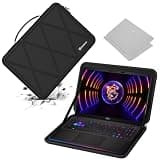 Smatree X8310 is not a laptop, it's the accessory that keeps one alive in a child's hands. If you've spent your budget on a machine for a primary or secondary school child, a hard shell case is the single most sensible add-on you can buy. This one is shaped for 16-inch laptops (it's designed around the MSI Raider GE68 HX and Vector 16 HX), so it suits the larger machines in a family, and the moulded EVA shell resists the knocks, drops and general chaos of a school bag far better than a soft sleeve.
The headline feature is the anti-shock construction. The rigid EVA outer holds its shape under pressure, so a stack of textbooks landing on top won't crush the screen inside. The interior is lined with a softer material that cushions the laptop and won't scratch the lid, which matters for a machine you hope will survive several school years. A zip runs around the edge for easy access, and there's a small pocket for a charger or a mouse, which stops loose cables rattling around loose.
At 16 inches this is a large case, and that's worth flagging. If your child's laptop is a compact 11 or 12-inch model, this sleeve will be far too big and the machine will slide about inside. Check the dimensions carefully before buying. The hard shell also adds a little bulk and weight compared to a thin fabric sleeve, so a younger child carrying it alongside a full school bag might notice the difference. For the protection on offer, most parents will find that trade-off well worth making.
At £54.99, this comes in at well under a third of the bracket cap, leaving plenty of the budget for the laptop itself. For a family with a larger 16-inch machine that needs to survive daily transport, it's a cheap way to avoid a much bigger repair or replacement bill later.
Verdict: A well-made hard case that protects larger laptops from real-world school knocks, provided you match it to a 16-inch machine.
Pros
- Rigid EVA shell resists crushing and drops far better than a soft sleeve
- Soft-lined interior cushions the laptop and won't scratch the lid
- Extra pocket keeps charger and mouse tidy, and it's cheap relative to the cap
Cons
- Sized for 16-inch laptops, so far too big for 11 or 12-inch machines
- Hard shell adds bulk and weight compared with a thin fabric sleeve
Quick Verdict
Best Overall: HP Chromebook 14 (B0F1DZBV2Y), more RAM and storage than any rival here, plus a full-size 14-inch 1080p IPS display, all for £179.00.
Best Value: Samsung Galaxy Chromebook2 360 (B0BTZ5GJ45), a 360-degree hinge, high-resolution touchscreen and sub-1.3 kg weight at £179.00 make it the pick for younger children who want a tablet-style experience without the tablet price.
Budget Pick: ASUS Chromebook 14 CX1405CTA (B0FL2CV8N2), the lowest price of the full-size options at £208.87, with a solid IPS panel and four ports.
2. ASUS Chromebook 14 CX1405CTA, Budget Full-Size Pick
The ASUS Chromebook 14 CX1405CTA is the most affordable full-size Chromebook in this round-up, making it the right choice for families who need a 14-inch machine but want to spend as little as possible. At £208.87, it undercuts the HP Chromebook 14 while offering a very similar physical footprint and the same 1920×1080 IPS panel. The IPS certification matters: it means wider viewing angles and more consistent colour reproduction than standard TN panels, which is useful when a parent and child are looking at the screen together or when the child is working at an angle.
The specification inside is the familiar Celeron N4500 with 4 GB of RAM and 64 GB of eMMC storage, the same combination as the Acer and Samsung. For ChromeOS this is adequate: the operating system is lightweight by design, and the Celeron N4500 handles Google Workspace, video streaming and Android apps without significant complaint. Where the ASUS falls behind the HP is in multitasking headroom: 4 GB of RAM means that opening many tabs simultaneously or running several Android apps at once will cause noticeable slowdown, particularly as the machine ages.
The port selection on the ASUS is strong: two USB-C ports, two USB-A ports, a microSD card reader and a 3.5mm audio jack. This matches the Acer Chromebook 314 and is significantly better than the HP's single USB-C and single USB-A. For a child who connects a mouse, uses a memory stick for school projects and wears headphones, having four data ports is a practical advantage. ASUS has also built a reputation for durable budget Chromebooks, and the CX1405CTA's chassis feels solid for the price.
ASUS devices in the Chromebook line receive ChromeOS updates for a defined period, so parents should check the Auto Update Expiry date before purchasing to ensure the machine will receive security patches throughout the child's school years. The IPS display, four-port selection and competitive price make the CX1405CTA a strong alternative to the Acer 314 for families who prioritise screen quality over all else.
Verdict: The most affordable full-size IPS Chromebook here, a sensible pick for families on a tighter budget who still want a proper 14-inch screen.
Pros
- IPS panel delivers wider viewing angles than standard LCD at this price point
- Four ports including two USB-C and two USB-A, matching the Acer's connectivity
- Lowest price among the full-size 14-inch options in this round-up
Cons
- 4 GB RAM and 64 GB storage are the minimum spec, limiting longevity
- ChromeOS Auto Update Expiry date should be checked before purchase
Buying Guide
ChromeOS vs Windows: which is better for kids?
For children under £200, ChromeOS is almost always the better choice. Windows laptops at this price point typically run on very slow processors with 4 GB of RAM, and the operating system itself is heavier, meaning the machine feels sluggish from day one and deteriorates quickly. ChromeOS is a lightweight, cloud-first operating system that boots in seconds, updates silently in the background and is effectively immune to the viruses and malware that require expensive antivirus software on Windows. Google Family Link, the parental control system that integrates natively with ChromeOS, allows parents to set screen time limits, approve app downloads, filter web content and monitor activity from a smartphone. For school use, ChromeOS is the standard in many UK primary and secondary schools, meaning children are already familiar with the interface.
How much RAM does a child's laptop need?
For ChromeOS, 4 GB of RAM is the minimum and is adequate for a single user doing schoolwork, watching videos and using Google Workspace. However, 8 GB is noticeably better if the child multitasks heavily, uses Android apps alongside browser tabs, or if you want the machine to remain fast for three or four years rather than two. The HP Chromebook 14 is the only machine in this round-up with 8 GB, which is why it earns the Best Overall recommendation for secondary school pupils.
What screen size suits different ages?
For primary school children aged 5 to 10, a 12 to 13-inch screen is often more practical: the machine is lighter, easier to carry and the keyboard is scaled more appropriately for smaller hands. The Samsung Galaxy Chromebook2 360 at 12.4 inches is ideal for this age group. For secondary school pupils aged 11 and above, a 14-inch screen provides more room for side-by-side windows, which is useful for research and essay writing. The HP, Acer and ASUS all offer 14-inch 1080p displays.
Does storage matter on a Chromebook?
Less than on a Windows laptop, because ChromeOS stores most data in Google Drive by default. However, 64 GB of local storage is still useful for offline files, downloaded videos and Android apps. If your child's school uses a lot of offline tools or if the home internet connection is unreliable, 128 GB is a meaningful upgrade. All models except the HP offer 64 GB; the HP provides 128 GB, which is a genuine advantage for longer-term use.
What about durability and parental controls?
None of the machines in this round-up are military-specification ruggedised devices, but Chromebooks as a category are more resilient than Windows laptops because they have fewer moving parts and no mechanical hard drives. A protective sleeve or case is a worthwhile investment for younger children. For parental controls, Google Family Link is free, works across all ChromeOS devices and is one of the most capable parental control systems available on any platform. It requires a Google account for the child, which parents manage from their own Google account.
Should you buy a touchscreen or a 360-degree hinge?
A touchscreen is genuinely useful for younger children who are accustomed to tablets and for creative tasks such as drawing or annotating documents. The Samsung Galaxy Chromebook2 360 is the only model here with both a touchscreen and a 360-degree hinge, making it the standout pick for families who want tablet-like flexibility. The other models are traditional clamshell designs, which are more appropriate for typing-heavy secondary school work.
The HP Chromebook 14 is the best laptop for kids under £200 available in the UK right now. Its 8 GB of RAM and 128 GB of storage give it a meaningful performance and longevity advantage over every other machine in this round-up, and the Intel N100 processor handles ChromeOS tasks with ease. The 14-inch 1080p IPS display is sharp and comfortable for extended homework sessions, and ChromeOS with Google Family Link provides the safest, most manageable environment for children of any age.
For younger children or families on a tighter budget, the Samsung Galaxy Chromebook2 360 is the best value pick: its 2560×1600 touchscreen, 360-degree hinge and 1.28 kg weight make it the most versatile and child-friendly machine in the group, and its price leaves room in the budget for a protective case. The Acer Chromebook 314 earns a mention for its best-in-class port selection, and the ASUS Chromebook 14 is the right call for families who want a full-size IPS screen at the lowest possible outlay. All four are solid choices; the right one depends on your child's age, how they use a laptop, and whether raw performance or physical flexibility matters more to your family.