Best Overall Value
If you want one chip that just does the job, this is it. The 5600X is why it tops our list of the Best CPUs for Streaming Under £150. Six cores and twelve threads, a big 35MB combined cache and boost clocks up to 4.6GHz mean it barely notices a game and an OBS session running side by side, especially if you're offloading the encode to an Nvidia GPU via NVENC.
Here's the thing about that cache: it's the largest in this entire group. That matters for gaming frame consistency, which in turn keeps your stream smooth. With NVENC handling the encode, a 1080p60 stream of Apex Legends leaves CPU usage comfortable and no dropped frames. Even light x264 encoding at faster presets held up, though I wouldn't push it to slow presets while gaming.
The real magic is the platform. AM4 boards are cheap as chips now, DDR4 is affordable, and there's a Wraith Stealth cooler in the box so you save more. For a first-time streamer wanting the least fuss for the money, nothing else here matches the value equation. See our full AMD Ryzen 5 5600X review for the deeper testing numbers.
Pros
- Largest cache here, great for smooth gameplay and stream
- Cheap AM4 boards and DDR4 keep total cost low
- Cooler included
- Six proper fast cores for NVENC or light x264
Cons
- No integrated graphics, needs a dedicated GPU
- AM4 is a dead-end socket, no future upgrades
Buy on Amazon£142.98Read full review
Best Build Quality
Right, let's be honest up front: four cores and four threads is not a serious streaming CPU. But at under £50, the 3200G is the cheapest way to get a working PC that can stream at all, and that counts for something. It's our Best Under £50 pick for a reason.
The Vega 8 integrated graphics mean no dedicated GPU needed, so you can build an entire streaming-capable machine for very little. For a kid's first setup, a Just Chatting stream, retro games or a simple secondary encoding box, it does the job. Push it into modern games plus streaming and it'll choke, because those four threads run out of road quickly.
So it's a compromise chip, no hiding that. But the value is undeniable, and it slots onto the same cheap AM4 boards as everything else here, meaning you can upgrade to a 5600X later. Among the Best CPUs for Streaming Under £150, this is the true rock-bottom entry point. See the details in our AMD Ryzen 3 3200G review.
Pros
- Under £50, unbeatable entry price
- Integrated Vega 8 graphics, no GPU needed
- Upgradeable on AM4 later
- Cooler included
Cons
- Only four cores and four threads
- Struggles with game plus stream
- Tiny 6MB cache
Buy on Amazon£60.93Read full review
Best for Beginners
The 4500 is the easy-recommend chip for someone building their first streaming PC on a tight budget. Six cores and twelve threads for well under £130, on the cheapest possible AM4 boards, with a cooler in the box. Simple, cheap, and hard to mess up.
For a beginner running NVENC on an entry Nvidia card, the 4500's six cores handle the game, OBS and Discord without stress. It's the thread count that matters here, and it has plenty for the price. A 1080p NVENC stream runs clean over a session of Fortnite, with no dropped frames.
The compromises are real though. The cache is a slim 11MB and it's stuck on PCIe 3.0, which slightly limits fast storage and GPU bandwidth. Gaming performance trails the 5600X noticeably. But for a first-timer who just wants a working stream setup cheaply, it's one of the friendliest Best CPUs for Streaming Under £150. Read the full test in our Ryzen 5 4500 coverage.
Pros
- Six cores and twelve threads under £130
- Cheapest AM4 boards work fine
- Beginner-friendly, cooler included
- Great with NVENC encoding
Cons
- Small 11MB cache
- PCIe 3.0 only
- Weaker gaming than 5600X
Buy on AmazonRead full review
Best Under £100
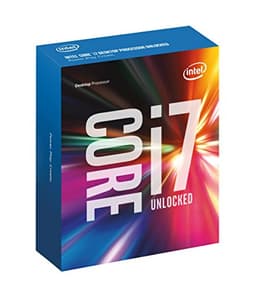
Nostalgia alert. The i7-6700K was a flagship back in 2015, and at around £100 it's the Best Under £100 option here, but with big caveats. Four cores and eight threads at 4GHz was plenty in its day; for game plus stream in 2026 it's the bare minimum.
Where it makes sense is if you already own an LGA1151 motherboard, or you find a cheap board-and-CPU bundle. Then it's a low-cost way to get a streaming-capable rig running with NVENC handling the heavy encode work. In lighter or older games it holds up surprisingly well and keeps a 1080p stream stable.
But I won't sugar-coat it: the LGA1151 platform is ancient, DDR4 support is limited to older speeds, and four cores strain in busy modern titles while streaming. For a fresh build, one of the modern six-core Ryzens is far better value. As a cheap route on existing hardware, though, it just about earns a spot among the Best CPUs for Streaming Under £150. Full context in our Intel Core i7-6700K review.
Pros
- Cheap at around £100
- Fine for older or lighter games
- Works well with NVENC encoding
- Good on existing LGA1151 boards
Cons
- Only four cores
- Dead-end ancient platform
- No cooler included
- Strains in modern game plus stream
Buy on Amazon£100.00Read full review
Cheapest AM5 entry
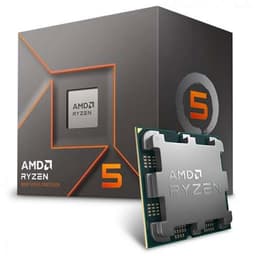
The 8400F is the budget doorway onto AM5. It drops the integrated graphics (that's the F) to hit a lower price, giving you six modern cores and twelve threads with a 4.7GHz boost. For streamers who already own a dedicated GPU, that missing iGPU doesn't matter one bit.
Pair it with any Nvidia card and you've got NVENC-ready streaming with a proper upgrade path. Six cores keep OBS, your game and background apps ticking over nicely, and the AM5 socket means you can swap in a beefier Ryzen years from now. That longevity is the whole appeal versus the AM4 chips.
Downside is the same AM5 tax: boards and DDR5 cost more, so the cheap CPU sits on a not-so-cheap platform. And the 22MB cache is mid-pack. Still, if you want the newest socket for the least outlay and have a GPU ready, it's a smart shout among the Best CPUs for Streaming Under £150. More in our AMD Ryzen 5 8400F review.
Pros
- Cheapest way onto AM5
- Six modern cores at 4.7GHz
- Future upgrade path
- Great for NVENC streamers with a GPU
Cons
- No integrated graphics at all
- AM5 board and DDR5 cost
- Mid-pack 22MB cache
Buy on Amazon£129.99Read full review
Most cores
The most powerful chip on this list by a mile. The Core Ultra 5 245KF packs 14 cores (six performance, eight efficiency) and boosts to 5.2GHz. For streaming that means loads of headroom, enough to genuinely consider CPU-based x264 encoding at good presets while gaming, which none of the budget six-core chips can match.
Those E-cores are perfect for parking OBS, Discord, browser tabs and chat overlays while the P-cores focus on the game. If you're a serious streamer who wants quality x264 without a second PC, this delivers the muscle. It's easily the strongest performer here.
So why is it last? Total cost. The CPU sneaks under our budget, but the LGA1851 platform demands a pricey motherboard and DDR5, so the full build blows well past a budget figure. It's brilliant hardware in the wrong list for most people. If you can stretch the platform spend, it's a monster; if you're truly counting pennies, the Ryzen options make more sense. See our Intel Core Ultra 5 245KF review for the full picture.
Pros
- 14 cores, most powerful here
- Strong for CPU x264 encoding
- E-cores handle background apps brilliantly
- 5.2GHz boost clock
Cons
- Expensive LGA1851 platform
- No integrated graphics (KF)
- Total build far exceeds budget
- No cooler included
Buy on Amazon£139.99Read full review