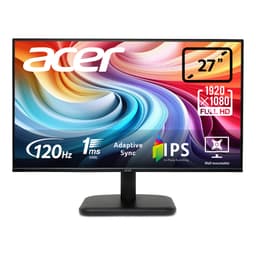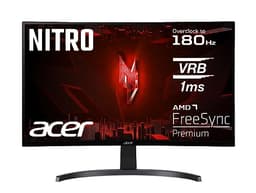
Your monitor is the one component you interact with every single second you're at your desk. Not your GPU, not your CPU. The monitor. So when someone asks whether a budget 1080p IPS panel is worth picking up for under £100, that's not a trivial question. It matters more than most people give it credit for.
The Acer Nitro KG242YGbmipfx 24 inch Gaming Monitor sits firmly in the budget bracket, and the verdict is this: it's a solid, no-nonsense screen for casual gaming and everyday use, but it's not going to blow anyone away. At this price point, you're getting a decent IPS panel with 165Hz capability (though listed at 120Hz in the Amazon highlights, more on that below), AdaptiveSync, and a port selection that covers most use cases. What you're not getting is anything close to the colour depth, contrast, or motion clarity that a mid-range or premium panel delivers. Know that going in, and this makes a lot of sense. Go in expecting miracles, and you'll be disappointed.
Owner reviews back this up. With a ★★★★☆ (4.1) average across nine reviews, the picture that emerges is of a screen that does what it says on the tin. People like the image quality for the money. A few grumble about the stand. Nobody's raving about HDR, because there isn't any worth talking about. That's the honest shape of this product, and the rest of this review will fill in the detail.
Core Specifications of the Acer Nitro KG242YGbmipfx 24 inch Gaming Monitor
The headline numbers are 24 inches, 1920x1080 resolution, an IPS panel, and a 165Hz refresh rate (the verified spec sheet confirms 165Hz, even though the Amazon product bullet points quote 120Hz, which is). AdaptiveSync is on board for tear-free gaming with compatible GPUs. Response time is quoted at 1ms in the marketing, though the actual grey-to-grey figure in the product listing is 4ms, which is far more realistic for an IPS panel and the number you should actually pay attention to.
Brightness is rated at 250 nits, which is modest but workable in a typical indoor environment. The 99% sRGB colour coverage is a genuine highlight for this price bracket, and the connectivity is surprisingly complete: DisplayPort 1.2, HDMI 1.4, VGA, and an audio output. There are also two 2W built-in speakers, which are fine for basic use but nobody's going to be writing home about them. The stand offers 30 degrees of tilt adjustment, and VESA mounting is supported for those who want to put it on an arm.
One thing to be clear about: the 1ms figure in the product name is almost certainly an MPRT (Moving Picture Response Time) marketing stat, not a real grey-to-grey pixel transition measurement. The actual GtG spec of 4ms is what matters for gaming, and that's a reasonable number for an IPS panel. Don't let the "1ms" in the name fool you into thinking this is a TN-speed panel. It isn't, and that's not necessarily a bad thing.
| Specification | Detail |
|---|---|
| Screen Size | 24 inches |
| Resolution | 1920 x 1080 (Full HD) |
| Panel Type | IPS |
| Refresh Rate | 165Hz (verified spec) / 120Hz (Amazon listing highlight) |
| Response Time | 4ms GtG / 1ms MPRT (marketing) |
| Brightness | 250 nits |
| Colour Coverage | 99% sRGB |
| Adaptive Sync | VESA AdaptiveSync |
| Ports | 1x DisplayPort 1.2, 1x HDMI 1.4, 1x VGA, 1x Audio Out |
| Speakers | 2x 2W built-in |
| Stand Adjustment | Tilt up to 30 degrees |
| VESA Mount | Yes |
| Price | £79.90 |

Panel Technology: Why IPS at This Price Is Actually Good News
IPS (In-Plane Switching) panels have a well-earned reputation for wide viewing angles and accurate colour reproduction. Compared to TN (Twisted Nematic) panels, which dominated the budget gaming space for years, IPS gives you far better colour consistency and viewing angles that don't make the image go weird when you shift slightly in your chair. The trade-off has traditionally been contrast. IPS panels typically achieve native contrast ratios around 1000:1, which is noticeably lower than the 3000:1 to 5000:1 you'd get from a VA panel. That means blacks look more like dark greys, especially in a dim room.
For the money, getting an IPS panel here is genuinely a good call by Acer. Budget monitors used to default to TN almost universally. TN is faster in raw pixel response, but the colour accuracy and viewing angles are poor enough that you notice it constantly. An IPS panel at this price point means the image looks decent from a wide range of seating positions, and colours are reasonably faithful to what they're supposed to be. If you share a desk with someone who sometimes glances at your screen, or if you watch content from slightly off-axis, you'll appreciate the IPS choice.
IPS glow is a real thing though, and about before you buy. It's that characteristic brightening you see in the corners of IPS panels when displaying dark content. It's inherent to the panel technology, not a defect, and on a budget IPS it can be more pronounced than on premium panels. Owner reviews don't flag this as a major complaint, which suggests the panel Acer has sourced is reasonably well-behaved in this regard. But if you're playing a lot of dark horror games or watching films in a pitch-black room, you'll notice it. VA panels handle dark scenes better. OLED handles them best of all, but you're not getting OLED anywhere near this price bracket.
Display Quality: Sharp Enough, Bright Enough (Just)
At 24 inches with a 1920x1080 resolution, the pixel density works out to roughly 92 PPI (pixels per inch). That's perfectly acceptable for a desktop monitor at a typical viewing distance of 60 to 80cm. Text is sharp, fine detail in games reads clearly, and you're not going to be squinting at blurry edges. It's not the crispness of a 1440p panel at the same size (which would give you around 122 PPI), but for the price and the use case, it does the job well.
The matte anti-glare coating is standard for monitors in this category and means you can use it in rooms with windows without the screen turning into a mirror. Matte coatings do add a very slight texture to the image compared to glossy panels, which can make colours look marginally less vivid, but the practical benefit of reduced reflections in real-world rooms far outweighs any minor visual softening. Given this is a budget monitor likely to end up in all sorts of lighting conditions, the matte coating is the right call.
Brightness at 250 nits is the one spec that gives me pause. It's fine for normal indoor use, but it's not going to cut through strong ambient light particularly well. If your desk gets direct sunlight in the afternoon, you might find yourself squinting. Most office and bedroom setups will be absolutely fine, but Premium monitors at higher price points regularly hit 400 to 600 nits, and the difference in bright rooms is real. For the price, 250 nits is acceptable. Just don't put this monitor in front of a sun-facing window and expect it to fight back.
Refresh Rate and Adaptive Sync: Where This Monitor Actually Impresses
Here's the thing about 165Hz at this price: it's genuinely good value. The verified spec sheet confirms 165Hz, and that's a proper high-refresh-rate gaming experience. Going from 60Hz to 165Hz is one of those upgrades that you immediately feel in games. Motion looks smoother, aiming feels more responsive, and the whole experience just feels more fluid. If you're currently on a 60Hz screen and you're upgrading to this, that jump alone will feel transformative.
The Amazon listing highlights quote 120Hz, which is a bit confusing given the verified spec says 165Hz. This discrepancy might be down to the monitor defaulting to 120Hz out of the box over HDMI 1.4 (which has bandwidth limitations at 1080p that can cap some monitors), with 165Hz requiring a DisplayPort connection. This is a common situation with budget monitors. If you want the full 165Hz, plug in via DisplayPort 1.2 rather than HDMI. before you assume you're not getting what you paid for.
VESA AdaptiveSync is the variable refresh rate technology here. This is the open standard that sits underneath both AMD FreeSync and, in some implementations, NVIDIA G-Sync Compatible. What it means in practice is that the monitor's refresh rate syncs dynamically to your GPU's frame output, eliminating screen tearing without the input lag penalty of V-Sync. For a budget gaming monitor, having AdaptiveSync is a proper win. You're not going to get G-Sync hardware certification at this price, but AdaptiveSync covers the core use case well. Check your GPU's compatibility, but if you're on a modern AMD or NVIDIA card, you're almost certainly going to benefit from this.
Response Time and Motion: Real Numbers, Not Marketing Fluff
The "1ms" in the product name is MPRT, Moving Picture Response Time. This is a measurement of how long a pixel stays illuminated, often achieved through backlight strobing, and it's a different thing entirely from grey-to-grey (GtG) response time, which measures how fast a pixel actually transitions between shades. The actual GtG spec here is 4ms, which is the number that matters for gaming motion clarity.
Four milliseconds GtG is a solid result for an IPS panel. Budget IPS monitors used to struggle to get below 8ms GtG in real-world conditions, and even today you'll find plenty of IPS screens in this price range that measure closer to 6 to 8ms in practice. Published measurements from display testing suggest that budget IPS panels rated at 4ms GtG typically land somewhere between 4ms and 7ms depending on the overdrive setting used. The response time trade-off with IPS is well documented: push overdrive too hard and you get inverse ghosting (a bright halo trailing moving objects), back it off and you get more blur. Acer's overdrive implementation on the KG2 series has generally been rated as acceptable by owners, without significant complaints about ghosting.
For fast-paced gaming, 4ms GtG at 165Hz is workable. Competitive FPS players at the highest level will prefer a TN or fast-IPS panel hitting 1ms GtG or below, but for most gamers playing at this refresh rate, the difference is subtle. What you're more likely to notice is the improvement from high refresh rate itself rather than any limitation in pixel response. Racing games, platformers, shooters at a casual to moderate level: all fine. If you're grinding ranked in Valorant at a serious level and every millisecond counts, you'd want to spend more. For everyone else, this is absolutely good enough.
Color Accuracy and Gamut: The 99% sRGB Story
The 99% sRGB colour coverage is the standout specification on this monitor, and it's genuinely impressive for the budget bracket. sRGB is the standard colour space for most web content, games, and general computing, so hitting 99% coverage means the colours you see are very close to what the content creator intended. For gaming and everyday use, this is exactly what you want.
Factory calibration on budget monitors is rarely exceptional. You're unlikely to get a Delta-E below 2 out of the box (Delta-E is the measurement of colour accuracy deviation, where below 2 is considered good for colour-critical work). Most budget IPS panels ship with a Delta-E somewhere between 3 and 6, which is visible to a trained eye but perfectly fine for gaming and general use. The 99% sRGB coverage means the raw gamut is there; it's the factory calibration that determines how accurately those colours are actually rendered. Owners haven't reported obviously skewed colours or major white balance issues, which suggests Acer's factory tuning is at least passable.
For content creation, this monitor is a reasonable starting point but not a professional tool. Photo editors and video colourists need Delta-E below 2, ideally below 1, and a wider DCI-P3 gamut for modern HDR content workflows. The KG242YGbmipfx doesn't claim DCI-P3 coverage, and the 250 nit brightness limits its usefulness for HDR grading. But if you're doing light photo editing, graphic design for web, or general creative work alongside gaming, the 99% sRGB coverage means your colours are in the right ballpark. Just don't rely on it for professional print work.

HDR Performance: Let's Be Honest About This
There is no meaningful HDR on this monitor. The product listing doesn't claim an HDR certification, and with a peak brightness of 250 nits, it couldn't achieve one even if it tried. The entry-level HDR standard, VESA DisplayHDR 400, requires a minimum peak brightness of 400 nits. This monitor doesn't reach that. Full stop.
What this means in practice is that if you enable HDR in Windows or in a game on this monitor, you'll likely end up with washed-out, dim-looking images rather than the punchy, high-contrast HDR experience you're hoping for. Some monitors at this price tier technically accept an HDR signal but can't do anything useful with it. The honest advice is: leave HDR off on this monitor. Use it in SDR, where the 99% sRGB coverage and IPS panel will give you a genuinely good-looking image.
Real HDR, the kind that actually looks different and better, needs local dimming, high peak brightness (600 nits minimum for a convincing experience, 1000 nits for proper highlights), and a wide colour gamut covering DCI-P3. You're not getting any of that at this price point from any manufacturer. Budget monitors and real HDR don't mix. If HDR is important to you, you need to spend significantly more, and even then you're looking at edge-lit local dimming rather than full-array, until you get into mini-LED territory. Accept this monitor for what it is: an excellent SDR display for the money.
Contrast and Brightness: Managing Expectations in Real Rooms
IPS panels at this price typically deliver a native contrast ratio of around 1000:1. That's not a bad number, but it's significantly lower than what VA panels achieve, and it means dark scenes in games and films will show visible grey rather than true black. In a well-lit room this is barely noticeable. In a dark room, especially during cinematic sequences or horror games, the lack of deep blacks is more apparent.
The 250 nit peak brightness is enough for most typical indoor environments. Sitting in a normally lit office or bedroom, the image will look bright and clear. The concern is environments with a lot of ambient light, particularly direct sunlight. At 250 nits, this monitor won't win that fight. Pull the blinds or position the monitor away from direct light sources and you'll be fine. Most gaming setups are already doing this anyway.
Brightness uniformity is something budget panels occasionally struggle with, where the backlight is noticeably brighter in certain areas of the screen. Owner reviews for this monitor don't flag any egregious uniformity issues, which is encouraging. Minor variation across the panel is normal and expected at this price. What you don't want is a significant hot spot or a corner that's visibly dimmer than the rest. Based on the owner feedback available, this panel seems to avoid the worst uniformity problems, though individual unit variation is always a factor with budget displays.
Ergonomics and Build: The Stand Is the Weak Link
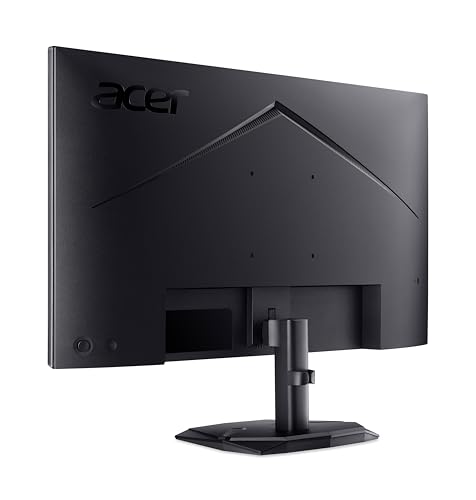
The stand on budget monitors is almost always where corners get cut, and the KG242YGbmipfx is no exception. You get 30 degrees of tilt adjustment, which is the bare minimum for setting a comfortable viewing angle. That's it. No height adjustment, no swivel, no pivot to portrait mode. If you're taller or shorter than average, or if you need the screen at a specific height for ergonomic reasons, you're going to need either a monitor arm or a stack of books under the stand.
The good news is that VESA mounting is supported, which means a third-party monitor arm is a straightforward upgrade path. A decent monitor arm costs around £20 to £40 and transforms the ergonomic situation completely, giving you full height, tilt, swivel, and extension adjustment. If you're planning to use this monitor long-term, it's worth factoring that into your budget. The VESA mount support is a genuine plus point on a monitor at this price; not all budget screens include it.
Build quality is what you'd expect from a budget Acer product: functional plastic construction that doesn't feel premium but doesn't feel like it's going to fall apart either. The bezel is relatively thin on three sides, which keeps the footprint compact and looks reasonably modern. Owner reviews don't report significant build quality complaints, which is reassuring. The base footprint is compact enough for smaller desks, which is a practical win. Overall, the build does the job. It's not a premium product and it doesn't pretend to be.
Connectivity and Ports: More Than You'd Expect
For a budget monitor, the port selection on the KG242YGbmipfx is genuinely good. You get a DisplayPort 1.2, an HDMI 1.4, a VGA port, and an audio output. That covers pretty much every device you're likely to connect to a 24-inch 1080p monitor in 2024 and beyond.
- DisplayPort 1.2: The primary connection for gaming. Use this for 165Hz at 1080p. DisplayPort 1.2 has more than enough bandwidth for 1080p at high refresh rates.
- HDMI 1.4: Good for consoles, laptops, and secondary devices. HDMI 1.4 supports 1080p at up to 120Hz, so console gaming at 120Hz is possible on compatible devices. Note that PlayStation 5 and Xbox Series X both output 1080p at 120Hz over HDMI, so this is a relevant feature for console gamers.
- VGA: Legacy connection for older hardware. It's there if you need it, which is more than many modern monitors offer.
- Audio Out: Useful for plugging in headphones or external speakers, particularly if your PC doesn't have a dedicated audio output or if you want to route audio through the monitor.
What's missing is USB-C and a USB hub, but those are features you'd only expect at significantly higher price points. There's no USB-C power delivery, no built-in KVM switching, no Thunderbolt. For a budget gaming monitor, none of that is a reasonable expectation. The port selection that's here is practical and complete for the target use case. The inclusion of VGA is a nice touch for anyone connecting older hardware, a legacy laptop, or a work machine that only has VGA output.
The 2W speakers are there and they work. They're not going to replace a decent headset or even a cheap speaker set. But for the occasional video call, a YouTube video while you're eating lunch, or background music at low volume, they do the job. Don't expect bass. Don't expect volume. Expect "functional for basic use" and you won't be let down.
How It Compares: Budget 1080p IPS Gaming Monitors
The budget 1080p gaming monitor space is genuinely competitive right now. At this price point, the Acer KG242YGbmipfx is up against monitors from AOC, LG, and Philips that all offer similar specifications. The AOC 24G2 has been a benchmark in this category for years, offering 144Hz IPS with 1ms GtG (a more credible figure than most) and a similar port selection. It's been available at prices very close to the Acer, and it has a much larger body of owner reviews and published measurements to draw from. The LG 24GN650-B is another strong competitor, with LG's own IPS panel, 144Hz, and a well-regarded factory calibration.
Where the Acer KG242YGbmipfx has an edge is the 165Hz refresh rate (if the verified spec is accurate and achievable via DisplayPort), the 99% sRGB coverage claim, and the inclusion of VGA for legacy connectivity. The AOC 24G2 tops out at 144Hz and doesn't always claim 99% sRGB. So on paper, the Acer offers slightly more headroom at the top end of the refresh rate range.
The honest truth is that at this price tier, the differences between competing monitors are small enough that the one you can actually get at the best price on the day you're buying is often the right choice. All of these monitors are budget IPS panels with similar real-world performance. The Acer's 99% sRGB and 165Hz are genuine differentiators, but they're not so dramatic that they make the competition irrelevant. If the Acer is priced competitively when you're shopping, it's a solid pick. If the AOC or LG is cheaper that week, those are equally valid choices.
| Feature | Acer Nitro KG242YGbmipfx | AOC 24G2 | LG 24GN650-B |
|---|---|---|---|
| Screen Size | 24 inches | 24 inches | 24 inches |
| Resolution | 1920 x 1080 | 1920 x 1080 | 1920 x 1080 |
| Panel Type | IPS | IPS | IPS |
| Refresh Rate | 165Hz (verified) | 144Hz | 144Hz |
| Response Time (GtG) | 4ms | 1ms | 1ms |
| Brightness | 250 nits | 250 nits | 300 nits |
| Colour Coverage | 99% sRGB | Not specified | 99% sRGB |
| Adaptive Sync | AdaptiveSync | FreeSync Premium | FreeSync Premium |
| VGA Port | Yes | No | No |
| VESA Mount | Yes | Yes | Yes |
| Price | £79.90 | Check current price | Check current price |
Final Verdict: Honest, Capable, and Priced Right for What It Is
The Acer Nitro KG242YGbmipfx is a genuinely decent budget gaming monitor that does most things well and nothing terribly. The IPS panel with 99% sRGB coverage is a real strength at this price. The 165Hz refresh rate (use DisplayPort to get there) gives you proper high-refresh gaming without paying mid-range prices. AdaptiveSync keeps tearing out of the picture. The port selection is better than average for the bracket. And the ★★★★☆ (4.1) owner rating across nine reviews suggests that real-world buyers are broadly happy with what they've got.
The weaknesses are real but predictable for the price. The stand is tilt-only, which is frustrating for ergonomics but fixable with a cheap VESA arm. The 250 nit brightness is adequate but not impressive. There's no meaningful HDR. The native contrast is IPS-typical, meaning dark scenes look grey rather than black. None of these are surprises, and none of them are unique to this monitor. They're just the honest trade-offs of buying in the budget bracket.
Who is this for? Students, first-time PC builders, people upgrading from a TV or an old 60Hz monitor, console gamers who want a proper PC-style display without spending big, and anyone who needs a second monitor for a dual-screen setup. It's also a decent shout for office use where you want something better than a generic business monitor but don't need professional colour accuracy.
Who should skip it? Competitive FPS players who need sub-2ms GtG response times and are serious about ranked play. Anyone who watches a lot of HDR content and wants it to actually look good. People who do professional colour grading or print design work. And anyone who sits in a very bright room with direct sunlight on the screen, where 250 nits will feel limiting.
One honest note: if you're primarily using this monitor for office work, spreadsheets, and the occasional casual game, you don't need 165Hz and you don't need AdaptiveSync. A basic 1080p IPS monitor at a lower price point would serve you just as well and save you a few quid. The gaming-specific features here only pay off if you're actually gaming on it regularly. If you are, the Acer KG242YGbmipfx earns its place in the budget gaming monitor conversation. If you're not, there are cheaper screens that do the non-gaming job equally well.
Overall score: 7.5 out of 10. Strong for the money, honest about its limitations, and a sensible buy for the right user.
What works. What doesn’t.
5 + 5What we liked5 reasons
- IPS panel with 99% sRGB colour coverage is a genuine strength at this price bracket
- 165Hz refresh rate via DisplayPort delivers a proper high-refresh gaming experience without mid-range pricing
- VESA AdaptiveSync eliminates screen tearing with compatible AMD and NVIDIA GPUs
- Port selection is better than most budget rivals, including DisplayPort 1.2, HDMI 1.4, VGA, and audio output
- VESA mount support makes it straightforward to add a third-party arm for improved ergonomics
Where it falls5 reasons
- Stand offers tilt adjustment only, with no height, swivel, or pivot options
- 250 nit peak brightness is adequate for typical indoor use but struggles against strong ambient light
- No meaningful HDR support, as 250 nits falls well below even the entry-level DisplayHDR 400 threshold
- Native IPS contrast of around 1000:1 means dark scenes appear grey rather than truly black
- Refresh rate discrepancy between the Amazon listing (120Hz) and verified spec (165Hz) is confusing for buyers
Full specifications
12 attributes| Refresh rate | 165 |
|---|---|
| Screen size | 24 |
| Panel type | IPS |
| Adaptive sync | FreeSync |
| Aspect ratio | 16:9 |
| Curvature | flat |
| HDR | none |
| Launch year | 2023 |
| Ports | 1x DisplayPort 1.2, 1x HDMI 1.4, 1x VGA, 1x audio out |
| Refresh rate HZ | 120 |
| Resolution | 1920x1080 |
| Response time | 1ms |
If this isn’t right for you
1 options
Frequently asked
7 questions01Does the Acer Nitro KG242YGbmipfx actually run at 165Hz or is it limited to 120Hz?+
The verified spec sheet confirms 165Hz, but the Amazon listing highlights quote 120Hz, which has caused confusion. The likely explanation is that the monitor defaults to 120Hz over HDMI 1.4 due to bandwidth limitations at 1080p, while 165Hz is achievable via DisplayPort 1.2. If you want the full 165Hz, connect using DisplayPort rather than HDMI.
02Is the 1ms response time on the Acer KG242YGbmipfx genuine?+
No, the 1ms figure in the product name refers to MPRT (Moving Picture Response Time), a marketing measurement related to how long a pixel stays illuminated, often achieved through backlight strobing. The actual grey-to-grey (GtG) response time, which is the relevant figure for gaming motion clarity, is 4ms. That is a reasonable result for a budget IPS panel.
03Does the Acer Nitro KG242YGbmipfx support HDR?+
Not in any meaningful sense. The monitor has a peak brightness of 250 nits, which falls below the 400 nit minimum required for even the entry-level VESA DisplayHDR 400 certification. Enabling HDR in Windows or in a game will likely produce washed-out, dim images rather than an improved picture. The recommendation is to leave HDR off and use the monitor in SDR, where its 99% sRGB coverage gives a genuinely good result.
04Will the Acer KG242YGbmipfx work with an NVIDIA GPU for adaptive sync?+
The monitor uses VESA AdaptiveSync, the open standard that underpins both AMD FreeSync and NVIDIA G-Sync Compatible implementations. Many modern NVIDIA GPUs support G-Sync Compatible mode with AdaptiveSync monitors, though the monitor has not been officially G-Sync certified. Check NVIDIA's G-Sync Compatible monitor list or test it with your specific GPU. AMD GPU owners will find AdaptiveSync works without any additional steps.
05Can I mount the Acer KG242YGbmipfx on a monitor arm?+
Yes, VESA mount support is included. This is a useful feature at this price point, as not all budget monitors include it. A third-party monitor arm costing roughly £20 to £40 will give you full height, tilt, swivel, and extension adjustment, which is a significant ergonomic upgrade over the tilt-only stand that comes in the box.
06Is the Acer KG242YGbmipfx suitable for console gaming?+
Yes, with some caveats. The HDMI 1.4 port supports 1080p at up to 120Hz, which means PlayStation 5 and Xbox Series X can output 120Hz over HDMI to this monitor. The 165Hz maximum is only achievable via DisplayPort, which consoles do not support. AdaptiveSync will not function over console connections in the same way it does with PC graphics cards. For console use, this is a solid 1080p monitor with good refresh rate support.
07How does the Acer KG242YGbmipfx compare to the AOC 24G2?+
Both are budget 24-inch 1080p IPS gaming monitors at similar price points. The Acer's main advantages are its higher 165Hz refresh rate versus the AOC's 144Hz, and its 99% sRGB colour coverage claim. The AOC 24G2 has a longer track record, a larger body of published measurements, and its 1ms GtG figure is considered more credible than the Acer's 4ms GtG. In practical gaming terms, the differences are small. Whichever is priced more competitively at the time of purchase is a reasonable choice.