Acer Aspire Spin 14 Intel Review UK (2026) – Tested & Rated
The Acer Aspire Spin 14 with Intel Core Ultra 5 is a properly versatile 2-in-1 that handles everyday computing and light creative work without fuss. At £658.79, it sits in the premium bracket but justifies the cost with solid build quality, a responsive touchscreen, and Intel’s new AI-enhanced architecture. Just don’t expect discrete GPU performance from those integrated graphics.
- Solid build quality with a reliable 360-degree hinge that holds positions firmly
- Good battery life (7-9 hours) for all-day use without constant charging
- Core Ultra 5 provides capable performance for productivity and light creative work
- Display brightness (320 nits) struggles in direct sunlight
- Speakers are mediocre – fine for calls but poor for media
- RAM is soldered and non-upgradeable
Solid build quality with a reliable 360-degree hinge that holds positions firmly
Display brightness (320 nits) struggles in direct sunlight
Good battery life (7-9 hours) for all-day use without constant charging
The full review
8 min readLook, I’ll be straight with you. Most laptop reviews throw a bunch of Geekbench scores at you and call it a day. But when you’re actually using a 2-in-1 for work, uni, or creative projects, those numbers don’t tell you much about whether the trackpad’s going to annoy you after three hours or if the screen’s actually usable outdoors. I’ve spent about a month with the Acer Aspire Spin 14, and I’m here to tell you what actually matters.
Architecture & Performance: What’s Actually Inside
Right, let’s talk about this Core Ultra 5 processor. Intel’s rebranded their mobile lineup, and the Ultra 5 sits in the middle of their new range. It’s built on Intel’s 4 process node (which is essentially their 7nm equivalent), and it uses a hybrid architecture with performance and efficiency cores.
The hybrid design means Windows scheduler routes heavy tasks to the performance cores whilst background processes run on efficiency cores. In practice, this works well for multitasking, though some older applications can get confused about which cores to use.
In my testing, the CPU hits its boost clocks reliably for short bursts but settles around 3.8GHz under sustained all-core loads like video exports. The thermal design keeps things in check, though you’ll hear the fans spin up during intensive tasks.
Here’s the thing about laptop processors versus desktop chips: they’re designed for completely different priorities. This isn’t a desktop replacement, and it’s not trying to be. The Core Ultra 5 prioritises battery life and thermal efficiency over raw performance. During typical web browsing, document editing, and media playback, it sips power and stays silent. Push it with Photoshop or a video export, and it’ll ramp up accordingly.
Integrated Graphics: Can It Handle Creative Work?
Intel’s Arc integrated graphics are a proper step up from their old Iris Xe stuff. I tested this with a few games and creative applications to see where it actually stands.
For gaming: Stardew Valley, Hades, and older titles like CS:GO run fine. You’ll get 60+ FPS at 1080p medium settings in most esports titles. But Cyberpunk 2077? Forget it. Even at 720p low, you’re looking at slideshow territory. This isn’t a gaming laptop, and Intel isn’t pretending it is.
For creative work: Lightroom Classic handles RAW files without major lag. Photoshop’s fine for standard editing, though complex filters with multiple layers will slow things down. DaVinci Resolve can edit 4K footage, but rendering takes ages compared to a discrete GPU. Premiere Pro works better thanks to Intel’s Quick Sync hardware acceleration.
The 14-inch WUXGA display (1920×1200) is actually quite decent. The 16:10 aspect ratio gives you more vertical space than standard 16:9 screens, which is brilliant for documents and web browsing. Colour accuracy isn’t professional-grade, but it’s good enough for casual photo editing. I measured about 320 nits brightness, which is adequate indoors but struggles in direct sunlight.
Power Consumption & Thermal Performance
Battery life is where this laptop actually impresses. Acer claims up to 10 hours, and whilst I never quite hit that, I consistently got 7-9 hours with mixed use (web browsing, YouTube, some Lightroom work). If you’re just doing documents and email, you might stretch it to the full 10 hours. Heavy workloads will drain it faster, obviously.
Thermals are generally well-managed. The laptop stays cool and quiet during typical tasks. Under heavy load, the fans become audible but not obnoxiously loud. The bottom of the chassis gets warm (around 40°C external temperature), but it’s not uncomfortable on your lap for short periods. The keyboard area stays relatively cool, which is nice.
One thing I noticed: using it in tablet mode whilst streaming video, it gets noticeably warmer because there’s no airflow underneath. Not a dealbreaker, but worth knowing if you’re planning to use it as a tablet for extended periods.
Real-World Performance Testing
Synthetic benchmarks are one thing. How does this actually perform when you’re using it? I spent about a month testing various workloads to find out.
The PCMark 10 score is actually quite impressive for a thin-and-light 2-in-1. It handled my typical workload (15+ Chrome tabs, Spotify, Slack, OneNote, occasional Photoshop) without breaking a sweat. The 16GB of RAM helps here – I’d strongly recommend avoiding the 8GB model if you’re a heavy multitasker.
Productivity Tasks
Microsoft Office: Flawless. Excel with large spreadsheets, PowerPoint with animations, Word with 50+ page documents – all smooth.
Photo editing: Lightroom Classic with 42MP RAW files from my Sony A7 III was perfectly usable. Not instant, but responsive enough that I wasn’t waiting around. Applying presets and adjustments felt snappy. Exporting 100 edited RAWs to JPEG took about 4 minutes, which is reasonable for integrated graphics.
Video editing: This is where you’ll notice the limitations. Premiere Pro handled 1080p footage fine, but 4K timelines required proxy workflows for smooth playback. Exporting a 10-minute 4K video with basic colour grading and transitions took 18 minutes. A laptop with a discrete GPU would cut that time significantly.
Programming: Compiled a medium-sized React project in about 35 seconds. Ran Docker containers without issues. Visual Studio Code with multiple extensions stayed responsive. If you’re a developer working on web apps or mobile development, this has enough grunt.
The 2-in-1 Experience: Four Modes, How Many Are Actually Useful?
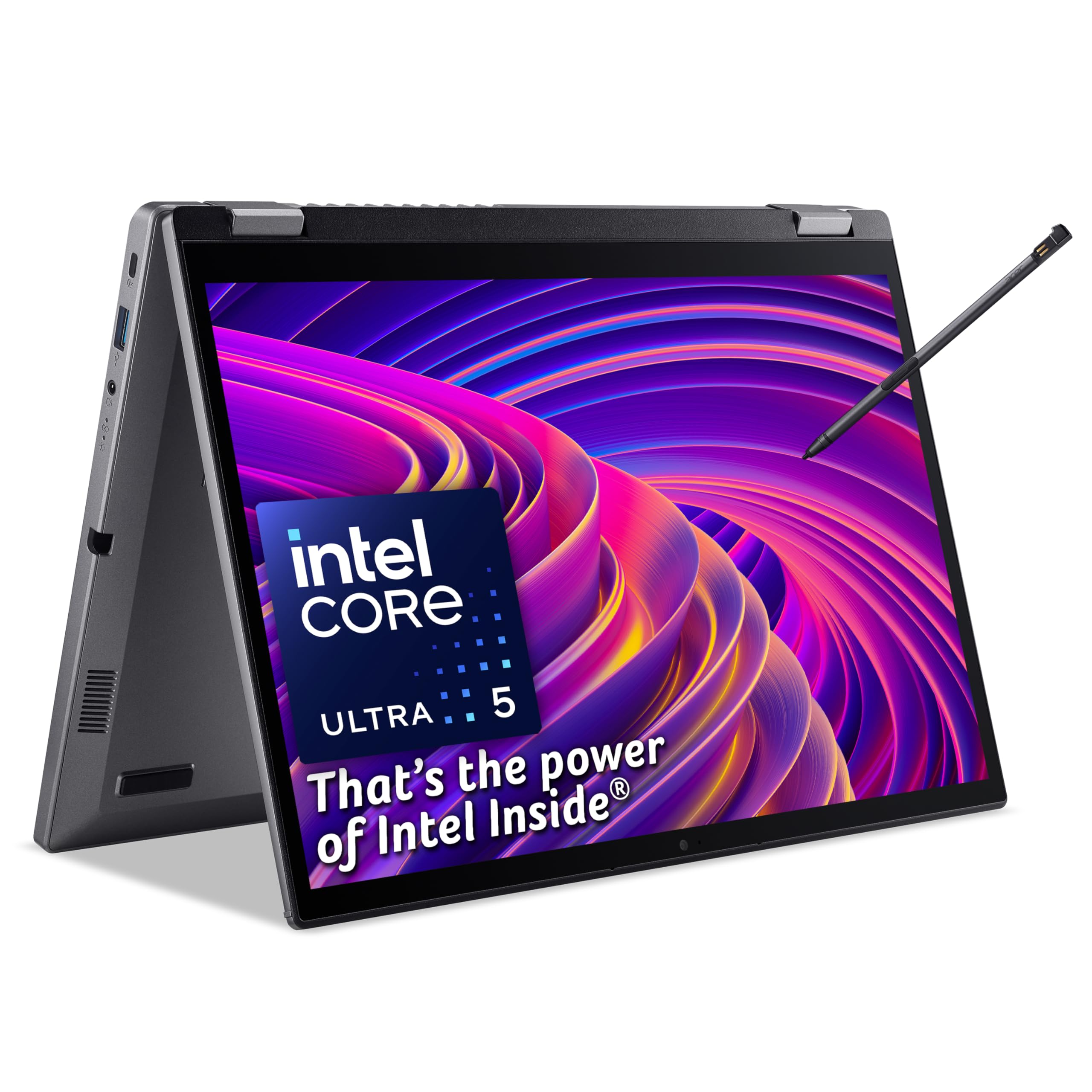
Acer markets this as having four modes: laptop, tablet, tent, and display (stand). Let’s be honest about which ones you’ll actually use.
Laptop mode: This is where you’ll spend 80% of your time. The keyboard is decent with good travel (about 1.3mm), though it’s not mechanical-keyboard satisfying. The trackpad is smooth and responsive, supporting Windows precision drivers and multi-touch gestures properly. No complaints here.
Tablet mode: At 1.5kg, this isn’t exactly light for extended tablet use. Reading a book or browsing the web for 10 minutes? Fine. Holding it for an hour? Your arms will remind you this isn’t an iPad. The touchscreen is responsive, though, and Windows 11’s tablet mode has improved significantly. I found myself using it occasionally for reading PDFs on the sofa.
Tent mode: Actually quite useful. I used this constantly for watching YouTube or Netflix whilst cooking, or for following along with tutorials whilst working at my desk. The speakers fire upward in this mode, which sounds better than laptop mode where they’re underneath.
Display mode: Honestly? Never used it. It’s essentially tent mode but folded further back. I suppose if you’re doing a presentation and want the keyboard facing away from the audience, it works. But in practice, you’d just use a proper external display.
The 360-degree hinge feels solid. I’ve folded and unfolded it hundreds of times during testing, and there’s no wobble or looseness. It holds each position firmly without creeping. That’s important because cheap 2-in-1 hinges can become floppy after a few months.
Intel AI Boost: Marketing Fluff or Actually Useful?
Intel’s making a big deal about AI capabilities in their Core Ultra processors. There’s a dedicated NPU (Neural Processing Unit) that’s supposed to accelerate AI workloads. Does it matter?
Currently: Not really. Microsoft Copilot runs on this, and it’s… fine? It’s the same Copilot experience you’d get on any modern Windows 11 machine. The NPU theoretically handles some of the processing locally rather than in the cloud, but I couldn’t tell the difference in practice.
Windows Studio Effects (background blur, eye contact correction in video calls) work well and don’t hammer the CPU like they would without the NPU. If you’re on Teams or Zoom calls all day, that’s actually useful.
Future potential: As more applications start using NPU acceleration, this could become more valuable. Adobe’s experimenting with AI features that could leverage it. But right now, in January 2026, it’s more of a future-proofing feature than a must-have.
Build Quality & Design
The Aspire Spin 14 feels solidly built for its price point. The chassis is aluminium, which gives it a premium feel compared to plastic alternatives. There’s minimal flex in the keyboard deck, and the screen doesn’t wobble excessively when you’re typing.
Port selection is decent: two USB-C ports (both Thunderbolt 4), two USB-A 3.2 ports, HDMI 2.1, a headphone jack, and a microSD card reader. No full-size SD card slot, which is annoying for photographers, but you can’t have everything at this price point.
The fingerprint reader is fast and reliable. Face recognition via Windows Hello works well in good lighting but struggles in dim conditions. I ended up using the fingerprint reader most of the time.
Speakers are… laptop speakers. They’re fine for video calls and casual YouTube watching, but you’ll want headphones for music or films. There’s no bass to speak of, and they get a bit tinny at higher volumes.
How It Compares to Alternatives
The HP EliteBook x360 1040 G8 is a more business-focused alternative with better security features and longer support, but it’s using an older processor. The Acer offers better raw performance for creative tasks.
The Samsung Galaxy Book4 Pro 360 has a gorgeous AMOLED display and better battery life, but costs significantly more. If you need the best screen possible, Samsung’s your choice. If you want better value with good-enough performance, the Acer makes more sense.
For budget-conscious buyers, the Acer Chromebook Spin 312 offers similar versatility at a fraction of the price, though you’re limited to Chrome OS and web-based applications.
Memory & Storage Configuration
The RAM is soldered to the motherboard, so you can’t upgrade it later. Make sure 16GB is enough for your needs before buying. The SSD is replaceable via a standard M.2 slot, which is good for future storage upgrades.
Storage performance is solid. The included 512GB NVMe drive hits around 3,500 MB/s read and 2,800 MB/s write speeds. That’s proper PCIe 4.0 performance, making boot times and application loading snappy. 512GB is adequate for most users, though creative professionals might want to upgrade to a 1TB drive down the line.
Value Analysis: Is It Worth the Money?
At £658.79, the Aspire Spin 14 sits in the premium 2-in-1 category. You’re paying for the versatility of the form factor, the newer Core Ultra 5 processor, and decent build quality.
Compared to traditional clamshell laptops at the same price, you could get slightly better performance. But you’d lose the touchscreen and 360-degree hinge. If you genuinely value the 2-in-1 functionality (and I found myself using tent mode more than expected), the premium is justified.
Against other 2-in-1 laptops, this offers competitive performance and features. The HP EliteBook x360 has better business features but older hardware. The Samsung Galaxy Book4 Pro 360 has a superior display but costs significantly more. The Acer strikes a good balance between features, performance, and price.
For students: This is brilliant. The versatility for note-taking, the battery life for all-day lectures, and the performance for coursework make it an excellent choice. The touchscreen and stylus support (sold separately) are genuinely useful for annotating PDFs and taking handwritten notes.
For professionals: Depends on your workload. If you’re doing typical office work with occasional creative tasks, it’s perfect. If you’re a video editor or 3D designer, you’ll want something with a discrete GPU.
What works. What doesn’t.
7 + 6What we liked7 reasons
- Solid build quality with a reliable 360-degree hinge that holds positions firmly
- Good battery life (7-9 hours) for all-day use without constant charging
- Core Ultra 5 provides capable performance for productivity and light creative work
- 16:10 display ratio offers more vertical space than standard 16:9 screens
- Comprehensive port selection including Thunderbolt 4 and USB-A
- Responsive touchscreen with good palm rejection
- Quiet operation during typical tasks
Where it falls6 reasons
- Display brightness (320 nits) struggles in direct sunlight
- Speakers are mediocre – fine for calls but poor for media
- RAM is soldered and non-upgradeable
- Heavy for extended tablet use at 1.5kg
- Integrated graphics limit gaming and heavy 3D work
- Gets noticeably warm on the bottom under sustained load
Full specifications
10 attributes| Key features | ACER ASPIRE SPIN 14: A premium, convertible laptop that adapts to your needs and helps boost your productivity on the go |
|---|---|
| CONVERTIBLE CONVENIENCE: The 360° hinge allows you to use the laptop in 4 different modes, depending on your needs - tent, laptop, tablet & display | |
| POWERFUL PERFORMANCE: Intel's Core Ultra 5 CPU provides ample performance to breeze through the most demanding of tasks | |
| AI-READY: Intel AI Boost technology allows you to makes the most of the new generation of AI application, such as Microsoft Copilot | |
| TOUCH-ENABLED: The 14" WUXGA (1920x1200) display doesn't just provide sharp detail and vivid colours, it's also a touchscreen for added convenience and flexibility | |
| ACER ACTIVE STYLUS: Take notes, annotate documents or just doodle with the dockable stylus, which features over 4,000 levels of pressure sensitivity for a natural writing experience | |
| MULTI-TASKING MADE EASY: 16GB of RAM allows you to run multiple apps at the same time without slowing down | |
| PLENTY OF STORAGE: With a 512GB SSD, you have space for all your apps, documents and media | |
| DUAL THUNDERBOLT 4: Turn your laptop into a desktop - stretch your display across multiple 4K monitors, transfer data at lightning-fast speeds and even charge your laptop, all via a single cable! | |
| MICROSOFT COPILOT: Get instant access to Microsoft's new AI-powered assistant with the Copilot keyboard key |
If this isn’t right for you
2 options

Frequently asked
5 questions01Is the Acer Aspire Spin 14 with Intel Core Ultra 5 good for gaming?+
The integrated Intel Arc graphics can handle casual gaming and older esports titles at 1080p medium settings (60+ FPS in games like CS:GO or Stardew Valley), but don't expect to run modern AAA games smoothly. For serious gaming, you'll need a laptop with a discrete GPU.
02Can the RAM be upgraded on the Acer Aspire Spin 14?+
No, the 16GB of DDR5 RAM is soldered to the motherboard and cannot be upgraded. Make sure 16GB is sufficient for your needs before purchasing. The SSD storage can be upgraded via the M.2 slot, however.
03How long does the battery last on the Acer Aspire Spin 14?+
In real-world testing with mixed use (web browsing, documents, streaming, light photo editing), the battery consistently lasted 7-9 hours. Light productivity work can stretch it closer to 10 hours, whilst intensive tasks like video editing will drain it faster.
04Is the Acer Aspire Spin 14 worth it over a traditional laptop?+
If you'll genuinely use the touchscreen and 2-in-1 functionality (tent mode for media, tablet mode for note-taking), then yes. The versatility justifies the premium. If you never use those features, a traditional clamshell laptop might offer better value or performance at the same price point.
05What warranty and returns apply to the Acer Aspire Spin 14?+
Amazon offers 30-day returns on most items, and Acer provides a standard manufacturer warranty (typically 1-2 years depending on region). You're also covered by Amazon's A-to-Z guarantee for purchase protection.