

The line on the graph was steady for months, and then it wasn't. Before anyone rewrites the homepage, find out which number fell and on what date. If your website traffic dropped suddenly, the first checks take about half an hour, and they need doing in the right order.
That order matters because some "drops" aren't drops at all.
Quick answer
First check the drop is real: compare your analytics with Google Search Console, which counts Google clicks separately. Then, in Search Console, compare the last 16 months to rule out seasonality, look for site changes, errors, security issues or manual actions, and check Google's Search Status Dashboard for an update on the same dates.
At a glance
- Difficulty: Easy
- Time needed: About half an hour for the first checks; a week or more if a Google update is still rolling out
- You'll need: Search Console access, your analytics login, and your enquiry or sales figures for the same weeks
What can make traffic fall
Google's guide to traffic drops sorts the causes into a short list: an algorithmic update, technical issues that stop Google crawling or showing your pages, security issues, spam issues, seasonality and changing interests, and site moves. It adds one more that catches people out, a glitch in Search Console's own reporting.
Your own analytics breaking isn't on the list, because it isn't Google's to list. That's why the tracking comes first.
Each cause leaves a different mark. A broken tag hits analytics and leaves Search Console alone. A season repeats at the same point every year. A technical fault tends to start around the day something on the site changed. An update lines up with dates Google publishes.
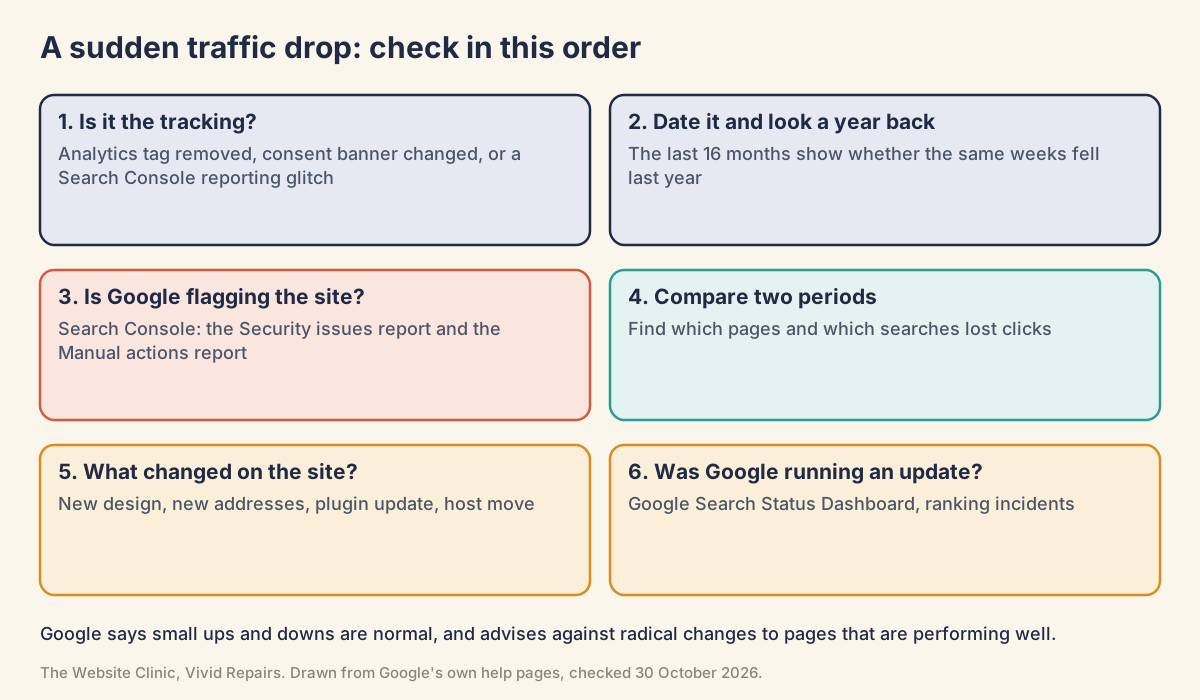
Rule out the measuring first
Visitors or the counting? Easy
- Ask the till
Did calls, enquiries and sales fall over the same weeks? If business is steady and only the graph fell, suspect the tracking. - Watch yourself arrive
In Google Analytics, open Reports, then Realtime, and visit your site on your phone. Accept the cookies on your own banner for the test. What you'll see if tracking works: the "Active users in last 30 minutes" card ticks up. Try an inner page too, because a tag can be missing from one template and present on another. - Compare with Search Console
Open the Performance report for the same dates. Search Console counts clicks from Google's results on Google's side, not through your site's tag. - Think back
Was a cookie banner added or changed, a theme swapped, or a plugin updated around that date? A banner that blocks analytics until people accept means visitors who decline aren't counted.
Put a date on it, and look a year back Easy
- Widen the dates
In the Performance report, choose the Date filter at the top and select Last 16 months. What you'll see: a line for Clicks and one for Impressions. A dotted stretch at the right-hand end means the newest data is still preliminary. - Find the turn
Note the date the clicks line fell. Write it down; every later check hangs off it. - Look for last year's dip
A heating engineer sees fewer searches in summer, a garden centre fewer in winter. If the same weeks dipped last year, it's the season. - Check the demand
Search your main service on Google Trends (trends.google.co.uk) over five years. What you'll see: if interest drops at the same point every year, or has been falling for everyone, the fault isn't with your site.
Is Google flagging the site? Easy
- Open the Manual actions report
This is what people mean by a Google penalty. A manual action means a person at Google has decided pages break its spam policies, and the report says what was found. - Open the Security issues report
This is what people mean by being blacklisted. Hacked or harmful pages can carry a warning in search results or a warning page in the browser, which turns visitors away before they arrive.
Narrowing it down in Search Console
Compare two periods and find what fell Medium
- Set up the comparison
In the Performance report, open the Date filter, choose Compare, and pick Compare last 3 months year over year, or Compare last 3 months to previous period. Click Apply. - Smooth out the weekdays
Switch the chart to weekly granularity, one point per week, so a quiet Sunday doesn't look like a crisis. - Read the Difference column
The table below the chart now shows both periods and the difference. On the Pages tab, sort by the clicks difference to see which pages lost the most. - Click every tab
Go through Queries, Pages, Countries, Devices and Search appearance. One page or one search down is a different problem from everything down, and a fall on mobile only points somewhere else again. - Try the Search type filter
Above the chart, switch between web, image, video and news. A drop confined to images, say, narrows things a lot. - Match the pattern
Impressions steady but clicks down suggests your titles and the short descriptions under them are being beaten, or other results have more eye-catching features. Both down means you're appearing less. A small slip in position within the top results is normal; a fall out of the top results across many searches is the bigger warning.
Comparing 2026 with 2025? Use clicks, not impressions. Google's Data anomalies page records a logging error that stopped Search Console accurately reporting impressions from 13 May 2025 until 27 April 2026. It has been resolved, and you may see a decrease in impressions as a result. Clicks weren't affected; impressions, CTR (click-through rate) and average position were.
Did something change on the site? Medium
- List the changes near the start date
A new site, new page addresses, a plugin or theme update, a host move, a lapsed domain renewal. A drop that starts the day after a change most likely has its answer in that change. - Open the Page indexing report
What you'll see if something broke: a rise in "Not found (404)", "URL marked 'noindex'", "URL blocked by robots.txt" or "Server error (5xx)" from around your start date. - Inspect a lost page
Paste the address of a page that lost clicks into the search bar at the top of Search Console. What you'll see: "URL is on Google" or "URL is not on Google", with details underneath.
Was Google running an update? Medium
- Open the Search Status Dashboard
Go to status.search.google.com and look at the Ranking row. Its history lists each update under Summary, Date and Duration. What you'll see: entries such as "May 2026 core update" with the day it started and how long it ran. - Line up the dates
Did your clicks fall inside one of those windows? As of 30 October 2026, the latest entries are the September 2026 and August 2026 spam updates. The last core update began on 21 May 2026. - Wait, then compare fairly
After a core update, Google recommends waiting at least a full week after it completes, then comparing a week afterwards with a week before it started.
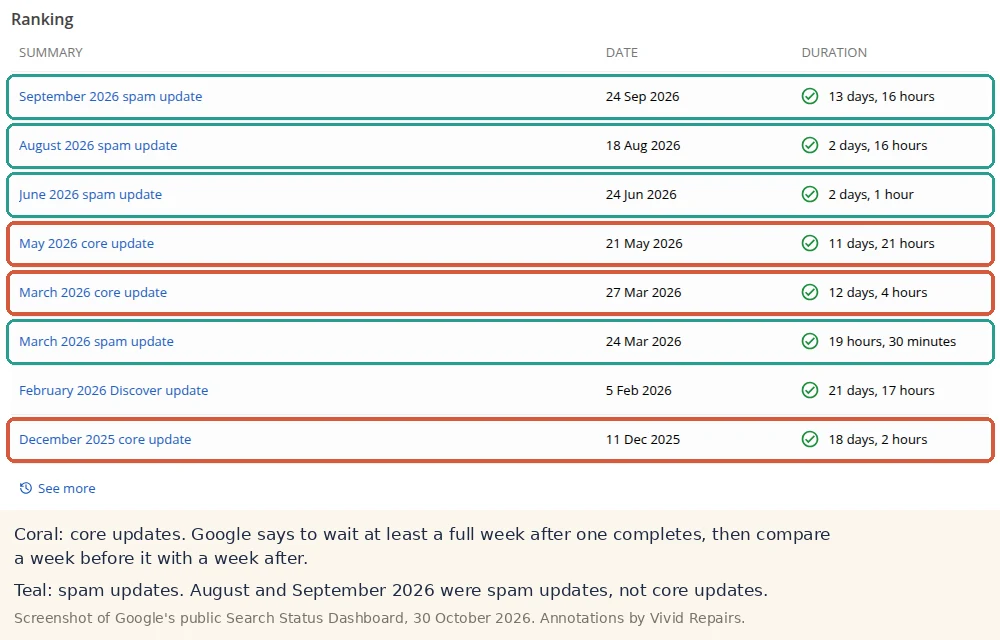
A drop during an update doesn't mean something's wrong with your content. Core updates don't target individual sites, and other pages may simply have been judged more useful for those searches. Small moves can reverse without you doing anything. A large fall across many searches is different: Google suggests stepping back and assessing the whole site for whether it's helpful and reliable, rather than tinkering with single pages.
What about AI Overviews? Clicks from AI Overviews and AI Mode are counted in Search Console's totals, and there's nothing extra to do to appear in them. In August 2025 Google said total clicks from Search to websites had been relatively stable year on year, while some sites gained and others lost. That's Google's own figure. Your Performance report is the one to go by.
While you investigate. Don't rewrite or delete pages that were working, just in case. Google's advice after an update is to avoid "quick fix" changes. Don't buy links or pay for "penalty removal" when neither report shows a problem; paid links break Google's spam policies. And don't restructure the site's addresses to start afresh, because that brings its own period of ranking wobble on top of the drop.
For your developer or SEO: the evidence in detail
Getting a clean comparison Hard
Show the technical detail
- Filters: use + Add filter, then Pages or Queries, with "URLs containing" or "Queries containing" (not case-sensitive), or "Custom (regex)" for a pattern such as a whole directory. Only one comparison can be active at a time.
- Time zone: all dates are Pacific Time, so a change made in the early hours UK time is charted on the previous day.
- Hidden queries: some queries are omitted for privacy, so the Queries tab may not add up to the chart total.
- Data anomalies: check the page before trusting a year-on-year comparison. Beyond the impressions logging error, it notes that FAQ rich results stopped appearing in Google Search on 7 May 2026, so a site that relied on them will see that search appearance's impressions fall. It also lists 2026 Discover logging errors.
- Exports: export both periods and diff them by page if the table is too long to read on screen.
- Alerts: the Dashboard publishes an Atom feed at
status.search.google.com/en/feed.atom, which is easier than checking by hand.
Crawling, indexing and the server Hard
Show the technical detail
Google's guide suggests checking the Crawl stats and Page indexing reports for a spike in issues that matches the drop, then using URL Inspection on a few affected pages if only a group of pages fell.
- Crawl stats (under Settings): host status covers "robots.txt fetching", "DNS resolution" and "Server connectivity". By response, look for a rise in "Not found (404)" or "Server error (5XX)" against "OK (200)".
- URL Inspection: run "Test live URL" on a lost page and compare the "Google-selected canonical" with the one you declared. A different choice can explain a page that vanished while a near-duplicate took its place.
- Host move: a temporary drop in Googlebot's crawl rate straight after a hosting change is normal, followed by a steady increase over the next few days.
- site: searches: the site: operator doesn't necessarily return every indexed URL, so it's neither proof of indexing nor a count of it.
# Status, redirects and any header-level noindex on the homepage
curl -sI https://www.example.co.uk/ | grep -iE '^(HTTP|x-robots-tag|location)'

# A robots meta tag in the HTML
curl -s https://www.example.co.uk/ | grep -iE "name=[\"']?(robots|googlebot)"

# What robots.txt currently says
curl -s https://www.example.co.uk/robots.txt

# Has DNS changed (a host move nobody mentioned)?
dig +short www.example.co.uk
Run the first two against a service page and a blog post as well as the homepage. Templates differ.
Analytics tags and consent mode Hard
Show the technical detail
Find which measurement IDs each template carries. Google tag IDs start with G- or GT-; a tag loaded through Tag Manager shows a GTM- container instead.
curl -s https://www.example.co.uk/ | grep -oE '(G|GT|GTM)-[A-Z0-9]+' | sort -u
curl -s https://www.example.co.uk/services/ | grep -oE '(G|GT|GTM)-[A-Z0-9]+' | sort -u
Compare the ID with the one under Admin, Data collection and modification, Data streams. Then open Tag Assistant, choose Add domain, enter the URL and Connect. If it doesn't find the tag, check the measurement ID is right and the code is live. Ad blockers, consent management tools and a Content Security Policy can all stop the Google tag running. New collection can take up to 30 minutes to begin.
Consent mode: in basic mode, Google tags are blocked until consent is granted, and when they're blocked no data is collected. In advanced mode, tags send cookieless pings when cookies are declined, and Analytics can fill gaps with modelling. Behavioural modelling needs at least 1,000 events a day with analytics_storage='denied' for at least 7 days, plus at least 1,000 daily users with it granted on 7 of the previous 28 days. A small site below those thresholds simply doesn't see the visitors who decline.
Patterns owners report
Analytics fell, Search Console didn't. Owners on the Google Analytics help forum describe GA4 showing a sharp organic drop with no change in Search Console, and one said they were still selling the same amount. A volunteer expert's first question was whether total traffic fell or organic visits had moved to another channel. Check the channel split before anything else.
Average position improved while traffic collapsed. Impressions and clicks fell sharply in a week while average position went from 6.7 to 4.3, one owner reported on Google's Search Central forum. When a site stops showing for searches where it ranked low, the average of what's left can rise. A better position isn't good news on its own.
"Nothing changed on my site." An owner posted that traffic fell massively from 17 August 2026, with no redesign, migration or address change. The August 2026 spam update started on 18 August, the day after, and finished on 21 August. Search Console dates are in Pacific time, so a day either way is worth allowing, but line the dates up exactly before deciding what caused it. The same owner noticed the Page indexing report's latest data was days behind the Performance report.
"site: still shows all my pages." Owners on the forum point to a site: search as proof they're still indexed and ranking. It proves neither. Use the Page indexing report and URL Inspection instead.
Asking Google to look into one site. Owners sometimes ask on the forum for Google to investigate their domain. The Dashboard only covers issues that affect many sites, and its documentation sends problems isolated to your own pages to the Search Central help community instead.
Google's own pages on this
- Debugging drops in Google Search traffic
- Advanced filtering and comparison in the Performance report
- Data anomalies in Search Console
- Google Search Status Dashboard
- Google Search's core updates
- Manual actions report
- Security issues report
- Crawl stats report
- Consent mode in Google Analytics
- AI features and your website