

Whether the new site is still on the drawing board or went live last month and the phone has gone quiet, the worry is the same: will it lose the rankings you spent years building? It can. In the trade this is called a site migration, and keeping your rankings through one is mostly careful bookkeeping. You list every address Google knows for your business, and you tell it where each one went.
If yours is already live and traffic has fallen, keep reading with a list of your old addresses to hand. The checks that prevent the damage are the same ones that find it.
Quick answer
A new website can cause some ranking movement while Google recrawls it, which is normal. To keep what you've built, keep page addresses where you can, permanently redirect (301 or 308) every changed address to its closest new page, carry your useful content across and make sure the site isn't hidden from search at launch.
At a glance
- Difficulty: Medium
- Time needed: A few hours of groundwork for a small site before launch, then a few weeks of checking afterwards
- You'll need: Access to Google Search Console, a spreadsheet, and whoever controls the new site's redirect settings
What Google loses when a site is rebuilt
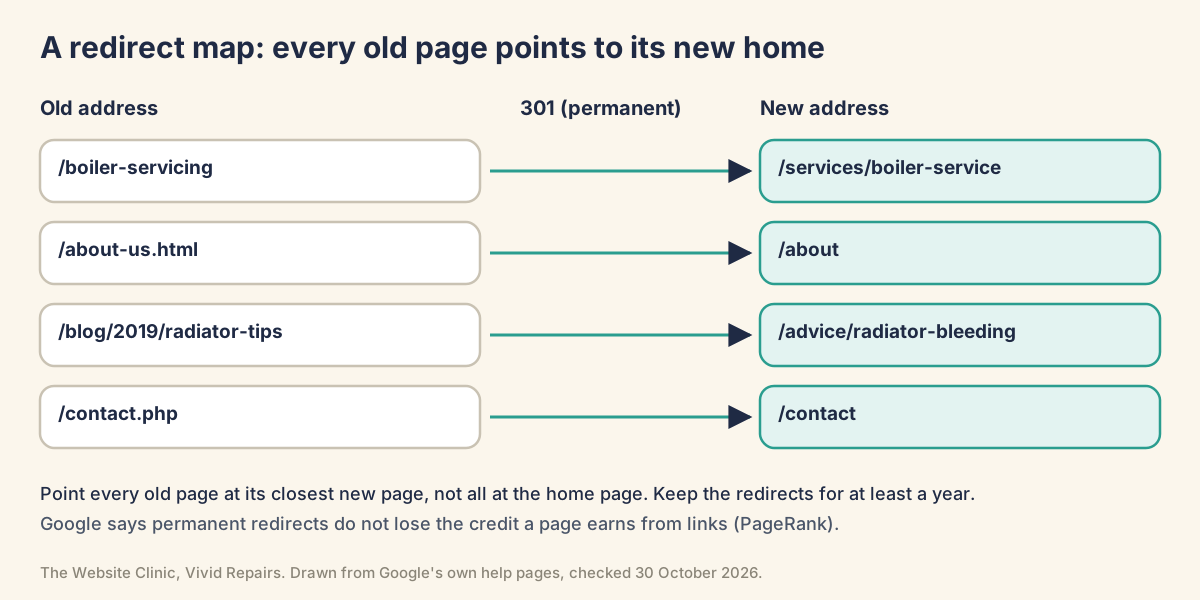
Google keeps its records page by page. It knows that /boiler-servicing is a useful page about boiler servicing, that other sites link to it, and that people who click on it seem satisfied. A new site can break that.
The address goes nowhere. New sites often rename pages, so /boiler-servicing becomes /services/boiler-service. To Google, the old page has vanished and an unknown one has appeared, and anyone clicking your old result gets "page not found". Changing platform makes this more likely, because Wix, Squarespace, WordPress and Shopify each lay out addresses their own way.
The content stays behind. A sleek new design often carries far less text. If the old service page answered customers' questions and the new one is a headline and a photo, Google has less reason to show it. Even a job sold as "design only" counts here when it quietly rewrites every page title.
The site launches hidden. New sites are built somewhere private and set not to be indexed. If that setting comes across at launch, the whole site tells Google to stay away.
The fix for the first is a redirect map: every old address paired with its closest new page.
Groundwork anyone can do
List every page you have now Easy
- Start with your sitemap
Most sites publish one at/sitemap.xml. Copy every address into the first column of a spreadsheet. What you'll see: a page of addresses, sometimes split into several smaller sitemaps for pages, posts and products. - Add what Google actually sends visitors to
In Search Console, open the Performance report, set the dates to the last 12 months and choose the Pages tab. Sort by Clicks and export the table. What you'll see: tabs named Queries, Pages, Countries, Devices, Search appearance and Dates above the table. - Fill the gaps
Add your analytics landing pages, and check the Wayback Machine (web.archive.org) for old blog posts the others missed. - Mark the pages that bring work
Highlight the pages with the most clicks and the ones that turn into enquiries.
Keep the addresses and keep the words Easy
- Ask for the old addresses back
If/boiler-servicingcan stay/boiler-servicingon the new site, nothing needs redirecting. Most platforms let you set the address of each page by hand. - Put old and new side by side
For each marked page, compare the title, main heading, questions answered, prices and areas covered. What you'll see if something's wrong: a new page that's shorter, vaguer, or missing the words your customers actually type. - Ask your builder four questions
Will addresses change, and who's setting up the redirects? Is all the content moving across? Who checks the site is visible to Google on launch day? Who watches Search Console afterwards? If any answer is a shrug, sort it out before launch.
Already launched and traffic fell? Easy
- Date the drop
In the Performance report, find the day the clicks line turned. Compare it with your launch date and with the ranking updates on Google's Search Status Dashboard. A drop that began a fortnight before launch isn't the new site's fault. - Check it isn't the counting
If your analytics fell but Search Console clicks held steady, the visitors are probably still there and the tracking isn't. A new template can lose the analytics tag, and a new cookie banner can stop it recording people who decline. - Try five old addresses
Paste your five busiest old addresses into a browser. What you'll see if it's working: each one lands on its own new page. A "page not found", or the homepage every time, means the redirects are missing or wrong.
The switchover, step by step

Launch without losing your place Medium
- Finish the redirect map
Next to every old address, write the closest new page, never just the homepage. A page you're dropping with no equivalent can return "not found"; in general, 404 errors don't harm the rest of the site. - Switch the redirects on as permanent
Set each one up as a 301 or 308 redirect, either on the server or in your platform's redirect settings. A temporary 302 or 307 is the wrong choice for a relaunch. - Make sure the site isn't hidden
On WordPress, go to Settings, then Reading, and make sure "Discourage search engines from indexing this site" is unticked. On other platforms, look for password protection or a "hide from search engines" option left on from the build. - Test the busiest old addresses
Paste each marked address into a browser and confirm it lands on the right new page. - Submit the new sitemap
Add it in Search Console's Sitemaps report. Leave the old sitemap submitted as well: Google's site-move guide has you submit both. Warnings on the old one about redirecting URLs are expected and can be ignored. - Check your analytics still counts
Open Google Analytics, then Reports, then Realtime, and visit your new site on your phone. You should appear under Active users in last 30 minutes. Try an inner page too, not just the homepage.
Changing domain name as well Medium
- Verify both domains
Add the old and new domains to Search Console under the same Google account. - Redirect first
Put the 301 redirects live from the old homepage and every old page to their new equivalents. - Then tell Google
Use the Change of Address tool on the old domain's property, once for each version of the old address, www and non-www. What you'll see: the tool runs a quick check that you own both sites and that a few pages return 301s, and stops you if a critical check fails. - Keep the old domain renewed
Google recommends paying for it for at least a year, so nobody else can buy it and use it for malicious purposes.
Change of Address isn't the tool for a switch from http to https, from www to non-www on the same domain, or a move to a new host that keeps the same addresses. Redirects handle the first two, and a host move with unchanged addresses needs neither.
Reading Search Console in the weeks after Medium
- Open the Page indexing report
Look at the reasons pages aren't indexed. What you'll see, and what it means: "Page with redirect" rising for old addresses is your redirects working. "Not found (404)" on addresses that used to get visits means a redirect is missing. "Redirect error" means a chain or a loop. "Soft 404" can mean old pages were pointed somewhere irrelevant, such as the homepage. "URL marked 'noindex'" means the hide setting is still on. - Compare before and after
In the Performance report, compare the weeks since launch with the same number of weeks before, on the Pages tab. That shows which pages lost clicks, not just that the total fell. - Fix, then validate once
After fixing an issue, press Validate fix in the report. Validation typically takes up to about two weeks. Don't press it again until it has passed or failed. - Hold your nerve
Google's general rule is that a small to medium-sized website can take a few weeks for most pages to move, and the visibility of your pages may go up and down while that happens.
Don't put the old site back, or start another rebuild, in a panic. Google advises making changes one after the other rather than all at once, and a second big change lands on top of the first while Google is still reassessing.
For whoever builds or hosts the site
Redirect types and how Google reads them Hard
Show the technical detail
- 301 and 308: permanent. Google's crawler documentation treats 301 as a strong signal that the target should be canonical, and 308 as equivalent to 301.
- 302, 303 and 307: temporary. Google treats 302 as a weak signal, and its indexing pipeline doesn't use a temporary redirect as a signal that the target should be canonical.
- Instant meta refresh: read as permanent. A delayed meta refresh is read as temporary.
- JavaScript redirects: only if server-side or meta refresh redirects aren't possible, because rendering can fail.
Within each pair, the HTTP standard (RFC 9110) lets a client change a POST to a GET on a 301 or 302, but not on a 307 or 308. So 308 is the choice when a form posts to a moved address. For ordinary pages, 301 and 308 behave the same in Search.
Two server examples in the form Google's redirects page gives them (the page also covers mod_rewrite, NGINX rewrite and PHP):
# Apache, mod_alias
Redirect permanent "/old" "https://example.com/new"

# NGINX
location = /service {
  return 301 $scheme://example.com/about/service;
}Test the whole map, chains included Hard
Show the technical detail
URL Inspection suits single addresses; for a full map, script it.
# One old URL: the status and where it points
curl -sI https://www.example.co.uk/boiler-servicing

# Every hop in the chain
curl -sIL http://example.co.uk/boiler-servicing | grep -iE '^(HTTP|location)'

# Final status, number of hops, final URL (a GET, for servers that answer HEAD differently)
curl -s -o /dev/null -L -w '%{response_code} %{num_redirects} %{url_effective}\n' http://example.co.uk/boiler-servicing

# The whole map. map.csv: old,new on each line, both as full addresses starting https://
while IFS=, read -r old new || [ -n "$old" ]; do
  new=${new%$'\r'}
  read code hops final < <(curl -s -o /dev/null -L -w '%{response_code} %{num_redirects} %{url_effective}' "$old")
  [ "$final" = "$new" ] && [ "$code" = "200" ] && [ "$hops" -le 1 ] && echo "OK   $old" || echo "FAIL $old -> $final ($code, $hops hops)"
done < map.csv
Good: a first response of 301 or 308, one hop, and a final 200 on the intended page.
Red flags: a 302 or 307 on a permanent move; a final 404; the homepage as the destination for a page that had its own equivalent; more than one hop; a loop, which shows up as a very high hop count, or as a "Maximum redirects followed" error if you add -S to the curl command.
Chains build up quietly. An old http:// address on the bare domain can go to https, then to www, then to the new page: three hops. Googlebot follows up to 10, but the site-move guide advises redirecting to the final destination directly, and keeping any chain ideally to no more than 3 and fewer than 5.
Signals the new site must send Hard
Show the technical detail
- Internal links: change them from the old URLs to the new ones.
- Canonicals: each new URL should carry a self-referencing
rel="canonical". - hreflang: on multi-language sites, update every annotation to the new URLs. Each version has to reference all the alternates.
- Sitemaps: submit both the old-URL and new-URL sitemaps. Indexed pages from the old one should fall towards zero over time, and then it can go.
- robots.txt: make sure the new file blocks only what you mean to block, and remove anything that was only there for the build.
- Capacity: Google crawls a newly moved site more heavily than usual. A server that buckles returns 5xx errors, and those make Google temporarily slow its crawling.
Check for a leftover noindex in the header and the HTML:
curl -sI https://www.example.co.uk/ | grep -i x-robots-tag
curl -s https://www.example.co.uk/ | grep -iE "name=[\"']?(robots|googlebot)"
Since WordPress 5.3, the "Discourage search engines" box outputs a robots meta tag; on current versions it reads <meta name='robots' content='noindex, nofollow' />. A noindex is only seen if robots.txt lets Google fetch the page, so don't block and noindex the same URL.
In the Crawl stats report (under Settings), a large share of "Moved permanently (301)" is expected after a move. A large share of "Moved temporarily (302)" means the redirects are the wrong type.
Domain moves and host-only moves Hard
Show the technical detail
Change of Address: open it in a domain-level property. It doesn't move subdomains, including www, so run it for every version of the old domain (www and non-www, and any subdomains), even ones you don't use, with each one verified. Its effects continue for 180 days from the start, and Cancel Move withdraws it. Keep the redirects for at least a year regardless.
New host, same URLs: lower the DNS TTL to a conservative value, such as a few hours, at least a week before the switch. Remove any crawl blocks from the new copy when the move starts. A temporary drop in Googlebot's crawl rate straight after launch is normal, followed by a steady increase over the next few days.
# Which address does the name point at, before and after the switch?
dig +short www.example.co.uk

# Read the TTL as set, from the domain's own nameserver (the number after the name, in seconds)
dig +noall +answer www.example.co.uk @$(dig +short NS example.co.uk | head -1)
Relaunches that went wrong
Same addresses, "only a new design", and traffic still fell. Owners on Google's help forum describe URLs left untouched and organic traffic sliding for weeks. In one case the relaunch had rewritten the titles of the homepage and every service page. Volunteer experts there pointed to pages dropped from the menu and core text that didn't survive. Compare old and new versions of your top pages.
"Should we put the old site back?" One owner on a builder that keeps every version asked exactly this on Google's help forum. Before reverting, date the drop against the launch and the Search Status Dashboard. A rollback is another big change.
Every old page pointed at the homepage. It's quick to set up, and it's the shortcut Google warns against. Rebuild the map page by page, starting with the addresses that had clicks.
Redirects to pages that don't exist. Google's troubleshooting notes say it frequently sees redirects aimed at wrong or non-existent addresses on the new site. A page renamed again after the map was written is one way it happens. The curl loop above catches these.
A domain change done by the book, still down. Another owner followed every step, from redirects to Change of Address, and still reported a large fall. Experts there said recovery can take days, weeks or months, and sometimes doesn't come. It's one report, not a prediction, but it's a reason not to change domain without a need.