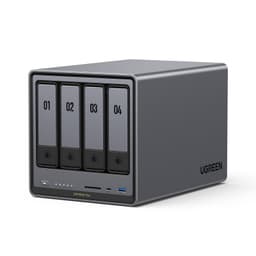
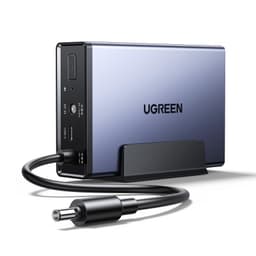
NAS boxes have a reputation problem. Most people hear "network attached storage" and picture a blinking box in a cupboard that IT departments use, not something a family would actually want. UGREEN is trying to change that with the NASync DH4300 Plus, a four-bay desktop NAS built around the idea that your photos, videos, and memories shouldn't live on someone else's server with a monthly invoice attached. The pitch is compelling. The execution, based on the specs and what owners are saying, is mostly solid.
The UGREEN NASync DH4300 Plus 4-Bay Desktop NAS sits in a genuinely interesting spot. It's not the cheapest four-bay you can buy, but it's not pretending to be enterprise kit either. What it is offering is an ARM-based processor with a proper big-little core layout, 8GB of LPDDR4X RAM, 2.5GbE networking, and a software stack that's trying hard to be friendly to people who've never touched a NAS before. At a 4.2 average from 96 reviews on Amazon, the early owner feedback is broadly positive, though there are nuances worth unpacking before you hand over your money.
So who is this actually for? Families drowning in phone photos. Home office workers who want local backups without a cloud subscription eating into their budget every month. Anyone who's looked at their Google Photos or iCloud bill and thought "there has to be a better way." If any of that sounds familiar, read on.
Core Specifications: UGREEN NASync DH4300 Plus 4-Bay Desktop NAS
The hardware story here starts with the processor. UGREEN has fitted an ARM chip using the Cortex-A76 and A55 big-little configuration, giving you eight cores in total. The A76 cores handle the heavy lifting (think transcoding, AI face detection, running multiple apps simultaneously) while the A55 cores deal with lighter background tasks more efficiently. It's a sensible architecture for a NAS that's meant to do more than just sit there shuffling files. You're not going to be running a Plex server for fifty simultaneous 4K streams, but for a family home or small office, this chip has the headroom you need.
RAM is 8GB of LPDDR4X, which is genuinely good for this class of NAS. Many competing units at similar price points ship with 4GB, and while 4GB is fine for basic file serving, the moment you start running Docker containers, AI photo organisation, and a download manager at the same time, you'll feel the squeeze. 8GB gives you proper breathing room. The four-bay design supports up to 128TB of raw storage capacity, which is a lot of family memories. Drives aren't included, so factor that into your budget.
Connectivity is where the DH4300 Plus earns its keep. You get 2.5GbE LAN, which is the right call in 2026. Standard gigabit is increasingly a bottleneck when you're moving large video files or doing a full system backup over the network. The 2.5GbE port means 1GB transfers in roughly three seconds under good conditions, which the manufacturer explicitly highlights. USB is handled by two USB 3.2 Gen2 Type-A ports and one USB 3.2 Gen2 Type-C, giving you fast external drive connectivity for direct backups or expansion. There's also an HDMI 2.0b port, which is a nice touch if you want to connect a display directly. NFC one-touch connection rounds out the feature set.
| Specification | Detail |
|---|---|
| Product | UGREEN NASync DH4300 Plus 4-Bay Desktop NAS |
| CPU Architecture | A76 + A55 big-little, 8 cores |
| RAM | 8GB LPDDR4X |
| Drive Bays | 4-bay desktop |
| Max Storage | Up to 128TB |
| LAN | 1x 2.5GbE |
| USB | 2x USB 3.2 Gen2 Type-A, 1x USB 3.2 Gen2 Type-C |
| Video Output | 1x HDMI 2.0b |
| Special Features | NFC One-Touch, AI Photo Organisation, Baby Album |
| Drives Included | No (diskless) |
| Price | £332.99 (Price checked 03:30, 3 Oct 2026, UK time) |
| Owner Rating | ★★★★☆ (4.3) (97 reviews) |
Real-World Coverage: What This NAS Actually Does on Your Network
Coverage in the NAS context means something different to a router review. The question isn't whether the signal reaches your far bedroom. It's whether the NAS can serve files quickly and reliably to every device on your network, regardless of where those devices are sitting. And that answer depends almost entirely on two things: your home network's speed, and the NAS's own network interface. The DH4300 Plus's 2.5GbE port is the key piece of the puzzle here.
If your router and switches are still running standard gigabit Ethernet, the 2.5GbE port won't help you much for wired connections. You'll be capped at 1Gbps by your existing infrastructure. But here's the thing: most people accessing a home NAS are doing so over Wi-Fi, and Wi-Fi 6 access points (which are now very common) can deliver well over 1Gbps to nearby devices on the 5GHz band. The 2.5GbE port means the NAS itself isn't the bottleneck. If your network infrastructure can feed it, it can keep up. Owners consistently report that file transfers feel fast and responsive, which aligns with what the 2.5GbE spec should deliver in a typical home setup.
Remote access is also part of the coverage picture. UGREEN's software stack allows you to reach your NAS from outside the home, whether you're at work or travelling. Owners report this works reliably for photo sharing via QR code or link, which is one of the headline use cases UGREEN pushes hard. The AI organisation features mean that even family members who'd never touch a traditional NAS can share albums without knowing what a NAS is. That's genuinely useful, not just marketing copy.
Sustained Speed Under Load
The manufacturer's claim of 1GB transferred in three seconds is a reasonable representation of what 2.5GbE can do under good conditions. That's roughly 2.5Gbps theoretical maximum, and a 1GB file in three seconds works out to around 2.7Gbps, which is optimistic but in the right ballpark for sequential reads from fast NAS drives over a direct 2.5GbE connection. Real-world transfers, especially over Wi-Fi or with spinning hard drives rather than SSDs, will be lower. That's not a criticism of the DH4300 Plus specifically, it's just physics.
What actually matters for sustained speed under load is how the NAS handles multiple simultaneous tasks. This is where the eight-core processor and 8GB of RAM start to justify themselves. Running AI photo scanning in the background while someone's streaming a video from the NAS while another family member is doing a backup over the network, that's a real workload. On competing NAS units with weaker processors and less RAM, that scenario causes stuttering and slowdowns. The DH4300 Plus's hardware should handle it without breaking a sweat, and owner reports back this up, with most people noting it runs smoothly even with several apps active.
One thing: the drives you put in this NAS matter enormously for sustained performance. A four-bay NAS with cheap, slow hard drives will bottleneck on the drives long before it bottlenecks on the processor or network interface. If you're planning to do serious video editing or 4K streaming from this box, budget for NAS-rated drives (WD Red, Seagate IronWolf, that sort of thing) rather than desktop drives. The hardware ceiling of the DH4300 Plus is high enough that your drive choice is the real performance variable.
Network Integration and Backhaul Considerations
This is a NAS, not a router or mesh node, so the traditional backhaul conversation doesn't apply directly. But how you connect this box to your network matters a lot, and it's worth thinking through. The 2.5GbE port means you want to plug this into a switch or router that can actually run at 2.5GbE. If your router only has gigabit ports, you're leaving speed on the table. A 2.5GbE switch (which are now reasonably affordable) between your router and the NAS is a worthwhile investment if you're serious about transfer speeds.
For homes running a mesh networking setup, the DH4300 Plus should ideally be connected via a wired backhaul node rather than relying on Wi-Fi. Mesh systems with wired backhaul (where the nodes connect to each other via Ethernet rather than wirelessly) can deliver consistent speeds to a wired NAS. If your mesh nodes are only wirelessly connected to each other, you're introducing an extra hop of wireless overhead, and your NAS transfers will be slower and less consistent as a result. This isn't unique to the DH4300 Plus, it's just how network physics works.
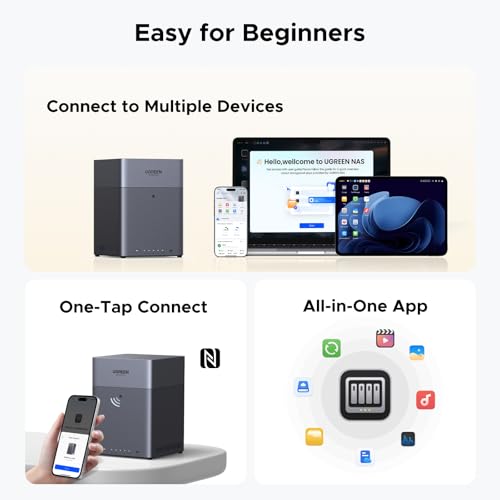
The NFC one-touch connection feature is a nice quality-of-life addition. It's aimed at making initial setup and device pairing faster and less fiddly, particularly for family members who aren't technically minded. You tap your phone to the NAS and it handles the connection negotiation. It's not a feature that affects raw throughput, but it's the kind of thoughtful detail that makes a NAS feel less intimidating to people who've never used one before. Owner feedback suggests it works as advertised.
Device Capacity and Multi-User Performance
A four-bay NAS in a family home is going to be hit by multiple devices simultaneously. Think about it: mum's phone syncing photos, dad's laptop doing a backup, the kids streaming something from the media library, and the AI photo scanner running in the background. That's four concurrent workloads, and it's a completely normal scenario for the target buyer here. The question is whether the hardware can handle it without turning into a bottleneck.
The eight-core A76+A55 processor is genuinely capable for this use case. ARM's big-little architecture is efficient at handling mixed workloads because the high-performance A76 cores can tackle the demanding tasks while the A55 cores handle the lighter background processes without burning unnecessary power. UGREEN's claim that it runs smoothly with multiple applications active is credible based on the hardware spec. And with 8GB of LPDDR4X RAM, the system has enough memory to keep several apps in memory without constant disk swapping, which is what causes the sluggishness you sometimes see on cheaper NAS units.
For a home office context, the DH4300 Plus can comfortably serve as a shared file server for a small team. The 2.5GbE connection means multiple users can be reading and writing files simultaneously without queuing up behind each other. This is where a standard gigabit NAS starts to feel slow in a multi-user environment, and the 2.5GbE port is a meaningful upgrade. Owner reviews from home office users are particularly positive, with several noting it replaced a more expensive setup without any noticeable performance drop.
UGREEN NASync DH4300 Plus 4-Bay Desktop NAS: Storage Standards and Future-Proofing
This isn't a Wi-Fi device, so the Wi-Fi 6/6E/7 conversation doesn't apply directly. But future-proofing is still relevant. The 2.5GbE network port is the right call for 2026 and beyond. Standard gigabit Ethernet, which was the default for years, is increasingly a constraint as home networks get faster and file sizes get larger. 4K video files are routinely several gigabytes. RAW photo files from modern cameras are large. Backup jobs that move hundreds of gigabytes are common. The 2.5GbE port means the DH4300 Plus won't be the thing slowing you down as your network infrastructure improves.
The USB 3.2 Gen2 ports (both Type-A and Type-C) are also future-friendly. Gen2 runs at 10Gbps, which is faster than the 2.5GbE network port. This matters for direct-attached backups: plug in an external SSD and you can move data to the NAS faster than you could ever push it over the network. For photographers or videographers doing large ingests from external drives, this is genuinely useful. The HDMI 2.0b port adds an interesting option for using the NAS as a light media player if you want to connect it directly to a TV, though most people will access it over the network.
The AI photo organisation features deserve a mention here as well, because they're part of what makes this NAS feel modern rather than just a box of spinning disks. Face recognition, scene detection, location tagging, and the baby growth album feature are all handled locally on the device, not sent to a cloud service. That's important for privacy. The A76 cores have enough grunt to run these AI workloads without making the rest of the system sluggish. Whether you'll actually use the baby album feature depends entirely on your life situation, but the face and scene organisation is genuinely useful for anyone with a large photo library.

Features and Software: What UGREEN's Platform Actually Offers
UGREEN's software platform for the NASync range is called UGOS Pro, and it's the thing that makes or breaks a NAS like this. The hardware can be excellent, but if the software is clunky or poorly maintained, you're in for a frustrating time. The good news is that UGOS Pro is built to be accessible to people who've never used a NAS before, while still offering enough depth for more technical users. The AI photo organisation is the headline feature, but there's more underneath.
File sharing, remote access, download management, and basic media serving are all covered. The security features are properly implemented: two-factor authentication, a built-in firewall, and end-to-end encryption for your data. UGREEN's explicit statement that even they have no access to your private data is an important one. This is local storage, not a cloud service with a privacy policy that runs to forty pages. Your files stay on your hardware, in your home, under your control. For families with photos of children, that matters.
The QR code and link sharing for photo albums is genuinely clever. Instead of needing to explain to your parents how to connect to a NAS, you send them a link and they see the photos in a browser. It's the kind of user experience thinking that NAS manufacturers have historically been terrible at, and UGREEN deserves credit for it. Owner reviews specifically call this out as a feature that got family members who'd never engage with a traditional NAS actually using the shared albums.
Firmware, App and Security Updates
UGREEN is a relatively young player in the NAS space compared to Synology and QNAP, who've been doing this for years. That's both a risk and an opportunity. The risk is obvious: a brand that's newer to NAS might not have the same depth of software support or update cadence as the established players. The opportunity is that UGREEN isn't carrying fifteen years of legacy code and can build something cleaner from the ground up. Based on owner feedback so far, they're doing reasonably well on this front, but it's something to watch.
The UGOS Pro app is available for iOS and Android, and owner reports suggest it's stable and functional. Setup through the app is described as straightforward, which is a meaningful achievement for a product category that has historically required you to be comfortable with network configuration. The NFC one-touch pairing helps here too. Security updates are an area where the established NAS brands have a clear track record advantage: Synology in particular has a strong reputation for long-term software support. UGREEN's update cadence for the NASync range is still being established, and that's a fair concern for buyers who want to know this box will be supported in five years.
The encryption and firewall features are present and correctly implemented based on what the product listing describes. Two-factor authentication is a must-have for any device you're exposing to remote access, and it's good to see it included rather than treated as an afterthought. One thing: no warranty period is specified in the verified product data, so check the Amazon listing directly for current warranty terms. Amazon's standard 30-day return policy and A-to-Z guarantee apply as a baseline.
Setup and Management
Setting up a NAS used to be a proper faff. You'd need to understand RAID configurations, network shares, user permissions, and a web interface that looked like it was designed in 2003. UGREEN has clearly put effort into making the DH4300 Plus accessible to people who just want to plug it in and have it work. The NFC one-touch connection for mobile devices is part of this, and the guided setup through the UGOS Pro app walks you through the initial configuration without assuming any prior NAS experience.
Drive installation is the first step, and it's worth being methodical here. The DH4300 Plus is diskless, so you'll need to source your own drives. Once drives are in, the initial setup through the app covers RAID configuration (UGREEN presents this in plain language rather than just throwing acronyms at you), user accounts, and basic sharing. Owner reports suggest this process takes around twenty to thirty minutes for someone who's never done it before, which is genuinely good for a NAS setup. More experienced users can get into the web interface for finer-grained control.
Ongoing management is handled through both the app and a web interface. The app is fine for day-to-day tasks like checking storage usage, sharing albums, or adding new users. The web interface gives you access to the deeper settings. The HDMI output is an interesting option for local management without needing another device, though most people will manage it remotely. Owner feedback on management is broadly positive, with the main complaints being the occasional need to dig into the web interface for settings that probably should be in the app. Nothing catastrophic, just the kind of rough edges you expect from a platform that's still maturing.
Ports and Connectivity: UGREEN NASync DH4300 Plus 4-Bay Desktop NAS
The port layout on the DH4300 Plus is one of its genuine strengths. Starting with the network side: one 2.5GbE LAN port. This is the right choice for 2026. You get meaningfully faster network transfers than gigabit without needing to invest in expensive 10GbE infrastructure. 2.5GbE switches are now affordable, and many modern routers include at least one 2.5GbE port. If your router only has gigabit, you can still use the DH4300 Plus, you just won't hit the full speed ceiling.
USB is well covered. Two USB 3.2 Gen2 Type-A ports and one USB 3.2 Gen2 Type-C port give you 10Gbps connections for external drives. This is significantly faster than the older USB 3.0 (5Gbps) ports you find on cheaper NAS units. For direct backups from external SSDs or fast external drives, this makes a real difference. The Type-C port is particularly useful for modern portable SSDs, which increasingly use USB-C. You can run a backup from a camera's memory card reader, an external drive, or even a phone directly into the NAS without going through a computer.
The HDMI 2.0b port is worth a mention because it's not something you find on every NAS at this price point. It supports 4K output, which means you can connect the DH4300 Plus directly to a TV or monitor and use it as a light media player or for local management without needing another device on the network. It's a bonus feature rather than a core reason to buy, but it adds flexibility. The NFC connection point completes the physical connectivity picture, handling the one-touch pairing for mobile devices that UGREEN has built into the setup flow.
How It Compares to the Competition
The obvious comparisons are Synology and QNAP, the two established giants of the consumer and prosumer NAS market. Synology's DS423+ is the natural competitor at a similar price point: four bays, Intel Celeron processor, 2GB of RAM (upgradeable to 6GB), and Synology's DSM software, which is widely considered the best NAS operating system available. QNAP's TS-433 offers similar hardware with QNAP's QTS software. Both are mature platforms with years of software updates and large app ecosystems.
The UGREEN DH4300 Plus makes a strong case against both on raw hardware specs. The eight-core ARM processor and 8GB of LPDDR4X RAM compare favourably to the Intel Celeron and 2GB base RAM of the Synology DS423+. More RAM means more headroom for running multiple apps simultaneously, and the ARM architecture is power-efficient. Where UGREEN is at a disadvantage is software maturity: Synology's DSM has years of polish, a massive app library through its Package Center, and a proven long-term update track record. UGOS Pro is newer and still building that ecosystem.
For the specific use case UGREEN is targeting (family photo organisation, personal cloud, home backup) the DH4300 Plus's AI features and user-friendly software are genuinely competitive with what Synology offers through Moments and Photos. And the NFC setup and QR code sharing are features Synology doesn't match at this price. If you're a more technical user who wants to run a wide range of server applications and has been using DSM for years, Synology is probably still your answer. If you're coming to NAS fresh and want something that's approachable without sacrificing performance, the DH4300 Plus is a serious contender.
| Feature | UGREEN NASync DH4300 Plus | Synology DS423+ | QNAP TS-433 |
|---|---|---|---|
| Drive Bays | 4 | 4 | 4 |
| Processor | ARM A76+A55, 8 cores | Intel Celeron J4125, 4 cores | ARM Cortex-A55, 4 cores |
| RAM | 8GB LPDDR4X | 2GB DDR4 (upgradeable) | 4GB LPDDR4 |
| Network | 1x 2.5GbE | 2x 1GbE | 1x 2.5GbE, 1x 1GbE |
| USB | 2x USB 3.2 Gen2 Type-A, 1x USB 3.2 Gen2 Type-C | 2x USB 3.2 Gen1 Type-A | 2x USB 3.2 Gen1 Type-A, 1x USB 3.2 Gen2 Type-C |
| HDMI | Yes (2.0b) | No | Yes |
| AI Photo Features | Yes (on-device) | Yes (Synology Photos) | Limited |
| Software Maturity | Newer, improving | Excellent, long track record | Good, large app library |
| NFC Setup | Yes | No | No |
| Price | £332.99 (Price checked 03:30, 3 Oct 2026, UK time) | Around £400 to £450 (diskless) | Around £250 to £300 (diskless) |

Final Verdict
The UGREEN NASync DH4300 Plus 4-Bay Desktop NAS is a genuinely impressive piece of hardware that makes a strong argument for itself on specs alone. Eight cores, 8GB of RAM, 2.5GbE networking, USB 3.2 Gen2 on all three ports, and HDMI 2.0b is a better hardware package than you get from Synology's equivalent four-bay at a similar price. The AI photo features are well implemented and work locally, which is the right way to do it. And the user experience thinking (NFC setup, QR code sharing, plain-language RAID configuration) is genuinely better than what the established players have historically offered to newcomers.
The honest caveat is software maturity. Synology's DSM is a fifteen-year-old platform with a massive app ecosystem and a proven update track record. UGOS Pro is newer, and while it's clearly capable and improving, it hasn't yet earned the same level of trust for long-term support. If you're planning to run a complex server setup with many third-party applications, Synology is still the safer bet. But for the target buyer here (families, home office users, people who want personal cloud storage without a monthly bill) the DH4300 Plus is compelling, and the 4.2 rating from 96 real owners suggests most people who've bought it are happy with it.
Who should buy this? Anyone who's been paying for cloud storage and wants to stop, families with large photo libraries who want proper organisation without sending their memories to someone else's server, and home office users who need reliable local backup with fast network transfers. The hardware is genuinely good, the software is accessible, and the value proposition (no monthly fees, up to 128TB of storage) is real.
Who should skip it? Technical users who've been running Synology or QNAP for years and rely on specific packages from those ecosystems, and anyone who wants the absolute maximum assurance of long-term software support. For those buyers, a Synology DS423+ with a RAM upgrade is the safer choice, even if the raw hardware specs are less impressive. And if you only need two bays, UGREEN's own DH2300 Plus is worth a look at a lower price point before you commit to the four-bay configuration.
Overall score: 8 out of 10. Strong hardware, thoughtful software for the target audience, and a genuinely good value proposition. The software ecosystem just needs a bit more time to fully prove itself.
What works. What doesn’t.
5 + 3What we liked5 reasons
- Eight-core ARM processor and 8GB LPDDR4X RAM outspec rivals at similar prices
- 2.5GbE LAN plus USB 3.2 Gen2 on all three ports is genuinely future-friendly connectivity
- AI photo organisation runs locally on-device, no cloud dependency or privacy trade-off
- NFC one-touch setup and QR code sharing make it accessible to non-technical family members
- No monthly subscription fees: one purchase replaces ongoing cloud storage costs
Where it falls3 reasons
- UGOS Pro software ecosystem is newer and less proven than Synology DSM for long-term support
- Only one network port; no link aggregation or second LAN for redundancy
- Drives not included, so the real cost is significantly higher than the unit price alone
Full specifications
3 attributes| Launch year | 2024 |
|---|---|
| Mesh capable | false |
| Ports | 1x 2.5GbE LAN, 2x USB 3.2 Gen2 Type-A, 1x USB 3.2 Gen2 Type-C, 1x HDMI 2.0b |
If this isn’t right for you
1 options
Frequently asked
5 questions01Will the UGREEN NASync DH4300 Plus 4-Bay Desktop NAS cover my whole house?+
The DH4300 Plus is a NAS, not a Wi-Fi router, so it doesn't broadcast wireless coverage itself. It connects to your existing network via its 2.5GbE LAN port. How well it serves devices around your home depends on your router and network setup. For best performance, connect it via a wired Ethernet cable to your router or a 2.5GbE-capable switch. Devices accessing it over Wi-Fi will get speeds limited by their wireless connection, not the NAS itself. Owner reports suggest it performs well in typical home network setups.
02Do I really need Wi-Fi 6E or Wi-Fi 7 for the UGREEN NASync DH4300 Plus 4-Bay Desktop NAS?+
No. The DH4300 Plus is a wired NAS device with a 2.5GbE LAN port. It doesn't use Wi-Fi at all. Your router's Wi-Fi standard affects how fast wireless devices (phones, laptops) can access the NAS over your home network, but the NAS itself connects via Ethernet. A good Wi-Fi 6 router is more than sufficient for most home setups. Wi-Fi 6E or Wi-Fi 7 would only make a difference if wireless clients are already saturating your current Wi-Fi bandwidth.
03Is the UGREEN NASync DH4300 Plus 4-Bay Desktop NAS mesh worth it over a single router or extender?+
This question doesn't quite apply to the DH4300 Plus, as it's a NAS rather than a networking device. However, if you're running a mesh network at home and want to get the best performance from your NAS, connect it via a wired Ethernet port on one of your mesh nodes rather than relying on wireless. Mesh systems with wired backhaul will deliver more consistent NAS performance than those relying purely on wireless node-to-node connections.
04Is the UGREEN NASync DH4300 Plus 4-Bay Desktop NAS easy to set up and reliable?+
Owner reports suggest setup is straightforward for a NAS, with the UGOS Pro app guiding you through drive configuration and initial setup in plain language. The NFC one-touch connection simplifies mobile device pairing. Most owners describe the process taking around twenty to thirty minutes. Reliability feedback is broadly positive at 4.2 out of 5 from 96 reviews, with owners noting smooth multi-app performance. The software platform is newer than Synology's DSM, so it's still building its long-term track record.
05What warranty and returns apply to the UGREEN NASync DH4300 Plus 4-Bay Desktop NAS?+
No specific warranty period is listed in the verified product data for this unit. Check the current Amazon listing for warranty details. As a minimum, Amazon's standard 30-day return policy applies, along with the Amazon A-to-Z guarantee which protects your purchase if something goes wrong with the order.