Your laptop doesn't have an ethernet port. Or it did, and now it doesn't work. Or you've got a Steam Deck sitting next to a router and you're sick of watching your ping spike every time someone else in the house opens YouTube. Whatever the specific frustration, the fix is the same: a USB to ethernet adapter, and this UGREEN USB 3.0 to 1000Mbps Gigabit Network Adapter is one of the more popular options on Amazon UK right now. Pull apart the spec sheet and the owner feedback and you can see pretty quickly where it earns its keep and where the limitations sit.
The short version: for most people, this does exactly what it says. Plug it in, get a wired connection, stop arguing with Wi-Fi. It supports full gigabit speeds over a USB 3.0 connection, works without drivers on Windows, macOS, Chrome OS and even the Nintendo Switch, and the aluminium shell means it doesn't feel like it'll snap the moment you look at it funny. The 7,727 owner reviews average out at ★★★★½ (4.6), which for a budget networking accessory is genuinely strong. But there are a few things before you buy, especially if you're expecting it to replace a proper router or work in every situation without a second thought.
Core Specifications: UGREEN USB 3.0 to 1000Mbps Gigabit Network Adapter
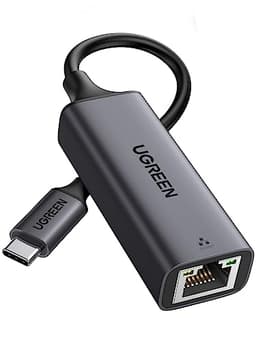
The hardware here is straightforward. You get one USB 3.0 port on one end and one standard RJ45 ethernet port on the other. The USB 3.0 bus runs at up to 5Gbps, which is more than enough headroom for the gigabit ethernet connection it's feeding. The ethernet side supports 10/100/1000Mbps, meaning it'll auto-negotiate down to 100Mbps or 10Mbps on older network equipment, and it'll hit full gigabit on any modern router or switch. That's the spec that matters most here.
The adapter is also backwards compatible with USB 2.0 and USB 1.1 ports.: if you're running it off a USB 2.0 port, you're capped at around 480Mbps on the USB side, which means your gigabit ethernet connection won't actually deliver gigabit throughput. USB 2.0 can theoretically hit around 480Mbps but real-world throughput is typically lower. So if you've got an older machine with only USB 2.0 ports and a gigabit broadband connection, you'll still see a meaningful improvement over a shaky Wi-Fi signal, but you won't be saturating that gigabit line. Something to keep in mind.
The build is aluminium, which UGREEN specifically calls out as a design choice for heat management. That matters more than it sounds. Cheap plastic adapters can get warm under sustained load and thermal throttle quietly. The aluminium shell acts as a passive heatsink and owners consistently report it running cool even during extended use. The form factor is small and light enough to live in a laptop bag without you noticing it's there.
| Specification | Detail |
|---|---|
| USB Port | 1x USB 3.0 (backwards compatible with USB 2.0/1.1) |
| Ethernet Port | 1x RJ45 (1GbE, supports 10/100/1000Mbps) |
| USB Bus Speed | Up to 5Gbps |
| Ethernet Standard | Full Gigabit (1000Mbps) |
| Driver Required | No (plug and play) |
| OS Compatibility | Windows 11/10/8.1/8, macOS, Chrome OS, Nintendo Switch |
| Shell Material | Aluminium |
| Price | £9.96 |

Real-World Coverage and What You're Actually Solving
This isn't a router, so the usual coverage conversation doesn't apply in the traditional sense. What you're solving here is a different problem: the gap between where your Wi-Fi signal is unreliable and where you actually need a stable connection. A wired ethernet connection, even over USB, eliminates that gap entirely for the device you're using it on. No dead zones. No signal dropping when your neighbour's router decides to use the same channel. No latency spikes when the microwave turns on (yes, that's still a thing on 2.4GHz).
Where this adapter genuinely shines is in situations where Wi-Fi is present but unreliable. Think a hotel room with a wired ethernet port in the wall but no decent Wi-Fi. A home office where your laptop doesn't have an ethernet port but the router is nearby. A Steam Deck plugged into a dock next to your TV. A MacBook Air that Apple decided didn't need ethernet. In all of these cases, you're not extending coverage, you're bypassing the wireless problem entirely, and that's a much more reliable solution than any range extender or mesh node.
Owners consistently report that the connection is stable once established. The most common complaint in the reviews isn't about connectivity dropping, it's about compatibility edge cases, which we'll get to. But for the core use case, which is simply getting a reliable wired connection to a device that doesn't have one natively, the feedback is overwhelmingly positive. That 4.6-star average across nearly 7,759 doesn't happen if the thing keeps disconnecting.
Sustained Speed Under Load
The headline number is 1000Mbps, and unlike the marketing figures you see on router boxes, this one is actually achievable in practice. Your real-world throughput will depend on a few things: the speed of your broadband connection, the quality of your router or switch, and critically, whether you're plugging into a USB 3.0 port or a USB 2.0 port. But assuming you've got USB 3.0 and a gigabit-capable network, the adapter won't be your bottleneck.
Where things get slightly more nuanced is on older machines. If your laptop only has USB 2.0 ports, the USB bus itself becomes the limiting factor. Real-world USB 2.0 throughput typically sits somewhere around 200 to 280Mbps in sustained transfers, well short of gigabit. Still faster than most people's broadband connections, and still more stable than Wi-Fi, but if you're specifically trying to saturate a fast line. The USB Implementers Forum publishes the official USB specification standards if you want to dig into the bus architecture, but the practical upshot is simple: USB 3.0 port equals no bottleneck, USB 2.0 port equals some bottleneck.
For the most common use cases, sustained speed is a non-issue. If you're using this for video conferencing, file transfers, gaming, or HD video streaming, which are the exact use cases UGREEN calls out, you're not going to be anywhere near the limits of a gigabit connection anyway. A 4K Netflix stream uses around 25Mbps. A video call uses maybe 10Mbps. A gaming session might use a few Mbps for the game data itself, though latency matters far more than raw throughput for gaming. On all of those tasks, this adapter delivers what you need and the connection stays stable. Owners who specifically mention gaming report noticeably lower and more consistent ping compared to their previous Wi-Fi setup.
Mesh and Backhaul: Not Applicable, But Here's Why That Matters
This is a USB to ethernet adapter, not a mesh node or a router, so there's no backhaul conversation to have in the traditional sense. But it's worth addressing why someone might be looking at this alongside mesh Wi-Fi options, because the two solve genuinely different problems. Mesh networking extends wireless coverage across a larger area. This adapter gives a single device a wired connection. If your problem is that one room in your house has terrible Wi-Fi, a mesh node helps everyone in that room. If your problem is that your specific laptop or console keeps dropping off Wi-Fi, this adapter fixes that device specifically.
There's also a cost argument. A decent mesh system costs significantly more than this adapter. If the actual problem is that one device keeps having Wi-Fi trouble, buying a full mesh system to fix it is like buying a new car because one tyre is flat. This adapter is the tyre. If you genuinely have coverage problems across multiple rooms and multiple devices, that's when mesh makes sense. But if you're working from a home office and your laptop's Wi-Fi is flaky, or you've got a games console that keeps disconnecting, this is a much cheaper and often more effective fix.
What this adapter does interact with is your existing network infrastructure. If your router only has 100Mbps LAN ports (which is rarer now but still exists on some ISP-supplied routers), you won't get gigabit throughput regardless of what the adapter is capable of. Similarly, if you're running a long ethernet cable from a switch to the adapter, the cable quality and length matters. Cat5e or Cat6 cable, which is the standard for gigabit ethernet, is what you want. The adapter itself is not the weak link in that chain.
Device Capacity and What This Actually Connects
This adapter adds one wired ethernet port to one device. That's it. It's not a hub, it's not a switch, it doesn't expand your network's device capacity in any meaningful way. But that framing slightly misses the point, because what it does do is free up wireless capacity on your router for everything else. Every device you move from Wi-Fi to wired is one fewer client competing for airtime on your router's wireless radio. In a busy home with 30-plus wireless devices, moving even two or three of the heaviest users (a gaming PC, a streaming TV, a work laptop) to wired connections can noticeably improve Wi-Fi performance for everything else.
The compatibility list is genuinely broad. UGREEN lists MacBook Pro models from 2016 through 2022, MacBook Air, iPad Air and iPad Pro, iMac, Mac Mini, Chromebook, Surface Pro 7, Surface Book 2, Dell XPS 13 and 15, Samsung tablets, various Lenovo ThinkPad and IdeaPad models, HP Pavilion and Spectre, ASUS ZenBook, Steam Deck, and Nintendo Switch and Switch Lite. That covers the vast majority of modern laptops and several popular portable gaming devices.
The Nintendo Switch compatibility is specifically because it's not obvious. The Switch doesn't have an ethernet port, and Nintendo's own official ethernet adapter is considerably more expensive. Using a third-party USB adapter like this one requires putting the Switch into its dock and using the dock's USB port. Owners who've used it this way report it working reliably, which is useful if you're playing online and tired of the Switch's Wi-Fi being temperamental. The Steam Deck use case is similar: dock it, plug in the adapter, get a wired connection. Both are legitimate use cases that owners specifically mention in reviews.
Wi-Fi Standard and Future-Proofing: Honest Take
This adapter doesn't do Wi-Fi. That's not a criticism, it's just what it is. So the usual conversation about Wi-Fi 6, Wi-Fi 6E, or Wi-Fi 7 doesn't apply here in the way it would for a router or a wireless adapter. What does apply is the wired ethernet standard, and 1GbE is still the right answer for most homes and most broadband connections in the UK.
The reality is that most UK broadband connections top out at 1Gbps or below. Full-fibre gigabit broadband is increasingly common, but 2.5Gbps and 10Gbps residential connections are still very much the minority. So a 1GbE adapter covers the actual broadband speeds most people have. If you're on a 900Mbps full-fibre connection, you'll be fine. If you're on a 500Mbps or lower connection, you've got headroom to spare. The only scenario where you'd genuinely outgrow this adapter's ethernet port is if you're on a multi-gigabit broadband connection and need to saturate it over a wired link, which is not most people's situation in 2026.
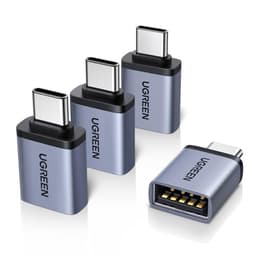
The USB 3.0 interface is also in terms of future-proofing. USB 3.0 is still the dominant USB standard on laptops and peripherals, and it'll remain relevant for years. USB-C is increasingly common, and if your laptop only has USB-C ports, you'll need a USB-C to USB-A adapter or hub to use this. UGREEN does make USB-C variants of similar adapters, so if that's your situation, it's their range. But for machines with a standard USB-A port, USB 3.0 is not going anywhere soon.
Features and QoS
There's no QoS here. No parental controls, no guest network, no VPN passthrough, no buffer-bloat management. None of that applies to a USB ethernet adapter. What you get is a wired connection, and the quality of that connection in terms of latency, packet loss, and jitter is determined by your router and your ISP, not by this adapter. The adapter's job is simply to bridge your USB port to your ethernet network, and it does that without adding any overhead or complexity.
What is is the plug-and-play claim, because it's one of the things that genuinely differentiates good adapters from annoying ones. Plenty of cheap USB ethernet adapters require you to download drivers, which is a pain when you're trying to get online quickly on a new machine or a machine you don't have admin rights on. This one doesn't. Windows 10 and 11 recognise it immediately. macOS handles it natively. Chrome OS works. The Switch works through the dock. Owners consistently confirm this, and it's one of the most frequently mentioned positives in the reviews.
The aluminium shell does double duty as both a heat sink and a build quality signal. Budget adapters in plastic shells can feel flimsy and the connectors can loosen over time with repeated plugging and unplugging. The aluminium construction here feels more durable, and the RJ45 socket has a proper locking tab for the ethernet cable. That's a small thing, but a loose ethernet connection that intermittently disconnects is exactly the kind of problem that drives people mad. Owners who mention build quality are generally positive, with the adapter described as feeling premium for the price point.
Firmware, App and Security Updates
There's no firmware to update and no app to manage. This is a passive adapter with a built-in chip that handles the USB to ethernet translation. The chip is what determines compatibility and performance, and UGREEN specifies it as a high-end built-in chip, though they don't name the specific chipset in the public listing. For most users, this doesn't matter. The adapter either works with your OS or it doesn't, and the broad compatibility list and owner feedback suggest it works with the vast majority of setups.
The absence of firmware does have an upside: there's nothing to go wrong with updates, no security vulnerabilities introduced by a poorly maintained firmware stack, and no chance of an update breaking something that was working. For a simple adapter, this is actually a feature. The security surface is essentially zero. You're not exposing any management interface to your network, you're not running any software that could be exploited, and there's no cloud connectivity or app to worry about.
Where this matters more is on the OS compatibility side. UGREEN lists Windows 11/10/8.1/8, macOS, Chrome OS, and Nintendo Switch as supported platforms. Linux isn't mentioned in the listing, but owners on various Linux distributions report the adapter working without issues, since the underlying chipset is typically supported by the Linux kernel's built-in drivers. That said, Linux compatibility isn't verified in the product data, so if that's your primary use case, owner reviews specifically for your distribution before buying.
Setup and Management
Setup is about as simple as it gets. Plug the USB end into your computer, plug an ethernet cable into the RJ45 port, and you're online. No software to install, no account to create, no app to download. On Windows, the adapter shows up as a network interface within seconds. On macOS, same story. The Switch requires the dock, but once it's in the dock and the adapter is plugged into the dock's USB port, the console recognises it and you can switch to wired in the network settings.
There's no ongoing management required or possible. You can't configure anything on the adapter itself. It's a bridge, not a smart device. If you need to change network settings, you do that in your OS's network preferences or on your router, exactly as you would with any other wired connection. For non-technical buyers, this is actually the ideal situation: nothing to configure, nothing to break, nothing to update. It either works or it doesn't, and based on the owner feedback, it almost always works.
The only setup wrinkle that comes up in owner reviews is the USB-C situation. If your laptop has only USB-C or Thunderbolt ports, you'll need an adapter or hub to use this. Some owners mention this as a frustration, though notably, that UGREEN sells USB-C versions of similar adapters. If you're on a modern MacBook Pro or MacBook Air with only USB-C ports, double-check which version you're ordering. The product listing does cover a wide range of MacBook models, so it's clearly designed to work with them, but you may need a USB-C hub in the middle if your machine doesn't have a USB-A port.
Ports and Connectivity: UGREEN USB 3.0 to 1000Mbps Gigabit Network Adapter
The port layout is exactly what it says on the tin: one USB 3.0 Type-A port and one RJ45 ethernet port supporting 10/100/1000Mbps. The USB 3.0 bus provides up to 5Gbps of bandwidth, which gives the gigabit ethernet connection plenty of headroom. The ethernet port auto-negotiates speed with whatever it's connected to, so it'll drop to 100Mbps or 10Mbps on older network equipment without any manual configuration.
There's no USB hub functionality here. You're not getting extra USB ports out of this. It's a single-function adapter: USB in, ethernet out. If you need to add ethernet and USB ports simultaneously, you'd want a USB hub with a built-in ethernet port, or a USB-C dock if your laptop supports it. But for the specific job of adding ethernet to a device that doesn't have it, this does that job cleanly without unnecessary complexity.
The backwards compatibility with USB 2.0 and 1.1 is here because it affects real-world performance. USB 2.0 has a theoretical maximum of 480Mbps but practical throughput is typically lower. If you're running this off a USB 2.0 port, your effective ethernet throughput will be limited by the USB bus, not the ethernet standard. For most broadband connections in the UK, which are under 500Mbps, this won't matter in practice. But if you're specifically trying to max out a gigabit connection, you need a USB 3.0 port. The USB 3.2 specification from the USB-IF makes clear why the generational difference matters for throughput-sensitive applications.
How It Compares to the Competition
The budget USB to ethernet adapter market is crowded, and most of the options are functionally similar. The main competitors at this price point are the Anker USB 3.0 to Ethernet Adapter and the TP-Link UE300 USB 3.0 to Gigabit Ethernet Adapter. Both do the same basic job: USB 3.0 in, gigabit ethernet out, plug and play. The differences come down to build quality, compatibility breadth, and brand trust.
The TP-Link UE300 is probably the most direct competitor. It's been around longer, has a large owner review base, and TP-Link is a well-known networking brand. It uses a Realtek chipset, which has broad driver support across operating systems. The UGREEN adapter's aluminium shell gives it a slight edge on build quality perception and heat management over the UE300's plastic body. The UGREEN also has a broader stated compatibility list, specifically calling out the Steam Deck and Nintendo Switch, which the TP-Link doesn't emphasise. On raw performance, both deliver gigabit ethernet over USB 3.0, so there's no meaningful difference there.
The Anker USB 3.0 to Ethernet Adapter sits in a similar space. Anker has strong brand recognition and good customer support. Like the UGREEN, it's plug and play and supports gigabit speeds. The UGREEN's aluminium construction is a differentiator here too. Anker's adapter uses a plastic shell, which is fine but doesn't have the same heat dissipation properties. For casual use, that won't matter. For sustained high-throughput transfers over long periods, the UGREEN's passive cooling is a practical advantage.
| Feature | UGREEN USB 3.0 Gigabit Adapter | TP-Link UE300 | Anker USB 3.0 Ethernet Adapter |
|---|---|---|---|
| Price | £9.96 | Budget tier | Budget tier |
| USB Standard | USB 3.0 (5Gbps) | USB 3.0 (5Gbps) | USB 3.0 (5Gbps) |
| Ethernet Speed | 10/100/1000Mbps | 10/100/1000Mbps | 10/100/1000Mbps |
| Shell Material | Aluminium | Plastic | Plastic |
| Driver Required | No | No | No |
| Nintendo Switch Support | Yes (stated) | Not emphasised | Not emphasised |
| Steam Deck Support | Yes (stated) | Not emphasised | Not emphasised |
| macOS Compatibility | Yes | Yes | Yes |

Final Verdict
The UGREEN USB 3.0 to 1000Mbps Gigabit Network Adapter does one thing and does it well. It adds a wired ethernet port to a device that doesn't have one, does it without drivers, and does it reliably enough that nearly 8,000 owners have given it a 4.6-star average. That's not a fluke. For the price, the aluminium build quality is a genuine differentiator over cheaper plastic alternatives, the compatibility list is genuinely broad, and the plug-and-play experience is as friction-free as this category gets.
It's not for everyone. If your laptop only has USB-C ports, you'll need an adapter in the middle, which adds cost and a potential failure point. If you're on a USB 2.0 machine and trying to saturate a gigabit connection, the bus will hold you back. And if you're expecting this to fix your whole-home Wi-Fi situation, it won't. It fixes one device's connection, not your network's coverage. For that, you'd want to look at a proper mesh system or a better router.
But for the specific problem it's designed to solve, which is getting a reliable wired connection to a device that doesn't have an ethernet port, this is a proper solution at a budget price. The Steam Deck and Switch compatibility is a nice bonus that genuinely matters to a chunk of buyers. The aluminium shell means it'll survive rattling around in a laptop bag. And the fact that it just works, without drivers or setup faff, is worth more than it sounds when you're in a hotel room at 8am trying to get on a call.
If you're genuinely just after the cheapest possible adapter and build quality doesn't matter to you, the TP-Link UE300 is marginally cheaper in some listings and works fine. But the UGREEN's aluminium construction and broader stated compatibility make it worth the small price difference for most buyers. Score: 8 out of 10.
What works. What doesn’t.
5 + 3What we liked5 reasons
- Genuine plug-and-play on Windows, macOS, Chrome OS and Nintendo Switch with no driver download needed
- Aluminium shell provides better heat management and durability than plastic competitors at the same price
- Full 10/100/1000Mbps gigabit ethernet over a USB 3.0 bus with real headroom to spare
- Broad compatibility list including Steam Deck, Switch, MacBook Pro, Dell XPS and more
- 4.6-star average from nearly 8,000 owner reviews is a strong reliability signal
Where it falls3 reasons
- USB-C-only laptops need an additional adapter or hub, adding cost and a potential weak point
- USB 2.0 ports will bottleneck throughput below gigabit speeds
- No hub functionality, just a single ethernet port added
Full specifications
6 attributes| Device type | usb-adapter |
|---|---|
| Ethernet ports | 1 |
| Frequency bands | none |
| HAS bluetooth | none |
| MAX speed | 1000 |
| Wifi standard | none |
Frequently asked
5 questions01Will the UGREEN USB 3.0 to 1000Mbps Gigabit Network Adapter, Aluminum RJ45 LAN Internet Adapter, Compatible with Switch, MacBook Pro 2022, XPS, TV Box, Steam Deck cover my whole house?+
This adapter doesn't extend Wi-Fi coverage. It adds a wired ethernet connection to a single device. If you plug it into your laptop or Steam Deck and connect an ethernet cable to your router or a wall socket, that one device gets a stable wired connection. Your other devices stay on Wi-Fi as normal. For whole-home coverage improvements, you'd need a mesh Wi-Fi system or additional access points.
02Do I really need Wi-Fi 6E or Wi-Fi 7 for the UGREEN USB 3.0 to 1000Mbps Gigabit Network Adapter, Aluminum RJ45 LAN Internet Adapter, Compatible with Switch, MacBook Pro 2022, XPS, TV Box, Steam Deck?+
No, and the question doesn't quite apply. This is a wired ethernet adapter, not a wireless device. It doesn't use Wi-Fi at all. It connects your device directly to your router or switch via an ethernet cable, bypassing Wi-Fi entirely. That's actually the point: you get a stable, low-latency wired connection without any of the interference or congestion issues that affect Wi-Fi.
03Is the UGREEN USB 3.0 to 1000Mbps Gigabit Network Adapter, Aluminum RJ45 LAN Internet Adapter, Compatible with Switch, MacBook Pro 2022, XPS, TV Box, Steam Deck mesh worth it over a single router or extender?+
This isn't a mesh product. It's a USB to ethernet adapter that adds a single wired port to one device. If you're deciding between this and a mesh system, they solve different problems. This fixes one device's unreliable Wi-Fi by giving it a wired connection. A mesh system improves wireless coverage for all devices across a larger area. If your specific problem is one device with flaky Wi-Fi and you're near a router or ethernet wall socket, this adapter is a simpler and cheaper fix.
04Is the UGREEN USB 3.0 to 1000Mbps Gigabit Network Adapter, Aluminum RJ45 LAN Internet Adapter, Compatible with Switch, MacBook Pro 2022, XPS, TV Box, Steam Deck easy to set up and reliable?+
Setup is about as simple as networking kit gets: plug the USB end into your device, plug an ethernet cable into the RJ45 port, and you're online. No drivers to download, no software to install. It's plug and play on Windows 10 and 11, macOS, Chrome OS, and Nintendo Switch. Owner feedback across nearly 8,000 reviews averages 4.6 out of 5, with reliability consistently praised. The most common complaints are about USB-C compatibility on newer laptops, not about the adapter dropping connection.
05What warranty and returns apply to the UGREEN USB 3.0 to 1000Mbps Gigabit Network Adapter, Aluminum RJ45 LAN Internet Adapter, Compatible with Switch, MacBook Pro 2022, XPS, TV Box, Steam Deck?+
Warranty details aren't specified in the verified product data for this listing. When buying through Amazon UK, you're covered by Amazon's standard 30-day returns policy and the A-to-Z Guarantee, which protects you if the item doesn't arrive or isn't as described. For warranty terms beyond that, check the product listing directly or contact the seller before purchasing.