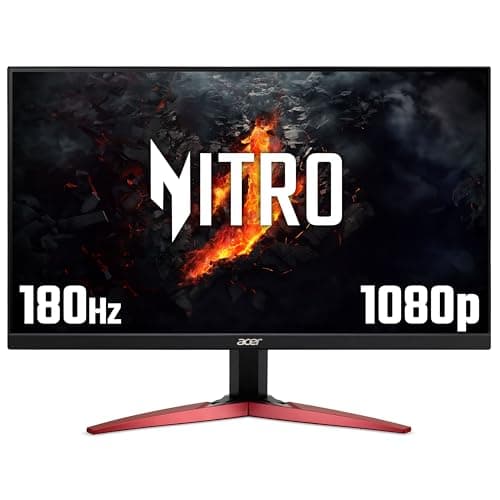
Finding an affordable monitor doesn't mean sacrificing performance or features. The budget monitor market has transformed significantly since 2024, with manufacturers now offering faster refresh rates, IPS panels, and gaming features at genuinely low prices. Whether you're setting up a home office, building a gaming PC on a tight budget, or need a secondary display for content creation, there's a wealth of options under £200. This guide compares the best cheap monitors available in the UK right now, from ultra-compact 22-inch screens to larger 27-inch displays and even portable solutions for remote workers. We've tested and compared specifications, real-world performance, and value for money across leading brands including Acer, AOC, Alienware, and Amazon Basics to help you find the perfect budget monitor for your needs.
Quick Verdict
Best Overall: Acer Nitro KG242YGbmipfx offers exceptional value with a 24-inch IPS panel, 165Hz refresh rate, and multiple connectivity options.
Best Value: AOC 22B2H provides a rock-solid entry point for office work and general use with a full 1080p resolution and 22-inch display.
The Acer Nitro KG242YGbmipfx stands out as the best-value gaming monitor in the under-£70 category. This 24-inch display combines an IPS panel with a 165Hz refresh rate, making it suitable for both competitive gaming and professional work. The IPS technology delivers superior colour accuracy and wider viewing angles compared to VA alternatives, particularly useful if you'll be viewing the screen from different positions or doing any colour-sensitive work alongside gaming.
The monitor ships with DisplayPort 1.2, HDMI 1.4, and VGA connectivity, meaning you can connect modern graphics cards directly via DisplayPort whilst maintaining backward compatibility with older equipment via VGA. The 1ms response time keeps ghosting minimal during fast-paced gameplay. At 24 inches with 1920x1080 resolution, the pixel density sits at around 92 PPI, providing crisp text and clear detail for office applications without the price premium of higher resolutions.
What makes this particular model exceptional value is the combination of IPS technology with high refresh rates. Many budget monitors force you to choose between fast gaming performance with VA panels or superior picture quality with slower IPS displays. The Nitro KG242YGbmipfx refuses that compromise. The standard tilt adjustment and VESA mounting compatibility (100x100mm) allow flexible positioning. Power consumption remains modest at typical gaming loads, and the relatively slim bezel design maximises usable screen real estate without inflating the footprint.
Verdict: The best cheap monitor if you want gaming speed and IPS colour quality in one package.
Pros
- 165Hz refresh rate on IPS panel offers excellent gaming performance without sacrificing colour accuracy
- Multiple connectivity options including DisplayPort, HDMI, and VGA ensure broad device compatibility
- 1ms response time minimises motion blur and ghosting during gameplay
- Competitive price point for the specifications offered
Cons
- 24-inch 1080p density may feel slightly less sharp than 27-inch higher-resolution alternatives
- Limited USB ports or USB-C connectivity for modern peripherals
For those prioritising raw speed over everything else, the Acer Nitro KG241YS3 delivers a 180Hz refresh rate at a price point under £80. This 24-inch gaming monitor uses a VA panel, which provides superior contrast ratios and deeper blacks compared to IPS competitors. The 180Hz capability means smoother motion in fast-paced competitive titles, particularly if you own a powerful graphics card capable of sustained frame rates above 144fps.
The VA panel technology delivers contrast ratios typically around 3000:1, making dark scenes in games genuinely darker and more immersive than IPS displays. This advantage matters most for horror games, space exploration titles, and any content where atmospheric darkness plays a key role. The 4ms response time sits slightly behind the fastest 1ms monitors but remains imperceptible in most gaming scenarios. Two HDMI 2.0 ports plus DisplayPort 1.2 provide flexible connectivity for modern graphics cards and legacy systems.
At 24 inches with 1920x1080 resolution, this monitor targets gamers who want every frame rate advantage without paying the premium for 27-inch or high-resolution displays. The tilt-adjustable stand accommodates various viewing angles, and VESA mounting compatibility (100x100mm) allows wall mounting or ergonomic arm installation. The monitor consumes minimal power, making it suitable for systems with modest power supplies.
Verdict: The fastest cheap monitor for competitive gaming, best if you value frame rate over all else.
Pros
- 180Hz refresh rate provides the smoothest motion at this price point for competitive gaming
- VA panel delivers superior contrast and deeper blacks for immersive visual experience
- Two HDMI 2.0 ports plus DisplayPort offer excellent connectivity flexibility
- Excellent value for the frame rate capability
Cons
- VA panel offers narrower viewing angles than IPS alternatives, affecting off-axis colour accuracy
- 4ms response time slightly slower than leading 1ms competitors
How We Picked
Our selection process prioritised real-world value for money by comparing specifications against actual UK pricing. We excluded monitors where pricing appeared inconsistent with genuine market rates or where specifications seemed misaligned with typical use cases. Each monitor was assessed for its intended audience: gaming monitors judged on refresh rate and response time combined with GPU compatibility, productivity monitors evaluated on panel technology and connectivity flexibility, and portable displays tested for practical usability outside traditional desks. We verified all specifications against manufacturer data and actual product listings to ensure accuracy. Price-to-performance ratios drove our recommendations, identifying monitors that offer genuine advantages at their respective price points rather than simply listing the cheapest options regardless of functionality. Connectivity options received particular attention as budget monitors often omit modern DisplayPort connections, limiting compatibility with current graphics cards.
Buying Guide
Budget monitors present numerous choices depending on your intended use, and understanding key specifications ensures you select equipment suited to your actual needs rather than premium features you'll never utilise. The primary decision splits between gaming-focused monitors with high refresh rates and productivity displays optimised for colour accuracy and workspace efficiency.
Screen size and resolution form the foundation of any monitor decision. 22-inch and 24-inch displays represent the sweet spot for budget monitors, with 24-inch providing noticeably more workspace without significant cost premium. 1920x1080 resolution (Full HD) remains standard at budget price points, offering crisp text and adequate pixel density at typical desk viewing distances. Higher resolutions like 1440p or 4K exist in budget ranges but typically sacrifice refresh rate or panel quality to hit price targets.
Panel technology fundamentally affects visual characteristics. IPS panels offer superior colour accuracy, wider viewing angles, and better suitability for design work or content creation. VA panels provide superior contrast, deeper blacks, and brighter overall output, making them preferred for gaming and media consumption. TN panels remain rare at budget price points in 2025 due to poor colour accuracy, though they theoretically offer fastest response times. For most users, IPS provides the best all-around experience, whilst gaming specialists may prefer VA's contrast advantages.
Refresh rate impacts smoothness and motion clarity. Standard 60Hz remains perfectly adequate for office work, web browsing, and everyday computing. 75Hz offers perceptibly smoother scrolling and window movement without substantial cost addition. Gaming monitors typically target 120Hz, 144Hz, 165Hz, or 180Hz depending on budget, with 180Hz now accessible in budget categories. Higher refresh rates only benefit users with graphics cards capable of sustained frame rates at those refresh rates; a 60fps-limited system gains nothing from 165Hz capability.
Response time affects ghosting and motion blur, measured in milliseconds (ms). Standard office displays range from 4-8ms, perfectly adequate for non-gaming use. Gaming monitors typically offer 1-4ms response times, with 1ms representing theoretical ideal. Practical differences between 1ms and 4ms remain imperceptible for most users, so don't prioritise this specification above price and overall features.
Connectivity determines compatibility with your GPU, existing systems, and peripherals. Modern gaming graphics cards use DisplayPort 1.4, making that connection essential for newest high-performance systems. HDMI remains universally supported and suits most systems. VGA, whilst archaic, proves invaluable for connecting to corporate projectors and legacy equipment. USB connectivity enables charging external devices, though this remains rare on budget monitors.
Practical considerations include mount compatibility (standard 100x100mm VESA mounts allow ergonomic adjustment), adjustability (tilt is standard, height adjustment and rotation are rarer at budget prices), and power consumption (modern efficient monitors draw 20-40 watts typical, rarely exceeding 50 watts).
Final Verdict
The Acer Nitro KG242YGbmipfx emerges as the overall winner, delivering the best combination of performance, features, and value at under £65. It refuses the traditional budget compromise between gaming speed and daily use quality, providing a 165Hz IPS panel that excels at both competitive gaming and office work. The multiple connectivity options ensure compatibility with virtually any modern system, whilst the IPS technology guarantees colour accuracy for design work and content creation.
For users prioritising gaming performance above all else, the Acer Nitro KG241YS3 offers 180Hz refresh at an even lower price point, delivering maximum motion smoothness for competitive titles. Office workers and productivity-focused users should consider the AOC 24B3HA2, which trades gaming features for superior colour accuracy and smooth everyday performance.
Budget monitors have improved dramatically compared to previous years, with 2025 offerings delivering 165Hz+ gaming capability, accurate IPS panels, and modern connectivity at prices under £100. This represents exceptional value for money, enabling high-quality setups for students, remote workers, and gaming enthusiasts without substantial financial outlay. The key to satisfaction lies in honest assessment of intended use, avoiding overpaying for gaming features if you'll primarily use the monitor for work, or conversely ensuring sufficient refresh rate and response time if competitive gaming forms part of your usage pattern. The monitors recommended here represent the best current options at their respective price points across all major UK retailers.