Ultrawide monitors have moved firmly into mainstream territory, and the sub-£300 bracket has never been more competitive. Whether you are a content creator who wants more horizontal real estate, a gamer chasing immersive curved panels, or a home-office worker tired of juggling two separate screens, there is now a genuinely capable option at this price point. The two true 34-inch 3440x1440 ultrawides in this roundup, the AOC CU34G2XPD and the LXZ 34-inch, represent the core of what ultrawide buyers are after: wide-format immersion, high refresh rates, and FreeSync support. Alongside those, we have included three strong 16:9 gaming monitors that regularly come up in the same purchase conversations, offering high refresh rates, sharp resolutions, and curved panels for buyers who are weighing up ultrawide versus a large flat or curved standard display. If you're exploring other premium brands in this category, ASUS monitors under £300 also merit consideration. All five picks sit under £300, and all have been assessed against real-world use cases for UK buyers in 2025.
Quick Verdict
Best Overall Ultrawide: AOC Gaming CU34G2XPD. At under £200 it delivers a genuine 34-inch 3440x1440 ultrawide experience with a 180 Hz refresh rate, comprehensive port selection, and FreeSync Premium support. It is the standout pick for anyone who wants a true ultrawide without breaking the budget.
Best Value Ultrawide: LXZ 34-inch Curved Monitor. The LXZ costs a little more than the AOC but still sits comfortably under £300, offering 165 Hz and the same 3440x1440 resolution in a 1500R curved chassis. It is the pick for buyers who want ultrawide immersion and are happy to trade a few hertz for a slightly lower price ceiling.
Best Standard Alternative: Z-Edge 27-inch 240 Hz QHD. For buyers who are not committed to the ultrawide format, the Z-Edge delivers 2560x1440 at 240 Hz on an IPS panel for under £200, making it a compelling alternative if frame rate matters more than aspect ratio.
The AOC CU34G2XPD is the headline pick in this roundup and the monitor most buyers searching for an ultrawide under £300 should look at first. It is a 34-inch curved VA panel running at 3440x1440 resolution with a 180 Hz refresh rate and a 1 ms response time, all for under £200. That combination of specs at this price point would have been unthinkable just two years ago, and it makes the CU34G2XPD one of the most significant value propositions in the current UK monitor market.
The 3440x1440 resolution, sometimes called UWQHD or simply ultrawide QHD, gives you a 21:9 aspect ratio that is noticeably wider than a standard 16:9 panel. For gaming, this means more peripheral vision in supported titles, which is particularly impactful in racing games, flight simulators, and open-world RPGs. For productivity, it means you can comfortably run two full-size application windows side by side without the bezels and desk clutter of a dual-monitor setup. The 1800R curvature wraps the screen gently around your field of view, reducing the need to move your head to see the edges of the panel.
The port selection is genuinely impressive for this price tier. You get two HDMI 2.0 ports, two DisplayPort 1.4 ports, a USB-B upstream, four USB-A downstream ports, and a 3.5mm audio output. The dual DisplayPort 1.4 connections mean you can drive the full 3440x1440 at 180 Hz without any bandwidth compromises, and the USB hub functionality is a practical bonus for gaming peripherals like keyboard and mouse connections. FreeSync Premium support is included, and the monitor is also G-Sync compatible, so it works well with both AMD and Nvidia GPU owners.
The VA panel delivers strong contrast ratios, which is particularly beneficial in darker game environments and when watching HDR content. Black levels are noticeably deeper than you would get from an IPS panel at this price. The trade-off is that VA panels can exhibit some ghosting on fast-moving content, though the 1 ms response time specification and the 180 Hz refresh rate mitigate this considerably compared to older VA displays.
This monitor suits gamers who want immersive ultrawide gaming without spending over £200, content creators who want more horizontal workspace, and home-office users who want to replace a dual-monitor setup with a single wide panel. It is not ideal for competitive esports players who prioritise absolute pixel response over immersion, as a fast IPS panel would serve that use case better. For everyone else, the CU34G2XPD is a remarkable monitor at its price point.
Verdict: The best ultrawide monitor under £300 in the UK right now. Exceptional value, strong specs, and a port selection that rivals monitors costing twice as much.
Pros
- Genuine 34-inch 3440x1440 ultrawide at under £200, outstanding value
- 180 Hz refresh rate with FreeSync Premium and G-Sync compatibility
- Four USB-A downstream ports and dual DisplayPort 1.4 connections included
Cons
- VA panel can exhibit some ghosting on very fast-moving content compared to IPS alternatives
- No built-in speakers, requiring external audio solution
The LXZ 34-inch is the second true ultrawide in this roundup and a solid alternative to the AOC CU34G2XPD for buyers who find the AOC out of stock or who prefer a different aesthetic. It shares the same fundamental appeal: a 34-inch 3440x1440 VA panel with a 1500R curve and FreeSync support, all under £300. The refresh rate comes in at 165 Hz rather than the AOC's 180 Hz, which is a minor difference in practice but worth noting if you are comparing the two side by side.
The 1500R curvature is slightly tighter than the AOC's 1800R, which means the screen wraps more aggressively around your field of view. Some users find this more immersive, particularly at close viewing distances of 60-80 cm. Others find it introduces some geometric distortion when working with straight-line content such as spreadsheets or architectural drawings. It is a matter of personal preference, and if possible, viewing both curvatures in person before purchasing is worthwhile.
The port selection on the LXZ is more modest than the AOC, with two HDMI ports and one DisplayPort rather than the AOC's dual DisplayPort and USB hub. For most users connecting a single PC or console, this is perfectly adequate. However, if you plan to connect multiple sources simultaneously, the AOC's broader connectivity is a meaningful advantage. There is no USB hub on the LXZ, so peripheral connections will need to go directly to your PC.
The 3440x1440 resolution on a 34-inch screen gives a pixel density of approximately 109 pixels per inch, which is sharp enough for comfortable close-up work and gaming without requiring any scaling. Text rendering is clean, and the panel's VA contrast performance means dark scenes in games and films look rich rather than washed out. Colour coverage is competitive for a VA panel at this price, making it usable for light photo editing and content consumption alongside gaming.
The LXZ suits buyers who want ultrawide immersion on a tighter budget, gamers who play titles that benefit from the wider field of view, and users who are upgrading from a single standard monitor and want a significant step up in screen real estate. It is a particularly good fit for console gamers who only need HDMI connectivity and do not require the USB hub functionality of the AOC.
Verdict: A capable and affordable 34-inch ultrawide that delivers the core ultrawide experience. The port selection is more limited than the AOC, but the price and the tighter 1500R curve make it a genuine contender.
Pros
- 34-inch 3440x1440 ultrawide at a competitive price point under £300
- 1500R curvature provides a highly immersive viewing experience for gaming and film
- FreeSync support ensures smooth gameplay with compatible AMD GPUs
Cons
- Only one DisplayPort connection, limiting multi-source flexibility compared to the AOC
- No USB hub, so peripheral connections must route through the PC directly
The Z-Edge 27-inch is not an ultrawide, but it earns its place in this roundup as the strongest argument for choosing a standard 16:9 panel over an ultrawide at this price point. It offers a 2560x1440 QHD resolution on a 27-inch IPS panel with a 240 Hz refresh rate and a 1 ms response time, all for under £200. For competitive gamers and users who prioritise frame rate and pixel response over screen width, this is a compelling alternative to the ultrawide options.
The IPS panel technology is a meaningful differentiator here. Where the ultrawide picks in this roundup use VA panels, the Z-Edge's IPS panel delivers better colour accuracy, wider viewing angles, and faster pixel transitions. The result is crisper motion in fast-paced games and more accurate colour reproduction for creative work. The 240 Hz refresh rate is the highest in this roundup and is genuinely useful for competitive titles like Valorant, CS2, and Apex Legends, where every millisecond of display latency matters.
The 2560x1440 QHD resolution strikes a good balance between sharpness and GPU demand. It is noticeably sharper than 1080p on a 27-inch screen, with a pixel density of approximately 109 PPI, but it is considerably less demanding to drive than 4K. A mid-range GPU such as an RTX 4060 or RX 7600 can push high frame rates at 1440p in most titles, making the 240 Hz refresh rate achievable in practice rather than just on paper.
The port selection is strong, with two HDMI ports, two DisplayPort connections, and an audio output. The dual DisplayPort inputs are useful for users who want to connect both a PC and a laptop, or who plan to upgrade their GPU and want flexibility. The monitor's flat panel design means it takes up less desk depth than a curved ultrawide, which can be an advantage in tighter workspaces.
This monitor is best suited to competitive gamers who want the highest possible frame rates at a sharp resolution, users who work with colour-sensitive content and need IPS accuracy, and buyers who are not convinced by the ultrawide format but want a premium gaming experience under £200. It is less suited to users who want the immersive widescreen experience that only a 21:9 panel can provide.
Verdict: The best non-ultrawide option in this roundup. If competitive gaming performance and IPS colour accuracy matter more than screen width, the Z-Edge delivers exceptional value at 240 Hz QHD.
Pros
- 240 Hz refresh rate with IPS panel delivers excellent motion clarity for competitive gaming
- 2560x1440 QHD resolution is noticeably sharper than 1080p without excessive GPU demand
- Dual HDMI and dual DisplayPort inputs provide flexible multi-source connectivity
Cons
- Standard 16:9 aspect ratio does not provide the immersive ultrawide field of view
- Flat panel design lacks the curved immersion of the ultrawide alternatives in this roundup
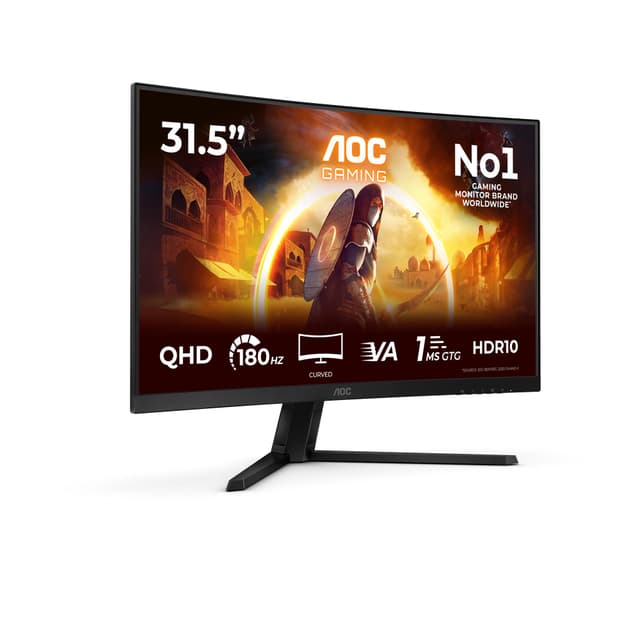
The AOC C32G2ZE is a 31.5-inch curved FHD monitor running at 240 Hz, and it occupies an interesting niche in this roundup. It is not an ultrawide, but its large curved screen and high refresh rate make it a popular choice for gamers who want a big, fast, immersive display without the GPU demands or price premium of ultrawide or QHD panels. At under £100, it is also the most affordable pick in this roundup by a significant margin.
The 1920x1080 resolution on a 31.5-inch screen gives a pixel density of approximately 70 PPI, which is noticeably lower than the other picks in this roundup. Text and fine detail are less crisp than on a 27-inch 1440p or 34-inch ultrawide panel, and this is the main trade-off you accept for the combination of large screen size, high refresh rate, and low price. For gaming at typical viewing distances of 60-80 cm, the lower pixel density is less noticeable, but for productivity work involving text or detailed graphics, it can become apparent.
The 240 Hz refresh rate is the headline specification, and it is genuinely useful for competitive gaming. Combined with the 1 ms MPRT response time and AMD FreeSync Premium support, the C32G2ZE delivers smooth, tear-free gameplay in fast-paced titles. The VA panel provides strong contrast and deep blacks, which enhances the gaming experience in dark environments. The 1500R curvature wraps the large screen around your field of view, adding a degree of immersion that partially compensates for the lack of ultrawide width.
The port selection includes HDMI and DisplayPort connections, which is adequate for most single-PC setups. The monitor's large footprint means it requires a reasonably deep desk, and the stand offers tilt adjustment but may not provide the full ergonomic flexibility of more expensive monitors.
The C32G2ZE suits budget-conscious gamers who want a large, fast screen for competitive gaming, users who are upgrading from a smaller monitor and want a significant size increase, and buyers who prioritise refresh rate and screen size over pixel density. It is not the right choice for users who need sharp text for office work or who want the ultrawide aspect ratio.
Verdict: An impressive combination of size, speed, and price. The lower pixel density is a genuine compromise, but for fast-paced gaming on a tight budget, the C32G2ZE is hard to beat.
Pros
- 240 Hz refresh rate and 1 ms MPRT at under £100 is exceptional value for competitive gaming
- 31.5-inch curved screen provides a large, immersive gaming experience
- FreeSync Premium support ensures smooth gameplay with AMD graphics cards
Cons
- 1920x1080 on a 31.5-inch screen results in noticeably lower pixel density than QHD or ultrawide alternatives
- Not an ultrawide panel, so the immersive 21:9 field of view is absent
Buying Guide
Is it worth getting an ultrawide monitor?
For most users, yes. A 34-inch 3440x1440 ultrawide monitor provides roughly 33% more horizontal screen space than a standard 27-inch 1440p monitor, which translates to a genuinely different experience for both gaming and productivity. In gaming, supported titles render a wider field of view, which is particularly impactful in racing games, open-world titles, and simulation games. In productivity, you can run two full-size application windows side by side without the bezel gap of a dual-monitor setup. The main caveats are that not all games support ultrawide resolutions natively, some competitive multiplayer titles restrict ultrawide to prevent unfair advantages, and the wider panel requires a GPU with enough bandwidth to drive 3440x1440 at high refresh rates.
Is ultrawide harder to run than 4K?
Generally, no. A 3440x1440 ultrawide has approximately 4.95 million pixels, compared to 8.29 million pixels in a 4K (3840x2160) display. This means a 3440x1440 ultrawide is considerably less demanding on your GPU than 4K, making it a practical choice for mid-range hardware. An RTX 4060 or RX 7600 can push high frame rates at 3440x1440 in most titles, whereas 4K gaming typically requires a higher-end GPU to achieve comparable performance. For buyers with mid-range GPUs, ultrawide at 3440x1440 is a more achievable target than 4K.
Is 3440x1440 considered 2K or 4K?
Neither, strictly speaking. The 3440x1440 resolution is most accurately described as UWQHD (Ultra-Wide Quad HD) or simply ultrawide QHD. It shares the 1440-pixel vertical resolution of standard QHD (2560x1440), which is often colloquially called 2K, but its wider horizontal resolution of 3440 pixels is unique to the 21:9 ultrawide format. It is not 4K, which requires a minimum of 3840x2160 pixels. In terms of visual sharpness on a 34-inch panel, 3440x1440 delivers approximately 109 PPI, which is comfortably sharp for both gaming and productivity work.
Is there a downside to curved monitors?
Curved monitors have a few genuine trade-offs worth considering. The curvature can introduce slight geometric distortion when working with straight-line content such as spreadsheets, architectural drawings, or photo editing, particularly on tighter curvatures like 1500R. Reflections can also appear more complex on a curved surface than on a flat panel. For multi-monitor setups, matching the curvature and panel type across multiple screens can be challenging. That said, for single-monitor gaming and general use, the curvature is generally a benefit rather than a drawback, reducing the need to move your head to see the edges of a wide panel.
Does ultrawide reduce FPS?
Yes, running a game at 3440x1440 ultrawide will produce lower frame rates than running the same game at 1920x1080 or even 2560x1440 on the same hardware, because the GPU is rendering more pixels per frame. The performance difference compared to 2560x1440 is roughly 20-30% depending on the title and GPU, which is meaningful if you are targeting very high frame rates. However, for most gaming scenarios at medium-to-high settings, a modern mid-range GPU can comfortably drive 3440x1440 at 100 Hz or above, making the ultrawide refresh rate targets of 165-180 Hz achievable with appropriate hardware.
What refresh rate do I need for an ultrawide monitor?
For general gaming and productivity, 100-120 Hz is a comfortable baseline that most mid-range GPUs can sustain at 3440x1440. The 165 Hz and 180 Hz panels in this roundup are worth having if your GPU can reach those frame rates, as the smoother motion is perceptible in fast-paced games. If you are primarily a competitive esports player, a standard 1440p or 1080p monitor at 240 Hz may serve you better than an ultrawide at 165-180 Hz, as the higher frame rate is more impactful in competitive titles than the wider field of view.
What is the difference between 1500R and 1800R curvature?
The curvature rating refers to the radius of the circle that the monitor's curve would form if extended. A 1500R monitor has a tighter curve (a smaller circle radius of 1500 mm) than an 1800R monitor. Tighter curves are more immersive at close viewing distances but can introduce more geometric distortion for productivity work. The 1800R curvature of the AOC CU34G2XPD is generally considered a good balance between immersion and usability, while the 1500R curvature of the LXZ is better suited to users who prioritise gaming immersion and sit relatively close to their screen.
The AOC Gaming CU34G2XPD is the clear overall winner in this roundup. It is one of the very few monitors on the market that delivers a genuine 34-inch 3440x1440 ultrawide experience, a 180 Hz refresh rate, FreeSync Premium support, and a comprehensive port selection including four USB-A ports and dual DisplayPort 1.4 connections, all for under £200. For UK buyers searching for an ultrawide monitor under £300, it is the obvious starting point and, for most users, the obvious finishing point too. The LXZ 34-inch is a worthy alternative if the AOC is unavailable or if the tighter 1500R curvature appeals, though its more limited port selection and slightly lower refresh rate make it the second choice. For buyers who decide that a standard 16:9 panel better suits their needs, the Z-Edge 27-inch 240 Hz QHD offers the strongest performance credentials at a competitive price, with its IPS panel and 240 Hz refresh rate making it particularly compelling for competitive gaming. The AOC C32G2ZE and MSI MAG 274CXF round out the roundup as budget-friendly curved gaming monitors for users who want immersion without the ultrawide price premium.