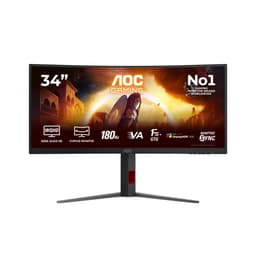
Buying a gaming monitor in 2026 means wading through a swamp of specs where half the numbers are technically true but practically meaningless. "1ms response time" sounds brilliant until you realise it might mean MPRT, not GtG, and the actual pixel transition in dark scenes could be twice that. So when AOC puts 240Hz, 1ms, and FreeSync Premium on the box of the AOC Gaming C27G2Z3, the sensible question isn't "does it have those features" but "do those features actually deliver." The answer, based on the spec sheet and what 25 owners have reported, is mostly yes, with a couple of caveats before you hand over your money.
Here's the verdict up front: this is a solid 1080p curved gaming monitor that does exactly what it says on the tin, but it's priced in the upper mid-range bracket where 1440p monitors and IPS panels start competing for your attention. If you're a competitive FPS player who wants maximum frame rates at 1080p without caring much about colour accuracy or HDR quality, the C27G2Z3 is a genuinely good pick. If you're after a monitor that doubles as a decent content creation tool or want HDR that actually looks good, you should probably look elsewhere. The panel type, a VA, tells you most of what you need to know about where this excels and where it falls short.
Core Specifications: AOC Gaming C27G2Z3-27 Zoll Curved FHD Monitor
Start with the basics. The AOC Gaming C27G2Z3 is a 27-inch curved display running at 1920x1080 (Full HD) with a 240Hz refresh rate and a VA panel underneath. Those three facts together tell a specific story. At 27 inches, 1080p gives you a pixel density of roughly 82 PPI, which is noticeably lower than the 109 PPI you'd get from a 27-inch 1440p screen. Text won't be as crisp, fine details in games won't be as sharp, and you'll see individual pixels if you sit close. That's not a dealbreaker for pure gaming, but it's worth being clear-eyed about before you buy.
The 240Hz refresh rate is the headline number and it's a real one, not a "motion blur reduction" trick. Paired with AMD FreeSync Premium, which requires a minimum 120Hz VRR range and includes Low Framerate Compensation (LFC), this monitor is genuinely built for fast-paced competitive gaming. The connectivity is straightforward: two HDMI 2.0 ports and one DisplayPort 1.4. That's a reasonable port selection for a gaming monitor at this level. Note that to hit 240Hz you'll want to use DisplayPort 1.4, since HDMI 2.0 tops out at 240Hz for 1080p but bandwidth can be tighter depending on your setup.
AOC also lists HDR10 support and a curved design, both of which we'll dig into properly in their own sections. The red and black colour scheme (schwarz-rot, as the German product name has it) is fairly typical gaming monitor aesthetics. Nothing outrageous, nothing subtle either. Owner reviews mention the build quality is decent for the price, with the stand feeling reasonably solid rather than wobbly, though adjustment options are limited as we'll cover later.
| Specification | Detail |
|---|---|
| Screen Size | 27 inches |
| Resolution | 1920 x 1080 (Full HD) |
| Panel Type | VA (Vertical Alignment) |
| Refresh Rate | 240Hz |
| Adaptive Sync | AMD FreeSync Premium |
| Response Time (marketed) | 1ms MPRT |
| HDR | HDR10 |
| Curve | Curved |
| Ports | 2x HDMI 2.0, 1x DisplayPort 1.4 |
| Colour Scheme | Black / Red |
| Rating | ★★★★☆ (4.4) (25 reviews) |

Panel Technology: What VA Actually Means for You
VA panels are the middle child of the display world. They're not as fast as TN panels (which are largely obsolete now anyway), not as colour-accurate as IPS, but they have one genuinely impressive trick: native contrast ratios. Where a typical IPS panel delivers around 1000:1 contrast, a good VA can hit 3000:1 or higher. That means blacks that look genuinely dark rather than the washed-out grey you get from IPS in a dim room. For gaming in the evening with the lights down, that's a real, visible difference. Dark scenes in horror games or space titles look properly moody rather than milky.
The trade-off is viewing angles. VA panels suffer more colour shift when you move off-axis compared to IPS. At 27 inches curved, you're unlikely to be sitting at a dramatic angle to your own monitor, so in practice this matters less than it sounds. But if you're planning to share the screen with someone sitting beside you, the colours will look noticeably different from their position. Also: VA panels can exhibit what's called "black smearing" in dark scenes with fast motion. This is where dark pixels are slow to transition and you get a faint trailing effect. It's the main practical downside of VA for gaming, and it's something the MPRT backlight strobing on this monitor is specifically designed to reduce.
The curved design (AOC doesn't specify the exact curvature radius in the verified data, so we won't invent a number) is a natural companion to VA technology. The curve helps maintain consistent viewing angles across the panel, partially compensating for VA's off-axis weakness. It also creates a more immersive feel at 27 inches, wrapping the image around your peripheral vision slightly. Owner reviews are generally positive on the curve, with most finding it comfortable rather than distracting. A few note it makes the monitor harder to wall-mount flat, which is a practical point if you're planning a VESA mount setup.
Display Quality: Sharp Enough for Gaming, Not for Everything
At 1920x1080 on a 27-inch panel, pixel density lands at approximately 82 PPI. That's the honest number and it has real consequences. Sit within 60cm of this screen and you'll likely notice the pixel grid. Text in productivity apps looks softer than on a 1440p or 4K display. For gaming, where you're typically sitting a bit further back and the image is in motion, it's much less of an issue. Fast-paced shooters, racing games, anything where fluidity matters more than fine detail will look great at 240Hz. A meticulously crafted open-world RPG where you're reading small text and admiring distant landscapes? The 1080p limitation starts to show.
The anti-glare coating on the panel (standard for gaming monitors) keeps reflections manageable in typical room lighting. Most owner reviews don't mention glare as a problem, which suggests AOC's coating is doing its job without introducing excessive graininess. Some cheaper anti-glare coatings add a sparkle effect that makes the image look slightly grainy, particularly noticeable on white backgrounds. The owner feedback here doesn't flag this as a significant issue, which is a good sign.
Brightness uniformity is one area where VA panels can be inconsistent. Some units show brighter or darker patches across the panel, particularly visible on solid-colour backgrounds. This is a manufacturing variance thing rather than a design flaw, and it varies between individual units. The 25 owner reviews don't report widespread uniformity complaints, suggesting AOC's quality control is reasonable, but it's this is something to check when you first set up the monitor. If you get a unit with noticeable clouding or uniformity issues, Amazon's returns process is straightforward.
Refresh Rate and Adaptive Sync: Where This Monitor Actually Earns Its Price
240Hz is the real headline here and it genuinely matters if your GPU can push enough frames. The difference between 144Hz and 240Hz is subtler than the jump from 60Hz to 144Hz, but it's real and measurable in competitive gaming. Targeting enemies, tracking fast movement, reacting to on-screen events, all of these benefit from the extra frames. AOC's own product description puts it well: 240Hz "completely unleashes top end GPUs," which is accurate if slightly enthusiastic phrasing. The practical point is that you need a GPU capable of hitting high frame rates at 1080p to make this worthwhile. More on that in the GPU recommendations section.
AMD FreeSync Premium is a meaningful certification rather than just a marketing badge. The Premium tier (as distinct from basic FreeSync) requires a minimum 120Hz VRR range, which this monitor clearly meets given its 240Hz ceiling. It also requires Low Framerate Compensation (LFC), which kicks in when your frame rate drops below the VRR range's minimum and multiplies frames to keep the sync working. In practice, this means you get tear-free gaming across a very wide performance envelope, from the moments your GPU is struggling to the moments it's flying. The DisplayPort 1.4 connection is the right way to connect for full 240Hz with VRR enabled.
One thing: FreeSync Premium monitors can work with Nvidia GPUs via G-Sync Compatible mode, though Nvidia hasn't officially certified this specific model. In practice, most FreeSync Premium monitors work fine with recent Nvidia cards through DisplayPort. If you're on an AMD GPU, you're fully sorted. Nvidia users should find it works well but may want to verify compatibility with their specific card before assuming perfect VRR performance. This isn't a flaw specific to this monitor, it's just how the ecosystem works.
Response Time and Motion: The "1ms" Conversation We Need to Have
The "1ms" claim on this monitor refers to MPRT, Moving Picture Response Time, not GtG (grey-to-grey) pixel transition time. AOC's own product description actually explains this honestly, which is refreshing: MPRT works by strobing the backlight, disabling it during frame changes to reduce the time each frame is visible. This reduces perceived blur and ghosting. But it's a different measurement from GtG response time, and the two aren't directly comparable. A VA panel's actual GtG response is typically in the 4ms to 8ms range depending on the transition and the overdrive setting used.
Why does this matter practically? Because VA panels have a known weakness with dark-to-dark pixel transitions. Moving from one dark shade to another is slow on VA technology, and this can manifest as faint trailing or smearing in dark scenes. MPRT backlight strobing helps mask this by reducing how long each frame is displayed, but it doesn't eliminate the underlying pixel response limitation. In bright, fast-paced games like CS2 or Valorant, this is largely a non-issue. In darker games with lots of shadow detail and fast camera movement, you may notice some trailing if you're looking for it. Owner reviews don't flag this as a major complaint, which suggests it's within acceptable limits for most users.
The overdrive settings AOC provides (typically adjustable through the OSD) matter here. Too little overdrive and you get ghosting. Too much and you get inverse ghosting, where a bright halo appears around moving objects. Finding the right overdrive setting for your typical gaming content is worth spending five minutes on when you first set up the monitor. Owner feedback suggests the middle overdrive setting works well for most use cases, which is a common pattern with gaming monitors. The 240Hz refresh rate itself does a lot of heavy lifting here: at 240Hz, each frame is displayed for just 4.17ms, which means even a slow pixel transition has less time to cause visible problems than it would at 60Hz or 144Hz.
Color Accuracy and Gamut: Good Enough for Gaming, Limited for Creation
AOC doesn't publish specific sRGB coverage percentages or Delta-E figures in the verified product data for this model, so we won't invent numbers. What we can say is that VA panels typically cover sRGB well, often hitting 95% to 100% coverage, which is perfectly adequate for gaming and general use. DCI-P3 coverage on budget-to-mid-range VA panels is usually more limited, typically in the 85% to 90% range, which is fine for consuming HDR content but not ideal if you're doing professional colour work.
Factory calibration on monitors at this price point is rarely impressive. Most units ship with decent out-of-box accuracy for gaming, meaning colours look punchy and vibrant, but Delta-E values (which measure colour accuracy against a reference) are typically above 3, which is the threshold where colour errors become visible to a trained eye. For gaming, this doesn't matter much. For photo editing, video grading, or any work where colour fidelity is important, you'd want a proper IPS panel with factory calibration certification. The C27G2Z3 is not that monitor and doesn't pretend to be.
Owner reviews describe the colours as vivid and punchy out of the box, which is typical for gaming-tuned VA panels. AOC tends to ship their gaming monitors with slightly boosted saturation and contrast settings that look impressive at first glance. If you prefer more accurate colours, spending a few minutes in the OSD adjusting colour temperature and reducing saturation will get you closer to neutral. The monitor's gaming-focused presets are fine for their intended use. Just don't expect to use this as your primary tool for colour-critical creative work.

HDR Performance: Checkbox Ticked, Not Much More
HDR10 support is listed, and that's about as much as can be said positively about the HDR implementation here. HDR10 is the baseline HDR standard, and on a monitor without a high peak brightness rating and without local dimming, it delivers what's politely called "entry-level HDR." Real HDR requires peak brightness well above 400 nits (ideally 600 to 1000+) and the ability to selectively brighten highlights while keeping shadows dark. Without local dimming, the entire backlight has to compromise between the two.
AOC doesn't specify a peak brightness figure in the verified product data, so we won't guess. But VA panels at this price point typically sit in the 250 to 350 nit range for peak SDR brightness, which means HDR mode, if it boosts brightness at all, isn't going to deliver the specular highlights and deep blacks simultaneously that make HDR actually impressive. What you'll likely get in HDR mode is a slightly brighter, slightly more saturated image compared to SDR. It's not bad. It's just not the HDR experience you'd get from a proper HDR600 or HDR1000 display with full-array local dimming.
For gaming specifically, many players find SDR mode with a well-tuned picture setting looks better than HDR mode on monitors like this. The VA panel's native high contrast ratio (a genuine strength of the technology) does more for perceived image depth than the HDR10 certification. If you're buying this monitor and HDR is your primary reason, reconsider. If you're buying it for 240Hz competitive gaming and HDR is a nice-to-have, you won't be disappointed, just don't expect it to transform your experience.
Contrast and Brightness: VA's Party Trick
Here's where VA panels genuinely shine. Native contrast ratios on VA technology are substantially higher than IPS, typically in the 3000:1 to 5000:1 range versus IPS's 1000:1. The practical effect is that blacks look genuinely dark rather than the light grey that IPS panels show in dim environments. If you game in a darker room or play games with lots of dark scenes, this is a real, visible advantage. The difference between a VA and an IPS panel displaying a dark night sky in a game is immediately apparent.
The trade-off is something called VA glow, or sometimes "black crush." In very dark scenes, VA panels can lose shadow detail in the corners of the screen, where the viewing angle is slightly off-axis even when you're sitting directly in front. This is a known characteristic of the technology. It's less severe on curved panels (the curve helps maintain a more consistent viewing angle across the screen), but it's about. Owner reviews on this specific monitor don't flag severe black crush as a widespread complaint, which suggests AOC has tuned this reasonably well.
In bright, well-lit rooms, the anti-glare coating keeps things manageable, but like any monitor without a high peak brightness rating, very bright ambient light will wash out the image somewhat. This is a gaming monitor designed primarily for use in typical gaming environments, which usually means controlled lighting rather than a sun-drenched office. In those conditions, the contrast performance is a genuine strength. SDR gaming with the lights down is where this monitor looks its best, and the VA panel's contrast advantage over IPS is most apparent in exactly that scenario.
Ergonomics and Build: Decent, Not Exceptional
Owner reviews describe the build quality as solid for the price point, with no widespread reports of creaking stands or flimsy panels. The red and black aesthetic is firmly in gaming monitor territory, which will either suit your setup or clash with it depending on your taste. The stand footprint is typical for a 27-inch monitor, meaning it'll take up a reasonable chunk of desk space. If you're working with a smaller desk, this is worth factoring in.
Ergonomic adjustment is where budget and mid-range gaming monitors often cut corners, and the C27G2Z3 is no exception to that pattern. The stand offers tilt adjustment, which lets you angle the screen up or down to suit your eye level. Whether it offers height adjustment or swivel is not specified in the verified product data, so we won't claim either way. What owner reviews do suggest is that the stand is stable enough for gaming without wobble, and the tilt range is adequate for most desk setups. If you need full ergonomic adjustment (height, swivel, pivot), you'll want to use the VESA mount with a third-party arm, which is a common solution at this price point.
The VESA mount compatibility means you're not locked into the included stand if it doesn't suit your setup. A decent monitor arm will give you far more flexibility than any included stand, and they're not expensive. Several owner reviews mention using this monitor on a VESA arm and being happy with the result. The curved design does mean the monitor won't sit flush against a wall even on an arm, but that's true of any curved display. The red accent lighting (if present, based on the product name's schwarz-rot description) is subtle enough not to be distracting in most setups, though exact RGB capabilities aren't specified in the verified data.
Connectivity and Ports
The port selection on the AOC Gaming C27G2Z3 is clean and practical. Two HDMI 2.0 ports mean you can connect two devices simultaneously, which is useful if you're switching between a PC and a console, or between two machines. The single DisplayPort 1.4 connection is your go-to for the full 240Hz experience from a PC. HDMI 2.0 can handle 1080p at 240Hz, so you're not completely limited to DisplayPort for high refresh rates, but DisplayPort 1.4 is the more reliable choice for maxing out the panel's capabilities.
- 2x HDMI 2.0 (supports 1080p up to 240Hz)
- 1x DisplayPort 1.4 (recommended for 240Hz with VRR)
What's not listed in the verified product data: USB hub ports, USB-C, or audio output. We won't claim these are absent (they may or may not be present), but if a built-in USB hub or USB-C connectivity is important to your setup, verify this directly with the product listing before buying. At this price point, USB-C with DisplayPort Alt Mode is uncommon but not unheard of, and a basic USB hub (two or three USB-A ports) is sometimes included on gaming monitors.
The two HDMI 2.0 ports are a practical advantage over monitors that include only one HDMI alongside DisplayPort. Console gamers who also use a PC will appreciate being able to leave both devices connected and switch inputs without unplugging cables. The DisplayPort 1.4 connection also supports Display Stream Compression (DSC) and higher bandwidth than DisplayPort 1.2, which means it's future-proofed for higher resolutions if you ever connect a device that benefits from that, though at 1080p you're well within the bandwidth limits of even older DisplayPort versions.
How It Compares: The Competition at This Price Point
At the upper mid-range price bracket, the AOC Gaming C27G2Z3 faces some genuinely awkward competition. The most pointed comparison is against 27-inch 1440p monitors at similar or slightly higher prices. The LG 27GP850-B is a 27-inch 1440p IPS monitor with 180Hz and Nano IPS technology, offering significantly sharper image quality, better colour accuracy, and wider viewing angles. It's a fundamentally different monitor: less raw refresh rate, but better in almost every other dimension. If competitive FPS gaming at maximum frame rates isn't your primary use case, the 1440p IPS option is the more versatile long-term buy.
The other natural comparison is the Samsung Odyssey G5 (C27G55T), a 27-inch 1440p VA curved monitor with 144Hz and FreeSync Premium. It offers the same VA contrast advantages as the AOC, adds the resolution bump to 1440p, and comes in at a price that's often competitive. The trade-off is 144Hz versus 240Hz, which matters if you're a serious competitive player but less so for most gaming. For anyone who games across a variety of genres rather than purely competitive shooters, the Samsung's 1440p resolution is a more meaningful upgrade than the AOC's extra 96Hz.
Where the AOC C27G2Z3 wins clearly is in raw refresh rate for 1080p competitive gaming. If you're playing CS2, Valorant, or Apex Legends at high frame rates and you want the smoothest possible experience without the GPU overhead of 1440p, 240Hz at 1080p is the right tool. The FreeSync Premium certification and the VA panel's contrast advantage over TN (which used to dominate the high-refresh-rate market) make this a genuinely appealing option for that specific use case. It's just worth being honest that the upper mid-range price point puts it in competition with monitors that offer more for general use.
| Feature | AOC C27G2Z3 | LG 27GP850-B | Samsung Odyssey G5 C27G55T |
|---|---|---|---|
| Panel Type | VA | Nano IPS | VA |
| Resolution | 1080p | 1440p | 1440p |
| Refresh Rate | 240Hz | 180Hz | 144Hz |
| Adaptive Sync | FreeSync Premium | FreeSync Premium / G-Sync Compatible | FreeSync Premium |
| HDR | HDR10 | HDR10 | HDR10 |
| Curve | Yes | No | Yes (1000R) |

Final Verdict: Good Monitor, Right Buyer Matters
The AOC Gaming C27G2Z3 does what it promises. 240Hz is real, FreeSync Premium is properly implemented with LFC, the VA panel delivers strong contrast for gaming in dim conditions, and the overall build quality earns its 4.4-star average across 25 owner reviews. For a player whose primary use is competitive gaming at 1080p, particularly in fast-paced titles where frame rate matters more than resolution, this monitor delivers a genuinely good experience. The MPRT backlight strobing helps manage VA's motion weaknesses, and the 240Hz ceiling means you're not going to outgrow the refresh rate any time soon.
The honest caveat is the price bracket. At upper mid-range money, you're paying a premium for that 240Hz number, and the 1080p resolution is a real limitation at 27 inches. The HDR10 implementation is checkbox-level rather than transformative. Colour accuracy is adequate for gaming but not for creative work. These aren't surprises for a monitor marketed squarely at competitive gamers, but they're worth stating clearly for anyone who's considering this as a general-purpose display.
If you don't need 240Hz specifically, and most people don't, the Samsung Odyssey G5 at 1440p and 144Hz is a smarter buy at a lower price. You get sharper images, the same VA contrast advantages, and FreeSync Premium, and you give up refresh rate headroom that most games and most GPUs won't fully utilise anyway. The AOC C27G2Z3 is the right choice only when maximum frame rate at 1080p is genuinely your priority. Know your use case, and this monitor delivers. Go in expecting a premium all-rounder and you'll be disappointed.
Score: 7.5 out of 10. Excellent for its intended purpose, priced slightly ambitiously for what the resolution offers at this screen size.
What works. What doesn’t.
5 + 4What we liked5 reasons
- Genuine 240Hz refresh rate with FreeSync Premium and LFC for tear-free competitive gaming
- VA panel delivers strong native contrast, making dark scenes look properly dark
- Two HDMI 2.0 ports plus DisplayPort 1.4 covers most connection needs
- 4.4-star average from owners suggests reliable build quality and out-of-box experience
- MPRT backlight strobing actively reduces the motion blur VA panels are prone to
Where it falls4 reasons
- 1080p at 27 inches is only around 82 PPI, noticeably soft compared to 1440p alternatives
- HDR10 implementation is entry-level with no local dimming, not worth buying for
- Upper mid-range pricing puts it against 1440p monitors that offer more for general use
- VA dark-to-dark pixel transitions can cause faint smearing in very dark game scenes
Full specifications
12 attributes| Refresh rate | 240 |
|---|---|
| Panel type | VA |
| Adaptive sync | FreeSync |
| Aspect ratio | 16:9 |
| Curvature | 1500R |
| HDR | HDR10 |
| Launch year | 2024 |
| Ports | 2x HDMI 2.0, 1x DisplayPort 1.4 |
| Refresh rate HZ | 240 |
| Resolution | 1920x1080 |
| Response time | 1ms |
| Response time MS | 1 |
If this isn’t right for you
2 options
Frequently asked
5 questions01Is the AOC Gaming C27G2Z3-27 Zoll Curved FHD Monitor, 240Hz, 1ms, Freesync Premium, HDR10 (1920 x 1080, 2X HDMI 2.0, 1x DisplayPort 1.4) schwarz-rot good for gaming?+
Yes, specifically for competitive gaming at 1080p. The 240Hz refresh rate is genuine and pairs well with AMD FreeSync Premium, which includes Low Framerate Compensation for smooth, tear-free performance across a wide frame rate range. The VA panel adds strong native contrast for dark scenes. For fast-paced titles like CS2 or Valorant where frame rate matters most, this is a capable monitor. For slower, detail-rich games where image sharpness counts, the 1080p resolution at 27 inches is a limitation.
02Does the AOC Gaming C27G2Z3-27 Zoll Curved FHD Monitor, 240Hz, 1ms, Freesync Premium, HDR10 (1920 x 1080, 2X HDMI 2.0, 1x DisplayPort 1.4) schwarz-rot have good HDR?+
Not really. The HDR10 certification means the monitor can accept an HDR signal and display it, but without high peak brightness and local dimming, the result is entry-level at best. You'll get a slightly brighter, slightly more saturated image in HDR mode compared to SDR, but not the dramatic highlight and shadow separation that makes HDR genuinely impressive on premium displays. For most users, a well-tuned SDR picture will look better than HDR mode on this monitor.
03Is the AOC Gaming C27G2Z3-27 Zoll Curved FHD Monitor, 240Hz, 1ms, Freesync Premium, HDR10 (1920 x 1080, 2X HDMI 2.0, 1x DisplayPort 1.4) schwarz-rot good for content creation?+
It's not designed for content creation and shouldn't be your first choice for it. VA panels typically cover sRGB well enough for general use, but factory calibration on gaming monitors at this price point rarely achieves the Delta-E accuracy needed for colour-critical work. The 1080p resolution also limits fine detail work. If you need a monitor for photo editing, video grading, or graphic design, look at a factory-calibrated IPS panel with published colour accuracy specs instead.
04What graphics card do I need for the AOC Gaming C27G2Z3-27 Zoll Curved FHD Monitor, 240Hz, 1ms, Freesync Premium, HDR10 (1920 x 1080, 2X HDMI 2.0, 1x DisplayPort 1.4) schwarz-rot?+
To make 240Hz worthwhile, you need a GPU capable of consistently delivering high frame rates at 1080p. In competitive titles like CS2 or Valorant, almost any modern mid-range GPU can hit 200fps or above at 1080p on medium-to-high settings. For more demanding games, a card like an AMD RX 7600 or Nvidia RTX 4060 or better will push frame rates high enough to benefit from the 240Hz panel. The FreeSync Premium sync range means the monitor handles frame rate fluctuations smoothly, so you don't need to hit 240fps constantly to benefit.
05What warranty and returns apply to the AOC Gaming C27G2Z3-27 Zoll Curved FHD Monitor, 240Hz, 1ms, Freesync Premium, HDR10 (1920 x 1080, 2X HDMI 2.0, 1x DisplayPort 1.4) schwarz-rot?+
Warranty details for this specific model aren't confirmed in the product data we've verified. When buying through Amazon UK, you're covered by Amazon's standard 30-day returns policy and the Amazon A-to-Z guarantee, which provides a safety net if the product arrives damaged or not as described. For manufacturer warranty terms, check the AOC UK website or contact AOC support directly before purchasing.