Finding a reliable motherboard under £75 demands careful consideration of chipset, socket compatibility, and feature set. This buying guide covers the best budget options available in 2024, updated to reflect current pricing and the shift towards DDR5-capable AM5 platforms alongside proven AM4 solutions. Whether you are building your first PC, upgrading an ageing system, or creating a second rig for streaming or workstation duties, these picks balance cost with genuine performance and longevity. The budget segment has evolved significantly, with DDR5 support trickling down to lower price points, making newer platforms more accessible without breaking the bank.
Quick Verdict
Best Overall: ASUS Prime B650-Plus AMD AM5 (exceptional value with DDR5 and PCIe 5.0 support at the top of the budget range).
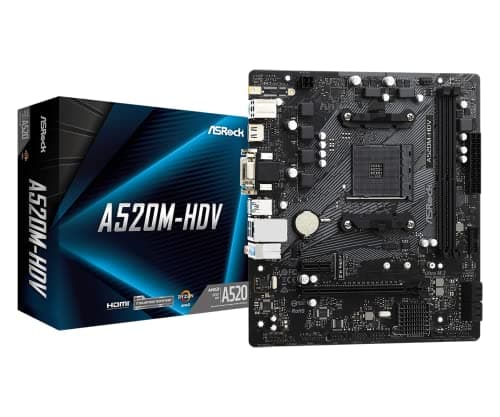
Best Value: ASRock A520M-HDV (proven AM4 platform for budget-conscious builders seeking simplicity and reliability).
The ASRock A520M-HDV represents the entry point for AM4 platform builders, offering proven reliability and compatibility at the lowest cost in this roundup. This Micro-ATX board fits smaller cases and ITX-focused builds whilst maintaining all essential connectivity. The A520 chipset brings straightforward functionality without premium features, targeting users who prioritise stability over cutting-edge specifications. Support spans the entire Ryzen 3000 and 5000 series lineup, with BIOS updates covering newer 5000XT parts, making this an excellent choice for second-hand CPU markets where pricing favours older stock.
Who it suits: Budget-conscious builders seeking simplicity, small form factor PC enthusiasts using ITX cases, users upgrading from older AM4 platforms, office and workstation builds where gaming performance remains secondary. The A520 chipset provides ample capability for office productivity, light streaming, and content creation on moderate budgets.
Headline specs: AM4 socket, A520 chipset, Micro-ATX form factor, dual-channel DDR4 support up to 5100MHz OC, single M.2 NVMe slot, four SATA ports, VGA and DVI video outputs alongside HDMI for multi-display setups, 1 Gigabit Ethernet. The board supports up to 105W Ryzen 5000 processors with adequate power delivery for stable operation.
Verdict: The A520M-HDV delivers straightforward AM4 platform access without unnecessary features that inflate cost. For builders with tight budgets or those seeking maximum value, this board remains a solid foundation for light gaming, productivity, and streaming builds. The limitation to DDR4 and absence of PCIe 5.0 matters less for systems prioritising current-generation value over distant future upgrades.
Pros
- Extremely affordable entry point to AM4 platform with proven long-term reliability
- Micro-ATX form factor suits smaller cases and ITX builds better than full-size boards
- Multiple video outputs (VGA, DVI, HDMI) support legacy monitors and multi-display setups
- Compatible with entire AM4 Ryzen lineup via BIOS updates
Cons
- Limited to DDR4 memory eliminates future upgrade path to DDR5
- A520 chipset lacks premium features found on B550 and higher alternatives
- Single M.2 slot restricts NVMe expansion
How We Picked
Our selection process prioritised genuine performance value and platform longevity within strict budget constraints. We evaluated boards across multiple criteria: chipset capability and CPU support breadth, memory and storage expansion options, VRM quality sufficient for stated processor compatibility, rear I/O comprehensiveness for various use cases, and form factor suitability for different build scenarios. We excluded gaming-focused branding and RGB lighting claims that add cost without tangible benefits in this price segment. Comparison focused on real-world usability: will this board remain viable for three to five years? Does the chipset provide upgrade headroom within AM4 or AM5? We consulted user feedback on stability and BIOS support quality, avoiding boards with documented compatibility issues or poor vendor support histories.
Buying Guide
Understanding motherboards: A motherboard serves as the central nervous system of your PC, connecting every component through a unified circuit board. It distributes power from the PSU to CPU, RAM, and storage devices; routes data between components; and provides essential connectivity for peripherals via USB, Ethernet, and audio connectors. The name derives from the concept of a main circuit board giving birth to all other system components, making it the parent board in PC terminology.
Socket compatibility: Your motherboard choice is dictated primarily by processor socket type. AM4 and AM5 dominate consumer AMD systems, whilst Intel uses LGA1700 for current-generation chips. Verify that any CPU you own or plan to purchase matches your board socket exactly, as incompatible sockets prevent installation entirely. Chipset designation (A520, B550, B650, etc.) determines feature support but does not prevent processor installation, provided the socket matches.
Memory considerations: Budget AM4 boards support DDR4 memory, whilst AM5 platforms now standardise on DDR4 or DDR5 depending on model. DDR5 carries cost premiums but offers no real gaming performance benefit over quality DDR4 in current titles. For budget builds, DDR4 remains the sensible choice until DDR5 prices equalise further. Verify maximum supported speeds and capacity limits in your motherboard manual, though most boards support modern memory configurations without issue.
Form factor matters: ATX boards measure 305x244mm and suit standard tower cases with ample space. Micro-ATX measures 244x244mm, fitting smaller cases and ITX-style enclosures. Mini-ITX (170x170mm) offers maximum space savings but commands premium pricing. Budget builds typically benefit from Micro-ATX options balancing compactness with sufficient expansion slots.
Storage and expansion: M.2 NVMe slots provide high-speed storage essential for modern operating systems and large applications. Budget boards typically offer single M.2 slots, adequate for OS installation and one large game library. SATA ports support older mechanical drives and SSDs, useful for existing hardware integration. Verify how many slots your board provides before committing to multi-drive setups.
Power delivery: VRM quality, measured in phase count, determines stability under load. Budget boards often feature 6-8 phase VRMs, sufficient for mid-range processors but potentially limiting for high-end chips. Cross-reference your planned CPU's TDP and power requirements against the motherboard specifications, ensuring adequate headroom for stability.
Final Verdict
The ASUS Prime B650-Plus AMD AM5 emerges as the overall winner for most budget-conscious builders in 2024. Its combination of DDR5 memory support, PCIe 5.0 capability, and reasonable pricing places it at the sweet spot between current usability and future-proofing. You gain access to newer processor architectures and faster storage technologies without spending significantly more than entry-level AM4 alternatives. The full ATX form factor provides better cooling characteristics and expansion capacity than cramped Micro-ATX options.
However, the ASRock A520M-HDV remains the smarter choice if your budget remains extremely tight or if you already own AM4 processors. Its proven reliability, compact form factor, and rock-bottom pricing make it unbeatable for secondary builds, office systems, and small form factor enclosures. Both boards deliver stable platforms suitable for gaming, streaming, content creation, and productivity workloads. Choose based on your available budget, case constraints, and processor availability rather than perceived performance differences that do not exist at this price level.