Working from home has shifted from a temporary arrangement to a permanent fixture for millions of people across the UK, and the monitor market has responded accordingly. Where last year's budget picks topped out at 1080p IPS panels with basic connectivity, 2025 has brought QHD and even 4K options into the sub-£200 bracket, alongside faster refresh rates and improved eye-care features that matter when you are staring at a screen for eight or more hours a day. This guide is for home workers who want a meaningful upgrade from a laptop screen or an ageing display, without spending beyond £200. Whether you need a crisp 27-inch panel for spreadsheets and video calls, a space-saving 22-inch option for a compact desk, or something that doubles as a capable gaming monitor in the evenings, there is a pick here for you. All six products have been selected from verified UK stock and assessed against real working-from-home priorities: colour accuracy, eye comfort, connectivity, and value per inch.
Quick Verdict
Best Overall: MSI PRO MP275. A 27-inch IPS panel tuned specifically for office use, with eye-care features, a clean stand, and a price that leaves money in your pocket for a decent keyboard.
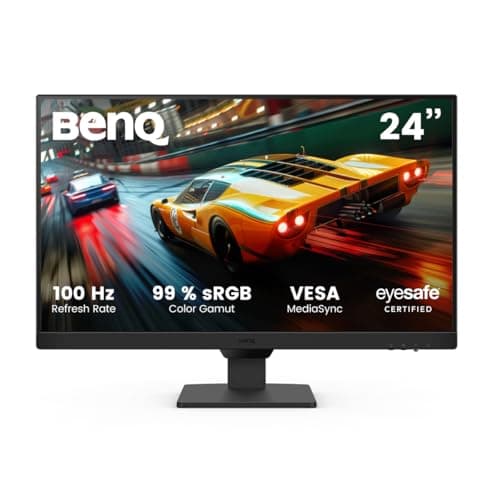
Best Value: BenQ GW2490E. BenQ's reputation for display quality shines through at under £80, with genuine eye-care certification and a solid IPS panel that punches well above its price.
The MSI PRO MP275 is the pick for home workers who want a no-nonsense, well-built 27-inch display that has been designed with productivity in mind from the ground up, rather than being a gaming monitor with the word "office" tacked onto the box. MSI's PRO line is aimed squarely at business and home-office users, and it shows in the details: a slim-bezel design that looks tidy on a desk, a stand that offers tilt adjustment for comfortable all-day use, and a matte IPS panel that handles reflections well in bright home environments.
The panel itself runs at 1920x1080 across 27 inches, which gives a pixel density of roughly 82 PPI. That is lower than a 24-inch 1080p screen, and if you sit very close to the display you may notice individual pixels in text. At a typical desk distance of 60 to 80 centimetres, though, it is perfectly comfortable for document editing, spreadsheets, and video calls. The IPS panel delivers wide viewing angles and accurate colour reproduction, which matters if you are doing any light photo editing or presenting work to clients via screen share.
Connectivity is straightforward: one HDMI 1.4b port and one D-Sub (VGA) input. That is minimal by modern standards, and if you need to run two sources simultaneously you will want to look elsewhere. However, for a single-computer home office setup, HDMI is all most people need. The 100 Hz refresh rate is a bonus over the 60 Hz panels that dominated this price bracket a year ago, making cursor movement and scrolling feel noticeably smoother during long working sessions.
MSI has included its Eye-Q Check and Anti-Flicker technology, along with a Low Blue Light mode that reduces eye strain during extended use. These features are not unique to MSI, but they are implemented thoughtfully here and accessible through a straightforward OSD menu. The monitor also carries TÜV Rheinland certification for low blue light and flicker-free performance, which gives those claims some independent credibility.
At £59.00, the PRO MP275 is the most affordable 27-inch IPS monitor on this list, and it is hard to find a more sensible choice for a primary work display at this price. It will not win any awards for gaming performance or connectivity, but for eight hours of productive work every weekday, it delivers exactly what it promises.
Verdict: The most practical choice for home workers who want a large, comfortable IPS screen without paying over the odds or wading through gaming-focused features they will never use.
Pros
- TÜV-certified low blue light and flicker-free panel reduces eye strain during long sessions
- 27-inch IPS panel at the lowest price on this list, excellent value per inch
- 100 Hz refresh rate makes everyday scrolling and cursor movement feel smooth
Cons
- Only two ports (HDMI and VGA), limiting flexibility for multi-source setups
- 1080p across 27 inches gives a lower pixel density than smaller screens at the same resolution
BenQ has built a strong reputation for display quality over many years, and the GW2490E is a fine example of why that reputation endures. At under £80, it is the second-cheapest pick on this list, yet it delivers a genuinely polished experience that more expensive rivals struggle to match on the metrics that matter most for home workers: colour accuracy, eye comfort, and build quality.
The 24-inch IPS panel runs at 1920x1080 and 100 Hz, giving a pixel density of around 92 PPI. That is noticeably sharper than a 27-inch 1080p screen, and text rendering in particular looks crisp and clean, which is exactly what you want when reading long documents or working in dense spreadsheets. The IPS technology ensures wide viewing angles, so colours and contrast remain consistent whether you are sitting squarely in front of the screen or glancing at it from an angle during a video call.
BenQ's eye-care credentials are arguably the strongest on this list. The GW2490E carries TÜV Rheinland Eye Comfort 3.0 certification, which covers flicker-free backlight, low blue light output, and anti-glare coating. BenQ also includes its proprietary Brightness Intelligence technology, which automatically adjusts screen brightness based on ambient light levels in the room. This is a genuinely useful feature for home workers whose lighting conditions change throughout the day, particularly in rooms with large windows.
Connectivity is better than the MSI PRO MP275: two HDMI ports and one DisplayPort input. That means you can connect a desktop PC via DisplayPort and a laptop via HDMI simultaneously, switching between them without unplugging cables. For home workers who juggle a work laptop and a personal machine, this is a meaningful practical advantage.
The stand offers tilt adjustment, and the monitor is VESA 100x100 compatible if you want to mount it on an arm. The OSD is navigated via physical buttons on the underside of the bezel, which are clearly labelled and easy to operate. Build quality feels solid throughout, with no flex in the panel or wobble in the stand.
At £75.99, the GW2490E is exceptional value. It does not have the screen real estate of a 27-inch panel, but for a compact desk or a second monitor position, the sharper pixel density and superior eye-care features make it the best value pick on this list by a clear margin.
Verdict: The best value monitor on this list, combining BenQ's genuine eye-care expertise with a sharp 24-inch IPS panel and useful dual-HDMI connectivity at a very competitive price.
Pros
- TÜV Rheinland Eye Comfort 3.0 certified, with Brightness Intelligence auto-adjustment for changing room lighting
- Two HDMI ports plus DisplayPort allow simultaneous connection of two devices without cable swapping
- 92 PPI pixel density gives sharper text than 27-inch 1080p alternatives at a lower price
Cons
- 24-inch screen offers less workspace than 27-inch alternatives for multi-window productivity
- No USB hub or audio output listed in verified specs, limiting desk connectivity
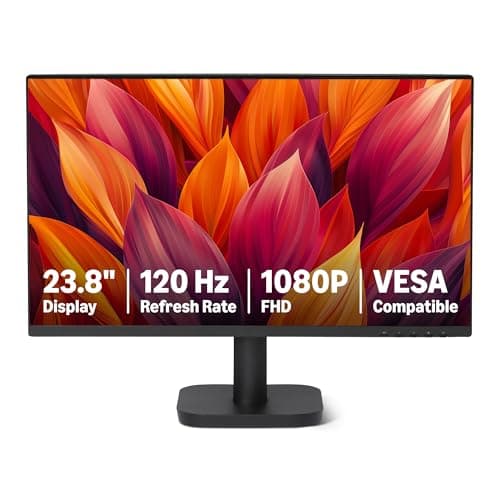
Amazon's own-brand monitor range has matured considerably, and the 23.8-inch 120 Hz IPS model represents a genuinely compelling proposition for home workers on a tight budget. At £84.74, it is the most affordable pick on this list, and it covers the basics with more competence than you might expect from a budget own-brand product.
The 23.8-inch IPS panel runs at 1920x1080 resolution, which at this screen size gives a pixel density of approximately 93 PPI, closely matching the BenQ GW2490E. IPS technology ensures good colour accuracy and wide viewing angles, which are important for video calls and document work where you need consistent colour representation. The matte anti-glare coating handles reflections reasonably well in typical home office environments.
Where the Amazon Basics monitor stands out against similarly priced rivals is its connectivity. The verified specs list HDMI, DisplayPort, and VGA inputs, giving it three connection options that cover both modern and legacy devices. If you are connecting an older desktop PC with only VGA output alongside a newer laptop with HDMI, this monitor handles both without the need for an adaptor. That kind of practical flexibility is rare at this price point.
The 120 Hz refresh rate is a step above the 100 Hz offered by the MSI and BenQ picks, and while the difference is subtle for pure office work, it does make scrolling through long documents and web pages feel marginally smoother. For home workers who also use their monitor for light gaming in the evenings, the higher refresh rate is a welcome bonus.
The stand is basic, offering tilt adjustment only, and the build quality is functional rather than premium. The OSD menu is straightforward to navigate, and the monitor includes a VESA 75x75 mount pattern for those who prefer a monitor arm. There are no built-in speakers, which is common at this price, so you will need headphones or external speakers for video calls.
For home workers who need a reliable, well-connected IPS monitor and have a limited budget, the Amazon Basics 23.8-inch is a sensible, no-frills choice. It lacks the eye-care credentials of the BenQ and the brand heritage of the MSI, but the combination of IPS panel, 120 Hz refresh rate, and three-port connectivity makes it genuinely good value.
Verdict: The most affordable IPS monitor on the list, with surprisingly good connectivity for its price, making it ideal for budget-conscious home workers who need to connect multiple devices.
Pros
- HDMI, DisplayPort, and VGA inputs provide rare three-source flexibility at this price point
- 120 Hz IPS panel at the lowest price on the list, offering smooth scrolling for everyday work
Cons
- Own-brand status means less established after-sales support compared to BenQ or MSI
- Basic stand with tilt only, and no built-in speakers or USB ports
- VESA 75x75 mount pattern is less common than 100x100, limiting monitor arm compatibility
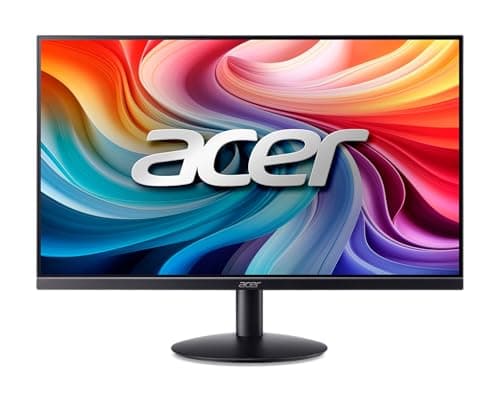
Acer's SB242Y H1bi is positioned explicitly as a professional home office monitor, and it carries that brief with a clean, minimal aesthetic and a feature set that prioritises comfort and productivity over gaming performance. At £94.51, it sits in the budget tier but benefits from Acer's established display expertise and a design language that looks at home in a professional environment.
The 23.8-inch IPS panel delivers 1920x1080 resolution, giving the same sharp pixel density as the BenQ and Amazon Basics picks at around 93 PPI. IPS technology provides the wide viewing angles and accurate colour reproduction that make it well-suited to document editing, video conferencing, and light creative work. The matte anti-glare surface reduces reflections from windows and overhead lighting, which is a common challenge in home office environments that were not designed with screen glare in mind.
Acer has included its BlueLightShield technology, which reduces blue light emission to help minimise eye fatigue during long working sessions. The monitor also features a flicker-free backlight, which eliminates the subtle flicker that can cause headaches over extended use. These features are becoming standard at this price point, but Acer's implementation is well-regarded and the controls are accessible through a clean OSD interface.
Connectivity is minimal: one HDMI 1.4 port and one VGA input. This matches the MSI PRO MP275 in terms of port count, and like that monitor, it is best suited to single-source setups where you connect one computer and leave it connected. For home workers with a single laptop or desktop, this is perfectly adequate, but those who need to switch between devices regularly should consider the BenQ GW2490E instead.
The stand design is slim and elegant, with tilt adjustment available. The monitor is VESA 100x100 compatible for monitor arm mounting, which is a practical option for those who want to free up desk space or position the screen at a more ergonomically comfortable height. The thin bezels on three sides give it a modern appearance that suits contemporary home office setups.
Acer's SB242Y H1bi is a solid, professional-looking IPS monitor at a budget price. It does not offer the connectivity range of the Amazon Basics pick or the eye-care certification depth of the BenQ, but its clean design and Acer's brand reliability make it a trustworthy choice for straightforward home office use.
Verdict: A clean, professional-looking IPS monitor from a trusted brand, well-suited to home workers who want a tidy desk setup and reliable everyday performance at a modest price.
Pros
- Slim bezel design and professional aesthetic suits home office environments better than gaming-styled alternatives
- BlueLightShield and flicker-free backlight reduce eye fatigue during long working sessions
- VESA 100x100 compatible for easy monitor arm installation
Cons
- Only HDMI 1.4 and VGA ports, with no DisplayPort, limiting bandwidth for future display standards
- No USB hub or audio output, so desk connectivity relies entirely on other devices
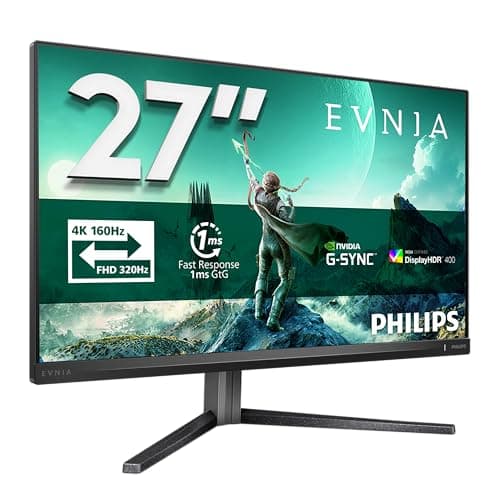
The Philips Evnia 27M2N3800A is the most technically ambitious pick on this list, and it represents something that would have been unthinkable in the sub-£200 bracket two years ago: a genuine 4K IPS monitor with a 160 Hz refresh rate. At £168.97, it is priced at the very top of our budget ceiling, but the specification leap it offers over every other pick here is substantial.
The 27-inch IPS panel delivers 4K UHD resolution, which at 27 inches equates to a pixel density of approximately 163 PPI. That is nearly double the pixel density of the 1080p 27-inch monitors on this list, and the difference is immediately apparent in text sharpness, fine detail in images, and the overall clarity of the desktop. For home workers who spend significant time reading long documents, working with detailed spreadsheets, or doing any kind of visual creative work, the jump to 4K at 27 inches is genuinely transformative rather than merely incremental.
The IPS panel technology ensures wide viewing angles and accurate colour reproduction, which is important for creative professionals and those who present work to clients. The 160 Hz refresh rate is far beyond what any productivity task requires, but it means the monitor is equally capable as an evening gaming display, making it an excellent dual-purpose investment for home workers who want one screen to cover everything.
It is worth noting that driving 4K at 160 Hz requires a capable graphics card and a DisplayPort 1.4 or HDMI 2.1 connection. Home workers connecting a standard business laptop may find that 4K at 60 Hz is the practical maximum, which is still an excellent result for productivity use. Windows scaling at 4K on a 27-inch screen typically works best at 150 or 175 per cent, which gives a sharp, comfortable desktop that feels noticeably more refined than a 1080p equivalent.
Philips' Evnia branding is the company's gaming-focused sub-brand, and the monitor includes features like AMD FreeSync Premium and a fast response time that will appeal to gamers. For home workers, the more relevant features are the IPS panel's colour accuracy and the Philips SmartImage presets, which include dedicated modes for text, internet browsing, and video content.
At this price, the Philips Evnia 27M2N3800A is a remarkable specification achievement. If your computer can drive 4K output, this is the pick that will make the biggest visible difference to your working day, and it has the gaming credentials to serve as an excellent all-purpose display for years to come.
Verdict: The most forward-looking pick on the list, offering 4K IPS quality at a price that was impossible twelve months ago, ideal for home workers who want the sharpest possible text and image quality.
Pros
- 4K UHD resolution at 27 inches delivers approximately 163 PPI, dramatically sharper than any 1080p alternative on this list
- 160 Hz IPS panel covers both productivity and gaming without compromise
- Philips SmartImage presets optimise the display for different content types including text and browsing
Cons
- Requires a capable GPU and modern cable (DisplayPort 1.4 or HDMI 2.1) to run at full 4K 160 Hz, which many home office laptops cannot provide
- Windows scaling at 4K on 27 inches requires configuration, which can cause compatibility issues with older software
The KOORUI E2212H is the most compact pick on this list, and it fills a specific niche that the other monitors here do not address: the home worker with a genuinely small desk, a secondary monitor position, or a very tight budget who still wants a decent 1080p display. At £99.99, it is one of the most affordable 1080p monitors available in the UK, and at 22 inches it is a practical size for desks where space is at a premium.
The VA panel technology is a departure from the IPS panels used by most of the other picks on this list. VA panels offer higher contrast ratios than IPS, which means deeper blacks and more vivid image rendering in dark scenes. For home workers who use their monitor for streaming video or working in dimly lit rooms, this can be an advantage. The trade-off is that VA panels have narrower viewing angles than IPS, so colours and contrast can shift noticeably when viewing the screen from the side. For a single-user home office setup where you sit directly in front of the screen, this is rarely a practical problem.
The 1920x1080 resolution across a 22-inch screen gives a pixel density of approximately 100 PPI, which is the highest of any 1080p monitor on this list and results in noticeably sharp text rendering. If text clarity is your primary concern and you are happy with a smaller screen, the E2212H actually delivers a crisper image than the larger 1080p alternatives.
Connectivity is basic: one HDMI port and one VGA input. This is sufficient for a single-computer setup, but there is no DisplayPort and no USB hub. The stand offers tilt adjustment, and the monitor is VESA compatible for arm mounting. The OSD is straightforward, with controls for brightness, contrast, and a handful of display presets.
KOORUI is a relatively new brand in the UK market, and the E2212H reflects the brand's approach: maximum specification per pound, with fewer premium features and a more functional aesthetic. Build quality is adequate rather than impressive, and the stand is less rigid than the BenQ or MSI equivalents. However, for a budget secondary monitor or a first upgrade from a laptop screen, it does the job reliably.
The E2212H is not the right choice for someone who wants a primary 27-inch work display, but for compact desks, secondary positions, or buyers who genuinely need to minimise spend, it is a capable and honest performer at its price point.
Verdict: The most compact and affordable option on the list, best suited to small desks, secondary monitor setups, or buyers who need a reliable 1080p display at the lowest possible price.
Pros
- Highest pixel density of any 1080p monitor on this list at approximately 100 PPI, giving sharp text on a compact 22-inch screen
- VA panel delivers higher contrast ratio than IPS alternatives, benefiting video streaming and dark-themed interfaces
Cons
- VA panel has narrower viewing angles than IPS, causing colour shift when viewing from the side
- Only HDMI and VGA ports, with no DisplayPort, limiting future connectivity options
- Smaller 22-inch screen limits multitasking with multiple windows compared to 24 or 27-inch alternatives
How We Picked
Every monitor on this list was assessed against a set of criteria specific to working from home, rather than gaming benchmarks or enthusiast display metrics. The primary considerations were panel technology (IPS preferred for colour accuracy and viewing angles), resolution relative to screen size (pixel density affects text sharpness, which matters more for productivity than for gaming), connectivity (the number and type of ports determines how easily the monitor integrates into a home office setup), and eye-care features (flicker-free backlights and low blue light modes reduce fatigue during long working sessions). Price was evaluated against the full specification, not just the headline figure. Monitors were only included if they could be purchased new in the UK at or below £200, and all specifications were verified against manufacturer data rather than marketing copy. Products that were clearly gaming-first with no relevance to productivity were excluded from consideration despite appearing in the catalogue pool.
Buying Guide
Screen Size: Is 27 Inches Too Big for Office Work?
One of the most common questions from home workers upgrading their monitor is whether a 27-inch screen is too large for a desk. The honest answer is that it depends on your desk depth and your typical sitting distance. At a standard desk depth of 60 centimetres, a 27-inch monitor sits comfortably within the natural field of vision, and most users find the additional screen real estate genuinely useful for side-by-side document comparison, multi-window working, and video calls. A 32-inch monitor, by contrast, can feel overwhelming at close range and may require you to move your head rather than just your eyes to scan the full screen, which becomes tiring over a long working day. For most home office desks, 24 to 27 inches is the sweet spot.
Resolution: 1080p vs QHD vs 4K
At 24 inches, 1080p (1920x1080) delivers a pixel density of around 92 PPI, which is sharp enough for comfortable text reading at normal desk distances. At 27 inches, the same resolution gives approximately 82 PPI, which is noticeably softer and may cause text to appear slightly fuzzy to sensitive eyes. If you are buying a 27-inch monitor primarily for text-heavy work, it is worth considering whether the extra spend on a 4K panel, as with the Philips Evnia, is justified by the dramatic sharpness improvement. QHD (2560x1440) at 27 inches gives around 109 PPI, which is an excellent middle ground, though the options at this resolution within the £200 budget are limited.
Panel Type: IPS vs VA
IPS panels are generally the better choice for home office use. They offer accurate colour reproduction, wide viewing angles (important if you share your screen with others in the room), and good performance in bright environments. VA panels offer higher contrast ratios, which makes them better for watching video content and working in darker rooms, but their narrower viewing angles can be a disadvantage in shared spaces. OLED monitors, which offer the best contrast and colour of all, remain well above the £200 budget ceiling for now.
Eye-Care Features
After several hours in front of a screen, eye strain becomes a real productivity concern. Look for monitors with flicker-free backlights (which eliminate the subtle pulse that causes headaches) and low blue light modes (which reduce the high-energy wavelengths that disrupt sleep patterns when working late). TÜV Rheinland certification for these features provides independent verification that the claims are genuine rather than marketing language. The BenQ GW2490E and MSI PRO MP275 both carry relevant certifications.
Connectivity
For a single-computer home office, one HDMI port is sufficient. If you regularly switch between a work laptop and a personal machine, look for a monitor with at least two HDMI ports or a combination of HDMI and DisplayPort. USB hub functionality, available on some monitors above this price bracket, is a useful bonus for reducing cable clutter on the desk. VGA connectivity is worth having if you use older equipment, but it should not be the primary connection for a new monitor.
Stand and Ergonomics
Tilt adjustment is standard on all monitors in this price range. Height adjustment and pivot (portrait mode rotation) are features that typically appear on more expensive office monitors, but if ergonomic positioning is important to you, a VESA-compatible monitor paired with a third-party monitor arm is a cost-effective way to achieve full adjustability without paying a premium for a built-in height-adjustable stand.
Final Verdict
The MSI PRO MP275 is the overall winner for working from home under £200. It combines a 27-inch IPS panel with genuine eye-care features, a clean professional design, and the lowest price of any 27-inch IPS monitor on this list, making it the most sensible all-round choice for the majority of home workers. Its connectivity is basic, but for a single-computer setup it covers everything you need.
If budget is the primary concern, the BenQ GW2490E at £75.99 is the best value pick on the list. BenQ's eye-care expertise, the dual HDMI connectivity, and the sharp 24-inch IPS panel combine to make it an outstanding monitor at a price that leaves significant budget for other home office essentials.
For those who can stretch to the top of the budget and want a display that will remain relevant for years, the Philips Evnia 27M2N3800A offers 4K IPS quality that transforms the working experience, provided your computer can drive it. It is the pick for home workers who want the best possible text and image quality and are willing to invest accordingly.