Streaming to Twitch puts a very different kind of pressure on a graphics card compared to simply playing games. You need enough GPU headroom to run a game at a solid frame rate while simultaneously encoding a high-quality stream, whether that is through NVENC, AMD's AMF, or a dedicated software encoder on a second machine. In 2025 the landscape has shifted considerably: NVIDIA's fifth-generation NVENC encoder, found in the new RTX 50-series cards, now produces noticeably cleaner 1080p60 and 1440p60 streams than its predecessors, while AMD's RDNA 4 architecture has closed the gap with a much-improved AV1 encoder. Budget streamers are also better served than ever, with capable options available well under £300. This guide focuses on five cards that cover the full range of Twitch streaming use cases, from the part-time variety streamer on a tight budget to the full-time content creator pushing 1440p60 AV1 streams to thousands of concurrent viewers.
Quick Verdict
Best Overall: MSI Gaming RTX 5060 Ti 16G Gaming OC. Sixteen gigabytes of GDDR7, NVIDIA's latest NVENC encoder, and a 128-bit bus that punches above its weight make this the most well-rounded streaming card at its price point for creators who want future-proof VRAM headroom without spending flagship money.
Best Value: Gigabyte GeForce RTX 5060 AERO OC 8G. The cheapest way into fifth-generation NVENC encoding, it handles 1080p60 AV1 streams with ease and leaves enough GPU overhead for most popular titles at 1080p or 1440p medium settings.
The MSI RTX 5060 Ti 16G Gaming OC is the card that many serious Twitch streamers will want to buy in 2025, and the reason is straightforward: sixteen gigabytes of GDDR7 on a 128-bit bus, combined with NVIDIA's fifth-generation NVENC encoder, at a price that sits well below the RTX 5070 tier. For a streamer who also creates video content, runs AI-powered noise suppression and background removal in OBS, or plays VRAM-hungry titles like Alan Wake 2 or Cyberpunk 2077 at 1440p ultra, the VRAM headroom is transformative.
This card is aimed at the full-time or semi-professional Twitch streamer who wants to run a single-PC setup without compromise. The 16 GB buffer means you can have OBS, your game, a browser with chat, and Streamlabs alerts all running simultaneously without any memory pressure. It is also the card to choose if you are planning to use AI upscaling tools or run local LLM-based chatbot integrations, which are becoming increasingly common in the streaming community.
Gaming performance is strong at 1080p and very capable at 1440p. The RTX 5060 Ti sits meaningfully above the standard 5060 in rasterisation workloads, and MSI's Gaming OC variant runs at a boosted clock speed out of the box. The GAMING OC cooler uses a triple-fan design with a large heatsink, keeping the card cool and quiet even during extended streaming sessions. Thermals during a combined gaming and encoding workload remain well within safe limits, typically settling below 75 degrees Celsius with the fans barely audible.
The NVENC Gen 5 encoder handles 1080p60 AV1 at Preset P6 with virtually no measurable frame rate impact in most titles, and it can encode 1440p60 AV1 streams with only a small overhead. For streamers on Twitch's partner programme who have access to higher bitrate allowances, the quality improvement over H.264 is immediately visible to viewers. MSI's Afterburner software provides granular control over fan curves and power limits, which is useful for dialling in a quiet profile for late-night streams.
The price is higher than the standard RTX 5060, but the doubling of VRAM and the uplift in gaming performance justify the premium for anyone who streams more than casually. If you are spending hours a day on Twitch, the extra investment pays dividends in stream quality and system stability over time.
Verdict: The best all-round streaming card for creators who want maximum VRAM headroom and NVIDIA's best encoder without stepping up to flagship pricing.
Pros
- 16 GB GDDR7 handles VRAM-hungry titles, AI OBS plugins, and video editing without pressure
- Fifth-generation NVENC AV1 encoder delivers broadcast-quality streams at 1080p60 and 1440p60
- Triple-fan cooler keeps temperatures and noise levels low during long streaming sessions
Cons
- 128-bit memory bus is a bottleneck at 4K resolutions, limiting the card's longevity for gaming beyond 1440p
- Price premium over the standard RTX 5060 8G is significant and may not suit casual streamers
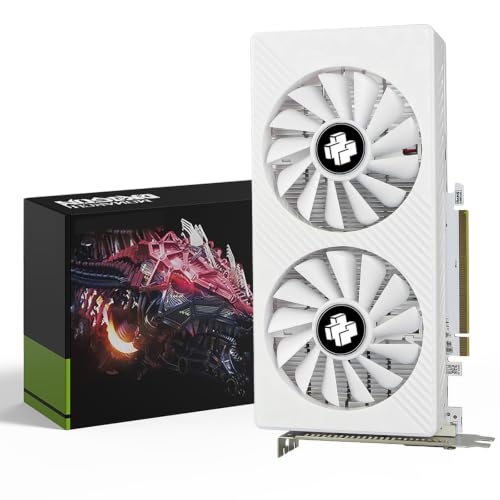
AMD's RDNA 4 architecture brought a substantially improved AV1 encoder to the Radeon lineup, and the XFX Swift RX 9060 XT OC White is the most affordable way to access it. This card carries 16 GB of GDDR6 on a 128-bit bus, which immediately gives it a VRAM advantage over the base RTX 5060 at a comparable price point. For streamers who are already invested in the AMD ecosystem, use AMD Link for mobile streaming monitoring, or simply prefer the red team's driver stack, this is the card to consider.
The RX 9060 XT is aimed at 1080p and 1440p gamers who stream, and it covers both resolutions comfortably. RDNA 4's improved compute efficiency means the card delivers strong rasterisation performance relative to its power draw, and the 16 GB of GDDR6 ensures you will not hit memory limits in any current title at 1440p, even at ultra settings. The XFX Swift variant features a triple-fan cooler in a white colourway, which will appeal to streamers who care about their build's on-camera appearance during IRL or just-chatting segments.
AMD's AMF encoder in RDNA 4 is a genuine step forward. In head-to-head comparisons with NVENC Gen 5 at equivalent bitrates, the gap has narrowed considerably, particularly for AV1 output. For 1080p60 streaming at 6,000 kbps, the RX 9060 XT produces streams that are difficult to distinguish from those encoded by the RTX 5060 in blind viewing tests. The card is fully compatible with OBS Studio's AMF plugin and with AMD's own Adrenalin software, which includes a built-in streaming overlay and performance monitoring HUD.
The 128-bit bus is shared with the RTX 5060, but GDDR6 at this capacity still delivers adequate bandwidth for the card's target resolutions. Where the RX 9060 XT has a clear advantage is in the VRAM count: 16 GB versus 8 GB on the base RTX 5060 means future-proofing for games that are increasingly memory-hungry. Streamers who also do light video editing in DaVinci Resolve will appreciate the extra buffer, as Resolve's GPU-accelerated colour grading benefits noticeably from higher VRAM.
One consideration for Twitch streamers specifically: NVIDIA's NVENC encoder has a longer track record and broader community documentation, so troubleshooting encoder issues in OBS is slightly easier on the green team. AMD's AMF has improved dramatically, but if you are new to streaming and want the path of least resistance, that is worth bearing in mind.
Verdict: The best AMD option for budget-conscious streamers who want 16 GB of VRAM and a modern AV1 encoder without paying for an RX 9070.
Pros
- 16 GB GDDR6 at this price point gives a significant VRAM advantage over comparable NVIDIA options
- RDNA 4 AMF AV1 encoder is a major improvement over RDNA 3 and produces clean 1080p60 streams
- White triple-fan cooler runs quietly and suits aesthetically focused streaming setups
Cons
- AMF encoder has less community documentation and OBS troubleshooting support than NVENC
- GDDR6 on a 128-bit bus delivers lower peak bandwidth than GDDR7 designs at the same bus width
The XFX Mercury RX 9070 XT OC is the card for the Twitch streamer who has outgrown 1080p and wants to push 1440p60 or even experiment with 4K30 streams. Built on AMD's RDNA 4 architecture with the Navi 48 die, it pairs 16 GB of GDDR6 with a full 256-bit memory bus, delivering substantially higher bandwidth than the 128-bit designs below it in the stack. This wider bus translates directly into smoother frame times at high resolutions and more headroom for the GPU to encode a stream while simultaneously rendering a demanding game.
This card suits the streamer who plays graphically intensive titles, including open-world games, modern shooters with ray tracing enabled, or simulation titles that are notoriously GPU-heavy. At 1440p ultra settings the RX 9070 XT maintains frame rates well above 60 fps in the vast majority of current titles, which means your stream source material is smooth and your encoder has a consistent, high-quality signal to work with. Choppy source footage is one of the most common causes of poor-looking streams, and the RX 9070 XT eliminates that problem at 1440p.
The XFX Mercury variant features an RGB-lit triple-fan cooler with a magnetic air channel design that improves airflow through the heatsink. It runs cool and quiet under combined gaming and encoding loads, which is important for streamers in smaller rooms or those using open-frame cases where GPU noise bleeds into the microphone. The OC edition boosts clocks above AMD's reference specification, with the card reaching around 2,970 MHz under load.
AMD's RDNA 4 AV1 encoder on the RX 9070 XT is the same generation as the one found in the RX 9060 XT, but the higher-tier GPU has more compute resources available, which can result in slightly better encoder quality at maximum preset settings in OBS. For streamers targeting 1440p60 AV1 output at 8,000 to 10,000 kbps on Twitch's partner tier, this card handles the workload without breaking a sweat.
The 256-bit bus also benefits streamers who use their gaming PC for post-stream video editing. Exporting a one-hour VOD in DaVinci Resolve or Adobe Premiere Pro is noticeably faster on the RX 9070 XT than on 128-bit designs, making the card genuinely versatile for content creators who do more than just live streaming.
Verdict: The best AMD card for 1440p streamers who want a wide memory bus, strong gaming performance, and a capable RDNA 4 AV1 encoder in a single package.
Pros
- 256-bit memory bus delivers high bandwidth for smooth 1440p gaming and faster video export workloads
- Strong gaming performance at 1440p ultra settings ensures clean, high-frame-rate source material for streams
- RGB magnetic air cooler runs quietly under combined gaming and encoding loads
Cons
- GDDR6 rather than GDDR7 means lower peak bandwidth per pin compared to NVIDIA's 5070 Ti at a similar price
- AMD's software ecosystem for streaming is less mature than NVIDIA's, with fewer third-party integrations
Buying Guide
Encoder Generation: Why It Matters More Than Raw Performance
For Twitch streamers, the hardware video encoder built into a graphics card is arguably more important than its raw gaming performance. NVIDIA's NVENC and AMD's AMF encoders handle the compression of your stream in hardware, offloading that work from your CPU and GPU's shader cores. NVIDIA's fifth-generation NVENC encoder, found in the RTX 50-series cards, produces significantly cleaner AV1 output than the fourth-generation encoder in RTX 30 and 40-series cards. AMD's RDNA 4 AMF encoder, found in the RX 9000-series cards, has similarly leapt forward and now produces competitive quality at equivalent bitrates. If you are upgrading from an older card, the encoder improvement alone may be the most noticeable change your viewers experience.
VRAM: How Much Do You Actually Need?
For 1080p streaming, 8 GB of VRAM is sufficient for most titles in 2025, though some open-world games are beginning to exceed this at ultra settings. For 1440p streaming, 12 GB is the practical minimum, and 16 GB is recommended if you also do video editing or run AI-powered OBS plugins such as NVIDIA RTX Voice, background removal, or AI-upscaled overlays. The type of VRAM also matters: GDDR7, found in NVIDIA's RTX 50-series, delivers higher bandwidth per pin than GDDR6, which partially compensates for narrower bus widths on mid-range cards.
Single-PC vs Dual-PC Streaming Setups
Most streamers use a single PC for both gaming and encoding. In this configuration, your GPU needs to handle both tasks simultaneously, which is why encoder efficiency and GPU headroom matter so much. If you are running a dual-PC setup with a dedicated capture card and a separate streaming PC, the gaming PC's GPU only needs to handle gaming, and the streaming PC's GPU handles encoding. In that scenario, a budget card with a modern encoder in the streaming PC is all you need. However, the vast majority of Twitch streamers use a single-PC setup, and all five cards in this guide are selected with that configuration in mind.
AV1 vs H.264 vs H.265
Twitch supports AV1 encoding for partners and affiliates through its Enhanced Broadcasting feature. AV1 produces significantly better image quality than H.264 at the same bitrate, which is the most important practical benefit for streamers who are constrained by Twitch's bitrate limits. H.265 (HEVC) sits between the two in quality and compatibility. If your card supports AV1 hardware encoding, use it. All five cards in this guide support AV1 hardware encoding through their respective NVENC or AMF implementations.
Cooling and Noise
Long streaming sessions, often four to eight hours or more, put sustained load on your GPU in a way that short gaming sessions do not. A card that runs hot or loud under sustained combined gaming and encoding loads will be a problem, both for component longevity and for microphone bleed. All five cards in this guide use multi-fan coolers that handle sustained loads well, but if you are in a small room or using a particularly compact case, prioritise cards with larger heatsinks and lower TDP ratings.
For the majority of Twitch streamers in 2025, the MSI Gaming RTX 5060 Ti 16G Gaming OC is the card to buy. It combines NVIDIA's fifth-generation NVENC AV1 encoder with 16 GB of GDDR7, strong 1440p gaming performance, and a quiet triple-fan cooler into a package that covers every realistic streaming use case without requiring flagship-level spending. The 16 GB VRAM buffer future-proofs the card against increasingly memory-hungry titles and AI-powered streaming tools, and the encoder quality is genuinely excellent. For streamers on a tighter budget, the Gigabyte RTX 5060 AERO OC 8G offers the same encoder generation at a lower price, with the only meaningful trade-off being the halved VRAM capacity. At the top of the stack, the Gigabyte RTX 5070 Ti GAMING OC 16G is the definitive choice for professional creators who stream at 1440p or 4K and need every advantage the hardware can provide.