Best Overall Value
Price: £29.99 | Rating: ★★★★☆ (4.4)
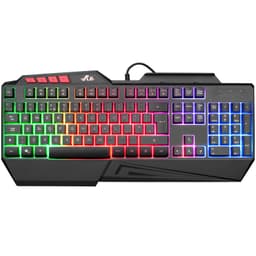
The Dierya DK61se is where you go if you want genuine mechanical switches in a 60% layout without paying the AULA WIN60 HE's price. At around £30, it's one of the cheapest true mechanical keyboards you can buy in the UK, and it's a solid first step into the world of mechanical typing and gaming.
The 60% layout is compact and clean. You lose the numpad, function row, and navigation cluster, but you gain desk space and a more focused gaming setup. The DK61se uses standard Cherry MX-compatible switches (available in red, blue, or brown depending on the listing), so you can swap keycaps easily and even hot-swap switches on some versions. That's a feature that's genuinely rare at this price.
For a first gaming keyboard, the DK61se teaches you what mechanical switches actually feel like, which is valuable if you're trying to figure out whether you prefer linear, tactile, or clicky. The RGB lighting is per-key and looks decent. Build quality is acceptable for the price, though the plastic chassis won't impress anyone coming from the Logitech G413.
The Fn layer system for accessing missing keys takes some getting used to, and the software is basic. But as a budget mechanical starter board, it does the job well.
Pros
- Genuine mechanical switches at a very low price
- 60% layout with hot-swap capability on some versions
- Standard keycap compatibility for easy upgrades
- Per-key RGB lighting
Cons
- Plastic chassis feels budget
- 60% layout requires Fn layer adjustment
- Basic software
- No dedicated arrow keys
Buy on Amazon
Best Metal Build on a Shoestring
Price: £23.98 | Rating: ★★★★☆ (4.4)
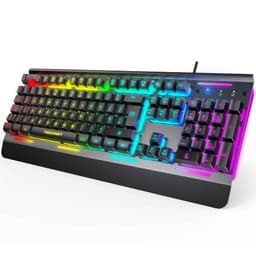
The TECKNET's headline feature is the all-metal panel, and at under £25, that's genuinely surprising. Most keyboards at this price use plastic throughout. The metal top plate adds rigidity and a premium feel that makes the TECKNET look and feel more expensive than it is. If you're buying your first gaming keyboard and want something that doesn't feel flimsy on your desk, this is worth considering.
Fifteen-zone RGB illumination covers the board well, and the IP32 water resistance means minor spills won't kill it immediately. The 105-key full-size layout includes a numpad, which is useful if you do any work on your PC alongside gaming. Twenty-five anti-ghosting keys is on the lower side compared to full anti-ghosting boards, but it covers the most commonly used gaming key combinations.
The switches are membrane, described as 90% quiet. They're fine for casual gaming and typing. Don't expect the feedback of a mechanical board. But for a beginner who wants a solid-feeling, full-size keyboard with good lighting and a metal build at a very low price, the TECKNET delivers more than you'd expect.
Pros
- All-metal panel at a very low price
- 15-zone RGB looks impressive for the money
- IP32 water resistance
- Full-size layout with numpad
Cons
- Only 25 anti-ghosting keys, not full anti-ghosting
- Membrane switches
- TECKNET brand has limited gaming pedigree
Buy on Amazon£23.98
Best Wireless Combo
Price: £22.99 | Rating: ★★★★½ (4.5)
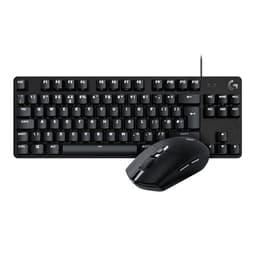
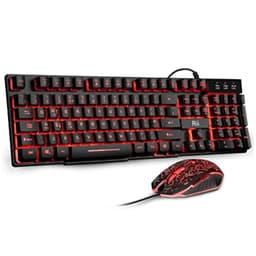
Around £22 for a keyboard and mouse. That's the Rii RK108 set, and for a complete beginner who needs everything in one box without spending much, it's hard to argue with. You get a full-size UK layout keyboard with three-colour backlit lighting (red, purple, or blue) and a matching wired mouse, all plug-and-play with no software required.
The PS4, PS5, and Xbox compatibility is explicitly listed, which makes this a decent option for console gamers who want a keyboard for typing or certain games. Just plug it in and it works. No drivers, no setup, no fuss. That simplicity is actually a genuine strength for a first gaming keyboard.
The keyboard is membrane, the mouse is basic, and neither will impress anyone with experience. But that's not the point. The RK108 set is for someone who has never owned a gaming keyboard before, wants to try gaming without a big financial commitment, and just needs something that works. It does that job honestly and cheaply. When you're ready to upgrade, you'll know exactly what you want from having used this first.
Pros
- Extremely low price for a keyboard and mouse combo
- PS4, PS5, and Xbox compatible
- Plug-and-play, no software needed
- Three backlit colour options
- UK layout
Cons
- Basic membrane keyboard and entry-level mouse
- Not suitable for competitive gaming
- You'll want to upgrade relatively quickly
- No per-key RGB
Buy on Amazon£22.99
Best Spill-Resistant Budget Pick
Price: £20.98 | Rating: ★★★★☆ (4.4)
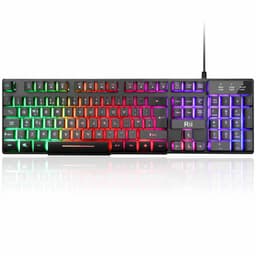
The Rii RK202 is a step up from the RK108 if you want a keyboard on its own rather than a combo. The rainbow backlit lighting cycles through colours automatically and looks fun, especially in a darker room. The spill-resistant design is a practical bonus for beginners who game with drinks nearby.
Console compatibility with PS4, PS5, and Xbox is listed, and the UK layout is correct. For casual gaming on PC or console, the RK202 does what it says. The membrane keys are nothing special, and the rainbow lighting can't be customised per-key, but at this price that's expected. It's a functional, colourful starter keyboard that won't embarrass itself on a desk.
The honest truth is that the Rii RK202 is a throwaway board. It'll get you started, but most gamers will want something better within six months. Buy it if you're genuinely unsure whether you'll stick with gaming, or if you need a cheap spare keyboard for a secondary setup.
Pros
- Spill-resistant design
- Rainbow backlit lighting looks fun
- PS4, PS5, and Xbox compatible
- Very low price
Cons
- Basic membrane keys
- Non-customisable lighting
- You'll outgrow it quickly
Buy on Amazon£20.98
Cheapest Entry Point
Buying Guide: What to Look For in the Best First Gaming Keyboards Under £50
Choosing from the best first gaming keyboards under £50 comes down to a few key decisions. Get these right and you'll avoid the most common beginner mistakes.
Mechanical vs Membrane
Mechanical keyboards use individual switches under each key. They have a distinct tactile feel, last longer (typically 50 to 100 million keypresses per switch), and give you more precise feedback when gaming. Membrane keyboards use a rubber dome layer under the keys. They're quieter and cheaper to produce, but the mushy feel is less satisfying for gaming. For your first gaming keyboard, mechanical is worth the small extra cost if your budget allows. The Dierya DK61se gets you genuine mechanical switches for around £30.
Layout: 60%, TKL, or Full Size?
Full-size keyboards include a numpad. Tenkeyless (TKL) removes the numpad but keeps the function row and arrow keys. Sixty percent removes everything except the core alphanumeric block. For gaming, TKL is the most popular compromise: compact enough to give your mouse more room, but familiar enough that you won't spend weeks relearning where keys are. Sixty percent boards are great for desk space but have a steeper learning curve. For most beginners, TKL is the safest starting point.
Hall Effect vs Traditional Switches
Hall Effect switches, like those in the AULA WIN60 HE, use magnets to detect keypresses. They support Rapid Trigger (instant actuation reset) and don't wear out the same way traditional switches do. For competitive gaming, they're a significant advantage. At under £50, the AULA WIN60 HE is the only option with Hall Effect technology in this roundup, and it's remarkable value for it.
Polling Rate
Polling rate is how often the keyboard reports its position to your PC. Standard is 1000Hz (1ms). The AULA WIN60 HE runs at 8000Hz. For most beginners, 1000Hz is perfectly fine. You won't notice the difference until you're playing at a very high level competitively.
Anti-Ghosting and N-Key Rollover
Anti-ghosting means the keyboard correctly registers multiple simultaneous keypresses. N-key rollover means every key can be pressed simultaneously without any being missed. For gaming, you want at least partial anti-ghosting. Full N-key rollover is ideal. Check the spec before buying if this matters to you.
Software and RGB
RGB lighting looks great but isn't a performance feature. Software like Corsair iCUE or Logitech G HUB lets you customise lighting and macros, which is genuinely useful. Budget keyboards often have no software at all, relying on Fn key combinations for lighting changes. That's fine, just be aware of the limitation.
Price Brackets Within the Budget
Under £20: Membrane only, basic features, fine for casual use. Twenty to £35: Where you start finding genuine mechanical switches (Dierya DK61se) and better-built membrane boards (TECKNET). Thirty-five to £50: Where proper gaming brands appear (SteelSeries, Logitech, Corsair) and advanced features like Hall Effect switches become accessible (AULA WIN60 HE).
How We Chose These Picks
We assessed each keyboard across four areas: build quality (materials, flex, key stability), switch feel (actuation, feedback, noise), gaming performance (anti-ghosting, response, Rapid Trigger where applicable), and software (ease of use, features, stability). We used each board for gaming sessions across multiple genres including FPS, strategy, and RPG titles. We also considered real owner feedback from verified UK Amazon reviews to cross-check the published figures and flag any reliability concerns that specifications alone won't reveal.
Best Overall
AULA WIN60 HE Mechanical Gaming Keyboard
Hall Effect switches, 8K polling rate, and Rapid Trigger under £50. Nothing else in this roundup comes close for serious gaming performance at this price.
Check PriceBest Value
Rii RK108 Gaming Keyboard and Mouse Set
A complete keyboard and mouse combo for around £22. Perfect for beginners who need everything in one box without spending much. PS4, PS5, and Xbox compatible too.
Check Price£22.99
For more on what makes a great gaming keyboard, RTINGS.com's keyboard testing methodology is one of the most thorough resources available. And if you want to go deeper on Hall Effect switch technology, Tom's Hardware has excellent coverage of how magnetic switches compare to traditional mechanical options.
Final Verdict: Best First Gaming Keyboards Under £50
The best first gaming keyboards under £50 cover an enormous range of quality and capability, from throwaway membrane boards to genuinely impressive Hall Effect mechanical keyboards. For most beginners, the AULA WIN60 HE is the clear recommendation: Hall Effect switches, 8000Hz polling, and Rapid Trigger at under £50 is a combination that shouldn't exist at this price, and it gives you a keyboard that won't feel limiting even as your gaming improves. If you're starting from absolute zero and need a keyboard and mouse together without spending much, the Rii RK108 set gets you gaming immediately for around £22. And if you want a trusted brand with a beginner-friendly layout and silent switches, the SteelSeries Apex 3 TKL is the safe, sensible choice. Whatever your starting point, there's a genuinely good option here for every type of new gamer.