Best Overall Value
If you want the single best mix of sharpness, speed and immersion in this price bracket, this is it. The Odyssey G5 pairs a 2560x1440 QHD panel with a 165Hz refresh rate, and at 32 inches that resolution is the sweet spot. Text stays crisp, games look detailed, and your graphics card isn't punished the way it would be pushing 4K.
The 1000R curve is the aggressive one, far tighter than the 1800R panels lower down this list. Sat at a normal desk distance it wraps around your peripheral vision nicely, which is exactly the point of a curve this size. For single-player games and racing it feels genuinely immersive. Owners consistently praise the motion clarity too, and the 1ms response with FreeSync keeps tearing and smearing in check for most fast games.
HDR10 is supported but, and this matters, it's the entry-level sort. Peak brightness isn't high enough for HDR to look dramatic, so treat it as a tick-box feature rather than a reason to buy. The stand is tilt-only on some batches, so check your listing if height adjustment matters to you. VESA mounting is there if you'd rather use an arm.
For the money, nothing else here balances resolution and refresh so well. That's why it takes the top spot among the Best 32 Inch Monitors Under £300. You can read more about Samsung's Odyssey range on their official gaming monitor page.
Pros
- QHD resolution is the ideal fit for 32 inches
- 165Hz and 1ms handle fast games well
- Immersive 1000R curve
- Trusted Samsung panel quality
Cons
- HDR10 is weak in practice
- Stand adjustment is limited on some units
- No built-in speakers
Buy on Amazon
Best Build Quality
Here's the odd one out, and the one plenty of buyers will actually want. This isn't a gaming monitor first. It's a 4K smart display that happens to double as a very good work screen. The 3840x2160 panel at 32 inches gives you lovely pixel density, so text is razor sharp and photos look great. If your screen spends more time on spreadsheets, browsers and Netflix than in Call of Duty, this is the smart buy.
The clever bit is the Smart Hub. It runs Samsung's Tizen apps, so you get Netflix, Disney+, iPlayer and the rest built in, no PC or console needed. There are speakers too, plus WiFi, Bluetooth and USB-C. That USB-C port can charge and drive a laptop over a single cable, which is genuinely handy for a tidy desk. The white finish is smart and it feels the best built of the group.
Where it loses ground for gamers is refresh rate. This is a 60Hz-class panel, so it can't touch the 165Hz to 240Hz screens elsewhere in this roundup for fast-paced play. Casual and slower games are fine. Competitive shooters, less so. Among the Best 32 Inch Monitors Under £300, this is the one to pick if streaming, work and 4K clarity matter more than frame rates.
Pros
- Sharp 4K panel, superb for work and media
- Built-in smart TV apps and speakers
- USB-C with power delivery
- Best build quality in the group
Cons
- 60Hz-class, not for fast gaming
- 4K demands a stronger GPU for games
- Smart interface can feel sluggish
Buy on Amazon
Best Under £100... nearly
Want raw speed on a budget? This is the fast one. The AOC C32G2ZE runs at a blistering 240Hz, which is more than any other screen here, and it's the standout choice for competitive shooters and esports titles. Paired with FreeSync Premium and low input lag, it feels genuinely responsive. The VA panel also brings deep contrast, so dark scenes look richer than you'd expect at this price.
The trade-off is resolution. It's 1080p, and across 32 inches that works out to roughly 69 pixels per inch. Up close, text and fine detail look a touch soft compared to the QHD Samsung. In fast games you honestly won't clock it, because your eyes are tracking movement, not reading tiny fonts. But for desktop work it's the weak point.
Brightness sits at 300 cd/m², which is fine for a normal room but nothing special, and there's no meaningful HDR. Owners rate it highly for value and the curve helps immersion. It's one of the fastest gaming options among the Best 32 Inch Monitors Under £300, just go in knowing 1080p at this size is a compromise. We covered AOC's wider curved range in our AOC C32G2ZE review.
Pros
- Blazing 240Hz refresh rate
- VA panel with strong contrast
- FreeSync Premium and low input lag
- Great value for fast gaming
Cons
- 1080p looks soft at 32 inches for desktop use
- Only 300 cd/m² brightness
- HDR is not worth counting on
Buy on AmazonRead full review
Best for Beginners
The KOORUI is the no-drama pick. It won't win spec sheet arguments, but it gets the fundamentals right and does it cheaply, which makes it a sensible first big monitor. If someone's stepping up from a small 24 inch office screen to their first proper curved gaming display, this is an easy, low-risk landing spot.
You get a curved FHD panel aimed squarely at gaming, with the sort of refresh rate and adaptive sync you'd expect at this price. Nothing here is flashy. It's a solid, functional screen that owners generally find does what they hoped for, with the usual budget caveats about colour accuracy needing a tweak out of the box.
Like the AOC, it's 1080p, so the pixel density point applies again. And build quality is plasticky rather than premium. But for a beginner who wants a big, immersive screen without overthinking specs, it's a reasonable entry into the Best 32 Inch Monitors Under £300. Just don't expect it to match the Samsung panels on sharpness or the AOC on speed.
Pros
- Affordable entry into 32 inch curved gaming
- Simple, no-fuss setup
- Curve adds immersion
Cons
- 1080p resolution at 32 inches
- Plasticky build
- Colours benefit from calibration
Buy on Amazon£159.99
Best Under £150
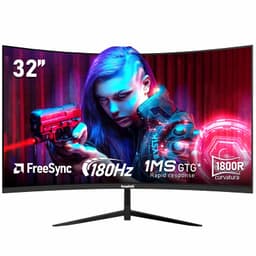
The cheapest screen here, and honestly the biggest surprise. For a price that dips well under £150, the Gawfolk gives you a 180Hz refresh rate, an 1800R curve and, unusually for the budget, a claimed 98% sRGB coverage. That colour figure matters, because it means images look punchier and more accurate than the usual pale, washed-out cheap panel.
At 180Hz with FreeSync and a 1ms response, it's plenty fast for most gamers. Not 240Hz fast like the AOC, but faster than the Samsungs, and the near bezel-less design looks smart if you ever want a multi-monitor setup down the line. The 178 degree viewing angles keep colours stable off-axis too.
It's still 1080p, so the same softness caveat applies at 32 inches, and the stand and menus feel every bit as budget as the price suggests. But as a value proposition, it's the star of the show. If your budget is tight and you still want a fast, colourful, curved screen, this is the one to grab from the Best 32 Inch Monitors Under £300. There's more detail in our Gawfolk 32 inch 180Hz review.
Pros
- Cheapest option, superb value
- 180Hz refresh with FreeSync
- 98% sRGB for punchy colour
- Near bezel-less curved design
Cons
- 1080p at 32 inches looks soft up close
- Basic stand and on-screen menus
- No proper HDR
Buy on Amazon£139.97Read full review