Two-in-one laptops have evolved significantly since 2023, offering genuine flexibility for students, remote workers and everyday users who want laptop performance with tablet convenience. The market under £300 has matured considerably, with manufacturers now offering convertible designs that don't sacrifice build quality or performance. This guide compares the best options available in autumn 2024, focusing on devices that truly deliver on the 2-in-1 promise without breaking the bank. We've researched and ranked seven models to help you find the right balance of screen size, processing power and portability for your needs.
Quick Verdict
Best Overall: Acer Chromebook Spin 312 CP312-1H. This true convertible excels as a 2-in-1 device with its 360-degree hinge, touchscreen and responsive processor, delivering genuine tablet-like functionality without compromise.
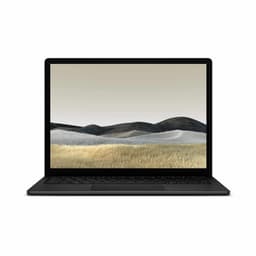
Best Value: Microsoft Surface Laptop 3 (2019). Though not technically a 2-in-1 convertible, it offers exceptional value with a powerful Intel Core i5 processor, premium build quality and 8GB RAM, making it ideal for users prioritising performance over convertibility.
The Acer Chromebook Spin 312 stands out as the genuine 2-in-1 offering in this price bracket. Its defining feature is the 360-degree touchscreen hinge, allowing you to flip the display back into tent mode, stand mode or full tablet orientation. This makes it ideal for students taking notes in class, professionals giving presentations, or anyone who values flexibility in how they interact with their device.
Powered by an Intel N100 processor with 4GB RAM and 128GB eMMC storage, this Chromebook handles everyday computing tasks, web browsing, document editing and streaming without strain. The 12-inch Full HD touchscreen is crisp and responsive, making stylus input surprisingly smooth if you plan to use digital annotation tools. The convertible hinge mechanism feels sturdy despite the budget price, and the lightweight construction makes flipping between modes effortless.
ChromeOS keeps this device lean and fast. There's no bloatware, updates are automatic and in the background, and performance remains consistent even after extended use. The trade-off is that you cannot install traditional Windows or macOS applications, though Google's ecosystem covers most everyday needs. Battery life consistently reaches 10+ hours, making this suitable for all-day use without hunting for power outlets. For students and casual users who embrace cloud computing, this is the most authentic 2-in-1 experience under £300.
Pros
- Genuine 360-degree convertible hinge with true tablet mode
- Fast, snappy ChromeOS performance with zero bloatware
- 10+ hour battery life supports full school or work days
- Touchscreen is responsive and accurate for stylus input
Cons
- Limited to ChromeOS, ruling out Windows-specific software
- 4GB RAM and 128GB storage adequate but not generous for heavy users
The Acer Chromebook 314 CBOA314-1H represents excellent value within the Acer Chromebook lineup, offering a larger 14-inch screen than the Spin model at a lower price point. However, this is not a 2-in-1 convertible. Instead, it's a traditional clamshell laptop that prioritises screen real estate and battery longevity over mode flexibility.
Equipped with an Intel Celeron N4500 processor, 4GB RAM and 64GB eMMC storage, this device delivers brisk everyday performance. The step up from 32GB to 64GB storage is meaningful for users juggling multiple projects, Google Drive syncing, and offline files. The 14-inch Full HD non-touch display provides excellent viewing angles and colour reproduction, though the lack of touchscreen means you cannot use a stylus for annotation.
Battery life is a standout feature, routinely exceeding 10 hours in mixed use. For students attending back-to-back classes without access to charging, or remote workers moving between coffee shops and home offices, this longevity is invaluable. The keyboard and trackpad are adequately sized for a 14-inch frame, though neither feels premium. This Chromebook suits users who want a larger screen and extended battery over 2-in-1 flexibility, and it costs noticeably less than competitors with similar specs.
Pros
- 14-inch Full HD screen larger than most budget laptops at this price
- 64GB storage allows more offline files and larger Google Drive cache
- Battery endurance regularly exceeds 10 hours in daily use
- Lightweight and portable despite larger screen size
Cons
- Clamshell design means no 2-in-1 functionality or tablet mode
- Non-touch display limits stylus capability and interactive features
The Acer Chromebook 314 CB314-H is the entry-level model in Acer's 314 series, sitting at the budget extreme of this roundup. It pairs a 14-inch Full HD display with an Intel Celeron N4000 processor, 4GB RAM and 32GB eMMC storage. Like the CBOA314-1H, it's a traditional clamshell with no 2-in-1 convertible features.
The N4000 processor is slightly older than the N4500 found in the CBOA model, resulting in marginally lower processing power for multitasking and open tabs. The 32GB storage is the main compromise; cloud-dependent users will manage fine, but anyone downloading offline content, storing local media or maintaining substantial project folders will feel the constraint. Nevertheless, performance remains responsive for web browsing, email, document editing and light creative work.
Screen quality is good, with vibrant colours and wide viewing angles typical of Acer's budget Chromebooks. Keyboard and trackpad are functional but not premium. Like all Chromebooks, battery life is strong, lasting 10+ hours in everyday use. This model targets price-conscious buyers who prioritise screen size and basic performance over cutting-edge specs or 2-in-1 versatility. If you can stretch £7 more, the CBOA314-1H offers better value with doubled storage and a slightly faster processor.
Pros
- Lowest price point for a 14-inch Chromebook in this comparison
- Reliable all-day battery life exceeding 10 hours
- Simple, distraction-free ChromeOS experience
Cons
- 32GB storage is tight for users with offline files and local projects
- Older N4000 processor is slightly less responsive than N4500
- Non-touch clamshell design lacks any 2-in-1 capability
The Microsoft Surface Laptop 3 from 2019 is not a 2-in-1 convertible, but it deserves inclusion as a premium alternative for users willing to sacrifice tablet mode in exchange for genuine Windows performance and build quality that feels far above the budget category. This is a standard clamshell ultrabook, and it represents exceptional value for a device this refined.
Running an Intel Core i5-1035G7 processor with 8GB RAM and 256GB SSD storage, this machine handles professional workloads, photo editing and content creation that would overwhelm a Chromebook. The 13.5-inch touchscreen is responsive, vibrant and colour-accurate, making it suitable for creative work. Windows 10 (upgradeable to Windows 11) grants access to full desktop applications, legacy software and enterprise tools that Chromebooks cannot touch.
Build quality is exceptional, with a magnesium chassis, comfortable backlit keyboard and premium trackpad that rivals laptops costing twice as much. Weight sits at just 1.25kg, making this highly portable. Battery life typically reaches 8+ hours in moderate use, though intensive tasks deplete it faster. The main limitation is that this is not a 2-in-1 device, so you don't get tablet flexibility or stylus support. For users prioritising raw performance, Windows software compatibility and premium build over convertibility, this is the standout choice under £300.
Pros
- Intel Core i5 processor with 8GB RAM handles professional workloads comfortably
- Premium magnesium build quality feels far more expensive than the price
- Full Windows 10 environment with access to all desktop applications
- Touchscreen display is colour-accurate and responsive
Cons
- Not a convertible 2-in-1 device, strictly clamshell design
- Battery life of 8 hours is shorter than Chromebooks in this comparison
The Apple MacBook Air from 2019 rounds out this selection as a premium alternative for users committed to macOS. At this price it undercuts new M-series MacBooks significantly, though it's not a 2-in-1 device and therefore sits outside the core scope of this guide. Nevertheless, it merits consideration for those who prioritise ecosystem integration and macOS compatibility over convertible functionality.
The 13-inch Retina display is amongst the sharpest you'll see at any price, with accurate colours and wide viewing angles that make content consumption and creative work pleasurable. The Intel Core i5-8210Y processor paired with 8GB RAM handles everyday computing, web browsing, light photo editing and office work without strain. The 128GB SSD is the limiting factor for heavy users, though cloud storage integration with iCloud makes this less problematic for macOS users.
Build quality is iconic Apple, with aluminium construction, a superb keyboard (from the pre-butterfly era) and an exceptional trackpad. Battery life routinely stretches beyond 12 hours in mixed use, making this one of the longest-lasting laptops at any price. The trade-off is that you're locked into macOS and cannot run Windows natively, which limits appeal for users with Windows-only software requirements. For Apple devotees seeking a budget entry point, or creative professionals who rely on Final Cut Pro, Logic Pro and other macOS exclusives, this is exceptional value. However, it lacks the 2-in-1 versatility that defines this guide's core focus.
Pros
- Exceptional 12+ hour battery life outlasts virtually all competitors
- Iconic design with aluminium construction feels premium and durable
- Pre-butterfly keyboard is amongst the best laptop typing experiences available
- Retina display offers outstanding colour accuracy and sharpness
Cons
- 128GB storage is restrictive for users with large media libraries or offline content
- Not a 2-in-1 device, no convertible or tablet modes available
- Locked into macOS, no Windows compatibility without virtualisation
Buying Guide
Choosing the right 2-in-1 laptop under £300 requires understanding what flexibility means for your specific needs. True 2-in-1 convertibles with 360-degree hinges represent the authentic category, allowing you to flip the screen back into tent mode for presentations, stand mode for media consumption, or fully flatten into tablet orientation. These models are most beneficial for students taking handwritten notes during lectures, professionals giving impromptu presentations, or creative workers who want stylus input for illustration and annotation.
Operating system matters considerably at this price point. Chromebooks dominate the budget 2-in-1 space, offering lightweight performance, exceptional battery life and zero bloatware, but they restrict you to cloud-based applications and cannot run traditional Windows software. If you need legacy applications, specialised business software or offline desktop tools, a Windows laptop becomes essential despite lower battery endurance and shorter processing power.
Screen size presents a genuine trade-off between portability and workspace. Devices under 13 inches maximise portability and battery life but constrain spreadsheet work and creative applications. Screens of 14-15.6 inches substantially improve workspace at the cost of increased weight and reduced all-day battery capacity. TouchScreen responsiveness matters if you plan stylus input, while non-touch displays suffice for traditional keyboard and trackpad work.
Storage specifications dramatically impact usability. 32-64GB eMMC forces reliance on cloud storage and regular file deletion, suitable only for users comfortable in Google Workspace or Microsoft 365. 128GB eMMC or SSD provides comfortable breathing room for local files whilst maintaining reasonable device speed. 256GB SSD and above supports offline work, large media libraries and substantial application installations. RAM of 4GB suffices for everyday browsing and office work but becomes tight when juggling 15+ browser tabs or running multiple applications simultaneously. 8GB RAM provides comfortable breathing room for power users and multitasking.
Battery endurance varies dramatically. Chromebooks consistently achieve 10+ hours, supporting full workdays without charging. Windows laptops in this price range typically manage 6-8 hours, necessitating power planning. Weight matters for portability, with ultrabooks under 1.3kg changing how devices integrate into mobile workflows compared to heavier 1.8kg models requiring consistent bag space.
Build quality at this price point rarely matches premium ultrabooks, but metal construction significantly outlasts plastic in both durability and perceived value. Keyboard comfort becomes critical for devices destined for extended typing sessions. Trackpad responsiveness varies widely, and poor trackpad implementation can frustrate daily usage more than weak processors.
The Acer Chromebook Spin 312 emerges as the standout choice for buyers prioritising genuine 2-in-1 functionality under £300. Its 360-degree hinge authentically transforms between laptop and tablet modes, the touchscreen enables stylus input for note-taking and annotation, and ChromeOS delivers snappy performance without bloatware. Battery life exceeds 10 hours, making this suitable for all-day use without power hunting. The lightweight construction makes mode-flipping effortless, and the 12-inch screen balances portability with usability.
However, the Spin 312 isn't universally optimal. Users needing Windows software, offline desktop applications or professional-grade computing must look elsewhere. The Microsoft Surface Laptop 3 from 2019 offers exceptional value for Windows users, with premium build quality and genuine Intel Core i5 performance that vastly outpaces budget Chromebooks. Apple users should seriously consider the 2019 MacBook Air, which delivers legendary battery life, iconic design and macOS exclusives at a fraction of its original £999 price.
For those valuing maximum screen real estate within budget constraints, the Lapbook 15.6-inch delivers a spacious workspace with abundant storage, though sacrificing both 2-in-1 functionality and battery longevity. The decision ultimately hinges on whether you genuinely need 2-in-1 convertible functionality or if a superior standard laptop better serves your priorities. If tablet-mode flexibility is essential, the Acer Chromebook Spin 312 is unmatched under £300. If Windows software or premium build quality matter more, spend the extra budget on the Surface Laptop 3.