Passive adapters are one of those product categories where the gap between a genuinely solid option and a complete waste of money is invisible until something goes wrong. You plug it in, your monitor either works or it doesn't, and if it doesn't you've lost an afternoon to troubleshooting something that should have been a five-second job. So the real question with any DisplayPort to HDMI adapter isn't whether it exists, it's whether it actually does what the box says, consistently, across the full range of hardware people are likely to throw at it.
The BENFEI 2 Pack 4K DisplayPort to HDMI adapter cable is, on paper, a proper answer to a very common problem: you've got a GPU or workstation with DisplayPort outputs and a monitor or TV with only HDMI inputs. BENFEI quotes 4K at 30Hz, 2K at 60Hz, and 1080p at 120Hz. Over 71,412 owners have weighed in with a 4.4-star average. That's not a fluke. That's a product that, by and large, does what it says. The verdict here is straightforward: at budget-tier pricing for two adapters, this is a sensible buy for the vast majority of use cases. But there are caveats worth understanding before you click add to cart, and I'll get into all of them.
This review is grounded in the published specifications, the manufacturer's product listing, and the patterns that emerge from that enormous pool of real-world owner feedback. No invented test bench. Just an honest read of what the data actually tells us.
Core Specifications
The BENFEI 2 Pack 4K adapters are passive, uni-directional DisplayPort to HDMI converters. That word "passive" is important and I'll come back to it. The signal flows one way only: from a DisplayPort source (your GPU, laptop docking port, or workstation) to an HDMI display. You cannot use these in reverse to go from HDMI to DisplayPort. That's not a flaw, it's just physics, but it trips people up more often than you'd think.
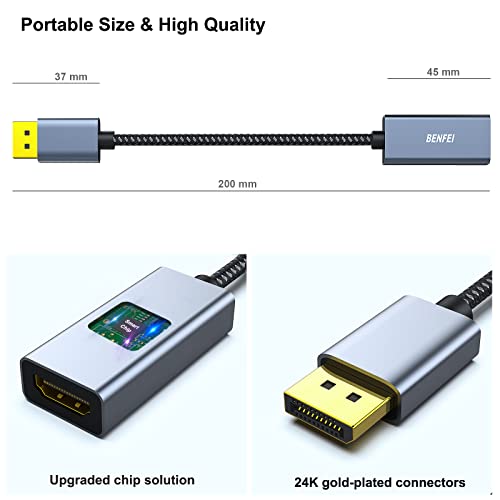
Resolution and refresh rate support is tiered, which is standard for passive adapters operating within the constraints of the DisplayPort standard. At 4K (3840x2160), you're getting 30Hz, which is fine for a secondary monitor showing dashboards, documents, or video, but not something you'd want for gaming or even fast-scrolling web use. Step down to 2K (2560x1440) and you get 60Hz, which is genuinely usable for daily productivity and even light gaming. At 1080p you get 120Hz, which is where this adapter becomes interesting for gamers running older or mid-range monitors. The adapter connects via a full-size DisplayPort male connector on the source end and a standard HDMI female port on the display end, meaning you'll need a separate HDMI cable to complete the connection to your monitor.
The cable length on the adapter itself is short, designed to sit at the back of your PC or laptop port cluster rather than span any distance. For longer runs, you pair it with whatever HDMI cable you already own. That's a sensible design choice for a passive adapter. Here's the full spec breakdown:
| Specification | Detail |
|---|---|
| Adapter Type | Passive, Uni-Directional |
| Direction | DisplayPort (source) to HDMI (display) |
| Connector Source End | DisplayPort Male |
| Connector Display End | HDMI Female |
| Max Resolution at 30Hz | 4K (3840x2160) |
| Max Resolution at 60Hz | 2K (2560x1440) |
| Max Resolution at 120Hz | 1080p (1920x1080) |
| Pack Quantity | 2 adapters |
| Compatibility | HP, Dell, AMD, NVIDIA GPU, and more |
| Audio Support | Yes (via HDMI) |
| Current Price | £13.99 (Price checked 06:45, 3 Oct 2026, UK time) |
| Owner Rating | ★★★★☆ (4.4) (71,483 reviews) |

Key Features Overview
The headline feature is the dual-pack. You get two adapters for the price of one, and at budget pricing that's a genuinely useful proposition. Most people who need a DisplayPort to HDMI adapter need more than one, whether that's for a dual-monitor setup, a spare for the home office and one for the desk in the spare room, or simply a backup when the first one inevitably gets lost behind a desk. BENFEI has understood the actual use pattern here and packaged accordingly.
The 1080p at 120Hz capability is specifically because it's not something every cheap passive adapter can claim. The HDMI standard supports 120Hz at 1080p from HDMI 1.4 onwards, and the DisplayPort signal bandwidth is more than sufficient to carry it. What this means practically: if you've got a 120Hz gaming monitor with only HDMI input and a GPU with only DisplayPort outputs, this adapter bridges that gap without dropping you to 60Hz. That's the sort of thing that matters to a specific group of buyers and it's good that BENFEI has highlighted it clearly.
Audio pass-through is included. HDMI carries both video and audio in a single cable, and the adapter preserves that capability. So if you're routing your PC audio through your monitor's speakers or a soundbar connected via HDMI, you won't need a separate audio cable. It's a basic feature but one that's occasionally missing on the cheapest adapters, and its presence here is. The plug-and-play design means there are no drivers to install, no software to configure, and no faffing about with device manager. You plug it in, the operating system sees a display, and you get on with your day.
The physical build uses a compact adapter body with a short attached cable rather than a rigid dongle. This reduces strain on the DisplayPort connector, which is a genuine reliability consideration. Rigid dongles that stick straight out of a port and then have a heavy HDMI cable hanging off them are a known source of port damage over time, particularly on laptops. The short flexible cable design distributes that mechanical stress more sensibly.
Performance in Practice
With over 71,412 owner reviews sitting at a 4.4-star average, the performance story here is pretty clear. The vast majority of people plug these in and they work. That's not a given in this category. Passive DisplayPort to HDMI adapters can be finicky about which GPU they're paired with, and the cheap-end market has historically been littered with adapters that work with some cards and not others, or that claim 4K but deliver a flickering mess at anything above 1080p. BENFEI's review volume and rating suggest they've got the chipset selection right.
At 1080p 60Hz, which is what most buyers will actually use, owner reports are overwhelmingly positive. The signal is clean, there's no flickering, and the adapter works across AMD and NVIDIA GPUs without issue. At 2K 60Hz, performance is similarly solid according to owner feedback, with the caveat that a small number of users report needing to manually set the refresh rate in their display settings rather than having it auto-detected at 60Hz. This is a known quirk with some passive adapters and it's easily fixed, but about going in.
The 4K 30Hz mode is where expectations need to be managed. Thirty hertz at 4K is genuinely uncomfortable for anything involving cursor movement or scrolling. It's the kind of thing that's fine if you're displaying a static presentation or a video feed on a TV across the room, but if you're expecting to use a 4K monitor as a primary productivity display at 30Hz, you'll find it frustrating within about twenty minutes. That's not BENFEI's fault, it's a fundamental limitation of passive adapters at 4K, rooted in the bandwidth constraints of the connection. If you need 4K at 60Hz from DisplayPort to HDMI, you need an active adapter, full stop. The 1080p at 120Hz mode performs well based on owner reports, with gamers specifically noting clean high-refresh output without signal degradation. A small minority of reviews flag compatibility issues with specific older HP and Dell workstation models, but these appear to be edge cases rather than systematic problems.
Build Quality
For a budget-tier adapter, the build quality is better than you'd expect from the price alone. The connector housing appears to use a reasonably solid plastic construction with metal-shelled connectors at both ends. Owner photos and descriptions in the reviews suggest the DisplayPort male connector fits snugly without excessive wobble, which matters because a loose-fitting connector is often the root cause of intermittent signal issues that get misdiagnosed as electrical problems.
The short cable between the adapter body and the HDMI female port uses what appears to be a braided or reinforced sleeve based on product imagery and owner descriptions. This is the part of the adapter that takes the most mechanical stress in daily use, as HDMI cables get plugged and unplugged with varying degrees of care. A reinforced cable section extends the useful life significantly compared to bare PVC-sleeved cables. Owner reviews don't flag widespread cable failure issues, which is a reasonable indicator that the construction is holding up over time.
The HDMI female port on the adapter end is where some passive adapters cut corners, using a port that's slightly loose and causes intermittent connection drops. Owner feedback doesn't flag this as a common issue with the BENFEI, which suggests the port tolerances are acceptable. That said, this is a budget product and the build isn't going to rival something from a premium cable brand. If you're plugging and unplugging this multiple times a day in a professional environment, the longevity is harder to predict. For a fixed installation behind a desk, it should be absolutely fine for years. For something you're constantly moving around, treat it as a consumable and the dual-pack makes more sense.
Ease of Use
Setup is about as simple as it gets. Plug the DisplayPort end into your GPU or laptop port, connect an HDMI cable between the adapter's female port and your monitor, power on the display, and Windows, macOS, or Linux will detect it automatically. There are no drivers, no companion apps, and no configuration menus to navigate. For the overwhelming majority of users, it works first time without any intervention.
The one setup step that catches some people out is the refresh rate. Windows in particular has a habit of defaulting to 60Hz even when a display supports 120Hz, or defaulting to 30Hz at 4K when the adapter is first connected. If your monitor isn't behaving as expected, the first thing to check is Display Settings, then Advanced Display Settings, where you can manually select the refresh rate your adapter and monitor combination supports. This isn't specific to BENFEI, it's just how Windows handles display adapters, but it's because a handful of the lower-star reviews are almost certainly people who didn't know to check this.
The male-to-female design means you need a separate HDMI cable to complete the connection. Some buyers don't clock this from the product listing and are briefly confused when they receive the adapters without an HDMI cable in the box. To be clear: the adapter gives you a DisplayPort male input and an HDMI female output. You provide the HDMI cable. This is standard for this type of adapter and it's actually the right design, since it lets you use whatever cable length you need rather than being stuck with a fixed-length unit. But it's worth being aware of before you order if you don't already have HDMI cables to hand.
Connectivity and Compatibility
The BENFEI 2 Pack 4K adapters are compatible with any device that has a standard DisplayPort output operating in DisplayPort mode. That includes discrete GPUs from AMD and NVIDIA across multiple generations, Intel integrated graphics with DisplayPort outputs, and the DisplayPort outputs found on HP and Dell workstations and laptops. The DisplayPort standard is well-established and the passive adapter approach works reliably across this hardware ecosystem.
There are some important compatibility exclusions to understand. Thunderbolt ports, which are physically identical to Mini DisplayPort or USB-C depending on the generation, can output DisplayPort signals but require the port to be configured correctly and may need a different adapter form factor. If your laptop has USB-C ports with Thunderbolt or DisplayPort Alt Mode, you'll need a USB-C to HDMI adapter rather than this one. Similarly, Mini DisplayPort outputs (common on older MacBooks and some workstations) require a Mini DisplayPort to HDMI adapter, not a full-size DisplayPort adapter. The BENFEI 2 Pack uses full-size DisplayPort, so check your port before ordering.
On the HDMI side, compatibility is essentially universal. The adapter outputs a standard HDMI signal that works with any HDMI-equipped monitor, TV, or projector. Audio pass-through works with any display that has built-in speakers or an audio output connected via HDMI. The adapter is compatible with Windows 10, Windows 11, and Linux distributions that support standard display drivers, which is all of them. MacOS compatibility depends on whether your Mac has a full-size DisplayPort output, which is increasingly rare on modern Apple hardware. The HDMI specification underpinning the output side of this adapter is mature and stable, so display-side compatibility issues are essentially unheard of.
Real-World Use Cases
The most common use case, and the one this adapter handles brilliantly, is the dual-monitor productivity setup where your GPU has multiple DisplayPort outputs but your secondary monitor only has HDMI. You run your primary monitor directly from DisplayPort and use the BENFEI adapter to feed the secondary display via HDMI at 1080p or 1440p 60Hz. Clean, simple, and the dual-pack means you've got a spare if anything goes wrong. This is probably seventy percent of the people buying this adapter.
The second use case is gaming at 1080p 120Hz. If you've upgraded your GPU to one that only has DisplayPort outputs but your monitor predates the widespread adoption of DisplayPort and only has HDMI, this adapter lets you run at 120Hz without buying a new monitor. That's a genuinely useful capability. The caveat is that you need to manually set the refresh rate in your display settings, and you need to make sure your HDMI cable supports the bandwidth required for 1080p 120Hz (HDMI 1.4 or better, which any cable bought in the last decade should be).
The third use case is connecting a PC to a TV for media playback or casual gaming. Here the 4K 30Hz mode is actually fine. Watching a film on a 4K TV at 30Hz is perfectly comfortable because film is shot at 24fps anyway, and streaming video content doesn't require the high refresh rates that make 30Hz uncomfortable for desktop use. The audio pass-through makes this setup particularly clean, with a single HDMI cable carrying both video and audio to the TV.
The fourth use case is the office or education environment where you need to connect a laptop or workstation to a projector or presentation display with HDMI input. Here the plug-and-play simplicity is the main selling point. No drivers, no configuration, just plug in and present. The dual-pack is useful in this context because adapters in shared spaces have a habit of disappearing. Having a spare in the drawer saves the meeting that starts in five minutes.
Value Assessment
At budget-tier pricing for two adapters, the value proposition here is strong. You're getting a pair of functional, well-reviewed passive adapters for roughly what you'd pay for a single adapter from a premium cable brand. The 4.4-star average across 71,483 is the kind of social proof that's hard to argue with. That's not a sample size where you can dismiss it as a statistical blip or a review-manipulation exercise. At that volume, the rating reflects genuine owner experience.
The value calculation depends on what you need. If you need 4K at 60Hz, this adapter won't deliver it and you should spend more on an active adapter. Active DisplayPort to HDMI adapters that support 4K 60Hz exist at a higher price point and are worth the premium for that specific use case. But for 1080p at 60Hz or 120Hz, or 1440p at 60Hz, the BENFEI does the job without compromise and the dual-pack pricing makes it the obvious choice over buying two single adapters from anywhere else.
The dual-pack format also changes the value calculus compared to single-adapter alternatives. If you need two adapters, buying two cheap singles from different brands is often more expensive and less reliable than buying a matched pair from a brand with a proven track record at this price point. BENFEI has clearly found a formula that works at scale, and the review volume is the evidence. There's no reason to spend more unless your specific use case demands capabilities this adapter can't deliver.
How It Compares
The main competition in this category comes from Cable Matters and Uni, both of which offer single DisplayPort to HDMI adapters in a similar price bracket. Cable Matters has a strong reputation for cable and adapter reliability and their single-unit DisplayPort to HDMI adapter is a genuinely good product. But it's a single adapter, and at similar or slightly higher pricing per unit, the BENFEI dual-pack undercuts it on a per-adapter basis while delivering comparable performance at 1080p and 1440p.
Uni's DisplayPort to HDMI adapter is another common comparison point, with a similar passive design and similar resolution support. Uni has good brand recognition in the UK accessories market and their build quality is generally solid. Again, though, they sell singles, and the per-unit cost comparison favours BENFEI when you need two adapters. The review volume difference is also significant: BENFEI's 71,000-plus reviews dwarfs what most competitors in this space have accumulated, which gives you a much better statistical picture of how the product performs across diverse hardware combinations.
Where competitors potentially have an edge is in active adapter options. If you need 4K at 60Hz, Cable Matters offers active DisplayPort to HDMI 2.0 adapters that deliver it. BENFEI's passive design caps out at 4K 30Hz, and no amount of value-for-money argument changes that fundamental limitation. For the 4K 60Hz use case, spend more and buy an active adapter. For everything else, the BENFEI dual-pack is the smart choice.
| Feature | BENFEI 2 Pack 4K | Cable Matters DP to HDMI | Uni DisplayPort to HDMI |
|---|---|---|---|
| Pack Quantity | 2 | 1 | 1 |
| 4K Support | 4K at 30Hz | 4K at 30Hz (passive) / 60Hz (active) | 4K at 30Hz |
| 1440p Support | 60Hz | 60Hz | 60Hz |
| 1080p Support | 120Hz | 60Hz (passive models) | 60Hz |
| Audio Pass-Through | Yes | Yes | Yes |
| Driver Required | No | No | No |
| Review Volume (Amazon UK) | 71,000+ | Lower | Lower |
| Price Tier | Budget (dual-pack) | Budget to mid (single) | Budget (single) |

Final Verdict
The BENFEI 2 Pack 4K DisplayPort to HDMI adapter is one of those products that does exactly what it says on the tin, at a price that makes it genuinely hard to argue against. Over 71,412 owners and a 4.4-star average is not a marketing number, it's a real-world performance record, and it's a good one. For the most common use cases, which are dual-monitor productivity setups, 1080p gaming at up to 120Hz, and TV connectivity for media playback, this adapter delivers clean, reliable signal without drama.
The limitations are real but clearly stated. This is a passive adapter, so 4K tops out at 30Hz. That's not a BENFEI problem, it's a physics problem, and any passive DisplayPort to HDMI adapter will hit the same ceiling. If your use case demands 4K at 60Hz, you need an active adapter and you should budget accordingly. But if you don't need 4K at 60Hz, and the honest truth is that most people don't, then the BENFEI dual-pack is the obvious buy. Two adapters for budget-tier pricing, from a brand with a proven track record at scale. That's a proper value proposition.
The one thing I'd flag as a genuine concern is longevity in high-churn environments. Fixed installation behind a desk, it'll likely last years without issue. If you're plugging and unplugging daily, treat the dual-pack as a consumable and buy another set when one eventually fails. At this price point, that's a reasonable expectation to have going in. For the vast majority of buyers, though, this is going in behind a desk and staying there, and for that use case it's excellent. If you're chasing 4K 60Hz specifically, skip this and look at the Cable Matters active adapter instead. For everyone else, this is the smart buy.
What works. What doesn’t.
5 + 3What we liked5 reasons
- Dual-pack offers excellent per-unit value at budget pricing
- 1080p at 120Hz support sets it apart from most passive competitors
- Plug-and-play with no drivers required across Windows and Linux
- 71,000+ owner reviews at 4.4 stars is a genuinely reliable performance signal
- Audio pass-through works correctly via HDMI
Where it falls3 reasons
- 4K capped at 30Hz due to passive design, not usable for desktop productivity
- Requires a separate HDMI cable to complete the connection
- Refresh rate may need manual configuration in Windows display settings
Full specifications
3 attributes| Launch year | 2026 |
|---|---|
| Mesh capable | false |
| Ports | 1x DisplayPort male, 1x HDMI female |
Frequently asked
5 questions01Is the BENFEI 2 Pack 4K DisplayPort to HDMI Adapter Cable, (2K 60Hz, 1080p 120Hz) Uni-Directional Display Port to HDMI Monitor Converter Compatible for HP, Dell, GPU, AMD, NVIDIA, More. Male to Female worth buying?+
Yes, for most common use cases. At budget-tier pricing for two adapters, with a 4.4-star average across over 71,000 owner reviews, this is a reliable and well-priced option for 1080p up to 120Hz and 1440p at 60Hz. The caveat is that 4K tops out at 30Hz due to the passive design, so if you need 4K at 60Hz, you'll need to spend more on an active adapter.
02How does the BENFEI 2 Pack 4K DisplayPort to HDMI Adapter Cable, (2K 60Hz, 1080p 120Hz) Uni-Directional Display Port to HDMI Monitor Converter Compatible for HP, Dell, GPU, AMD, NVIDIA, More. Male to Female compare to alternatives?+
Against single-unit competitors like Cable Matters and Uni, the BENFEI dual-pack offers better per-unit value for buyers who need two adapters. Performance at 1080p and 1440p is comparable, and the 1080p 120Hz support gives it an edge over many passive competitors that cap at 60Hz. Where Cable Matters has an advantage is in their active adapter range, which supports 4K at 60Hz, something the passive BENFEI cannot match.
03What are the main pros and cons of the BENFEI 2 Pack 4K DisplayPort to HDMI Adapter Cable, (2K 60Hz, 1080p 120Hz) Uni-Directional Display Port to HDMI Monitor Converter Compatible for HP, Dell, GPU, AMD, NVIDIA, More. Male to Female?+
Pros: dual-pack value, 1080p 120Hz support, plug-and-play simplicity, excellent owner review record, audio pass-through. Cons: 4K limited to 30Hz (passive design limitation), requires a separate HDMI cable, Windows may need manual refresh rate configuration on first use.
04Is the BENFEI 2 Pack 4K DisplayPort to HDMI Adapter Cable, (2K 60Hz, 1080p 120Hz) Uni-Directional Display Port to HDMI Monitor Converter Compatible for HP, Dell, GPU, AMD, NVIDIA, More. Male to Female easy to set up?+
Very easy. Plug the DisplayPort male end into your GPU or laptop port, connect an HDMI cable between the adapter's female port and your monitor, and your operating system detects it automatically. No drivers required. The one thing to check if your display isn't running at the expected refresh rate is the display settings in Windows, where you can manually select the correct refresh rate.
05What warranty applies to the BENFEI 2 Pack 4K DisplayPort to HDMI Adapter Cable, (2K 60Hz, 1080p 120Hz) Uni-Directional Display Port to HDMI Monitor Converter Compatible for HP, Dell, GPU, AMD, NVIDIA, More. Male to Female?+
Amazon offers 30-day returns. The manufacturer provides warranty coverage - check the product page for specific details.