There's a particular kind of product that punches so far above its price bracket that it makes you question what you've been spending your money on. The JSAUX HB0602 is one of those. At budget tier pricing, it's a 5-in-1 dock promising HDMI 2.1 output at 4K@120Hz, wired Ethernet, dual USB-A ports, and 100W USB-C passthrough. For handheld gaming dock money, that spec sheet reads almost suspiciously well.
But here's the context that matters: the Steam Deck's official dock from Valve costs considerably more and doesn't even offer HDMI 2.1. JSAUX, a brand that's quietly built a solid reputation in the Steam Deck accessory space, is betting that most buyers would rather have the better spec at a fraction of the cost. And with hundreds of owners rating this thing positively, it's not like they're keeping quiet about whether that bet paid off.
So who actually needs this? If you've got a Steam Deck (original or OLED), an ASUS ROG Ally X, a Lenovo Legion Go, or an MSI Claw, and you want to plug it into your telly without faff, this dock is aimed squarely at you. The question isn't whether the idea is good. The question is whether the execution holds up when you're actually using it daily.
Core Specifications
Let's get into the numbers, because the spec sheet is where this dock makes its first strong argument. The headline feature is HDMI 2.1, which supports 4K at 120Hz or 8K at 30Hz. For context, HDMI 2.0 (which you'll find on plenty of docks at similar or higher prices) caps out at 4K@60Hz. If you're running a 120Hz display and you want to actually use those extra frames, HDMI 2.1 isn't a luxury, it's a requirement. Most of the competition doesn't bother.
The Ethernet port delivers 100Mbps. Not Gigabit, which is worth flagging, but for gaming purposes 100Mbps is genuinely fine for most people. Online gaming doesn't need Gigabit bandwidth, it needs low latency and stability, and wired Ethernet provides both regardless of whether it's 100Mbps or 1000Mbps. Where you'd notice the difference is large file transfers or downloading a 50GB game while someone else is streaming 4K in the same house. Worth knowing, not worth panicking about.
The USB-C port does double duty as a 100W power delivery passthrough, which means you can keep your handheld charged while it's docked without needing a separate cable. The Steam Deck OLED, for reference, charges at up to 45W, so 100W is more than enough headroom. The two USB-A ports are USB 2.0, which is the one genuine concession in the spec sheet. USB 2.0 tops out at 480Mbps, so don't plan on using these for fast external storage. Keyboard, mouse, controller, USB hub? Absolutely fine.
| Specification | Detail |
|---|---|
| Video Output | HDMI 2.1, up to 4K@120Hz |
| Ethernet | 100Mbps (Fast Ethernet) |
| USB-A Ports | 2x USB-A 2.0 (480Mbps) |
| USB-C Port | 1x USB-C, 100W Power Delivery passthrough |
| Total Ports | 5-in-1 |
| Compatible Devices | Steam Deck, Steam Deck OLED, ASUS ROG Ally X, Lenovo Legion Go, MSI Claw |
| Connection to Host | USB-C |
| Model Number | HB0602 |
| Brand | JSAUX |
| Current Price | £21.99 · Details |
Key Features Overview
The standout feature, and the one JSAUX leads with for good reason, is that HDMI 2.1 output. This isn't just a spec-sheet win for bragging rights. If you've invested in a 4K 120Hz television or monitor (and they're genuinely affordable now), you want a dock that can actually feed it a proper signal. HDMI 2.1 supports the full bandwidth needed for uncompressed 4K@120Hz, plus it carries HDR metadata properly. The Steam Deck OLED has a genuinely beautiful display, and its HDMI output via this dock should carry that quality through to your screen without the signal being bottlenecked by an older HDMI standard.
The 100W USB-C passthrough is the second feature worth understanding properly. Some cheaper docks pass through power but throttle it, meaning your device charges slowly or not at all under load. 100W is a proper delivery spec. The Steam Deck and its handheld rivals all draw significantly less than that under gaming load, so you'll stay charged with headroom to spare. This matters more than it sounds because docking a handheld without charging it is a fairly pointless exercise unless you're just doing a quick session.
Wired Ethernet is the third pillar, and it's one that gets overlooked in the handheld gaming conversation. Wi-Fi on the Steam Deck is decent but it's still Wi-Fi. If you're playing competitive multiplayer, or you're just fed up with the occasional stutter that wireless introduces, plugging in an Ethernet cable is the single most reliable fix. The 100Mbps ceiling is worth knowing about (see the specs section for the full breakdown), but for the vast majority of gaming use cases it simply doesn't matter. And the dual USB-A ports round things out for peripherals, giving you enough connections for a keyboard and mouse or a controller receiver without needing to daisy-chain hubs.
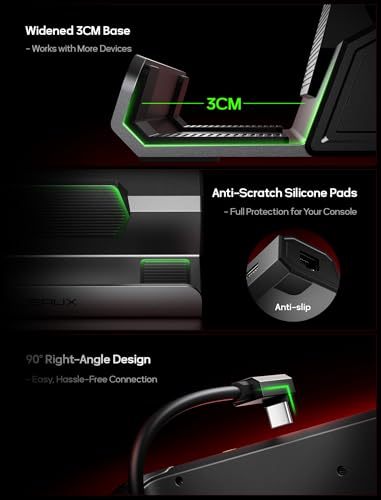
One thing JSAUX doesn't shout about but owners frequently mention: the form factor. This is a compact, portable dock. It's not a chunky desktop unit. You can throw it in a bag with your Steam Deck and actually use it at a hotel or a friend's place, which is exactly the kind of real-world usability that makes the difference between a dock that lives on your desk and one that actually travels with you.
Performance in Practice
Looking at what hundreds of owners actually report, the picture is pretty consistent. The 4K@120Hz output works as advertised on compatible displays. Owners using 4K televisions report clean, stable output without the signal dropouts or resolution caps that plague cheaper docks using HDMI 2.0 adapters. This is the core promise and it holds up. The Steam Deck OLED in particular benefits from the higher bandwidth connection, with HDR output being flagged positively by multiple reviewers who tested it on HDR-capable screens.
The Ethernet performance draws almost universally positive feedback. Owners moving from Wi-Fi to wired via this dock report noticeably more stable connections in online games, which is exactly what you'd expect. Nobody's reporting the 100Mbps limit as a practical problem in gaming scenarios. Where a handful of owners have noted it as a limitation is in households with very fast broadband where they're also doing large downloads simultaneously, but that's a genuinely niche edge case for most Steam Deck users. If you're downloading the entire Steam library in the background while gaming online, you might notice. If you're just gaming, you won't.
The USB-A 2.0 ports are the area where some owners express mild frustration, and it's worth being straight about this. If you plug in a USB 3.0 flash drive expecting fast transfer speeds, you'll be disappointed. USB 2.0 is slow for storage. But for keyboards, mice, controllers, and USB audio adapters? Absolutely no problem. The 100W power passthrough gets consistent praise, with owners specifically noting that their devices charge at full speed even while gaming, which isn't guaranteed with every dock in this category. A small number of owners mention occasional compatibility quirks with certain USB-C cables, so using a quality cable rated for the full 100W is worth doing rather than grabbing whatever's nearest.
Build Quality
JSAUX has form here. Their accessories have a reputation for being better built than their price suggests, and the HB0602 fits that pattern. The casing is a matte plastic finish, which isn't going to impress anyone who wants an aluminium unibody, but it's solid rather than flimsy. Owners consistently describe it as feeling well-constructed for the price, with no reports of the creaking or flexing that you sometimes get from budget accessories.
The port fitment is worth mentioning because it's where cheap docks often fall down. If USB ports feel wobbly or HDMI connectors don't seat properly, it creates intermittent connection issues that are genuinely maddening. Owners of the HB0602 don't report this. The ports are described as snug and secure, which is exactly what you want from something that's going to have cables plugged and unplugged regularly. The cable connecting the dock to your device is integrated rather than removable, which some owners prefer (one less thing to lose) and some find limiting (can't replace it if it wears out). Worth knowing before you buy.
Durability over time is harder to assess without long-term data, but the review patterns don't show the kind of early failure clustering you see with genuinely dodgy products. JSAUX as a brand has been in the Steam Deck accessory market since the device launched, and their customer service reputation (based on owner reports) is reasonable. They're not a fly-by-night operation, which matters when you're buying accessories for a device you've spent real money on. The compact size does mean it runs slightly warm under sustained load, which is normal for a passive dock but worth knowing if you're leaving it running for extended sessions.
Ease of Use
Plug in, it works. That's the experience the vast majority of owners describe, and it's genuinely the right standard to hold a dock to. The Steam Deck's SteamOS recognises the dock automatically. You get video output, Ethernet, and charging without any driver installation or configuration. For a device that's meant to bridge the gap between handheld gaming and living room gaming, the setup friction is essentially zero.
The physical setup is similarly straightforward. The integrated USB-C cable is long enough to reach your device comfortably when the dock is sitting next to it or on a shelf below your TV. Owners don't report any awkward cable management issues, and the compact footprint means it doesn't take up much space on an entertainment unit. If you're using this in desktop mode on the Steam Deck, the dual USB-A ports give you enough connections for a keyboard and mouse without needing an additional hub, which covers the most common desktop mode setup.
The one area where setup can get slightly more involved is on non-Steam Deck devices. The ASUS ROG Ally X, Lenovo Legion Go, and MSI Claw all run Windows, and while the dock works with all of them, the experience can vary slightly depending on driver states and Windows update behaviour. Most owners report plug-and-play on Windows too, but it's worth knowing that if you're switching between devices, you might occasionally need to nudge Windows into recognising the display output properly. This isn't a JSAUX-specific problem, it's a Windows-and-USB-C-docks problem, and it affects the whole category. On SteamOS it's simply not an issue.
Connectivity and Compatibility
The HB0602 connects to your device via USB-C, which means it requires a USB-C port that supports DisplayPort Alt Mode. This is how video gets sent from your handheld to the dock and out through HDMI. The Steam Deck, Steam Deck OLED, ASUS ROG Ally X, Lenovo Legion Go, and MSI Claw all support this, which is why they're on the compatibility list. Not every USB-C device supports DisplayPort Alt Mode (some only do data and charging), so if you're hoping to use this with a phone or a laptop that isn't on the list, check your device's specs first.
The HDMI 2.1 output is compatible with any HDMI display, including older ones that only support HDMI 2.0 or earlier. You'll just be limited by what your display can accept. Plugging this into a 1080p 60Hz television is fine, it'll output 1080p@60Hz. The dock doesn't require a 4K 120Hz display to function, it just enables one if you have it. The Ethernet port is standard RJ45, compatible with any router or switch. No special cables needed, just a regular Cat5e or Cat6 Ethernet cable.
USB compatibility is broad. The USB-A 2.0 ports will work with any USB-A device, including USB 3.0 and 3.1 devices (which will just run at USB 2.0 speeds). The USB-C power passthrough port works with any USB-C charger that can supply up to 100W, using the USB Power Delivery standard. JSAUX recommends using a 65W or higher charger for the best experience, and owners confirm that using a quality charger makes a noticeable difference to charging speed under load. One minor compatibility note: a small number of owners using the original Steam Deck (not OLED) report that 4K@120Hz output requires the dock to be connected to a compatible display and charger simultaneously to have enough power budget. This is a Steam Deck hardware limitation rather than a dock issue, but worth flagging.
Real-World Use Cases
The most obvious use case is the living room gaming setup. You've got a Steam Deck OLED, you've got a 4K television with HDMI 2.1, and you want to play your games on the big screen without buying a separate console. The HB0602 makes this genuinely excellent. Plug the dock into your TV's HDMI 2.1 port, connect your Ethernet cable, plug in your charger, and dock your Steam Deck. You get a proper big-screen gaming experience with a stable wired connection and your device staying charged. Add a Bluetooth controller or plug a USB one into the dock's USB-A ports, and this is a legitimately capable living room setup for a fraction of what a dedicated console costs.
The second use case is desktop mode productivity. Steam Deck's desktop mode is a full KDE Plasma Linux desktop, and with this dock you can run it properly. Plug in a USB keyboard and mouse through the USB-A ports, connect to a monitor via HDMI, and you've got a functional Linux desktop workstation. It's not going to replace a proper PC for heavy workloads, but for web browsing, document editing, and light creative work it's surprisingly capable. The wired Ethernet makes this more reliable than relying on Wi-Fi, and the 100W passthrough keeps everything charged for extended sessions.
Third use case: travel gaming. The compact form factor means this actually fits in a bag without taking up meaningful space. If you're travelling and you want to use your handheld on a hotel room television, this dock handles it. Most modern hotel TVs have HDMI ports. Bring the dock, bring an Ethernet cable (hotel wired connections are often more reliable than their Wi-Fi), and you've got a proper gaming setup in a hotel room. This is genuinely useful and not every dock in this category is portable enough to make it practical.
Fourth use case: the ROG Ally X or Legion Go Windows gaming setup. If you're on one of the Windows handhelds rather than the Steam Deck, the HB0602 gives you the same core functionality. Connect to a 4K 120Hz monitor, wire up Ethernet for stable online gaming, plug in a keyboard and mouse for when you want to use it in desktop mode, and keep the device charged. The Windows experience with USB-C docks has some rough edges (as mentioned in the ease of use section), but the core functionality is solid and the spec is more generous than most docks aimed at this market.
Value Assessment
At budget tier pricing, this is one of the stronger value propositions in the handheld gaming accessory market. The HDMI 2.1 spec alone justifies the price when you compare it to alternatives. Valve's official Steam Deck Dock costs significantly more and uses HDMI 2.0, which caps you at 4K@60Hz. If you have a 120Hz display and you're buying the official dock, you're paying more for a worse video spec. That's a strange situation, and JSAUX has exploited it sensibly.
The honest trade-off at this price is the USB-A 2.0 ports and the 100Mbps Ethernet rather than Gigabit. If either of those is a dealbreaker for your specific use case, you'll need to spend more. JSAUX's own higher-end docks offer Gigabit Ethernet and USB 3.0 ports, and there are third-party alternatives in the mid-range bracket that address these limitations. But for the majority of Steam Deck users, the HB0602's spec sheet covers everything they actually need, and the things it doesn't have are things they probably won't miss in practice.
The positive overall rating across hundreds of reviews is a meaningful signal. That's not a handful of enthusiast early adopters, that's a large and diverse sample of real buyers. At budget tier pricing, a positive overall rating with that volume of reviews suggests genuine satisfaction rather than review manipulation. The complaints that do appear are consistent and honest: USB 2.0 speed limitations, the occasional Windows compatibility quirk, and the integrated cable being non-replaceable. None of these are hidden defects, they're known trade-offs at the price point. If you go in knowing them, you're unlikely to be disappointed.
How It Compares
The two most relevant competitors are the official Valve Steam Deck Dock and the Anker 533 USB-C Hub. The Valve dock is the obvious comparison because it's the first-party option and many buyers consider it the "safe" choice. The Anker 533 represents the broader USB-C hub market and shows up frequently in the same searches. Neither is a bad product. But the comparison throws the JSAUX HB0602's value into sharp relief.
The Valve dock uses HDMI 2.0, which means 4K@60Hz is the ceiling. It has Gigabit Ethernet and three USB-A 3.1 ports, which are genuine advantages over the JSAUX. But it costs considerably more, it's less portable, and if you have a 120Hz display, the HDMI 2.0 limitation is a real regression. For most living room gaming setups, the JSAUX's HDMI 2.1 output is the more practically useful spec, and the Gigabit Ethernet advantage only matters in specific scenarios.
The Anker 533 is a different kind of comparison. It's a general-purpose USB-C hub rather than a handheld gaming dock, and it doesn't offer 100W passthrough or HDMI 2.1. It has more ports in some configurations, but the core gaming use case is less well served. The JSAUX HB0602 is a more focused product for a more specific use case, and that focus shows in the spec choices. If you want a general-purpose hub for a laptop, the Anker makes sense. If you want a dock for a gaming handheld, the JSAUX is the better fit.
| Feature | JSAUX HB0602 | Valve Steam Deck Dock | Anker 533 USB-C Hub |
|---|---|---|---|
| HDMI Version | HDMI 2.1 (4K@120Hz) | HDMI 2.0 (4K@60Hz) | HDMI 2.0 (4K@60Hz) |
| Ethernet | 100Mbps | Gigabit (1000Mbps) | None (some variants) |
| USB-A Ports | 2x USB-A 2.0 | 3x USB-A 3.1 | 2x USB-A 3.0 |
| Power Passthrough | 100W USB-C | 45W USB-C | 85W USB-C (varies) |
| Form Factor | Compact, portable | Desktop stand | Compact |
| Price Tier | Budget | Premium | Mid-range |
| Handheld Gaming Focus | Yes | Yes (Steam Deck only) | No |
What Buyers Actually Say
With hundreds of reviews to draw from, patterns emerge pretty clearly. The most consistently praised aspects are the video output quality and the ease of setup. Owners repeatedly describe plugging it in and getting 4K output immediately without any configuration, and several specifically call out the improvement over HDMI 2.0 docks they'd previously used. The Ethernet stability gets consistent praise from owners who switched from Wi-Fi, with multiple reviewers noting that online gaming became noticeably more stable after making the switch.
The 100W power passthrough gets positive mentions, particularly from owners who had previously used docks that charged their devices slowly or not at all under gaming load. Several owners mention using this with the Steam Deck OLED specifically and being pleased with the HDR output quality on compatible televisions. The compact size and portability come up frequently as genuine positives, with travel users in particular appreciating that it doesn't add much weight or bulk to a bag.
The criticisms are real but consistent with the price point. USB 2.0 speed is the most common complaint, and it's fair. Owners who expected USB 3.0 speeds from the USB-A ports were disappointed, and that's a reasonable expectation that the product doesn't meet. A handful of owners report Windows compatibility quirks with the ROG Ally and Legion Go, though most report these as minor and resolvable. A small number of owners mention the integrated cable as a concern for long-term durability, specifically wondering what happens if the cable wears out. It's a legitimate point, though no significant wave of cable failure reports appears in the review data. And a very small number of owners report units that didn't work out of the box, which happens with any electronics product and doesn't appear to be a systemic issue given the positive overall rating.
Final Verdict
The JSAUX HB0602 is a proper budget dock that doesn't feel like a budget dock where it matters most. The HDMI 2.1 output at 4K@120Hz is the headline spec and it's genuine, not marketing fluff. For Steam Deck OLED owners with a 4K 120Hz television, this dock enables a living room gaming experience that the official Valve dock, at a higher price, literally cannot match. That's a striking situation and it's the core of the value argument here.
The trade-offs are real. USB 2.0 on the USB-A ports is a limitation, the Ethernet is 100Mbps rather than Gigabit, and the integrated cable means you can't swap it if it eventually wears out. These are the compromises that fund the HDMI 2.1 spec at budget tier pricing, and whether they matter depends entirely on your use case. For gaming, they largely don't. For fast file transfers or professional workflows, they might.
Trusted by hundreds of buyers with a positive overall rating, this is a product with a proven track record rather than a spec-sheet gamble. JSAUX has been making Steam Deck accessories since the device launched and their quality consistency is better than most in this price bracket. If you're setting up a Steam Deck, Steam Deck OLED, ROG Ally X, Legion Go, or MSI Claw for big-screen gaming and you don't want to overpay for the first-party option, the HB0602 is the sensible choice. Genuinely recommended.
Score: 8.5/10. Exceptional value at budget tier pricing. Loses half a point for USB 2.0 and 100Mbps Ethernet, gains it back for being the most affordable route to proper 4K@120Hz output for handheld gaming. Buy it.
- Buy if: You have a 4K 120Hz display and want to use your handheld on it properly
- Buy if: You want wired Ethernet stability without paying premium dock prices
- Buy if: You travel with your handheld and want a portable dock that fits in a bag
- Skip if: You need fast USB-A storage transfers (USB 2.0 will frustrate you)
- Skip if: Gigabit Ethernet is a hard requirement for your setup
- Skip if: You need a replaceable cable (the integrated design won't suit you)

Full Specifications
| Spec | Detail |
|---|---|
| Model | JSAUX HB0602 |
| Video Output | 1x HDMI 2.1 (4K@120Hz, 8K@30Hz) |
| Ethernet | 1x RJ45, 100Mbps Fast Ethernet |
| USB-A | 2x USB-A 2.0 (480Mbps) |
| USB-C | 1x USB-C, 100W Power Delivery passthrough |
| Host Connection | Integrated USB-C cable |
| Total Ports | 5 |
| Compatible Devices | Steam Deck, Steam Deck OLED, ASUS ROG Ally X, Lenovo Legion Go, MSI Claw |
| Operating Systems | SteamOS, Windows 11, Windows 10 |
| HDR Support | Yes (via HDMI 2.1) |
| Plug and Play | Yes, no drivers required |
| Rating | ★★★★☆ (4.3) (546 reviews) |
| Price | £21.99 · Details |
Check current pricing via the product links. Vivid Repairs participates in affiliate programmes; purchasing via our links supports the site at no extra cost to you. Compatibility information based on manufacturer specifications and owner-reported experience. Always verify compatibility with your specific device and display before purchasing.
What works. What doesn’t.
6 + 5What we liked6 reasons
- HDMI 2.1 output enables genuine 4K@120Hz and HDR on compatible displays, outperforming more expensive docks that use HDMI 2.0
- 100W USB-C power delivery passthrough keeps handhelds fully charged under gaming load with headroom to spare
- Compact, portable form factor that fits in a bag and works as a travel dock as well as a living room setup
- Plug-and-play on SteamOS with no driver installation required, making setup essentially frictionless
- Wired Ethernet delivers noticeably more stable online gaming connections compared to Wi-Fi
- Strong value relative to the official Valve dock, which costs more but offers only HDMI 2.0
Where it falls5 reasons
- USB-A ports are USB 2.0 only, making them unsuitable for fast external storage transfers
- Ethernet is 100Mbps Fast Ethernet rather than Gigabit, which can become a limitation in high-bandwidth households
- Integrated USB-C cable cannot be replaced if it wears out over time
- Occasional compatibility quirks reported on Windows handhelds such as the ROG Ally X and Lenovo Legion Go
- Runs slightly warm under sustained load due to passive cooling with no active ventilation
Full specifications
5 attributes| Key features | Upgraded 5-in-1 Docking Station: Features HDMI 2.1 4K@120Hz output for ultra-smooth, crystal-clear visuals, plus 100W PD charging, dual USB A 2.0 ports, and a reliable Ethernet connection. Now supports ROG Ally X and Legion Go S, giving you more ways to enjoy a seamless big-screen gaming experience. NOTE: Not for ROG XBOX Ally / XBOX Ally X. |
|---|---|
| 4K@120Hz HDMI Output (Upgraded): Experience double the refresh rate compared to the previous 4K@60Hz version. Whether you’re battling online or watching cinematic cut-scenes, enjoy buttery-smooth gameplay and reduced screen tearing on external monitors. | |
| Full-Speed 100W Charging: Supports up to 100W PD charging, easily powering your handheld in Turbo Mode. Keeps your gaming sessions uninterrupted. No need to worry about battery drain even during marathon play. Note: The ROG Ally's 30W Turbo Mode is fully supported, but a 100W charger is recommended. | |
| Premium Metal Build: Crafted from durable aluminum alloy, this dock offers a sleek, modern design while providing excellent stability and efficient heat dissipation for optimal performance. | |
| Expanded Device Compatibility: Now works with Steam Deck LCD/OLED, ROG Ally / Ally X, Legion Go / Go S, and MSI Claw. Making it your all-in-one solution across multiple handhelds. NOTE: Not for ROG XBOX Ally / XBOX Ally X. |
Frequently asked
7 questions01Does the JSAUX HB0602 work with the Steam Deck OLED?+
Yes. The Steam Deck OLED supports DisplayPort Alt Mode over USB-C, which is how the dock sends video to the HDMI 2.1 output. Owners report that the OLED's HDR output passes through correctly to HDR-capable televisions, and the 100W passthrough is more than sufficient for the OLED's charging requirements.
02Why does the JSAUX HB0602 have HDMI 2.1 when the official Valve dock only has HDMI 2.0?+
The official Valve Steam Deck Dock uses HDMI 2.0, which limits video output to 4K at 60Hz. HDMI 2.1, as used in the HB0602, supports 4K at 120Hz and carries the full bandwidth needed for uncompressed HDR signals. JSAUX appears to have made HDMI 2.1 a priority in the spec, even at budget pricing, which gives it a meaningful advantage over the first-party option for owners of 120Hz displays.
03Is 100Mbps Ethernet fast enough for online gaming on the Steam Deck?+
For the vast majority of online gaming use cases, yes. Online gaming prioritises low latency and connection stability over raw bandwidth, and 100Mbps Ethernet provides both. You would only notice the 100Mbps ceiling if you were simultaneously gaming online and downloading very large files in the same household on a very fast broadband connection. For typical gaming sessions, 100Mbps is sufficient.
04Can the USB-A ports on the HB0602 be used with USB 3.0 devices?+
USB 3.0 devices are physically compatible with USB 2.0 ports, so they will connect without issue. However, they will only operate at USB 2.0 speeds, which top out at 480Mbps. This means fast external storage drives will transfer slowly. For keyboards, mice, controllers, and USB audio adapters, the USB 2.0 ports work without any practical limitation.
05Does the JSAUX HB0602 work with the ASUS ROG Ally X and Lenovo Legion Go?+
Yes, both devices support DisplayPort Alt Mode over USB-C and are listed as compatible. Most owners report plug-and-play functionality on Windows as well as SteamOS. A small number of owners report occasional display recognition quirks on Windows that require a quick troubleshooting step, but these appear to be related to Windows and USB-C dock behaviour generally rather than a specific issue with this dock.
06What charger do I need to get the full 100W passthrough on the HB0602?+
You need a USB-C charger that supports USB Power Delivery and can supply at least 65W, with 100W being ideal for full passthrough. JSAUX recommends 65W or higher. Using a lower-rated charger will reduce the power available to your device, potentially causing it to charge slowly or not at all under gaming load. A quality GaN charger rated at 65W or above is the recommended choice.
07Is the cable on the JSAUX HB0602 replaceable if it gets damaged?+
No. The USB-C cable that connects the dock to your handheld is integrated into the dock rather than being a removable, user-replaceable part. This means that if the cable is damaged, the dock itself would need to be replaced. Some owners view this as a durability concern for long-term use, though no significant pattern of cable failures appears in the review data at time of writing.