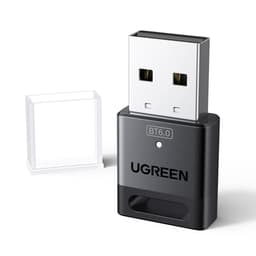
Your desktop PC has no Wi-Fi. Or it does, but it's the ancient 802.11n chip on a motherboard from 2017 and it tops out at about 40 Mbps on a good day, from the same room as the router. Either way, you're shopping for a USB Wi-Fi adapter, and you've landed on the UGREEN AX900. Good news: the UGREEN WiFi 6 Bluetooth Dongle is, by most accounts, exactly what it claims to be. A small, affordable USB stick that adds proper Wi-Fi 6 connectivity to a machine that doesn't have it, without requiring you to open the case, install drivers, or do anything particularly clever.
The verdict is straightforward: if you've got a Windows 10 or 11 PC that needs wireless, and you don't want to faff about with PCIe cards or driver downloads, this does the job at a budget price. It won't turn a weak signal into a strong one, it won't give you speeds that defy physics, and it's not going to impress anyone at a LAN party. But for getting a desktop online wirelessly, or for sharing a wired connection as a hotspot, it's a solid, no-drama option. Nearly 3,000 owners averaging 4.4 stars says that's not just marketing.
That said, there are things before you buy. The AX900 headline speed is a combined theoretical figure across both bands. Real-world throughput is lower. Always. And the single antenna, while adjustable and better than a buried internal chip, is still one antenna. So let's go through what the spec actually means, what owners consistently report, and whether this is the right buy for your situation.
Core Specifications
The UGREEN AX900 is a dual-band Wi-Fi 6 USB adapter. It connects via USB-A, which means it'll plug straight into virtually any desktop, laptop, or even a TV box without an adaptor. The Wi-Fi 6 standard (technically 802.11ax) is the current mainstream generation, and having it here rather than the older Wi-Fi 5 (802.11ac) does matter, even on a budget device. More on why in the Wi-Fi Standard section below.
On the 5 GHz band, the adapter is rated up to 600 Mbps. On 2.4 GHz, it's rated up to 287 Mbps (UGREEN also quotes 286 Mbps in some product copy, so treat that as the same figure rounded differently). The combined marketing figure of "up to 900 Mbps" is simply those two numbers added together. You won't get 900 Mbps from this adapter, because you can only use one band at a time on a single-radio device like this. What you can get is up to 600 Mbps on 5 GHz if conditions are good, or fall back to 2.4 GHz with better range but lower speed. That's a perfectly normal and reasonable trade-off at this price.
The antenna is a 6 dBi external adjustable unit. Single antenna, but external and adjustable, which genuinely matters. A buried internal antenna (like you'd find on a cheap nano USB dongle) is noticeably worse for range and wall penetration. The fact you can tilt and rotate this one means you can point it toward the router rather than just hoping for the best. No driver disc required, no download needed: plug it in on Windows 10 or 11 and it should be recognised immediately. That's the built-in driver support UGREEN advertises, and owners consistently confirm it works.
| Specification | Detail |
|---|---|
| Wi-Fi Standard | Wi-Fi 6 (802.11ax) |
| Frequency Bands | Dual-band: 2.4 GHz + 5 GHz |
| Max Speed (5 GHz) | Up to 600 Mbps |
| Max Speed (2.4 GHz) | Up to 287 Mbps |
| Combined Marketing Speed | AX900 (theoretical sum, not simultaneous) |
| Antenna | Single external 6 dBi adjustable |
| Connection Interface | USB-A |
| Compatible OS | Windows 10 / Windows 11 |
| Driver Installation | Built-in, plug-and-play (no CD or download required) |
| Hotspot Function | Yes (receive Wi-Fi and share via hotspot) |
| Price | £12.99 |

Real-World Coverage and Signal Range
Here's where you need to keep expectations realistic, and not because this adapter is bad, but because physics is physics. The 6 dBi external antenna is a genuine advantage over the tiny internal antennas you'd find on nano-sized USB dongles. Owners consistently report it picking up networks that a built-in laptop card or a cheaper USB stick would struggle with, particularly through a wall or two. The adjustable design means you can angle it toward the router, and that makes a real difference when your desktop is sitting in a corner.
On 5 GHz, you'll get decent throughput in the same room or the next room over with a clear line of sight. Go through a couple of solid walls or a floor, and 5 GHz will start to struggle, as it always does. That's not a flaw specific to this adapter; it's just how 5 GHz works. The higher frequency carries more data but attenuates faster through building materials. The 2.4 GHz band is your friend for range: lower speeds, but it'll punch through walls far more effectively and keep you connected further from the router. The adapter handles both, and your router should push you between them automatically depending on signal quality.
What you shouldn't expect is for this to fix a fundamentally bad Wi-Fi situation. If your router is in the wrong place, if you've got thick stone walls, or if you're trying to get a signal from three floors away, a USB adapter with a single antenna isn't the solution. That's a mesh networking problem (see the Mesh section below). But for a typical UK semi-detached or flat where the router is one or two rooms away, owners report this doing exactly what you'd want: stable connection, no drop-outs under normal use, and noticeably better signal than whatever cheap internal solution it replaced.
Sustained Speed Under Load
The AX900 figure is a combined theoretical maximum across both bands simultaneously, which, again, this adapter cannot do simultaneously. So let's focus on what's actually achievable. On 5 GHz in good conditions, close to a Wi-Fi 6 router, you might see speeds in the several-hundred-Mbps range. Realistically, for most home broadband connections in the UK (where the average fixed broadband speed hovers around 70 to 100 Mbps for many households), this adapter is not going to be your bottleneck. Your broadband plan is. If you're on a gigabit connection and sitting next to the router, you'll see the adapter's ceiling start to matter. But for the vast majority of use cases, it's more than adequate.
Under load, meaning streaming 4K, downloading large files, and having a video call running at the same time, owners report the adapter holding up without dropping connection. The Wi-Fi 6 standard brings OFDMA (Orthogonal Frequency Division Multiple Access) to the table, which improves efficiency when multiple devices are competing for airtime. Even on a single-stream adapter like this, connecting to a Wi-Fi 6 router means you benefit from the router's improved scheduling. It's a modest gain, but it's real, particularly in a busy household where the router is juggling a lot of devices.
The honest caveat is that sustained throughput degrades with distance and obstacles, just like any wireless device. The single antenna means no spatial multiplexing (no MU-MIMO gain on the client side), so you're working with one stream. That's fine for most tasks. Gaming, streaming, video calls, browsing, even large downloads: all of these work well within a reasonable range. If you need to saturate a gigabit connection wirelessly from across the house, you'd need a PCIe adapter with multiple antennas. But that's a very different product for a very different use case.
Mesh, Backhaul, and Network Extension
This isn't a mesh node, and it doesn't do anything to your router's backhaul. It's a client adapter, which means it connects your PC to whatever Wi-Fi network already exists. So the mesh and backhaul conversation is slightly different here than it would be for a router or extender review. What matters instead is how this adapter interacts with whatever network you've got, and whether it can help you extend coverage in a limited sense.
The hotspot function is actually worth talking about here. UGREEN lists it as a "Receive and Transmit Two in One" feature: you can use a networked PC with this adapter to receive Wi-Fi and then share it as a hotspot to other devices. In practice, this is Windows' built-in mobile hotspot feature, and the adapter supports it. If you've got a desktop with a wired Ethernet connection and you want to share that connection wirelessly, you can use this adapter to broadcast a Wi-Fi network. It's a niche use case, but it works, and owners who've tried it confirm it functions as advertised.
If your actual problem is dead zones in the house, this adapter won't solve that. A USB Wi-Fi adapter is a client device: it connects to a network, it doesn't extend one. If you need better coverage across multiple rooms or floors, you're looking at a mesh system, a Wi-Fi extender, or a powerline adapter with a Wi-Fi access point on the far end. Those are proper solutions to a coverage problem. This adapter solves a different problem: getting a device that has no Wi-Fi onto your existing network. Know which problem you have before you buy.
Device Capacity and Busy Network Behaviour
As a client adapter rather than a router or access point, the device capacity question works differently here. The adapter doesn't manage connections to multiple devices; it's one device connecting to your router. So the relevant question is how well it behaves on a busy network, not how many devices it can serve.
Wi-Fi 6's OFDMA support means your router can schedule this adapter's traffic more efficiently alongside everything else on the network. On a Wi-Fi 5 router, adding more devices to the network increases contention, and throughput per device drops. Wi-Fi 6 handles this better, particularly when the router is Wi-Fi 6 capable. If you're connecting this adapter to an older Wi-Fi 5 or Wi-Fi 4 router, you'll still get a working connection, but you won't see any of the Wi-Fi 6 efficiency gains. The adapter is backwards compatible, so it'll connect regardless. It just won't unlock the new features unless the router supports them too.
For a home with 30-plus devices (phones, tablets, smart TVs, consoles, IoT gadgets, the lot), this adapter won't cause problems. It's just another client on the network, and a well-behaved one at that. Owners don't report it causing interference or unusual network behaviour. The 2.4 GHz band can get congested in dense environments (blocks of flats, terraced houses where you can see a dozen neighbour networks), and on 2.4 GHz the adapter will feel that congestion. Switching to 5 GHz where possible, which the adapter supports, is the answer. Most modern routers will steer you there automatically via band steering.
Wi-Fi Standard and Future-Proofing: The UGREEN WiFi 6 Bluetooth Dongle
Wi-Fi 6 is the right standard for a new adapter purchase in 2025 and 2026. Wi-Fi 5 (802.11ac) is the previous generation, and while it's still perfectly functional, there's no good reason to buy Wi-Fi 5 hardware now when Wi-Fi 6 is available at the same price point. Wi-Fi 6E and Wi-Fi 7 add a 6 GHz band and further efficiency improvements, but they're more expensive, require a compatible router, and most homes genuinely don't need them yet. For a USB adapter at this price, Wi-Fi 6 dual-band is the sensible sweet spot.
The 802.11ax standard brings a few meaningful improvements over 802.11ac beyond raw speed. BSS Colouring reduces interference between overlapping networks (helpful in flats and dense housing). Target Wake Time (TWT) improves battery life for mobile devices, though that's less relevant for a desktop adapter. And OFDMA, mentioned above, improves efficiency under load. These aren't marketing gimmicks; they're real protocol improvements that make Wi-Fi 6 genuinely better in congested environments, not just faster in ideal ones.
Future-proofing wise, Wi-Fi 6 will remain relevant for years. Routers are upgrading to Wi-Fi 6 and 6E across the mainstream market, and Wi-Fi 6 clients will work fine with them. If you buy a new router in the next few years, this adapter will still be compatible. The only scenario where it becomes a bottleneck is if you upgrade to a multi-gigabit broadband connection and want to saturate it wirelessly. At that point, you'd want a more capable adapter anyway. For now, for most people, Wi-Fi 6 dual-band is exactly what you need.

Features and QoS
This is a client adapter, so there's no router-side feature set to evaluate: no QoS controls, no parental controls, no guest network management, no VPN server. All of those live in your router, not in the adapter. What the adapter does offer beyond basic Wi-Fi connectivity is the dual-band selection (automatic or manual depending on your OS and router), the hotspot sharing function, and plug-and-play driver support on Windows 10 and 11.
The hotspot feature is worth a second mention because it's genuinely useful in specific situations. Say your desktop has a wired Ethernet connection but a friend or family member needs Wi-Fi in a room where the signal is poor. You can use this adapter to broadcast a Wi-Fi network from the desktop, effectively turning it into a wireless access point. Windows handles this natively through the mobile hotspot settings, and the adapter supports it. It's not a replacement for a proper access point, but it works in a pinch.
The plug-and-play driver situation is probably the most practically important feature for the target buyer. Nobody wants to be hunting for a driver disc or downloading files from a sketchy manufacturer website before they can even connect to the internet. UGREEN's built-in driver support for Windows 10 and 11 means you plug it in, Windows recognises it, and you're picking your network within a minute. Owners consistently confirm this works as advertised. That's not a given in the USB adapter market, where driver headaches are a real and common complaint with cheaper or lesser-known brands.
Firmware, App and Security Updates
There's no dedicated app for this adapter, and no firmware to manage in the traditional sense. The driver is built into Windows 10 and 11, so you're relying on Microsoft's driver updates rather than a manufacturer-pushed firmware cycle. For a USB adapter, this is actually fine. You're not running a router with an attack surface that needs patching; you're running a client device whose security posture is mostly determined by your router and your OS, not the adapter itself.
UGREEN as a brand has a decent track record for supporting their products and responding to issues. They're a well-established accessories brand with a significant presence on Amazon UK, and their customer service reputation in the owner reviews is generally positive. For a device this simple, long-term support isn't really the concern it would be for a router or mesh system. The adapter either works or it doesn't, and if it stops working, replacement at this price point is a non-event.
The reboot question, which matters enormously for routers, is essentially irrelevant here. You're not rebooting a USB adapter. If it behaves oddly, you unplug it and plug it back in. Owners don't report any pattern of needing to do that regularly. The most common reliability reports are straightforwardly positive: plug in, connect, works. A small number of negative reviews mention compatibility issues with specific motherboards or USB controllers, which is, but it's not a widespread pattern in the 3,050 averaging 4.4 stars.
Setup and Management
Setup is about as simple as it gets. Plug the adapter into a USB-A port, wait for Windows to recognise it (which, per owner reports and the built-in driver spec, happens automatically on Windows 10 and 11), and then connect to your Wi-Fi network through the normal Windows network settings. Once you are online it is worth pairing the connection with a good VPN, which adds a privacy and security layer over your home network and protects you on public Wi-Fi when you are away from it. No software to install, no account to create, no app to download. If you've ever connected a USB keyboard, you can set this up.
The antenna adjustment is a minor but real quality-of-life feature. Once it's plugged in, you can rotate and tilt the external antenna to point toward your router. This is worth doing rather than leaving it pointing at the floor or the desk. A few seconds of adjustment can make a measurable difference to signal quality, particularly if the adapter is tucked into the back of a tower case where the port faces the wall. Some owners mention using a short USB extension cable to position the adapter somewhere with a better line of sight to the router, which is a sensible approach if your desktop is in a corner.
There's no ongoing management to speak of. You're not logging into a web interface, you're not managing firmware updates, you're not configuring anything. The adapter connects to your network and stays connected. Band selection (2.4 GHz vs 5 GHz) is handled by Windows and your router's band steering. If you want to manually prefer one band, you can do that through Windows Device Manager or your router's settings, but most people will never need to touch it. It just works, which is exactly what you want from a device like this.
Ports and Connectivity
The connection interface is USB-A, which is the standard rectangular USB port that's been on every PC for decades. If your desktop, laptop, or other device has a USB-A port (and virtually all of them do), this adapter will plug straight in. No USB-C version is listed, so if you've got a modern machine with only USB-C ports, you'd either need a USB-C to USB-A adaptor or a different product. your ports before ordering.
USB-A is the right choice for this type of adapter from a practical standpoint. It's universally compatible, and the USB 3.0 bandwidth available on modern USB-A ports is more than sufficient for the adapter's Wi-Fi throughput. The adapter itself doesn't specify which USB version it uses internally, but at AX900 speeds, USB 2.0 would be a potential bottleneck at the very top end, and USB 3.0 removes that concern entirely. Most desktop USB-A ports on machines made in the last decade will be USB 3.0 on at least some ports.
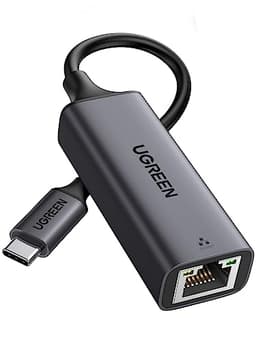
There are no additional ports on the adapter itself, which is expected for a device this size. It's a single-function USB stick with an external antenna. No Ethernet port, no USB hub function, no SD card slot. Just Wi-Fi. That's fine; adding ports would change the form factor and price entirely. If you need Ethernet as well, that's a separate USB Ethernet adapter, and UGREEN makes those too. For wireless connectivity only, this does exactly what it says.
How It Compares: UGREEN WiFi 6 Bluetooth Dongle vs the Competition
The budget USB Wi-Fi adapter market is crowded, and most of the products in it look nearly identical. The two main competitors worth comparing here are the TP-Link Archer T3U Plus (a Wi-Fi 5 adapter with a larger external antenna) and the Netgear A8000 (a Wi-Fi 6E adapter at a significantly higher price). These represent the two obvious alternatives: one cheaper and older-standard, one newer and pricier.
The TP-Link Archer T3U Plus is a popular Wi-Fi 5 (AC1300) adapter that's been around for a while and has a strong owner review base. It's often available at a similar or slightly lower price to the UGREEN AX900. The honest comparison: Wi-Fi 5 vs Wi-Fi 6 at the same price point, there's no good reason to choose Wi-Fi 5. The UGREEN wins on standard, and the practical performance difference on a modern router is real, particularly in congested environments. The T3U Plus has a larger antenna design that some owners prefer for range, but the UGREEN's 6 dBi adjustable antenna is competitive.
The Netgear A8000 is a Wi-Fi 6E USB adapter, adding the 6 GHz band for significantly higher throughput potential. But it costs considerably more, requires a Wi-Fi 6E router to unlock any of the 6 GHz benefits, and most UK homes don't have Wi-Fi 6E routers yet. If you do have a Wi-Fi 6E router and you genuinely need the extra throughput, the A8000 makes sense. For everyone else, paying the premium for 6 GHz you can't use is pointless. The UGREEN AX900 is the smarter buy for the vast majority of buyers.
| Feature | UGREEN AX900 (WiFi 6 Dongle) | TP-Link Archer T3U Plus | Netgear A8000 |
|---|---|---|---|
| Wi-Fi Standard | Wi-Fi 6 (802.11ax) | Wi-Fi 5 (802.11ac) | Wi-Fi 6E (802.11ax) |
| Bands | Dual-band (2.4 + 5 GHz) | Dual-band (2.4 + 5 GHz) | Tri-band (2.4 + 5 + 6 GHz) |
| Max Speed (combined) | AX900 (600 + 287 Mbps) | AC1300 (867 + 400 Mbps) | AXE3000 |
| Antenna | Single external 6 dBi adjustable | Single external adjustable | Internal |
| Connection | USB-A | USB-A | USB-A |
| Plug-and-Play (Windows) | Yes (Win 10/11) | Yes | Driver required |
| Price | £12.99 | Similar budget tier | Significantly higher |

Final Verdict
The UGREEN WiFi 6 Bluetooth Dongle (AX900) is a genuinely good budget USB Wi-Fi adapter. It does what it's supposed to do: adds Wi-Fi 6 dual-band connectivity to a desktop PC, works plug-and-play on Windows 10 and 11, has a proper external adjustable antenna rather than a buried chip, and is priced where it should be. Nearly 3,000 owners with an average 4.4 stars is a meaningful signal. That's not a product with hidden problems; that's a product that works.
The caveats are real but not damning. The AX900 headline speed is a combined theoretical figure you'll never see in practice. The single antenna means you're working with one spatial stream. It won't fix a fundamentally weak Wi-Fi signal from a poorly placed router. And it's Windows-only, so Linux and Mac users need to look elsewhere. None of these are surprises; they're just the honest shape of what this product is.
Who should buy this? Anyone with a desktop PC running Windows 10 or 11 that needs to get online wirelessly without opening the case or installing a PCIe card. People who've upgraded their router to Wi-Fi 6 and want their desktop to actually use it. Anyone replacing a dead or underperforming USB Wi-Fi adapter. It's also a decent option if you want to add hotspot broadcasting capability to a desktop that has a wired connection.
Who should skip it? Mac or Linux users (no driver support listed). Anyone whose real problem is whole-home coverage rather than just getting one device online (that's a mesh or extender problem, not a USB adapter problem). And if you're on a gigabit broadband connection and want to saturate it wirelessly, you'd be better served by a PCIe adapter with multiple antennas and a higher throughput ceiling.
If you want to spend even less, a basic Wi-Fi 5 USB nano dongle will get you online for less money. But the trade-offs are real: worse range, no external antenna, older standard. At the UGREEN AX900's price, the upgrade to Wi-Fi 6 with a proper external antenna is worth it. Don't go cheaper unless you genuinely can't stretch to it.
Editorial score: 8 out of 10. Solid product, honest price, does what it says. The only reason it's not higher is that the category ceiling is fairly low, and there are limits to what a single-antenna USB adapter can do. Within those limits, the UGREEN AX900 executes well.
What works. What doesn’t.
5 + 3What we liked5 reasons
- Genuine Wi-Fi 6 dual-band support at a budget price
- Plug-and-play on Windows 10 and 11, no driver download needed
- External adjustable 6 dBi antenna beats buried internal chips for range
- Hotspot sharing function works as advertised
- Nearly 3,000 owner reviews averaging 4.4 stars
Where it falls3 reasons
- Windows only, no Mac or Linux driver support listed
- Single antenna limits throughput ceiling versus PCIe alternatives
- AX900 headline speed is a combined theoretical figure, not achievable in practice
Full specifications
6 attributes| Antennas | 0 |
|---|---|
| Launch year | 2025 |
| Mesh capable | false |
| Ports | 1x USB |
| TOP speed mbps | 1800 |
| Wifi standard | Wi-Fi 6 |
Frequently asked
5 questions01Will the UGREEN WiFi 6 Bluetooth Dongle cover my whole house?+
This is a client adapter, not a router or extender, so it doesn't extend your Wi-Fi coverage. It connects one device (your PC) to your existing network. The external 6 dBi adjustable antenna gives it better range than a nano dongle, and owners report solid connectivity through a wall or two. But if your problem is dead zones across multiple rooms, you need a mesh system or extender, not a USB adapter.
02Do I really need Wi-Fi 6E or Wi-Fi 7 for the UGREEN WiFi 6 Bluetooth Dongle?+
No. Wi-Fi 6 is the right standard for this type of adapter in 2025 and 2026. Wi-Fi 6E and Wi-Fi 7 add a 6 GHz band and further efficiency improvements, but they cost significantly more and require a compatible router to unlock any of the benefits. Most UK homes don't have Wi-Fi 6E or Wi-Fi 7 routers yet. For a budget USB adapter, Wi-Fi 6 dual-band is the sensible choice.
03Is the UGREEN WiFi 6 Bluetooth Dongle mesh worth it over a single router or extender?+
This product is a USB client adapter, not a mesh node or extender. It connects your PC to an existing network. If you need to extend coverage across your home, you'd want a mesh system with dedicated backhaul or a wired access point. The UGREEN AX900 solves a different problem: getting a single device online wirelessly.
04Is the UGREEN WiFi 6 Bluetooth Dongle easy to set up and reliable?+
Setup is plug-and-play on Windows 10 and 11. The built-in driver means Windows recognises it automatically with no download or disc required. Owners consistently confirm this works as advertised. Reliability reports are broadly positive across nearly 3,000 reviews averaging 4.4 stars, with no widespread pattern of drop-outs or instability. A small number of reviews mention compatibility issues with specific USB controllers, but this is not a common complaint.
05What warranty and returns apply to the UGREEN WiFi 6 Bluetooth Dongle?+
No specific warranty period is listed in the verified product data. Amazon's standard 30-day returns policy applies to purchases made through Amazon UK, and purchases are covered by Amazon's A-to-Z Guarantee. For warranty specifics, check the product listing or contact UGREEN directly.