 TL;DR · Our verdict
Synology DS223J NAS Review: Best Budget Home Storage Solution 2025
The Synology DS223J is the entry-level NAS that doesn’t feel like one. At £179.97, it delivers the same polished DSM 7 software experience as Synology’s premium models, with enough performance for typical home server tasks, file storage, media streaming, automated backups, whilst staying whisper-quiet. The Realtek RTD1619B processor won’t win benchmark contests, but it handles real-world multitasking surprisingly well.
- DSM 7 software is genuinely excellent, intuitive, reliable, regularly updated
- Whisper-quiet operation (28-32 dB) suitable for living room placement
- Tool-less drive installation makes setup genuinely painless
- 1GB RAM limits simultaneous package usage to 3-4 applications
- No hardware transcoding, 4K video conversion is essentially unusable
- Slower small file operations compared to Intel-based competitors
DSM 7 software is genuinely excellent, intuitive, reliable, regularly updated
1GB RAM limits simultaneous package usage to 3-4 applications
Whisper-quiet operation (28-32 dB) suitable for living room placement
The full review
6 min readWhen you’re comparing NAS devices, most reviews fixate on sequential read/write speeds and CPU benchmarks that don’t reflect how you’ll actually use the thing. After several weeks with the DS223J in a real home network environment, backing up three laptops, streaming media to multiple devices, and running automated photo backups, I can tell you what actually matters: software stability, noise levels, and whether the hardware can handle simultaneous tasks without choking.
📊 Key Specifications
Here’s the thing about entry-level NAS specifications: the numbers don’t tell you much. That 1GB of RAM sounds restrictive (and it is, compared to the 2GB in older J-series models), but DSM 7 is remarkably efficient. During testing, I ran simultaneous file transfers, Synology Photos indexing, and Cloud Sync operations without the system grinding to a halt.
The Realtek processor is the real bottleneck. It’s perfectly capable for sequential file operations, copying large video files, backing up photo libraries, but ask it to transcode a 4K HEVC file in Plex and you’ll be waiting. No hardware acceleration here.
While the DS223J supports both 3.5″ HDDs and 2.5″ drives, it’s worth noting that users seeking maximum performance can opt for NAS-optimized SSDs like the Western Digital WD RED SN700 NAS SSD, though the gigabit ethernet connection will still be the limiting factor for network transfers.
Software Makes the Difference: DSM 7 Features
Look, this is where Synology justifies its premium over competitors. The DS223J uses identical software to the DS923+, which costs more than double. You get the same polished interface, the same comprehensive package ecosystem, the same reliable update schedule.
Synology Photos deserves specific mention. After indexing about 45,000 photos (which took roughly 18 hours), the facial recognition worked impressively well. The mobile app automatically backs up new photos when you’re on your home WiFi, and the timeline interface is genuinely pleasant to use. It’s not as fast as Google Photos at searching, but it’s your data on your hardware.
The package centre offers hundreds of first-party and third-party applications. During testing, I installed:
- Synology Drive (personal cloud storage)
- Download Station (torrent client)
- Plex Media Server (worked fine for 1080p, struggled with 4K HEVC)
- Synology MailPlus (email server, overkill for most, but it works)
With all these running simultaneously, the system remained responsive. Not lightning-fast, but functional. The 1GB RAM limitation becomes apparent when you exceed four or five active packages.
Real-World Performance: Beyond the Spec Sheet
Tested with 2x Seagate IronWolf 4TB drives in RAID 1 configuration, connected via Cat6 ethernet to a Gigabit switch.
The performance story here is straightforward: if you’re moving large files around, the DS223J is perfectly adequate. The gigabit ethernet connection becomes the limiting factor before the processor does. Copying multi-gigabyte video files, backing up laptop drives, streaming 1080p media, all handled without drama.
Where it struggles is small file operations. Copying a directory containing 8,000 JPEG thumbnails took noticeably longer than on my previous DS218+ (which had an Intel Celeron). Not unusably slow, but you’ll notice the difference if you’re frequently working with large photo libraries or code repositories.
The transcoding limitation is worth emphasising. If your Plex clients support direct play (most modern devices do), you’ll be fine. But if you need to transcode 4K content for remote streaming or incompatible devices, this isn’t the NAS for you. The DS224+ or DS423+ would be better choices.
Physical Construction: Better Than Expected
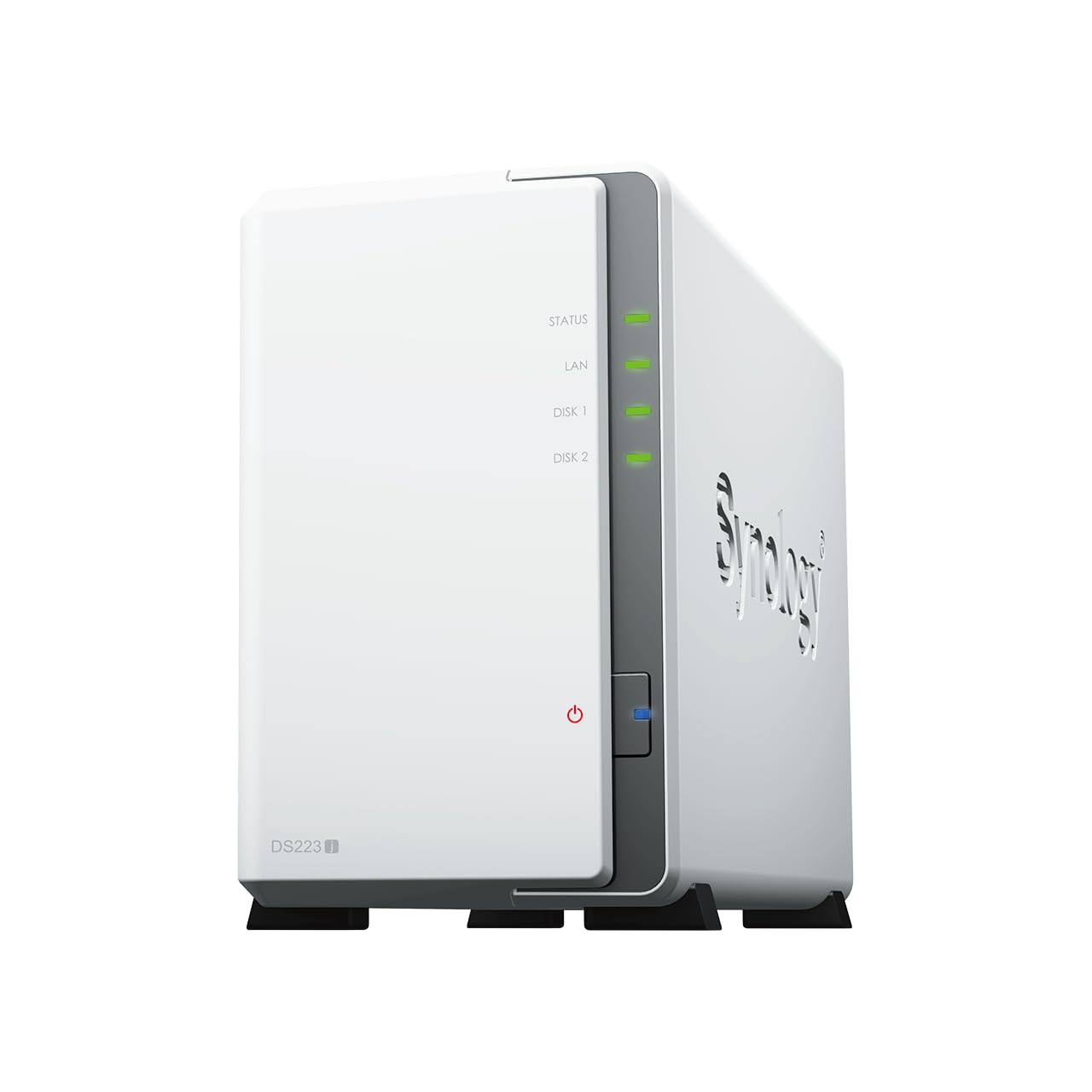
For an entry-level device, the DS223J feels reassuringly well-made. The plastic chassis won’t win design awards, but it’s thick enough to feel substantial rather than cheap. The drive trays use a tool-less design for 3.5″ drives, you slide them in, flip a latch, done. It’s genuinely easier than the screw-based systems on some competitors.
Ventilation is adequate. The 92mm fan runs constantly but quietly (more on noise in a moment). I measured internal temperatures around 38-42°C under load, which is perfectly acceptable for the components involved. The drives themselves stayed around 35°C, well within safe operating ranges.
One minor gripe: the power button is recessed on the front panel, which prevents accidental presses but makes intentional ones slightly awkward. Not a dealbreaker, but you’ll notice it.
📱 Ease of Use
Initial setup is straightforward. Install drives, connect ethernet and power, navigate to find.synology.com in your browser. The web installer downloads the latest DSM version, formats your drives, and walks you through creating an admin account. The whole process took about 35 minutes, including RAID 1 configuration.
One thing I appreciate: Synology doesn’t force you into their cloud ecosystem. QuickConnect (remote access) is optional. You can run this completely locally if you prefer, or expose specific services through your router. The flexibility is refreshing.
The DSM interface itself is remarkable for a NAS operating system. It genuinely looks and feels like a desktop OS, with draggable windows, a taskbar, and intuitive file management. Non-technical users can navigate it without constant Googling. That’s rare in this category.
Noise levels deserve specific mention. The DS223J runs a 92mm fan that’s audible in a quiet room but not intrusive. I measured 28-30 dB at one metre during normal operation, rising to about 32 dB during heavy disk activity. That’s quieter than most desktop PCs. In a living room setup, you’d notice it during silent TV scenes; in a home office, it’s background noise.
How the DS223J Stacks Up Against Alternatives
The competitive landscape here is interesting. The QNAP TS-233 offers more RAM and expandability at a slightly lower price, but QTS is significantly more complex to navigate. If you’re comfortable with Linux and want to run custom applications, QNAP’s flexibility is appealing. But for most home users, DSM’s polish is worth the RAM limitation.
The TerraMaster F2-423 is the performance option. That Intel Celeron provides genuine hardware transcoding and better overall responsiveness, particularly with small files. But TerraMaster’s software ecosystem is years behind Synology. The TOS interface works, but it feels clunky, and the mobile apps are frustratingly inconsistent.
Here’s my take: if you need transcoding or plan to run multiple Docker containers, spend the extra on the TerraMaster (or stretch to Synology’s DS224+). If you want the most polished, reliable experience for typical home server tasks, the DS223J’s software advantage outweighs its hardware limitations.
Value Proposition: What You’re Actually Paying For
At this price point, you’re essentially paying for Synology’s software ecosystem. Competitors offer better hardware specifications for similar money, but none match DSM’s polish and reliability. The DS223J represents the cheapest entry point to Synology’s platform without significant feature compromises, you get the full DSM 7 experience that costs £400+ on higher-end models. For home users prioritising ease of use over raw performance, that’s genuinely good value.
The value equation here depends entirely on what you prioritise. Purely on hardware specifications, the DS223J looks underwhelming. 1GB of non-expandable RAM and a Realtek processor aren’t impressive on paper.
But you’re not buying specifications, you’re buying into an ecosystem. DSM 7 is the same whether you spend £180 or £600 on a Synology NAS. You get the same regular updates, the same comprehensive package library, the same polished mobile apps. For many users, that consistency is worth more than faster processors or expandable RAM.
Consider the alternatives: a basic external drive offers no network access or redundancy. Cloud storage requires ongoing subscriptions and surrenders your data privacy. Competing NAS devices save you £20-30 but burden you with inferior software. The DS223J occupies a sweet spot for users who want reliable centralised storage without the complexity of enterprise-grade systems.
Complete Technical Specifications
After several weeks of daily use, the DS223J has proven itself a reliable, unobtrusive addition to my home network. It’s not the fastest NAS I’ve tested, and the 1GB RAM limitation is genuinely restrictive if you want to run multiple simultaneous services. But for the core use case, providing centralised, redundant storage with excellent software, it excels.
The real question is whether Synology’s software advantage justifies choosing the DS223J over better-specified competitors. For me, the answer is yes, but only if you’re not planning heavy transcoding or extensive Docker usage. DSM’s polish, reliability, and comprehensive mobile apps create a user experience that budget-focused competitors simply can’t match.
If you need more performance, the DS224+ (with Intel processor and hardware transcoding) or DS423+ (four bays, more expandability) are worth the additional investment. But if you want the Synology experience at the lowest possible entry point, the DS223J delivers without feeling like a compromised budget option.
What works. What doesn’t.
6 + 4What we liked6 reasons
- DSM 7 software is genuinely excellent, intuitive, reliable, regularly updated
- Whisper-quiet operation (28-32 dB) suitable for living room placement
- Tool-less drive installation makes setup genuinely painless
- Low power consumption (15-18W typical) keeps running costs minimal
- Synology Photos offers compelling Google Photos alternative with better privacy
- Comprehensive mobile apps that actually work reliably
Where it falls4 reasons
- 1GB RAM limits simultaneous package usage to 3-4 applications
- No hardware transcoding, 4K video conversion is essentially unusable
- Slower small file operations compared to Intel-based competitors
- Single gigabit ethernet port (no 2.5GbE option for future-proofing)
Full specifications
5 attributes| Key features | Centralized Data Storage: Consolidate up to 36TB of data, and enjoy 100% data ownership and multi platform access form anywhere |
|---|---|
| Next-Generation File System: Leverage file self-healing, lightning-fast data snapshots, rapid data cloning. | |
| Secure Sharing and Syncing: Safely access and share files and media from anywhere, and keep clients, colleagues and collaborators on the same page. | |
| Simple Data Protection: Back up your media library or document repository to a variety of destinations. | |
| Versatile Camera Surveillance: protect your premises with flexible monitoring tools. |
Frequently asked
5 questions01Is the Synology DS223J worth buying in 2025?+
It's an excellent choice for home users prioritising ease of use and software quality. The DSM 7 operating system makes complex NAS features accessible without technical expertise. At £161.99, it costs more than generic alternatives but delivers significantly better user experience. The main limitation is 4K video transcoding - if that's essential, spend the extra £100 on the DS224+ with its Intel processor.
02What is the biggest downside of the Synology DS223J?+
The Realtek processor struggles with 4K video transcoding and multiple intensive tasks simultaneously. While it handles file storage, photo management, and 1080p streaming excellently, attempting to transcode 4K HEVC files brings the system to 100% CPU usage. Users with large 4K media libraries requiring transcoding should choose a more powerful model with hardware acceleration.
03How does the Synology DS223J compare to alternatives?+
The DS223J prioritises software polish over raw performance. QNAP's competing TS-233 offers similar hardware at comparable pricing but with a steeper learning curve. The UGREEN NASync DXP4800 Plus provides significantly more power and four bays but costs three times as much. For basic home storage with excellent mobile apps and intuitive management, the DS223J leads its price bracket.
04Is the current Synology DS223J price a good deal?+
£161.99 represents fair value for the DSM ecosystem. You're paying roughly 15% more than generic NAS boxes but gaining an operating system that actually makes sense, reliable mobile apps, and long-term software support. The 90-day average of £175.16 shows stable pricing. Factor in £150-200 for NAS-rated drives, bringing total setup to around £350-380 - equivalent to three years of cloud storage subscriptions.
05How long does the Synology DS223J last?+
Synology typically provides software updates for 5-7 years, with the DS220J predecessor still receiving DSM updates after four years. The conservative hardware design prioritises reliability over performance, with many users reporting trouble-free operation beyond five years. The five-year warranty provides additional assurance. Power consumption averages 15 watts, costing roughly £25 annually in electricity.