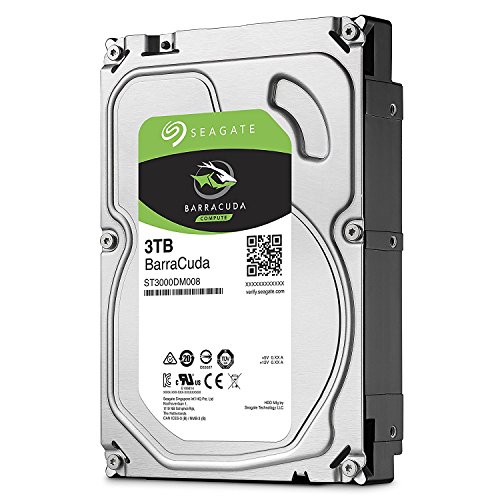
Swapping a spinning hard drive for an SSD is still the most dramatic performance jump you can make to a PC. The latency difference is not subtle. It is not something you need a benchmark to notice. But this article is not about SSDs. This is about the Seagate BarraCuda 3 TB Internal Hard Drive HDD, a 3.5-inch mechanical drive aimed squarely at desktop users who need bulk storage at a price that does not make your eyes water. And the honest verdict is: for what it actually is, it is a solid, dependable workhorse. Not exciting. Not fast by modern standards. But genuinely good at its job.
The ST3000DM008 sits in a category that plenty of people still need. Not every gigabyte needs to be on an NVMe drive. Game libraries, media archives, backup targets, secondary storage, bulk downloads. All of that stuff can live on a spinning platter without you ever noticing the difference in day-to-day use. The BarraCuda line has been around long enough that Seagate is not shy about pointing to its track record, and with over 28,000 owner ratings averaging ★★★★☆ (4.4), there is clearly a large audience that agrees. So who is this for, and what do you need to know before buying? Here is the straight version.
Core Specifications: Seagate BarraCuda 3 TB Internal Hard Drive HDD
Strip away the marketing and you get a 3.5-inch SATA hard drive spinning at 7,200 RPM with a 64 MB cache buffer. The interface is SATA 6 Gb/s, which is the standard desktop HDD connection and has been for well over a decade. Capacity is 3 TB. Seagate rates the maximum sustained data transfer rate at up to 210 MB/s, which is the headline figure you will see in the marketing. That is a sequential figure from the outer tracks of the platter, and it drops as the drive fills up and the heads move to inner tracks..
The 64 MB cache is a traditional DRAM buffer, not the SLC flash cache you see on SSDs. Its job is to smooth over small read and write bursts, not to mask slow NAND. This is a mechanical drive, so the performance model is entirely different from an SSD. Rotational latency and seek time govern how fast the drive responds to random requests, not cache architecture. At 7,200 RPM, the BarraCuda is the fastest class of desktop hard drive you can buy. It is not competing with an SSD. It is competing with other HDDs.
Seagate backs this drive with a two-year warranty. That is the standard for this class of drive. It is not the three-year or five-year coverage you get on Seagate's IronWolf NAS drives, but it is in line with what the competition offers at this capacity and price point. The drive ships in a standard 3.5-inch form factor, compatible with any desktop PC case that has a drive bay. No adapter needed.
| Specification | Detail |
|---|---|
| Model | ST3000DM008 |
| Capacity | 3 TB |
| Form Factor | 3.5 inch |
| Interface | SATA 6 Gb/s |
| Spindle Speed | 7,200 RPM |
| Cache Buffer | 64 MB |
| Max Sustained Transfer Rate | Up to 210 MB/s |
| Drive Type | Mechanical HDD |
| Warranty | 2 years |
| Current Price | Check price |
| Owner Rating | ★★★★☆ (4.4) (28,629 reviews) |
Interface and Form Factor
SATA 6 Gb/s has a theoretical bandwidth ceiling of around 600 MB/s. The BarraCuda tops out at 210 MB/s sustained sequential. So the interface is absolutely not the bottleneck here. The mechanical platter is. That means you are not leaving any bandwidth on the table by using SATA rather than NVMe. This drive physically cannot saturate the interface it runs on. For a mechanical hard drive, that is completely normal and expected.
The 3.5-inch form factor means this fits in a desktop PC tower, a home server chassis, or a NAS enclosure (though Seagate makes the IronWolf range specifically for NAS use, which we will come back to). It does not fit in a laptop. If you need portable bulk storage, you are looking at a different product entirely. For desktop builds, installation is as simple as screwing the drive into a bay and connecting a SATA data cable plus a power connector from your PSU. There are no compatibility surprises here.
One thing worth being clear about: this is not an NVMe drive. There is no M.2 slot involved, no PCIe lanes consumed, no discussion of Gen 3 versus Gen 4 versus PCIe Gen 5 speeds. All of that is irrelevant here. This drive connects via the same SATA port that has been on motherboards since the mid-2000s. Every modern desktop motherboard has at least two SATA ports. Compatibility is essentially universal. If you have a desktop PC and a spare SATA port and a spare power connector, this drive works. Full stop.
Real-World Performance: What the Seagate BarraCuda 3 TB Actually Delivers
This is where expectations need calibrating. A mechanical hard drive at 7,200 RPM is not going to make your operating system boot faster. It is not going to speed up application launches or reduce game load times compared to an SSD. If you are running Windows or your games from this drive, you will notice. Published benchmarks consistently show that a 7,200 RPM HDD delivers random read performance in the range of 0.5 to 1 MB/s in 4K random reads. A mid-range SATA SSD does 40 to 60 MB/s. An NVMe drive does hundreds. That gap is why the HDD-to-SSD upgrade feels so dramatic.
But random I/O performance is almost irrelevant when this drive is doing what it is actually designed for: storing large files sequentially. Copying a 50 GB video project from one folder to another, writing a backup archive, storing a media library that your NAS or Plex server streams from. For those tasks, the 210 MB/s sequential ceiling is perfectly adequate. Owner reports consistently describe the drive as performing exactly as expected for bulk storage, with no significant complaints about sequential transfer speeds in desktop use. That tracks with what the specs suggest.
Where owners do flag issues is when they try to use this as a primary drive for an operating system. Boot times are long. Application launches feel sluggish. Games take noticeably longer to load. None of that is surprising. It is what every 7,200 RPM HDD does. The performance profile of this drive is not a flaw in the product. It is the nature of the technology. The right way to use this drive is as secondary storage alongside an SSD boot drive, not as a replacement for one.
Sustained Writes and Cache Behaviour
Mechanical hard drives do not have an SLC cache in the way SSDs do. There is no flash buffer that fills up and then exposes a slower native write speed. The 64 MB DRAM cache on this drive works differently. It is a small, fast memory buffer that absorbs burst writes and smooths out small sequential operations. It is not large enough to mask any kind of performance cliff in the way an SSD's SLC cache does. What you see from this drive is essentially what you get: consistent sequential throughput up to its rated ceiling, governed by platter density and spindle speed.
The sustained write behaviour of a 7,200 RPM drive is actually more predictable than many modern QLC SSDs. There is no dramatic drop-off after a cache fills. The drive writes at its mechanical rate, which varies depending on which part of the platter is being written to. Outer tracks are faster (closer to the 210 MB/s ceiling), inner tracks are slower. Published benchmarks of similar 7,200 RPM BarraCuda drives show sustained sequential write speeds that track consistently in the 150 to 210 MB/s range depending on fill level. That is not fast by SSD standards, but it is consistent.
For the use cases this drive is aimed at, sustained write consistency matters more than peak speed. If you are copying a large video archive or writing a backup, you want the drive to keep going at a steady rate without throttling or dropping off unexpectedly. Mechanical drives do not throttle due to thermal limits in the way NVMe SSDs can. The physics of spinning platters means the performance curve is gradual and predictable. Owners copying large files to this drive report exactly that: steady, if unspectacular, transfer rates. No nasty surprises. That is genuinely useful.
Controller, NAND and DRAM: Not the Right Questions for an HDD
The SSD vocabulary of controllers, NAND type, and DRAM caches does not apply here in the same way. There is no NAND. There is no flash controller. This is a magnetic platter drive with read/write heads, a spindle motor, and a small DRAM buffer. The engineering that matters is the platter density, the head design, and the firmware managing the Multi-tier Caching technology that Seagate mentions. That caching technology is about optimising how the drive handles mixed workloads, not about masking a slow NAND layer.
Seagate's Multi-tier Caching on the BarraCuda series uses the DRAM buffer alongside an internal algorithm to prioritise frequently accessed data and manage write sequencing. The practical effect is that the drive handles typical desktop workloads (lots of small reads mixed with occasional large writes) more smoothly than a naive sequential write approach would. It is not magic, and it does not close the gap with SSDs on random I/O. But it does mean the drive is better optimised for real desktop use than a bare-bones, no-frills HDD design.
For buyers coming from the SSD world who are worried about DRAM-less drives and QLC NAND: those concerns simply do not map onto this product. You are not buying this for random IOPS. You are not worrying about cache exhaustion cliffs. The relevant questions here are about spindle speed (7,200 RPM is the fast class), platter density (which governs sequential throughput), and the reliability track record of the specific drive family. On all three of those, the BarraCuda ST3000DM008 is in good shape.
Endurance and Reliability
Seagate backs the ST3000DM008 with a two-year warranty. That is the baseline for desktop HDDs. It is not as generous as the five-year warranty on Seagate's IronWolf Pro NAS drives, and it is shorter than the three-year coverage on some competing desktop drives. But it is consistent with what Seagate offers across the consumer BarraCuda range, and it is not a red flag. The BarraCuda line has over 20 years of heritage behind it, which is a reasonable signal of a mature, well-understood product.
Owner reliability reports across 28,629 averaging ★★★★☆ (4.4) suggest this is a drive that mostly just works. The one-star reviews, as with any high-volume hard drive, include early failures and dead-on-arrival units. That is not unique to Seagate. All mechanical hard drives have a bathtub failure curve: a small percentage fail early, the majority run for years, and a small percentage fail as they age. The smart response is to treat any hard drive as a storage device that will eventually fail, keep a backup, and use the warranty if it goes wrong within two years.
Mechanical hard drives do not have a TBW (terabytes written) rating in the way SSDs do. The endurance model is different. Platter wear is not the primary failure mode. Head crashes, spindle motor failures, and electronics failures are more common. The best proxy for expected lifespan is the MTBF (mean time between failures) rating, which Seagate publishes in the full datasheet for this drive. For typical desktop use, a 7,200 RPM BarraCuda in a well-ventilated case with reasonable workloads should run for many years without issue. Owner reports support that picture. Plenty of users in the review pool mention running BarraCuda drives for three, four, or five years without problems.
Thermals
Mechanical hard drives generate heat from the spindle motor and the drive electronics. At 7,200 RPM, the BarraCuda runs warmer than a 5,400 RPM drive. In a well-ventilated desktop case with reasonable airflow, this is not a problem. The drive does not need a heatsink. It does not throttle under sustained load in the way a hot NVMe SSD can. The thermal behaviour of a spinning hard drive is far more predictable than a Gen 4 or Gen 5 NVMe drive running a sustained workload.
Owner reports do not flag thermal issues with this drive in normal desktop installations. In cramped cases with poor airflow, any 7,200 RPM drive will run hotter, and sustained operation in a hot environment accelerates wear. But that is true of every hard drive. The practical guidance is simple: make sure your case has at least one intake fan, do not block the drive bay with cables, and you will be fine. There is no heatsink required, no thermal pad needed, and no throttling to worry about under normal conditions.
Where thermals become more of a consideration is in external enclosures or tight NAS units without good airflow. If you are putting this drive in an external USB enclosure that runs hot, you are shortening its life. But in a standard desktop tower, this is a non-issue. The contrast with Gen 4 and Gen 5 NVMe drives is stark. Those drives can hit 70 degrees Celsius under sustained load and throttle hard without a proper heatsink. The BarraCuda, running off a SATA power connector with a spinning platter, is thermally benign by comparison.
Capacity Options and Price Per GB
The BarraCuda desktop range covers a wide span of capacities, from 500 GB up to 8 TB. The 3 TB model sits in the middle of that range. At the current price, the cost per gigabyte is competitive with other 7,200 RPM desktop drives at this capacity. Hard drive pricing has been relatively stable in recent years, and the 3 TB to 4 TB range tends to offer good value per gigabyte compared to the smaller capacities.
If you are purely optimising for price per gigabyte, the 4 TB or 6 TB models often work out cheaper per gigabyte than the 3 TB. But 3 TB is a sensible sweet spot if that is the capacity you actually need. Buying more than you need just to get a lower price per gigabyte is not a great strategy if the extra space sits empty for years. And if you need more than 3 TB, it is whether a 4 TB BarraCuda or a WD Blue 4 TB comes out better value at the time of purchase, because drive pricing shifts regularly.
Compared to SSDs, the price per gigabyte of this drive is dramatically lower. At the 3 TB level, an equivalent-capacity SATA SSD would cost substantially more. An NVMe SSD at 3 TB or 4 TB is even pricier. For bulk storage where sequential throughput is all you need, mechanical HDDs remain the most cost-efficient option by a significant margin. That is the core value proposition here, and it is a real one. Not everything needs to be on flash storage.
Installation and Compatibility
Installation is about as straightforward as it gets. The drive uses a standard 3.5-inch SATA interface, which means you need a SATA data cable (usually included with your motherboard) and a SATA power connector from your PSU. Slide it into a 3.5-inch drive bay, screw it in with four standard screws, connect the cables, and you are done. Windows will detect it on first boot and you format it through Disk Management. No drivers needed. No firmware update required out of the box.
Compatibility is essentially universal for desktop PCs. Every desktop motherboard made in the last fifteen years has SATA ports. If your case only has 2.5-inch bays (which is uncommon in full-size towers but does happen in some slim or mini-ITX builds), you will need a 3.5-to-2.5-inch adapter bracket. That is a cheap fix, but before you buy. The drive is not compatible with laptops. It does not fit in an M.2 slot. It is not suitable for PS5 expansion storage. It is a desktop 3.5-inch drive, full stop.
If you are migrating data from an old drive, Seagate provides access to cloning software through its DiscWizard tool, which is based on Acronis True Image. Owner reports suggest it works reliably for drive-to-drive cloning, though the process is more relevant if you are replacing an old drive rather than adding a new one. For adding this as a secondary storage drive alongside an existing boot SSD, there is nothing to clone. Just format and use. One note from owner reviews: a small number of users report the drive arriving without adequate packaging, leading to damage in transit. the condition on arrival and testing immediately.
Who This Drive Is For
The Seagate BarraCuda 3 TB is the right drive for anyone building a desktop PC who needs bulk secondary storage at a reasonable price. If your boot drive is already an SSD (which it should be, in 2026), this is the obvious companion for storing your game library, your photo and video archive, your music collection, or anything else that does not need the random I/O performance of flash storage. It is also a solid choice as a backup target, a scratch disk for video editing (for footage that has already been ingested), or a general-purpose storage drive in a home server.
It is particularly well-suited to users who are building or upgrading a desktop on a budget and need to stretch their storage capacity without spending SSD prices per gigabyte. Three terabytes of fast-class HDD storage at desktop HDD prices is a genuinely useful amount of space for most home users. And with 28,000-plus owner reviews averaging 4.4 stars, the reliability track record is reassuring enough that you are not taking a significant gamble.
Who should look elsewhere? Anyone who wants to run an operating system or games from this drive and expects SSD-like responsiveness. You will be disappointed. Anyone who needs a NAS drive should look at the Seagate IronWolf range instead, which is specifically designed and rated for the always-on, multi-drive environment of a NAS enclosure. And anyone who needs maximum reliability for mission-critical data should consider the IronWolf Pro or WD Red Pro, both of which carry longer warranties and are rated for higher workloads.
How It Compares
The two most obvious competitors at this capacity are the Western Digital Blue 3 TB (WD30EZAZ) and the Toshiba P300 3 TB (HDWD130). Both are 3.5-inch SATA desktop drives aimed at the same bulk storage market. The WD Blue 3 TB runs at 5,400 RPM rather than 7,200 RPM, which means it is quieter and cooler but slower on sequential transfers. The Toshiba P300 runs at 7,200 RPM and is a direct speed competitor to the BarraCuda. All three sit in a similar price bracket, so the decision comes down to brand preference, warranty terms, and noise tolerance.
The BarraCuda's 210 MB/s rated maximum transfer rate is competitive with the Toshiba P300 and faster than the WD Blue's 5,400 RPM ceiling. The WD Blue's lower spindle speed means it runs quieter and slightly cooler, which some users prioritise in a home office or living room PC. The Toshiba P300 is often marginally cheaper and offers comparable performance. Neither competitor offers a meaningfully longer warranty at this price point.
| Feature | Seagate BarraCuda 3 TB (ST3000DM008) | WD Blue 3 TB (WD30EZAZ) | Toshiba P300 3 TB (HDWD130) |
|---|---|---|---|
| Capacity | 3 TB | 3 TB | 3 TB |
| Spindle Speed | 7,200 RPM | 5,400 RPM | 7,200 RPM |
| Interface | SATA 6 Gb/s | SATA 6 Gb/s | SATA 6 Gb/s |
| Cache Buffer | 64 MB | 64 MB | 64 MB |
| Max Sequential Read | Up to 210 MB/s | Up to 180 MB/s | Up to 190 MB/s |
| Warranty | 2 years | 2 years | 2 years |
| Noise Profile | Moderate (7,200 RPM) | Quiet (5,400 RPM) | Moderate (7,200 RPM) |
| Price | Check price | Check Amazon | Check Amazon |
The comparison table makes the choice fairly clear. If sequential throughput matters and you want the fastest desktop HDD at this capacity, the BarraCuda and the Toshiba P300 are neck and neck. If quiet operation is the priority, the WD Blue's 5,400 RPM design has the edge. All three are reliable choices with similar warranty terms. The BarraCuda's large owner review pool (28,629) gives it a slight confidence advantage simply because there is more data available on how it behaves in real-world use over time.

Final Verdict
The Seagate BarraCuda 3 TB Internal Hard Drive HDD is exactly what it says it is. A fast-class desktop hard drive with a solid track record, a competitive price per gigabyte, and a performance profile that suits bulk secondary storage well. It is not an SSD. It is not trying to be. And if you buy it understanding that, you will not be disappointed.
The 210 MB/s sequential ceiling, 7,200 RPM spindle, and 64 MB cache buffer make it the better-performing class of desktop HDD. The two-year warranty is standard for this market. The 4.4-star average across over 28,000 owner reviews is a genuine signal of reliability rather than just marketing noise. Multi-tier Caching technology helps it handle mixed workloads more smoothly than a bare-bones design would. These are real, practical advantages for the intended use case.
The honest cons: the two-year warranty is shorter than the IronWolf's five-year coverage, and the 7,200 RPM spindle means it is not the quietest drive in its class. Random I/O performance is, inevitably, orders of magnitude slower than any SSD. If you are running your OS from this drive, that is a mistake you will feel every single day.
The smarter buy, if you do not specifically need 7,200 RPM speeds and the noise bothers you, is the WD Blue 3 TB. It is quieter, runs cooler, and for typical bulk storage use you will rarely notice the difference in sequential throughput. But if you want the fastest desktop HDD at this capacity and trust the BarraCuda's long heritage, the ST3000DM008 earns its place. For bulk desktop storage, it is a solid 7.5 out of 10.
What works. What doesn’t.
5 + 3What we liked5 reasons
- 7,200 RPM delivers up to 210 MB/s sequential throughput, the fastest class of desktop HDD
- Excellent price per gigabyte compared to any SSD at this capacity
- Strong reliability track record backed by 28,000-plus owner reviews averaging 4.4 stars
- Over 20 years of BarraCuda heritage and a mature, well-understood product
- Predictable, consistent sustained write behaviour with no cache-exhaustion cliff
Where it falls3 reasons
- Two-year warranty is shorter than Seagate's own IronWolf NAS range
- 7,200 RPM spindle is noisier and warmer than 5,400 RPM alternatives
- Random I/O performance is orders of magnitude slower than any SSD
Full specifications
5 attributes| Capacity | 3TB |
|---|---|
| Capacity GB | 3000 |
| Form factor | 3.5" |
| Interface | SATA III |
| Type | HDD |
If this isn’t right for you
1 options
Frequently asked
5 questions01Is the Seagate BarraCuda 3 TB Internal Hard Drive HDD, 3.5 Inch SATA 6 Gb/s 7200 RPM 64 MB Cache for Computer Desktop PC (ST3000DM008) fast enough for everyday use?+
It depends entirely on what you are using it for. As a secondary storage drive for a game library, media archive, or backup target alongside an SSD boot drive, it is perfectly adequate. Sequential transfers up to 210 MB/s handle large file copies and media streaming without issue. But if you are asking whether it is fast enough to run an operating system or launch applications quickly, the answer is no. Random I/O performance on a 7,200 RPM mechanical drive is orders of magnitude slower than any SSD, and you will feel that gap every day if this is your boot drive. Use it as secondary storage, not as a system drive.
02Does the Seagate BarraCuda 3 TB Internal Hard Drive HDD, 3.5 Inch SATA 6 Gb/s 7200 RPM 64 MB Cache for Computer Desktop PC (ST3000DM008) slow down once the cache fills?+
Not in the way an SSD does. Mechanical hard drives do not have an SLC flash cache that exhausts and exposes a slower native NAND write speed. The 64 MB DRAM buffer smooths burst writes but is not large enough to mask any performance cliff. Sustained write performance is governed by the platter and spindle mechanics, which means throughput is consistent and predictable, varying gradually as the drive fills and heads move to inner tracks. There is no dramatic drop-off. Published benchmarks of similar 7,200 RPM BarraCuda drives show sustained sequential writes tracking steadily in the 150 to 210 MB/s range depending on fill level.
03Is the Seagate BarraCuda 3 TB Internal Hard Drive HDD, 3.5 Inch SATA 6 Gb/s 7200 RPM 64 MB Cache for Computer Desktop PC (ST3000DM008) DRAM-less, and does that matter?+
The DRAM-less versus DRAM cache debate is specific to SSDs, not mechanical hard drives. This drive has a 64 MB DRAM buffer, which is a traditional cache used to smooth burst reads and writes. It is not the same as the DRAM cache on an SSD, and the concerns about DRAM-less SSDs leaning on Host Memory Buffer do not apply here. This is a mechanical platter drive, and its performance is governed by spindle speed and platter density, not by cache architecture. The DRAM-less concern is simply not relevant to this product.
04How long will the Seagate BarraCuda 3 TB Internal Hard Drive HDD, 3.5 Inch SATA 6 Gb/s 7200 RPM 64 MB Cache for Computer Desktop PC (ST3000DM008) last?+
Mechanical hard drives do not carry a TBW endurance rating like SSDs do. Lifespan depends on usage patterns, operating environment, and luck. The drive carries a two-year warranty from Seagate. Owner reports across over 28,000 reviews suggest the majority of units run reliably for several years under typical desktop workloads. As with any hard drive, early failures do occur in a small percentage of units, and drives do eventually fail as they age. The sensible approach is to keep a backup of anything important, use the two-year warranty if problems arise, and treat the drive as a storage device that will need replacing at some point rather than a permanent archive.
05What warranty and returns apply to the Seagate BarraCuda 3 TB Internal Hard Drive HDD, 3.5 Inch SATA 6 Gb/s 7200 RPM 64 MB Cache for Computer Desktop PC (ST3000DM008)?+
Seagate covers this drive with a two-year warranty. For purchases through Amazon UK, you also benefit from Amazon's standard 30-day returns policy and the A-to-Z Guarantee, which provides additional protection if the product arrives damaged or does not match the listing. If you have a problem within the warranty period after the Amazon return window closes, you would contact Seagate directly to arrange a warranty claim.