Redragon M908 Impact Review UK (2026) – Best Gaming Mice Under £30
The Redragon M908 Impact is one of the best gaming mice under £30 if you prioritise features over premium materials. At £28.04, it packs a Pixart PAW3327 sensor, 18 programmable buttons, and proper software customisation into a package that costs less than most “gaming” mice with half the functionality. The build quality won’t wow anyone, but the performance punches well above its weight.
- Exceptional value with 18 programmable buttons and quality sensor at budget pricing
- Pixart PAW3327 sensor tracks accurately with no acceleration or jitter
- Onboard memory stores profiles so software doesn’t need to run constantly
- Heavy at 145g base weight, unsuitable for lightweight FPS gaming
- Glossy plastic shell feels cheap and attracts fingerprints constantly
- Side buttons use membrane switches that feel mushy compared to mechanical alternatives
Exceptional value with 18 programmable buttons and quality sensor at budget pricing
Heavy at 145g base weight, unsuitable for lightweight FPS gaming
Pixart PAW3327 sensor tracks accurately with no acceleration or jitter
The full review
7 min readSpec sheets tell you the Redragon M908 has 18 programmable buttons and 12,400 DPI. What they don’t tell you is whether those buttons feel like cheap plastic after a month of use, or if that sensor actually tracks properly when you’re mid-flick in Valorant. I’ve spent several weeks with this thing strapped to my desk, and here’s what actually matters.
📊 Key Specifications
Here’s the thing about budget gaming mice: they usually skimp somewhere obvious. The M908’s party trick is that it doesn’t cheap out where it counts. That Pixart PAW3327 sensor? It’s the same one you’ll find in mice costing twice as much. I’ve tested it extensively in Apex Legends and CS2, and tracking is consistent with no acceleration or jitter. The 1000 Hz polling rate means there’s no perceptible lag between moving the mouse and seeing your crosshair respond.
But (and this is important) Redragon saved money on materials and build quality. The shell is glossy plastic that picks up fingerprints like it’s being paid to do so. The side buttons have a slightly mushy feel compared to proper mechanical switches. And the RGB lighting, while bright, has visible hotspots where the LEDs shine through unevenly.
Feature Breakdown: Where Your Money Actually Went
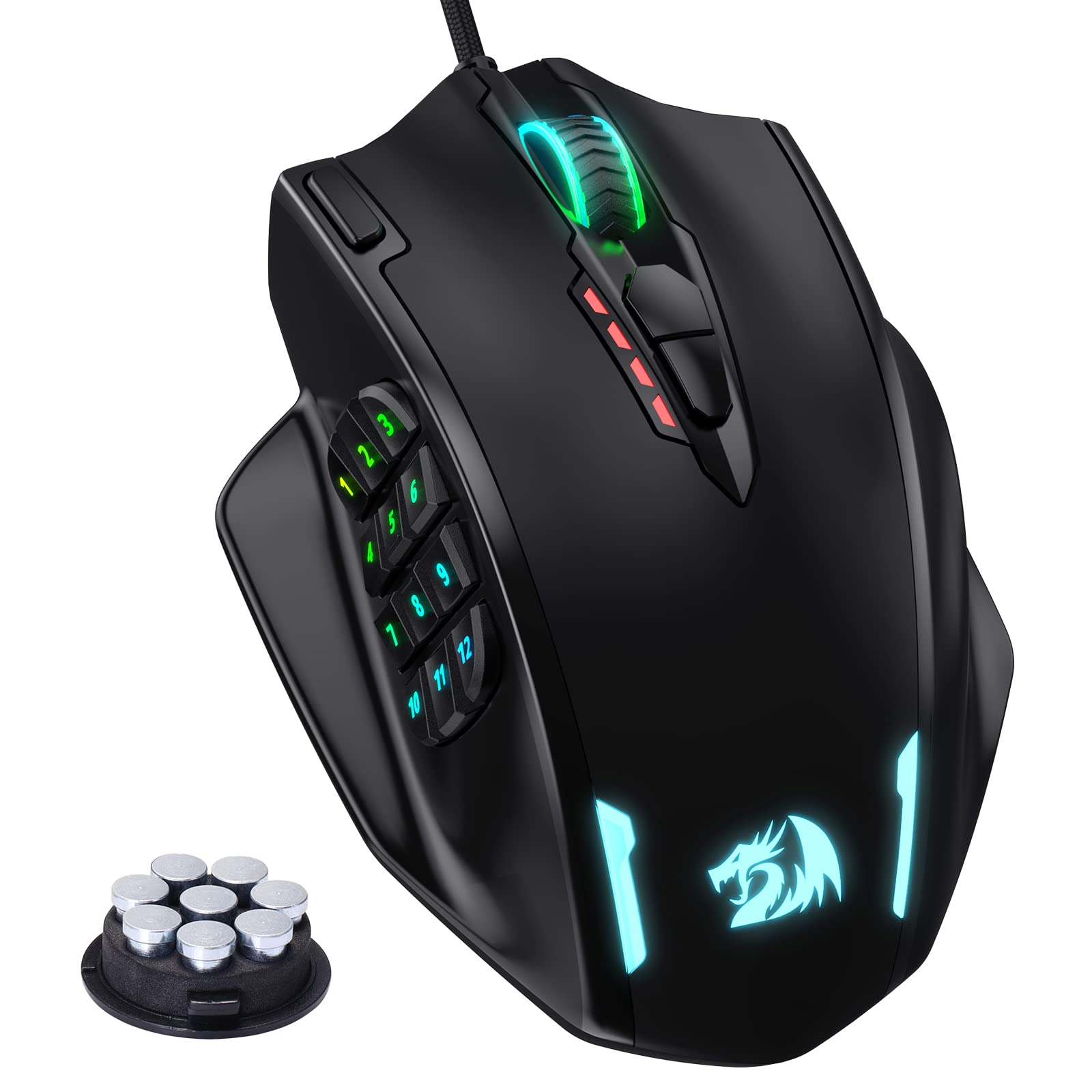
The 12-button thumb grid is why most people buy this mouse, so let’s talk about it properly. The buttons are arranged in a 3×4 grid with slightly raised edges between each key. They’re not mechanical switches – they feel more like membrane keyboard keys – but they’re distinct enough that I rarely hit the wrong button once I’d spent a few days with it.
One thing that surprised me: the top row of thumb buttons (numbers 10-12) are positioned high enough that they’re genuinely awkward to reach without shifting your grip. I ended up mapping less critical abilities to those slots. If you’ve got smaller hands, you might find them practically unusable.
The software is… functional. It’s not winning any design awards (it looks like it was made in 2015), but it does everything you need. You can record macros, adjust DPI in 100-increment steps, customise the RGB, and save everything to the mouse’s onboard memory. That last bit is important because the software itself is a bit dodgy about running in the background without occasionally forgetting your settings.
Performance Testing: Does It Actually Game?
After several weeks of testing across multiple games (CS2, Valorant, World of Warcraft, and general desktop use), the M908’s sensor performance is genuinely impressive for the price. This isn’t a case of “good for a budget mouse” – it tracks as accurately as mice costing £60-70.
I ran the M908 through my standard testing routine: precision aiming in Kovaak’s, flick shots in Valorant, and tracking tests in Apex. The PAW3327 sensor handled everything without complaint. No acceleration, no angle snapping, no weird behaviour when moving quickly. At 1600 DPI (my preferred setting), tracking felt identical to the Logitech G502 I usually use.
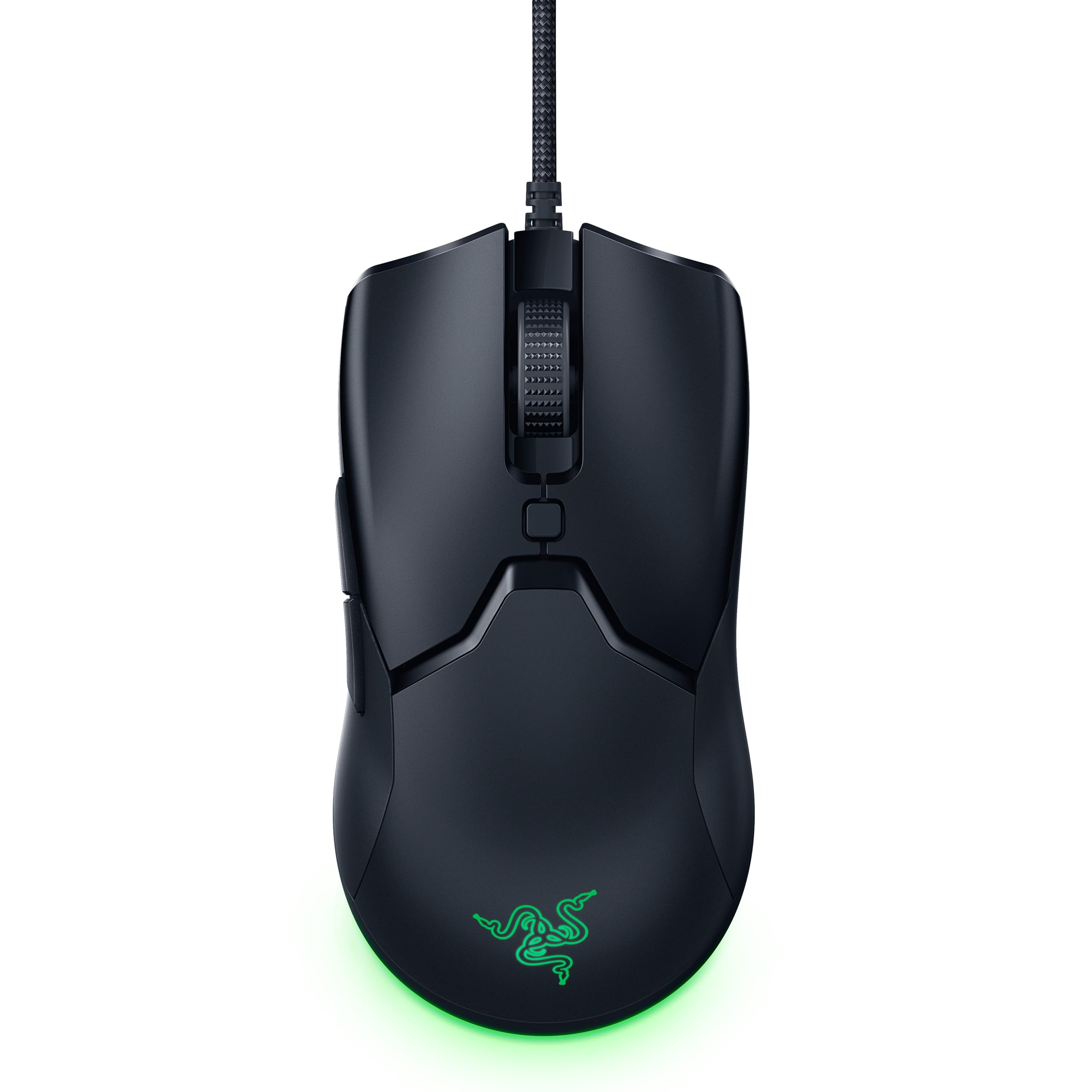
Where it falls short is weight and glide. At 145g before you add any of the included weights, this is a heavy mouse by 2026 standards. The Logitech G203 weighs 85g. The Razer Viper V2 Pro is 58g. If you’re used to lightweight mice, the M908 feels like you’re dragging a brick across your mousepad. The included PTFE feet are decent quality, but they’re not helping much when the mouse itself weighs this much.
For MMO gaming? The weight doesn’t matter. You’re not making rapid flick shots; you’re clicking buttons in rotation. For competitive FPS? You’ll feel the weight after extended sessions, and it’ll slow down your aim slightly compared to lighter alternatives.
Build Quality: Where The Budget Shows
Look, I’m not going to pretend this feels like a £100 mouse. The glossy plastic shell picks up fingerprints within seconds of touching it. There are visible seam lines where the top and bottom shells meet. The RGB lighting has uneven brightness across different zones. This is a budget mouse, and it feels like one.
But here’s what matters: after several weeks of daily use, nothing’s broken. The main left and right buttons use proper Omron switches rated for 20 million clicks, and they feel crisp and consistent. The scroll wheel has defined steps with no wobble. The braided cable is flexible enough not to interfere with movement.
My main concern is the side button panel. Those 12 thumb buttons don’t use individual mechanical switches – they’re mounted on what feels like a membrane system. They work fine now, but I’m not convinced they’ll still feel this responsive after a year of heavy MMO gaming. The panel itself has slight flex when you press hard, which doesn’t inspire confidence in long-term durability.
The PTFE feet are decent quality and glide smoothly on cloth pads. They’re not as thick as aftermarket options, but they’re doing the job. The gold-plated USB connector is a nice touch that suggests Redragon at least thought about longevity, even if they couldn’t afford premium materials everywhere.
📱 Ease of Use
The M908 is shaped for right-handed users with medium to large hands. I’ve got fairly average-sized hands (19cm from wrist to middle fingertip), and it fits comfortably in both palm and claw grip. The thumb rest is well-positioned, and the button grid sits naturally under my thumb without requiring awkward stretching.
If you’ve got smaller hands (under 17cm), you’ll struggle to reach the top row of side buttons without shifting your grip. And if you’re left-handed, well, you’re out of luck entirely. This is an aggressively right-handed design with no ambidextrous option.
The software situation is… typical budget peripheral stuff. You download it from Redragon’s website (not the Microsoft Store or anywhere convenient), install it, and it works. Mostly. I had to reinstall it once when it forgot all my profiles after a Windows update. But because the settings save to onboard memory, I just had to reload my saved profiles rather than recreate them from scratch.
One genuinely nice touch: you can adjust DPI on-the-fly using the buttons behind the scroll wheel without opening the software. The current DPI level is indicated by the RGB colour, which is actually useful when switching between games that need different sensitivity settings.
How It Compares: M908 vs The Competition
The M908 sits in an interesting spot. It’s competing with the Logitech G203 on price, but the G203 is a completely different mouse. The G203 is lightweight (85g), simple (six buttons), and built for FPS gaming. The M908 is heavy, complex, and built for MMOs. They’re both among the best gaming mice under £30, but for totally different reasons.
The real comparison is with the Razer Naga V2 HyperSpeed. Both are MMO mice with 12-button thumb grids. The Naga costs nearly five times as much, but you get wireless connectivity, better build quality, more refined software, and mechanical switches on those side buttons. Is that worth the extra cash? If you’re serious about MMO gaming and can afford it, probably yes. If you’re on a tight budget or just want to try the MMO mouse experience without major investment, the M908 delivers 80% of the functionality for 20% of the price.
Against other budget options like the VGUARD Gaming Mouse, the M908 wins on sensor quality and software support. Those ultra-cheap options often use generic sensors with acceleration issues and barely functional software. The M908 feels like a proper gaming peripheral that happens to be cheap, rather than a cheap peripheral pretending to be for gaming.
What Buyers Say: The Good and The Grumbles
With over 14,000 reviews averaging 4.3 stars, there’s a clear consensus: this mouse delivers way more than you’d expect at this price point, but you need to accept some compromises. The buyers who love it are mostly MMO players who needed programmable buttons without spending Razer money. The disappointed buyers are usually FPS players who bought it for the high DPI spec without realising how heavy it is.
Value Analysis: Where This Sits in the Market
At this price point, you typically get basic 6-button mice with generic sensors and minimal software support. The M908 is an outlier, offering mid-range features (quality sensor, extensive programmability, onboard memory) in a budget package. The trade-off is build quality – the materials and construction are clearly budget-tier, even if the performance isn’t. You’re essentially getting £60-70 worth of functionality in a £30 shell.
Here’s the value proposition in simple terms: if you bought a Razer Naga V2 HyperSpeed, you’d spend around £130 for wireless connectivity, premium build quality, and refined software. The M908 gives you the same basic functionality (12 programmable thumb buttons, quality sensor, customisation software) for a fraction of that cost. You lose wireless, the build quality is noticeably cheaper, and the side buttons don’t feel as nice. But for MMO gaming? You’re getting 80% of the experience for 20% of the price.
Compared to other budget mice around this price, the M908 is exceptional. The Logitech G203 is cheaper and lighter but only has six buttons. The PEEH Wireless Gaming Mouse offers wireless connectivity but with a generic sensor and no side button array. If you specifically need those programmable buttons for MMO gaming, there’s nothing else at this price point that comes close.
Full Specifications
Buy this if you’re playing World of Warcraft, Final Fantasy XIV, Guild Wars 2, or any other game where having a dozen abilities mapped to your thumb is genuinely useful. The M908 delivers that functionality at a price that won’t make you wince, even if the build quality occasionally reminds you why it’s so affordable.
Skip it if you’re primarily playing competitive FPS games where weight matters, or if you want premium materials that’ll still feel solid in five years. For those use cases, save up for something like the Razer Viper V2 Pro (lightweight FPS) or Razer Naga V2 HyperSpeed (premium MMO mouse).
What works. What doesn’t.
6 + 6What we liked6 reasons
- Exceptional value with 18 programmable buttons and quality sensor at budget pricing
- Pixart PAW3327 sensor tracks accurately with no acceleration or jitter
- Onboard memory stores profiles so software doesn’t need to run constantly
- 12-button thumb grid genuinely useful for MMO ability rotations once you adapt
- Adjustable weight system lets you customise feel (though it’s already quite heavy)
- Trusted by over 14,000 UK buyers with consistent positive feedback
Where it falls6 reasons
- Heavy at 145g base weight, unsuitable for lightweight FPS gaming
- Glossy plastic shell feels cheap and attracts fingerprints constantly
- Side buttons use membrane switches that feel mushy compared to mechanical alternatives
- Windows-only software with occasional stability issues after system updates
- No wireless option available
- Right-handed design only, no ambidextrous version
Full specifications
5 attributes| Key features | Professional Gaming Mouse - Redragon M908 optical gaming mouse is designed with up to 12400 DPI, 5 adjustable DPI levels (500/1000/2000/3000/6200 DPI) meet your multiple needs, either for daily work or gaming. DPI can be adjusted freely by ±100 from 100 to 12400 via software. 1000 Hz polling rate, 30G acceleration and high-precision Pixart PAW3327 Sensor giving you a greater edge over your competition. |
|---|---|
| RGB Backlight & Programmable Buttons - 16.8 million RGB LED color options (LED Backlight can be disabled). 18 programmable buttons, 5 memory profiles each with a dedicated light color for quick identification. Comes with 8-piece weight tuning set (2.4g x8), easy to change the weight to suit your games. | |
| Comfort & Precision At Your Hands - Redragon M908 gaming mouse is an essential computer accessory for die-hard gamers with its aggressive design for hands! You will be amazed by the unmatched comfort, lethal accuracy and killer precision of our durable, desktop and laptop pro gaming mouse! | |
| High-end Design - Redragon M908 Mouse features 8 buttons and 12 MMO programmable side buttons. Durable smooth TEFLON feet pads for ultimate gaming control. 6ft braided-fiber cable with gold-plated USB connector ensures greater durability. | |
| Die-hard Gamers Choice - Whether you are targeting, aiming, slashing or attacking, a professional gaming mouse is your basic weapon! The mouse will be your ideal partner. Compatible with Windows 2000/ME/XP/03/VISTA/7/8/10 system for programmable using and Mac OS for normal using. |
If this isn’t right for you
2 options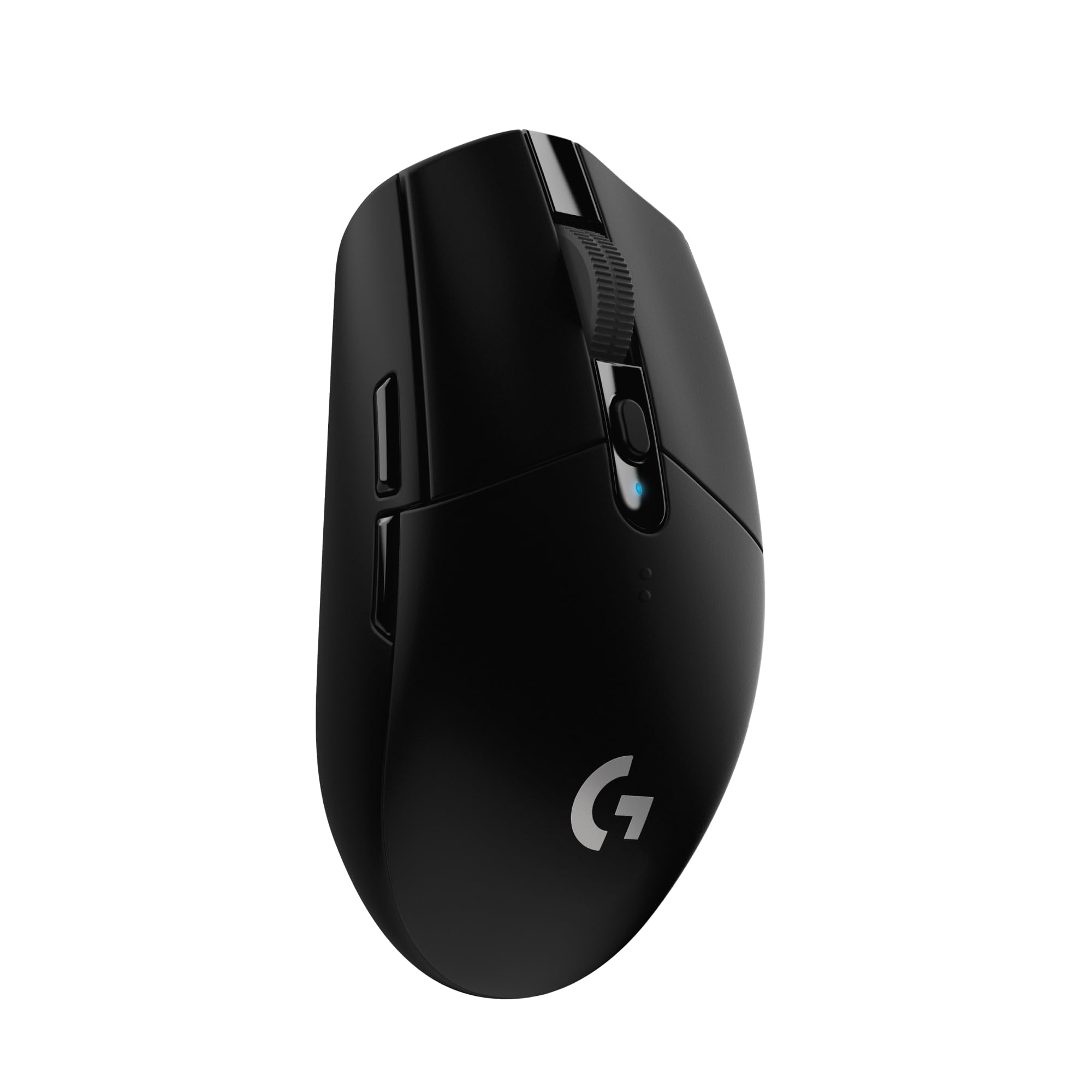
Frequently asked
5 questions01Is the Redragon M908 Impact worth buying in 2026?+
Yes, if you need extensive programmable buttons for MMO gaming on a budget. The M908 offers 18 programmable buttons and a quality Pixart PAW3327 sensor at under £30, delivering functionality that typically costs £60-130 on competing mice. Build quality is budget-tier with plasticky materials, but performance is genuinely impressive for the price. Skip it if you want a lightweight FPS mouse or premium materials.
02How does the Redragon M908 compare to the Razer Naga?+
Both offer 12-button thumb grids for MMO gaming, but the Razer Naga V2 HyperSpeed costs nearly five times as much. The Naga provides wireless connectivity, better build quality, mechanical side button switches, and more refined software. The M908 delivers about 80% of the functionality for 20% of the price, making it ideal for budget-conscious gamers or those wanting to try the MMO mouse format without major investment.
03What are the main pros and cons of the Redragon M908?+
Pros: Exceptional value with quality Pixart sensor, 18 programmable buttons, onboard memory for profiles, accurate tracking with no acceleration. Trusted by 14,000+ UK buyers. Cons: Heavy at 145g (unsuitable for lightweight FPS gaming), glossy plastic feels cheap, side buttons are mushy membrane switches rather than mechanical, Windows-only software, no wireless option, right-handed design only.
04Is the Redragon M908 good for FPS gaming?+
The sensor tracks accurately enough for FPS gaming, but the 145g weight makes it unsuitable for competitive play if you're used to modern lightweight mice. It's designed primarily for MMO gaming where rapid flick shots aren't required. For FPS gaming on a budget, consider the Logitech G203 (85g) or Glorious Model O instead.
05What warranty applies to the Redragon M908?+
Amazon offers 30-day returns on most items. Redragon provides warranty coverage - check the product page for specific details. Main buttons use Omron switches rated for 20 million clicks. Amazon's A-to-Z Guarantee provides purchase protection on every order.