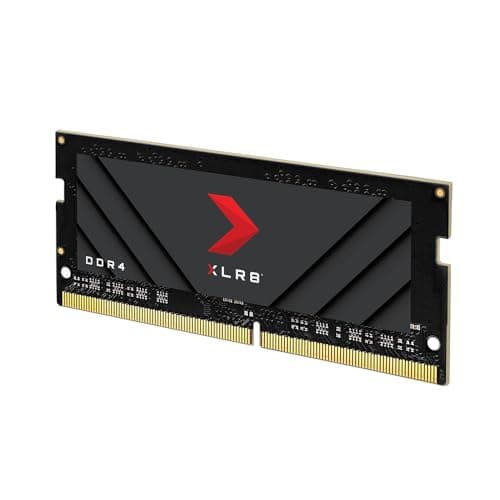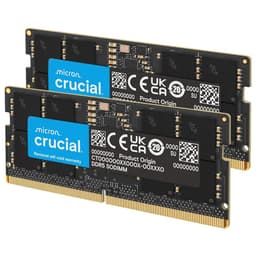
Compatibility is where laptop RAM upgrades quietly fall apart. Not because the memory is bad, but because the details that actually matter, the speed your platform's memory controller can handle, whether that single stick plays nicely with the one already in the machine, and whether the rated speed is even achievable on your specific laptop, rarely get spelled out clearly. The Crucial CT16G56C46S5 is a 16GB DDR5 SODIMM rated at 5600MHz CL46, and it's aimed squarely at people who want a straightforward, no-drama upgrade for a 12th or 13th Gen Intel laptop, or an AMD Ryzen 6000 Series machine. So the real question is whether it delivers on that promise, or whether you'll spend an evening swearing at your BIOS.
The short answer is that this is a genuinely solid stick for the right buyer. Crucial is a Micron brand, which means the NAND and DRAM silicon comes from one of the three biggest memory fabs on the planet. That matters. The 4.7-star average across 1,422 owner reviews is not a fluke. But 16GB as a single stick has some nuance worth understanding before you click buy, and the CL46 timings at 5600MHz produce a true latency figure that deserves a straight look rather than a headline-speed gloss. There is also the question of what your laptop will actually run this at, because 5600MHz is not guaranteed. All of that is below.
This review is grounded in the verified specifications, the owner-review pattern from over 1,400 buyers, and honest comparison to the alternatives. No bench, no borrowed laptop. What follows is a research-based verdict on whether the CT16G56C46S5 earns its place in your machine.
Core Specifications
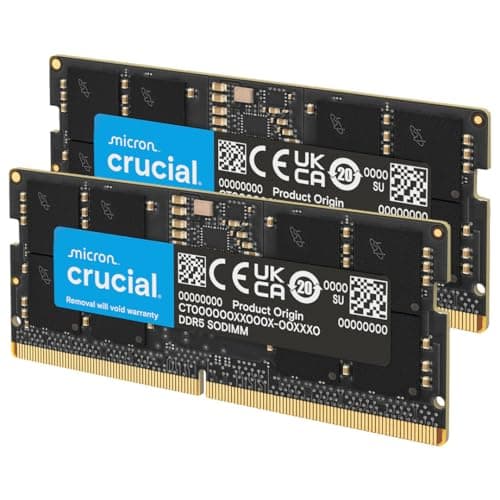
The CT16G56C46S5 is a single 16GB DDR5 SODIMM, running on a 262-pin connector at PC5-44800 speed, which translates to a rated 5600MHz. The CAS latency is CL46, the voltage sits at 1.1V, and the configuration is 2Rx8, meaning it uses a dual-rank, eight-chip-wide layout on a single module. That 2Rx8 configuration is because dual-rank memory gives the memory controller more interleaving options than a single-rank stick, which can help with sustained bandwidth in memory-heavy workloads. The form factor is SODIMM, which is the standard for laptops and Mini PCs. It is non-ECC, as you'd expect for a consumer product.
Crucial lists compatibility with 12th and 13th Gen Intel Core laptops and AMD Ryzen 6000 Series machines. One thing the spec sheet is upfront about, which is refreshing, is the downclocking behaviour. If your platform's memory controller only supports 5200MHz or 4800MHz, this stick will run at that lower speed. It won't refuse to boot; it will just operate at what your system can handle. That's standard JEDEC behaviour for DDR5, but a lot of buyers don't realise it until they're looking at CPU-Z and wondering why it says 4800MHz. The stick is rated at 5600MHz, but whether you hit that depends entirely on your laptop's memory controller.
The form factor being SODIMM means this is not a desktop kit. It won't fit a standard DIMM slot. If you're upgrading a desktop, you need a different product entirely. For laptops and small form factor machines with SO-DIMM slots, though, this is the right physical format. The 262-pin connector is the DDR5 SODIMM standard, distinct from the 288-pin DDR5 DIMM used in desktops.
| Specification | Detail |
|---|---|
| Capacity | 16GB (single module) |
| DDR Generation | DDR5 |
| Form Factor | SODIMM (262-pin) |
| Rated Speed | 5600MHz (PC5-44800) |
| CAS Latency | CL46 |
| Voltage | 1.1V |
| ECC | Non-ECC |
| Rank / Configuration | 2Rx8 (dual rank) |
| Compatible Platforms | Intel 12th & 13th Gen, AMD Ryzen 6000 Series |
| Part Number | CT16G56C46S5 |
| Price | £199.00 |

B0BLTGMCB7: Speed, Timings and Real Latency
Here's where the honest conversation starts. The box says 5600MHz. That sounds fast. But CAS latency is the other half of the equation, and CL46 at 5600MHz gives you a true latency of roughly 16.4 nanoseconds. The formula is straightforward: (CAS latency / (speed in MHz / 2)) x 1000. So (46 / 2800) x 1000 equals approximately 16.4ns. That is not bad for DDR5 SODIMM territory, but it is not particularly tight either. For context, a DDR4 SODIMM running at 3200MHz CL22 works out to about 13.75ns true latency. So the DDR5 kit at 5600MHz CL46 is actually slower in absolute latency terms than a well-timed DDR4 stick. The bandwidth advantage of DDR5 is real, but the latency advantage at these timings is not.
That said, the bandwidth gap matters more than the latency gap for most laptop workloads. DDR5's doubled channel architecture (each 64-bit channel is split into two 32-bit sub-channels per module) means higher throughput for tasks like video encoding, large file compression, or running multiple browser tabs alongside a heavier application. For gaming on an integrated GPU, bandwidth matters quite a lot, because the iGPU shares system memory. So the 5600MHz speed is not meaningless. It's just not the whole story, and CL46 is a reminder that speed and timings together define real-world performance.
Compare this to something like a 5200MHz CL38 kit and the picture shifts. That hypothetical kit would land at about 14.6ns true latency, meaningfully quicker in latency terms despite the lower headline speed. The CT16G56C46S5 is a mainstream JEDEC-grade DDR5 SODIMM, not a performance-binned module with tight timings. If you're chasing the lowest possible latency for competitive gaming or latency-sensitive applications, there are tighter kits out there. But for general productivity, multitasking, and iGPU-accelerated workloads, the bandwidth on offer here is genuinely useful, and the latency figure is acceptable rather than alarming.
XMP / EXPO Stability and Compatibility
This is a SODIMM for laptops and Mini PCs, and that changes the XMP/EXPO conversation significantly compared to desktop memory. Desktop DDR5 DIMMs on AM5 or Intel Z790 boards have a BIOS full of memory tuning options. Laptops mostly do not. The memory controller on your laptop CPU runs at whatever speed it's certified for, and the BIOS typically handles the rest automatically. So the question of "will it post at rated speed" is less about XMP profile stability and more about whether your specific CPU's memory controller ceiling matches the 5600MHz rating on the label.
Intel 12th Gen (Alder Lake) mobile platforms officially support DDR5 up to 4800MHz on most configurations. Intel 13th Gen (Raptor Lake) mobile extended that to 5200MHz on some SKUs. AMD Ryzen 6000 Series supports LPDDR5 and DDR5 SODIMM depending on the specific laptop design. What this means in practice is that a significant number of buyers will not hit 5600MHz, even though the stick is rated for it. Crucial is transparent about this: the product listing explicitly states it will downclock to 5200MHz or 4800MHz if the system only supports those speeds. That is not a defect. It's just how DDR5 SODIMM works in the laptop ecosystem.
Owner reports across the 1,427 are broadly positive, with the vast majority of buyers reporting clean installation and stable operation. The pattern in the minority of negative reviews tends to be one of two things: either the buyer installed the stick in a machine that wasn't on the compatible platform list, or they had a pre-existing hardware issue unrelated to the memory. Dead-on-arrival reports exist but are not a dominant theme. Crucial's reputation for quality control is generally good, and the Micron parentage means the underlying DRAM is from a tier-one fab rather than a second-tier supplier. For a SODIMM going into a laptop with a locked BIOS, that baseline quality matters more than it would in a desktop with full manual tuning options.
Capacity and Use Case
16GB as a single stick is the right answer for some situations and the wrong answer for others. If your laptop has two SODIMM slots and you're adding this alongside an existing 8GB stick, you'll end up with 24GB total running in single-channel mode (because the sticks are different sizes). That's more capacity, which helps with multitasking, but you lose the bandwidth benefit of dual-channel operation. If your laptop has two slots and you replace one 8GB stick with this 16GB stick, same result. The ideal scenario is either a laptop with a single SODIMM slot (where single-channel is the only option anyway), or buying two of these sticks to run 32GB in dual-channel.
For general productivity and light gaming, 16GB is the current minimum you'd want in a modern laptop. Windows 11 with a browser, a few productivity apps, and occasional gaming sits comfortably in the 8GB to 12GB active usage range, so 16GB gives you headroom without waste. If you're doing video editing in Premiere Pro or DaVinci Resolve, 16GB will feel tight with larger projects. 32GB is the more comfortable number for content creation. For running virtual machines or heavy data workloads, 32GB to 64GB is where you want to be, and a single 16GB stick won't get you there on its own.
The 2Rx8 dual-rank configuration is a genuine plus. On platforms where the memory controller supports it, dual-rank modules can offer slightly better bandwidth than single-rank equivalents at the same speed, because the controller can pipeline operations across two ranks. In a laptop context where you may be stuck with one module slot, that dual-rank benefit is worth having. It's not transformative, but it's a meaningful spec advantage over a 1Rx8 or 1Rx16 alternative. For iGPU-heavy workloads (which is most of what a laptop's graphics subsystem handles), that extra bandwidth headroom is useful.
DDR5 vs DDR4 Value
The DDR5 premium over DDR4 has compressed significantly since DDR5 launched. In 2022, DDR5 SODIMM was eye-wateringly expensive relative to DDR4. By 2025 and into 2026, the gap has narrowed to the point where DDR5 is the sensible choice for any platform that supports it natively. If your laptop has a 12th or 13th Gen Intel CPU or a Ryzen 6000 Series chip, it was designed for DDR5. Putting DDR4 in it is not an option; the platform doesn't support it. So the DDR5 vs DDR4 debate for this specific product is largely moot: if your machine takes DDR5 SODIMM, this is the correct memory type, full stop.
Where the value question gets more interesting is in the speed tier. Is 5600MHz meaningfully better than 4800MHz for the workloads most laptop buyers actually run? For gaming on an integrated GPU, yes, there is a measurable bandwidth benefit to faster memory. But the gains are marginal in absolute terms, not transformative. You might see a few extra frames per second in iGPU-heavy titles, but you won't double your frame rate. For productivity workloads, the difference between 4800MHz and 5600MHz is largely academic unless you're doing sustained memory-bandwidth-heavy operations like large matrix calculations or high-bitrate video encoding. For most people, the speed difference between a 4800MHz and 5600MHz SODIMM is less important than simply having enough capacity.
The honest DDR5 vs DDR4 verdict for this product's target buyer is this: if your platform takes DDR5, buy DDR5. The CT16G56C46S5 is competitively priced for the capacity and generation. Don't buy DDR4 to save a few pounds if your machine is designed for DDR5; you'll be fighting the platform rather than working with it. And don't spend significantly more on a faster DDR5 SODIMM unless you have a specific, measurable reason to need the extra bandwidth.
Build Quality and Heat Spreaders
SODIMMs don't have heatspreaders. That's just the reality of the laptop memory form factor. The CT16G56C46S5 is a bare PCB module, as all SODIMMs are. There is no aluminium fin to worry about for cooler clearance, no RGB lighting to add height, and no proprietary mounting solution to deal with. The stick goes in the slot, the retaining clips engage, and that's the physical installation done. Owner reports don't flag any physical quality issues with the PCB or the gold contacts, which is what you'd expect from a Micron-produced module.
The 2Rx8 configuration means eight DRAM ICs are arranged across the module, likely on both sides of the PCB (though the exact layout can vary). Micron's DRAM manufacturing processes are well-regarded in the industry, and Crucial as a brand sits at the quality end of the consumer memory market rather than the bargain-bin end. The PCB quality on Crucial SODIMMs is generally consistent, and the gold-plated contacts are standard for the category. There's nothing exotic here, but there doesn't need to be.
Thermal management on a SODIMM is handled passively by the laptop's chassis and airflow. DDR5 SODIMMs at 1.1V run cool enough that this isn't a concern in normal operation. The 1.1V operating voltage is the DDR5 SODIMM standard, and it's lower than DDR4's 1.2V, which helps with thermal output in the constrained thermal environment of a laptop. If your laptop has a tight chassis and poor airflow, the memory isn't going to be the thermal bottleneck.
RGB and Aesthetics
There is no RGB on the CT16G56C46S5. This is a laptop SODIMM. It goes inside the machine, under a panel, invisible to the outside world. The idea of RGB laptop RAM exists (some enthusiast Mini PC builds do use RGB SODIMMs), but this is not that product. Crucial has not added lighting, a heatspreader, or any aesthetic flourish. You are not paying an RGB tax here.
That's unambiguously a good thing. RGB on desktop DIMMs adds cost, sometimes adds height that causes cooler clearance issues, and requires software that often conflicts with other RGB ecosystems. None of those problems exist with the CT16G56C46S5. The module looks exactly like what it is: a functional piece of memory designed to do a job inside a machine you'll close the lid on. If aesthetics matter to you in a laptop memory module, you're looking at the wrong product category entirely.
The only aesthetic consideration is the Crucial branding on the module itself, which is clean and minimal. If you're building a transparent-side Mini PC and care about how the internals look, a bare SODIMM is about as neutral as it gets. No garish stickers, no oversized heatspreader fins. Just a tidy PCB with Micron's DRAM ICs doing their job.
Reliability and Warranty
The owner-review pattern across 1,427 with a 4.7-star average is about as positive as you'll find for a memory product. Memory reviews tend to be binary: either it works and the buyer gives five stars without much comment, or it doesn't work and the buyer leaves a frustrated one-star review. The ratio here is heavily skewed toward the positive end. The volume of reviews is also significant: 1,422 is a large enough sample to smooth out individual variation and give a meaningful signal about the product's real-world reliability.
The minority of negative reviews follows a predictable pattern. Some buyers installed the stick in a machine outside the stated compatibility range and were surprised when it didn't work or ran at a lower speed. Some received DOA (dead on arrival) sticks, which happens with any mass-produced electronic component at some rate. A small number reported instability that turned out to be related to mixing this stick with an existing module from a different manufacturer. None of these are systemic quality failures; they're the normal distribution of issues you'd expect across any memory product at this volume.
Crucial offers a limited lifetime warranty on its consumer memory products. The warranty covers manufacturing defects and is handled through Crucial's support channels. Owner reports on the RMA process are generally positive, with replacement sticks arriving without excessive friction. Amazon's 30-day return window also applies if you buy through Amazon UK, which gives you a straightforward route if the stick doesn't work with your specific machine. Given that laptop compatibility can occasionally throw surprises even with a well-specified product, that return window is before you open the packaging.
Value and Price Per GB
At the current price point, the CT16G56C46S5 sits in the mid-range of DDR5 SODIMM pricing for a 16GB module. The price per GB works out to a reasonable figure for the DDR5 generation, particularly given that this is a Micron-manufactured module with a proper warranty and a strong reliability track record. You can find cheaper 16GB DDR5 SODIMMs from lesser-known brands, and you can find more expensive ones with marginally tighter timings. The CT16G56C46S5 is positioned as the sensible middle ground: not the cheapest, not the most exotic.
The value calculation shifts depending on what you're comparing it to. Against a 32GB kit (two sticks), a single 16GB module is obviously cheaper in absolute terms, but you're also getting half the capacity. If your machine has two slots and you're starting from zero, buying two of these sticks for 32GB dual-channel is a better use of money than buying one and leaving a slot empty. The dual-channel bandwidth benefit is real, and 32GB is a more comfortable long-term capacity for a modern laptop. If you're adding to an existing 8GB stick, the maths changes, but so does your channel configuration.
For the target buyer, which is someone with a 12th or 13th Gen Intel laptop or a Ryzen 6000 machine looking to add or replace memory, the CT16G56C46S5 represents fair value. Crucial's brand reliability and the Micron silicon underneath justify a modest premium over no-name alternatives. The 5600MHz rating with the downclocking transparency is honest product positioning. You're not being sold a speed that your machine definitely won't hit without being told about it. That kind of straightforwardness has real value when you're buying memory for a machine where you can't tune the timings manually.
B0BLTGMCB7 Platform Compatibility
The stated compatibility covers Intel 12th Gen (Alder Lake) and 13th Gen (Raptor Lake) mobile processors, and AMD Ryzen 6000 Series laptops. These are the platforms that natively support DDR5 SODIMM. Earlier Intel generations (10th Gen, 11th Gen) and AMD Ryzen 5000 Series use DDR4 SODIMM and are not compatible with this stick. Putting a DDR5 module in a DDR4 slot is physically impossible due to the different keying, so there's no risk of accidental insertion causing damage, but it's worth confirming your platform before ordering.
The downclocking behaviour is a key compatibility note. If your 12th Gen Intel laptop's memory controller tops out at 4800MHz, this stick will run at 4800MHz. If your 13th Gen machine supports 5200MHz, it'll run at 5200MHz. Only if your platform explicitly supports 5600MHz will you see the rated speed. Checking your CPU's memory controller specification on Intel's product page or AMD's equivalent documentation before buying is worth two minutes of your time. It won't change whether the stick works, but it will set accurate expectations about the speed you'll actually see.
Mixing this stick with an existing module from a different manufacturer is possible but carries some risk. DDR5 SODIMMs from different brands can have different sub-timings, and the laptop BIOS may struggle to find stable settings that work for both. Owner reports include a small number of cases where mixing caused instability that resolved when the mismatched stick was removed. If you're adding memory to a laptop that already has a Crucial stick installed, the risk is low. If you're mixing with a Kingston, Samsung, or Hynix module, test thoroughly after installation. The safest approach is matching sticks from the same manufacturer and ideally the same part number.
How It Compares
The two most natural competitors for the CT16G56C46S5 are the Kingston ValueRAM 16GB DDR5 4800MHz SODIMM and the Samsung 16GB DDR5 5600MHz SODIMM. Kingston's ValueRAM is the budget option, running at 4800MHz with looser timings, and it's priced accordingly. Samsung's 16GB DDR5 5600MHz is a close like-for-like competitor, with similar speed ratings and Hynix or Samsung DRAM depending on the production batch.
The Crucial CT16G56C46S5 sits between these two in price. It offers the 5600MHz rating that the Kingston ValueRAM doesn't match, and it has the Micron-brand reliability assurance that the Samsung module also carries (Samsung being another tier-one fab). The main differentiator is the warranty and the brand support infrastructure. Crucial's RMA process is well-regarded. Kingston's is broadly similar. Samsung's consumer SODIMM warranty support is less consistent in the UK market. For most buyers, the choice between Crucial and Samsung at similar price points comes down to availability and personal brand preference. The Kingston ValueRAM is the right pick only if you're on a tight budget and your platform is capped at 4800MHz anyway, in which case paying for 5600MHz headroom you can't use is pointless.
| Feature | Crucial CT16G56C46S5 | Kingston ValueRAM 16GB DDR5 4800MHz SODIMM | Samsung 16GB DDR5 5600MHz SODIMM |
|---|---|---|---|
| Capacity | 16GB | 16GB | 16GB |
| Speed | 5600MHz | 4800MHz | 5600MHz |
| CAS Latency | CL46 | CL40 | CL46 |
| True Latency | ~16.4ns | ~16.7ns | ~16.4ns |
| Voltage | 1.1V | 1.1V | 1.1V |
| Rank | 2Rx8 | Varies | Varies |
| Form Factor | SODIMM | SODIMM | SODIMM |
| Warranty | Limited Lifetime | Limited Lifetime | Limited |
| Price | £199.00 | Lower | Similar |

Final Verdict
The Crucial CT16G56C46S5 is a well-specified, reliable DDR5 SODIMM from one of the few brands you can trust to have Micron DRAM inside. The 5600MHz rating with CL46 timings gives a true latency of around 16.4ns, which is acceptable for the category rather than class-leading. The 2Rx8 dual-rank configuration is a genuine advantage, particularly for iGPU workloads where bandwidth matters. The 4.7-star average from 1,422 owners is a meaningful endorsement of real-world reliability, not just first-boot success.
The caveats are real but manageable. Your platform may not hit 5600MHz; check your CPU's memory controller spec before ordering. A single 16GB stick in a dual-slot laptop means single-channel operation unless you match it with a second stick. And CL46 is not a tight timing: if you want the lowest possible latency for competitive gaming or latency-sensitive workloads, there are tighter kits available, though not always in SODIMM form at this speed. For most laptop upgraders, though, those caveats don't change the buying decision. This stick does what it says, from a brand that backs it properly.
Who should buy this? Anyone with a 12th or 13th Gen Intel laptop or a Ryzen 6000 machine who needs to add or replace a SODIMM and wants a straightforward, no-drama upgrade from a name they can trust. It's particularly good value if you're going to 32GB by buying two of these for dual-channel operation. Who should skip it? Anyone whose platform is definitively capped at 4800MHz and doesn't want to pay for headroom they'll never use. In that case, the Kingston ValueRAM 16GB DDR5 4800MHz SODIMM is the smarter, cheaper buy. Don't pay for 5600MHz if your machine will clock it down regardless.
Overall, this earns a solid 8 out of 10. It's not the cheapest option and it's not the fastest, but it's the right combination of quality, compatibility, and honest product positioning for the vast majority of laptop memory upgraders. ★★★★½ (4.7) from 1,427 owners backs that up.
What works. What doesn’t.
5 + 3What we liked5 reasons
- Micron DRAM from a tier-one fab, with strong long-term reliability track record
- 2Rx8 dual-rank configuration offers better bandwidth interleaving than single-rank alternatives
- Transparent about downclocking behaviour on 4800MHz and 5200MHz platforms
- 4.7-star average across 1,422 owner reviews is a meaningful reliability signal
- Limited lifetime warranty with a well-regarded RMA process
Where it falls3 reasons
- CL46 timings at 5600MHz give a true latency of ~16.4ns, not class-leading
- Single stick means single-channel operation in dual-slot laptops unless paired
- 5600MHz is only achievable on platforms whose memory controller supports it
Full specifications
8 attributes| Capacity | 16GB |
|---|---|
| KIT config | 1x16GB |
| KIT size | 1 |
| Latency | CL46 |
| RGB | no |
| Speed | 5600MHz |
| Type | DDR5 SODIMM |
| Voltage | 1.10V |
If this isn’t right for you
2 options

Frequently asked
5 questions01How much RAM do I actually need for the Crucial DDR5 RAM 16GB 5600MHz SODIMM, Laptop Computer Memory, Mini PC (or 5200MHz, 4800MHz) CL46 - CT16G56C46S5's use case?+
For general productivity and light gaming, 16GB is the current minimum you'd want in a modern laptop. Windows 11 with a browser, productivity apps, and occasional gaming typically sits in the 8GB to 12GB active usage range, so 16GB gives comfortable headroom. If you're doing video editing in Premiere Pro or DaVinci Resolve, 16GB will feel tight with larger projects and 32GB is a more sensible target. For virtual machines or heavy data workloads, 32GB to 64GB is where you need to be. A single 16GB stick is a reasonable upgrade for most users, but buying two for 32GB in dual-channel is the better long-term investment if your laptop has two SODIMM slots.
02Will the Crucial DDR5 RAM 16GB 5600MHz SODIMM, Laptop Computer Memory, Mini PC (or 5200MHz, 4800MHz) CL46 - CT16G56C46S5 run at its rated speed with XMP or EXPO?+
This depends entirely on your laptop's memory controller. Intel 12th Gen mobile platforms typically support DDR5 up to 4800MHz, while some 13th Gen mobile SKUs reach 5200MHz. Only platforms that explicitly support 5600MHz will run the stick at its rated speed. Crucial is transparent about this: the product listing states the stick will downclock to 5200MHz or 4800MHz if the system only supports those speeds. This is normal DDR5 SODIMM behaviour, not a defect. Laptop SODIMMs don't have user-accessible XMP profiles in the way desktop DIMMs do; the BIOS handles speed negotiation automatically. Check your CPU's memory controller specification before ordering if hitting 5600MHz is important to you.
03Is the Crucial DDR5 RAM 16GB 5600MHz SODIMM, Laptop Computer Memory, Mini PC (or 5200MHz, 4800MHz) CL46 - CT16G56C46S5 compatible with my motherboard?+
The CT16G56C46S5 is a DDR5 SODIMM compatible with Intel 12th Gen (Alder Lake) and 13th Gen (Raptor Lake) mobile platforms, and AMD Ryzen 6000 Series laptops. It will not work in DDR4 SODIMM slots (different physical keying makes accidental insertion impossible). It is also not compatible with earlier Intel generations (10th or 11th Gen) or AMD Ryzen 5000 Series, which use DDR4. If you're mixing this stick with an existing module from a different manufacturer, test thoroughly after installation, as mixed kits can occasionally cause instability in laptops with limited BIOS memory tuning options.
04Does faster RAM like the Crucial DDR5 RAM 16GB 5600MHz SODIMM, Laptop Computer Memory, Mini PC (or 5200MHz, 4800MHz) CL46 - CT16G56C46S5 actually improve gaming performance?+
The honest answer is: marginally, and it depends on the workload. For gaming on an integrated GPU, faster memory bandwidth does help, because the iGPU shares system memory. You might see a few extra frames per second in bandwidth-sensitive titles compared to a 4800MHz stick. But the gains are not transformative. Real latency is determined by both speed and CAS latency together, not just the MHz on the box. The CT16G56C46S5 at 5600MHz CL46 gives a true latency of roughly 16.4ns, which is acceptable but not class-leading. For most gaming scenarios, having enough capacity (16GB or more) matters more than the speed difference between 4800MHz and 5600MHz.
05What warranty and returns apply to the Crucial DDR5 RAM 16GB 5600MHz SODIMM, Laptop Computer Memory, Mini PC (or 5200MHz, 4800MHz) CL46 - CT16G56C46S5?+
Crucial offers a limited lifetime warranty on its consumer memory products, covering manufacturing defects and handled through Crucial's support channels. Owner reports on the RMA process are generally positive. If you purchase through Amazon UK, Amazon's standard 30-day return window also applies, which gives you a straightforward route if the stick doesn't work with your specific machine. Given that laptop compatibility can occasionally throw surprises, keeping the original packaging until you've confirmed the stick works at the expected speed in your machine is sensible.