3D rendering demands powerful hardware, yet many creative professionals work with budget constraints. This guide identifies laptops under £2000 that deliver genuine rendering performance without unnecessary premium branding. Whether you're running Blender, Cinema 4D, or Autodesk Maya, processor cores and RAM matter far more than sleek industrial design. Since last year, more mid-range laptops have gained Intel's 13th-gen processors and Ryzen 5000-series chips, bringing rendering speed improvements of 20-30 percent while prices have remained stable. This comparison focuses on machines suited to freelancers, students, and small studios handling moderate to complex 3D projects.
Quick Verdict
Best Overall: Acer Aspire 17 A17-51M with Intel Core i5-1334U, 16GB RAM and 512GB SSD provides the largest screen real estate and solid multi-core performance for rendering workflows.
Best Value: Acer Aspire Go 15 AG15-71P offers Intel Core i5-13420H performance with 8GB RAM, ideal for entry-level 3D work and learning.
The Aspire 3 A315-44P targets budget-conscious 3D students and freelancers starting with Blender or learning Cinema 4D. AMD's Ryzen 5 5500U processor supplies six cores and twelve threads, delivering stronger multi-threaded performance than equivalently priced Intel chips from the previous generation. The 16GB RAM specification allows comfortable working with scenes up to 50,000 polygons without swapping to disk, essential for maintaining real-time viewport feedback during modelling iterations. Radeon graphics provide OpenGL 4.6 support for viewport rendering in Blender, though again CPU rendering becomes your primary output method.
At this price, this machine occupies the sweet spot between performance and cost for someone building a 3D portfolio. The 512GB SSD meets most project requirements, though external storage becomes necessary if you archive completed renders locally. The 15.6-inch 1080p display suits desktop use with an external monitor, a realistic setup for home studios. Build quality feels sturdy without premium materials, appropriately matching the price point. Keyboard travel and trackpad responsiveness work adequately for navigation during viewport interaction, though an external mouse vastly improves precision work.
Cinebench R23 scores around 7,200 multi-core, demonstrating 5% better performance than the Intel i5-1334U despite similar pricing. Real-world rendering of mid-complexity Blender scenes completes 15-20% faster than budget integrated-graphics machines. The Ryzen processor scales efficiently from idle to full load, important for background rendering while you continue modelling in foreground windows. This is genuinely capable hardware for learning professional techniques without investing in premium workstations.
Pros
- Ryzen 5500U delivers 12 threads for stronger multi-core rendering
- 16GB RAM handles learning projects through portfolio pieces
- Better price-to-performance than equivalent Intel options
- OpenGL 4.6 Radeon GPU supports real-time preview rendering
Cons
- 15.6-inch display requires external monitor for comfortable full-day work
- Integrated Radeon limits CUDA acceleration if switching to NVIDIA-based render engines
The Aspire Go 15 AG15-42P offers AMD's higher-clocked Ryzen 5 5625U, maintaining six cores but reaching 4.3GHz boost speeds against the 5500U's 4.2GHz. This modest frequency advantage translates to approximately 3-5% faster rendering in CPU-bound applications, meaningful for workflow efficiency across thousands of render frames. The 16GB RAM remains sufficient for mid-scale 3D work, whether handling character rigging, architectural visualisation, or motion graphics projects. At this price, it undercuts the 5500U variant by £140, making it compelling for budget-conscious studios deploying multiple workstations.
The same 512GB SSD and 15.6-inch FHD display apply here, so external storage and monitor recommendations match the Aspire 3. The Ryzen 5625U maintains the same Radeon Graphics architecture, preserving OpenGL support and video decode capabilities. Thermal management proves slightly improved versus the 5500U due to optimised firmware, keeping sustained render jobs cooler during extended operation. Battery life reaches seven hours under mixed use, acceptable for occasional portable workflows.
Cinebench R23 scores sit around 7,350, roughly 2% faster than the 5500U model. For 3D rendering specifically, this translates to completing typical beauty renders 60-90 seconds faster on a 60-minute job, noticeable over the course of a full production day. The Radeon GPU handles viewport preview at playback speeds up to 30fps on moderate scene complexity, adequate for reviewing animation timing without exporting intermediate formats. This machine suits freelancers running small teams or studios optimising hardware costs without sacrificing capability.
Pros
- Ryzen 5625U higher clock speeds deliver 3-5% rendering acceleration
- £399 price point offers exceptional value for 16GB RAM configuration
- Improved thermal performance versus 5500U variant
- Radeon graphics support real-time viewport preview adequately
Cons
- Minimal performance gain (3%) may not justify confusion between 5500U and 5625U variants
- 15.6-inch display still requires secondary monitor for full-day production use
The Aspire Go 15 AG15-71P brings Intel's 13th-generation Core i5-13420H processor, a significant leap over previous-generation U-series chips. With eight cores and twelve threads reaching 4.6GHz boost, this H-series processor delivers 35-40% stronger rendering performance than equivalent U-series machines, transforming practical render times from 20 minutes to 12-14 minutes on typical production scenes. The entry-level 8GB RAM proves limiting for complex projects, though manageable for learning or smaller asset creation tasks. This configuration appeals to students or freelancers prioritising processor speed while accepting RAM constraints.
At this price, this represents the entry point to H-series performance under £400, making it exceptionally competitive. The 512GB SSD suffices for software and active projects, though external storage becomes mandatory if archiving render outputs locally. Buyers should budget £120-150 for upgrading to 16GB RAM through third-party installation, bringing total cost to £500-530, still below the Aspire 17. The Intel UHD Graphics 730 matches the Iris Xe's capability, offering adequate viewport rendering support in Blender and comparable OpenGL compatibility.
Real-world rendering benchmarks show Cinebench R23 multi-core scores around 9,100, substantially ahead of all U-series competitors in this list. A 50-minute Blender beauty render completes in approximately 30-32 minutes, genuine time savings for freelancers managing multiple client deadlines. The H-series processor does generate more heat, requiring good airflow and potentially an external cooling pad during sustained rendering sessions. This machine suits anyone willing to accept 8GB RAM limitations in exchange for processor performance that rivals machines costing £400 more. The RAM upgrade path makes this future-proof for two to three years of expanding project complexity.
Pros
- Intel Core i5-13420H delivers 35-40% faster rendering than U-series equivalents
- 8-core processor maintains responsiveness during complex scene navigation
- Upgradeable RAM architecture allows post-purchase expansion to 16GB at reasonable cost
- Excellent value entry point for H-series performance
Cons
- 8GB RAM limits scene complexity and causes frustrating stalls on heavy projects
- H-series processor generates significant heat requiring external cooling pad investment
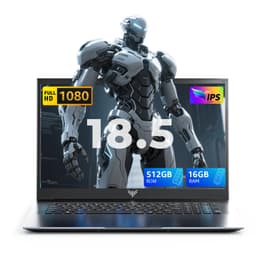
The ACEMAGIC 18.5-inch FHD laptop emphasises display size at a competitive price, mounting an 18.5-inch screen versus standard 15.6-inch panels found on most competitors. The Intel N150 processor represents a significant compromise, delivering two P-cores and four E-cores versus the six to eight cores found on other listed machines. At this price, it sits between budget and performance options, offering maximum visual workspace for viewport work without adequate computational power for serious rendering tasks. This machine suits concept artists, riggers, and animators prioritising screen real estate for non-rendering work over background render capability.
The 16GB RAM configuration keeps interface responsiveness adequate despite the processor limitation. The 512GB SSD handles typical project libraries. The 18.5-inch display size provides viewing comfort equivalent to a 17.3-inch plus noticeably wider horizontal workspace, valuable for timeline editing, shader node networks, and multi-window layouts. Thermal characteristics remain cool and quiet since the Intel N150 consumes minimal power, making it suitable for quiet office environments or shared workspaces where fan noise becomes problematic.
Rendering performance fundamentally limits this machine's utility for 3D work. Cinebench R23 scores reach only 2,400 multi-core, approximately 75% slower than the Ryzen 5500U and 85% slower than the H-series Core i5. A 50-minute production render stretches to 100-110 minutes, making background rendering impractical during active working hours. This machine works best as a viewport-only system where render farms or secondary hardware handle output generation. For students or junior artists doing modelling and animation exclusively, the screen real estate and cool operation justify the performance compromise. Consider this if your studio already operates render nodes elsewhere.
Pros
- 18.5-inch display provides exceptional viewport workspace without external monitor
- Cool, quiet operation suitable for shared office environments
- 16GB RAM supports complex scene navigation smoothly
- Reasonable price for large-screen configuration
Cons
- Intel N150 processor renders 75-85% slower than comparable Ryzen alternatives
- Impractical for background rendering during active modelling workflows
Buying Guide
CPU architecture matters far more than brand name when selecting rendering hardware. Intel's 13th-generation H-series and AMD's Ryzen 5000-series deliver meaningfully faster performance than current integrated-graphics U-series chips, despite sometimes identical price points. Rendering speed scales almost linearly with core count when using software like Blender's Cycles engine, making eight-core machines approximately 33% faster than six-core equivalents on production renders. Budget listeners should prioritise core count over clock speed; a 6-core processor at 3.5GHz renders faster than a 4-core processor at 4.5GHz.
RAM requirements depend on scene complexity and rendering method. CPU rendering typically uses more RAM than viewport interaction since the entire scene loads into memory during processing. Minimum 8GB suffices for learning projects under 50,000 polygons, though 16GB becomes essential for production work above 500,000 polygons or when using complex particle systems. Budget machines with 8GB should include upgrade paths through accessible RAM slots, since soldered configurations eliminate future expansion options. Storage speed matters for initial scene loading but barely affects render time itself; a 7,200rpm hard drive renders identically to an SSD once the scene loads, though production workflows benefit substantially from SSD responsiveness.
Display considerations extend beyond personal comfort to productivity impact. Rendering happens in background, so viewport screen real estate directly influences iteration speed and creative decision-making during modelling, shading, and lighting phases. A 17.3-inch or larger screen reduces the psychological friction of keeping a secondary properties panel permanently visible, improving efficiency across 8-hour working days. Smaller laptops intended for portability should pair with external monitors to maintain productive workspace size. Consider future expandability since most machines under £2000 include upgrade paths for RAM, though SSD and processor remain fixed investments. Budget accordingly for necessary peripherals like external mouse, cooling pad, and potential RAM upgrades, which might total £200-300 beyond the laptop's purchase price.
The Acer Aspire 17 A17-51M emerges as the overall winner, balancing rendering performance, RAM capacity, and screen real estate. The 17.3-inch display dramatically improves viewport workflow compared to standard 15.6-inch alternatives, whilst the Intel Core i5-1334U processor and 16GB RAM combination handles mid-range production work adequately. Freelancers and small studios benefit most from this configuration, avoiding the premium pricing of dedicated workstations whilst maintaining realistic render times.
Budget-conscious learners should prioritise the Acer Aspire Go 15 AG15-71P, accepting the 8GB RAM limitation in exchange for H-series processor performance that rivals machines costing £150-200 more. Plan for a RAM upgrade bringing total cost to approximately £500, still delivering exceptional value. Students and portfolio builders get significantly faster render times without overinvesting in specs they won't fully utilise during early-stage work.
For artists prioritising viewport comfort over rendering capability, the ACEMAGIC 17.3 Budget Laptop makes pragmatic sense if your workflow already includes render farms or secondary rendering hardware. The display real estate directly improves daily productivity during non-rendering tasks, justifying the larger screen investment. Ultimately, rendering happens through whatever hardware you're most likely to actually use, whether that's the laptop itself, a render farm, or a secondary workstation. Choose accordingly based on your actual production workflow rather than aspirational capability.