ASUS has spent the last two decades building one of the most respected monitor line-ups in the business, spanning the budget-friendly TUF Gaming range, the mid-tier ProArt creative panels, and the flagship ROG Strix series. Whether you are a competitive FPS player chasing the lowest possible input lag, a content creator who needs accurate colour reproduction, or simply someone upgrading from an ageing office screen, there is almost certainly an ASUS panel that fits your desk and your budget. For a broader comparison across brands, our guide to best pc accessories and monitors covers the full UK market. For those on a tighter budget, our guide to monitors for working from home under £200 covers excellent alternatives across brands. Since last year, ASUS has pushed refresh rates even higher on its IPS panels, improved ELMB (Extreme Low Motion Blur) sync technology on curved VA displays, and brought more affordable 1440p options into the mainstream. This guide covers six of the best ASUS monitors available in the UK right now, chosen across a range of price points, panel types, and use cases, so you can make a confident buying decision without wading through every specification sheet yourself.
Quick Verdict
Best Overall: ASUS ROG Strix XG32AQ. A 32-inch Fast IPS panel at 1440p and 175 Hz delivers the best combination of image quality, screen real estate, and gaming performance in the range.
Best Value: ASUS TUF Gaming VG249Q3R. At its price point it is hard to argue with a 23.8-inch IPS panel running at 180 Hz, making it an outstanding entry point for competitive gaming without sacrificing colour accuracy.
The ROG Strix XG32AQ sits at the top of this list for good reason. It is aimed squarely at gamers and enthusiasts who want a large, high-resolution display that does not compromise on speed, and it delivers on that promise convincingly. The 32-inch Fast IPS panel runs at a native 2560x1440 resolution with a 175 Hz refresh rate, giving you noticeably sharper detail than a 1080p screen at the same size while still pushing frames fast enough to satisfy most competitive players.
Fast IPS technology is the key differentiator here. Traditional IPS panels have historically struggled with response times compared to TN panels, but Fast IPS narrows that gap considerably, producing crisp motion without the ghosting that can plague slower IPS monitors. The result is a panel that suits both the frame-rate-obsessed shooter player and the person who wants to watch films, edit photos, or browse the web with excellent colour accuracy and wide viewing angles. ASUS pairs this with FreeSync Premium Pro and G-Sync compatibility, so both AMD and NVIDIA GPU owners benefit from tear-free gaming across the monitor's full refresh range.
The port selection is practical rather than extravagant: two HDMI 2.0 ports and a single DisplayPort 1.2 connection cover the most common use cases, and the dual HDMI inputs mean you can keep a console and a PC connected simultaneously. The ROG Strix aesthetic is bold, with an angular stand and subtle RGB lighting on the rear, though the stand itself offers height, tilt, and swivel adjustment, which is more than many gaming monitors at this price point provide.
At this price, the XG32AQ is a premium investment, but it justifies the cost through the sheer versatility of a 32-inch 1440p Fast IPS panel. If you spend long hours at your desk, whether gaming, working, or creating content, the extra screen real estate and image quality make a tangible difference to your daily experience. It is the monitor we would recommend to anyone who wants to buy once and not feel the urge to upgrade for several years.
Pros
- 32-inch Fast IPS delivers excellent colour accuracy and wide viewing angles for both gaming and productivity
- 1440p resolution at 175 Hz is a genuinely versatile combination that suits competitive and casual gaming equally
- G-Sync compatible and FreeSync Premium Pro support covers both major GPU brands
Cons
- Premium price puts it out of reach for budget-conscious buyers
- Only DisplayPort 1.2 rather than 1.4, which limits future-proofing at higher resolutions
The ASUS TUF Gaming VG249Q3R is the pick for anyone who wants a genuinely capable gaming monitor without spending a significant sum. At 23.8 inches with a 1920x1080 IPS panel running at 180 Hz, it punches well above its price bracket and represents one of the most compelling entry points in the entire ASUS line-up. It is particularly well suited to competitive gamers on a tight budget, students setting up their first proper gaming rig, or anyone replacing an older 60 Hz or 75 Hz panel and wanting an immediate, noticeable upgrade.
The IPS panel is a significant selling point at this price. Many monitors in this bracket use TN panels to keep costs down, which typically means washed-out colours and poor off-axis viewing. The VG249Q3R's IPS technology delivers accurate, vibrant colours and wide viewing angles, making it comfortable to use for extended sessions and versatile enough for general computing tasks beyond gaming. The 180 Hz refresh rate is higher than many rivals at this price, and combined with a 1ms MPRT response time, it produces smooth, responsive motion that competitive players will appreciate.
Connectivity is sensible: two HDMI 2.0 ports, a DisplayPort 1.2 input, and a 3.5mm audio output cover the essentials. The dual HDMI inputs are a thoughtful inclusion at this price, allowing you to connect a console alongside your PC without swapping cables. The stand is basic, offering tilt adjustment only, which is a common compromise at this end of the market. If you need height or pivot adjustment, you would need to invest in a third-party VESA arm, as the panel is VESA compatible.
ASUS has also incorporated its Flicker-Free and Low Blue Light technologies, both of which are part of the Eye Care suite, reducing eye fatigue during long gaming or work sessions. The TUF Gaming aesthetic is understated compared to ROG products, with clean lines and a matte finish that looks professional on any desk. For the price, the VG249Q3R is an exceptional monitor that we would confidently recommend as the best value option in this round-up.
Pros
- IPS panel at this price point delivers far better colour accuracy and viewing angles than budget TN rivals
- 180 Hz refresh rate is unusually high for this budget bracket, offering a genuine competitive advantage
- Dual HDMI 2.0 inputs allow simultaneous connection of a PC and console
Cons
- Stand only offers tilt adjustment, with no height or pivot movement
- 1080p resolution may feel limiting on a 24-inch panel for productivity-heavy users
The ASUS TUF Gaming VG27VQM1B is the monitor for serious competitive gamers who want the fastest refresh rate in this round-up. At 280 Hz on a 27-inch curved VA panel, it is built for players who prioritise motion clarity and response speed above all else. The 1800R curvature wraps the screen gently around your field of view, which many gamers find more immersive than flat panels, particularly at this screen size.
VA panels occupy an interesting middle ground between TN and IPS. They typically offer better contrast ratios than IPS, producing deeper blacks that are particularly noticeable in dark game environments, but they have historically suffered from slower pixel response times. ASUS addresses this with ELMB Sync (Extreme Low Motion Blur Sync), which combines backlight strobing with adaptive sync to reduce motion blur at high frame rates. The combination of 280 Hz and ELMB Sync makes this one of the most motion-blur-free experiences available at this screen size and price.
The 1920x1080 resolution is a deliberate choice at 280 Hz. Running a GPU hard enough to consistently push above 200 frames per second at 1440p is expensive, and 1080p keeps GPU requirements manageable, making this monitor a sensible pairing with mid-range graphics cards. The port selection covers the basics with two HDMI 2.0 inputs and a single DisplayPort 1.2, which is sufficient for most setups.
The curved form factor does divide opinion. Some users find the 1800R curve adds genuine immersion, while others prefer flat panels for mixed use cases that include productivity work. If your desk is primarily a gaming station and you play fast-paced titles such as first-person shooters or racing games, the curve and the 280 Hz refresh rate make this a compelling choice. For those who split time between gaming and productivity work, the ROG Strix XG32AQ may be a better fit.
The TUF Gaming VG27VQM1B sits at a mid-range price that reflects its specialist nature. It is not the cheapest monitor here, but the 280 Hz refresh rate and ELMB Sync technology justify the premium for competitive players who will genuinely use those features.
Pros
- 280 Hz refresh rate is among the highest available in this price bracket, providing a genuine competitive edge
- ELMB Sync combines backlight strobing with adaptive sync for exceptional motion clarity
- VA panel delivers deeper blacks and higher contrast than IPS at a comparable price
Cons
- 1080p resolution on a 27-inch screen produces a lower pixel density than 1440p alternatives at the same size
- Curved VA panels can exhibit some colour shift when viewed at extreme angles
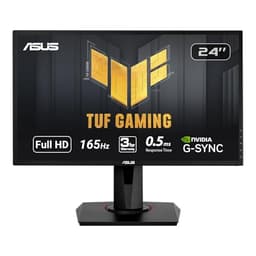
The ASUS VG248QG is the oldest design in this round-up and uses a TN panel rather than IPS or VA, which places it in a different category from most of the other picks here. It is included because it remains a relevant choice for a specific type of user: the competitive gamer who prioritises raw speed and G-Sync compatibility above all else, and who is willing to accept the colour and viewing angle trade-offs that TN technology brings.
The 24-inch panel runs at 1920x1080 with a 165 Hz refresh rate and a 0.5ms response time, which is the headline specification that TN panels have always excelled at. For fast-paced competitive titles where every millisecond of input lag matters, a 0.5ms TN panel still has a measurable advantage over slower IPS alternatives. G-Sync compatibility means NVIDIA GPU owners benefit from adaptive sync without the premium cost of a full G-Sync module, and the DisplayPort 1.2 connection supports the full 165 Hz refresh rate.
The port selection is notably more varied than some newer monitors: a DisplayPort 1.2, an HDMI 1.4, and a dual-link DVI-D connection cover legacy and current connectivity needs. The DVI-D port in particular is a rarity on modern monitors and may be useful for users with older systems or specific hardware requirements. The 24-inch size and relatively compact design make it easy to fit into tight desk setups or multi-monitor arrangements.
The main caveat is the TN panel itself. Colours are less vibrant, contrast is lower, and viewing angles are noticeably narrower than IPS alternatives. If you sit directly in front of the screen and primarily use it for gaming, these limitations are manageable. If you regularly view the screen from an angle, share your screen with others, or do any colour-sensitive work, the IPS options in this list will serve you better. The VG248QG is a specialist tool for a specific use case, and it performs that role well.
Pros
- 0.5ms response time is among the fastest available, giving a genuine advantage in competitive gaming
- Includes a DVI-D port alongside HDMI and DisplayPort, covering legacy connectivity needs
- G-Sync compatible adaptive sync works with NVIDIA GPUs without a full G-Sync module premium
Cons
- TN panel produces noticeably worse colour accuracy and narrower viewing angles than IPS alternatives
- HDMI 1.4 rather than 2.0 limits bandwidth on that input compared to newer monitors
Buying Guide
Panel Type: IPS, VA, or TN?
The single most important decision when choosing an ASUS monitor is the panel type. IPS (In-Plane Switching) panels offer the best combination of colour accuracy, wide viewing angles, and increasingly fast response times. They are the best all-round choice for most users and now dominate the ASUS TUF Gaming and ROG Strix ranges. VA (Vertical Alignment) panels deliver higher native contrast ratios than IPS, producing deeper blacks that are particularly noticeable in dark game environments and films. Their main weakness is slower pixel response times, though ASUS's ELMB technology mitigates this on the VG27VQM1B. TN (Twisted Nematic) panels are the oldest technology and offer the fastest raw response times, but at the cost of poorer colours and narrow viewing angles. Unless you are a dedicated competitive gamer for whom 0.5ms is a meaningful advantage, IPS is the better choice for most buyers.
Resolution and Screen Size
At 24 inches, 1920x1080 is a perfectly adequate resolution, delivering a pixel density that looks sharp in everyday use. Moving to 27 inches, 1080p begins to show its limitations, and 1440p (2560x1440) becomes the recommended minimum for a clean, detailed image. At 32 inches, 1440p remains excellent, though 4K becomes more relevant if you primarily use the monitor for creative work or media consumption. For gaming, 1440p at 27 or 32 inches is currently the sweet spot, balancing visual quality with manageable GPU demands.
Refresh Rate
If you are upgrading from a 60 Hz monitor, any of the panels in this list will represent a dramatic improvement. For competitive gaming, 144 Hz is a solid baseline, 165-180 Hz adds a noticeable further improvement, and 280-300 Hz is for serious players who want every possible advantage. Higher refresh rates require more GPU power to utilise fully, so match your monitor's refresh rate to your system's realistic frame rate output and best gaming peripherals.
Adaptive Sync
All of the monitors in this round-up support some form of adaptive sync, either FreeSync, G-Sync compatibility, or both. Adaptive sync eliminates screen tearing and reduces stuttering by synchronising the monitor's refresh rate to your GPU's output. If you have an NVIDIA GPU, look for G-Sync compatible certification. AMD GPU owners should look for FreeSync Premium or Premium Pro.
Is ASUS a Good Brand for Monitors?
ASUS is widely regarded as one of the top monitor manufacturers globally. The brand's ROG Strix, TUF Gaming, and ProArt ranges are consistently well reviewed for build quality, panel performance, and feature sets. ASUS is a Taiwanese company, founded in 1989 in Taipei, and manufactures a broad range of technology products including motherboards, laptops, and graphics cards alongside monitors. It is not a Chinese brand, though like most electronics manufacturers it uses global supply chains. Compared to Dell, ASUS tends to offer more gaming-focused features and more aggressive specifications at comparable prices, while Dell's UltraSharp range leads in colour-critical professional work. Against Samsung, ASUS generally offers better gaming-specific features and adaptive sync support, while Samsung has strengths in OLED and high-brightness consumer panels. Both are high-quality manufacturers, and the best choice depends on your specific use case.
The ASUS ROG Strix XG32AQ is the overall winner of this round-up. Its 32-inch Fast IPS panel at 1440p and 175 Hz delivers a genuinely versatile experience that works equally well for competitive gaming, everyday computing, and content consumption. The combination of image quality, screen size, and refresh rate is difficult to match at any price, and the dual HDMI 2.0 plus DisplayPort 1.2 connectivity covers the needs of most users. If budget is the primary concern, the ASUS TUF Gaming VG249Q3R is the standout value pick, offering an IPS panel at 180 Hz for a fraction of the price of the ROG Strix and outperforming most rivals at its price point. For the competitive gamer who wants the absolute fastest experience, the TUF Gaming VG27VQM1B's 280 Hz VA panel with ELMB Sync is a compelling specialist choice. Whatever your budget or use case, ASUS's range in 2025 offers a strong answer.