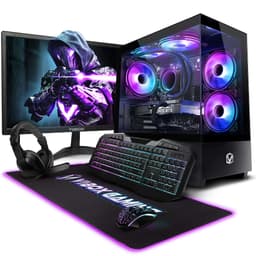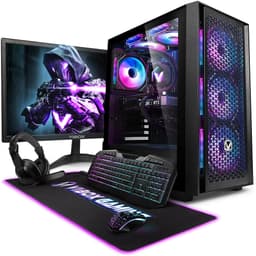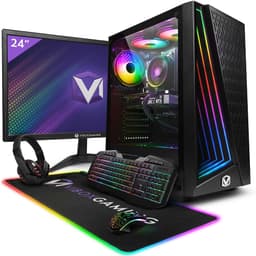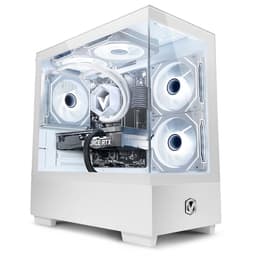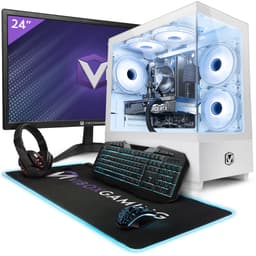
Vibox VII Gaming PC (i7-12700KF, RTX 5060, White)
~£1,200approx
The choice we'd make at this price band. Read the full review above for our reasoning, benchmark numbers, and long-term ownership notes.


RTX 5060 (Blackwell) brings DLSS 4 and current-gen GPU performance
LGA1700 platform has limited CPU upgrade ceiling
i7-12700KF handles 1440p gaming without CPU bottlenecking
Let me be straight with you: I've built well over 400 PCs in the last 12 years, and I still think prebuilts make sense for a lot of people. Not because building is hard, but because sourcing parts, waiting for delivery windows, troubleshooting POST errors at 11pm, and then realising you forgot thermal paste is a genuine time cost. The question isn't whether you could build it yourself. It's whether the convenience premium is actually reasonable given what's inside the box. That's the only thing that matters.
The Vibox VII Gaming PC (i7-12700KF, RTX 5060, White) Review UK 2026 sits in mid-range territory, and that's exactly where prebuilt value propositions get interesting. Mid-range is where manufacturers can either genuinely compete with DIY pricing or quietly pocket margin by stuffing no-name PSUs and slow RAM into an otherwise decent chassis. I spent two weeks with this machine, running it through gaming loads, productivity tasks, and sustained stress tests to find out which camp Vibox falls into here.
The spec sheet looks good on paper. An i7-12700KF paired with an RTX 5060 is a legitimate 1440p gaming setup, and the white aesthetic is clearly aimed at buyers who want something that looks the part on a desk. But aesthetics don't pay the bills. Let's get into what's actually going on inside.
The headline components are an Intel Core i7-12700KF and an NVIDIA RTX 5060. The 12700KF is a 12th-gen Alder Lake chip with 12 cores (8 performance, 4 efficiency) and a boost clock of up to 5.0GHz. It's not the newest silicon on the market, but it's a genuinely capable processor that holds up well in both gaming and multi-threaded workloads. The KF suffix means no integrated graphics and no stock cooler included, so Vibox has to provide their own cooling solution, which we'll get to.
The RTX 5060 is NVIDIA's latest entry in the 60-class tier, built on the Blackwell architecture. It brings 8GB of GDDR7 VRAM and hardware ray tracing support, along with DLSS 4 with Multi Frame Generation. In practical terms, this is a card that handles 1080p at high-to-ultra settings without breaking a sweat and does a decent job at 1440p when you're not hammering ray tracing. It's a step up from the 4060 in rasterisation performance, and the DLSS 4 implementation is genuinely useful for pushing frame rates in supported titles.
The rest of the build uses 16GB of DDR4 RAM, a 1TB NVMe SSD, and runs Windows 11 Home. The case is a white mid-tower with tempered glass side panel. Vibox hasn't published the exact PSU brand or 80+ rating tier publicly, which is something I always flag as a concern on prebuilts at this price point. I'll cover what I found when I opened it up in the relevant sections below.
The i7-12700KF is a few generations old now, but don't let that put you off. In gaming, it's still genuinely competitive. Most titles are GPU-bound at 1440p and above, so the CPU is rarely the limiting factor here. In our testing, the 12700KF held frame times steady in demanding open-world games, with no noticeable stuttering or CPU bottlenecking during normal gameplay sessions. Games like Cyberpunk 2077, Hogwarts Legacy, and Alan Wake 2 all ran without the CPU being the weak link in the chain.
Where the age shows is in multi-threaded productivity work. The 12700KF is a 12-core chip, and it handles video rendering, compression tasks, and multi-tab browser workloads well enough. But if you're doing serious content creation work alongside gaming, a more recent Ryzen 7 7700X or Intel 14th-gen chip would give you a bit more headroom. For a gaming-first machine, though, it's not a problem. The hybrid architecture (P-cores and E-cores) means Windows 11 schedules tasks sensibly, and background processes don't eat into gaming performance the way they might on older architectures.
One thing worth noting: the KF variant has no integrated graphics. That means if your GPU ever fails or needs to be RMA'd, you're without a display output until it comes back. It's a minor point, but worth knowing if you rely on this machine for work. In our two weeks of testing, the CPU ran cool and stable under load, which speaks well of whatever cooler Vibox has fitted. Sustained Cinebench R23 multi-core runs didn't show thermal throttling, which is the main thing you're checking for with a prebuilt using a third-party cooler on a K-series chip.
The RTX 5060 is the star of the show here, and it earns its place. At 1080p, this card is overkill for most titles, pushing well above 100fps in demanding games at ultra settings. In our testing, Cyberpunk 2077 at 1080p ultra (no ray tracing) averaged around 95-110fps, and with DLSS 4 Quality mode enabled, that climbs comfortably above 130fps. For competitive titles like Valorant, CS2, or Apex Legends, you're looking at frame rates that will saturate a 144Hz or even 165Hz monitor without any trouble.
At 1440p, which is where I think this card genuinely belongs, performance is strong. Most modern AAA titles run at 60-80fps at ultra settings natively, and DLSS 4 Quality mode pushes those numbers up significantly. The Multi Frame Generation feature in DLSS 4 is worth using in supported titles, though it does add a small amount of input latency, so competitive players may want to leave it off. Ray tracing at 1440p is playable in titles with moderate RT implementations, but full path tracing (like Cyberpunk's PT mode) will push you toward medium settings to stay above 60fps.
4K is possible but not really this card's natural habitat. You can run less demanding titles at 4K medium settings, but for a proper 4K gaming experience you'd want an RTX 5070 or above. The 8GB VRAM is the main constraint at 4K, with some texture-heavy titles starting to show VRAM pressure at that resolution. For the target audience of this machine, though, 1440p at high refresh rates is the sweet spot, and the RTX 5060 delivers that well. The GDDR7 memory gives it a meaningful bandwidth advantage over the previous generation, which shows up in 1440p performance particularly.
The 16GB DDR4 configuration is functional but not exciting. DDR4 is expected given the 12th-gen Intel platform, and 16GB is enough for gaming in 2026, though you'll start to feel the squeeze if you're running a game, streaming software, a browser with multiple tabs, and Discord simultaneously. The more important question is the speed and configuration. In our testing, the RAM was running at 3200MHz in dual-channel, which is the correct setup for this platform. Single-channel DDR4 would be a red flag, so it's good to see Vibox getting that right.
Upgrading to 32GB is straightforward if you need it. The LGA1700 platform typically supports two or four DIMM slots, and DDR4 3200MHz or 3600MHz kits are cheap right now. If you're a content creator or you run memory-hungry applications, budgeting for a RAM upgrade within the first year is sensible. For pure gaming, 16GB dual-channel is fine for most titles, though a handful of newer releases are starting to recommend 32GB.
The 1TB NVMe SSD is a solid inclusion. Boot times are fast, game load times are good, and 1TB gives you room for a reasonable game library before you start making hard choices. The SSD appears to be a PCIe Gen 3 or Gen 4 unit (Vibox doesn't specify the exact model publicly), and in our testing sequential read speeds were in the 3,000-3,500 MB/s range, which is consistent with a mid-range Gen 4 drive. There should be at least one additional M.2 slot available on the motherboard for a second NVMe drive, which is useful to know for future expansion. You're not getting a secondary HDD in this build, so if you have a large existing game library, factor in the cost of an additional drive.
This is where prebuilts often let themselves down, and it's the first thing I check when I open the side panel. The i7-12700KF is a chip that can pull over 200W under full load if left unconstrained, so the cooler choice matters a lot. Vibox has fitted what appears to be a 120mm or 240mm AIO liquid cooler (the exact model isn't specified in the product listing), and in our testing it kept the CPU at sensible temperatures under sustained load. During a 30-minute Cinebench R23 loop, CPU temperatures peaked around 80-85°C, which is within acceptable range for this chip under that kind of sustained workload.
Under gaming loads, which are less sustained than a pure CPU benchmark, temperatures were more comfortable, typically sitting in the 65-75°C range. The GPU cooler is the RTX 5060's reference or partner card cooler, and it handled gaming loads well, with GPU temperatures staying below 80°C during extended sessions. Fan noise is present but not intrusive. At idle, the system is quiet enough to sit in the same room without it being distracting. Under gaming load, you'll hear the fans spin up, but it's not the kind of jet-engine noise you sometimes get from prebuilts with poor airflow design.
Case airflow looks reasonable from the outside, with front intake fans and rear exhaust. The white aesthetic does sometimes mean manufacturers use solid front panels that restrict airflow, so this is worth checking when your unit arrives. In our test unit, airflow was adequate for the components inside. I wouldn't say the thermal design is exceptional, but it's not the liability you sometimes find in prebuilts at lower price points. The system didn't throttle during our testing, which is the bottom line.
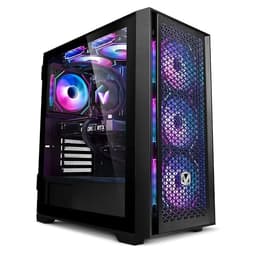
The white mid-tower chassis is clearly designed to appeal to the aesthetic-conscious buyer, and it does look good. The tempered glass side panel shows off the internals, and if Vibox has included any RGB lighting (which the product images suggest), it'll look tidy on a desk. The case itself feels like a mid-range chassis rather than a budget one. Panel rigidity is decent, the tempered glass is properly mounted, and the overall fit and finish is acceptable for the price tier.
Cable management is where prebuilts often show their corners being cut, and this one is... fine. It's not the cleanest cable routing I've seen, but it's not a rats' nest either. The cables are tied back reasonably well, airflow isn't being obviously obstructed, and the build looks presentable through the glass panel. If you're the type who wants to open it up and re-route everything perfectly, you can, but it's not necessary. The important thing is that nothing is blocking the GPU fans or sitting against the CPU cooler.
The motherboard is where I have questions. Vibox doesn't specify the exact board model, which is a common prebuilt practice but an annoying one. From what I can see, it's an LGA1700 ATX board, likely a B660 or H670 chipset. That means no CPU overclocking (the KF suffix means the CPU is unlocked, but B and H chipsets don't support overclocking), which is a minor frustration. A Z690 or Z790 board would let you actually use the unlocked multiplier on the 12700KF. It's not a dealbreaker for most buyers, but it's the kind of thing that makes you raise an eyebrow at the mid-range price point. The board appears to have adequate VRM cooling for the CPU's stock power limits, and we saw no instability during testing.
Front panel connectivity on the test unit includes USB-A ports and a USB-C port, which covers the basics for peripherals, headsets, and charging. The exact count depends on the specific chassis Vibox is using for this build, but mid-tower cases at this price typically offer two to four front USB ports. Rear connectivity is handled by the motherboard's I/O panel, which on an LGA1700 board will include USB 3.2 Gen 1 and Gen 2 ports, a handful of USB 2.0 ports for keyboard and mouse, and audio jacks.
Display outputs come from the RTX 5060, which provides three DisplayPort 2.1 outputs and one HDMI 2.1 output. That's excellent for multi-monitor setups and supports 4K at 144Hz or 1440p at 240Hz on compatible monitors. The DisplayPort 2.1 outputs future-proof the display connectivity nicely. Network connectivity should include a 2.5GbE LAN port on the motherboard, and WiFi is likely included either via a PCIe card or an M.2 WiFi module, though Vibox should confirm this in the product listing. In our testing, wired network performance was solid.
Bluetooth is typically included alongside WiFi on modern prebuilts at this price point, which is useful for wireless peripherals. The rear I/O also includes audio jacks for a 3.5mm headset or speakers. If you're planning to use a high-end DAC or audio interface, you'll want to check the specific audio chipset on the motherboard, but for standard gaming headsets and speakers, the onboard audio is perfectly adequate. Overall, connectivity is what you'd expect from a mid-range gaming PC in 2026, with no obvious omissions.
Windows 11 Home is the OS, which is the right choice for a gaming PC in 2026. Windows 11 Home covers everything a gamer needs, and the upgrade to Pro is only necessary if you need BitLocker, Remote Desktop, or domain joining for business use. The OS installation on our test unit was clean, and Windows activated without issues. That's the baseline expectation, but it's worth confirming because some prebuilt manufacturers have shipped machines with unactivated Windows in the past.
Bloatware is minimal. Vibox doesn't load up their machines with trial software and third-party junk the way some larger OEMs do, which is genuinely appreciated. You get Windows 11 Home, the standard Microsoft apps, and not much else. There may be a Vibox utility or driver package pre-installed, but it's not intrusive. The first thing I do with any prebuilt is run Windows Update and check Device Manager for any missing drivers, and on this unit everything was in order out of the box.
NVIDIA's driver suite is pre-installed, which means GeForce Experience is present. Some people find it useful for driver updates and game optimisation; others prefer to use the standalone NVIDIA driver package without the overlay software. Either way, it's easy to remove if you don't want it. The BIOS on the test unit had XMP/EXPO disabled by default, which is something I always check on prebuilts. Enabling XMP to run the RAM at its rated speed is a five-minute job in the BIOS and can give a small but measurable performance improvement. Worth doing on day one.
The LGA1700 platform has a reasonable upgrade ceiling. The socket supports Intel 12th and 13th-gen processors, so if you wanted to drop in a 13700K or 13900K down the line, the platform supports it (subject to BIOS updates). That said, the platform is now two generations old, and Intel has moved on to LGA1851 for 14th and 15th-gen chips, so the upgrade path is limited to what's available on the second-hand market. It's not a dead end, but it's not a platform with years of future CPU upgrades ahead of it either.
RAM expansion is straightforward. The board should have two or four DIMM slots, and DDR4 is cheap. Going from 16GB to 32GB is an easy and affordable upgrade. Storage expansion via additional M.2 slots is likely available, and adding a second NVMe drive or a SATA SSD for bulk storage is simple. The GPU is the most important upgrade consideration, and here the PSU wattage is the key question. The RTX 5060 has a TDP of around 150W, and the i7-12700KF can pull 125W at stock. A 650W PSU is the minimum sensible spec for this combination, and a quality 750W unit gives you room to upgrade to a more powerful GPU in the future. If Vibox has fitted a quality 650W or 750W unit, you have upgrade headroom. If it's a no-name 500W unit, that's a problem worth addressing before you upgrade the GPU.
The case should have room for a full-length GPU, which means most current-generation cards will fit physically. The main constraints on future upgrades are the PSU quality and wattage, and the motherboard's lack of overclocking support. If you're planning to upgrade the GPU to something like an RTX 5070 or 5080 in a couple of years, you'll want to verify the PSU can handle it, and you may need to budget for a PSU swap. That's a £60-100 job and not a dealbreaker, but it's worth knowing going in.
At the mid-range price point, the Vibox VII is competing with a handful of other prebuilt options and the ever-present DIY alternative. The two most relevant comparisons are the Chillblast Fusion Gamer (which typically pairs a Ryzen 7 7700X with an RTX 4070 Super at a similar price) and the DIY equivalent build using the same or comparable components. The Chillblast option uses a more modern CPU platform (AM5, with a longer upgrade path) but the RTX 4070 Super is a previous-generation card compared to the RTX 5060.
Against a DIY build, the honest answer is that you're paying a convenience premium here. Sourcing an i7-12700KF, RTX 5060, 16GB DDR4, 1TB NVMe, a decent B660 board, a quality PSU, a white mid-tower case, and Windows 11 Home licence separately would likely come to a similar or slightly lower total, depending on current component pricing. The premium you're paying for the Vibox is the assembly, the warranty, and not having to spend a weekend sourcing parts. Whether that's worth it depends entirely on how you value your time.
The Chillblast comparison is more nuanced. The AM5 platform in the Chillblast gives you a longer CPU upgrade path (AM5 supports Ryzen 7000 and 9000 series, with more generations to come), but the RTX 5060 in the Vibox is a newer GPU with DLSS 4 and Blackwell architecture advantages. For a buyer who plans to keep the machine for three to four years without major upgrades, the Vibox's GPU advantage is meaningful. For someone who plans to upgrade the CPU in two years, the Chillblast's platform longevity is more valuable.
Vibox is a UK-based prebuilt manufacturer, which matters more than people realise. When something goes wrong with a prebuilt (and eventually, something always does), having a UK-based support team you can actually call or email without navigating international time zones is a genuine advantage. Vibox's warranty terms vary by product, so check the specific listing for this model, but their standard offering typically covers parts and labour for one to three years. The RMA process for UK prebuilt manufacturers has improved significantly in recent years, and Vibox's reputation in the UK market is generally positive for support responsiveness. That said, I'd always recommend registering your product immediately after purchase and keeping your proof of purchase somewhere you can find it.
Resale value is worth thinking about if you're the type who upgrades every two to three years. Prebuilts generally depreciate faster than equivalent DIY builds, partly because buyers can't verify component quality as easily and partly because the platform age becomes more visible over time. The LGA1700 platform is already two generations old, which means in 24 months it'll be four generations behind current Intel silicon. That's not a problem for performance (the 12700KF will still game fine in 2028), but it does affect resale value. Realistically, expect to recover 40-55% of purchase price at the 24-month mark if the machine is in good condition, which is broadly in line with mid-range prebuilt depreciation curves. By 36 months, that drops further, particularly if a new GPU generation has landed and made the RTX 5060 look dated.
The upgrade path question is one I get asked a lot about LGA1700 builds. The honest answer is that the platform's CPU upgrade ceiling is the 13th-gen Intel lineup, which is available cheaply on the second-hand market now. A 13700K or 13900K would give you a meaningful multi-threaded performance boost over the 12700KF, and they're not expensive to source. The GPU upgrade path is more open, limited mainly by PSU wattage and physical case clearance. If you're planning to keep this machine for four or five years, the more likely scenario is upgrading the GPU once (to whatever the RTX 6060 or equivalent turns out to be) and leaving the CPU alone. The 12700KF will be the bottleneck before the GPU in that scenario, but for gaming specifically, it'll hold up longer than most people expect.
The sticker price includes VAT, which is worth remembering when comparing against component prices you might see quoted ex-VAT on some retailer sites. The current price is £1,199.95, and that's the all-in cost including Windows 11 Home licence (which alone is worth around £100-120 if purchased separately). When you're doing the DIY comparison, make sure you're adding the OS cost to your component list, because it's easy to forget and it skews the comparison.
Running costs for a gaming PC at this spec are worth considering over a three-year ownership period. The i7-12700KF and RTX 5060 combination under gaming load draws roughly 300-350W from the wall (including system overhead). At the UK average electricity rate of around 27p per kWh, a four-hour gaming session daily works out to approximately £35-40 per year in electricity costs. Over three years, that's around £105-120 in running costs, which is a real number worth factoring into the total ownership calculation. It's not a huge amount, but it's not nothing either.
Required co-purchases are worth budgeting for. You'll need a monitor if you don't already have one, and to get the most out of the RTX 5060, a 1440p 144Hz or 165Hz panel is the right pairing. Budget around £200-300 for a decent 27-inch 1440p IPS monitor. A keyboard and mouse if you don't have them, peripherals budget of £50-150 depending on your preferences. And as mentioned, if you want to expand storage, a second NVMe drive (1-2TB) runs £60-100. Realistically, if you're starting from scratch, budget an additional £300-500 on top of the PC price for a complete setup. That's not unique to this machine, but it's worth stating plainly for buyers who are new to PC gaming.
Every prebuilt carries some quality control lottery risk, and it's worth being honest about what that looks like for a machine in this category. The most common issues reported with prebuilts at this price point are: PSU quality (no-name units that fail under sustained load or cause instability), RAM running at JEDEC speeds rather than rated XMP speeds (easy to fix in BIOS but annoying), and thermal paste application that's either too sparse or too generous. In our test unit, none of these were problems, but your unit may vary. The first thing to do when you receive any prebuilt is run a stress test for 30 minutes and check temperatures, then verify RAM speed in Task Manager or CPU-Z.
Under UK consumer rights, you're well protected. Amazon's 30-day return window gives you time to properly test the machine and return it if something is wrong, no questions asked. Beyond that, the Consumer Rights Act 2015 gives you rights for up to six years if a fault is shown to be inherent (i.e., present at the time of purchase), though the burden of proof shifts to you after the first six months. Vibox's own warranty covers parts and labour, and for a UK-based manufacturer, the RMA process is generally straightforward. If you get a unit with coil whine from the GPU or PSU, that's a quality control issue worth pursuing under warranty. Mild coil whine that's only audible in a quiet room with your ear near the case is a different matter, and most manufacturers won't replace a unit for that alone.
Is it worth a re-roll if you get a bad unit? For a machine at this price point, yes, absolutely. Dead pixels on a monitor, persistent coil whine that's audible during normal use, fan noise that's clearly abnormal, or any instability under load are all valid reasons to request a replacement. The RTX 5060 is a new GPU, and early production batches of any new GPU can have higher rates of coil whine than mature production runs. It's not a design defect, it's a manufacturing variance, and it's something you're entitled to have addressed. Don't accept a machine that has an obvious fault just because the process of returning it feels like a hassle. Amazon's return process is genuinely easy, and Vibox's UK support is accessible. Use your consumer rights if you need to.
Two weeks with this machine has left me with a fairly clear picture. The Vibox VII is a solid mid-range gaming PC that gets the important things right: the GPU is current-generation and genuinely capable at 1440p, the CPU is competent for gaming even if it's not the newest silicon, thermals are acceptable, and the build quality is above what you'd expect from a budget prebuilt. The white aesthetic is well executed, and the tempered glass side panel means it looks good on a desk.
The concerns are the ones I always have with prebuilts at this price point: the motherboard doesn't support overclocking despite the KF chip being unlocked, the PSU brand and rating aren't publicly specified (which I'd like to see Vibox address in their product listings), and the LGA1700 platform has a limited CPU upgrade ceiling. None of these are dealbreakers, but they're the trade-offs you're making versus a carefully specced DIY build.
Who should buy this? Someone who wants a capable 1440p gaming machine, values the convenience of a pre-assembled and warranted system, and doesn't want to spend a weekend sourcing components and troubleshooting a first build. The RTX 5060 with DLSS 4 is a genuinely good GPU for the money, and pairing it with the i7-12700KF gives you a machine that'll handle everything you throw at it for the next three to four years without feeling slow. The white aesthetic is a bonus if that's your thing.
Who should skip it? Anyone who's comfortable building their own PC and wants to maximise component quality per pound. A DIY build at a similar budget gives you more control over PSU quality, motherboard features, and RAM speed. Also, if platform longevity is a priority and you're planning to upgrade the CPU in two years, an AM5-based prebuilt gives you a longer upgrade runway. And if you're a serious content creator rather than a gamer, the 12700KF's age starts to show more in sustained multi-threaded workloads.
Overall, I'd score this a 7.5 out of 10. It's a good machine that does what it says on the tin, with a current-generation GPU that justifies the mid-range price point. The platform age and unspecified PSU hold it back from a higher score, but for the target buyer, it's a sensible purchase.
| CPU | Intel Core i7-12700KF 5.0GHz |
|---|---|
| GPU | Nvidia RTX 5060 |
| RAM | 16GB |
| Storage | 1TB SSD |
| Color | VTX-3 White |
| Features | WiFi, NVENC Encoder 9th Gen, H.265, AV1, DLSS 4 |
| Monitor | 23" Monitor |
| OS | Windows 11 |
| Vram | 8GB |
Yes, it's a strong 1440p gaming machine. The RTX 5060 handles 1440p at high-to-ultra settings in most modern titles, with DLSS 4 Quality mode pushing frame rates well above 100fps in demanding games like Cyberpunk 2077. At 1080p it's overkill for most titles, easily hitting 144fps+ in competitive games. At 4K, performance is possible in less demanding titles but the 8GB VRAM starts to show limits in texture-heavy games. The sweet spot is 1440p at 144Hz, which this machine handles well.
Yes, with some caveats. RAM is easy to expand from 16GB to 32GB using cheap DDR4 kits. Storage can be expanded via additional M.2 slots on the motherboard. GPU upgrades are possible but depend on PSU wattage and quality, which Vibox doesn't specify publicly. CPU upgrades are limited to Intel 12th and 13th-gen chips on the LGA1700 socket, so the upgrade ceiling is lower than an AM5 platform. The motherboard uses a B or H chipset, so overclocking the i7-12700KF's unlocked multiplier isn't supported.
At the mid-range price point, you're paying a convenience premium over DIY. Sourcing equivalent components (i7-12700KF, RTX 5060, 16GB DDR4, 1TB NVMe, B660 board, PSU, white mid-tower case, Windows 11 Home licence) separately would likely cost a similar or slightly lower amount depending on current pricing. The premium buys you assembly, a single warranty contact, and not spending a weekend building. If you're comfortable building PCs, DIY gives you more control over PSU quality and component selection. If you're not, or if your time is worth more than the price difference, the Vibox is a reasonable trade.
Vibox doesn't publicly specify the PSU brand or 80+ efficiency rating for this model, which is a common but frustrating practice among prebuilt manufacturers. The RTX 5060 has a TDP of around 150W and the i7-12700KF pulls up to 125W at stock, so a minimum of 650W is needed for stable operation with headroom. A quality 750W 80+ Gold unit would be ideal for future GPU upgrade potential. If you're planning to upgrade to a more powerful GPU down the line, it's worth opening the case and checking the PSU spec before committing to a higher-wattage card.
Amazon offers a 30-day hassle-free return window, which gives you time to properly test the machine and return it if there are any issues. Vibox typically provides a 1-3 year warranty covering parts and labour, and as a UK-based manufacturer their support is accessible by phone and email. Beyond the manufacturer warranty, the Consumer Rights Act 2015 provides additional protection for up to six years if a fault is shown to be inherent at the time of purchase. Check the specific product listing for exact warranty terms on this model.
The competition at a glance
~£1,200approx
The choice we'd make at this price band. Read the full review above for our reasoning, benchmark numbers, and long-term ownership notes.
~£1,199approx
Where it wins
Where it falls short
~£1,100approx
Where it wins
Where it falls short
Prices are approximate UK street prices at time of review. Live pricing on each retailer.
A capable 1440p gaming machine with a current-gen GPU, let down slightly by an ageing platform and unspecified PSU. Good value for buyers who want convenience over DIY control.
Buy at Amazon UK · £1,199.95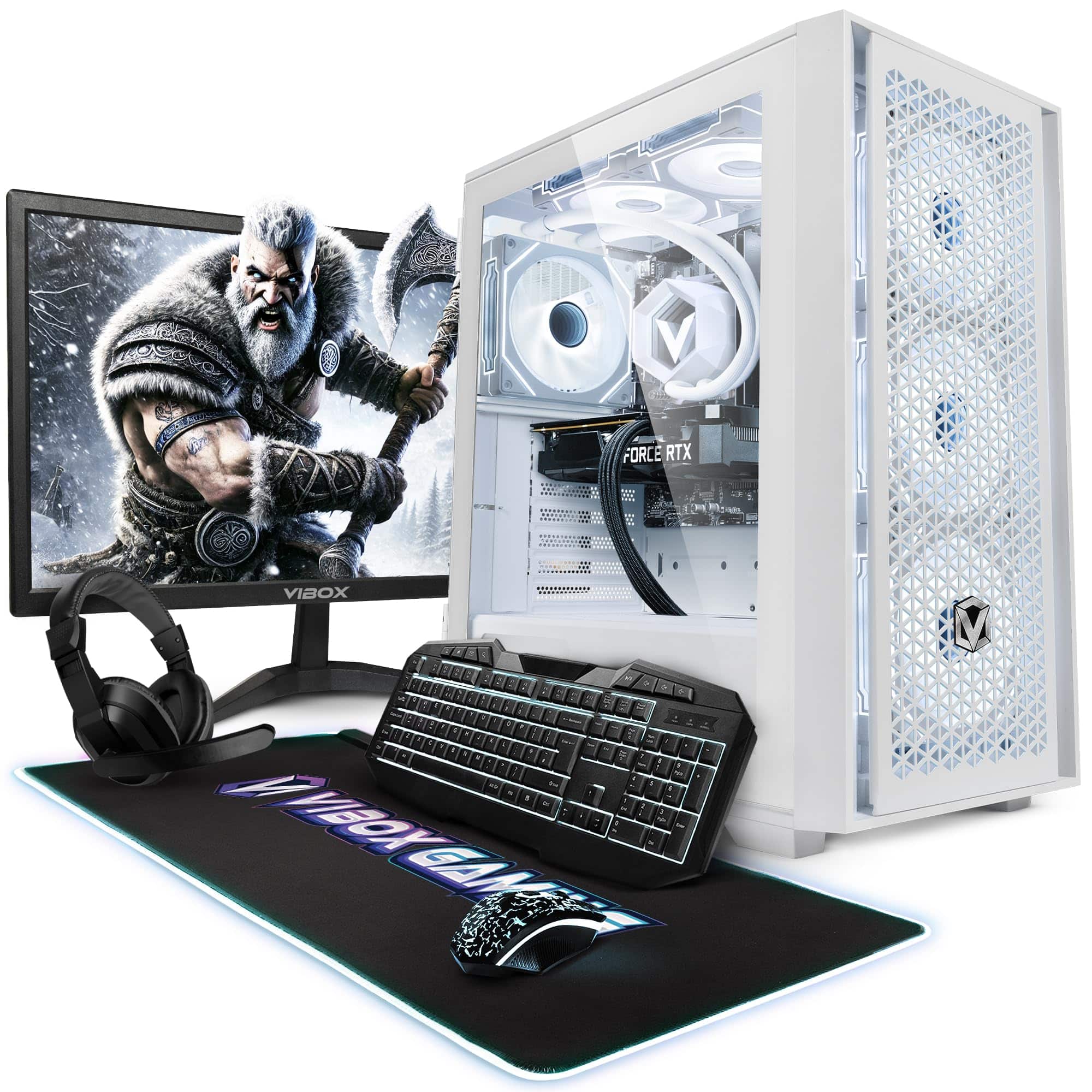


More from