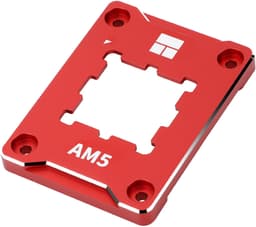
There's a particular kind of satisfaction in solving a problem that shouldn't exist in the first place. AMD's AM5 platform is genuinely excellent, but the stock ILM (independent loading mechanism) has a well-documented tendency to let CPU lids bow under cooler pressure, creating uneven contact and costing you real thermal performance. It's not catastrophic, but it's annoying, and it's entirely fixable. The Thermalright AM5 CPU Contact Frame V2, listed under ASIN B0D1V45DSL, exists specifically to fix it.
The verdict is simple: if you're running an AM5 system and you care about getting the most out of your cooler, this is probably the cheapest meaningful upgrade you can make. The spec sheet is honest, the owner feedback at 4.7 stars across 373 is genuinely positive, and the price is low enough that the risk is basically zero. But there are a few things before you order, and a couple of situations where it's not quite the right fit, so read on.
Pull apart the spec, cross-reference what owners are actually reporting after months of use, and compare it against the alternatives, and you get a very clear picture of what this frame does well and where its limits are. That's exactly what we've done here. B0D1V45DSL is a niche product solving a specific problem, and it either solves your problem or it doesn't. Let's work out which category you fall into.
Core Specifications (B0D1V45DSL)
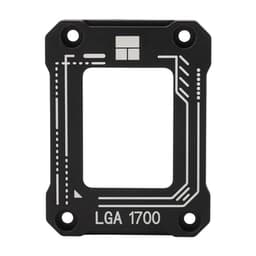
This isn't a cooler in the traditional sense, so some of the usual spec categories don't apply. There's no fan, no radiator, no heat pipes, and no TDP rating. What the Thermalright AM5 CPU Contact Frame V2 is, specifically, is a replacement contact frame for the AM5 socket's stock retention mechanism. It's machined from aluminium, oxidised at the edges to resist scratching, and designed to sit where the original plastic buckle sits, applying more consistent and even pressure across the CPU's integrated heat spreader.
The package is minimal by design: one CPU bending correction frame, and one L-shaped screwdriver to fit it. That's it. No thermal paste, no mounting backplate, no fan. The frame works with your existing cooler and your existing motherboard, it just replaces the part of the mounting system that was causing the problem. Compatibility is stated as AM5 Secure Frame Kit systems, so it's specifically targeting AM5 motherboards running the standard ILM configuration.
The aluminium construction is because it's not an afterthought. The original AM5 retention mechanism uses plastic components that flex under load, and that flex is precisely what causes the CPU to bow. Swapping to a rigid all-aluminium frame eliminates that flex. The oxidised edge treatment is a practical detail too, because you're working close to an expensive CPU and motherboard, and you don't want sharp edges catching on anything nearby.
| Specification | Detail |
|---|---|
| ASIN | B0D1V45DSL |
| Compatible Socket | AM5 (Secure Frame Kit) |
| Material | All-aluminium, oxidised edge treatment |
| Function | CPU contact frame / anti-bending buckle replacement |
| Colour | Black |
| Package Contents | 1x CPU Bending Correction Frame, 1x L-shaped screwdriver |
| Installation Method | Screw-mounted to AM5 motherboard |
| Price | £4.90 |
| Rating | ★★★★½ (4.7) (373 reviews) |
Cooler Type and Design
Calling this a cooler type feels a bit generous, but the design category matters for understanding what you're actually buying. The Thermalright AM5 CPU Contact Frame V2 is a retention mechanism replacement, not a thermal solution in itself. Think of it as the mechanical foundation that your actual cooler sits on. The better that foundation, the better your cooler performs, regardless of whether that cooler is a budget air tower or a 360mm AIO. That's the whole point.
The frame itself is precision-machined aluminium, which is a significant step up from the plastic components in AMD's stock ILM. The design mimics the footprint of the original buckle so it drops into the same mounting position on the motherboard, but it doesn't flex the way plastic does under the clamping force of a heavy cooler. That consistent rigidity is what keeps the CPU lid flat against the cooler's base plate or cold plate, maintaining even contact across the entire IHS surface rather than just the centre or the edges.
The black finish is clean and understated. If you've got a windowed case and you care about what's visible on the motherboard, this looks considerably better than the stock plastic frame. It's a small thing, but it's a nice thing. The L-shaped screwdriver in the box is a practical touch too, because the mounting screws are recessed in a way that makes a standard screwdriver awkward to use. Whoever designed this clearly thought about the install experience, which isn't always the case with small accessory products like this.
Precision engineering is specifically called out in the product listing, and the owner reviews back this up. The tolerances are tight enough that the frame aligns correctly without fiddling, and there are no reports of it sitting proud or causing fitment issues with standard AM5 cooler mounting hardware. That matters because a frame that introduces its own alignment problems would be worse than useless.
Thermal Performance vs TDP
Here's where things get interesting, because the thermal performance story for B0D1V45DSL is entirely indirect. The frame itself generates no heat and dissipates no heat. What it does is improve the thermal contact between your CPU and your cooler by keeping the CPU lid flat. And that matters more than you might think, particularly on high-core-count Ryzen 7000 and Ryzen 9000 series chips where the TDP figures are significant and the margin for poor contact is small.
The problem the frame solves is CPU warping or bending under cooler pressure. When the IHS bows, even slightly, you get a gap between the CPU surface and the cooler's base plate. That gap is filled with thermal paste, which is a poor conductor compared to direct metal-to-metal contact. More gap means more thermal resistance, which means higher temperatures under load. On a chip running anywhere near its thermal limits, that extra resistance can push you into throttling territory. Fixing the contact geometry can bring temperatures down by several degrees, and on a chip that's already running hot, several degrees is the difference between stable and throttling.
Owner reports consistently mention temperature improvements after fitting the frame, particularly on higher-end Ryzen chips with beefier coolers. The heavier the cooler, the more pressure it applies, and the more the stock plastic frame allows the CPU to bow, so the gains from switching to a rigid aluminium frame scale with cooler weight. If you're running a lightweight 120mm air cooler, you'll see less benefit. If you're running a 360mm AIO or a dual-tower air cooler, the improvement in contact pressure distribution is more meaningful. The product listing specifically notes that it improves thermal contact by maintaining consistent pressure distribution across the processor surface, and the owner feedback supports that claim.
Noise At Load
This section is genuinely short, and that's fine, because there's nothing to say about noise from a passive aluminium frame. It has no moving parts. It makes no sound. Zero decibels at idle, zero decibels at full load, zero decibels ever. If anything, the frame indirectly reduces the noise your system makes under load, because better thermal contact means your CPU runs cooler, which means your cooler's fan curve doesn't have to ramp as hard to keep temperatures in check.
That's not a trivial point if you're someone who cares about acoustics. A system that runs 3 to 5 degrees cooler at load doesn't just protect your CPU, it keeps your fans quieter. Fan curves are typically aggressive in the upper temperature ranges, so shaving a few degrees off your peak load temperature can meaningfully reduce fan speed and therefore noise. The frame doesn't directly control your fans, but it influences the thermal conditions that your fan controller responds to.
If you came here specifically worried about pump noise or fan noise from a cooler, that's a conversation about your actual cooler rather than this frame. But as an accessory that can indirectly help your system stay quieter under load, the Contact Frame V2 is doing something useful. It's not a silver bullet for a loud system, but it removes one variable that might be pushing your temperatures higher than they need to be.
Socket and Clearance Compatibility (B0D1V45DSL)
The frame is designed exclusively for AMD's AM5 socket, specifically the Secure Frame Kit configuration. That's the socket used by Ryzen 7000 series and Ryzen 9000 series desktop processors, and it's the platform where CPU warping under cooler pressure has been most commonly reported. If you're on AM4, LGA1700, or any other socket, this frame is not for you. Full stop. There's no cross-compatibility here, and the listing doesn't claim any.
Because this is a socket-level retention frame rather than a cooler, the usual clearance questions (RAM height, case height, radiator mounting) don't apply directly. The frame sits at the socket level and doesn't change the height profile of your cooler installation. Your RAM clearance is still determined by your cooler, your case height limit is still determined by your cooler, and your radiator mounting is still determined by your case and AIO. What the frame does affect is the mounting footprint at the socket, and it's designed to be a drop-in replacement for the stock AM5 frame without requiring any modifications to the motherboard or surrounding components.
One thing is whether your specific motherboard uses the standard AM5 ILM configuration or a modified one. Most AM5 boards from ASUS, MSI, Gigabyte, and ASRock use the standard configuration, and the frame is compatible with all of them. There are a small number of boards with non-standard retention solutions (some high-end ASUS boards have used their own custom frames, for example), so it's worth confirming your board's socket configuration before ordering. Owner reports don't flag any widespread compatibility issues with standard AM5 boards, which is reassuring.
Installation and Mounting
The install process is straightforward by design. You remove your existing cooler, remove the stock AM5 retention frame (the plastic buckle), fit the Thermalright aluminium frame in its place using the included screws, and remount your cooler. The included L-shaped screwdriver handles the screw access, which is genuinely useful because the mounting points are in positions that a standard screwdriver struggles to reach cleanly. The fact that Thermalright included a dedicated tool rather than assuming you'd have the right driver in your drawer suggests someone actually thought about this from the user's perspective.
Owner reports consistently describe the install as simple and quick, typically taking 10 to 15 minutes including cooler removal and remounting. There are no reports of the frame requiring force to fit, no reports of it interfering with nearby capacitors or VRM heatsinks, and no reports of stripped screws or cross-threading. That's a clean bill of health for a product that's going close to an expensive CPU and motherboard. The precision engineering claim in the listing appears to be genuine, because a poorly toleranced frame would show up immediately in owner feedback as fitment problems.
First-timers should note that you will need to remove and reapply your thermal paste as part of this process, since you're pulling the cooler off to fit the frame. That's not a complicated step, but it's worth having fresh thermal paste to hand before you start. The install doesn't require removing the motherboard from the case, which is a relief, and the screw-based mounting means there's no ambiguity about whether the frame is seated correctly. If the screws are in and tightened, it's seated. Simple.
Build Quality and Reliability
There's no pump here, so pump longevity isn't a conversation we need to have. What we can assess is the build quality of the aluminium frame itself, and the picture from both the spec sheet and owner feedback is positive. All-aluminium construction with an oxidised edge treatment is genuinely durable. Aluminium doesn't corrode under normal PC operating conditions, it doesn't fatigue the way plastic does under sustained pressure, and the oxidised edges mean you're not going to scratch your motherboard or your fingers during install.
The long-term reliability story for a product like this is simple: there's nothing to fail. No moving parts, no electronics, no thermal interface material that degrades. Once it's installed and torqued down, it sits there applying consistent pressure indefinitely. The only way this frame stops working is if it physically deforms, which would require force well beyond anything a cooler mounting system generates. Owner reports don't include any cases of the frame warping, cracking, or otherwise failing over time, which is exactly what you'd expect from a solid aluminium component.
The precision tolerances mentioned in the product listing matter for long-term reliability too. A frame that fits loosely will allow micro-movement under thermal cycling, which can gradually degrade contact pressure and lead to temperature creep over months of use. A frame that fits precisely, as the spec and owner feedback suggest this one does, maintains consistent pressure regardless of how many heat and cool cycles the system goes through. That's the kind of thing that separates a well-engineered accessory from a cheap one, and it's reassuring that the owner reviews at 4.7 stars across 373 back up the engineering claims.
RGB and Aesthetics
No RGB. None. The frame is black anodised aluminium and that's the entirety of the aesthetic story. If you were hoping for addressable lighting, a small display screen, or any kind of visual flair beyond a clean matte black finish, this is going to disappoint you. But honestly, if you're buying a CPU contact frame and RGB is your primary concern, you might want to reconsider your priorities.
The black finish is actually a nice touch in the context of a visible motherboard. The stock AM5 plastic frame is a fairly utilitarian beige or grey depending on the board, and swapping it for a clean black aluminium component tidies up the look of the socket area noticeably. If you've got a windowed case and you've put effort into your build's aesthetics, the frame contributes to that rather than working against it. It's a small thing, but small things add up.
There's no software, no ecosystem integration, and no RGB controller to deal with. This is a mechanical component, and the aesthetic experience is entirely physical. Clean lines, tight fit, matte black finish. For enthusiast builders who find RGB AIOs and flashy lighting somewhat exhausting, that restraint is genuinely appealing. Sometimes the best-looking component in a build is the one that does its job quietly and doesn't demand attention.
Real-World Use and Owner Feedback
With 373 averaging 4.7 stars, the owner feedback for B0D1V45DSL is about as positive as you'll see for any PC component. The patterns in the reviews are consistent and worth paying attention to. The most common praise is for the build quality, specifically the feel of the aluminium compared to the stock plastic frame, and for the install experience being simpler than expected. Multiple owners mention that the included screwdriver was a genuinely useful addition rather than an afterthought.
Temperature improvements are mentioned frequently, though the numbers vary depending on the CPU, cooler, and ambient conditions. Owners running heavier coolers (dual-tower air coolers, 360mm AIOs) on higher-TDP chips (Ryzen 9 7900X, 7950X, and similar) report the most noticeable gains, which aligns with the physics of the problem. Lighter coolers on lower-TDP chips see smaller improvements, but owners in that category still generally report that the frame was worth fitting for the peace of mind and the improved contact consistency.
Negative reviews are rare and mostly fall into two categories: owners who fitted the frame on a system that didn't have significant warping to begin with and saw minimal temperature change (which is expected, not a product failure), and a small number of owners who had fitment questions about specific motherboard configurations. Neither category represents a product problem, really. The frame does what it says it does. If your system already had good contact, you won't see dramatic gains. That's honest physics, not a flaw.
Compatibility
AM5 only. That's the entire compatibility story for socket support, and it's important to be clear about it. The Thermalright AM5 CPU Contact Frame V2 is designed for AMD's AM5 platform, which covers Ryzen 7000 series (Zen 4 architecture) and Ryzen 9000 series (Zen 5 architecture) desktop processors. If you're building or upgrading on AM5, this is relevant to you. If you're on AM4, Intel LGA1700, LGA1851, or anything else, it isn't.
Within the AM5 ecosystem, the frame suits any chip from the Ryzen 5 7600 up to the Ryzen 9 7950X and their Ryzen 9000 equivalents. The warping problem is most pronounced under heavy cooler pressure, so the frame is most beneficial for owners running large coolers on high-TDP chips. A Ryzen 5 7600 under a lightweight 120mm single-tower air cooler is unlikely to show significant warping with the stock frame, so the gains there are smaller. A Ryzen 9 7950X under a 360mm AIO is a different story entirely.
Case compatibility is essentially universal because the frame doesn't change the height profile of your installation. Any case that fits your motherboard and cooler before fitting the frame will still fit them after. There are no known issues with mini-ITX builds, and no known issues with any specific motherboard brand or tier. The frame is also compatible regardless of whether you're using an air cooler or an AIO, which makes it a useful upgrade for any AM5 build running a serious cooler.
How It Compares
The main competitors in this specific niche are the Thermalright AM5 Frame (the original V1 version), the Thermal Grizzly Ryzen Mounting Kit (which takes a different approach to the same problem), and the option of simply doing nothing and accepting the stock ILM. The V2 improves on the V1 with better precision tolerances and the included screwdriver, which owners of the V1 frequently wished had been included. The Thermal Grizzly kit is a more involved solution that includes shims and a revised mounting approach, and it costs more. For most users, the Thermalright frame hits the right balance of simplicity, effectiveness, and price.
The Thermal Grizzly Ryzen Mounting Kit is the most direct rival. It's designed to address the same AM5 warping problem but uses a different mechanical approach, replacing more of the mounting hardware rather than just the retention frame. Owners who've used both generally report similar thermal results, but the Thermal Grizzly kit is more expensive and the install is more involved. For builders who want maximum control over mounting pressure, the Grizzly kit has the edge. For everyone else, the Thermalright frame is simpler and cheaper.
Doing nothing is also a legitimate option if your system is running fine. If your CPU temperatures are where you'd expect them to be and your cooler is making good contact, you don't need this frame. The problem it solves is real but not universal. Some AM5 builds with lighter coolers never experience meaningful warping. The frame earns its place in builds where the cooler is heavy and the CPU is high-TDP, and in those builds it's genuinely worth fitting.
| Feature | Thermalright AM5 Contact Frame V2 (B0D1V45DSL) | Thermal Grizzly Ryzen Mounting Kit | Stock AM5 ILM (do nothing) |
|---|---|---|---|
| Socket | AM5 | AM5 | AM5 |
| Material | All-aluminium, oxidised edges | Aluminium shims and hardware | Plastic |
| Anti-warp function | Yes, rigid frame replacement | Yes, revised mounting system | No |
| Install complexity | Simple, screws only | More involved | N/A |
| Includes tool | Yes (L-shaped screwdriver) | Varies by kit version | N/A |
| Price tier | Very low | Higher | Free |
| Owner rating | 4.7 stars (373) | Highly rated | N/A |
Final Verdict
The Thermalright AM5 CPU Contact Frame V2, ASIN B0D1V45DSL, is one of those products that's almost impossible to argue against if you're in its target audience. It's cheap, it's well-made, it installs in under 15 minutes, and it solves a genuine problem with AMD's AM5 platform. The 4.7-star average across 373 owner reviews isn't a fluke, it's what happens when a product does exactly what it claims to do without any drama. The all-aluminium construction, the oxidised edges, the included screwdriver, and the precise fit all suggest a product that was designed by people who understood the problem they were solving.
The thermal gains are real but conditional. If you're running a heavy cooler on a high-TDP Ryzen chip and you've noticed temperatures that seem higher than they should be, this frame is a very cheap first step before you start blaming your cooler or your paste application. If you're running a lightweight cooler on a modest chip and your temperatures are already sensible, the gains will be smaller and the case for buying is weaker. The frame doesn't create cooling performance out of nothing, it removes a mechanical bottleneck that was limiting the performance of the cooling solution you already have.
Who should buy this? Anyone on AM5 running a dual-tower air cooler or a 240mm-plus AIO, particularly on Ryzen 7 or Ryzen 9 class chips. Anyone who's noticed higher-than-expected temperatures on an AM5 build and hasn't yet addressed the ILM. Anyone building a new AM5 system who wants to start with the best possible thermal foundation. The price is low enough that it's worth fitting proactively in any serious AM5 build.
Who should skip it? Anyone not on AM5. Anyone running a lightweight cooler on a low-TDP chip who's already getting sensible temperatures. And anyone who's already fitted the V1 of this frame or the Thermal Grizzly equivalent, because you've already solved the problem this product addresses. There's no meaningful upgrade from V1 to V2 that would justify refitting if your current frame is working fine.
The honest don't-overspend note: if your AM5 system is already running cool and stable, save your money. The stock ILM isn't broken for every build, it's just not optimal for heavy coolers on hot chips. Buy this when you have a reason to, not just because it exists. But when you do have a reason, at this price, there's genuinely no reason not to.
What works. What doesn’t.
5 + 3What we liked5 reasons
- All-aluminium build is a genuine step up from the stock plastic AM5 frame
- Effectively prevents CPU lid warping under heavy cooler pressure
- Simple screw-based install with a useful L-shaped screwdriver included
- Very low price makes it a near-zero-risk upgrade for AM5 builds
- 4.7 stars across 373 reviews confirms real-world effectiveness
Where it falls3 reasons
- AM5 only, no use for any other socket platform
- Thermal gains are smaller on lightweight coolers and low-TDP chips
- No thermal paste included, so you need fresh paste ready for the install
Full specifications
3 attributes| Integrated graphics | none |
|---|---|
| Launch year | 2024 |
| Socket | AM5 |
Frequently asked
5 questions01Will the Thermalright AM5 CPU Contact Frame V2 for Secure Frame Kit Anti-Bending Buckle Black cool my CPU?+
Not directly, no. It doesn't have fans, heat pipes, or any active cooling components. What it does is improve the thermal contact between your CPU and your existing cooler by preventing the CPU lid from bowing under mounting pressure. That improved contact can reduce temperatures by a few degrees, which is most meaningful on high-TDP Ryzen 7 and Ryzen 9 chips running heavy coolers. On lower-TDP chips with lightweight coolers, the gains are smaller.
02Is the Thermalright AM5 CPU Contact Frame V2 for Secure Frame Kit Anti-Bending Buckle Black loud?+
It's completely silent. The frame has no moving parts and generates no noise whatsoever. If anything, it can indirectly help your system run quieter by improving thermal contact and reducing CPU temperatures, which means your cooler's fans don't need to ramp as hard under load.
03Will the Thermalright AM5 CPU Contact Frame V2 for Secure Frame Kit Anti-Bending Buckle Black fit my case and RAM?+
The frame is compatible with AM5 motherboards using the standard Secure Frame Kit configuration, which covers the vast majority of AM5 boards from ASUS, MSI, Gigabyte, and ASRock. It doesn't change the height profile of your cooler installation, so RAM clearance and case height limits are determined entirely by your cooler, not by this frame. It is AM5 only and won't work on AM4, LGA1700, or any other socket.
04Is the Thermalright AM5 CPU Contact Frame V2 for Secure Frame Kit Anti-Bending Buckle Black hard to install?+
Owner reports consistently describe it as simple and quick, typically taking 10 to 15 minutes including cooler removal and remounting. The frame mounts with screws, and an L-shaped screwdriver is included in the box. You'll need to remove your cooler to fit the frame, which means you'll also need to clean off and reapply your thermal paste. No motherboard removal is required.
05What warranty and returns apply to the Thermalright AM5 CPU Contact Frame V2 for Secure Frame Kit Anti-Bending Buckle Black?+
No specific manufacturer warranty period is listed in the product data. As with all products sold on Amazon UK, you're covered by Amazon's standard 30-day returns policy and the A-to-Z Guarantee, which provides protection if the item arrives damaged or not as described. Check the product listing for any updated warranty information at time of purchase.