Most people buying a USB flash drive don't think much about sustained write behaviour, SLC cache exhaustion, or native NAND write speeds. And honestly, for a flash drive, that's probably fine. But the question of whether a drive actually delivers on its headline number, or whether that number exists only in a brief burst before the controller runs out of buffer and slows to a crawl, still matters. Even on a portable drive you're using to shuttle photos off your phone, the difference between a drive that moves 10GB in 30 seconds and one that takes three minutes is the difference between useful and annoying.
The SanDisk 128GB Ultra Dual Drive Go is a dual-connector USB flash drive aimed squarely at people who own a mix of devices: a USB-C phone or tablet on one side, a traditional USB-A laptop or desktop on the other. The pitch is simple. One drive, both ends, no adapter needed. It's a product that solves a real problem, and at 128GB it hits a capacity that's genuinely useful for photo and video offloads rather than just token storage. Whether it solves that problem well, and whether the 400MB/s read figure is something you'll actually see in practice, is what we need to work out.
With over 50,000 owner reviews on Amazon averaging 4.5 stars, there's a lot of real-world signal to work with here. This isn't a niche product with a handful of enthusiast opinions. People are buying this in volume, using it daily, and reporting back. So let's look at what the specs actually say, what the architecture underneath means for performance, and whether this is the right call for your money.
Core Specifications
The SanDisk Ultra Dual Drive Go is a USB flash drive, not an SSD, so the spec sheet reads differently from what you'd see on an M.2 or 2.5-inch drive. The headline figure is a 400MB/s read speed over USB 3.2 Gen 1, which is the interface ceiling here. USB 3.2 Gen 1 tops out at 5Gbps theoretical bandwidth, which translates to roughly 500MB/s real-world maximum, so SanDisk's 400MB/s read claim is plausible and sits just below that ceiling. Write speed figures are not published by SanDisk for this drive, which is a pattern we'll return to shortly.
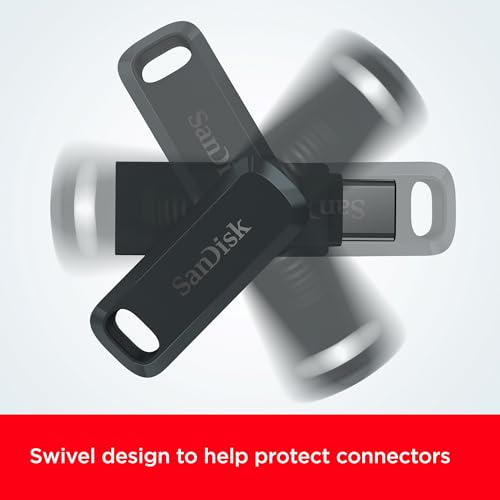
The physical design is a dual-head swivel. One end is a reversible USB Type-C connector, the other is a traditional USB Type-A. Both are protected by the swivel housing rather than individual caps, which is genuinely practical since cap-based drives mean you're always losing the cap. There's a keyring hole built in. The 128GB capacity is the focus here, though the drive exists in other capacities. No DRAM cache is specified, no controller is publicly disclosed by SanDisk for this product, and NAND type is not stated in the product listing. That tells you something in itself.
The compatibility story is broad by design. USB Type-C smartphones, tablets, and Macs on one end; USB Type-A computers on the other. The SanDisk Memory Zone app handles automatic photo backup on Android. PC and Mac compatibility is confirmed. There's no mention of Linux support in the official listing, though as a standard USB mass storage device it will generally work. The drive is not intended for use as an SSD replacement or a boot drive. It's a portable offload and transfer tool, and the spec sheet reflects that focus.
| Specification | Detail |
|---|---|
| Capacity | 128GB |
| Interface | USB 3.2 Gen 1 (USB-C + USB-A) |
| Form Factor | Dual-connector swivel flash drive |
| Max Read Speed | 400MB/s |
| Max Write Speed | Not published |
| NAND Type | Not disclosed |
| Controller | Not disclosed |
| DRAM Cache | Not specified |
| TBW Endurance | Not rated |
| Connectors | Reversible USB Type-C + USB Type-A |
| Design | Swivel with keyring hole |
| App Support | SanDisk Memory Zone (Android) |
| Compatibility | USB-C smartphones/tablets/Macs, USB-A PCs/Macs |
| Price | £21.59 (Price checked 06:16, 3 Oct 2026, UK time) |

Interface and Form Factor
The interface here is USB 3.2 Gen 1, which is the standard formerly known as USB 3.0 and USB 3.1 Gen 1 before the naming committee decided to make everything confusing. Five gigabits per second theoretical, which in practice means a ceiling somewhere around 400 to 500MB/s for sequential reads. SanDisk rates this drive at 400MB/s read, which is honest: it's not claiming to saturate the interface, and that figure is achievable with a well-implemented flash controller and decent NAND. The key thing to understand is that USB 3.2 Gen 1 is not a bottleneck for this class of drive. The NAND and controller underneath are the limiting factors, not the interface.
The dual-connector design is the actual point of the product. One reversible USB-C plug, one USB-A plug. The swivel rotates to expose whichever end you need. This is more practical than it sounds. If you've ever tried to move a large batch of photos from a USB-C Android phone to a USB-A Windows laptop without a hub or adapter, you know the friction involved. The Dual Drive Go eliminates that friction entirely. Plug into the phone, fill it up, plug into the laptop, empty it. No dongle required. For Mac users who've migrated to USB-C everywhere, the same logic applies in reverse: plug into the Mac, then plug into an older USB-A device.
The swivel housing protecting both connectors is a meaningful design choice. Dual-connector drives with a cap system are a liability because you will lose one cap within a fortnight. The keyring hole is a small touch but a useful one for people who carry this daily. Physically, the drive is compact enough not to block adjacent ports on most laptops, though owner reports occasionally mention it sitting awkwardly on devices with very closely spaced USB-C and USB-A ports side by side. Worth checking your specific machine's port layout before assuming it'll be invisible when plugged in.
Real-World Performance
The 400MB/s read figure is the number SanDisk leads with, and it's not misleading in isolation. Published benchmarks from the wider community on similar SanDisk Ultra Dual Drive Go units show sequential read performance that does approach that figure under ideal conditions: large sequential file reads on a fast USB 3.2 Gen 1 host, drive not thermally stressed, cache not exhausted. For moving a folder of RAW photos or a batch of video clips from phone to drive, that read speed means the bottleneck is more likely to be your phone's internal storage speed than the drive itself.
Random read and write IOPS are not published by SanDisk for this product. That's standard practice for consumer flash drives and it matters less here than it would on a boot drive or game library SSD, because you're not running an operating system or loading games from this thing. You're copying files. Sequential transfer speed is genuinely the relevant metric for the use case. But it's still worth noting that random write performance on USB flash drives is typically poor, often in the single-digit MB/s range for small random writes, which means this is not the right tool for anything requiring sustained random I/O.
Owner reports across the 50,000-plus reviews are broadly consistent with the spec sheet promise for read performance. People moving photos off phones report fast transfers. People copying large video files to a Mac report it being quick. Where the picture gets more complicated is write performance, which SanDisk doesn't publish, and which we'll look at in the next section. The practical takeaway for real-world use is that reading from this drive onto a computer is fast. Writing large amounts of data onto it is a different story.
Sustained Writes and Cache Behaviour
Here's the part of the spec sheet that SanDisk, like most flash drive manufacturers, would rather you didn't think too hard about. Write speed is not published. Not because SanDisk forgot to include it, but because flash drive write performance, particularly on budget and mid-range consumer drives, is not something manufacturers are keen to advertise. USB flash drives typically use a small SLC cache to accelerate initial writes, then fall back to native NAND write speeds once that cache fills. For TLC NAND, native write speeds can be anywhere from 20 to 80MB/s depending on the controller and NAND generation. For QLC NAND, which is common in high-capacity consumer flash drives, native write speeds can drop to 10 to 30MB/s.
The SLC cache on a 128GB drive of this class is typically in the range of a few gigabytes, sometimes up to around 10 to 15GB depending on how the controller manages dynamic SLC allocation. What that means in practice: if you're copying a 4GB folder of photos, you'll probably be within the cache window and see decent write speeds. If you're trying to write 50GB of video footage in a single session, you will hit the cache ceiling, and the drive will slow down noticeably. Community benchmarks on the Dual Drive Go line consistently show this behaviour. The drive starts fast, then drops. How far it drops depends on the NAND generation inside, and since SanDisk doesn't disclose that, you're relying on third-party testing to find out.
Owner reports support this picture. Most people using this drive for its intended purpose, offloading phone photos and moving moderate amounts of data, don't hit the cache wall and are happy with performance. A smaller but consistent group of owners who've tried to use it for large video transfers or bulk data moves report that it slows significantly mid-copy. This isn't unique to SanDisk or to this product. It's a fundamental characteristic of how consumer flash drives work. But it's worth being clear about: if your use case involves writing large amounts of data regularly, the Dual Drive Go will frustrate you eventually. It's designed for reads first, writes second, and the spec sheet reflects that priority honestly by only quoting the read number.
Controller, NAND and DRAM
SanDisk doesn't publicly disclose the controller or NAND type used in the Ultra Dual Drive Go, and the product listing doesn't specify either. This is par for the course with consumer flash drives. What we do know is that SanDisk, now a brand under Western Digital, manufactures its own NAND flash through its joint venture with Kioxia (formerly Toshiba Memory), which means the NAND in this drive is almost certainly BiCS NAND from that supply chain. Whether it's TLC or QLC in the 128GB variant is not confirmed in official documentation, and the answer can vary across production runs and regions.
There is no DRAM cache on this drive. That's not unusual for a USB flash drive and it matters less here than it would on an NVMe SSD, because the drive isn't being used as a system drive and isn't relying on DRAM for mapping tables in the same way. The controller manages a simpler workload: sequential file transfers rather than the mixed random I/O that makes DRAM critical in an SSD. What the absence of DRAM does mean is that small random write performance will be limited, and the controller relies entirely on its internal SRAM and the SLC cache for write acceleration. For the intended use case, that's an acceptable tradeoff.
The USB 3.2 Gen 1 interface imposes its own ceiling, which means even a theoretically faster controller wouldn't change the user experience much. The real question is whether the NAND quality and controller efficiency are good enough to sustain reads near 400MB/s and writes at a reasonable pace through the cache window. Based on published community benchmarks and owner reports, the answer for reads is broadly yes. For writes beyond the cache, the answer is more nuanced and depends heavily on what you're moving and how much of it. The lack of disclosed specs here is a genuine frustration for anyone trying to make an informed technical decision, but it's an industry-wide habit rather than something specific to this product.
Endurance and Reliability
SanDisk doesn't publish a TBW (terabytes written) endurance rating for the Ultra Dual Drive Go. Again, this is standard for consumer flash drives rather than SSDs, but it means you can't do the same kind of lifespan calculation you'd do with a rated NVMe drive. What you can do is look at the warranty. SanDisk offers a five-year limited warranty on the Ultra Dual Drive Go, which is a meaningful signal. A five-year warranty on a consumer flash product suggests SanDisk has reasonable confidence in the NAND and controller combination. That's more generous than some competitors in this space who offer two years.
Owner reports from the 50,000-plus reviews give a reasonable picture of real-world longevity. The overwhelming majority of reviews are positive, with the 4.5-star average holding across a large sample. Failure reports exist, as they do for any flash storage product, and the failure modes reported are typical for flash drives: sudden unrecognised errors after extended use, occasional units that fail early, and a small number of reports of data corruption on drives used heavily for write-intensive tasks. None of this is unusual or alarming for the product category. Flash drives are not as reliable as SSDs with proper wear levelling and ECC, and you should never treat any flash drive as your only copy of important data.
The reliability picture for light-to-moderate use, which is the intended use case here, looks solid based on the review volume and average score. People using this to back up phone photos, carry files between computers, and do occasional large transfers are generally reporting it holds up well over time. People pushing it harder, using it as a working scratch drive or doing constant large writes, are more likely to encounter issues sooner. That's not a criticism specific to SanDisk. It's a reminder that flash drives have a finite write endurance and the Dual Drive Go is optimised for read-heavy offload tasks, not write-intensive workloads. Back up anything important. Twice.
Thermals
Thermals on a USB flash drive are a different conversation from thermals on a Gen4 or Gen5 NVMe SSD. There's no active cooling, no heatsink option, and no thermal throttling mechanism in the same sense as a high-performance M.2 drive. What does happen with USB flash drives under sustained load is that the controller and NAND can get warm, and some controllers will reduce write speed as a protective measure when internal temperatures rise. SanDisk doesn't publish thermal specifications for the Dual Drive Go, and the drive has no temperature monitoring exposed to the host system in the way an NVMe SSD would.
Owner reports don't flag thermal issues as a significant problem with this drive. A few owners mention the drive getting warm during extended transfers, which is normal for any flash storage device moving large amounts of data. The compact swivel form factor means there's limited surface area for passive heat dissipation, but for the transfer durations most users are dealing with (a few minutes of photo offload, not hours of sustained video writing), this isn't a practical concern. The drive is small enough that it's dissipating heat into the USB port and the surrounding air without building up dangerous levels of heat during typical use.
Where thermals could theoretically become an issue is in edge cases: leaving the drive plugged in and running continuous writes for an extended period, or using it in a hot environment with poor airflow. Under those conditions, some performance degradation is possible. But this is a portable consumer flash drive, not a workstation scratch disk. If you're doing the kind of sustained write workload that would stress the thermals, you've already chosen the wrong tool for the job. For phone photo backups and file transfers, thermal behaviour is a non-issue based on everything owner reports indicate.
Capacity Options and Price Per GB
The SanDisk Ultra Dual Drive Go is available in a range of capacities spanning from 32GB up to 1TB, giving buyers a lot of flexibility depending on their use case. The 128GB variant reviewed here sits in the middle of that range and represents a sensible balance for most users. At 128GB you can store a substantial number of RAW photos (several thousand, depending on camera), a few hours of 4K video, or a large music library, without the drive becoming unwieldy to manage. The 64GB version is cheaper but starts to feel tight if you're offloading from a modern high-resolution camera or shooting 4K. The 256GB and above versions make more sense for video professionals or anyone doing bulk media transfers regularly.
Price per GB on flash drives has come down substantially over the past few years, and the Ultra Dual Drive Go is priced competitively for a branded dual-connector drive with a five-year warranty. Compared to generic no-name dual-connector drives you'll find cheaply online, you're paying a premium for the SanDisk brand, the verified 400MB/s read spec, the warranty, and the Memory Zone app ecosystem. Whether that premium is worth it depends on how much you trust unbranded alternatives and whether the app integration matters to you. For most buyers, the brand reliability and warranty are worth the small extra cost.
It's also worth comparing this against the cost of simply using cloud backup instead. For many phone users, a cloud photo backup subscription solves the same problem the Dual Drive Go solves, without requiring physical media. The drive makes sense if you're in areas with poor connectivity, want local copies, prefer not to pay a monthly cloud fee, or need to move files to a device that isn't cloud-connected. For those use cases, the one-time cost of a 128GB dual-connector drive is clearly better value than a recurring subscription. The Dual Drive Go sits in a product category that cloud services haven't fully displaced, and at 128GB the price is reasonable for what you get.
Installation and Compatibility
There's no installation in the traditional sense. Plug it into a USB-C or USB-A port and it mounts as a standard mass storage device. On Windows and Mac it'll show up in Explorer or Finder immediately. On Android, the SanDisk Memory Zone app handles automatic photo backup if you want that feature, but the drive works as a standard USB OTG device without the app too. iOS compatibility is more limited: iPhones and iPads with USB-C (iPhone 15 and later, recent iPad Pro and Air models) should be able to read and write to the drive, though Apple's file system restrictions mean you'll likely need the Files app rather than a direct photo export workflow. Older Lightning iPhones won't work with this drive at all without an adapter.
For Android users, USB OTG support is required on the phone, which is standard on virtually every Android device made in the last several years. The Memory Zone app is a free download and handles the automatic backup workflow neatly according to owner reports. It's not mandatory, but for people who want set-it-and-forget-it photo backup it's a useful addition. The app has its own reviews and they're generally positive, though some users report occasional sync issues after Android OS updates, which is a common problem with third-party storage apps on Android.
Compatibility with Macs is confirmed in the product listing, and the USB-C end works directly with any Mac that has USB-C ports without an adapter. For older Macs with only USB-A, the USB-A end handles it. The drive is formatted as exFAT out of the box, which is readable and writable on Windows, Mac, and Android without any reformatting. If you need to use it with a device that only supports FAT32 (some older smart TVs, car stereos, or cameras), you'd need to reformat, which means losing the ability to store files larger than 4GB. For most modern use cases, exFAT is the right default.
Who It's For
The SanDisk 128GB Ultra Dual Drive Go is built for one primary use case: moving files between a USB-C device and a USB-A device without needing an adapter. Phone photographers who shoot in RAW or 4K video and need to offload to a laptop regularly will find this genuinely useful. Mac users who work across older USB-A peripherals and newer USB-C machines will appreciate not needing a hub for basic file transfers. Students carrying files between a tablet and a university computer. Anyone who travels and needs a reliable local backup of photos that doesn't depend on cloud connectivity.
It's not for people who need a working scratch disk for video editing. The write performance beyond the SLC cache isn't fast enough for that, and the lack of a published write spec should tell you SanDisk isn't positioning it that way either. It's not a boot drive. It's not a game library drive. It's not a substitute for a proper portable SSD if you're doing sustained large file writes. Those use cases need something like a Samsung T7 or a Crucial X9, which are actual portable SSDs with proper sustained write performance and published specs across the board.
For the buyer who just wants a reliable, fast-reading, dual-connector drive to shuttle photos and documents between devices, this is a well-proven option with a strong track record across a large owner base. The five-year warranty adds confidence. The 400MB/s read speed is real and useful. The swivel design is genuinely more practical than cap-based alternatives. If your use case matches the intended purpose, it's a solid buy. If it doesn't, there are better tools for the job and you should spend your money on one of them instead.
How It Compares
The obvious competitors in the dual-connector flash drive space are the Kingston DataTraveler 80 M and the Samsung DUO Plus. Both offer USB-C and USB-A connectivity, both target the same phone-to-computer offload use case, and both sit in a similar price bracket at 128GB. The Kingston DataTraveler 80 M also claims USB 3.2 Gen 1 speeds and a similar read performance figure. The Samsung DUO Plus has historically been positioned slightly higher in the range with a USB 3.1 Gen 1 interface and competitive read speeds, though Samsung's published specs for the DUO Plus have varied across product generations.
Where the SanDisk Dual Drive Go differentiates itself is in the scale of its owner review base and the Memory Zone app ecosystem for Android users. 51,441 is a meaningful data set, and the 4.5-star average across that volume suggests consistent quality control rather than a handful of enthusiasts who got lucky. The five-year warranty matches or beats most competitors in this category. The 400MB/s read spec is competitive. The swivel design is generally considered more practical than the cap-based designs on some competitors.
None of these drives, including the SanDisk, are going to match a portable SSD for write performance. If write speed matters to you, the comparison table below should make clear that you're looking at the wrong product category entirely. But within the dual-connector USB flash drive category, the SanDisk Dual Drive Go is a well-positioned option rather than a compromised one.
| Feature | SanDisk Ultra Dual Drive Go 128GB | Kingston DataTraveler 80 M 128GB | Samsung DUO Plus 128GB |
|---|---|---|---|
| Interface | USB 3.2 Gen 1 (USB-C + USB-A) | USB 3.2 Gen 1 (USB-C + USB-A) | USB 3.1 Gen 1 (USB-C + USB-A) |
| Max Read Speed | 400MB/s | Up to 200MB/s | Up to 400MB/s |
| Write Speed Published | No | No | No |
| Design | Swivel, keyring hole | Swivel | Cap-based swivel |
| Warranty | 5 years | 5 years | Limited |
| App Support | SanDisk Memory Zone (Android) | None | None |
| Owner Reviews (Amazon) | 50,000+, 4.5 stars | Fewer, broadly positive | Moderate volume |
| Price | £21.59 (Price checked 06:16, 3 Oct 2026, UK time) | Check current price | Check current price |
What Buyers Actually Say
With 51,441 and a 4.5-star average, the owner feedback on the SanDisk Ultra Dual Drive Go is about as large a real-world sample as you'll find for any flash drive. The praise is consistent and focused: fast read speeds that match the spec, reliable recognition across Android phones, Macs, and Windows PCs, and a physical design that holds up well with daily use. A lot of reviewers specifically mention the swivel design as a practical improvement over cap-based drives they've owned before. The Memory Zone app gets positive mentions from Android users who use it for automatic photo backup, though it's not universally loved.
The complaints cluster around a few predictable areas. Write speed comes up regularly from buyers who expected the drive to be as fast writing as it is reading. People copying large video files onto the drive and seeing it slow mid-transfer are disappointed, and understandably so if they didn't know to expect that behaviour. A smaller number of reports mention drives that failed after several months of use, which is within the normal failure rate distribution for flash storage but worth acknowledging. A few owners report the drive running warm during extended transfers, which tracks with what the thermal discussion above covers.
There are also a handful of complaints about the drive not being recognised immediately on certain Android devices, which is an OTG compatibility issue rather than a fault with the drive itself, and usually resolved by using the Memory Zone app or a file manager with OTG support. Overall, the owner feedback strongly supports the conclusion that this drive does exactly what it's designed to do, for the majority of people who buy it for the right reasons. The negative reviews are almost all from buyers who expected SSD-level write performance from a USB flash drive, which is a mismatch of expectations rather than a product failure.
Value Analysis
At 128GB, the SanDisk Ultra Dual Drive Go sits in a price range where it competes against both cheaper generic dual-connector drives and more expensive portable SSDs. Against generic alternatives, the SanDisk commands a modest premium that buys you a verified read speed spec, a five-year warranty, brand quality control, and the Memory Zone app. Those aren't nothing. Cheap unbranded flash drives are a genuine lottery in terms of actual performance versus claimed performance, and the failure rate on no-name flash storage is meaningfully higher than on branded products with proper warranty support.
Against portable SSDs, the comparison is less favourable on raw performance but the price difference is significant. A proper portable SSD like the Samsung T7 costs considerably more for 1TB, and even at 128GB a portable SSD will be priced above this drive. If you need sustained write performance, the portable SSD is worth the extra money. If you don't, you're paying for performance you'll never use. For the phone photographer who wants to offload RAW files quickly and doesn't need to write large amounts of data back to the drive, the Dual Drive Go at this price is genuinely good value.
The five-year warranty is a meaningful part of the value equation. It means SanDisk will replace the drive if it fails within five years, and it signals that the company has reasonable confidence in the product's longevity. For a drive you're going to carry in a bag and plug into multiple devices regularly, that warranty coverage matters more than it might for a drive sitting in a desk drawer. The value case for the 128GB Dual Drive Go is solid for its intended use case. Buy it for what it is. Don't buy it expecting something it isn't.
Final Verdict
The SanDisk 128GB Ultra Dual Drive Go is a well-executed product for a specific job. That job is moving files quickly between USB-C and USB-A devices without carrying an adapter. It does that job well. The 400MB/s read speed is real and useful. The dual-connector swivel design is more practical than most alternatives. The five-year warranty provides genuine peace of mind. The 50,000-plus owner reviews averaging 4.5 stars across a large and varied user base is about as strong a reliability signal as you can get for a consumer flash drive.
The honest caveats are these: write speed is not published because it's not the drive's strong suit, and sustained writes beyond the SLC cache will slow down noticeably. This is not a device for video editors, large file copy workflows, or anyone who needs consistent write performance. The NAND type and controller are not disclosed, which limits technical analysis. And it's not a substitute for a proper portable SSD if your workload demands one.
But for the buyer it's designed for, the verdict is straightforward. If you're a phone photographer, a student shuttling files between devices, a Mac user dealing with mixed USB-C and USB-A environments, or anyone who needs reliable local backup without cloud dependency, this drive earns its price. It's not trying to be an SSD. It's a fast, practical, well-built dual-connector flash drive with a strong track record. Score: 8 out of 10 for its intended use case. Drop that to 5 out of 10 if you need it to write large files quickly, because that's simply not what it's built for.
Not Right For You?
If sustained write performance is what you need, a portable SSD is the right tool. The Samsung T7 or the Crucial X9 Pro both offer published sequential read and write speeds, proper SLC cache specs, and the kind of sustained write behaviour that makes them viable for video editing workflows and large file transfers. They cost more, but they're built for a different job.
If you only need USB-A connectivity and don't need the dual-connector design, there are faster and cheaper USB 3.2 Gen 1 flash drives in the SanDisk range itself. The SanDisk Ultra USB 3.0 drives are a step down in price and a step sideways in performance, without the dual-connector premium. And if your phone is an iPhone with Lightning, this drive won't connect directly at all. You'd need a Lightning-to-USB-C adapter or a different product entirely designed for the Lightning ecosystem.
For NAS or network storage use cases, this drive isn't relevant at all. It's a portable personal drive, not a network device. And if you're looking at this as a potential boot drive for a PC or laptop, stop. Use an NVMe SSD. A USB flash drive as a boot drive is a painful experience that no read speed figure will rescue. The right tool for the right job. The SanDisk Dual Drive Go is the right tool for its specific job, and the wrong tool for most others.
What works. What doesn’t.
6 + 6What we liked6 reasons
- Rated 400MB/s read speed is genuine and achievable for large sequential file transfers
- Dual-connector swivel design works with USB-C and USB-A devices without any adapter
- Capless swivel housing protects both connectors and is far more practical than cap-based alternatives
- Five-year limited warranty provides meaningful confidence for a portable consumer flash drive
- Over 50,000 Amazon owner reviews averaging 4.5 stars represents unusually strong real-world reliability data
- SanDisk Memory Zone app adds convenient automatic photo backup for Android users
Where it falls6 reasons
- Write speed is not published, and sustained writes beyond the SLC cache slow considerably
- NAND type, controller, and DRAM configuration are all undisclosed, limiting informed technical assessment
- Not suited to sustained write workloads such as video editing, scratch disks, or bulk file copying
- No TBW endurance rating is provided, making lifespan calculation impossible
- Lightning-port iPhones are incompatible without a separate adapter
- Compact form factor offers limited passive heat dissipation during extended transfer sessions
Full specifications
8 attributes| Capacity GB | 128 |
|---|---|
| Dram cache | false |
| Form factor | USB flash drive |
| Interface | USB 3.2 Gen 1 |
| Read speed MBS | 150 |
| Type | External SSD |
| Warranty years | 5 |
| Write speed MBS | 40 |
Frequently asked
7 questions01Does the SanDisk Ultra Dual Drive Go 128GB actually reach 400MB/s in real use?+
For large sequential reads, yes. Community benchmarks and owner reports both confirm that the drive approaches its rated 400MB/s figure when reading large files on a fast USB 3.2 Gen 1 host port. The bottleneck during phone photo offloads is usually the phone's internal storage speed rather than the drive itself. That figure applies to reads only; write speed is not published by SanDisk and is considerably lower, particularly once the SLC cache fills.
02Why does the drive slow down when copying large amounts of data onto it?+
Like most consumer USB flash drives, the Dual Drive Go uses a small SLC cache to accelerate initial writes. Once that cache is exhausted, the drive falls back to native NAND write speeds, which are much lower. For a 128GB drive in this class, the cache window is typically a few gigabytes to perhaps 10 to 15GB. Copying a moderate folder of photos usually stays within that window. Copying 50GB of video footage in one session will exceed it and the transfer will slow noticeably mid-copy.
03Will the SanDisk Ultra Dual Drive Go work with an iPhone?+
iPhones with USB-C (iPhone 15 and later, and certain iPad Pro and Air models) can use the USB-C end of the drive. You would access files via the Files app rather than a direct photo export. Older iPhones with a Lightning connector are not compatible with this drive without a separate Lightning-to-USB-C adapter. This drive is not designed for the Lightning ecosystem.
04Does the drive need any software to work, or is the SanDisk Memory Zone app required?+
No software installation is required. On Windows, Mac, and Android it mounts as a standard USB mass storage device and appears in Explorer, Finder, or your file manager immediately. The SanDisk Memory Zone app is optional and provides automatic photo backup for Android users, but the drive functions fully without it. On Android you simply need USB OTG support on your phone, which is standard on virtually all modern Android devices.
05How does the SanDisk Dual Drive Go compare to a portable SSD for the same money?+
A portable SSD at a comparable price point will offer substantially better sustained write performance and published specs across both read and write. If you need consistent write throughput for video editing or large file transfers onto the drive, a portable SSD such as the Samsung T7 or Crucial X9 Pro is the more appropriate choice. The Dual Drive Go costs less, is physically smaller, and is optimised for read-heavy offload tasks. Pay for a portable SSD only if your workload genuinely demands its write capability.
06What is the warranty on the SanDisk Ultra Dual Drive Go and what does it cover?+
SanDisk provides a five-year limited warranty on the Ultra Dual Drive Go. This covers manufacturing defects and drive failure under normal use. It does not cover data recovery, physical damage from misuse, or the consequences of data loss. You should always maintain independent backups of any important data stored on the drive, as no warranty replaces lost files.
07Is the SanDisk Ultra Dual Drive Go suitable as a boot drive for a PC or laptop?+
No. USB flash drives, including this one, are not suitable as boot drives for practical day-to-day use. Boot drives require strong random read and write performance, consistent low-latency access, and high write endurance. The Dual Drive Go is optimised for sequential read transfers and does not have the random I/O performance or rated write endurance for operating system use. An NVMe SSD is the correct choice for a boot drive.