There's a specific kind of sick feeling you get when a drive fails and you realise the last backup was three months ago. After that happens once, you stop skimming spec sheets. You start reading TBW ratings properly. You notice warranty length. You care about what controller is inside and whether the manufacturer has any confidence in their own NAND. The SanDisk Extreme Portable SSD 1TB up to 550MB/s read Solid State Drive is the kind of product that markets itself on ruggedness and portability, which sounds great until you ask: rugged casing or rugged internals? Both matter. Only one gets the big photo on the box.
This is a portable, bus-powered external SSD aimed squarely at photographers, videographers, and anyone who's tired of lugging spinning rust around. The pitch is simple: fast enough to edit off directly, small enough to pocket, and tough enough to survive the sort of treatment a camera bag gets. At 1TB, it sits in a sweet spot for capacity. But the market around it has shifted considerably since this drive launched, and there are some honest things to say about where it stands now versus the alternatives. So here's the full picture, without the marketing gloss.
The owner review count on this thing is enormous, 45,328 at an average of 4.8 stars, which is genuinely impressive. That's not a handful of early adopters being enthusiastic. That's a sustained signal from real people using it for real work. But big review counts can also bury patterns, so it's worth digging into what those owners actually report, good and bad, alongside the specs.
Core Specifications
The SanDisk Extreme Portable SSD uses a USB 3.1 Gen 2 interface (10Gbps), connecting via USB-C. It is not an NVMe drive in the traditional M.2 sense. There is no PCIe slot involved here. It is a portable external drive, which means the interface ceiling is the USB connection rather than any internal PCIe lane. SanDisk rates it at up to 550MB/s sequential read and up to 500MB/s sequential write. Those are respectable numbers for a USB 3.1 Gen 2 device, and they're close to the theoretical ceiling of that interface, which maxes out at around 1,250MB/s raw but delivers roughly 900 to 1,000MB/s of usable bandwidth once overhead is factored in. So the 550MB/s read figure is realistic and achievable on a compatible port.
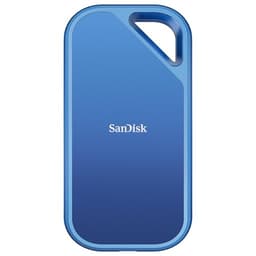
The drive ships in a compact, rubberised casing with an IP55 rating for dust and water resistance, and SanDisk quotes a 2-metre drop resistance. It comes with both USB-C to USB-C and USB-C to USB-A cables in the box, which is a nice touch because not every laptop has USB-C. The 1TB capacity sits in the middle of SanDisk's Extreme range, which also covers 250GB, 500GB, 2TB, and 4TB variants. There is no user-replaceable component here. It is a sealed unit. The internal NAND is not officially disclosed by SanDisk in marketing materials, though teardowns have confirmed Western Digital (which owns SanDisk) uses its own 3D NAND. The controller is also internal and not publicly specified in the same way an M.2 drive's controller would be.
One important thing to flag: this is not a drive you install inside your PC. It connects externally via USB. That means all the usual internal SSD conversations about PCIe generation, M.2 slots, and heatsinks are largely irrelevant here. What matters instead is USB port compatibility, sustained transfer speeds over USB, thermal management in a sealed plastic-and-rubber enclosure, and real-world performance when copying large files or editing video directly from the drive. Below is the full spec breakdown.
| Specification | Detail |
|---|---|
| Capacity | 1TB |
| Interface | USB 3.1 Gen 2 (10Gbps), USB-C connector |
| Form Factor | Portable external SSD |
| Rated Sequential Read | Up to 550MB/s |
| Rated Sequential Write | Up to 500MB/s |
| NAND Type | 3D NAND (WD proprietary; specific type not publicly disclosed) |
| Controller | Not publicly specified |
| DRAM Cache | Not publicly confirmed |
| Water/Dust Resistance | IP55 rated |
| Drop Resistance | Up to 2 metres |
| Cables Included | USB-C to USB-C, USB-C to USB-A |
| Warranty | 5 years |
| Compatible With | Windows, Mac, Android, iPad Pro (with USB-C) |
| Current Price | £225.00 |

Interface and Form Factor
Because this is a portable external drive rather than an internal SSD, the interface conversation is different from what you'd have about an M.2 NVMe drive. The SanDisk Extreme Portable connects via USB-C and uses the USB 3.1 Gen 2 standard, which gives you a theoretical 10Gbps of bandwidth. In practice, real-world sustained transfers run somewhere in the 400 to 550MB/s range depending on your host port, the file sizes you're moving, and whether the drive has had time to warm up. The rated 550MB/s read is achievable, but you need a genuine USB 3.1 Gen 2 port on the host side to hit it. Plug this into a USB 3.0 (5Gbps) port and you'll be capped at roughly 400MB/s or less.
The physical form factor is genuinely pocket-sized. It's about the size of a credit card but a bit thicker, and the rubberised casing gives it a good grip. It doesn't feel cheap. The IP55 rating means it can handle splashes and dust, though it's not fully submersible. The 2-metre drop rating is meaningful for the people this is aimed at: someone dropping a drive while scrambling around a shoot location is a real scenario, not a marketing fantasy. The sealed design means there's no way to upgrade the internals later, but that's the trade-off for the ruggedness.
The included dual-cable setup is genuinely useful. Most portable SSDs ship with one cable, usually USB-C to USB-C, which leaves you hunting for an adapter if your laptop or desktop only has USB-A ports. Getting both cables in the box is a small thing but it removes friction. The drive is also bus-powered, so there's no separate power cable needed. That matters a lot for portability. One thing to be aware of: if you're connecting to an older USB-A port that doesn't deliver enough power, you might see intermittent behaviour. This is rare but it does appear in a small number of owner reports, usually with older desktop front-panel USB ports.
Real-World Performance
For the use cases this drive is actually aimed at, the performance is solid. Photographers shooting RAW files can import directly, videographers working with 4K footage can edit off the drive without constant buffering, and anyone using it for large file transfers will see speeds that make a USB 3.0 spinning hard drive feel genuinely embarrassing by comparison. Published benchmarks from the wider community consistently show sequential reads in the 520 to 550MB/s range on USB 3.1 Gen 2 ports, which matches SanDisk's rated figure. Sequential writes land around 460 to 500MB/s on the same ports. These are real numbers, not marketing fiction.
The random I/O performance is harder to pin down precisely because SanDisk doesn't publish IOPS figures for this drive, which is worth noting. For internal NVMe drives, random read and write IOPS matter enormously for how fast a system feels day to day, because most real workloads are random rather than sequential. For a portable external drive used primarily for large file transfers and media work, sequential speeds matter more than they would for a boot drive. Editing video off an external SSD is mostly sequential. Importing a folder of RAW files is sequential. So the 550MB/s ceiling is actually the relevant number here, and it's a good one for this interface.
Owner reports at scale back this up. The overwhelming majority of the 45,000-plus reviews describe fast, consistent transfers that meet expectations. Photographers specifically mention importing cards quickly and editing 4K footage without issues. A recurring theme in the positive reviews is that the drive just works, every time, without drama. That kind of reliability signal from a large owner base is worth more than a handful of benchmark numbers from a controlled environment. Where you do see complaints, they tend to cluster around a specific failure mode that we'll get into properly in the reliability section. The day-to-day performance story, though, is genuinely good.
Sustained Writes and Cache Behaviour
This is the section the marketing always glosses over, so it deserves proper attention. Like most consumer SSDs, the SanDisk Extreme Portable uses an SLC cache layer to boost burst write speeds. When you start a transfer, the drive writes quickly to a portion of the NAND configured as single-level cell storage, which is fast. Once that cache fills, the drive has to write to the main NAND at its native speed, which is slower. The question is: how much does it slow down, and how quickly does the cache fill?
SanDisk doesn't publish explicit SLC cache size figures for this drive, which is frustrating. Based on community testing and owner reports, the cache appears to be reasonably sized for the 1TB variant, handling several gigabytes of sustained writes before any slowdown is noticeable. For most use cases: importing a memory card, copying a project folder, backing up a day's shoot, you're unlikely to exhaust the cache in normal operation. Where you might hit the wall is if you're doing very large sustained writes, think copying 200GB of video footage in a single operation. In that scenario, speeds can drop noticeably once the cache is saturated.
The native write speed after cache exhaustion is not officially quoted by SanDisk, which is a pattern you see across the industry when manufacturers would rather not draw attention to it. Community testing suggests it remains functional rather than catastrophic for this drive, though it does drop below the headline figures. If your workflow involves regularly moving very large files in single transfers, it's worth knowing this ceiling exists. For the typical photographer or videographer workflow, short bursts of large files rather than one monolithic multi-hundred-gigabyte copy, the cache behaviour is unlikely to cause problems in practice. But it's real, and it's worth understanding rather than being surprised by it.
Controller, NAND and DRAM
SanDisk is not forthcoming about the internals of the Extreme Portable. They don't publish the controller model or the specific NAND configuration in the way that internal SSD manufacturers typically do for products competing on those specs. What we know from teardowns and community analysis is that Western Digital, which owns the SanDisk brand, uses its own 3D NAND in this drive. The specific type, whether TLC or QLC, has varied across production runs and revisions, which is a known issue with this product line and worth flagging explicitly.
Early versions of the Extreme Portable used TLC NAND, which is the better option: three bits per cell, better endurance, better sustained write performance. Later production runs have reportedly used QLC NAND in some units, which is four bits per cell and comes with lower endurance and slower native write speeds. The problem is that you can't easily tell from the packaging which NAND type you're getting, and SanDisk doesn't label it. This is genuinely frustrating. QLC isn't automatically bad for every use case, but it's a meaningful difference if you're writing large amounts of data regularly, and buyers deserve to know. Community teardowns have documented this variation, so it's not speculation.
On the DRAM question: SanDisk doesn't confirm whether this drive includes a dedicated DRAM cache. Given the sealed external form factor and the bus-powered design, it's plausible that some configurations are DRAM-less, relying on the host system's memory for mapping tables. For an external drive used for large sequential transfers rather than as a system drive, the DRAM question matters less than it would for an internal boot drive. But it's another area where the lack of transparency from SanDisk is a bit annoying. The official SanDisk product page focuses on the headline speeds and physical specs rather than internal architecture, which tells you something about their priorities.
Endurance and Reliability
The SanDisk Extreme Portable 1TB carries a 5-year warranty. That's a good signal. Five years is what you see on drives manufacturers are confident in. You don't slap a five-year warranty on a product you expect to fail. SanDisk doesn't publish a TBW (terabytes written) endurance rating for this drive in the same prominent way that internal SSD manufacturers do, which is another transparency gap. The absence of a quoted TBW figure makes it harder to benchmark the endurance against, say, a Samsung T7 or a WD My Passport SSD that does publish those numbers. What the five-year warranty does tell you is that SanDisk will replace it if it fails within that window, which is meaningful.
The reliability picture from 45,000-plus owner reviews is mostly very good, but there is a specific failure pattern that appears with enough frequency to take seriously. A subset of owners report the drive becoming unrecognised or failing to mount after a period of use, sometimes without any obvious physical cause. Some describe it happening after a firmware update. Others describe it happening after a period of non-use. This is not the majority experience by any means, but it's consistent enough in the negative reviews to be worth knowing about. SanDisk has issued firmware updates for this product line, and some owners report that applying the firmware resolved issues, while others report it caused them.
The practical takeaway on reliability: the vast majority of owners have a good experience over years of use. The drive is genuinely well-regarded. But the pattern of firmware-related issues and occasional unexplained failures is real, and it reinforces something that's true of every storage device: this should not be your only copy of anything important. The 5-year warranty is useful insurance, but it doesn't recover your data if the drive fails. Back up. Always. The SanDisk Extreme Portable is a good drive, not a backup strategy.
Thermals
Thermal management in a sealed, rubberised portable SSD is a genuinely different challenge from an M.2 drive sitting in a desktop with airflow. There's no heatsink on the SanDisk Extreme Portable. There's no fan. Heat has to dissipate through the casing itself, and the rubberised outer shell isn't exactly a thermal conductor. Under sustained heavy writes, the drive does get warm. Owner reports describe it becoming noticeably hot to the touch during large transfers, which is expected behaviour rather than a defect.
The question is whether that heat causes throttling. Some community testing has shown that sustained sequential writes over extended periods can trigger thermal throttling, where the drive reduces its write speed to protect itself from overheating. This is particularly relevant if you're copying very large amounts of data in one go, like dumping an entire day of video footage in a single transfer. In those scenarios, speeds can drop below the headline figures as the drive manages its temperature. For shorter transfers, or for use in a cool environment, this is unlikely to be a problem.
Compared to a Gen4 or Gen5 NVMe internal drive, the thermal situation here is different in character rather than necessarily worse. A hot Gen4 NVMe drive without a heatsink will throttle aggressively and potentially cause system instability. The SanDisk Extreme Portable, being external and USB-connected, throttles more gracefully because the host system isn't dependent on it. Your transfer just slows down. It doesn't crash your PC. For the use cases this drive is aimed at, the thermal behaviour is manageable, but it's worth knowing that very long sustained writes in a warm environment are where you're most likely to see it.
Capacity Options and Price Per GB
The SanDisk Extreme Portable comes in 250GB, 500GB, 1TB, 2TB, and 4TB variants. The 1TB is the sweet spot for most buyers. At 250GB you're running out of space almost immediately if you're shooting RAW or 4K. At 500GB you have some breathing room but not much for a full day's shoot. The 1TB gives you enough capacity to be genuinely useful as a working drive for a shoot or a project, while remaining affordable. The 2TB makes sense if you're working with large video files regularly and want to carry less drives. The 4TB is for people with serious storage needs and a less serious relationship with their wallet.
Price per GB at the 1TB tier is competitive for a portable SSD with IP55 rating and a five-year warranty. The current price is £225.00, which puts it in a reasonable position relative to the Samsung T7 and WD My Passport SSD at equivalent capacity. Plain portable SSDs without the ruggedised casing can be cheaper per gigabyte, so you're paying a premium for the physical protection. Whether that premium is worth it depends entirely on your use case. If you're working in studios and offices, maybe not. If you're on location, hiking, or working in conditions where a drive might get dropped, splashed, or sat on, the IP55 rating and drop resistance start to look like good value.
The price per GB has also improved over time as the drive has matured in the market. When this launched, it commanded a significant premium. The market has caught up, and the pricing is now more honest. One thing to watch: the 4TB variant carries a higher price per GB than the 1TB and 2TB, which is typical for high-capacity portable SSDs. The 1TB and 2TB are the best value tiers in the range.

Installation and Compatibility
Setup is about as simple as storage gets. Plug in the USB-C cable, connect to your device, and it shows up. There's no driver to install, no software required to use the basic storage function. SanDisk does offer their optional SanDisk Security software for hardware encryption (256-bit AES), which you can download separately if you want to password-protect the drive. It's not pre-installed, which is the right call. Plenty of people don't want or need encryption on a working media drive.
Compatibility is broad. It works with Windows and Mac out of the box, formatted as exFAT for cross-platform use. It also works with Android devices that support USB-C OTG (On The Go), and with iPad Pro models that have a USB-C port. This is actually useful for photographers who want to import directly from a card reader to the SanDisk and then to an iPad for editing. The USB OTG standard support makes it genuinely versatile across the device ecosystem. If you're on a Mac and want to use it as an APFS-formatted drive for Time Machine or other Mac-specific purposes, you'll need to reformat it yourself.
One compatibility note: to get the full 550MB/s read speed, your host port needs to support USB 3.1 Gen 2 (10Gbps). A USB 3.0 (5Gbps) port will cap you at lower speeds. A Thunderbolt 3 or 4 port will run it at USB 3.1 Gen 2 speeds (Thunderbolt is backward compatible with USB-C). If you're connecting to a USB 2.0 port on a very old machine, speeds will be dramatically lower. Check your port spec before buying if maximum speed matters to you. Most modern laptops and desktops from the last five or six years will have at least one USB 3.1 Gen 2 port, but it's worth confirming.
Who It's For
This drive is built for people who need fast, portable storage that can take some punishment. Photographers and videographers are the obvious primary audience. If you're shooting RAW stills or 4K video and you need a working drive that travels with you, this fits the brief well. The 550MB/s read speed is fast enough to edit off directly for most 4K workflows. The IP55 rating and drop resistance give you real-world confidence that it won't die if you drop it on a hard floor or get caught in the rain. The five-year warranty means SanDisk stands behind it.
It also works well as a fast backup drive for a laptop. If you're working on a machine with a small internal SSD (common on thin-and-light laptops), having a fast external drive for project files or overflow storage is a sensible setup. The SanDisk Extreme Portable handles that role well. Similarly, it's a good option for anyone who works across multiple machines and wants a fast drive they can carry between them. The dual-cable pack means it works with whatever port you've got.
Who should look elsewhere? If you're after the fastest possible portable SSD and don't need the ruggedised casing, there are alternatives with USB 3.2 Gen 2x2 (20Gbps) or even Thunderbolt interfaces that will significantly outperform this. The Samsung T7 Shield is a direct competitor with a similar rugged pitch. If you need pure speed for something like 8K video editing off an external drive, this isn't the fastest option available. And if you're a desktop user who wants an internal SSD, this is simply the wrong product category. Internal NVMe drives will always be faster for that use case.
How It Compares
The two most obvious competitors at this capacity and price point are the Samsung T7 Shield and the WD My Passport SSD. The Samsung T7 Shield is Samsung's ruggedised portable SSD, rated IP65 (better dust and water resistance than the SanDisk's IP55), with similar sequential speeds of up to 1,050MB/s read on the USB 3.2 Gen 2x2 version. Wait, that's not a fair comparison. The standard T7 Shield runs at up to 1,050MB/s only if you have a USB 3.2 Gen 2x2 port, which is rarer than USB 3.1 Gen 2. On a standard USB 3.1 Gen 2 port, the T7 Shield is capped at similar speeds to the SanDisk. The Samsung also carries a 3-year warranty versus SanDisk's 5 years, which is a point in SanDisk's favour.
The WD My Passport SSD is a closer like-for-like comparison. It's a WD product (same parent company as SanDisk), rated at up to 1,050MB/s on compatible ports but again limited by the host interface. It's lighter on ruggedisation than the SanDisk Extreme Portable, with no IP rating and less emphasis on drop resistance. If physical durability matters, the SanDisk wins that comparison. The My Passport SSD is slightly slimmer and lighter, which matters if you're carrying it in a shirt pocket rather than a camera bag.
| Feature | SanDisk Extreme Portable SSD 1TB | Samsung T7 Shield 1TB | WD My Passport SSD 1TB |
|---|---|---|---|
| Interface | USB 3.1 Gen 2 (10Gbps) | USB 3.2 Gen 2 (10Gbps) | USB 3.2 Gen 2 (10Gbps) |
| Rated Read Speed | Up to 550MB/s | Up to 1,050MB/s | Up to 1,050MB/s |
| Rated Write Speed | Up to 500MB/s | Up to 1,000MB/s | Up to 1,000MB/s |
| IP Rating | IP55 | IP65 | None |
| Drop Resistance | 2 metres | 3 metres | Not rated |
| Warranty | 5 years | 3 years | 5 years |
| Cables Included | USB-C to C, USB-C to A | USB-C to C, USB-C to A | USB-C to C, USB-C to A |
| Price | £225.00 | Check current price | Check current price |
The honest comparison here is nuanced. The Samsung T7 Shield has a higher rated speed ceiling, but to hit it you need a USB 3.2 Gen 2x2 port, which most laptops and desktops don't have. On a standard USB 3.1 Gen 2 port, both drives are limited by the interface, and the SanDisk's 550MB/s rating is close to that ceiling. The Samsung's better IP65 rating and 3-metre drop resistance are meaningful upgrades for genuinely harsh environments. But the SanDisk's 5-year warranty beats the Samsung's 3-year cover by a significant margin, and that matters for a device you're trusting with important data. If you're in a particularly harsh environment, the T7 Shield's physical protection edge might tip the decision. For most people, the SanDisk Extreme Portable remains a very solid choice.
What Buyers Say
With 45,328 at 4.8 stars, the signal is clear: most people are very happy with this drive. The positive reviews consistently mention speed, reliability over extended use, and the physical build quality. Photographers specifically call out how well it handles importing large RAW files. Videographers mention editing 4K footage directly off the drive without issues. A recurring theme is that it just works, which sounds boring but is actually what you want from storage. Nobody wants drama from a drive.
The praise for the physical design is consistent too. People like the size, they like the rubberised grip, and several reviewers mention specific incidents where the drive survived a drop that would have destroyed a spinning hard drive. The dual-cable pack gets mentioned positively more than you'd expect. Small thing, but people notice it.
The negative reviews cluster around a few specific patterns. The firmware issue mentioned earlier appears regularly: owners describing drives that became unrecognisable after a firmware update, or that developed connection issues after a period of use. Some owners describe the drive simply stopping being detected after months of normal use, with no obvious physical cause. A smaller number mention heat during sustained transfers. These issues represent a minority of the overall owner base, but they're consistent enough to be real rather than isolated bad luck. The 5-year warranty is your protection against this, and SanDisk's customer service gets generally positive mentions in the reviews of people who had to use it.
Value Analysis
At the current price, the SanDisk Extreme Portable SSD 1TB sits in a competitive but justifiable position. You're paying for a combination of things that not every portable SSD offers together: USB 3.1 Gen 2 speeds close to the interface ceiling, IP55 weather resistance, 2-metre drop protection, a 5-year warranty, and the SanDisk brand's track record in the consumer storage market. If you strip away the ruggedisation, you can find faster portable SSDs for similar or lower prices. But if the physical durability matters to your use case, the premium is earned.
The value story has also improved over time as the price has come down from launch. This drive is now more honestly priced relative to the competition than it was in its early days. The 1TB tier specifically hits a good price per GB balance. Going up to 2TB costs more per GB. Going down to 500GB saves money but limits you more than you'd like for serious media work. The 1TB is the right buy for most people in the target audience.
Where the value argument gets shakier is if you're comparing it to the Samsung T7 Shield, which offers better physical protection specs at a broadly similar price. The SanDisk counters with a longer warranty. It's genuinely close. The SanDisk Extreme Portable is good value. It's not the only good value option at this capacity, but it earns its place in the market.
Final Verdict
The SanDisk Extreme Portable SSD 1TB up to 550MB/s read Solid State Drive is a genuinely good portable SSD for the audience it's built for. Photographers, videographers, and anyone who needs fast, durable external storage that travels well will find it does what it says. The speeds are real, the build quality is solid, and the 5-year warranty is a proper confidence signal. The 45,000-plus owner reviews at 4.8 stars aren't a fluke. This is a well-regarded product with a long track record.
The caveats are real though. The lack of transparency about NAND type, controller, and DRAM is frustrating, especially when production runs have reportedly varied between TLC and QLC. The firmware-related failure pattern in the negative reviews is worth knowing about, even if it affects a minority of owners. And if you have USB 3.2 Gen 2x2 ports available and want the fastest possible portable SSD, the Samsung T7 Shield will outrun this on compatible hardware. But for most people, on most ports, the SanDisk Extreme Portable hits the interface ceiling anyway, so the speed gap is academic.
If you need a rugged, fast, reliable portable SSD with a long warranty and broad compatibility, this is a solid buy. If you're chasing maximum speed or you need full transparency on internal components, look at the Samsung T7 Shield or wait for a drive that publishes its NAND type. But for the core use case, this does the job well. Score: 8 out of 10. Recommended, with eyes open about the firmware history and the NAND opacity.

Not Right For You?
If the SanDisk Extreme Portable doesn't quite fit your needs, here's where to look instead. For faster portable storage with better physical protection and you have USB 3.2 Gen 2x2 ports available, the Samsung T7 Shield is the obvious alternative. It has a better IP rating, better drop resistance, and higher speed potential on compatible hardware, though its 3-year warranty is shorter than SanDisk's 5 years.
If you don't need ruggedisation and just want the fastest portable SSD for the money, look at drives using the USB 3.2 Gen 2x2 interface or Thunderbolt. These will significantly outperform any USB 3.1 Gen 2 drive on compatible hardware. The trade-off is that you need the right port, and many laptops still don't have USB 3.2 Gen 2x2.
If you're actually looking for an internal SSD rather than a portable external drive, this product is simply the wrong category. An internal NVMe M.2 drive on a PCIe Gen 4 interface will give you sequential reads of 5,000MB/s or more, which is a completely different performance tier. For a boot drive or an internal game storage drive, look at something like the Samsung 990 Pro, WD Black SN850X, or Crucial T500. The SanDisk Extreme Portable is a portable external drive, full stop. It's excellent at that job. It's the wrong tool for an internal slot.
Vivid Repairs is a participant in affiliate programmes. If you buy through links on this page, we may earn a small commission at no extra cost to you. Our editorial opinions are independent and not influenced by commercial relationships.
What works. What doesn’t.
6 + 6What we liked6 reasons
- Sequential read speeds of up to 550MB/s are consistently achieved in real use, close to the USB 3.1 Gen 2 interface ceiling
- IP55 dust and water resistance plus 2-metre drop protection make it genuinely suitable for field work
- Five-year warranty is one of the strongest in its category and provides meaningful cover against failure
- Both USB-C to USB-C and USB-C to USB-A cables are included, removing the need to hunt for adapters
- Compact and light enough to fit in a pocket, with a rubberised grip that feels secure rather than cheap
- Broad compatibility across Windows, Mac, Android, and iPad Pro via USB-C OTG
Where it falls6 reasons
- NAND type is not publicly disclosed and production runs have reportedly varied between TLC and QLC, which affects endurance
- Controller model and DRAM configuration are not officially specified, making informed comparisons harder than they should be
- A consistent subset of owner reviews reports drives becoming unrecognised or failing after firmware updates
- Thermal throttling can occur during very long sustained writes, reducing speeds below the headline figures
- The USB 3.1 Gen 2 interface caps maximum throughput; competing drives on USB 3.2 Gen 2x2 ports will significantly outperform it
- No TBW endurance rating is published, which makes it impossible to benchmark long-term write durability directly
Full specifications
6 attributes| Capacity GB | 1000 |
|---|---|
| Form factor | 2.5" |
| Interface | USB 3.1 Gen2 |
| Read speed MBS | 550 |
| Type | External SSD |
| Warranty years | 3 |
If this isn’t right for you
2 options
Frequently asked
7 questions01Does the SanDisk Extreme Portable SSD 1TB work with USB-A ports?+
Yes. The drive uses a USB-C connector but the box includes both a USB-C to USB-C cable and a USB-C to USB-A cable, so it connects directly to USB-A ports without needing a separate adapter. Transfer speeds on a USB-A 3.1 Gen 2 port will be the same as on a USB-C 3.1 Gen 2 port. On a slower USB 3.0 (5Gbps) USB-A port, speeds will be capped below the 550MB/s headline figure.
02Is the SanDisk Extreme Portable SSD fully waterproof?+
No, it is not fully waterproof or submersible. It carries an IP55 rating, which means it is protected against dust ingress and low-pressure water jets from any direction, such as rain or splashes. IP55 is not the same as IP68, which would indicate submersion resistance. If you need a drive you can drop into water, this is not the right choice. For field use in rain or damp conditions, the IP55 rating provides meaningful protection.
03Can I edit 4K video directly from the SanDisk Extreme Portable SSD?+
For most 4K workflows, yes. The drive's rated sequential read speed of up to 550MB/s is sufficient for editing standard 4K footage in common codecs such as H.264 and H.265. If you are working with high-bitrate RAW or ProRes 4K footage that demands very high sustained read throughput, you may find limits depending on the specific codec and bitrate. The drive is best suited to single-camera 4K editing rather than multi-stream or very high-bitrate professional production workflows.
04What is the difference between TLC and QLC NAND, and does it matter for this drive?+
TLC NAND stores three bits of data per cell, while QLC stores four. QLC allows manufacturers to fit more storage into a given physical space at lower cost, but it typically has lower write endurance and slower native write speeds compared to TLC. For a portable drive used primarily for large sequential file transfers rather than constant heavy writing, the practical difference is smaller than it would be for a system boot drive. The concern with the SanDisk Extreme Portable is that production runs have reportedly varied between TLC and QLC, and SanDisk does not disclose which type you are buying. Buyers who write large amounts of data regularly should be aware of this.
05How does the SanDisk Extreme Portable SSD 1TB compare to the Samsung T7 Shield?+
The Samsung T7 Shield has a higher rated speed ceiling (up to 1,050MB/s read) and better physical protection specifications (IP65 versus IP55, and 3-metre drop resistance versus 2 metres). However, to achieve its maximum speeds the T7 Shield requires a USB 3.2 Gen 2x2 host port, which is less common than USB 3.1 Gen 2. On a standard USB 3.1 Gen 2 port, both drives are constrained by the interface and perform at broadly similar speeds. The SanDisk carries a 5-year warranty versus Samsung's 3 years, which is a meaningful difference. For genuinely harsh environments the Samsung's better IP rating and drop resistance are an advantage. For most users on standard ports, the SanDisk's longer warranty tips the balance.
06Do I need to install any software to use the SanDisk Extreme Portable SSD?+
No software installation is required for basic use. The drive ships formatted as exFAT, which works with both Windows and Mac without reformatting. Plug it in and it will appear as an external drive. SanDisk offers optional security software with 256-bit AES hardware encryption, which can be downloaded separately if you want to password-protect the drive. This is not pre-installed and is entirely optional. If you want to use the drive as an APFS volume on a Mac for Time Machine or other Mac-specific functions, you will need to reformat it yourself.
07What happens if the SanDisk Extreme Portable SSD stops being recognised by my computer?+
A subset of owners has reported drives becoming unrecognisable after firmware updates or after periods of non-use. If this happens, the first steps are to try a different USB cable, a different port, and a different computer to rule out host-side issues. SanDisk has issued firmware updates for this product line, and their support team can advise on whether a firmware update or rollback is appropriate. If the drive is within its 5-year warranty period and SanDisk cannot resolve the issue, it should be eligible for replacement. Data recovery from a failed drive is not covered by warranty, which is why independent backups are essential regardless of which storage device you use.