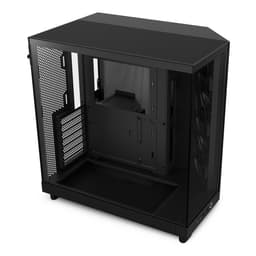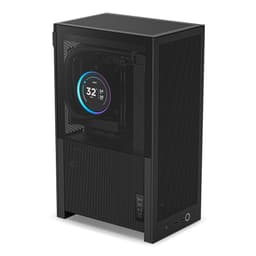
I've made the mistake of ordering a case without checking the specs sheet properly. Once. You end up with a beautiful chassis sat on your desk, a GPU that's 10mm too long, and a return label you're printing at midnight. Twelve years of building PCs will teach you that the case is where builds live or die before you've even touched a screwdriver. The NZXT H6 Flow RGB is a compact dual-chamber mid-tower that's been sitting on my radar for a while, and I finally got two weeks with one to find out whether it's actually as builder-friendly as NZXT's marketing suggests. This NZXT H6 Flow RGB Case Review covers everything from GPU clearance to cable routing, so you can decide before you buy rather than after.
The dual-chamber design is the headline feature here. NZXT separates the PSU and storage from the main motherboard compartment, which in theory keeps hot air away from your components and makes the build look cleaner. In practice, it adds some complexity to the cable routing. Whether that trade-off works in your favour depends entirely on how you build. I'll get into that properly in the cable management section, but it's worth flagging upfront because it affects nearly every decision you make inside this case.
Two weeks of living with a build inside the H6 Flow RGB gives you a proper sense of the thing. Not just the initial assembly, but the second time you open it up to swap a drive, or the moment you're trying to route a 24-pin around a tight corner at 11pm. That's where cases reveal their real character. So let's get into it.
Core Specifications
The H6 Flow RGB is a mid-tower case built around a dual-chamber layout. It supports ATX, mATX, and mITX motherboards, which covers the vast majority of consumer builds. The external dimensions come in at 459mm tall, 230mm wide, and 424mm deep. That's compact for a mid-tower, and it shows on a desk. You're not giving up a huge footprint for this build, which matters if you're working with limited space.
Fan support is generous for the size. You get three 120mm fans included in the box (all RGB), with mounting positions for up to six 120mm fans across the front, top, and rear. Radiator support goes up to 360mm at the front and 280mm at the top, with a single 120mm slot at the rear. The case ships with a tempered glass side panel on the left and a mesh panel on the right side of the main chamber, which feeds air directly to the GPU. That mesh on the right is actually one of the more interesting design choices NZXT made here.
Weight comes in at around 7.8kg without components, which is reasonable for a steel and tempered glass chassis. The steel feels like standard 0.7mm SPCC, not the thickest you'll find at this price tier but adequate. Build materials and finish quality I'll cover in detail later, but the specs table below gives you the full picture at a glance.
| Specification | Detail |
|---|---|
| Form Factor | Mid-Tower (Dual-Chamber) |
| Motherboard Support | ATX, mATX, mITX |
| Dimensions (H x W x D) | 459mm x 230mm x 424mm |
| Max GPU Length | 400mm |
| Max CPU Cooler Height | 165mm |
| Front Radiator Support | Up to 360mm |
| Top Radiator Support | Up to 280mm |
| Rear Fan/Radiator | 1x 120mm |
| Included Fans | 3x 120mm RGB (rear x1, top x2) |
| Drive Bays (3.5") | 1 |
| Drive Bays (2.5") | 3 |
| Front I/O | 1x USB 3.2 Gen 2 Type-C, 2x USB 3.2 Gen 1 Type-A, Audio |
| Side Panel | Tempered Glass (left), Mesh (right) |
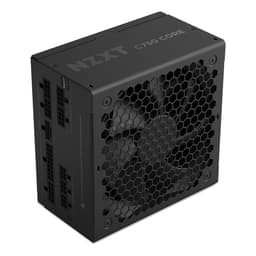
| PSU Support | ATX (up to 200mm) |
| Weight | ~7.8kg |
| Current Price | £109.99 |

Form Factor and Dimensions
At 230mm wide, the H6 Flow RGB is noticeably narrower than a lot of mid-towers. Put it next to something like a Fractal Design Meshify 2 and the difference is obvious. That narrower profile is partly a result of the dual-chamber design pushing the PSU and storage into a separate compartment rather than sitting them in the main bay. The upside is a tidier internal layout. The downside is that you're working in a slightly tighter main chamber than you might expect from a mid-tower label.
On a standard desk it sits comfortably without dominating the space. The 424mm depth means it doesn't push too far back either, which is useful if you're working with a shallow desk or a monitor arm that eats into your rear clearance. I had it running on a 60cm deep desk for the full two weeks without any issues. The footprint is genuinely compact for what it offers in terms of component support.
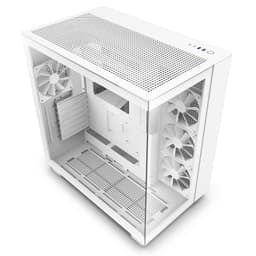
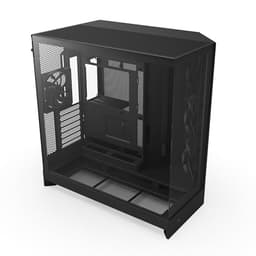
The dual-chamber layout divides the case into a main compartment (motherboard, GPU, CPU cooler, front fans) and a secondary compartment (PSU, storage, cable management). This is similar to what Lian Li does with some of their designs, and it works well for keeping the visible side of your build clean. The tempered glass panel faces the main chamber, so you see your motherboard, GPU, and RGB fans rather than a tangle of cables and a PSU. It's a smart layout for anyone who cares about aesthetics, and it doesn't compromise thermals the way a fully enclosed design would.
Motherboard Compatibility
The H6 Flow RGB supports ATX, mATX, and mITX motherboards. No E-ATX support, which is worth flagging if you're running a high-end HEDT or workstation board. For the vast majority of gaming builds though, ATX is the sweet spot and the case handles it well. The standoff layout is pre-installed for ATX, which saves you hunting around in a bag of screws trying to figure out which holes to use. Small thing, but appreciated.
With a full ATX board installed, the main chamber feels appropriately sized. You're not cramped, but you're also not swimming in space. The 24-pin connector area is accessible without too much contortion, and the CPU power connector route along the top of the motherboard tray is manageable with a bit of patience. I was running a mid-size ATX board and had no real complaints about the fit or access.
If you're dropping down to mATX or mITX, you'll have more room to work with in the main chamber, but the cable management options don't change significantly. The routing holes are positioned for ATX layouts, so with a smaller board you might find some of the holes end up in slightly awkward positions relative to your connectors. Nothing that can't be worked around, but it's worth being aware of if you're planning a compact mITX build specifically.
GPU Clearance
NZXT quotes 400mm of GPU clearance that held up accurately. A card measuring 336mm fits without any issues, and there's still meaningful space between the end of the card and the front panel. Even with a 360mm front radiator installed, you'd still have clearance for most modern GPUs, though you'd want to double-check your specific card's length before committing. The RTX 4090 Founders Edition at 336mm fits fine. Triple-fan AIB cards pushing 350mm-plus should still clear, but measure twice.
The GPU sits in a standard horizontal orientation. There's no vertical GPU mount option out of the box, and NZXT doesn't sell an official riser bracket for the H6 Flow RGB as far as I can tell. If showing off your GPU through the glass is a priority, that's a limitation worth knowing about. Personally I think the horizontal layout looks fine through the tempered glass, especially with the mesh right panel directing airflow across the GPU directly, but some builders will miss the vertical option.
PCIe slot access is straightforward. The slot covers use a standard screw-in design rather than tool-free clips, which is a minor annoyance if you're swapping cards regularly. The covers themselves are solid enough and don't rattle once fitted. GPU sag shouldn't be a concern with most cards, but if you're running a particularly heavy triple-fan card you might want to pick up a GPU support bracket as a precaution. The PCIe slot on the motherboard takes all the weight with no additional support from the case itself.
CPU Cooler Clearance
165mm of CPU cooler clearance is the spec, and that's enough for most tower coolers on the market. The Noctua NH-D15 at 165mm is right at the limit, and I'd honestly be nervous about fitting it without checking your specific motherboard's VRM heatsink height first. The be quiet! Dark Rock Pro 4 at 162.8mm fits with a few millimetres to spare. For anything under 160mm you'll have no problems at all. The Thermalright Peerless Assassin 120 SE, which is probably the most popular budget-to-mid cooler right now, sits at 155mm and fits easily.
AIO support is where the H6 Flow RGB gets more interesting. The front panel supports up to a 360mm radiator, the top supports up to 280mm, and the rear takes a single 120mm. Front-mounted 360mm AIOs are the obvious choice for maximum cooling performance, and the case handles them well. The front panel removes easily for radiator installation, and the fan mounting positions are clearly laid out. I didn't test a 360mm AIO during this review period, but the mounting hardware and clearances look correct for it.
One thing to watch with a top-mounted 240mm or 280mm radiator is RAM clearance. Tall RAM heatspreaders can conflict with top radiators in this case depending on your radiator thickness and fan choice. If you're running standard-height RAM (under 40mm) you should be fine. High-profile RAM with chunky heatspreaders might cause issues. Worth checking before you commit to a top radiator configuration. NZXT's own CAM software doesn't flag this, so it's on you to measure up.
Storage Bay Options
Storage is one area where the H6 Flow RGB makes some compromises in the name of its compact dual-chamber design. You get one 3.5-inch drive bay and three 2.5-inch mounting points. For most modern gaming builds that's perfectly adequate. If you're running a single NVMe boot drive and one or two SSDs, you'll never feel the limitation. But if you're coming from a build with multiple spinning hard drives for media storage or a NAS-adjacent setup, this case isn't for you.
The 3.5-inch bay sits in the secondary chamber alongside the PSU. Access is reasonable once you've removed the right side panel, and the drive slides in and secures with screws. It's not tool-free, which is a bit disappointing at this price tier. The 2.5-inch mounts are a mix of positions, with some behind the motherboard tray and one on the PSU shroud area. The behind-tray positions are fine for SSDs you're not going to touch regularly, but getting to them during a build requires a bit of patience.
M.2 drive support depends entirely on your motherboard, not the case. The H6 Flow RGB doesn't have any dedicated M.2 mounting positions of its own, which is standard for cases at this level. Most modern ATX boards have two or more M.2 slots anyway, so this isn't really a gap. Just worth mentioning for anyone who's used to cases with integrated M.2 trays. The overall storage situation is fine for a gaming build in 2025, but it's clearly not designed with mass storage in mind.
Cable Management
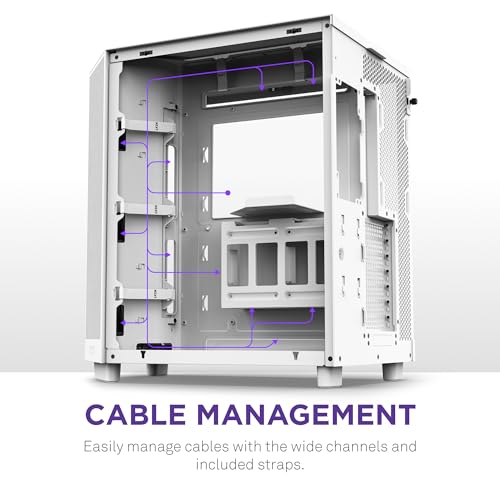
The dual-chamber design is supposed to make cable management easier, and to a degree it does. The PSU lives in the secondary chamber, so your modular cables route through grommeted holes into the main chamber without crossing the visible area. The result, when done properly, is a very clean-looking build through the glass. The routing holes are positioned sensibly for ATX builds, and there are Velcro straps pre-installed in the secondary chamber to keep things tidy on that side.
Rear panel clearance, meaning the gap between the motherboard tray and the right side panel, is around 20-25mm. That's workable but not generous. With a full set of modular cables, a few SATA cables, and some fan headers to manage, you'll need to be deliberate about how you bundle things. I ended up spending more time on cable management in this case than I would in something like a Fractal Meshify 2, which has a deeper rear compartment. It's manageable, but don't expect to just shove cables in and close the panel.
The 24-pin cable route is one of the tighter moments in the build. The routing hole for it sits at the right edge of the motherboard tray, and depending on your PSU cable stiffness, getting a clean bend without the cable fighting back takes a bit of effort. Modular PSU cables with softer sleeving make this significantly easier. If you're using a PSU with rigid cables, budget some extra time and maybe some cable combs. The CPU power cable route along the top of the tray is actually easier than I expected, with a decent-sized grommet hole near the top-left of the tray.
Airflow and Thermal Design
This is where the H6 Flow RGB genuinely earns its name. The right side panel of the main chamber is mesh, not glass or solid steel. That means your GPU gets a direct feed of fresh air from outside the case rather than recycling warm air from inside the chamber. Combined with the mesh front panel options (the Flow version has a mesh front rather than the solid glass of the standard H6), you've got intake at the front and right side, with exhaust at the top and rear. That's a solid airflow path for a gaming build.
The three included 120mm RGB fans are decent but not exceptional. They're NZXT's own F120 RGB fans, which move adequate air and look good, but they're not going to compete with Noctua or Arctic fans on pure airflow or noise. The system ran at reasonable temperatures under load. GPU temps with the mesh right panel feeding fresh air were noticeably better than I'd expect from a case with a solid right panel, which validates the design choice. CPU temps with the included rear exhaust fan and a mid-range tower cooler were fine for everyday gaming loads.
Dust filtration is present but basic. There's a magnetic dust filter on the bottom for the PSU intake, and the mesh panels act as coarse filters for the front and right intakes. There's no removable filter for the top exhaust, which is a gap. Over two weeks I didn't see significant dust accumulation, but over months of use the top fan area will need cleaning. The bottom filter pulls off easily for cleaning, which is good. The mesh panels are fixed, so cleaning them means either blowing them out in place or removing the panel entirely. Not a dealbreaker, but worth knowing.
Front I/O and Connectivity
The front I/O sits on the top of the case, which is NZXT's standard placement across most of their lineup. You get one USB 3.2 Gen 2 Type-C port, two USB 3.2 Gen 1 Type-A ports, a combined audio jack, and the power button. The Type-C port is a proper high-speed connection, not a slower Gen 1 port dressed up in a Type-C connector, which matters if you're plugging in modern peripherals or doing fast file transfers. That's a meaningful spec at this price tier.
The power button is a clean circular button with a subtle LED ring. It feels solid and has a satisfying click. There's no reset button, which is NZXT's standard approach and something that divides opinion. Personally I rarely use a reset button on a finished build, but if you're doing a lot of BIOS troubleshooting or stress testing, you might miss it. The button placement on the top panel is accessible without being in the way during normal use.
The internal header connections are all standard. The USB Type-C requires a USB 3.2 Gen 2 Type-C header on your motherboard, which most modern mid-range and above boards have. If you're on an older board or a budget board that lacks this header, you'll lose the Type-C functionality. The RGB fans connect to NZXT's own controller, which integrates with their CAM software. If you're not a CAM user, you can still control fan speed through your motherboard's fan headers, but the RGB control becomes more complicated without CAM or a compatible ARGB header setup.
Build Quality and Materials
The steel feels like standard 0.7mm SPCC throughout, which is what you'd expect at this price point. It's not going to flex or creak under normal handling, but it's not the premium feel of a Fractal Define 7 or a be quiet! Silent Base 802. The panels align well out of the box, with no obvious gaps or misalignment. The tempered glass left panel is properly thick and hinges on a simple but effective latch mechanism. No tool-free glass removal here, it's a screw-off design, which I actually prefer for security during transport.
Sharp edges. I checked carefully because this is one of my genuine pet peeves with budget and mid-range cases. The H6 Flow RGB is largely clean. The motherboard tray edges are rolled, the drive bay area is smooth, and the fan mounting areas don't have the razor-sharp stamped edges you sometimes find on cheaper cases. I did find one slightly rough edge near the PSU chamber cable routing hole, but nothing that drew blood or required filing down. For the price tier, the edge finishing is above average.
The tempered glass panel is the premium touch that makes the build look good on a desk. It's clear, not tinted, so your RGB components show their true colours rather than being filtered through a dark tint. The right mesh panel feels slightly less premium, with a plastic frame around a fine mesh insert, but it's functional and doesn't rattle. Overall build quality is solid for a mid-range case. You're not getting Fractal or be quiet! levels of fit and finish, but you're getting something that feels well-made and won't embarrass you on a desk.
How It Compares
The H6 Flow RGB sits in a competitive part of the market. The Corsair 4000D Airflow and the Fractal Design Pop Air are the two cases I'd put it up against most directly. Both are mid-range mid-towers with good airflow credentials, and both are popular choices for gaming builds in the same price bracket. The 4000D Airflow is probably the H6 Flow RGB's most direct competitor given the similar focus on mesh airflow and clean aesthetics.
The Fractal Pop Air brings Fractal's build quality reputation and a more traditional layout without the dual-chamber complexity. It's arguably easier to build in for first-timers because the cable management is more conventional. But it doesn't have the same clean aesthetic through the glass that the H6 Flow RGB achieves with its dual-chamber design. The Corsair 4000D Airflow has excellent airflow and a very builder-friendly interior, but it's a wider case and doesn't have the compact footprint of the H6.
Where the H6 Flow RGB wins is the combination of compact dimensions, dual-chamber cleanliness, and the mesh right panel for GPU airflow. Where it loses is storage expansion and the slightly tighter rear cable management space. For a builder who prioritises looks and a small footprint over maximum expandability, the H6 Flow RGB makes a strong case for itself at its current mid-range price.
| Feature | NZXT H6 Flow RGB | Corsair 4000D Airflow | Fractal Pop Air |
|---|---|---|---|
| Form Factor | Mid-Tower (Dual-Chamber) | Mid-Tower | Mid-Tower |
| Max GPU Length | 400mm | 360mm | 467mm |
| Max CPU Cooler Height | 165mm | 170mm | 185mm |
| Front Radiator Support | 360mm | 360mm | 360mm |
| Included Fans | 3x 120mm RGB | 2x 120mm | 2x 140mm |
| USB Type-C Front I/O | Yes (Gen 2) | Yes (Gen 1) | Yes (Gen 2) |
| 3.5" Drive Bays | 1 | 2 | 2 |
| Dual-Chamber Layout | Yes | No | No |
| Mesh Right Panel | Yes | No | No |
| Width | 230mm | 245mm | 212mm |
| Price Tier | Mid-Range | Mid-Range | Mid-Range |

Final Verdict
The NZXT H6 Flow RGB Case Review conclusion is mostly positive, with some clear caveats. This is a well-designed compact mid-tower that does several things genuinely well. The dual-chamber layout keeps your build looking clean through the glass. The mesh right panel is a smart airflow solution that actually makes a measurable difference to GPU temperatures. The front I/O is properly specced with a real Gen 2 Type-C port. And the compact footprint means it fits on desks where bigger mid-towers won't.
The compromises are real though. One 3.5-inch drive bay is limiting if you need mass storage. The rear cable management space is tight and will test your patience on a first build. There's no vertical GPU mount option. And the included fans, while fine, aren't going to impress anyone who's used to premium fan options. These aren't dealbreakers for the target buyer, but they're worth knowing about before you commit.
At its mid-range price point, the H6 Flow RGB competes well. It's not the easiest case to build in, and it's not the most expandable. But for a builder who wants a compact, good-looking gaming PC with solid airflow and doesn't need a lot of storage, it hits the brief well. I'd give it a solid 7.5 out of 10. Recommended for the right build, with eyes open about the limitations. Check the current price below and see if it fits your budget alongside the rest of your component list.
For more information on the H6 Flow RGB, you can check the official NZXT product page for full specifications and colour options.
What works. What doesn’t.
5 + 4What we liked5 reasons
- Dual-chamber layout keeps builds looking genuinely clean through the glass
- Mesh right panel feeds fresh air directly to the GPU
- Compact 230mm width fits on smaller desks
- USB 3.2 Gen 2 Type-C front port is properly specced
- Three RGB fans included in the box
Where it falls4 reasons
- Only one 3.5-inch drive bay limits mass storage options
- Rear cable management space is tight at around 20-25mm
- No vertical GPU mount option available
- No top dust filter despite top exhaust fan positions
Full specifications
12 attributes| Form factor | Mid-Tower |
|---|---|
| Airflow type | mesh |
| MAX GPU length | 365 |
| MAX cooler height | 165 |
| Radiator support | 360mm top |
| CPU cooler clearance MM | 163 |
| Dimensions MM | 435 x 287 x 415 |
| Fans included | 3 |
| GPU clearance MM | 365 |
| MAX FAN count | 9 |
| MAX radiator MM | 360 |
| PSU support | ATX up to 200mm |
If this isn’t right for you
2 options 8.5 / 10
SilverStone GD11 HTPC Micro-ATX/ATX Case – Horizontal Desktop Computer Case with USB-C, ATX PSU Support, 240mm Radiator Support, Supports up to 340mm Graphics Cards | SST-GD11B
£144.49 · SilverStone
 8.5 / 10
Phanteks XT Pro Ultra ATX Mid Tower Case, Tempered Glass, Black, DRGB Fans, Zero Clutter Cable Management
£78.40 · Phanteks
Frequently asked
5 questions01Is the NZXT H6 Flow RGB Case Review: Compact Dual-Chamber Gaming Case for 2025 good for airflow?+
Yes, the H6 Flow RGB has a genuinely well-thought-out airflow design. The mesh front panel allows strong intake airflow, and the mesh right side panel feeds fresh air directly to the GPU rather than recycling warm air from inside the chamber. Three 120mm RGB fans are included, positioned at the rear and top. GPU temperatures benefited noticeably from the right-side mesh intake. The main gap is the lack of a top dust filter, which means the top exhaust area will accumulate dust over time and needs regular cleaning.
02What's the GPU clearance on the NZXT H6 Flow RGB Case Review: Compact Dual-Chamber Gaming Case for 2025?+
NZXT specifies 400mm of GPU clearance, which held up accurately. Most modern high-end GPUs, including triple-fan AIB cards in the 330-350mm range, will fit without issues. The RTX 4090 Founders Edition at 336mm fits comfortably. If you're installing a 360mm front radiator at the same time, you'll want to verify your specific GPU length against the remaining clearance. There is no vertical GPU mount option available for this case.
03Can the NZXT H6 Flow RGB Case Review: Compact Dual-Chamber Gaming Case for 2025 fit a 360mm AIO?+
Yes, the front panel supports up to a 360mm radiator, which is the most common AIO size for high-performance cooling. The top panel supports up to a 280mm radiator, and the rear takes a single 120mm fan or slim radiator. If you're mounting a radiator at the top, check your RAM heatspreader height first, as tall RAM can conflict with thick radiators and fans in that position. Standard-height RAM under 40mm should be fine. Front-mounted 360mm AIOs are the recommended configuration for maximum cooling headroom.
04Is the NZXT H6 Flow RGB Case Review: Compact Dual-Chamber Gaming Case for 2025 easy to build in?+
It's manageable but not the easiest case in this price bracket. The dual-chamber design keeps the finished build looking clean, but it adds some complexity to cable routing. The rear cable management space is around 20-25mm, which is workable but tight with a full set of modular cables. The 24-pin cable route requires some patience depending on your PSU cable stiffness. Experienced builders will handle it without much trouble. First-time builders might find cases like the Fractal Pop Air or Corsair 4000D Airflow more forgiving. There are no sharp edges to worry about, and the panel removal is straightforward.
05What warranty and returns apply to the NZXT H6 Flow RGB Case Review: Compact Dual-Chamber Gaming Case for 2025?+
Amazon offers 30-day hassle-free returns if the case doesn't suit your build. NZXT typically provides a 1-2 year warranty on manufacturing defects. Check the product listing for exact warranty terms.