
Contents 10 sections
The AMD Ryzen 9 7900X is a formidable 12-core, 24-thread processor that demands a motherboard worthy of its capabilities. With a 170W TDP, up to 5.6 GHz max boost, and 76MB of cache, this AM5 socket chip pairs beautifully with modern B850, X670E, and B650 boards. Whether you're building a gaming rig, content creation workstation, or all-purpose powerhouse, the right motherboard will unlock the full potential of your 7900X. Here are the best AM5 options available as of 2026-04-30, ranked with a focus on VRM stability, feature set, and real-world value.
Quick Picks
- Best Overall: MSI MAG B850 TOMAHAWK MAX WIFI (B0DPKVF29H) - Our top choice for most builders.
- Best Budget: ASUS TUF GAMING B850-PLUS WIFI (B0DP5DQPRC) - Proper value with 14+2+1 power stages, Wi-Fi 7 and three M.2 slots.
AMD Ryzen 9 7900X Processor Compatibility Notes
The Ryzen 9 7900X uses the AM5 socket and is compatible with five chipset families: X670E, X670, B850, B650E, and B650. All boards in this guide support the 7900X out of the box or with a BIOS update. B850 is the newest chipset and offers the best feature-to-price ratio, including Wi-Fi 7 and PCIe 5.0 support. X670E boards provide maximum overclocking headroom and additional PCIe lanes if you need them. B650 and B650E remain solid choices if you find them at a discount. A620 is compatible but lacks features like PCIe 5.0, so we've excluded it from this roundup.
MSI MAG B850 TOMAHAWK MAX WIFI: Best Overall
The MSI MAG B850 TOMAHAWK MAX WIFI is the standout choice for most Ryzen 9 7900X builders. This ATX board delivers an 80A SPS VRM with solid power delivery for stock and moderate overclocking. The 7900X's 170W TDP is handled with ease, and the board's thermal design keeps VRM temperatures in check even under sustained loads.
What makes this board special is its feature density at a competitive price. You get Wi-Fi 7 for future-proof wireless connectivity, PCIe 5.0 x16 for next-gen graphics cards, and a PCIe 5.0 M.2 slot for blazing-fast NVMe drives. DDR5 memory support goes up to 8400+ MT/s (OC), giving you headroom for fast kits. The board includes three M.2 slots total, so you can run multiple drives without compromise. Connectivity is comprehensive: 5G LAN for wired networking, USB 3.2 Gen 2x2 Type-C, and plenty of USB headers for case expansion.
The BIOS is intuitive, and MSI's support for Ryzen 7000 series is rock solid. The only minor drawback is that it's not an X870E board, so you miss out on some bleeding-edge features like PCIe 5.0 x4 for secondary M.2 slots. For the vast majority of users, though, this is a non-issue. The board is also available at £259.99, making it exceptional value.
ASUS TUF GAMING B850-PLUS WIFI: Best Budget
If you're watching your budget, the ASUS TUF GAMING B850-PLUS WIFI is a no-brainer. The 14+2+1 80A DrMOS power stages are more than adequate for the 7900X, and ASUS's thermal management keeps the VRM cool under load.
The TUF GAMING B850-PLUS doesn't skimp on features. Wi-Fi 7 is included, which is impressive at this price point. PCIe 5.0 support is ready for future graphics cards and NVMe drives. You get three M.2 slots, with at least one supporting PCIe 5.0, so you're not bottlenecked for storage expansion. The board includes Realtek 2.5Gb Ethernet for wired connectivity, USB 20Gbps Type-C, and ASUS's Aura Sync RGB ecosystem for lighting control.
ASUS TUF boards are known for durability and reliability, and this one lives up to the reputation. The board supports DDR5 memory and handles overclocking well, though it's not quite as aggressive as higher-end models. The main trade-off versus pricier boards is fewer M.2 slots (three instead of four) and no 10G LAN. For gaming and general productivity, you won't notice the difference. At £182.51, this is genuine value.
ASUS ROG Strix B850-A Gaming WiFi
The ASUS ROG Strix B850-A Gaming WiFi is a well-rounded ATX board for the 7900X.
The ROG Strix B850-A features 14+2+2 power stages, which is solid for the 7900X's power requirements. The board handles both stock and overclocked scenarios without thermal issues. DDR5 support is comprehensive, and the board supports high-speed kits for memory-intensive workloads. Where this board shines is in connectivity and expansion: four M.2 slots give you plenty of storage options, and PCIe 5.0 support ensures future-proofing.
Wi-Fi 7 and USB 20Gbps Type-C are standard, and ASUS's Aura Sync RGB ecosystem lets you synchronise lighting across your entire build. The BIOS is user-friendly, and ASUS's post-launch support for Ryzen 7000 series has been excellent. The main reason this ranks below the TOMAHAWK MAX WIFI is price: at £199.99, it costs a bit more.
Gigabyte B850 AI TOP: Best for AI Features
The Gigabyte B850 AI TOP is a unique offering that brings AI-focused features to the mid-range. This ATX board supports AMD Ryzen 9000 series processors and is fully compatible with the 7900X. The 16+2+2 phases digital VRM provides robust power delivery, and DDR5 support extends to 8600MHz (OC), which is impressive for enthusiasts chasing memory performance.
The AI TOP includes Gigabyte's AI-enhanced BIOS features, which can help optimise performance and stability automatically. The board has two PCIe 5.0 M.2 slots plus one PCIe 4.0 slot, giving you flexibility for multiple high-speed drives. 10G LAN is included, which is a nice touch for content creators and network-heavy workloads. Wi-Fi 7 rounds out the connectivity story.
At £364.99, the B850 AI TOP sits in the mid-range price-wise. It's a solid choice if you want modern features and don't mind paying a bit extra for Gigabyte's AI optimisations. Gigabyte's support for Ryzen 7000 series has been reliable, so you shouldn't worry about BIOS stability.
MSI MEG X670E ACE: Best for Extreme Overclocking
For those who want maximum performance headroom, the MSI MEG X670E ACE is the ultimate choice. This E-ATX board is built for extreme overclocking and professional workloads. The 22 Duet Rail 90A power stages are overkill for the 7900X at stock settings, but they give you enormous headroom for pushing the chip to its limits.
The X670E ACE includes three PCIe 5.0 x16 slots, which is exceptional for multi-GPU setups or high-end graphics cards. DDR5 memory support extends to 6666+ MHz (OC), and the board's power delivery is stable even under extreme tuning. 10G LAN is included for content creators and professionals, and Wi-Fi 6E provides wireless connectivity.
The main drawback is price: at Check price, this board costs significantly more than B850 alternatives. You're paying for the extra PCIe lanes, the extreme VRM, and the prestige of the MEG lineup. For most users, the TOMAHAWK MAX WIFI offers better value. However, if you're building a high-end workstation or planning to push your 7900X hard, the X670E ACE is worth the investment.
Socket check: every board here against the Ryzen 9 7900X
Each row is that board's socket, from its chipset in our table and its listing, against the socket the guide states for your processor.
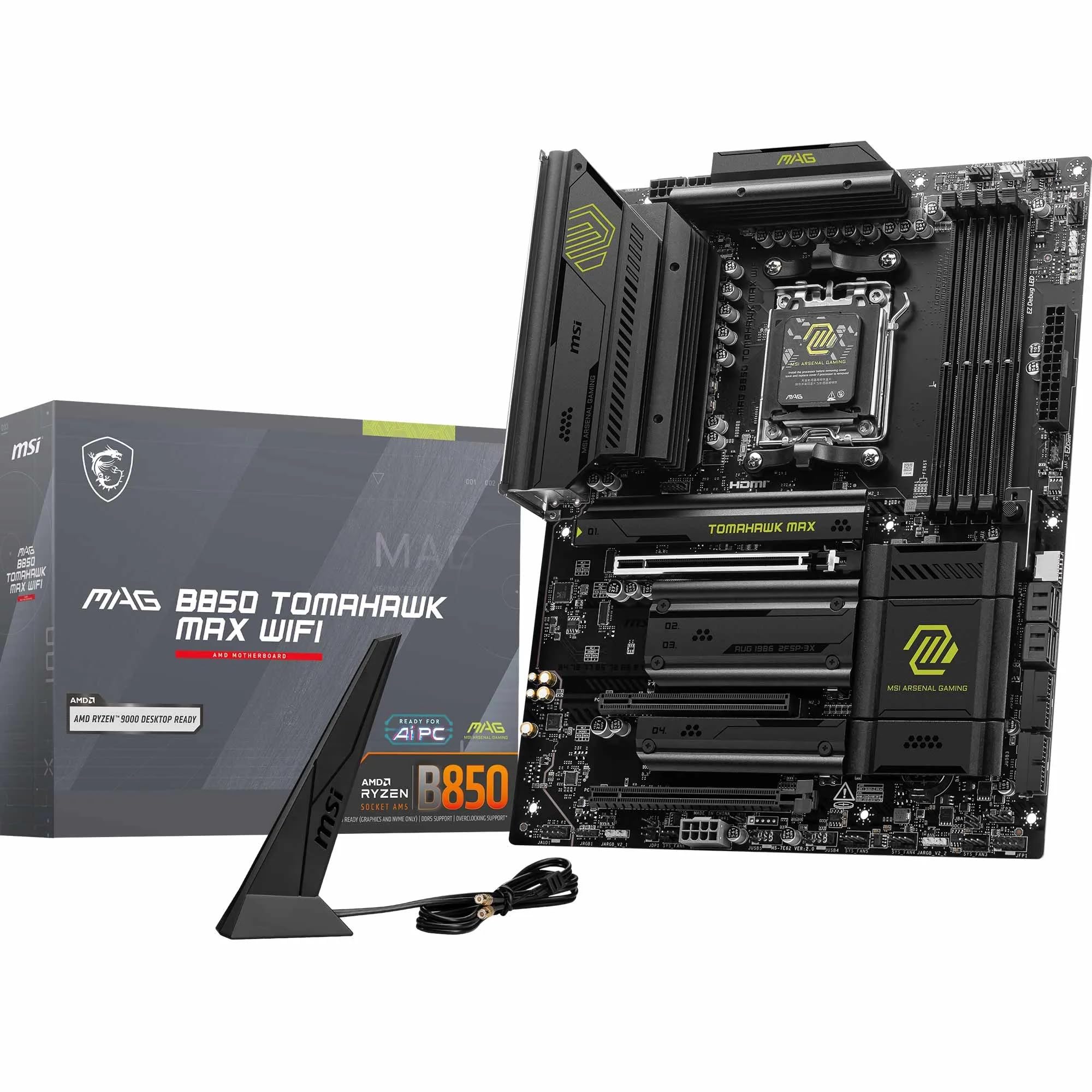 MSI MAG B850 Tomahawk Max WiFiMSI MAG B850 TOMAHAWK MAX WIFI
- Chipset
- B850
- Form Factor
- ATX
- VRM Phases
- 80A SPS
- Wi-Fi
- Wi-Fi 7
- PCIe 5.0
- Yes (x16 + M.2)
- M.2 Slots
- 3
- Rating
- ★★★★½ (4.7)
Takes it: a B850 board, AM5 socket
DDR5, from the listing
View on Amazon · B850, Wi-Fi 7, 5G LANPrice: £259.99
· Details ASUS TUF Gaming B850-Plus WiFiASUS TUF GAMING B850-PLUS WIFI
- Chipset
- B850
- Form Factor
- ATX
- VRM Phases
- 14+2+1 80A
- Wi-Fi
- Wi-Fi 7
- PCIe 5.0
- Yes (x16 + M.2)
- M.2 Slots
- 3
- Rating
- ★★★★½ (4.5)
Takes it: a B850 board, AM5 socket
DDR5, from the listing
View on Amazon · B850, Wi-Fi 7, three M.2 slotsPrice: £182.51
· Details ASUS ROG Strix B850-A Gaming WiFiASUS ROG Strix B850-A Gaming WiFi
- Chipset
- B850
- Form Factor
- ATX
- VRM Phases
- 14+2+2
- Wi-Fi
- Wi-Fi 7
- PCIe 5.0
- Yes (x16 + M.2)
- M.2 Slots
- 4
- Rating
- ★★★★½ (4.6)
Takes it: a B850 board, AM5 socket
DDR5, from the listing
View on Amazon · B850, four M.2 slots, Wi-Fi 7Price: £199.99
· Details Gigabyte B850 AI TopGigabyte B850 AI TOP
- Chipset
- B850
- Form Factor
- ATX
- VRM Phases
- 16+2+2
- Wi-Fi
- Wi-Fi 7
- PCIe 5.0
- Yes (2x M.2)
- M.2 Slots
- 3
- Rating
- ★★★½☆ (3.8)
Takes it: a B850 board, AM5 socket
DDR5, from the listing
View on Amazon · B850, 16+2+2 phase VRM, Wi-Fi 7Price: £364.99
· Details MSI MEG X670E ACEMSI MEG X670E ACE
- Chipset
- X670E
- Form Factor
- E-ATX
- VRM Phases
- 22 Duet Rail 90A
- Wi-Fi
- Wi-Fi 6E
- PCIe 5.0
- Yes (3x x16 + M.2)
- M.2 Slots
- 3
- Rating
- ★★★★☆ (4.1)
Takes it: a X670E board, AM5 socket
DDR5, from the listing
Check availability on Amazon
Final Verdict
The AMD Ryzen 9 7900X deserves a motherboard that matches its performance credentials, and you've got excellent options across multiple price points. The MSI MAG B850 TOMAHAWK MAX WIFI is our top pick. If you're budget-conscious, the ASUS TUF GAMING B850-PLUS WIFI is a genuine bargain that doesn't compromise on features or reliability. Mid-range enthusiasts should consider the Gigabyte B850 AI TOP for its AI-focused features and 10G LAN, whilst extreme overclockers will appreciate the MSI MEG X670E ACE's exceptional power delivery and PCIe 5.0 lanes. Whichever board you choose, you're getting a platform that will keep your 7900X running cool, stable, and ready for years of gaming, content creation, and productivity.
Frequently Asked Questions
Is the AMD Ryzen 9 7900X compatible with B850 motherboards?
Yes, absolutely. The Ryzen 9 7900X uses the AM5 socket and works with B850, B650E, B650, X670E, X670, and A620 chipsets. B850 boards offer the latest features like Wi-Fi 7 and PCIe 5.0 at a reasonable cost.
Do I need an X870E or X870 motherboard for the 7900X?
No. The 7900X performs brilliantly on B850 and X670E boards. X870E/X870 are newer and pricier but don't offer meaningful performance gains for this CPU. Choose B850 or X670E unless you specifically need the latest chipset features.
What VRM power stage count do I need for the Ryzen 9 7900X?
The 7900X has a 170W TDP, so 14+2+1 or better is solid for stock and moderate overclocking. If you plan aggressive tuning, aim for 16+ phases. All boards in this guide exceed the minimum requirement.
Should I prioritise Wi-Fi 7 or 10G LAN?
Wi-Fi 7 is useful if you game or stream wirelessly. 10G LAN is overkill for most users but future-proofs your setup. Most B850 boards include Wi-Fi 7; X670E models often have 10G LAN. Pick based on your actual network needs.
How many M.2 slots do I really need?
Three M.2 slots is plenty for most builds: OS drive, game library, and one spare. Four slots (like the ROG Strix B850-A) offer flexibility for content creators. Ensure at least one slot supports PCIe 5.0 for future NVMe drives.
Keep reading
 Comparisonmotherboard
Best Motherboards for content creation
 Comparisonmotherboard
Best Motherboards for overclocking
 Comparisonmotherboard
Best Motherboards for budget builds
 Comparisonmotherboard
Best Motherboards for gaming
 Comparisonmotherboard
Best ASRock Motherboards
 Comparisonmotherboard
Best Motherboards Money Can Buy