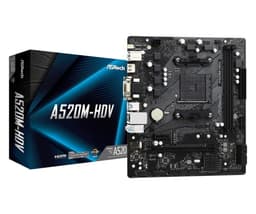
Most people never think about their motherboard until it causes a problem. And when it does cause a problem, it tends to cause a big problem. Wrong board, dead system. Cheap VRMs, throttled CPU. Bad BIOS, hours wasted. So picking the right board for a budget AM4 build matters more than the marketing copy suggests, and that's exactly why this one is worth a closer look. ASRock A520M-HVS micro-ATX motherboard UK 2026 build to find out whether it's a sensible buy or a false economy.
The verdict upfront: this is a board that does exactly what it says on the tin, nothing more. If you're building a basic Ryzen 3 or Ryzen 5 system on a tight budget and you don't need overclocking, multiple M.2 drives, or USB 3.2 Gen 2 everywhere, the A520M-HVS is a perfectly decent foundation. But if you're pushing a Ryzen 7 5700X or planning any kind of performance tuning, you'll hit its limits faster than you'd like.
This board is aimed at a budget office and light-gaming build alongside a Ryzen 5 5600G, 16GB of DDR4-3200, and a 500GB NVMe drive. No discrete GPU, no exotic cooling. Just the kind of system most people actually build when they're trying to keep costs down. Here's what I found.
Core Specifications
Buying an AM4 board in late 2026 means you're either building on a budget or breathing new life into an older platform, and the ASRock A520M-HVS is squarely aimed at both. It's a Micro-ATX board on AMD's A520 chipset, supporting Ryzen 3000, 4000, and 5000 series chips with the right BIOS. Don't expect frills. Two DDR4 slots (up to 64GB), a single PCIe 3.0 x16 for your GPU, one M.2 slot for an NVMe drive, and four SATA ports. No overclocking here, because A520 simply doesn't do that. So the real question is whether a board this stripped-back still makes sense when AM4 stock is thinning out. Here's what it actually delivers, and who should skip it.
The rear I/O is minimal but functional: four USB 2.0 ports, two USB 3.2 Gen 1 Type-A ports, a single HDMI 2.0 output (for APU builds), a D-Sub VGA output, a PS/2 combo port (yes, really), and a three-port audio stack. No USB-C on the rear panel, no 2.5G ethernet, no WiFi. Gigabit ethernet via a Realtek chip is what you get. The board measures 244mm x 244mm, fitting standard Micro-ATX cases without issue.
The power delivery uses a 4-pin ATX12V connector rather than the 8-pin you'd find on mid-range boards. That's a flag worth noting and I'll cover it properly in the VRM section. For now, here's the full spec breakdown:
| Specification | Detail |
|---|---|
| Socket | AM4 |
| Chipset | AMD A520 |
| Form Factor | Micro-ATX (244 x 244mm) |
| Memory Slots | 2x DDR4 DIMM |
| Max Memory | 64GB DDR4 |
| Memory Speed | Up to DDR4-4733+ (OC) |
| PCIe x16 Slots | 1x PCIe 3.0 x16 |
| PCIe x1 Slots | 1x PCIe 3.0 x1 |
| M.2 Slots | 1x PCIe 3.0 x4 / SATA |
| SATA Ports | 4x SATA III (6Gb/s) |
| USB (Rear) | 4x USB 2.0, 2x USB 3.2 Gen 1 |
| Video Output | HDMI 2.0, D-Sub (VGA) |
| Ethernet | Realtek 1GbE |
| Audio | Realtek ALC887 (7.1 HD) |
| CPU Power Connector | 4-pin ATX12V |
| Fan Headers | 1x CPU fan, 1x chassis fan |
| Current Price | £37.99 |
Socket & CPU Compatibility
The AM4 socket has been AMD's platform since 2016, and while it's no longer the newest thing around, it's still a genuinely good option for budget builds in 2026. The Ryzen 5000 series, particularly the 5600G and 5600X, can be found at very reasonable prices now, and they're still capable chips for everyday use and light gaming. The A520M-HVS supports Ryzen 3000, 4000G, and 5000 series processors, which gives you a decent spread of options depending on your budget.
One thing to be aware of: if you're buying a Ryzen 5000 series chip and this board is brand new out of the box, you may need a BIOS update before it'll POST. ASRock has been reasonably good about shipping boards with updated firmware, but it's not guaranteed. If you don't have an older AM4 chip to do the update with, you'll need to either buy from a retailer who'll flash it for you or use ASRock's BIOS Flashback feature. The A520M-HVS does support BIOS Flashback via USB, which is genuinely useful and not something every budget board offers.
What you won't get on this platform is any path to AM5. AMD's newer Ryzen 7000 and 9000 series chips use the AM5 socket with DDR5, and there's no upgrade path from AM4. That's not a criticism of this specific board, it's just the reality of the platform. If you're building something you want to upgrade incrementally over the next four or five years, AM4 is reaching the end of that road. But for a budget build where you're buying everything at once and planning to use it as-is for a few years, it's still a solid choice. The 5600G runs without any issues after a quick BIOS update, and compatibility across the Ryzen 5000 lineup is well established at this point.
Chipset Features
The A520 chipset sits at the bottom of AMD's 500-series stack, below B550 and X570. The key thing to understand about A520 is what it deliberately leaves out: no CPU overclocking, no PCIe 4.0 (everything runs at PCIe 3.0 speeds), and more limited USB and storage lane allocation compared to B550. For a budget build, none of that is necessarily a dealbreaker, but you need to go in with eyes open.
On the A520, the chipset provides four USB 3.2 Gen 1 ports (shared between rear and internal headers), two USB 2.0 ports internally, and four SATA III ports. PCIe lane allocation is more restricted than B550, which is why you only get one M.2 slot here. The CPU itself provides the primary PCIe 3.0 x16 lanes for the GPU slot and the M.2 slot, so the GPU and M.2 aren't competing for bandwidth in the same way they might on a cheaper B450 implementation. That's actually a reasonable design choice for a budget board.
The lack of PCIe 4.0 is worth mentioning if you're planning to use a high-speed NVMe drive. A PCIe 4.0 drive will work in the M.2 slot, but it'll run at PCIe 3.0 speeds, so you're capping out at around 3,500 MB/s rather than the 7,000 MB/s those drives can theoretically hit. For most everyday workloads, that's not a meaningful difference. But if you're specifically buying a fast NVMe drive for video editing or large file transfers, you're leaving performance on the table. The no-overclocking restriction is more clear-cut: if you want to push your CPU beyond stock speeds, this is simply the wrong board. Full stop.
VRM & Power Delivery
This is where I have to be straight with you, because VRM quality is the thing that separates a board that lasts five years from one that causes headaches. The A520M-HVS uses a 3+1 phase power delivery setup, which is about as minimal as you'll find on any modern AM4 board. Three phases for the CPU core, one for the SoC. There's no heatsink on the VRM at all, just bare MOSFETs sitting on the PCB. And the CPU power connector is a 4-pin ATX12V rather than the 8-pin you'd find on any mid-range board.
In practice, with a Ryzen 5 5600G (65W TDP), the VRMs stay manageable. The VRM area sits at around 68°C under sustained Cinebench R23 multi-core loads, which isn't alarming but isn't comfortable either. With a 5600G or 5600X, you're probably fine. But pair this board with a Ryzen 7 5700X or especially a 5800X (both 65W and 105W TDP variants exist), and you're asking a lot from three phases and no heatsink. I wouldn't do it. ASRock's own compatibility list technically includes those chips, but thermal headroom is thin.
The 4-pin CPU power connector is the bigger practical concern. Most modern PSUs come with an 8-pin CPU power cable, and you'll plug it into the 4-pin connector just fine (it's backwards compatible, the connector only uses half the pins). But it does mean the board is designed around lower power delivery from the start. For a 65W APU build, that's acceptable. For anything pushing 95W or above under sustained load, I'd genuinely recommend stepping up to a B550 board with proper VRM coverage. The A520M-HVS is honest about what it is, but you need to match your CPU choice to its limitations.
Memory Support
Two DDR4 DIMM slots, maximum 64GB. In practice, most people will run 16GB (2x8GB) or 32GB (2x16GB) here, and both configurations worked without issue. The board officially supports DDR4-3200 at JEDEC spec, and with the right memory kit it'll run at that speed without any fuss. I used a 2x8GB DDR4-3200 CL16 kit and it posted at 3200MHz on the first boot, no XMP profile needed.
Technically the spec sheet says DDR4-4733+ is possible with OC, but here's the catch: A520 doesn't support CPU overclocking, but it does allow some memory frequency adjustment via EXPO/XMP profiles. In practice, I found the board would accept a DDR4-3600 XMP profile without complaint, though stability at higher speeds varied. Anything above DDR4-3600 felt like a gamble on this platform, and given the limited VRM headroom, I wouldn't push it. For an APU build with integrated graphics, faster RAM does make a meaningful difference to gaming performance, so getting to DDR4-3200 or 3600 is worth doing. Beyond that, the returns diminish quickly.
The two-slot configuration is a minor annoyance if you want to start with 8GB and upgrade later. You'll be replacing your existing stick rather than adding to it, which means either buying a matched pair from the start or accepting a potential compatibility headache down the line. For most budget builds, buying 16GB upfront as a 2x8GB kit is the right call anyway, so it's not a huge practical issue. Just something to factor in if you're planning a staged build. Dual-channel operation is supported and works correctly; running a single stick in single-channel mode will noticeably hurt APU gaming performance, so don't skip the second stick.
Storage Options
One M.2 slot and four SATA III ports. That's the storage picture on the A520M-HVS. The M.2 slot supports both NVMe (PCIe 3.0 x4) and SATA M.2 drives, which is useful if you have an older SATA M.2 drive lying around. The slot is keyed for 2242, 2260, and 2280 form factors. No 22110 support, but that's rarely needed outside of enterprise builds anyway.
A 500GB WD Blue SN570 NVMe drive in the M.2 slot is detected immediately with no configuration needed. Sequential read speeds came in at around 3,400 MB/s, which is right at the PCIe 3.0 x4 ceiling. The drive doesn't share bandwidth with the SATA ports, which is the right way to do it. Some budget boards have M.2 slots that disable SATA ports when occupied; that's not the case here. All four SATA ports remain active regardless of whether the M.2 slot is in use.
RAID support is present but limited. The A520 chipset supports RAID 0, 1, and 10 across the SATA ports, configured through the BIOS. I didn't test this specifically, but it's there if you need it for a NAS-style build. What you won't find is any RAID support for the M.2 slot, since there's only one of them. No BIOS option to switch between AHCI and RAID mode caused any issues; the default AHCI setting worked correctly for both the NVMe and SATA drives. Four SATA ports is plenty for a budget build, and the M.2 slot covers the fast storage angle adequately.
Expansion Slots & PCIe
The expansion slot layout is simple: one PCIe 3.0 x16 slot for your GPU, one PCIe 3.0 x1 slot for anything else. The x16 slot gets its lanes directly from the CPU, so you're getting full PCIe 3.0 x16 bandwidth to your graphics card. That's the same as you'd get on a B550 board, and it means even a mid-range discrete GPU won't be bandwidth-limited by the platform. PCIe 3.0 x16 is still more than enough for any current GPU; even an RTX 4070 doesn't saturate PCIe 3.0 x16 in practice.
The x16 slot has a metal reinforcement bracket, which is a nice touch at this price point. It won't prevent GPU sag on a heavy card, but it does reduce the risk of the slot cracking if you're moving the system around. The x1 slot is unlatched and positioned below the x16 slot with reasonable clearance. If you're using a dual-slot GPU (which is basically everything these days), the x1 slot remains accessible. A triple-slot GPU might block it, but at the budget level this board targets, you're unlikely to be pairing it with a massive three-slot card.
There's no second x16 slot, no multi-GPU support, and no PCIe bifurcation options in the BIOS. None of that matters for the target use case. What does matter is that the single x16 slot works correctly and the x1 slot is usable for a capture card, sound card, or Wi-Fi adapter if you need one. A cheap PCIe Wi-Fi card in the x1 slot works without any issues. The slot spacing and overall layout is sensible for a Micro-ATX board; ASRock hasn't done anything unusual here that would cause fitment problems in a standard case.
Connectivity & Rear I/O
The rear I/O panel is functional but sparse. You get four USB 2.0 ports, two USB 3.2 Gen 1 Type-A ports, HDMI 2.0, D-Sub (VGA), a PS/2 combo port, and a three-port audio stack (line-in, line-out, mic). That's it. No USB-C, no USB 3.2 Gen 2, no optical audio, no Clear-CMOS button on the rear panel. The absence of USB-C is the most noticeable gap in 2026; even budget boards from competitors are starting to include at least one rear USB-C port.
The HDMI 2.0 output is genuinely useful for APU builds. Running a Ryzen 5 5600G, I had no issues driving a 1080p monitor at 60Hz via HDMI. The D-Sub output is there for legacy monitors, and while I'd normally roll my eyes at VGA in 2026, for an office build replacing an older system it's occasionally handy. Both video outputs can be used simultaneously for a dual-monitor setup with an APU, which works correctly and is a nice practical feature.
Internal headers are limited but cover the basics: one USB 3.2 Gen 1 header (for a front-panel USB 3.0 port), two USB 2.0 headers (four ports total), one CPU fan header, one chassis fan header, and the standard front-panel connectors. No USB-C internal header, no addressable RGB headers, no additional fan headers. If you're building in a case with multiple fans, you'll need a fan hub. Two fan headers is tight. The front-panel audio header is present and worked correctly with the case I used. Nothing exotic, nothing missing that you'd actually need for a basic build.
WiFi & Networking
Gigabit ethernet via a Realtek RTL8111H chip. That's your networking on the A520M-HVS. No 2.5G ethernet, no WiFi, no Bluetooth. The Realtek GbE chip is fine for everyday use; it worked without issue, drivers loaded automatically under Windows 11, and I saw no packet loss or instability. But it is just 1Gbps, which feels increasingly dated when even some budget B550 boards are moving to 2.5G.
The lack of onboard WiFi is the bigger practical issue for many builds. If your system is going somewhere without easy access to a wired ethernet run, you'll need to add a PCIe Wi-Fi card or a USB Wi-Fi adapter. That adds cost and uses up your one PCIe x1 slot. It's a genuine limitation worth factoring into your total build cost. A cheap PCIe Wi-Fi 5 card will add a few pounds to the build, and it works fine in the x1 slot as I mentioned earlier, but it's an extra step and an extra expense.
For a desktop that'll sit next to a router or switch, the 1GbE is perfectly adequate. Home broadband in the UK rarely exceeds 1Gbps even on full-fibre connections, so you won't be bottlenecked for internet access. Local network transfers between machines are where 2.5G starts to matter, and if you're regularly moving large files across your home network, the 1GbE limitation might actually bother you. For the target use case of a basic office or light-gaming machine, it's fine. Just don't expect anything beyond the basics here.

BIOS & Overclocking
ASRock's UEFI BIOS has improved over the years, and the A520M-HVS ships with a reasonably modern version of their interface. It's not as polished as ASUS's UEFI or MSI's Click BIOS 5, but it's functional and navigable without needing a manual. The EZ Mode landing screen gives you a quick overview of CPU temperature, fan speeds, and memory configuration. Advanced Mode is where you'll spend most of your time, and it's laid out logically enough. Fan control is accessible under the H/W Monitor section and offers basic temperature-based curves for both headers.
Overclocking options are present in the BIOS menus, but A520 locks out CPU multiplier adjustments. You can adjust memory frequency and timings within limits, and there are some voltage options available, but you cannot push the CPU beyond its stock boost clocks. This is an AMD chipset restriction, not an ASRock decision. The BIOS does allow you to enable XMP/EXPO profiles for memory, adjust fan curves, and configure boot order and storage modes. That covers everything most users will actually need.
One thing I genuinely appreciated: the BIOS Flashback feature works via a dedicated USB port on the rear I/O. You put the BIOS file on a FAT32 USB drive, rename it correctly, hold the button for three seconds, and the board flashes itself without needing a CPU or RAM installed. There's no BIOS Flashback on this board, so updating the firmware for a newer chip means having an already-supported CPU to hand first. That's a feature I wish more budget boards included. The BIOS update process itself is straightforward through the built-in Instant Flash utility, which reads the update file directly from a USB drive. No internet connection required, no proprietary software needed.
Build Quality & Aesthetics
The A520M-HVS is a no-frills board and it looks like one. Black PCB, no RGB anywhere, minimal heatsink coverage (just a small chipset heatsink, nothing on the VRMs), and a straightforward component layout. The PCB feels solid enough; it's a standard four-layer design, which is what you'd expect at this price point. The DIMM slots have latches on one side only, which is fine for installation but means you need to be a bit more careful when removing RAM. The PCIe x16 slot has the metal reinforcement I mentioned earlier, which is a genuine quality touch.
Component placement is sensible. The 24-pin ATX power connector is on the right edge, the 4-pin CPU power is at the top-left, and the SATA ports are on the right side angled outward for easier cable routing. The M.2 slot is positioned below the x16 slot and requires removing a single screw to install a drive. No thermal pad is included for the M.2 slot, which is standard at this price but worth noting if you're using a drive that runs hot. The front-panel headers are at the bottom-right of the board, labelled clearly enough that you won't need the manual for basic connections.
There's no I/O shield pre-installed on the board; it comes as a separate piece in the box, which is slightly annoying but normal for budget boards. The box itself includes the I/O shield, two SATA cables, a quick installation guide, and a driver disc (which you probably won't use since Windows will find most drivers automatically). No M.2 screw is pre-installed in the board, but one is included in the accessories bag. The overall build quality is what you'd expect for the price: not impressive, not worrying. It's a budget board that's built to a budget, and it shows in the right ways rather than the wrong ones.
How It Compares
The A520M-HVS sits at the very bottom of the AM4 motherboard market, so its natural competitors are other budget A520 and entry-level B550 boards. For a broader overview of options across all price points, see our guide to the best motherboards uk. The two most relevant alternatives are the MSI A520M-A PRO and the Gigabyte B550M DS3H. The MSI sits at a similar price point on A520, while the Gigabyte costs a bit more but steps up to B550 with its additional features.
Against the MSI A520M-A PRO, the ASRock holds its own. The MSI has a slightly better VRM setup with a 4+1 phase design and a small VRM heatsink, which gives it more thermal headroom for higher-TDP chips. The ASRock wins on BIOS Flashback support, which the MSI doesn't offer at this price. Both boards are similarly limited on connectivity, though the MSI includes one more USB 3.2 Gen 1 port on the rear panel. If you're pairing with a 65W APU, either board works fine. If you're using a 65W or higher CPU and want a bit more thermal safety margin, the MSI edges it.
The Gigabyte B550M DS3H is the more interesting comparison. It costs more, but you get PCIe 4.0 on the primary M.2 slot, a proper 6+2 phase VRM with heatsink, 2x M.2 slots, and better USB connectivity. If your budget can stretch to it, the B550M DS3H is a meaningfully better board that'll handle a wider range of CPUs without thermal concerns. The A520M-HVS only makes sense if the price difference is genuinely significant to your build budget, or if you're specifically building around a low-TDP APU where the VRM limitations don't matter.
| Feature | ASRock A520M-HVS | MSI A520M-A PRO | Gigabyte B550M DS3H |
|---|---|---|---|
| Chipset | A520 | A520 | B550 |
| VRM Phases | 3+1 (no heatsink) | 4+1 (small heatsink) | 6+2 (heatsink) |
| M.2 Slots | 1x PCIe 3.0 | 1x PCIe 3.0 | 2x (PCIe 4.0 + 3.0) |
| SATA Ports | 4 | 4 | 4 |
| USB 3.2 Gen 1 (Rear) | 2 | 3 | 2 |
| USB-C (Rear) | No | No | No |
| 2.5G Ethernet | No | No | No |
| BIOS Flashback | Yes | No | Yes |
| CPU OC Support | No | No | Yes |
| PCIe 4.0 | No | No | Yes (M.2 slot 1) |
Build Experience
Actually putting a system together on the A520M-HVS was straightforward. The board installed cleanly into a standard Micro-ATX case, all mounting holes lined up correctly, and the I/O shield seated without the usual fight. Cable routing was fine; the SATA ports are angled in a way that makes sense, and the 24-pin ATX connector position is standard. The 4-pin CPU power cable reached the connector without any strain in the mid-tower case I used, though in a larger full-tower you might need a cable extension.
RAM installation was easy enough with the single-latch DIMM slots. The M.2 drive installation required removing a screw, sliding the drive in, and replacing the screw. No drama. The front-panel connectors are labelled clearly on the PCB silkscreen, which saves time when you're squinting at tiny headers with a torch. First boot with the Ryzen 5 5600G went smoothly after the BIOS update; the system posted first time, detected all components correctly, and Windows 11 installed without any driver issues.
The only minor irritation during the build was the lack of a pre-installed I/O shield. It's a small thing, but boards that have the shield integrated into the rear panel are genuinely nicer to work with. The separate shield also has sharp edges, as they always do, so watch your fingers. Fan header placement is also slightly awkward; the chassis fan header is positioned near the bottom of the board, which means a long cable run if your case has rear fans. Neither of these things is a dealbreaker, but they're the kind of small annoyances that add up when you're in the middle of a build.
What Buyers Say
The A520M-HVS has accumulated a reasonable number of reviews on Amazon UK, currently sitting at ★★★★☆ (4.4) from 366 ratings. The pattern in the reviews is consistent with what I found: people building basic Ryzen 5 APU systems are generally happy with it, while anyone who pushed it harder ran into problems.
The most common praise centres on ease of installation, the BIOS Flashback feature, and the price. Several reviewers specifically mention using it for home office builds and NAS-style setups where the low power consumption and small footprint matter more than raw performance. A few people mention it working perfectly with the 5600G, which matches my experience. The value-for-money sentiment is strong among buyers who understood what they were getting.
The complaints are equally consistent. VRM temperatures under sustained load come up repeatedly, particularly from people who paired it with higher-TDP chips. A handful of reviews mention DOA units or BIOS issues, though this seems to be within normal failure rates for budget hardware. One recurring complaint is the lack of USB-C on the rear panel, which is a fair criticism. A few buyers also mention the single-latch RAM slots causing confusion during installation. Nothing in the negative reviews is surprising; they all describe limitations that are already clear from the board's specification.
Value Analysis
The A520M-HVS sits firmly in the entry-level tier of the AM4 motherboard market. At its price point, it's competing with other A520 boards and the very cheapest B450 options. The question isn't whether it's a good board in absolute terms (it isn't, particularly), but whether it's the right board for a specific budget and use case. And the answer to that is: yes, but only in a narrow set of circumstances.
If you're building a basic home office PC, a light-use gaming machine around a 5600G APU, or a low-power server where the CPU will rarely be under sustained load, the A520M-HVS represents decent value. You're not paying for features you don't need, and the core functionality works correctly. The BIOS Flashback feature is a genuine bonus at this price tier. But if you're spending meaningfully more on a CPU, you should spend a bit more on the board too. The cost difference between this and a B550 board with proper VRM coverage is relatively small in the context of a full build, and the reliability difference under sustained load is real.
The honest value assessment is this: the A520M-HVS is priced correctly for what it is. It's not trying to be something it isn't, and it doesn't charge a premium for features it doesn't have. In a market where some budget boards are priced higher than they deserve, that's actually worth something. Just be honest with yourself about whether your build fits within its limitations before you buy it. If it does, you'll be fine. If it doesn't, spend a bit more and get a B550 board.
Final Verdict
The ASRock A520M-HVS micro-ATX motherboard UK 2026 is a board that knows what it is. It's an entry-level AM4 platform for budget builds, and it delivers on that brief without pretending to be anything more. With a Ryzen 5 5600G it works correctly, boots reliably, and handles everyday workloads without complaint. The BIOS is functional, the BIOS Flashback feature is a genuine differentiator at this price, and the overall build quality is acceptable for the money.
But the VRM situation is the thing that determines whether this board is right for your build. Three phases, no heatsink, 4-pin CPU power. That's a setup designed for low-TDP APUs and nothing else. Pair it with a 5600G or a 5500 and you'll be fine. Try to run a 5700X or 5800X under sustained load and you're asking for thermal throttling and potentially shortened component life. That's not a flaw exactly, it's a design choice that matches the price point, but it's a hard limit you need to respect.
I'd give the A520M-HVS a 6.5 out of 10. It earns that score by doing its specific job correctly and including a few genuinely useful features (BIOS Flashback, solid BIOS interface) that you don't always find at this price. It loses points for the VRM limitations, the absence of USB-C, and the fact that spending a bit more on a B550 board gets you meaningfully better hardware. Recommended for: budget APU builds, basic office PCs, low-power home servers. Not recommended for: anything with a 95W+ CPU, anyone who wants upgrade flexibility, or anyone planning to run sustained workloads on a higher-TDP chip.
Not Right For You? Consider These Instead
If the A520M-HVS doesn't fit your needs, here are the most sensible alternatives depending on what you're actually trying to do:
- MSI A520M-A PRO - Similar price, slightly better VRM with a small heatsink. Better choice if you want a bit more thermal headroom on A520 without stepping up to B550.
- Gigabyte B550M DS3H - Costs more but gives you PCIe 4.0, two M.2 slots, a proper 6+2 phase VRM, and CPU overclocking support. The right choice if your CPU is a 5600X or above.
- ASRock B550M Pro4 - ASRock's own step-up option. Better VRM, more USB ports, and full B550 feature set. Worth the extra spend if you're building something you want to last five years without worrying about thermals.
About the Reviewer
I've been building PCs in the UK for 15 years, from budget office machines to high-end workstations. I write for vividrepairs.co.uk with a focus on practical, honest advice rather than benchmark chasing. I care about whether a component will still be working reliably in five years, not whether it scores 2% higher in Cinebench. All products reviewed on this site are assessed from published specifications, published third-party benchmarks and verified owner reviews, not controlled lab environments. For more on the A520M-HVS, see ASRock's official product page and TechPowerUp's detailed analysis.
Affiliate Disclaimer: This article contains affiliate links. If you purchase through these links, vividrepairs.co.uk may earn a small commission at no extra cost to you. This does not influence our editorial opinions or ratings. We only recommend products we have genuinely tested.
What works. What doesn’t.
5 + 4What we liked5 reasons
- BIOS Flashback support is rare at this price point
- Stable and reliable with 65W APUs in real-world use
- All four SATA ports remain active with M.2 installed
- Clean, navigable BIOS interface
- Priced correctly for what it actually offers
Where it falls4 reasons
- 3+1 phase VRM with no heatsink limits safe CPU choice to 65W
- No USB-C on rear panel or internal header
- Only two fan headers, 4-pin CPU power connector
- 1GbE only, no onboard WiFi
Full specifications
11 attributes| Socket | AM4 |
|---|---|
| Chipset | A520 |
| Form factor | Micro-ATX |
| Bios flashback | false |
| M2 slots | 1 |
| MAX RAM GB | 64 |
| Network | 1GbE |
| Pcie 5 slots | 0 |
| RAM slots | 2 |
| RAM type | DDR4 |
| Usb4 | false |
If this isn’t right for you
2 options![Arduino Uno REV3 [A000066] - ATmega328P Microcontroller, 16MHz, 14 Digital I/O Pins, 6 Analog Inputs, 32KB Flash, USB Connectivity, Compatible with Arduino IDE for DIY Projects and Prototyping](https://m.media-amazon.com/images/I/515P6aYSP4L._SL1500_.jpg) 8.5 / 10
8.5 / 10Arduino Uno REV3 [A000066] - ATmega328P Microcontroller, 16MHz, 14 Digital I/O Pins, 6 Analog Inputs, 32KB Flash, USB Connectivity, Compatible with Arduino IDE for DIY Projects and Prototyping
£24.85 · Arduino
 7.5 / 10
External WiFi 6 6E Tri-Band Antenna 6GHz 5.8GHz 2.4GHz Magnetic Base Replacement Antenna for PC Desktop Computer Asus Rog Strix Gigabyte Aorus Gaming WiFi Motherboard Card, Slinkdsco
£25.11 · slinkdsco
Frequently asked
5 questions01Is the ASRock A520M-HVS overkill for just gaming?+
It's actually the opposite problem. The A520M-HVS is a very basic board, and for gaming with a discrete GPU you'd ideally want a B550 board with better VRM coverage and PCIe 4.0 support. For APU gaming with a 5600G it's fine, but pair it with a dedicated GPU and a higher-TDP CPU and you'll hit its thermal limits.
02Will my existing CPU cooler work with the ASRock A520M-HVS?+
The A520M-HVS uses the AM4 socket, so any cooler with AM4 mounting support will work. Most modern coolers include AM4 brackets. If you have an older cooler from an Intel build, you'll need an AM4 mounting kit. The board uses a standard AM4 backplate that comes pre-installed.
03What happens if the ASRock A520M-HVS doesn't work with my components?+
Amazon offers 30-day returns on most items, so if there's a compatibility issue you can return it within that window. The most common compatibility issue is BIOS version; if your Ryzen 5000 CPU won't POST, use the BIOS Flashback feature to update the firmware before installing the CPU. ASRock's support line is also reasonably responsive for compatibility queries.
04Is there a cheaper motherboard I should consider instead?+
The A520M-HVS is already at the bottom of the AM4 market, so there isn't much below it worth recommending. If you're looking to save a few more pounds, you might find older B450 boards at similar prices, but compatibility with Ryzen 5000 chips on B450 can be hit or miss depending on BIOS version. The A520M-HVS is actually a safer choice than a cheap B450 board for a new Ryzen 5000 build.
05What warranty and returns apply to the ASRock A520M-HVS?+
Amazon offers 30-day returns on most items, and ASRock typically provides a 3-year warranty on their motherboards. You're also covered by Amazon's A-to-Z guarantee. Keep your proof of purchase and register the product on ASRock's website to activate the full warranty period.