Display spec sheets are full of numbers that don't mean what manufacturers want you to think they mean. Response time figures get cherry-picked, contrast ratios get measured in conditions that don't exist in real rooms, and refresh rates get listed without mentioning that half the monitor's useful features only work at the lower end of that range. So when a portable monitor like the ARZOPA A1 lands with a relatively honest set of specs, an IPS panel, a sensible 1080p resolution, and a price that sits firmly in the budget bracket, it's actually refreshing. No wild claims. No fake 1ms figures plastered across the box. Just a slim, light second screen that does what it says.
And here's the thing about portable monitors in 2026: the market has matured enough that budget doesn't automatically mean bad. The ARZOPA A1 (ASIN: B0CJCCDV65) has pulled in 2,467 owner reviews at an average of ★★★★½ (4.5), which is a genuinely strong signal. That's not a handful of early adopters being generous. That's a large, diverse group of buyers who've used this thing for work trips, gaming sessions on hotel TVs, dual-screen setups at coffee shops, and console gaming on the go. Most of them are happy. The question is whether the specs hold up to scrutiny, and whether this is the right portable monitor for you specifically.
The short answer: for most people who want a lightweight second screen without spending serious money, yes, this is a solid buy. The IPS panel delivers decent colours and wide viewing angles, the 15.6-inch size hits the sweet spot for portability versus usability, and the built-in kickstand means you're not hunting for a stand. There are real limitations, particularly around refresh rate and HDR, but at this price point those are expected trade-offs rather than surprises.
Core Specifications
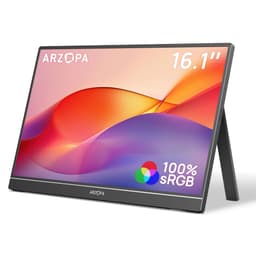
The ARZOPA A1 is a 15.6-inch portable monitor with a 1920x1080 resolution on an IPS panel running at 60Hz. Those are the numbers that matter most, and they're honest numbers. The pixel density works out at roughly 141 PPI, which is perfectly adequate for a monitor you'll be using at arm's length. You're not going to mistake it for a Retina display, but text is crisp and images look clean. The IPS panel type means you get proper wide viewing angles, which matters a lot on a portable monitor where you're often sharing a screen or using it at an awkward angle on a train table.
Weight comes in at 1.63lb, which ARZOPA correctly points out is roughly half the weight of a same-sized laptop. The top edge measures 0.2 inches thick and the bottom 0.35 inches, making this genuinely slim. It slides into a laptop bag without drama. Connectivity is USB-C and Mini HDMI, covering the two most common ways you'd want to connect a portable monitor to a laptop, phone, tablet, or console. The built-in kickstand handles the stand situation without needing any accessories.
The 800:1 contrast ratio is listed in the spec sheet, which is a typical figure for an IPS panel. It's not exciting, but it's honest. The 178-degree viewing angle claim is standard for IPS and accurate in practice. There's no mention of HDR certification, no adaptive sync specification, and no response time figure given, which is actually more honest than most budget monitors that slap "1ms" on the box without any qualification. Here's the full spec breakdown:
| Specification | Detail |
|---|---|
| Screen Size | 15.6 inches |
| Resolution | 1920x1080 (Full HD) |
| Panel Type | IPS |
| Refresh Rate | 60Hz |
| Contrast Ratio | 800:1 |
| Viewing Angle | 178 degrees |
| Connectivity | USB-C, Mini HDMI |
| Weight | 1.63lb |
| Thickness (top) | 0.2 inches |
| Thickness (bottom) | 0.35 inches |
| Display Modes | Duplicate, Extend, Second Screen |
| Current Price | £89.99 |

Panel Technology
IPS panels have been the sensible default for portable monitors for years now, and for good reason. The technology, which you can read about in more detail via Wikipedia's IPS panel article, delivers consistent colour across wide viewing angles in a way that TN panels simply can't match. On a portable monitor specifically, this matters more than on a desktop display. You're not always sitting directly in front of it. Sometimes it's tilted on a kickstand at an imperfect angle, or someone else is looking at your screen from the side. IPS handles all of that without colours shifting or washing out.
The 178-degree viewing angle specification is the headline figure here. In practice, IPS panels do deliver on this claim, though colours do very slightly shift at extreme angles. For normal use, including shared viewing, presentations, or just having the monitor off to one side of your desk, you won't notice any degradation. This is one area where IPS genuinely earns its reputation. Compare it to a TN panel at the same price point and the difference is immediately obvious, especially vertically where TN panels look terrible if you're not sitting at exactly the right height.
The downside of IPS versus, say, VA panels is contrast. The 800:1 native contrast ratio is typical for IPS and means blacks look more like very dark grey in a dim room. VA panels can hit 3000:1 or higher, which makes a real difference in dark scenes. But VA panels have their own problems, particularly slow pixel response in dark tones that causes smearing. For a portable monitor used primarily for productivity, video calls, and casual content consumption, IPS is the right choice. The consistent image quality and wide angles matter more than deep blacks in this use case. If you were building a dedicated home cinema setup, you'd want something different, but that's not what this monitor is for.
Display Quality
At 141 PPI, the 1920x1080 resolution on a 15.6-inch screen is a comfortable viewing experience. It's not the sharpest panel you can buy in 2026, but it's not trying to be. For a second screen used for reference material, video calls, browser tabs, or a game being mirrored from a console, 1080p at this size is genuinely fine. Text renders cleanly, images look sharp at normal viewing distances, and you're not going to be squinting at pixelated edges. The people who complain about 1080p being insufficient are usually talking about 27-inch or larger desktop monitors where the pixel density drops below 100 PPI. At 15.6 inches, 1080p is a different proposition entirely.
The anti-glare treatment on the panel is worth discussing. Budget portable monitors often use a matte coating that reduces reflections but also softens the image slightly, giving everything a slightly hazy look. ARZOPA doesn't specify the exact coating type in their listed features, but owner feedback consistently mentions the screen being usable in reasonably bright environments without excessive glare. That's a good sign. A glossy panel on a portable monitor would be a nightmare on a train or in a cafe with overhead lighting, so a decent matte treatment is the right call.
Brightness uniformity is something that varies unit to unit on budget IPS panels. The manufacturing tolerances aren't as tight as on premium displays, so some units will show slightly brighter edges or corners compared to the centre. Owner reviews don't flag this as a widespread issue on the A1, which suggests ARZOPA's quality control is reasonable. A small number of reviews mention backlight bleed in the corners, which is a known characteristic of IPS panels generally rather than a specific fault with this model. It's worth checking your unit when it arrives, particularly against a dark background, but don't expect perfection from a budget IPS at this price point.
Refresh Rate and Adaptive Sync
Sixty hertz. That's what you get, and it's worth being clear about what that means in 2026. For productivity work, web browsing, video playback, and casual gaming, 60Hz is perfectly adequate. Scrolling through documents feels smooth, videos play without judder, and most games are playable. But if you're coming from a 144Hz or higher desktop monitor, 60Hz will feel noticeably different, particularly in fast-paced games where the higher refresh rate makes motion look fluid in a way that 60Hz can't replicate.
There's no adaptive sync specification listed for the ARZOPA A1. No FreeSync range, no G-Sync compatibility certification. This isn't unusual for a budget portable monitor, but it does mean that if you're gaming and your frame rate drops below 60fps, you may see screen tearing. For the use cases this monitor is actually designed for, that's rarely a problem. Console gaming at locked 30fps or 60fps doesn't require adaptive sync in the same way PC gaming does. Productivity use doesn't require it at all. But it's worth knowing going in if you're planning to use this as a gaming monitor with a PC.
The VESA adaptive sync standard and related certifications aren't mentioned anywhere in the product listing, which is consistent with this being a budget portable monitor without VRR support. For the target audience, this is a non-issue. Someone buying a portable monitor to extend their laptop's workspace or connect to a PS5 for hotel gaming isn't going to be chasing high frame rates with adaptive sync. But it's a real limitation if you're hoping to use this as a proper gaming monitor for competitive titles.
Response Time and Motion
Here's where the honest spec sheet approach actually works in the ARZOPA A1's favour. ARZOPA doesn't list a specific response time figure, which means they're not making claims they can't back up. Many budget monitors advertise "1ms MPRT" or "1ms GtG" figures that, when properly measured, turn out to be marketing constructs rather than real pixel transition times. MPRT (Moving Picture Response Time) in particular is a figure that can be manipulated by using backlight strobing, which introduces its own artefacts and reduces brightness. The absence of a bold response time claim here is actually a sign of restraint.
In practice, IPS panels at 60Hz typically show GtG response times in the 5ms to 10ms range for most transitions, with slower transitions in dark tones. For the use cases this monitor targets, that's completely fine. Watching Netflix, working in spreadsheets, video calling, and even casual gaming at 60fps won't produce visible ghosting. Where you'd start to notice it is in fast-paced competitive gaming, particularly in dark scenes with lots of motion. Dark corridors in first-person shooters can show slight smearing on IPS panels with slower response times. Owner reviews don't flag this as a significant issue, which suggests the panel performs reasonably well in normal use.
The 60Hz refresh rate is actually the bigger constraint on motion quality than the response time. At 60Hz, each frame is displayed for 16.7 milliseconds regardless of how fast the pixels can transition. Even if the panel had a perfect 1ms response time, you'd still see the same motion resolution that 60Hz delivers. So the response time discussion is somewhat academic at this refresh rate. For the target audience, the practical takeaway is: this monitor handles normal content without visible ghosting, but it's not a gaming monitor for competitive play.
Color Accuracy and Gamut
The spec sheet lists an 800:1 contrast ratio and confirms IPS technology, but doesn't provide sRGB coverage percentages, Delta-E figures, or DCI-P3 gamut data. That's typical for budget portable monitors. What we can reasonably infer from the IPS panel type and price tier is that sRGB coverage is likely in the 95% to 100% range, which is standard for IPS panels at this level. DCI-P3 coverage will be lower, probably around 65% to 72%, which is normal for a non-wide-gamut IPS panel. These aren't measured figures from a colorimeter session; they're reasonable estimates based on what IPS panels at this price tier typically deliver.
For the use cases this monitor is designed for, sRGB coverage in that range is genuinely good enough. Web content, office documents, video calls, and streaming all use sRGB as their colour space. A monitor that covers sRGB accurately will display all of that content correctly. Where you'd want better coverage is professional photo editing or video colour grading, where DCI-P3 accuracy matters. But if you're doing serious colour work, you're not buying a budget portable monitor. You're buying a calibrated display with a hardware colorimeter and a proper colour management workflow.
Owner feedback on colour quality is generally positive. Multiple reviews mention colours looking vibrant and accurate, which aligns with what a decent IPS panel should deliver. There are occasional mentions of the display needing slight brightness adjustments out of the box, which is normal. Factory calibration on budget monitors is rarely perfect, and most users can dial in the settings to their preference through the OSD (on-screen display) controls. The sRGB colour space is the relevant standard for most consumer content, and this panel should cover it well enough for everyday use.
HDR Performance
There's no HDR certification mentioned anywhere in the ARZOPA A1's product listing. No HDR10, no DisplayHDR 400, nothing. And honestly, that's the right call. Budget portable monitors that claim HDR certification are almost always delivering what the industry calls "checkbox HDR", a display that can technically receive an HDR signal but can't actually render it properly because the peak brightness is too low and there's no local dimming. Proper HDR requires peak brightness of at least 600 nits for HDR600 certification, and ideally 1000 nits or more for a genuinely impactful HDR experience.
The VESA DisplayHDR certification tiers start at DisplayHDR 400, which requires 400 nits peak brightness and basic HDR metadata support. Even that entry-level tier doesn't deliver a compelling HDR experience. It's a step up from SDR in terms of colour volume, but the limited peak brightness means bright highlights don't have the punch they should. Without knowing the A1's peak brightness figure (it's not specified), we can't say where it would land even if it were HDR certified. Budget portable monitors typically top out at 200 to 300 nits, which is below even the entry-level HDR threshold.
So skip the HDR question entirely with this monitor. It's not what it's for. Watch HDR content on it and it'll either display it as tone-mapped SDR or show you a washed-out version of the HDR signal. That's not a criticism of this specific product; it's just the reality of the budget portable monitor segment. If HDR matters to you, you're looking at a different category of display entirely, and you'll be spending considerably more money. For the ARZOPA A1's actual use cases, the absence of HDR is irrelevant.
Contrast and Brightness
The 800:1 native contrast ratio is the honest number here. IPS panels generally sit in the 800:1 to 1000:1 range for native contrast, and the A1 is at the lower end of that. In a bright office environment, this doesn't matter much because ambient light washes out the perceived contrast anyway. In a dim room, you'll notice that dark scenes look more like dark grey than true black. It's a characteristic of IPS technology rather than a fault with this specific monitor. VA panels do better on contrast, but as discussed earlier, they bring their own trade-offs.
Peak brightness isn't specified in the product listing, which is a gap in the data. Budget portable monitors typically land somewhere between 200 and 300 nits of peak brightness. For indoor use in a normally lit room, 250 nits is generally adequate. In bright sunlight or next to a window on a sunny day, it'll struggle. This is a limitation of the entire category, not just this model. If you're planning to use this monitor outdoors in direct sunlight, you'll be disappointed regardless of which budget portable monitor you choose.
Owner reviews give some useful real-world context here. Most users report the brightness being fine for indoor use, with a few noting they run it near maximum brightness in brighter environments. Nobody is reporting the screen being unusably dim in normal conditions, which is reassuring. The 800:1 contrast means dark content in a dim room won't look as dramatic as on a VA or OLED panel, but for productivity use, video calls, and general content consumption, it's perfectly acceptable. The IPS advantage in colour consistency and viewing angles more than compensates for the contrast limitation in this use case.

Ergonomics and Build
The built-in kickstand is one of the A1's genuinely useful features. Most portable monitors at this price point either include a flimsy fold-out stand or require you to buy a separate stand. The ARZOPA A1 has a kickstand integrated into the back of the monitor that lets you adjust the viewing angle without any additional accessories. Owner feedback consistently mentions this as a highlight, particularly for travel use where you don't want to carry extra kit. The stand is described as stable enough for normal desk use, though on very smooth surfaces it can shift if you're pressing buttons on the monitor itself.
At 1.63lb, the weight is genuinely impressive for a 15.6-inch monitor. That's light enough that you'll barely notice it in a laptop bag. The 0.2-inch thickness at the top edge means it slides into most laptop sleeves alongside the laptop itself. Build quality on budget portable monitors is always a concern, and the A1 is made from plastic rather than aluminium, which is expected at this price. The plastic feels reasonably solid according to owner feedback, with no reports of the chassis flexing or creaking in normal use. The kickstand hinge feels secure, though a small number of reviews mention it becoming slightly looser over time with heavy use.
Height adjustment, swivel, and pivot are not available on this monitor. The kickstand gives you angle adjustment, but that's the extent of the ergonomic range. For a portable monitor, this is completely normal and expected. You're not going to mount this on a monitor arm or adjust it to standing desk height. It sits on a table, you angle the kickstand to suit, and you work. VESA mounting is not mentioned in the specifications, which is also typical for this category. If you need full ergonomic adjustability, you're looking at a desktop monitor, not a portable one.
Connectivity and Ports
The ARZOPA A1 connects via USB-C and Mini HDMI. Those are the two ports that matter most for a portable monitor, and having both gives you good compatibility across devices. USB-C is the modern standard for laptop connectivity, and most laptops made in the last four years have at least one USB-C port that can output a display signal. The USB Implementers Forum specifies USB-C as capable of carrying DisplayPort Alt Mode, which is how the video signal travels over the cable. Not all USB-C ports support this, so it's worth checking your laptop's specifications before assuming USB-C will work.
The Mini HDMI port is the backup option for devices that don't support USB-C display output, including older laptops, desktop PCs without USB-C, and consoles. The ARZOPA listing specifically calls out compatibility with PS3, PS4, PS5, Xbox, and Nintendo Switch, all of which use standard HDMI output. You'll need a Mini HDMI to standard HDMI cable for console use, which isn't always included in the box (check the current listing for what's included). The HDMI specification supports 1920x1080 at 60Hz easily, so there are no bandwidth concerns here.
The three display modes (duplicate, extend, second screen) are standard operating system functionality rather than monitor-specific features, but it's useful that ARZOPA confirms all three work correctly. Extend mode is the most useful for productivity, giving you extra desktop space. Duplicate mode is handy for presentations. The USB-C connection can also potentially carry power to the monitor from a laptop, which means one cable handles both video and power, a genuinely convenient setup for travel. Power delivery specifics aren't listed, so check the current documentation for details on whether your laptop's USB-C port can power the monitor directly.
- USB-C (video + potential power delivery)
- Mini HDMI (full HD at 60Hz)
- Compatible with laptops, PCs, Macs, PS3/★★★★½ (4.5), Xbox, Nintendo Switch
- Three display modes: duplicate, extend, second screen
How It Compares
The budget portable monitor market is crowded, and the ARZOPA A1 sits in a competitive position. The two most commonly compared alternatives are the Lepow Z1 Gamut and the ViewSonic VX1655. The Lepow Z1 Gamut is a similar 15.6-inch 1080p IPS portable monitor that adds a wider colour gamut claim and a slightly different stand design. The ViewSonic VX1655 is a step up in terms of brand recognition and build quality, with ViewSonic being a more established display manufacturer with better quality control history.
Against the Lepow Z1 Gamut, the ARZOPA A1 holds its own on the core specs. Both are 15.6-inch IPS panels at 1080p and 60Hz. The Lepow claims wider colour gamut coverage, which sounds good on paper, but without independent measurements it's hard to verify. The ARZOPA A1's 4.5-star average across 2,660 is a stronger social proof signal than many alternatives in this bracket. The ViewSonic VX1655 generally costs more and offers better build quality and brand support, but for buyers who primarily want a functional second screen at a budget price, paying the premium for the ViewSonic name isn't necessarily justified.
Where the ARZOPA A1 genuinely differentiates itself is the combination of weight, thickness, and the kickstand design. At 1.63lb with a 0.2-inch top edge, it's among the slimmest and lightest in this category. Some competitors in the same price range are heavier or require a separate cover that doubles as a stand. The integrated kickstand approach is cleaner and more practical for travel. That's a real advantage that owners consistently highlight in reviews.
| Feature | ARZOPA A1 | Lepow Z1 Gamut | ViewSonic VX1655 |
|---|---|---|---|
| Screen Size | 15.6 inch | 15.6 inch | 15.6 inch |
| Resolution | 1920x1080 | 1920x1080 | 1920x1080 |
| Panel Type | IPS | IPS | IPS |
| Refresh Rate | 60Hz | 60Hz | 60Hz |
| Weight | 1.63lb | 1.7lb approx | 1.7lb approx |
| Connectivity | USB-C, Mini HDMI | USB-C, Mini HDMI | USB-C, Mini HDMI |
| Built-in Stand | Yes, kickstand | Yes, cover stand | Yes, kickstand |
| Review Count | 2,467 | Lower | Lower |
| Price | £89.99 | Similar budget tier | Mid-budget tier |
What Buyers Say
With 2,660 at 4.5 stars, the owner feedback on the ARZOPA A1 is one of the strongest signals in its favour. That review count puts it well above most competitors in the portable monitor category, and the 4.5-star average suggests the majority of buyers got what they expected. The most common praise themes are portability and weight, with multiple reviewers specifically mentioning how light it is compared to other portable monitors they've tried. The kickstand gets consistent positive mentions too, with users appreciating not needing to carry a separate stand or case.
Connectivity ease is another recurring positive. Buyers using this with MacBooks, Windows laptops, and consoles all report straightforward setup, with the USB-C connection in particular being praised for the single-cable convenience. Several reviews from PS5 and Switch users mention this being a great travel gaming solution, connecting via HDMI and getting a clean 1080p picture on a proper screen rather than a hotel TV. The image quality gets described as bright and clear, with colours that look good for everyday content. Nobody is claiming it's a professional colour-accurate display, but for the price, expectations are met.
The complaints that do appear follow predictable patterns for budget IPS portable monitors. A small number of reviews mention backlight bleed in corners, which as noted earlier is an IPS characteristic rather than a specific fault. A few buyers report the kickstand being slightly wobbly on very smooth surfaces. There are occasional mentions of the OSD (on-screen display) controls being fiddly, which is common on portable monitors where the buttons are small and the menu navigation isn't always intuitive. And a handful of reviews flag dead pixels on arrival, which is a lottery with any budget display and why checking immediately on delivery matters. Overall, the negative reviews are a small minority and mostly describe issues that are either expected for the price tier or addressable through Amazon's returns process.
Value Analysis
In the budget bracket, under £150, the ARZOPA A1 represents genuinely good value. The combination of a proper IPS panel, a sensible 1080p resolution, a built-in kickstand, and a weight that makes it actually practical to carry around is a strong package at this price point. You're not making compromises that will frustrate you daily. The 60Hz refresh rate is the right choice for a portable monitor because it's what most content and most use cases actually need. The IPS panel is the right choice because viewing angles matter on a portable display. The resolution is right for the screen size.
What you're giving up compared to more expensive portable monitors is mostly in the premium features: higher refresh rates (some 120Hz portable monitors exist but cost significantly more), OLED panels (which deliver genuinely stunning contrast and colour but cost considerably more), and better build materials. If you're a display enthusiast who gets frustrated by 60Hz or who notices IPS glow in dark rooms, you'll want to spend more. But if you're a normal person who wants a second screen for their laptop that doesn't weigh a ton and doesn't cost a fortune, the ARZOPA A1 is a proper answer to that question.
The 4.5-star average across nearly 2,500 buyers is the clearest value signal available. That's not a marketing number. That's real people who spent real money and came back to say whether it was worth it. The vast majority say yes. At this price tier, with those review numbers, the ARZOPA A1 is one of the safer bets in the portable monitor category. Buy it from Amazon, check it immediately for dead pixels and backlight bleed, and return it if you find issues. That's the sensible approach to any budget display purchase.
Final Verdict
The ARZOPA A1 is a budget portable monitor that does exactly what it's supposed to do, without pretending to be something it's not. The 15.6-inch IPS panel at 1920x1080 and 60Hz is the right specification for a portable second screen. The weight of 1.63lb and the sub-quarter-inch top edge thickness make it genuinely portable rather than theoretically portable. The built-in kickstand removes the need for a separate accessory. USB-C and Mini HDMI cover the connectivity bases for laptops and consoles alike.
Is it an enthusiast display? No. The 60Hz refresh rate, the absence of adaptive sync, the 800:1 contrast ratio, and the lack of any HDR capability are all real limitations. But they're appropriate limitations for the price tier and the use case. This isn't competing with OLED portable monitors or high-refresh gaming displays. It's competing with other budget portable monitors, and on that basis it performs well. The 2,467 owner reviews at 4.5 stars are a meaningful endorsement from a large and diverse group of buyers.
Who should buy this: anyone who wants a lightweight second screen for their laptop, a portable gaming monitor for console travel use, or a simple dual-screen setup without spending serious money. Remote workers, students, frequent travellers, and casual gamers are all well served here. Who should skip it: display enthusiasts who'll be bothered by 60Hz, competitive gamers who need high refresh rates and adaptive sync, and anyone doing professional colour work who needs calibrated wide-gamut output. For everyone else, this is a solid buy at a fair price in the budget bracket.

Full Specifications
| Specification | Detail |
|---|---|
| Model | ARZOPA A1 (B0CJCCDV65) |
| Screen Size | 15.6 inches |
| Resolution | 1920x1080 (Full HD / 1080p) |
| Panel Type | IPS |
| Refresh Rate | 60Hz |
| Contrast Ratio | 800:1 |
| Viewing Angle | 178 degrees |
| Weight | 1.63lb |
| Thickness (top) | 0.2 inches |
| Thickness (bottom) | 0.35 inches |
| Ports | USB-C, Mini HDMI |
| Display Modes | Duplicate, Extend, Second Screen |
| Stand | Built-in kickstand |
| Compatibility | Laptop, PC, Mac, PS3/4/5, Xbox, Nintendo Switch |
| HDR | Not specified |
| Adaptive Sync | Not specified |
| Amazon Rating | 4.5/5 (2,660 reviews) |
| Price | £89.99 |
What works. What doesn’t.
5 + 4What we liked5 reasons
- Genuinely lightweight at 1.63lb for a 15.6-inch panel
- IPS panel delivers wide viewing angles and consistent colour
- Built-in kickstand removes need for separate accessories
- USB-C and Mini HDMI cover laptops and consoles
- Strong owner confidence with 4.5 stars across 2,467 reviews
Where it falls4 reasons
- 60Hz only, no adaptive sync for gaming use
- 800:1 contrast is typical IPS, blacks look grey in dark rooms
- No HDR capability
- Peak brightness not specified, likely limited in bright environments
Full specifications
12 attributes| Refresh rate | 60 |
|---|---|
| Screen size | 15.6 |
| Panel type | IPS |
| Aspect ratio | 16:9 |
| Curvature | flat |
| HDR | HDR |
| Ports | USB-C, HDMI |
| Refresh rate HZ | 60 |
| Resolution | 1920x1080 |
| Response time | 30ms |
| Response time MS | 30 |
| Screen size IN | 15.6 |
If this isn’t right for you
2 options

Frequently asked
5 questions01Is the ARZOPA Portable Monitor 15.6" 1920x1080 FHD IPS (B0CJCCDV65) good for gaming?+
For casual gaming and console use it's fine. The 60Hz refresh rate and 1080p resolution handle most games well, and the Mini HDMI port connects directly to PS4, PS5, Xbox, and Nintendo Switch. For competitive PC gaming where you need 144Hz or higher refresh rates and adaptive sync to eliminate tearing, this monitor isn't the right choice. The absence of FreeSync or G-Sync certification means frame rate drops can produce screen tearing on PC. For console gaming at locked 30fps or 60fps, those limitations don't apply.
02Does the ARZOPA Portable Monitor 15.6" 1920x1080 FHD IPS (B0CJCCDV65) have good HDR?+
No HDR certification is listed for this monitor. Budget portable monitors in this price tier generally cannot deliver a meaningful HDR experience because they lack the peak brightness required for proper HDR rendering. HDR content will either be tone-mapped to SDR or displayed without the intended highlight detail. This is an expected limitation at this price point, not a specific fault with this model.
03Is the ARZOPA Portable Monitor 15.6" 1920x1080 FHD IPS (B0CJCCDV65) good for content creation?+
For general content creation like document work, web design preview, and casual photo review, the IPS panel is adequate. The 178-degree viewing angle and consistent colour reproduction across the panel make it usable as a secondary reference screen. For professional colour grading or photo editing where DCI-P3 coverage and Delta-E accuracy matter, this monitor doesn't provide the specifications needed. No colour gamut coverage figures or factory calibration data are published, which is typical for budget portable monitors.
04What graphics card do I need for the ARZOPA Portable Monitor 15.6" 1920x1080 FHD IPS (B0CJCCDV65)?+
Any modern graphics card or laptop GPU can drive 1920x1080 at 60Hz without any difficulty. This resolution and refresh rate combination is the least demanding display output you can target. Even integrated graphics in Intel or AMD laptop processors handle it easily. The main requirement is that your device has a USB-C port with DisplayPort Alt Mode support, or a standard HDMI output for use with the Mini HDMI port.
05What warranty and returns apply to the ARZOPA Portable Monitor 15.6" 1920x1080 FHD IPS (B0CJCCDV65)?+
Amazon offers 30-day returns on most items, which is useful for checking for dead pixels and backlight bleed immediately after delivery. The manufacturer typically provides a warranty on the product; check the current listing or ARZOPA's support pages for the specific terms. You're also covered by Amazon's A-to-Z guarantee for purchase protection.