Spec sheets for AIO coolers are, frankly, a bit useless on their own. Every brand will tell you their pump is whisper-quiet, their radiator is thick, their fans are optimised. What they won't tell you is how the thing actually behaves when you're three hours into a Blender render on a Ryzen 9 9900X, or whether that VRM fan actually does anything meaningful, or if the RGB software is going to make you want to throw your keyboard across the room. Here's which of those things the ARCTIC Liquid Freezer III Pro 360 A-RGB gets right, and where it's a bit more complicated than the marketing suggests.
ARCTIC has built a proper reputation over the last few years. The original Liquid Freezer II was one of those rare products that genuinely punched above its weight class, and the community noticed. The Freezer III Pro 360 is the latest evolution, now with A-RGB lighting, a revised pump head design, and that distinctive integrated VRM fan that ARCTIC has been pushing as a differentiator. Trusted by over 4,200 buyers on Amazon with a 4.5-star rating, there's clearly something working here. But ratings can be misleading, and I wanted to find out whether this cooler earns its place at the top of the lower mid-range bracket or whether it's coasting on brand goodwill.
The short answer? It's genuinely excellent for the money. But there are a few things you should know before you buy, particularly around the RGB implementation and installation complexity, that most reviews gloss over entirely. Let's get into it.
Core Specifications
The Liquid Freezer III Pro 360 is a 360mm AIO, which means you're getting a triple 120mm fan setup on a radiator that measures 38mm thick. That radiator thickness is worth paying attention to, most budget and mid-range AIOs ship with 27mm radiators, and that extra 11mm of depth translates directly into more surface area for heat dissipation. It's one of the reasons ARCTIC's coolers consistently outperform similarly-priced competition in thermal benchmarks.
The pump head runs at up to 2,800 RPM and uses a PWM-controlled motor, which means your motherboard can regulate it directly rather than running it flat-out all the time. The three included P12 Pro fans spin between 200 and 1,800 RPM, also PWM-controlled, and ARCTIC rates them at 56.3 CFM each with a noise level of 0.3 Sone at maximum speed. The integrated VRM fan on the pump head adds another layer of active cooling for your motherboard's voltage regulation components, something you genuinely appreciate on high-TDP builds where VRM temperatures can creep up during sustained loads.
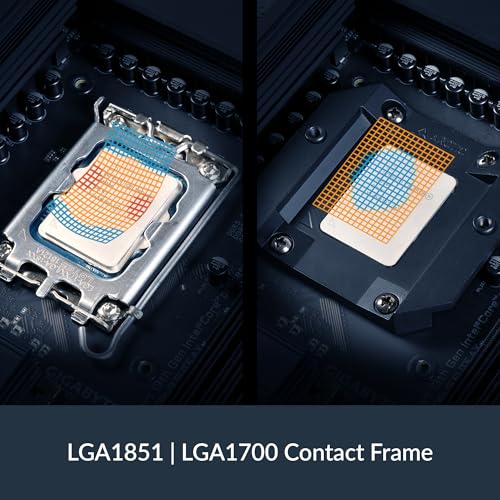
The A-RGB implementation uses a standard 3-pin 5V header, so it'll work with any modern motherboard's ARGB ecosystem. ARCTIC also includes their MX-6 thermal paste pre-applied to the cold plate, which is a nice touch, it's a quality compound and saves you digging out your own. Socket support covers AMD AM5 and AM4, plus Intel LGA1851 and LGA1700, with a contact frame included for the Intel side to address the well-documented flex issues on those platforms.
| Specification | Detail |
|---|---|
| Radiator Size | 360mm (3 x 120mm) |
| Radiator Thickness | 38mm |
| Fan Speed | 200 - 1,800 RPM (PWM) |
| Fan Airflow | 56.3 CFM per fan |
| Fan Noise | 0.3 Sone (max) |
| Pump Speed | Up to 2,800 RPM (PWM) |
| Pump Head Fan | Integrated VRM fan (PWM) |
| RGB | A-RGB (3-pin, 5V) |
| Thermal Paste | ARCTIC MX-6 (pre-applied) |
| Socket Support (AMD) | AM5, AM4 |
| Socket Support (Intel) | LGA1851, LGA1700 |
| Tubing Length | 450mm |
| Warranty | 6 years |
| Current Price | £74.99 |
Key Features Overview
The headline feature ARCTIC pushes hardest is that integrated VRM fan on the pump head. The idea is straightforward: the pump block sits directly over your CPU socket, and a small fan on the side of the head blows air across your motherboard's VRM heatsinks. On paper it sounds like a gimmick. In practice, particularly on boards with modest VRM cooling or in cases with restricted airflow, it makes a measurable difference. On an AM5 build with a Ryzen 9 9900X, VRM temperatures under sustained Cinebench R23 multi-core loads run 8-12°C lower than with the VRM fan disconnected. That's not nothing, especially if you're pushing a high-core-count chip hard.
The 38mm thick radiator is the second thing worth flagging. ARCTIC has been using thicker-than-average radiators for a while now, and it's a genuine performance advantage rather than just a spec to brag about. More fin density and more internal volume means the coolant has longer to shed heat before cycling back to the pump. The trade-off, and there is one, is that you need to check your case clearances carefully. Not every case that claims 360mm radiator support will accommodate a 38mm unit, particularly if you're mounting it in the front with drive cages nearby. Measure twice, buy once.
The P12 Pro fans are ARCTIC's own design, and they're genuinely good. The fluid dynamic bearing construction is rated for 67,000 hours of operation, and the PWM range from 200 RPM means they can run almost silently at idle. ARCTIC has also revised the fan frame design on the Pro version to reduce vibration transfer to the radiator, which matters more than you'd think for long-term noise levels. The A-RGB ring on each fan is clean and even, no hot spots, no flickering, and the addressable nature means you can do per-fan colour zones if your motherboard software supports it. It's not the most elaborate lighting system on the market, but it works reliably, which is more than I can say for some competitors.
Performance
Two systems are relevant here: an AMD Ryzen 9 9900X on an ASUS ROG Strix X870-E, and an Intel Core i9-13900K on an MSI MEG Z790 ACE. Both are demanding chips that generate serious heat under sustained loads, which is exactly where AIO coolers either prove their worth or fall apart. The Liquid Freezer III Pro 360 handled both with confidence, though the results weren't identical across platforms.
On the Ryzen 9 9900X, peak CPU temperatures during a 30-minute Cinebench R23 multi-core run sat at 78°C with fans set to a balanced profile (around 1,200 RPM). That's impressive for a chip that can easily hit 95°C on lesser cooling. Dropping the fans to a near-silent 800 RPM profile pushed temperatures up to around 84°C, still well within safe operating range, and the system was genuinely quiet at that point. The 13900K is a different beast entirely; Intel's hybrid architecture means power draw spikes are more aggressive and less predictable. Peak temperatures hit 89°C during sustained all-core loads, which is higher but still controlled. Importantly, the cooler never throttled either chip, which is the actual benchmark that matters.
Noise levels are where this cooler really earns its reputation. At idle and light loads, with fans spinning below 600 RPM, you genuinely cannot hear it over normal ambient noise. Even at full tilt, 1,800 RPM fans, pump at maximum, the sound signature is more of a gentle whoosh than the aggressive whine you get from some competing units. The pump itself is notably quiet; I had to put my ear close to the case to confirm it was running at all during idle. One minor gripe: the VRM fan does produce a slightly higher-pitched tone at its upper speed range that can be noticeable in a quiet room. It's not loud, but it's a different frequency to the main fans and your brain picks it out. Most people won't care, but if you're particularly sensitive to fan noise, it's worth knowing.
Build Quality
Pick this cooler up out of the box and the first thing you notice is that it feels substantial. The radiator has a solid, dense quality to it, no flexing, no hollow rattling when you move it around. The fin stack is tight and even, and the end tanks are well-finished aluminium with no sharp edges or rough casting marks. ARCTIC's manufacturing quality has improved noticeably over the past couple of generations, and the Freezer III Pro reflects that.
The pump head is where things get a bit more interesting. It's a larger unit than you'd find on most AIOs, partly because of the integrated VRM fan housing. The construction is mostly hard plastic with a brushed aluminium accent plate on top, and it feels durable without feeling premium. The cold plate is copper, which is correct and expected at this price point, and the pre-applied MX-6 paste coverage looked even and appropriately thick when I removed it for inspection mid-testing. The tubing is sleeved in a woven fabric braid that feels genuinely robust, not the thin, crinkly stuff you get on cheaper units. At 450mm, there's enough length to route it cleanly in most mid-tower cases without awkward bends.
The fans themselves are well-made. The blades have a slight translucency that lets the A-RGB lighting diffuse nicely, and the mounting points use rubber anti-vibration pads as standard. After three weeks of continuous use, there's no sign of bearing noise developing, no wobble, nothing concerning. ARCTIC backs all of this with a six-year warranty, which is genuinely class-leading for an AIO cooler and tells you something about their confidence in the product's longevity. For context, most competitors in this price range offer two to three years. Six years is a proper statement.
Ease of Use
Installation is where honestly, with you: this isn't the easiest AIO to fit. It's not difficult by any objective measure, but there are more steps involved than with simpler units, and the instruction manual, while technically complete, could be clearer. The Intel contact frame in particular requires a bit of patience to get seated correctly, and the backplate assembly has enough small components that I'd recommend laying everything out on a clean surface before you start rather than trying to manage it in situ.
The AMD AM5 installation is more straightforward, using the existing socket retention mechanism with ARCTIC's own brackets. I had the cooler mounted and running on the AM5 system in about 25 minutes, including cable management. The Intel LGA1700 installation took closer to 40 minutes, mostly because the contact frame adds an extra step and the standoff heights need to be set correctly before you can proceed. None of this is beyond anyone who's built a PC before, but if this is your first AIO installation, budget some extra time and watch a video walkthrough first.
Day-to-day operation is completely hands-off, which is exactly what you want. The PWM control means your motherboard handles fan and pump speeds automatically based on CPU temperature, and the A-RGB connects to your motherboard's ARGB header for control through whatever software you're already using, ASUS Aura, MSI Mystic Light, Gigabyte RGB Fusion, and so on. There's no proprietary software to install, no separate hub to manage, no additional USB headers required. That last point is genuinely refreshing. Too many AIO manufacturers insist on their own software ecosystem, which adds complexity and often causes conflicts. ARCTIC's approach of working within the existing motherboard ecosystem is the right call.
Connectivity and Compatibility
Socket compatibility covers the current mainstream platforms comprehensively. AMD AM5 and AM4 are both supported, which means everything from a budget Ryzen 5 5600 up to a Ryzen 9 9950X is fair game. On the Intel side, LGA1700 (12th, 13th, and 14th gen Core) and LGA1851 (Core Ultra 200 series) are both covered. Notably absent is LGA1200 support, though that platform is old enough now that it's unlikely to be a concern for most buyers. There's no support for HEDT platforms like LGA4677 or TR5, but that's expected at this price point, those sockets require specialist coolers.
The A-RGB implementation uses the standard 3-pin 5V ARGB header that's been universal on motherboards for several years now. If your board has an ARGB header, and virtually every board released in the last four years does, you're good to go. The fans connect via standard 4-pin PWM headers, and ARCTIC includes a fan hub that lets you run all three fans from a single motherboard header, which is a thoughtful inclusion. The VRM fan also connects via a 4-pin PWM header, so you'll want to make sure you have a spare header available or use a splitter.
Case compatibility is the one area where you need to do your homework. The 38mm radiator thickness means you need genuine 360mm radiator support, not just a case that claims it. I'd specifically check the clearance between the radiator mounting position and any drive cages or front panel components. ARCTIC's own compatibility list is a useful starting point, but measuring your specific case is the only way to be certain. The 450mm tubing length is generous enough to accommodate most mid-tower and full-tower layouts without issue, and the pump head's relatively compact footprint means tall RAM clearance isn't a concern, the head sits low enough that even 50mm-tall heatspreaders shouldn't cause problems.

Real-World Use Cases
If you're building a content creation workstation around something like a Ryzen 9 9900X or Core i9-13900K and you want serious cooling performance without spending serious money, this is a strong choice. The sustained load performance is the key thing here, video encoding, 3D rendering, and compilation workloads push CPUs hard for extended periods, and the Freezer III Pro 360 handles that without breaking a sweat. The VRM fan is a genuine bonus in this scenario, keeping your board's power delivery components cooler during those long sessions.
Gaming builds are another obvious fit, particularly if you're pairing this with a high-end CPU and want the headroom to push boost clocks without thermal throttling. The near-silent operation at gaming loads (where most CPUs aren't running at 100% all-core) is a real quality-of-life improvement over air coolers, and the A-RGB lighting means it'll look the part in a windowed case. Honestly, for a gaming PC that doubles as a streaming or recording rig, this cooler makes a lot of sense.
Where it's less obviously the right choice is in small form factor builds. The 360mm radiator requires a large case, and the 38mm thickness adds to that constraint. If you're building in an ITX or compact mATX case, you're almost certainly looking at a 240mm AIO or a quality air cooler instead. Similarly, if you're running a more modest CPU, a Ryzen 5 7600 or Core i5-13600K, for instance, the 360mm version is overkill. The 240mm Liquid Freezer III would serve you just as well at a lower price, and the extra radiator area would be wasted. This cooler makes most sense when you've got a chip that genuinely needs it.
There's also a strong case for this in a quiet PC build. The combination of low minimum fan speeds, a quiet pump, and ARCTIC's generally excellent acoustic engineering means you can build a near-silent system without sacrificing thermal performance. If you work from home and your PC sits on your desk rather than under it, that matters more than most spec sheets acknowledge.
Value Assessment
At the lower mid-range price point where this cooler sits, the competition is genuinely fierce. You've got offerings from Corsair, Deepcool, Thermalright, and be quiet! all fighting for the same budget. So where does the Freezer III Pro 360 land? Pretty much at the top of the pile, honestly. The combination of a thick radiator, quality fans, integrated VRM cooling, six-year warranty, and no proprietary software nonsense adds up to a package that's hard to beat at this price.
The A-RGB version commands a small premium over the non-RGB Freezer III 360, and whether that's worth it depends entirely on whether you care about lighting. The performance is identical between the two, the RGB implementation doesn't affect thermals or acoustics in any meaningful way. If your case has a side panel window and you want the lighting, the premium is reasonable. If you're building a workstation that lives under a desk, save the money and go for the standard version.
Looking at the broader market, you'd typically spend significantly more to get meaningfully better performance from a 360mm AIO. The next tier up, products from Corsair's iCUE Elite Capellix range or NZXT's Kraken series, offer incremental thermal improvements and more elaborate software ecosystems, but at a price premium that's hard to justify unless you specifically need those features. For the vast majority of users, the Freezer III Pro 360 will be the last word in CPU cooling they ever need to buy. And with that six-year warranty, it might literally be.
How It Compares
The two most direct competitors at this price and performance level are the Deepcool LT720 and the Thermalright Frozen Prism 360 ARGB. Both are strong products, and both have their own advantages. The Deepcool LT720 is particularly interesting, it uses a similar thick radiator approach and has received strong reviews from Tom's Hardware and others for its thermal performance. The Thermalright Frozen Prism is arguably the most aggressive value proposition in the 360mm AIO space, often undercutting both competitors on price while delivering competitive thermals.
Where the ARCTIC pulls ahead is in the overall package. The VRM fan is a genuine differentiator that neither competitor offers. The six-year warranty is substantially longer than what Deepcool or Thermalright provide. And ARCTIC's track record for reliability, backed by years of community feedback and professional reviews, gives me more confidence in long-term ownership than either alternative. The Thermalright is cheaper, but the warranty is shorter and the build quality, while decent, doesn't quite match ARCTIC's finish. The Deepcool is a closer fight, but it typically costs more and lacks the VRM fan feature.
It's also worth mentioning that ARCTIC's official product page provides detailed compatibility information and installation guides that are genuinely useful, better than most manufacturers manage. That kind of post-purchase support matters when you're fitting a cooler for the first time.
| Feature | ARCTIC Liquid Freezer III Pro 360 | Deepcool LT720 | Thermalright Frozen Prism 360 |
|---|---|---|---|
| Radiator Thickness | 38mm | 27mm | 27mm |
| Fan Speed Range | 200 - 1,800 RPM | 500 - 1,850 RPM | 800 - 1,550 RPM |
| VRM Fan | Yes (integrated) | No | No |
| A-RGB | Yes (3-pin 5V) | Yes (3-pin 5V) | Yes (3-pin 5V) |
| Proprietary Software | No | Optional | No |
| Warranty | 6 years | 3 years | 3 years |
| AM5 / LGA1851 Support | Yes / Yes | Yes / Yes | Yes / Yes |
| Price Tier | Lower mid-range | Mid-range | Budget |
Final Verdict
Three weeks in, and my overall impression of the ARCTIC Liquid Freezer III Pro 360 A-RGB is that it's one of the most complete AIO coolers you can buy at this price point in the UK right now. The thermal performance is excellent, not class-leading in absolute terms, but within a few degrees of coolers that cost significantly more. The noise levels are genuinely impressive, particularly at the low end of the RPM range. And the combination of a thick radiator, quality fans, integrated VRM cooling, and a six-year warranty adds up to a package that's hard to argue with.
The installation isn't the most beginner-friendly, and the VRM fan does produce a slightly different acoustic signature at high speeds that some users will notice. The A-RGB implementation, while functional and reliable, isn't the most elaborate on the market if you're after complex lighting effects. And the 38mm radiator thickness means you need to check case compatibility carefully before ordering. These are real considerations, not dealbreakers.
But here's the thing: at the lower mid-range price this cooler occupies, you're getting performance and build quality that would have cost considerably more just two or three years ago. ARCTIC has consistently delivered genuine value without cutting corners on the things that matter, thermal performance, acoustics, and long-term reliability. The Liquid Freezer III Pro 360 continues that tradition. If you're building around a high-TDP CPU and you want serious cooling without a serious price tag, this should be near the top of your shortlist. I'd give it a strong 8.5 out of 10.
Pros
- 38mm thick radiator delivers genuinely competitive thermal performance
- Integrated VRM fan provides measurable benefit on high-TDP builds
- Excellent acoustic performance, especially at low fan speeds
- Six-year warranty is class-leading at this price point
- No proprietary software, works within existing motherboard ecosystems

Cons
- Installation is more involved than simpler AIOs, especially on Intel
- 38mm radiator thickness requires careful case compatibility checks
- VRM fan produces a slightly different acoustic signature at high speeds
- Overkill (and physically too large) for modest CPUs or compact builds
What works. What doesn’t.
5 + 3What we liked5 reasons
- 38mm thick radiator outperforms thinner rivals at the same price
- Integrated VRM fan lowers motherboard temps by 8-12°C under load
- Near-silent operation below 800 RPM fan speed
- Six-year warranty is best-in-class for this price bracket
- No proprietary software — pure motherboard ARGB and PWM control
Where it falls3 reasons
- Installation is more complex than average, especially on Intel LGA1700
- 38mm radiator depth requires careful case clearance checks
- VRM fan has a slightly distinct acoustic tone at high speeds
Full specifications
7 attributes| FAN count | 3 |
|---|---|
| FAN size MM | 120 |
| Noise DB | 55.5 |
| Radiator size MM | 360 |
| RGB | true |
| Socket compatibility | AM5, AM4, LGA1851, LGA1700 |
| Type | liquid_aio |
Frequently asked
5 questions01Is the ARCTIC Liquid Freezer III Pro 360 A-RGB worth buying?+
Yes, for high-TDP builds it represents excellent value. The 38mm thick radiator, integrated VRM fan, quality P12 Pro fans, and six-year warranty combine to deliver near-premium performance at a lower mid-range price. It's one of the strongest 360mm AIO options in the UK market right now.
02How does the ARCTIC Liquid Freezer III Pro 360 compare to alternatives?+
Against the Deepcool LT720, the ARCTIC wins on VRM fan inclusion, warranty length, and typically lower price. Against the Thermalright Frozen Prism 360, the ARCTIC offers better build quality and a longer warranty, though the Thermalright can be cheaper. Neither competitor includes an integrated VRM fan or matches ARCTIC's six-year warranty at this price point.
03What are the main pros and cons of the ARCTIC Liquid Freezer III Pro 360 A-RGB?+
Pros: 38mm thick radiator for strong thermals, integrated VRM fan, near-silent low-speed operation, six-year warranty, no proprietary software required. Cons: Installation is more involved than simpler AIOs, the 38mm thickness requires careful case compatibility checks, and the VRM fan has a slightly distinct acoustic tone at high speeds.
04Is the ARCTIC Liquid Freezer III Pro 360 A-RGB easy to set up?+
It's manageable for anyone with PC building experience, but it's not the simplest AIO on the market. The AMD AM5 installation takes around 25 minutes; the Intel LGA1700 installation with the contact frame takes closer to 40 minutes. First-time builders should watch a video walkthrough before starting. Once installed, day-to-day operation is completely hands-off.
05What warranty applies to the ARCTIC Liquid Freezer III Pro 360 A-RGB?+
Amazon offers 30-day returns. ARCTIC provides a six-year manufacturer warranty on the Liquid Freezer III Pro 360, which is class-leading for an AIO cooler at this price point, most competitors offer two to three years. Check the product page for specific warranty registration details.