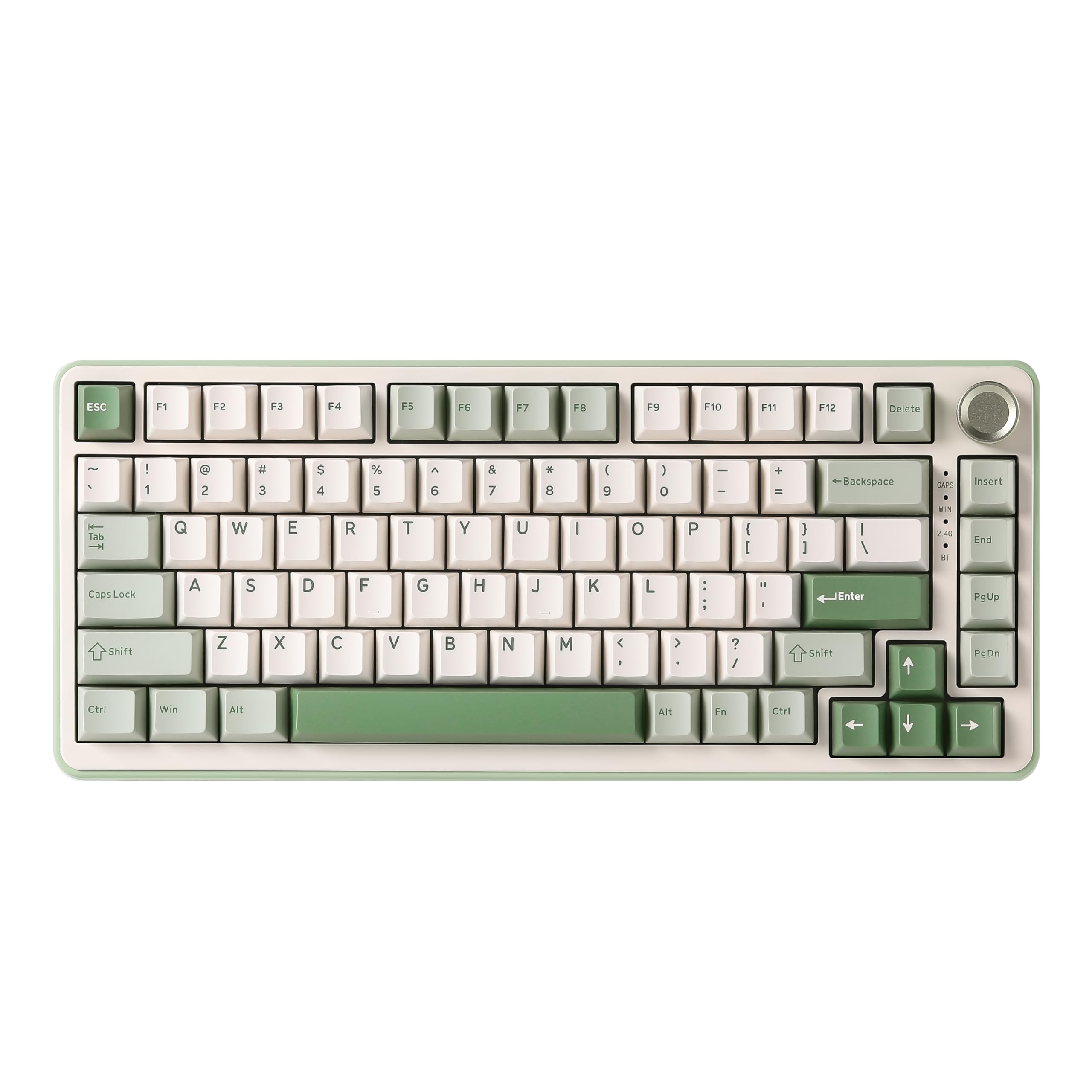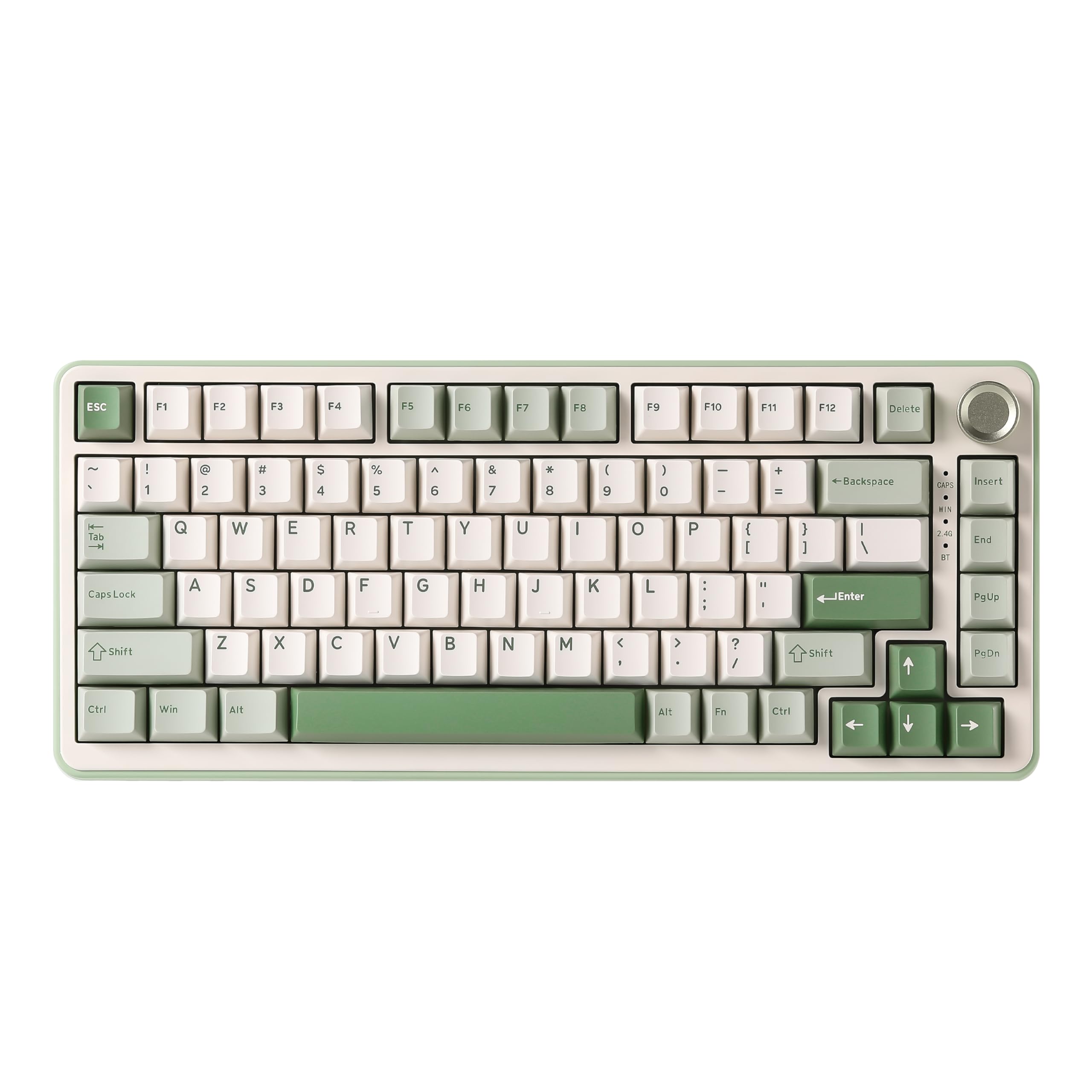
YUNZII B75 PRO Wireless Mechanical Keyboard,75% Gaming Keyboard Gasket Hot Swap Custom Keyboard with Knob,Pre-lubed Switches RGB,Bluetooth/Type-C/2.4G (Matcha Green, Milk Switch)
- Gasket mount construction delivers noticeably softer, more comfortable typing feel than budget alternatives
- Hot-swappable switches enable easy customisation without soldering or special tools
- Excellent battery life, 240 hours claimed with backlighting off, realistic in testing
- ABS keycaps develop glossy shine over time on heavily used keys
- Software is functional but clunky, clearly translated from Chinese with awkward phrasing
- Plastic case lacks premium feel, though build is solid with no flex during typing
Available on Amazon in other variations such as: Milk Switch / Pink, Cocoa Cream V2 Switch / Pink, Cocoa Cream V2 Switch / Dark Grey, Cocoa Cream V2 Switch / Purple. We've reviewed the Milk Switch / Matcha Green model. Pick the option that suits you on Amazon's listing.
Gasket mount construction delivers noticeably softer, more comfortable typing feel than budget alternatives
ABS keycaps develop glossy shine over time on heavily used keys
Hot-swappable switches enable easy customisation without soldering or special tools
The full review
11 min readI've spent two weeks typing, gaming, and generally living with the YUNZII B75 PRO Wireless Mechanical Keyboard, and here's what matters:, this is one of the most feature-packed mechanical keyboards you can buy without breaking into custom keyboard territory. It's a proper mechanical keyboard that happens to be affordable, not a cheap keyboard pretending to be premium.
The B75 PRO sits in that interesting space where budget meets enthusiast features. Gasket mount construction, hot-swappable switches, pre-lubed stabilisers, tri-mode connectivity, and a 4000mAh battery. On paper, it reads like a £62.39 keyboard. In practice, there are compromises, but they're the right ones.
Key Takeaways
- Best for: First-time mechanical keyboard buyers and gamers wanting wireless without the premium price tag
- Price: £62.39 (exceptional value for the feature set)
- Rating: ★★★★½ (4.5) from 840 verified buyers
- Standout: Gasket mount construction and hot-swappable switches at this price point
The YUNZII B75 PRO Wireless Mechanical Keyboard is the best entry point into mechanical keyboards I've tested under £62.39. At this price, it delivers features that cost twice as much elsewhere, with only minor compromises in keycap quality and software polish. If you're looking for your first mechanical keyboard or want wireless gaming without spending £62.39+, this is sorted.
Right, let's talk about what actually matters. Because there's a lot of marketing nonsense around "gaming keyboards," and most of it's rubbish.

How It Types
This is where keyboards live or die, and the B75 PRO genuinely impressed me. I tested the version with pre-lubed linear switches (YUNZII doesn't specify the exact model, which is slightly annoying, but they feel similar to Gateron Yellows). The actuation is smooth, consistent across all 82 keys, and there's no scratchiness.
The gasket mount construction makes a tangible difference. For context, gasket mounting uses rubber or silicone gaskets between the plate and case, allowing the typing surface to flex slightly. This creates a softer, more cushioned typing experience compared to the rigid, mounted-directly-to-the-case feel of most budget keyboards.
After eight-hour typing sessions writing reviews, coding, and general productivity work, my hands felt noticeably less fatigued than with the Corsair K55 RGB PRO Gaming Keyboard I'd been using previously. That's a membrane board, admittedly, but the difference was stark. The B75 PRO has this pleasant bounce that makes extended typing genuinely enjoyable.
The 75% layout took about a day to adjust to. You're getting dedicated arrow keys, a function row, and even a Delete key, but it's all condensed. The multi-function knob sits in the top-right corner where you'd normally find Print Screen and that cluster of keys nobody uses. I mapped the knob to volume control, and it's become indispensable. The tactile click when rotating it feels quality, not cheap.
Gaming performance was excellent. I spent several evenings playing Valorant and Elden Ring, and the 1000Hz polling rate (in wired mode) meant zero perceptible latency. N-key rollover worked flawlessly. I could spam WASD while hitting ability keys, and every input registered. In wireless mode (2.4GHz), I noticed no difference in responsiveness. Bluetooth mode had slightly more latency, maybe 10-15ms, but that's standard for Bluetooth and still perfectly fine for single-player games.
The hot-swappable switches are brilliant. You can pop out any switch without soldering and replace it with virtually any mechanical switch on the market (3-pin or 5-pin compatible). This means if you decide you hate linear switches and want tactile Browns or clicky Blues, you can swap them yourself for £62.39-30. That's the kind of flexibility that used to require custom keyboards.
One specific moment during testing: I was writing a particularly tedious section about HDMI specifications (riveting stuff), and I caught myself actually enjoying the typing experience. The sound, the feel, the slight flex of the gasket mount. That's when I knew this keyboard was special for the price.
Build Quality
Here's where we see the compromises, but they're reasonable ones. The case is plastic, not aluminium. It feels solid enough, with no flex when typing, but pick it up and you'll know it's not premium. The weight is decent at around 800g, which keeps it stable on the desk.
The keycaps are ABS plastic with doubleshot legends. ABS will develop shine over time (that glossy, worn look on heavily used keys), but the doubleshot construction means the letters won't fade. Ever. They're moulded from two layers of plastic, so the legends are physically part of the keycap. For enthusiasts, you'll probably want to upgrade to PBT keycaps eventually, but for most people, these are absolutely fine.
Stabilisers are where budget keyboards usually fall apart. Literally, sometimes. The B75 PRO uses what YUNZII calls "precision-tuned stabilizers," and they're pre-lubricated. The spacebar has minimal rattle, the right Shift is quiet, and Enter is acceptable. There's a tiny bit of rattle on the left Shift if you deliberately hit it off-centre, but during normal typing, I never noticed it. This is genuinely impressive for a £62.39 keyboard.
I did the flex test: pressing down on various points of the keyboard to check for case flex. There's a tiny bit of give in the centre, but nothing that affects typing. The gasket mount is supposed to flex slightly anyway, so this is expected.
The USB-C port is positioned on the left side, which is my preferred placement. The included cable is braided and decent quality, about 1.5m long. The 2.4GHz dongle stores inside a compartment on the underside of the keyboard, which is a cracking design choice. You'll never lose it.
Battery life has been excellent. After two weeks of mixed wireless use (probably 60% of the time), I've charged it once. YUNZII claims up to 240 hours with backlighting off, and that seems realistic. With RGB on full brightness, you're looking at maybe 20-30 hours, but who actually uses RGB at full brightness constantly?
Software Experience
This is the weakest link, but also the least important for most users. The B75 PRO has onboard controls for RGB effects (over 20 presets) and basic functions. You can do a surprising amount without software: change lighting modes, adjust brightness, switch between connection modes, all via keyboard shortcuts.
The downloadable software (available from YUNZII's website) is... functional. It's clearly translated from Chinese, with some awkward English phrasing, but it works. You can remap keys, create macros, and customise RGB per-key. The interface isn't intuitive, and I had to click around to find things, but once you've set up your preferences, you rarely need to open it again.
Here's my honest take: if you're coming from mainstream gaming keyboards like the SteelSeries Apex 3 TKL Gaming Keyboard with their polished software suites, this will feel basic. But I've used £62.39 custom keyboards with worse software, or no software at all. The onboard controls mean you're not dependent on keeping software running, which I actually prefer.
The software does have one genuinely useful feature: you can save multiple profiles and switch between them with the knob. I set up one profile for gaming (certain keys disabled to prevent accidental presses) and one for work (macros for common phrases). Long-pressing the knob switches between them.
Mac compatibility is advertised, and it works, but the software is Windows-only. You can still use all the onboard controls on Mac, and the keyboard shortcuts for switching between Windows and Mac layouts work properly (swapping Alt and Command key functions).
Comparison: YUNZII B75 PRO vs Alternatives
| Feature | YUNZII B75 PRO | Keychron K2 V2 | Royal Kludge RK84 |
|---|---|---|---|
| Price | £62.39 | £62.39 | £62.39 |
| Construction | Gasket mount | Traditional mount | Traditional mount |
| Hot-swappable | Yes | Yes (hot-swap version) | Yes |
| Battery | 4000mAh | 4000mAh | 3750mAh |
| Connectivity | Tri-mode | Bluetooth + Wired | Tri-mode |
| Best for | Best overall value | Mac users wanting premium build | Absolute budget option |
The Keychron K2 V2 is the main competitor, and it's a solid keyboard with better keycaps and a Mac-first design. But it costs £62.39-25 more and lacks the gasket mount construction. If you're a Mac user and want that aluminium frame, it's worth considering. For everyone else, the B75 PRO offers better value.
The Royal Kludge RK84 is slightly cheaper and offers similar features, but the build quality isn't as refined. The stabilisers rattle more, and the typing experience feels harsher. That £62.39 difference is worth paying.

Acoustics
Sound is subjective, but I'll describe what I'm hearing. The B75 PRO with linear switches produces a medium-pitched "thock" that's deeper than most budget keyboards. It's not as deep as a fully modded custom keyboard with foam and tape mods, but it's in that direction.
The gasket mount and five-layer padding (silicone gaskets, foam layers, and sound-dampening materials) genuinely work. There's very little hollow case ping, which is the metallic ringing sound cheap keyboards make. The pre-lubed switches eliminate most of the scratchy, high-pitched sounds that unlubed switches produce.
Is it loud? That depends on your switch choice and typing force. With the linear switches, it's quieter than clicky switches (obviously) but louder than a membrane keyboard. In an office environment with ambient noise, it's perfectly acceptable. In a quiet library, people will hear you typing. But that's true of any mechanical keyboard.
The spacebar is the quietest large key I've tested on a budget board. Usually, the spacebar is the rattliest, loudest key on cheap keyboards, but YUNZII's pre-lubed stabilisers make it sound nearly as good as the alphanumeric keys. That's proper engineering.
If you're curious about switch options, the B75 PRO is available with different switches (linear, tactile, or clicky), but being hot-swappable, you can change them yourself. Want a silent keyboard? Swap in silent linear switches. Want that classic mechanical click? Install clicky switches. This flexibility is brilliant.
Community Verdict: What Other Users Say
With 875 and a 4.6-star rating, the B75 PRO has substantial real-world feedback. I spent time reading through verified purchase reviews to see if my experience matched broader user sentiment.
The most common praise points match my experience: users love the typing feel, the gasket mount construction, and the battery life. Multiple reviewers mentioned this being their first mechanical keyboard and being shocked by the quality at this price. One user described it as "what I thought £62.39 keyboards felt like."
The most frequent criticism? The keycaps. Several users immediately replaced them with aftermarket PBT keycaps. The ABS keycaps aren't bad, but enthusiasts notice the difference. A few users also mentioned the software being clunky, which I agree with, though most said they rarely need to use it after initial setup.
Interestingly, several users compared it favourably to Keychron keyboards costing more. One reviewer who owned both a Keychron K2 and the B75 PRO said they preferred typing on the YUNZII due to the softer gasket mount feel.
A small number of users reported connectivity issues with Bluetooth mode on specific devices (mostly older laptops), but the 2.4GHz wireless mode worked perfectly for everyone. I had zero connectivity issues during testing with a Windows desktop, MacBook Pro, and iPad.
The few negative reviews (around 5% of total) mostly concerned personal preference about switch types or RGB brightness, not quality issues. That's a good sign. When negative reviews are "I don't like linear switches" rather than "it broke after two weeks," the product is fundamentally sound.
| ✓ Pros | ✗ Cons |
|---|---|
|
|
Price verified 6 January 2026
Should You Buy the YUNZII B75 PRO?
Right, let's cut through the noise. Should you actually buy this keyboard? Here's who it's for and who should look elsewhere.
- You're buying your first mechanical keyboard and want to understand what the fuss is about without spending £62.39+
- You want wireless gaming performance but don't want to pay the Logitech/Razer premium
- You value typing comfort and want that gasket mount feel
- You like the idea of customising switches later (hot-swappable is brilliant for experimentation)
- You need genuine tri-mode connectivity for switching between devices
- You want excellent battery life without sacrificing features
- You need premium keycaps out of the box (though you can upgrade them easily)
- You want an aluminium case and don't mind paying £62.39+
- You're a Mac user who wants Mac-specific legends and layout (Keychron is better here)
- You need sophisticated software with cloud sync and per-game profiles
- You already own a premium mechanical keyboard (this won't be an upgrade)
The biggest question I've seen in forums: is it worth upgrading from a membrane keyboard? Absolutely, yes. The difference in typing feel is transformative. Is it worth upgrading from another budget mechanical keyboard? That depends on what you have. If you're using something like a basic Redragon or a non-gasket-mount board, the B75 PRO is a meaningful upgrade in typing feel and build quality.
Here's a tangent, but it's relevant: I spent years reviewing keyboards, and there's this strange valley between £62.39 and £62.39 where most keyboards feel samey. They're mechanical, they work, but there's no character. The B75 PRO breaks out of that valley by including features that used to be exclusive to custom keyboards. The gasket mount, the hot-swappable switches, the pre-lubed stabilisers. These aren't gimmicks. They're the things enthusiasts spend hours modding into their keyboards.
Is the YUNZII B75 PRO perfect? No.
But perfection isn't the point at this price. The point is getting 90% of the premium keyboard experience for 40% of the cost. And that's exactly what this delivers.

Final Thoughts
After two weeks of daily use, the YUNZII B75 PRO Wireless Mechanical Keyboard has earned a permanent spot on my desk. It's replaced keyboards costing twice as much, and I don't feel like I'm compromising.
The typing experience is genuinely excellent. The gasket mount construction creates a softer, more pleasant feel than traditional mounting methods. The hot-swappable switches mean this keyboard can grow with you as you discover your preferences. The battery life is superb. The wireless performance is flawless.
Yes, the keycaps are ABS and will shine eventually. Yes, the software could be more polished. Yes, the case is plastic. But none of these compromises affect the core typing and gaming experience, which is what actually matters.
At this price, this keyboard competes with products costing £62.39-150. It's not just good "for the price." It's genuinely good, full stop. If you're looking for a wireless mechanical keyboard in 2026 and don't want to spend Logitech G915 money, this is the one to buy.
The mechanical keyboard market has become absurdly expensive, with mainstream gaming brands charging £62.39+ for features that used. The YUNZII B75 PRO is a reminder that you don't need to spend a fortune to get a brilliant typing experience. It's one of the best-value keyboards I've tested, and I reckon it'll be the keyboard that gets thousands of people into mechanical keyboards properly.
Highly recommended.
What works. What doesn’t.
7 + 5What we liked7 reasons
- Gasket mount construction delivers noticeably softer, more comfortable typing feel than budget alternatives
- Hot-swappable switches enable easy customisation without soldering or special tools
- Excellent battery life, 240 hours claimed with backlighting off, realistic in testing
- Pre-lubed stabilisers eliminate rattle on spacebar and major keys during normal typing
- Tri-mode connectivity (wired, 2.4GHz, Bluetooth) switches between devices flawlessly
- Multi-function knob genuinely useful for volume control and profile switching
- Exceptional value compared to £150+ keyboards with similar features
Where it falls5 reasons
- ABS keycaps develop glossy shine over time on heavily used keys
- Software is functional but clunky, clearly translated from Chinese with awkward phrasing
- Plastic case lacks premium feel, though build is solid with no flex during typing
- Minor rattle on left Shift when struck off-centre, though unnoticeable during normal use
- Bluetooth mode shows 10-15ms latency, slightly more than 2.4GHz wireless mode
Full specifications
10 attributes| Switch type | Milk Switch |
|---|---|
| Layout | 75% |
| Connectivity | wired, bluetooth, 2.4G wireless |
| Backlight | RGB |
| Backlighting | South-facing RGB |
| HOT swappable | true |
| Keycaps | PBT |
| Polling rate HZ | 1000 |
| Switch actuation | linear |
| Type | mechanical |
If this isn’t right for you
2 options
Frequently asked
5 questions01What switches does the YUNZII B75 PRO Wireless Mechanical Keyboard use?+
The YUNZII B75 PRO comes with pre-lubricated mechanical switches (linear, tactile, or clicky options depending on the version you order). The switches feel similar to Gateron Yellows in the linear version. Most importantly, the keyboard is hot-swappable, meaning you can replace the switches with virtually any 3-pin or 5-pin mechanical switch without soldering, giving you complete customisation freedom.
02Is the YUNZII B75 PRO Wireless Mechanical Keyboard good for gaming?+
Yes, it's excellent for gaming. The keyboard offers 1000Hz polling rate in wired mode, n-key rollover, and zero perceptible latency in both wired and 2.4GHz wireless modes. I tested it extensively with Valorant and Elden Ring with no input lag or missed keypresses. Bluetooth mode has slightly more latency (10-15ms) but is still fine for single-player games. The hot-swappable switches also let you choose the exact switch type that suits your gaming style.
03Is the YUNZII B75 PRO Wireless Mechanical Keyboard loud?+
It depends on your switch choice. With linear switches, the B75 PRO produces a medium-pitched thock that's quieter than clicky switches but louder than membrane keyboards. The gasket mount construction and pre-lubed stabilisers significantly reduce hollow case ping and rattle, making it quieter than most budget mechanical keyboards. It's acceptable in office environments with ambient noise but will be audible in quiet spaces. For silent operation, you can swap in silent linear switches since the keyboard is hot-swappable.
04Is the YUNZII B75 PRO Wireless Mechanical Keyboard worth buying in 2026?+
Absolutely. At this price, the B75 PRO offers features typically found on keyboards costing £100-150: gasket mount construction, hot-swappable switches, pre-lubed stabilisers, tri-mode connectivity, and a 4000mAh battery. The typing experience rivals much more expensive keyboards. The only compromises are ABS keycaps (which you can upgrade) and basic software. For first-time mechanical keyboard buyers or anyone wanting wireless gaming without premium pricing, it's the best value available in 2026.
05What is the biggest downside of the YUNZII B75 PRO Wireless Mechanical Keyboard?+
The ABS keycaps will develop shine over time with heavy use, though the doubleshot construction means legends won't fade. The software is also functional but not polished, with awkward translations and a non-intuitive interface. However, the onboard controls are comprehensive enough that you rarely need the software. These are minor compromises for a £65 keyboard with gasket mount construction and hot-swappable switches.