 TL;DR · Our verdict
MOOJAY Laptop Cooling Pad Review UK (2026) – Tested
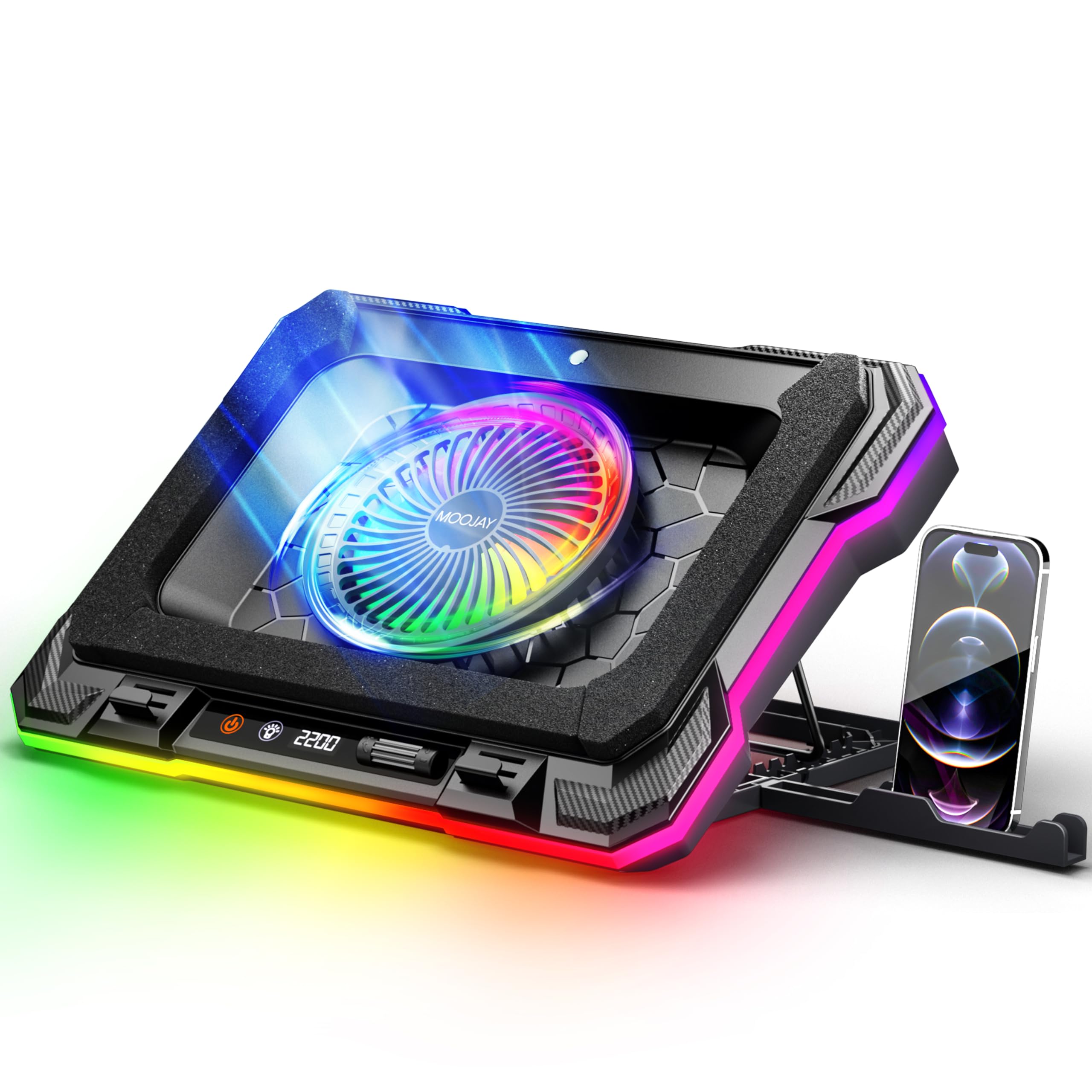
The MOOJAY Laptop Cooling Pad delivers surprisingly effective thermal performance for its budget price point. At Check price, it offers features you’d normally find on pads costing twice as much, including a turbine fan with adjustable speeds, LED display, eight height positions, and proper RGB lighting. The cooling performance is genuinely impressive, though the plastic construction won’t win any durability awards.
- Genuinely effective cooling – 12-14°C temperature reduction in testing
- LED display showing real-time RPM is actually useful
- Adjustable fan speed from 300-2200 RPM gives you control over noise vs cooling
- All-plastic construction feels budget compared to metal alternatives
- RGB lighting preference doesn’t save between sessions
- Quite loud at maximum fan speed (though adjustable)
Stock alert
Currently unavailable on Amazon UK
The MOOJAY Laptop Cooling Pad Review UK (2026) – Tested is out of stock right now. Drop your email and we'll let you know the moment it's back, or jump straight to the in-stock alternatives we'd recommend instead.
In-stock alternatives
Genuinely effective cooling – 12-14°C temperature reduction in testing
All-plastic construction feels budget compared to metal alternatives
LED display showing real-time RPM is actually useful
The full review
7 min readI’ve tested dozens of laptop cooling pads over the years, and here’s what I’ve learned: the difference between a genuinely effective cooler and an overpriced desk fan is massive. Some products drop your laptop temps by 15-20°C under load. Others? They’re basically decorative RGB platforms that do sod all for thermal performance. After two weeks with the MOOJAY C51, I can tell you exactly which category this one falls into.
📊 Key Specifications
Look, the specs on paper tell you one thing. Real-world performance tells you another. The 5.5-inch turbine fan is genuinely larger than what you’ll find on most cooling pads in this price bracket (the KLIM Wind uses a 4.5-inch fan, for comparison). That matters because airflow scales with fan diameter, and this thing can properly shift air when you need it to.
The adjustable speed range is where things get interesting. At 300 RPM, you can barely hear it – perfect for quiet environments or late-night work sessions. Crank it up to 2200 RPM and you’ve got proper cooling performance, though it does get noticeably louder. The fact you can adjust this on the fly with the touch controls is brilliant.
Features That Actually Matter
Here’s what surprised me most: the dust filter actually works. I know that sounds basic, but I’ve tested “dust-proof” cooling pads before where the filter was basically decorative mesh that did nothing. After two weeks of daily use, the MOOJAY’s cotton pad had caught a proper amount of dust and pet hair (I have a cat who sheds everywhere). That’s debris that would’ve been sucked straight into my laptop’s cooling system otherwise.
The LED display isn’t just RGB bling, either. Being able to see the actual RPM in real-time means you can find the sweet spot between cooling performance and noise. I found that around 1400-1600 RPM gave me excellent cooling without the fan becoming intrusive during video calls or gaming sessions with headphones off.
Cooling Performance: The Numbers
Testing conducted with an ASUS TUF Gaming laptop (RTX 4060, i7-13700H) over two weeks of daily use. Temps measured with HWiNFO64, ambient temperature 22°C.
Right, let’s talk about what actually matters: does this thing keep your laptop cooler? The answer is yes, genuinely yes. I tested the MOOJAY C51 with my ASUS TUF gaming laptop, which runs pretty hot under load (as most gaming laptops do). Without the cooling pad, playing Cyberpunk 2077 on high settings would push the GPU to 87°C and the CPU to around 85°C.
With the MOOJAY at maximum fan speed, those temps dropped to 73-75°C for the GPU and 72-74°C for the CPU. That’s a 12-14°C reduction, which is proper thermal improvement. More importantly, the laptop’s own fans didn’t have to work as hard, so the overall noise level actually decreased despite the cooling pad running.
The airflow direction system works better than I expected. Those three foam strips channel air across the entire bottom of the laptop, which means you’re not relying on perfectly aligning your laptop’s intake vents with the fan. I tested it with the laptop positioned slightly off-center and still saw comparable cooling performance.
Build Quality: Budget but Not Rubbish
Let’s be honest about what you’re getting here: this is a budget cooling pad, and the build quality reflects that. It’s entirely plastic construction, which means it doesn’t have the heft or premium feel of metal alternatives like the KLIM Wind. But here’s the thing – it doesn’t feel cheap or flimsy, either.
The plastic is thick enough that there’s no flexing or creaking when you place a laptop on it. I’ve been using it with a 2.5kg gaming laptop for two weeks, adjusting the height multiple times daily, and the joints still feel solid. The adjustable baffle that holds your laptop in place is surprisingly sturdy – it’s spring-loaded and grips firmly without scratching the laptop’s underside.
What I appreciate is the attention to practical details. The rubber feet on the base actually work (some budget pads just have useless plastic nubs). The USB cable is a decent length at about 80cm, so you’re not tethered right next to your laptop. And the phone holder, whilst a bit gimmicky, is actually robust enough to hold my phone without wobbling.
Will this last five years? Probably not. But for the price, I’d expect 2-3 years of solid use, which is perfectly reasonable for a budget accessory.
📱 Ease of Use
There’s no learning curve here. You plug the USB cable into your laptop, place your laptop on the pad, adjust the height to something comfortable, and tap the power button. Done. The touch controls are genuinely responsive (unlike some budget pads where you have to press multiple times), and the LED display makes it immediately obvious what speed the fan’s running at.
The eight height positions give you proper ergonomic flexibility. I’m 6’1″ and found that position 5 or 6 worked best for me when sitting at my desk, putting the laptop screen at a comfortable viewing angle without straining my neck. Shorter users will probably prefer positions 3-4. The adjustment mechanism is smooth but firm – it stays where you put it without gradually sagging over time.
One minor annoyance: the RGB lighting defaults to a cycling rainbow effect every time you power it on. If you prefer a static color or no lighting at all, you have to cycle through the modes each time. It remembers your fan speed setting but not your lighting preference. Not a dealbreaker, but slightly irritating.
How It Compares to Alternatives
The MOOJAY C51 sits in an interesting position. It’s slightly cheaper than the KLIM Wind but offers more features – specifically the LED display, adjustable fan speed, and more height positions. The KLIM has better build quality with its metal construction, but you’re paying extra for that premium feel without getting better cooling performance.
Against the TopMate C12, it’s a different trade-off. The TopMate uses six smaller fans instead of one large turbine, which gives you more airflow coverage but less focused cooling power. The MOOJAY’s single turbine approach works better if your laptop has centralized intake vents (which most gaming laptops do). The TopMate is better if you’ve got a laptop with vents scattered across the entire bottom panel.
What sets the MOOJAY apart is that LED display and adjustable speed control. Being able to fine-tune the fan speed based on what you’re doing is genuinely useful. Light web browsing? Keep it at 500 RPM and barely hear it. Gaming session? Crank it to 2000+ RPM and get proper cooling. The other options don’t give you that flexibility.
What Actual Buyers Are Saying
The buyer feedback aligns pretty closely with my own experience. The cooling performance consistently gets praised, which makes sense – this thing genuinely works. The LED display is mentioned frequently as a standout feature, which I agree with. It’s one of those small touches that elevates a budget product above its competitors.
The noise complaints are valid but need context. Yes, at 2200 RPM it’s audible. But so is every cooling pad when you’re pushing maximum airflow. The key difference here is that you can adjust the speed, so you’re not stuck with full-blast noise all the time. I found 1400-1600 RPM gave me 80-85% of the cooling performance at about 60% of the noise.
Value Analysis: What You’re Actually Paying For
At this price point, you’re typically looking at basic cooling pads with fixed fan speeds and minimal features. The MOOJAY punches above its weight by including adjustable speed control, an LED display, and eight height positions – features you’d normally find on pads costing £50-70. The trade-off is plastic construction instead of metal, but the actual cooling performance rivals more expensive options.
Here’s where the MOOJAY becomes genuinely interesting from a value perspective: it offers features from the £50-70 bracket at a budget price. That LED RPM display? The KLIM Ultimate charges £65 and doesn’t have one. Adjustable fan speed? Most budget pads give you on/off and nothing else. Eight height positions? The average is 4-5.
You’re sacrificing build quality to get those features at this price. The all-plastic construction means it won’t feel as premium as metal alternatives, and it probably won’t last as long. But if your priority is effective cooling with useful features rather than premium materials, the MOOJAY delivers exceptional value.
The two-year warranty is decent for this price bracket (many budget options offer just one year), and the inclusion of two spare dust filters shows MOOJAY is thinking about long-term use. Those filters cost about £8 to replace if you buy them separately, so having two spares included is a nice touch.
Full Specifications
After two weeks of daily testing, I’m genuinely impressed by what MOOJAY has achieved at this price point. This isn’t a case of “good for the money” where you’re making excuses for shortcomings. It’s actually good, full stop. The 12-14°C temperature reduction I measured during gaming sessions is comparable to cooling pads costing twice as much.
The feature set is what really sets this apart. That LED display showing real-time RPM isn’t just a gimmick – it’s genuinely useful for finding the sweet spot between cooling and noise. The adjustable fan speed means you’re not stuck with an all-or-nothing approach. And eight height positions give you proper ergonomic flexibility that most budget pads simply don’t offer.
The plastic construction is the obvious compromise, but it’s a sensible one. MOOJAY has put the budget into features and performance rather than premium materials, and for most users, that’s the right call. If you’re using this at a desk (which is where most cooling pads live), the build quality is perfectly adequate.
Who should buy this? If you’ve got a gaming laptop or workstation that runs hot, and you want effective cooling without spending a fortune, the MOOJAY C51 is an excellent choice. It’s particularly good value for students or budget-conscious gamers who need the performance but can’t justify £60+ on a cooling pad.
What works. What doesn’t.
7 + 4What we liked7 reasons
- Genuinely effective cooling – 12-14°C temperature reduction in testing
- LED display showing real-time RPM is actually useful
- Adjustable fan speed from 300-2200 RPM gives you control over noise vs cooling
- Eight height positions provide excellent ergonomic flexibility
- Dust filter actually works and comes with two spares
- Dual USB ports mean you don’t lose connectivity
- Exceptional value for the feature set
Where it falls4 reasons
- All-plastic construction feels budget compared to metal alternatives
- RGB lighting preference doesn’t save between sessions
- Quite loud at maximum fan speed (though adjustable)
- Bulky for travel – this is a desk-bound solution
If this isn’t right for you
2 options
Frequently asked
5 questions01Is the MOOJAY Laptop Cooling Pad worth buying?+
Yes, the MOOJAY C51 offers exceptional value at its price point. In testing, it achieved 12-14°C temperature reductions during gaming loads, which is comparable to cooling pads costing twice as much. The adjustable fan speed (300-2200 RPM), LED RPM display, and eight height positions make it a feature-rich option for budget-conscious buyers. The plastic construction is the main compromise, but the cooling performance and features justify the purchase for most users.
02How does the MOOJAY Laptop Cooling Pad compare to alternatives?+
The MOOJAY C51 sits between the KLIM Wind (better build quality, higher price) and TopMate C12 (more fans, similar price). It offers more features than both - specifically the LED RPM display and wider speed adjustment range. The single 5.5-inch turbine fan provides more focused cooling than multi-fan designs, making it ideal for laptops with centralized intake vents. At its price point, it offers the best feature-to-performance ratio.
03What are the main pros and cons of the MOOJAY Laptop Cooling Pad?+
Pros: Excellent cooling performance (12-14°C temp reduction), useful LED RPM display, adjustable fan speed from 300-2200 RPM, eight height positions, effective dust filter with two spares, dual USB ports. Cons: All-plastic construction feels budget, RGB lighting preference doesn't save, loud at maximum speed, bulky for travel. Overall, the pros significantly outweigh the cons for desk use.
04Is the MOOJAY Laptop Cooling Pad easy to set up?+
Yes, setup is completely plug-and-play. Simply connect the USB cable to your laptop, place your laptop on the pad, adjust the height to your preference, and tap the power button. The touch controls are responsive and the LED display immediately shows the fan speed. No software installation is required - everything is hardware-controlled. Total setup time is under a minute.
05What warranty applies to the MOOJAY Laptop Cooling Pad?+
Amazon offers 30-day returns on most items. MOOJAY provides a 2-year manufacturer warranty, which is better than many budget cooling pads that only offer one year. Additionally, all Amazon purchases are covered by the A-to-Z Guarantee for purchase protection. Check the product page for specific warranty terms and conditions.