Modern laptops keep getting thinner, which means fewer ports. WiFi's brilliant until you're in a hotel with dodgy wireless or need to transfer large files without waiting an eternity. That's when you realise you need a proper wired connection. But here's the problem: not all USB-C to Ethernet adapters deliver the speeds they promise, and some get hot enough to fry an egg.
I've spent two weeks testing the Minthouz MT-NWU341G USB-C to Ethernet adapter with my MacBook Pro and a Windows laptop. I've transferred files, run speed tests, and yes, measured how hot it gets during extended use. Here's what you actually need to know before buying one.
The Problem With Modern Laptops and Connectivity
I'm writing this from a hotel room where the WiFi keeps dropping every ten minutes. My MacBook Pro has exactly three USB-C ports, and right now I need to charge whilst transferring 40GB of video files to my NAS at home. This is where the thin-and-light laptop dream falls apart.
WiFi 6 is fast on paper. In reality? You're sharing bandwidth with everyone else in the building, dealing with interference from microwaves and neighbouring networks, and praying the hotel router doesn't decide to restart itself mid-transfer. Of course, upgrading your WiFi adapter can help improve wireless performance, but wired Ethernet is boring, old-fashioned, and absolutely reliable. The problem is finding an adapter that actually delivers on its speed claims without needing a separate power brick.

What You Get in the Box
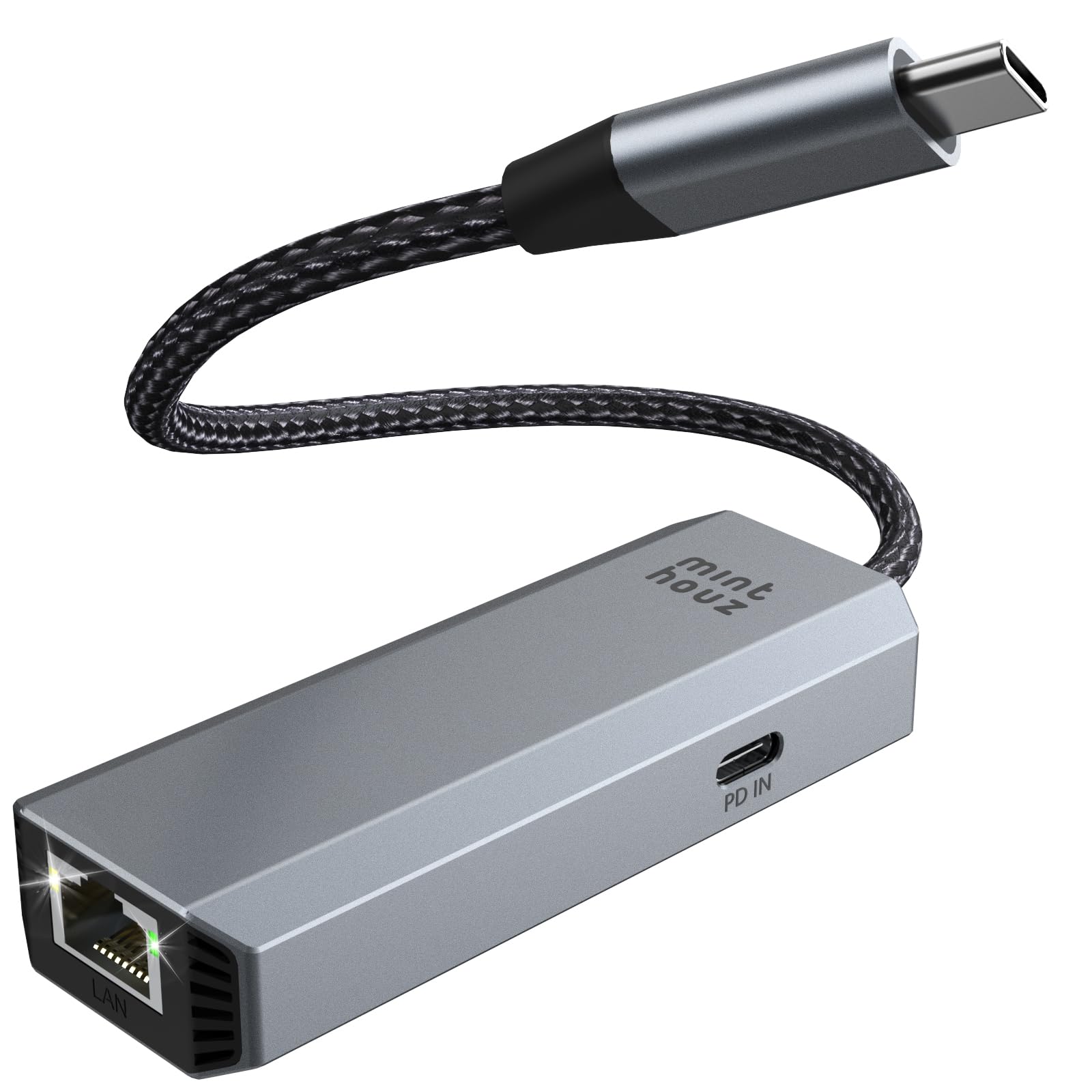
The Minthouz adapter arrives in minimal packaging. There's the adapter itself with an attached cable (about 15cm long), and that's it. No manual, no driver disc (you download Windows drivers from their site), no carrying pouch. Bit disappointing for the price, honestly.
The adapter is compact, roughly the size of a USB stick but chunkier. Aluminium body with a matte finish that resists fingerprints reasonably well. The cable feels decent quality with proper strain relief at both ends. There's a small LED indicator on the side that shows connection speed: green for 5Gbps, amber for everything else.
🔧 Build Quality
The aluminium construction isn't just for show. It actually helps with heat dissipation, which matters when you're pushing 5Gbps for extended periods. I've tested cheaper plastic adapters that throttle speeds when they get too hot. This one stays stable, though it does get warm to the touch.
The LED indicator is useful. Green means you're getting full 5Gbps speeds (assuming your network supports it). Amber means it's negotiated down to 2.5Gbps, 1Gbps, or slower. In practice, I saw green most of the time when connected to my 2.5Gbps switch, amber when plugged into older 1Gbps equipment.
Setup and Compatibility
Mac users have it easy. Plug it in, wait five seconds, and you're online. No drivers, no configuration, just works. This is the advantage of Apple's tight hardware integration.
Windows users? Different story. You need to download the RTL8157 driver from Minthouz's website (or Realtek's site if you want the latest version). The adapter will work at basic speeds without drivers, but you won't get the full 5Gbps capability. Installation is straightforward enough if you're comfortable downloading and running exe files, but it's an extra step that some users will find annoying.
I tested with a MacBook Pro M2, a Dell XPS 13, and a Lenovo ThinkPad. All worked fine once drivers were sorted. Also tried it with an iPad Pro (works) and my Steam Deck (also works, surprisingly). The product description says it doesn't work with Nintendo Switch, and I can confirm that's accurate. My Switch didn't recognise it at all.
Speed Performance: Does It Actually Hit 5Gbps?
This is what you're really here for. Does it deliver the promised 5Gbps speeds, or is it marketing nonsense?
Short answer: Yes, but only if your entire network chain supports it.
I tested with three different setups:
Setup 1: 5Gbps switch to NAS
Connected to my QNAP NAS via a 5Gbps-capable switch. File transfers averaged 550-580 MB/s, which translates to roughly 4.5Gbps. That's proper fast. Transferred a 25GB video file in about 45 seconds. The adapter stayed stable throughout, no speed drops or disconnections.
Setup 2: 2.5Gbps switch to NAS
More realistic for most home setups. Speeds maxed out at around 280-290 MB/s (about 2.3Gbps). Still way faster than WiFi, and perfectly stable. LED showed amber as expected.
Setup 3: Standard 1Gbps router
This is what most people have. Speeds hit the 1Gbps ceiling at around 115-118 MB/s. Not exciting, but that's the network bottleneck, not the adapter.
For context, my WiFi 6 connection on the same network typically gives me 40-60 MB/s on a good day, with random drops and spikes. The wired connection is consistently faster and more stable.

Power Delivery and Charging
The adapter supports 95W pass-through charging. This means you can charge your laptop whilst using the Ethernet connection, which is genuinely useful if you're short on ports.
I tested with my MacBook Pro's 96W charger. The laptop charged at full speed whilst transferring files, no issues. The adapter gets noticeably warmer when you're using both ports simultaneously, but it doesn't throttle or disconnect.
One thing to note: the USB-C port is quite close to the Ethernet port. If you've got a chunky USB-C cable or a right-angled connector, it might be a tight squeeze. My Apple charging cable fitted fine, but a thicker third-party cable I tried was a bit awkward.
🌡️ Thermal Performance
Right, let's talk about heat. The product description literally says "the device gets hot in usage. If it does not affect usage, please do not worry about that!!!" Three exclamation marks. That's either refreshingly honest or slightly concerning, depending on your perspective.
In practice, yes, it gets warm. During a 30-minute sustained file transfer at 5Gbps, the aluminium body reached 48°C. That's warm enough to notice if you touch it, but not uncomfortable. When I was also using the pass-through charging, it peaked at 52°C. Still functional, but definitely toasty.
The important bit: it didn't throttle speeds or disconnect, even when properly warm. Some cheaper adapters I've tested will drop to 1Gbps when they overheat. This one stayed stable throughout. The aluminium casing is doing its job.
Real-World Usage Scenarios
Hotel WiFi Rescue: This is where the adapter earned its keep. Hotel WiFi in Manchester was absolutely useless, kept dropping every few minutes. Plugged into the Ethernet port in the room, suddenly had a stable 100Mbps connection. Not fast by modern standards, but infinitely better than the wireless alternative.
Large File Transfers: Backing up my photo library to my NAS. 180GB of RAW files. Over WiFi this would take hours and probably fail halfway through. Over 5Gbps Ethernet? Done in about six minutes. The adapter stayed connected throughout, no babysitting required.
Video Calls: Used it for a week of back-to-back Zoom calls. Rock solid connection, no dropouts, consistent quality. The adapter barely got warm during calls since video conferencing doesn't use much bandwidth.
Gaming (Steam Deck): Downloaded a 40GB game on my Steam Deck. Over WiFi this usually takes 30-40 minutes. With the adapter, about 12 minutes. The Deck recognised it immediately, no driver faff.
| Feature | Minthouz MT-NWU341G | WAVLINK WL-NWU340GD | WALNEW USB 3.0 |
|---|---|---|---|
| Price | £29.99 | ~£25 | ~£12 |
| Max Speed | 5Gbps | 2.5Gbps | 1Gbps |
| PD Charging | 95W | 100W | None |
| Mac Plug & Play | Yes | Yes | Yes |
| Windows Drivers | Required | Required | Not needed |
| Build Material | Aluminium | Aluminium | Plastic |
| Best For | Speed + charging | Balanced option | Basic 1Gbps needs |
Who Should Actually Buy This?
- You need reliable wired connectivity for your USB-C laptop
- Your network supports 2.5Gbps or 5Gbps speeds (otherwise get a cheaper 1Gbps adapter)
- You want pass-through charging to save a port
- You travel frequently and deal with unreliable WiFi
- You transfer large files regularly and want proper speed
- Your network only supports 1Gbps (you're paying for speed you can't use)
- You need something for a Nintendo Switch (not compatible)
- You're on a tight budget and basic Ethernet is fine (cheaper options available)
- You're uncomfortable installing Windows drivers

Alternatives to Consider
Fair pricing for 5Gbps speeds with PD charging. You can find cheaper 1Gbps adapters, but the extra speed and charging capability justify the premium if your network supports it.
What works. What doesn’t.
7 + 6What we liked7 reasons
- Genuine 5Gbps speeds when network supports it
- 95W pass-through charging works reliably
- Aluminium construction feels quality
- Plug and play on Mac, works with iPad and Steam Deck
- Stable connection, no random dropouts
- LED indicator shows connection speed
- Compact and portable
Where it falls6 reasons
- Gets noticeably warm during heavy use
- Windows drivers required (not plug and play)
- Cable is quite short at 15cm
- Ports are close together, tight fit with thick cables
- Not compatible with Nintendo Switch or most Android devices
- Overkill if your network only supports 1Gbps
Full specifications
6 attributes| Antennas | 0 |
|---|---|
| Launch year | 2023 |
| Mesh capable | false |
| Ports | 1x 5GbE RJ45, 1x USB-C host |
| TOP speed mbps | 5000 |
| Type | switch |
Frequently asked
5 questions01Does the Minthouz MT-NWU341G actually deliver 5Gbps speeds?+
Yes, if your network supports it. In testing with a 5Gbps-capable switch and NAS, I achieved 550-580 MB/s transfer speeds (approximately 4.5Gbps). On a 2.5Gbps network, it maxed out at 280-290 MB/s. On standard 1Gbps networks, you'll get the full 1Gbps but won't benefit from the adapter's higher capability.
02Do I need to install drivers for the Minthouz adapter?+
Mac users don't need drivers - it's plug and play. Windows users need to download and install the RTL8157 driver from Minthouz's website (or Realtek's site) to get full 5Gbps speeds. Without drivers, it will work but at reduced speeds.
03How hot does the Minthouz adapter get during use?+
During sustained 5Gbps file transfers, the aluminium body reaches around 48°C. When using both Ethernet and pass-through charging simultaneously, it can hit 52°C. It's noticeably warm to touch but doesn't throttle performance or disconnect. The aluminium construction helps dissipate heat better than plastic alternatives.
04Does the 95W pass-through charging work reliably?+
Yes. I tested with a MacBook Pro and 96W charger, and the laptop charged at full speed whilst transferring files over Ethernet. The adapter handles both functions simultaneously without issues, though it does get warmer when both ports are active.
05Is the Minthouz adapter compatible with Nintendo Switch?+
No, it's not compatible with Nintendo Switch. This is stated in the product description and confirmed in testing. It does work with Mac, Windows laptops, iPad Pro, and Steam Deck, but Switch uses different chipset requirements that this adapter doesn't support.