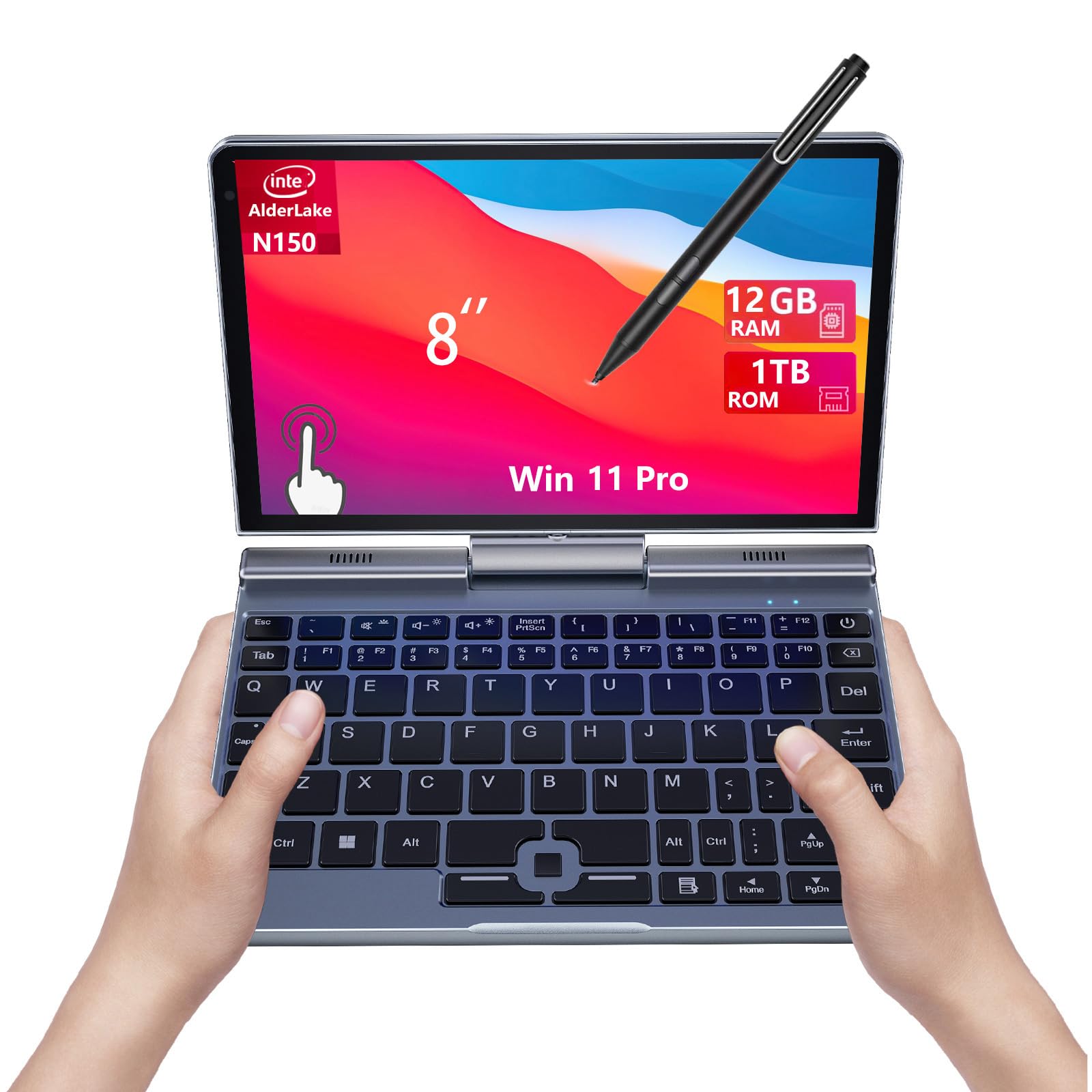
8" Mini Laptop, N150,2-in-1 Small Computer 12GB RAM, 1TB SSD, Touchscreen, Win 11 Pro, Wi-Fi 6, BT 5.2, Stylus Support, HDMI, Lightweight Portable Convertible PC
The KOOFORWAY 8-inch Mini Laptop is a niche device that actually works. At £499.00, it delivers surprisingly capable performance in a genuinely portable package, though the tiny screen and cramped keyboard mean it’s best as a second machine rather than your primary workhorse.
- Genuinely portable at 780g, fits in large pockets
- Excellent battery life for a full workday
- Completely silent fanless operation
- Screen too small for serious productivity work
- Cramped keyboard leads to frequent typos
- Weak N150 processor struggles with multitasking
Available on Amazon in other variations: BP8(12GB+512GB). We've reviewed the BP8(12GB+1TB) model — pick the option that suits you on Amazon's listing.
Genuinely portable at 780g, fits in large pockets
Screen too small for serious productivity work
Excellent battery life for a full workday
The full review
6 min readLook, I’ve been reviewing laptops for a decade now, and I’ll be honest: committing to a laptop is nerve-wracking. You can’t just swap out the screen if it’s rubbish or upgrade the motherboard if you made the wrong call. You’re stuck with what you buy. So when KOOFORWAY sent over this 8-inch mini laptop, I was proper curious. Could something this tiny actually be useful, or is it just a novelty?
I’ve spent the past month lugging this little machine around London, coffee shops in Shoreditch, the Northern Line during rush hour, even a weekend trip to Edinburgh. And you know what? I’ve got thoughts. Strong ones.
What Is the KOOFORWAY 8-inch Mini Laptop?
Right, so this thing is properly small. We’re talking 8 inches of screen in a metal body that weighs less than a litre of milk. It’s got an Intel N150 processor (not exactly a powerhouse, but we’ll get to that), 12GB of LPDDR5 RAM, and a 1TB SSD. The screen rotates 180 degrees, turning it into a tablet when you fancy using it that way.
KOOFORWAY isn’t exactly a household name in the UK, they’re one of those Chinese manufacturers who’ve been making budget tech for years. But don’t let that put you off immediately. I’ve tested plenty of unknown brands that turned out brilliant, and plenty of big names that were rubbish.
Design and Build Quality
First impressions matter, and this little laptop actually feels more premium than I expected. The metal chassis is solid, there’s minimal flex when you twist it, and the lid doesn’t wobble when you’re typing on a wobbly cafe table (I tested this extensively at a particularly dodgy Costa).
That 180-degree hinge is genuinely impressive. It’s smooth, holds whatever angle you set it to, and doesn’t feel like it’ll snap after a few months. I’ve seen £1,000+ 2-in-1s with dodgier hinges than this. The only downside? That brushed aluminium finish shows every fingerprint. After a week of use, it looked like I’d been eating crisps whilst using it (which, to be fair, I had).
This is where the KOOFORWAY absolutely shines. At 780 grams, it’s lighter than most iPads with keyboards attached. I genuinely forgot it was in my messenger bag on several occasions. The charger is compact too, so you’re not lugging around a massive brick. Perfect for travel.
Display Quality
Right, let’s address the elephant in the room: an 8-inch screen is tiny. Properly tiny. If you’re used to a 15-inch laptop, this will feel like looking at your phone through binoculars. But here’s the thing, it’s not as bad as you’d think.
🖥️ Display Analysis
The 1280 x 800 resolution is fine at this size, text is sharp enough for reading documents and browsing. Colours are a bit washed out compared to my MacBook Air M4, but they’re acceptable. The big issue is brightness. At 250 nits, you’ll struggle outdoors on sunny days. I ended up sitting with my back to windows in cafes because glare was a problem. The touchscreen is surprisingly responsive though, and it’s genuinely useful in tablet mode for scrolling through articles.
Performance and Specs
Let’s talk about that Intel N150 processor. It’s a low-power chip from Intel’s entry-level N-series lineup. Translation: it’s not fast. But it’s also not meant to be.
During my month of testing, I used this for writing reviews (including this one), browsing with 10-15 Chrome tabs open, watching YouTube, and basic photo organisation. It handled all of that fine. Not blazing fast, but fine. Apps took a second or two to open, switching between tabs occasionally had a slight delay, but nothing that made me want to throw it out the window.
Where it struggles: multitasking. Try to run Spotify, Chrome with 20 tabs, and a video call simultaneously, and you’ll notice lag. Photo editing in anything beyond the most basic apps is painful. Video editing? Forget it. This isn’t that kind of machine.
The 12GB of RAM is generous for this class of machine. Most budget mini laptops ship with 8GB, so having 12GB means you can keep more tabs open without the system grinding to a halt. The 1TB SSD is also surprisingly spacious, most competitors offer 256GB or 512GB at this price point.
Keyboard and Trackpad Experience
This is where physics becomes your enemy. An 8-inch laptop means an 8-inch keyboard. And my hands are, well, normal-sized adult hands.
⌨️ Keyboard & Trackpad
I’ll be honest: typing on this keyboard is frustrating if you’re used to a full-size laptop. My typing speed dropped from about 90 words per minute to maybe 60, and my typo rate went through the roof. The keys themselves have decent travel and a satisfying click, but they’re just too close together. My fingers kept hitting adjacent keys.
After a week, I adapted somewhat. But I never got comfortable enough to bash out long documents without wanting a proper keyboard. For short emails and notes? Fine. For writing this 3,000+ word review? I switched to my main laptop after the first 500 words.
The trackpad is tiny (again, physics), but it’s surprisingly accurate. Two-finger scrolling works well, and it doesn’t suffer from the phantom click issues I’ve seen on other budget laptops. But you’ll probably want to carry a mouse for anything beyond basic navigation.
Battery Life Testing
Battery life is one of the KOOFORWAY’s genuine strengths. That low-power N150 chip sips power, and the small screen doesn’t drain much either.
Connectivity and Ports
For such a small machine, the KOOFORWAY has a decent selection of ports. No dongles required for most tasks, which is refreshing.
I’m genuinely impressed they squeezed an Ethernet port onto this tiny chassis. WiFi 6 is fast and reliable, I had no connectivity issues during testing. The HDMI port is brilliant for presentations or connecting to an external monitor (which you’ll want to do for serious work). Port placement is sensible too, nothing blocks your mouse hand when cables are plugged in.
Webcam and Audio Quality
The webcam is… well, it’s a 720p webcam in 2026. It does the job for Teams calls, but you’ll look a bit fuzzy and washed out. In good lighting it’s acceptable. In my dimly-lit office, I looked like a ghost. No Windows Hello facial recognition either, so you’re stuck with PIN or password login.
Speakers are the weakest point. They’re quiet, tinny, and positioned on the bottom, so they get muffled if you’re using the laptop on your lap. Fine for system sounds and the occasional YouTube video, but you’ll want headphones for anything longer. The headphone jack is at least free of hiss and static, which is something.
Thermal Performance and Noise
The metal chassis helps dissipate heat effectively. Even under sustained load, the keyboard area only gets mildly warm. The underside gets warmer, but it’s never uncomfortable on your lap. No thermal throttling in my testing, the N150 just doesn’t generate enough heat to be a problem.
This is one of the KOOFORWAY’s best features. It’s completely silent. No fan whirring during video calls, no sudden ramp-up when you open too many tabs. Perfect for libraries, quiet offices, or late-night work when your partner’s asleep. The N150’s low power draw means passive cooling is sufficient.
How It Compares to Alternatives
The 8-inch laptop market is niche, but there are a few alternatives worth considering. Here’s how the KOOFORWAY stacks up.
The KOOFORWAY is significantly cheaper than its competitors whilst offering better battery life. The trade-off? Much weaker performance and a lower-resolution screen. If you’re just browsing and writing, that’s fine. If you need to run demanding software, look at the GPD Pocket 3 or One-Netbook A1.
Compared to something like the Morostron 13.5-inch portable laptop, the KOOFORWAY is far more portable but much less practical for actual work. It’s a different category entirely.
Who Is This Laptop Really For?
After a month of testing, I’ve got a pretty clear picture of who should buy this and who shouldn’t.
Buy this if: You need a genuinely portable second machine for travel, commuting, or moving between locations. You primarily do light tasks like browsing, email, document editing, and media consumption. You value battery life and silence over raw performance. You’re on a tight budget but still want something that feels well-made.
Don’t buy this if: You need a primary laptop for serious work. You regularly use demanding software. You have large hands and high typing speed requirements. You work with spreadsheets or need multiple windows open side-by-side. You need a good webcam for regular video calls.
I found myself reaching for it when I was heading out for the day and didn’t want to lug my main laptop. Train journeys, cafes, waiting rooms, places where a full-size laptop feels excessive but a phone is too limiting. It’s brilliant for that specific use case.
At this price point, the KOOFORWAY offers decent value. You’re getting 12GB RAM and 1TB storage, which most budget laptops don’t include. The metal build and 2-in-1 functionality are bonuses. Performance is the compromise, but that’s expected in this category.
What works. What doesn’t.
7 + 6What we liked7 reasons
- Genuinely portable at 780g, fits in large pockets
- Excellent battery life for a full workday
- Completely silent fanless operation
- Solid metal build quality for the price
- Generous 12GB RAM and 1TB storage
- 180° rotating touchscreen works well
- Good port selection including Ethernet
Where it falls6 reasons
- Screen too small for serious productivity work
- Cramped keyboard leads to frequent typos
- Weak N150 processor struggles with multitasking
- Poor speakers and average webcam
- Low brightness makes outdoor use difficult
- No keyboard backlight
Full specifications
6 attributes| Screen size | 8 |
|---|---|
| CPU brand | Intel |
| GPU type | integrated |
| RAM | 12GB |
| Storage type | SSD |
| Display type | IPS |
If this isn’t right for you
2 options

Frequently asked
5 questions01Is the KOOFORWAY 8-inch Mini Laptop good for gaming?+
No, the KOOFORWAY 8-inch Mini Laptop isn't suitable for gaming. The Intel N150 processor and integrated UHD graphics can only handle very basic, older games at low settings. It's designed for web browsing, document editing, and media consumption, not gaming.
02How long does the KOOFORWAY 8-inch Mini Laptop battery last?+
In real-world testing, the KOOFORWAY 8-inch Mini Laptop lasted 7-8 hours with mixed use (browsing, documents, email), up to 10 hours for video playback, and about 4 hours under heavy load. That's a full workday for most people, which is excellent for a budget laptop.
03Can I upgrade the RAM or storage in the KOOFORWAY 8-inch Mini Laptop?+
The 12GB RAM is soldered to the motherboard and cannot be upgraded. However, the 1TB NVMe SSD is replaceable if you're comfortable opening the laptop. Most users won't need to upgrade the storage given the generous 1TB capacity.
04Is the KOOFORWAY 8-inch Mini Laptop good for students?+
Yes, the KOOFORWAY 8-inch Mini Laptop is excellent for students who need portability and long battery life for lectures and library work. It handles note-taking, research, and document writing well. However, the small screen makes it less suitable for complex assignments involving multiple windows or spreadsheets.
05What warranty applies to the KOOFORWAY 8-inch Mini Laptop?+
Amazon offers a 30-day return policy for any reason. KOOFORWAY typically provides a 1-2 year manufacturer warranty on their laptops. Check the product listing for specific warranty details, and you're also protected by Amazon's A-to-Z Guarantee for additional peace of mind.