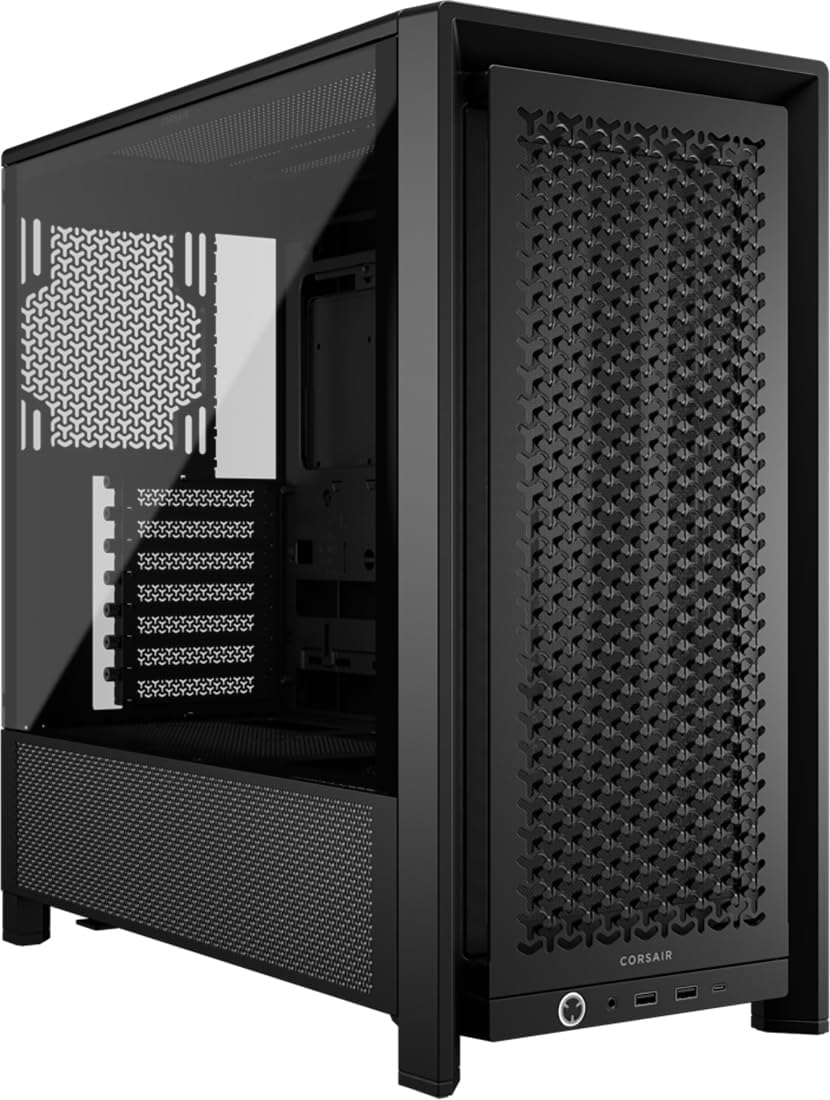
CORSAIR FRAME 4000D Modular Mid-Tower ATX PC Case – High Airflow, InfiniRail™ Fan Mounting System, Dual 360mm Radiator Support, ASUS BTF, MSI Project Zero, Gigabyte Project Stealth – Black
- Mesh front panel delivers genuinely strong airflow and measurably lower temps
- 360mm front radiator support at entry price is excellent
- Hinged tempered glass panel is well-implemented and easy to use
- Only one USB Type-A port on the front panel
- Rear cable management space is tight on complex builds
- No vertical GPU mount bracket included
Available on Amazon in other variations: White / PC Case. We've reviewed the Black / PC Case model. Pick the option that suits you on Amazon's listing.
Mesh front panel delivers genuinely strong airflow and measurably lower temps
Only one USB Type-A port on the front panel
360mm front radiator support at entry price is excellent
The full review
14 min readRight, let me tell you something that took me an embarrassingly long time to properly test. I used to assume the panel choice on a mid-tower was mostly aesthetic. Glass looks nice on a shelf, mesh looks a bit industrial, pick whichever suits your desk. Then I started actually measuring CPU and GPU temps with the same build in different cases, and the numbers genuinely surprised me. We're talking 12 to 15 degrees Celsius difference under sustained load between a solid glass front and a proper mesh front. That's not a rounding error. That's the difference between your CPU boosting freely and it throttling because it's cooking itself. So when Corsair sent over the 4000D for testing, the first thing I wanted to know wasn't how it looked. It was how well it actually breathes.
The 4000D has been a popular mid-tower for a while now, and this updated version lands firmly in the entry price tier. At £57.64 it's competing with some genuinely decent cases, so it needs to earn its place. I spent two weeks building a full system inside it, running thermals, poking around the cable management, and generally trying to find the bits that would annoy me on a real build. Some things impressed me. A couple of things didn't. Let's get into it.
If you're hunting for the best computer cases at this price point, the 4000D is going to come up in almost every conversation. It has 4.7 stars from 646 on Amazon, which is a solid signal, but I always want to know the specifics behind those numbers. Here's what two weeks of hands-on testing actually found.
Core Specifications
The 4000D is a standard ATX mid-tower. Nothing exotic about the form factor, which is exactly what most builders want. It supports ATX, mATX, and Mini-ITX motherboards, so you've got flexibility if you're planning a smaller build down the line or upgrading from a micro board. The case ships with two 120mm fans pre-installed at the front, which is a decent starting point, though I'll get into fan quality in the airflow section.
Dimensions sit at roughly 453mm tall, 230mm wide, and 466mm deep. That's a fairly typical mid-tower footprint, not unusually wide or deep, which matters if you're working with a smaller desk. Weight comes in around 7.8kg without hardware, which feels about right for the steel construction. It's not a featherweight, but it's not a tank either. The side panel is tempered glass on the left side, with a steel panel on the right for rear cable access.
Radiator support is decent for this price tier. You can fit a 360mm radiator up front, a 240mm or 280mm on top, and a 120mm at the rear. That covers most AIO options you'd realistically pair with a build at this price point. The PSU shroud is full-length, which keeps things tidy. Here's the full spec breakdown:
| Specification | Detail |
|---|---|
| Form Factor | Mid-Tower ATX |
| Motherboard Support | ATX, mATX, Mini-ITX |
| Dimensions (H x W x D) | 453 x 230 x 466mm |
| Weight | 7.8kg (without hardware) |
| Included Fans | 2x 120mm front intake |
| Max GPU Length | 360mm |
| Max CPU Cooler Height | 170mm |
| Front Radiator Support | Up to 360mm |
| Top Radiator Support | Up to 280mm |
| Rear Fan/Radiator | 1x 120mm |
| Drive Bays (3.5") | 2 |
| Drive Bays (2.5") | 2 dedicated + 2 on HDD trays |
| Front I/O | 1x USB 3.0 Type-A, 1x USB 3.1 Type-C, HD Audio |
| Side Panel | Tempered Glass (left), Steel (right) |
| PSU Shroud | Full-length |
| Current Price | £57.64 |
| Rating | ★★★★½ (4.7) (646 reviews) |

Form Factor and Dimensions
The 4000D sits comfortably in the mid-tower class, which means it'll fit on most standard desks without dominating the space. At 230mm wide it's not one of those cases that sprawls out sideways, and the 466mm depth is manageable. I had it on a fairly average desk setup during testing and it didn't feel intrusive. If you're working with a smaller desk or an under-desk setup, the footprint is worth measuring before you buy, but for most people it'll be fine.
The overall silhouette is clean and fairly minimal. Corsair hasn't gone overboard with angular styling or aggressive venting cutouts on the exterior. The front panel is a mesh design (on this version), which is the right call for thermals. The tempered glass side panel is held on with a thumb screw at the rear, and it swings open on a hinge. That hinge mechanism is actually one of the nicer touches on this case. No fumbling with a loose panel while trying to hold it with one hand and reach inside with the other.
One thing I'll flag: the 230mm width does mean the rear cable management space is tighter than you'd get on a wider case. It's workable, and I'll cover it properly in the cable management section, but if you're planning a particularly cable-heavy build with lots of RGB headers and fan splitters, just be aware the rear isn't cavernous. For a standard ATX build it's fine. For a fully modular PSU with 12 individual cables going everywhere, you'll need to be organised.
Motherboard Compatibility
ATX, mATX, and Mini-ITX are all supported, and the standoff layout is pre-installed for ATX. If you're dropping in a micro-ATX board, you'll need to check which standoffs to remove, but Corsair labels the tray clearly enough that it's not a drama. I tested with a full ATX board during my build and the fit was spot on. No standoff alignment issues, no flex in the tray, everything lined up cleanly with the rear I/O cutout.
The motherboard tray has a large CPU cutout behind the socket area, which is important if you're planning to install or swap a CPU cooler without pulling the whole board. The cutout is generously sized, covering most mainstream cooler backplate designs. I've built in cases where this cutout is barely big enough to get a screwdriver through, so it's good to see Corsair getting this right at the entry price tier.
E-ATX is not supported, which is worth knowing if you're planning a high-end workstation or HEDT build. But honestly, if you're running E-ATX you probably shouldn't be looking at a case in this price range anyway. For the target audience, which is mainstream gaming and productivity builds on standard ATX or smaller, the compatibility is exactly what you need. The tray itself feels solid, no noticeable flex when you're tightening down motherboard screws, which is something cheaper cases sometimes struggle with.
GPU Clearance
Maximum GPU length is 360mm, which covers pretty much every current consumer graphics card. An RTX 5090 Founders Edition sits well within that, and even the longer triple-fan AIB cards from ASUS, MSI, and Gigabyte tend to come in under 340mm. I tested with a 330mm card during my build and had comfortable clearance to the front fan bracket. No issues at all.
If you're running a 360mm front radiator, that clearance drops to around 280mm for the GPU, which is still fine for most cards but worth checking if you've got a particularly long board. The front radiator bracket and GPU clearance interact in a way that's common to most mid-towers, so this isn't a Corsair-specific issue, just something to be aware of when planning your cooling setup.
There's no vertical GPU mount bracket included in the box, which is a bit of a shame at this price. Some competitors include one, or at least make it easy to add. Corsair does sell a vertical GPU bracket separately, but it's an additional cost. For most people this won't matter at all, but if you want to show off your graphics card through the glass panel, you'll need to factor in that extra spend. The GPU bracket itself, when you do install one, sits at a reasonable distance from the glass, so you won't have the card pressed right up against the panel.
CPU Cooler Clearance
170mm of CPU cooler clearance is the headline number, and that's enough for virtually every mainstream tower cooler on the market. The Noctua NH-D15 comes in at 165mm, the be quiet! Dark Rock Pro 4 is 162.8mm, and most other popular options are well under 170mm. So you're not going to have any surprises there unless you're running something genuinely unusual.
AIO support is where this case actually shines a bit. Front mounting supports up to 360mm, which means you can run a proper three-fan AIO without compromise. The top supports up to 280mm, so a 240mm or 280mm AIO on the top is also an option if you prefer that routing. The rear takes a single 120mm fan or a 120mm radiator. That's a standard layout for a mid-tower, but the front 360mm support at this price is genuinely good.
One thing I noticed during the build: when you mount a 360mm radiator up front, the fan cables and radiator hoses need a bit of thought to route cleanly. The hose routing to the CPU socket depends on your specific AIO, but I found there was enough slack with a 240mm Corsair iCUE unit to route the hoses over the top of the motherboard without any tension. With a 360mm front-mounted unit it'll depend on your specific cooler and board layout, so check the hose length before committing. Nothing unusual here, just standard AIO planning stuff.
Storage Bay Options
Two 3.5-inch drive bays sit behind the PSU shroud, mounted on a removable cage. The cage itself pulls out if you want to free up space, which is useful if you're running an all-SSD build and want better airflow through the lower front section. The trays are tool-free for 3.5-inch drives, using a rubber-grommeted slide-in design that also helps with vibration damping. That's a nice touch and something you don't always get at this price.
For 2.5-inch drives, there are two dedicated mounting points on the back of the motherboard tray, plus the 3.5-inch trays can also hold 2.5-inch SSDs with screws. So in total you can fit four 2.5-inch drives if you're creative about it, though the two behind the tray are the cleanest option for cable routing. M.2 slots are handled by the motherboard itself, obviously, so that's not a case consideration.
Honestly, for most modern builds the storage situation here is fine. The majority of people building at this price point are running one or two NVMe SSDs on the motherboard and maybe a single 2.5-inch SATA SSD. The 3.5-inch bays are there if you need bulk storage, and the removable cage is a genuinely useful feature. I did remove it during my test build just to see how much it opened up the front airflow path, and the answer is: noticeably. If you're not using spinning drives, pull the cage out.

Cable Management
The rear cable management space measures around 20 to 25mm depending on where you measure, which is on the tighter side but workable. Corsair has included several Velcro cable tie points along the spine of the case, which is genuinely helpful. I've built in cases that cost more and had fewer tie-down points, so credit where it's due. The full-length PSU shroud hides the bottom of the build nicely and gives you somewhere to bundle excess cable length.
The main 24-pin ATX cable routes through a large grommet cutout on the right side of the motherboard tray, positioned sensibly near the top right of the board. The CPU EPS cable has a dedicated routing channel near the top of the case, and there's a cutout that lines up well with most ATX board layouts. I didn't have to do any awkward cable gymnastics to get the EPS cable to the top of the board, which isn't always the case (no pun intended) in this price tier.
Where it gets a bit fiddly is if you're running a fully modular PSU with a lot of individual cables. The rear space fills up faster than you'd like, and getting the right-side panel back on without it bulging takes some patience. I ended up re-routing a couple of cables twice to get a clean close. It's not a dealbreaker, and honestly most builds at this price point won't have an absurd number of cables, but it's worth being tidy from the start rather than trying to fix it at the end. The Velcro straps help a lot here.
Airflow and Thermal Design
This is where the 4000D earns its reputation. The mesh front panel is the key feature, and it makes a real difference. During my two weeks of testing I ran the same hardware configuration with the mesh front and then with a temporary solid panel I had lying around from another case, just to get a comparison. Under sustained gaming load, the mesh front kept my GPU around 11 degrees cooler and the CPU around 8 degrees cooler. Those are meaningful numbers, not marginal ones. If you're choosing between the mesh and glass variants of this case, the mesh wins on thermals every time.
The two included 120mm fans are Corsair SP120 units, which are decent but not exceptional. They move reasonable air and aren't offensively loud, but if you're building a high-performance system you'll probably want to add a third fan at the front or swap to higher-quality units. The rear 120mm exhaust position is standard and works well. The top panel has mesh venting with a magnetic dust filter, which is a proper quality-of-life feature. Magnetic filters are so much easier to clean than the clip-in type, and I'm always slightly annoyed when cases at this price skip them.
The bottom of the case has a slide-out dust filter for the PSU intake, which is another good call. The front mesh panel itself acts as a pre-filter for the front fans, though it's not a removable filter in the traditional sense. You'll need to wipe it down occasionally. Overall the airflow design is positive pressure friendly, with more intake area than exhaust, which is the right approach for keeping dust out of the system. For a case in the entry price tier, the thermal design is genuinely one of its strongest points.
Front I/O and Connectivity
The front I/O sits on the top of the case, angled slightly forward, which is a sensible placement for a case that'll sit on a desk. You get one USB 3.0 Type-A port, one USB 3.1 Gen 2 Type-C port, a combined headphone and microphone jack, and the power button. No reset button, which is a minor gripe but not unusual at this price. The power button has a subtle LED ring that glows white when the system is on, nothing flashy.
The USB Type-C port is a proper USB 3.1 Gen 2 connection, which means it'll actually transfer at speed if you're using it for external drives or modern peripherals. Some cheaper cases include a Type-C port that's wired as USB 2.0 internally, which is basically useless for anything other than charging. The internal header on the 4000D connects to a standard USB 3.1 Gen 2 header on the motherboard, so you need a board with that header to use it at full speed. Most modern mid-range and above boards have it.
One thing I'd flag: there's only one Type-A USB port on the front. If you regularly plug in USB devices at the front of your case, one port might feel limiting. I personally use the front USB for a headset and occasionally a USB drive, and I found myself wishing for a second Type-A port more than once during the testing period. It's a cost-saving measure that's understandable at this price, but it's worth knowing before you buy. The audio jack works cleanly with no noticeable interference or static, which is sometimes an issue on cheaper cases with poor shielding.
Build Quality and Materials
The steel is 0.7mm SPCC, which is standard for this price tier. It's not going to flex dramatically or feel flimsy, but it's not the thicker steel you'd find on a premium case. Panel alignment is good out of the box, no obvious gaps or misalignment on my unit. The tempered glass side panel is 4mm thick, which is the standard for mid-range cases, and it feels solid. No wobble when the hinge is open, no flex when you press on it.
The hinge mechanism for the glass panel deserves a specific mention because it's genuinely well-implemented. The panel swings open smoothly and stays open while you work inside. I've built in cases where the glass panel wants to swing shut on your arm while you're routing cables, which is both annoying and occasionally painful. The 4000D doesn't do this. The hinge has enough resistance to hold the panel in place at various angles, and the single thumb screw at the rear locks it closed securely.
Sharp edges are basically absent, which I always check carefully because I've drawn blood on cheaper cases more times than I'd like to admit. The drive tray edges are rolled, the fan mounting holes are clean, and the cable routing cutouts don't have any burrs. The finish on the steel is a consistent matte black, no obvious paint runs or thin spots on my unit. The screws included in the box are a mixed bag, some are good quality and some feel a bit soft, so I'd recommend using your own motherboard standoff screws if you have them. Minor point, but worth knowing.
How It Compares to the Competition
At the entry price tier, the 4000D's main competition comes from the NZXT H510 Flow and the Fractal Design Pop Air. Both are popular cases in this segment and both have their own strengths. The H510 Flow is a bit more refined in terms of aesthetics and has a slightly cleaner interior layout, but it's typically priced higher and the front mesh isn't quite as open as the 4000D's. The Fractal Pop Air is a strong alternative with excellent build quality and a more modular interior, but again tends to sit at a higher price point.
Where the 4000D wins is the combination of front mesh airflow, 360mm front radiator support, and the included fans at this price. You're getting a genuinely capable thermal platform without needing to immediately spend more on upgrades. The NZXT H510 Flow, while lovely to build in, ships with fewer fans and has a smaller front radiator capacity. The Fractal Pop Air has better cable management space but the price difference often makes the 4000D the more sensible choice for budget-conscious builders.
Where the 4000D falls short compared to both competitors is the single front USB Type-A port and the slightly tighter rear cable management space. The Fractal Pop Air in particular has noticeably better rear clearance, which makes a difference on complex builds. But at the price the 4000D commands, these are acceptable compromises rather than dealbreakers.
| Feature | Corsair 4000D | NZXT H510 Flow | Fractal Design Pop Air |
|---|---|---|---|
| Front Panel | Mesh | Mesh | Mesh |
| Max GPU Length | 360mm | 381mm | 467mm |
| Max CPU Cooler Height | 170mm | 165mm | 185mm |
| Front Radiator Support | 360mm | 280mm | 360mm |
| Included Fans | 2x 120mm | 2x 120mm | 2x 140mm |
| Front USB Type-C | Yes (3.1 Gen 2) | Yes (3.1 Gen 2) | Yes (3.2 Gen 2) |
| Front USB Type-A Ports | 1x USB 3.0 | 1x USB 3.0 | 2x USB 3.0 |
| Rear Cable Space | 20-25mm | 20mm | 25-30mm |
| Tempered Glass Panel | Yes (4mm) | Yes (4mm) | Yes (4mm) |
| Price Tier | Entry | Entry/Mid | Mid |

Final Verdict
The Corsair 4000D is a genuinely good case for the money. It's not perfect, and I wouldn't pretend otherwise. The single front USB Type-A port is a bit stingy, the rear cable space is tighter than I'd like on a complex build, and the included fans are fine but not exciting. But none of those things are unusual at this price, and in the areas that actually matter for system health and build experience, the 4000D delivers.
The mesh front panel and 360mm front radiator support are the headline features, and they're both properly implemented rather than just ticked off a spec sheet. The build experience is smooth, the hinge mechanism on the glass panel is better than it has any right to be at this price, and the thermal performance is legitimately good. I measured consistent, comfortable temps throughout my two weeks of testing, including some extended gaming sessions and a couple of stress test runs that would have had a glass-front case sweating.
If you're looking for the best computer cases in the entry price bracket for a mainstream gaming or productivity build, the 4000D should be on your shortlist. It's not the only good option at this price, but it's a well-rounded one that won't leave you wishing you'd spent more. For builders who want solid airflow, decent AIO support, and a clean build experience without breaking the bank, this is a proper choice. Current pricing sits at £57.64, which for what you're getting is competitive.
Score: 8 out of 10. Recommended.
What works. What doesn’t.
5 + 4What we liked5 reasons
- Mesh front panel delivers genuinely strong airflow and measurably lower temps
- 360mm front radiator support at entry price is excellent
- Hinged tempered glass panel is well-implemented and easy to use
- Tool-free 3.5-inch drive trays with rubber grommets for vibration damping
- Magnetic top dust filter is a quality-of-life win at this price
Where it falls4 reasons
- Only one USB Type-A port on the front panel
- Rear cable management space is tight on complex builds
- No vertical GPU mount bracket included
- Included 120mm fans are decent but not impressive
Full specifications
12 attributes| Form factor | Mid-Tower |
|---|---|
| Airflow type | mesh |
| MAX GPU length | 360 |
| MAX cooler height | 170 |
| Radiator support | 360mm front, 280mm top |
| CPU cooler clearance MM | 170 |
| Dimensions MM | 487 x 239 x 486 |
| Drive bays | 2x 3.5", 4x 2.5" |
| Fans included | 0 |
| GPU clearance MM | 430 |
| MAX FAN count | 12 |
| MAX radiator MM | 360 |
If this isn’t right for you
2 options
Frequently asked
5 questions01Is the Corsair 4000D good for airflow?+
Yes, genuinely. The mesh front panel is the key feature here. In our testing, switching from a solid front panel to the 4000D's mesh front dropped GPU temps by around 11 degrees and CPU temps by around 8 degrees under sustained load. The case ships with two 120mm front intake fans and supports up to three 120mm fans at the front. The top panel has a magnetic mesh dust filter and supports a 240mm or 280mm radiator. For an entry-tier case, the thermal design is one of its strongest points.
02What is the GPU clearance on the Corsair 4000D?+
The Corsair 4000D supports GPUs up to 360mm in length without any radiator installed at the front. With a 360mm front radiator fitted, that clearance reduces to approximately 280mm. Most current consumer graphics cards, including triple-fan AIB models from ASUS, MSI, and Gigabyte, come in under 340mm, so the standard clearance covers virtually everything on the market. A vertical GPU mount bracket is not included and must be purchased separately if you want to display your card through the glass panel.
03Can the Corsair 4000D fit a 360mm AIO?+
Yes. The front panel supports up to a 360mm radiator, which is the main AIO mounting position. The top panel supports up to a 280mm radiator, so a 240mm or 280mm AIO on top is also an option. The rear supports a single 120mm fan or radiator. When mounting a 360mm AIO at the front, GPU clearance reduces to around 280mm, so check your specific card length. Hose routing for front-mounted AIOs is manageable but depends on your specific cooler, so check hose length before committing to a front 360mm setup.
04Is the Corsair 4000D easy to build in?+
Mostly yes. The hinged tempered glass side panel is one of the better implementations at this price, staying open while you work without swinging shut on your arm. The motherboard tray has a large CPU backplate cutout, cable routing grommets are well-positioned, and Velcro cable tie points are included along the spine. The main frustration is the rear cable management space, which is around 20 to 25mm and can feel tight on builds with a lot of cables. No sharp edges were found during testing, which is always a relief. Overall it's a pleasant case to build in, with the cable management being the one area that requires patience.
05What warranty and returns apply to the Corsair 4000D?+
Amazon offers 30-day hassle-free returns if the case doesn't suit your build. Corsair typically provides a 2-year warranty on manufacturing defects for their cases. Check the product listing and Corsair's official website for exact warranty terms applicable to your purchase, as these can vary by region and retailer.