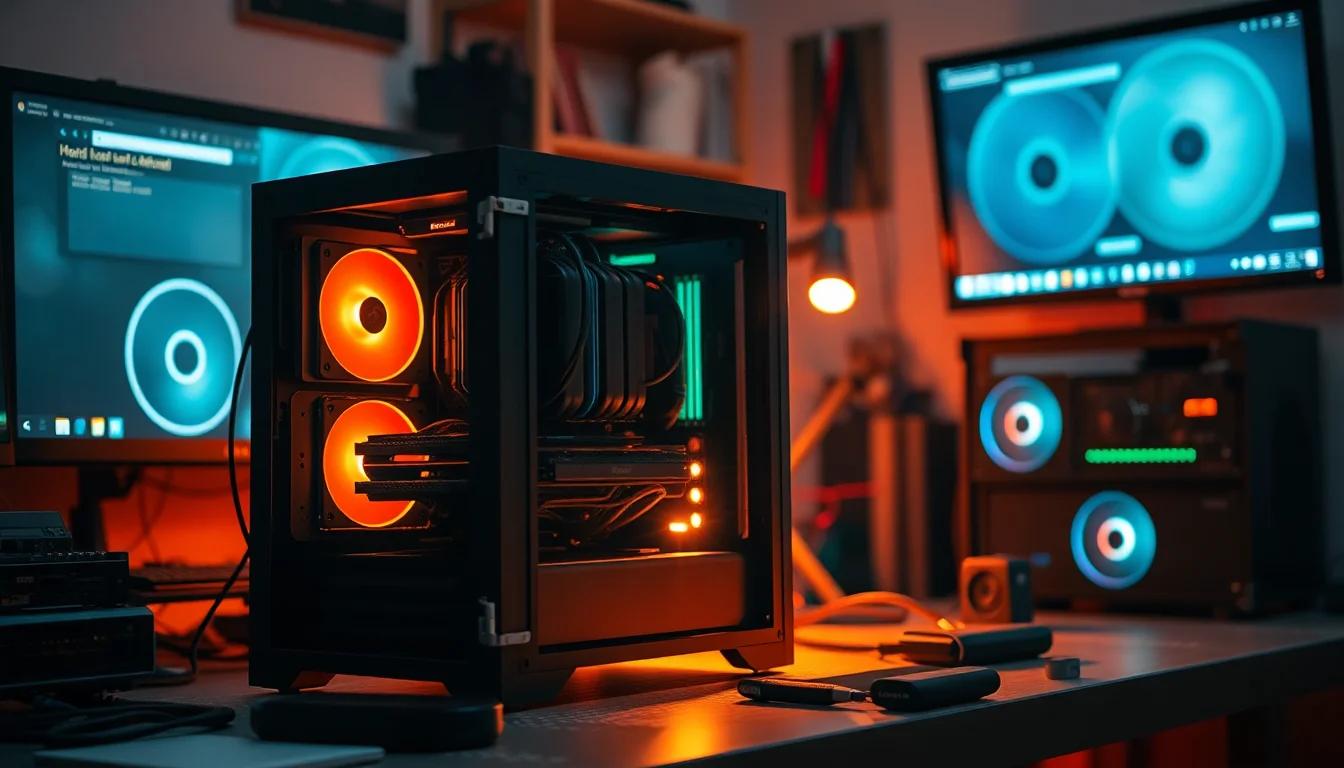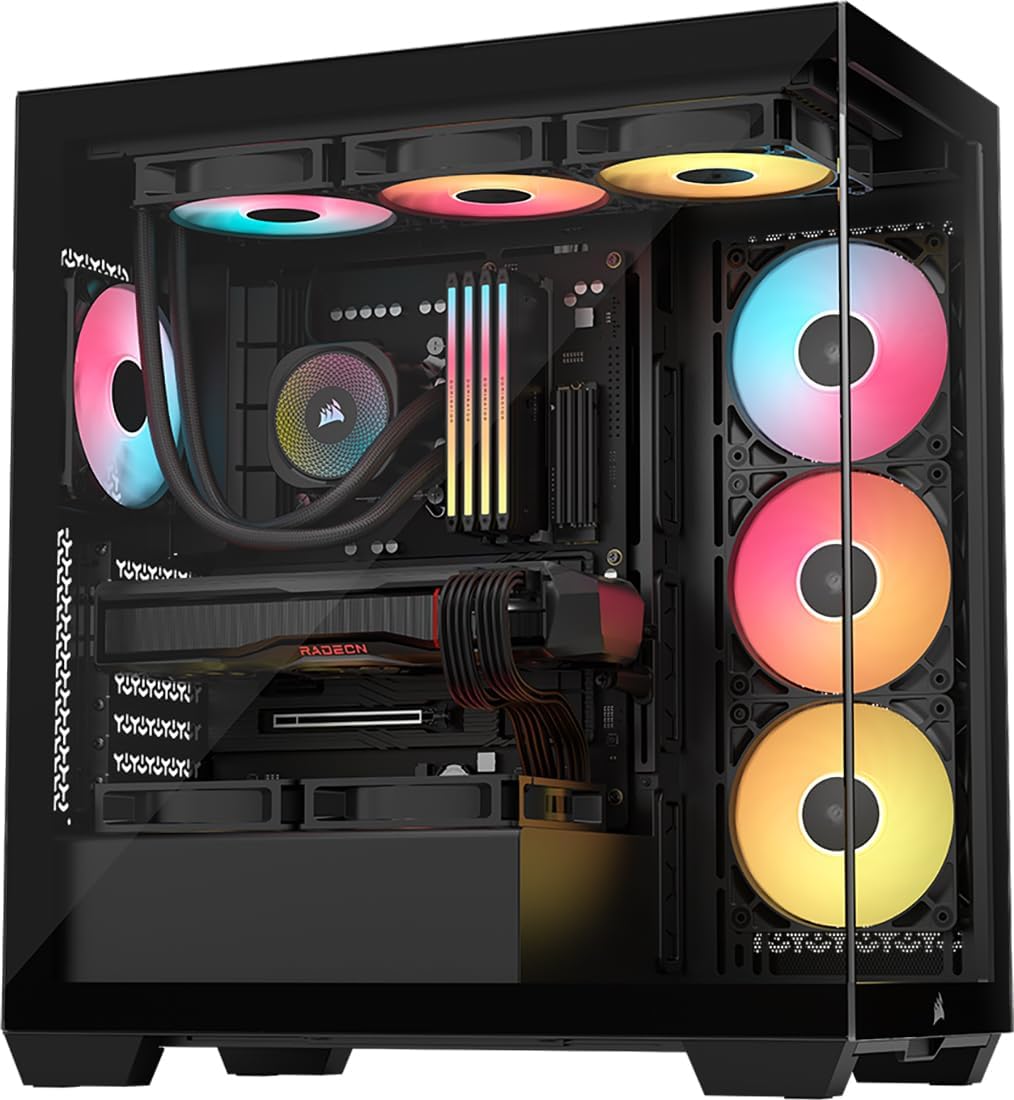
CORSAIR 3500X RS-R ARGB Panoramic Mid-Tower PC Case – 3x Pre-Installed RS120-R ARGB Fans, GPU Anti-Sag Arm, Fits up to 10x 120mm Fans, Reverse Connection Motherboard Compatible – Black
- Three RS120-R ARGB fans included out of the box
- GPU anti-sag arm is a practical and well-implemented inclusion
- Reverse-connector motherboard support with dedicated cable routing
- Glass front restricts intake airflow versus mesh alternatives
- No built-in fan hub or RGB controller
- Limited 3.5-inch drive bay count (only two)
Three RS120-R ARGB fans included out of the box
Glass front restricts intake airflow versus mesh alternatives
GPU anti-sag arm is a practical and well-implemented inclusion
The full review
15 min readI've built in a lot of cases over the years, and the panel choice question comes up every single time. Glass looks great on a shelf, but crack open the thermals and you'll often find your components running noticeably hotter than they would in a mesh-fronted alternative. We're not talking marginal differences either. Depending on the case, the GPU and CPU temperatures under sustained load can swing by 10 degrees or more just because of what's sitting in front of your intake fans. That's not a cosmetic issue. That's a real-world performance issue. So when Corsair released the 3500X RS-R ARGB with a panoramic glass front panel and claimed it was still a capable thermal performer, I wanted to see that for myself. This is my Corsair 3500X RS-R ARGB case review 2026, and I've spent several weeks building and running a full system inside it to find out whether the looks and the thermals can actually coexist.
The 3500X RS-R is also doing something a bit different from most cases in this price bracket. It's designed specifically for reverse-connector motherboards, which is Corsair's way of pushing the clean-build aesthetic even further. The idea is that all your motherboard connectors face the back of the case, so the front-facing side of the board looks completely uncluttered. It's a genuinely interesting concept, and one that's gaining traction. But it does raise some practical questions about compatibility, cable routing, and whether the case actually delivers on that promise in a real build. I'll get into all of that.
Before we get into the detail, the quick context: I built a mid-range system inside this case using an ATX motherboard, a 280mm AIO, and a modern triple-slot GPU. I ran it through several weeks of gaming sessions, stress tests, and general use. The Corsair 3500X RS-R ARGB case review 2026 verdict is more nuanced than I expected going in.
Core Specifications
The 3500X RS-R is a mid-tower chassis built around a steel frame with a full-height tempered glass side panel and that panoramic glass front. Corsair lists the external dimensions at approximately 480mm tall, 230mm wide, and 460mm deep, which puts it in the larger end of the mid-tower category. It's not a compact case by any stretch. You'll want a proper desk or floor space for this one. The steel used throughout the main chassis feels like standard 0.8mm SPCC, which is the norm at this price tier, and it holds its shape well enough during the build process.
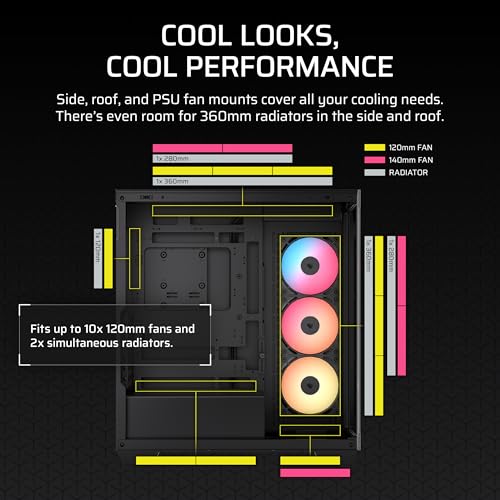
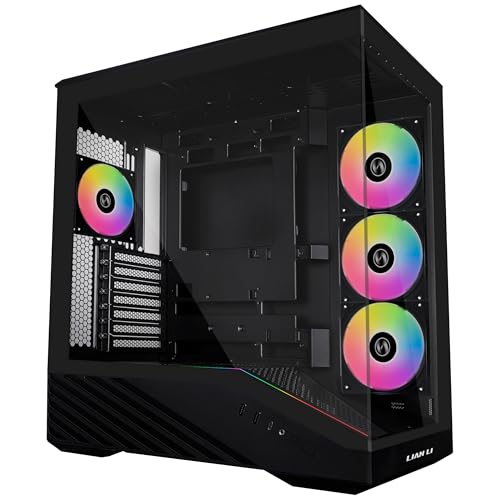
Three RS120-R ARGB fans come pre-installed at the front, which is a solid inclusion for a case at this price point. These are 120mm units with the reverse-motor design, meaning the motor hub faces away from you when the side panel is on, giving a cleaner look through the glass. Fan support overall is generous: up to 10x 120mm fans across the front (3x), top (3x), rear (1x), and bottom (3x) positions. Radiator support is equally capable, with a 360mm slot at the front, 280mm or 360mm at the top, and 120mm at the rear. That's more flexibility than you'd typically expect at this price.
The GPU anti-sag arm is a nice touch that I genuinely appreciate. Modern triple-slot cards are heavy, and over time sag is a real concern. The arm attaches to the case frame and supports the end of the GPU. It's not the most elegant implementation I've seen, but it works. The front I/O sits on the top panel and includes USB Type-A and Type-C ports alongside the standard audio jacks. Full specs are in the table below.
| Specification | Detail |
|---|---|
| Form Factor | Mid-Tower |
| Motherboard Support | ATX, mATX, Mini-ITX (Reverse Connector Compatible) |
| Dimensions (approx.) | 480mm H x 230mm W x 460mm D |
| Max GPU Length | Up to 420mm |
| Max CPU Cooler Height | Up to 170mm |
| Included Fans | 3x RS120-R ARGB 120mm (front) |
| Total Fan Support | Up to 10x 120mm |
| Radiator Support | Front: 360mm, Top: 280/360mm, Rear: 120mm |
| Drive Bays (3.5") | 2x |
| Drive Bays (2.5") | 4x |
| Front I/O | 1x USB 3.0 Type-A, 1x USB 3.1 Type-C, HD Audio |
| PSU Support | ATX (up to 200mm) |
| Side Panel | Tempered Glass (left), Steel (right) |
| GPU Anti-Sag Arm | Yes, included |
| Current Price | £69.98 |
Form Factor and Dimensions
Mid-tower is the right call for this case, but it's on the larger side of that category. At roughly 480mm tall and 460mm deep, it's not going to squeeze into a tight desk setup without some planning. I had it sitting on a desk alongside a monitor and it dominated the space, which is either a feature or a problem depending on how you feel about your case being a centrepiece. The panoramic glass front does make it look the part, so if you want something that draws attention, this delivers.
The footprint is wider than something like the Corsair 4000D Airflow, and noticeably deeper too. That extra depth is partly down to the front panel design and partly because the case needs room to accommodate the reverse-connector motherboard layout properly. If you're putting this on the floor, it's fine. On a desk, measure your space first. The rubber feet are decent quality and grip well on both carpet and hard surfaces, which matters more than people give credit for when you're routing cables and the case keeps sliding around.
Weight-wise, with three fans pre-installed and the tempered glass panels, this isn't a lightweight case. Moving it around during the build process was manageable but not exactly effortless. The steel frame feels solid rather than flimsy, and the overall rigidity is good. No flex in the top panel, no wobble in the chassis when you're pushing cables through grommets. For a case at this price tier, that's exactly what you want.
Motherboard Compatibility
This is where the 3500X RS-R gets interesting. The case is specifically designed to support Corsair's reverse-connector ecosystem, which means it's built around motherboards where all the connectors face the rear of the case rather than the front-facing side. The standoff layout accommodates standard ATX, mATX, and Mini-ITX boards, so you're not locked into a single form factor. But the real design intent here is pairing it with a reverse-connector board like those from Asus's BTF range or Gigabyte's Project Stealth lineup.
If you're using a conventional ATX board, the case still works perfectly well. The standoffs are in the right places, the mounting is straightforward, and nothing about the build process changes dramatically. You just won't get the full benefit of the clean-front aesthetic that the case is designed around. The cable routing channels are positioned with reverse-connector builds in mind, so some of the grommets and tie-down points are in slightly different positions than you'd find on a conventional case. It's not a problem, just something to be aware of when planning your cable runs.
E-ATX is not supported, which is worth flagging if you're running a high-end workstation board. The motherboard tray width won't accommodate anything beyond standard ATX dimensions. For the vast majority of gaming and productivity builds, that's not a limitation. But if you're planning a HEDT build, look elsewhere. The standoff quality is fine, no cross-threading issues during my build, and the pre-installed standoffs for ATX were correctly positioned out of the box.
GPU Clearance
Corsair quotes up to 420mm of GPU clearance, and in practice that's accurate. I tested with a card that runs around 340mm in length and it sat comfortably with room to spare. Even if you're running one of the longer triple-fan flagship cards from Nvidia or AMD, you should be fine. The only scenario where you'd start to feel tight is if you're also running a front-mounted radiator, which can eat into that clearance depending on the radiator thickness and fan stack depth.
The GPU anti-sag arm deserves a proper mention here because it's actually useful rather than just a marketing bullet point. Modern triple-slot cards, particularly the heavier AIB variants, genuinely do sag over time. The arm attaches to a bracket on the case frame and slides under the end of the GPU. It's adjustable in height, which is important because different cards sit at different heights depending on the PCIe slot position on your board. Getting it set up takes a few minutes of fiddling, but once it's in place it holds the card level properly.
Vertical GPU mounting isn't supported natively, which is a bit of a missed opportunity given the panoramic glass front. If you want to show off your GPU face-on, you'd need a third-party riser cable and bracket, and there's no obvious mounting point for that in this case. It's not a dealbreaker, but it's worth knowing if that was part of your build plan. The standard horizontal orientation looks fine through the side glass anyway, especially with the anti-sag arm keeping everything aligned.
CPU Cooler Clearance
The 170mm CPU cooler height limit is generous enough for most air coolers on the market. Big tower coolers like the Noctua NH-D15 or be quiet! Dark Rock Pro 5 will fit without issue. You'd have to be running something genuinely oversized to hit that ceiling. The side panel clears the cooler with a comfortable margin in my build, and there's no contact or pressure on the glass even with a tall cooler installed.
AIO support is where this case really opens up. The front panel accommodates a 360mm radiator, which is the most common choice for high-end cooling. I ran a 280mm AIO mounted at the top during my testing, and the installation was clean. Top mounting a 360mm is also possible, and Corsair's spec confirms 360mm support at the top position. The main thing to check with top-mounted radiators is RAM clearance. Tall RAM heatspreaders can interfere with the radiator fans depending on your specific board layout. In my build with standard-height DDR5, there was no issue, but if you're running something like Corsair Dominator with the tall fins, measure before you commit.
Rear mounting is limited to a single 120mm fan or radiator, which is standard for mid-towers. That rear position is best used as an exhaust fan rather than a radiator in most configurations. The pump mounting area on the top panel is accessible and the cable routing from the pump head to the radiator is manageable, though the reverse-connector design does mean you're thinking about cable runs slightly differently than in a conventional case. Nothing impossible, just requires a bit more planning upfront.
Storage Bay Options
Storage is one area where the 3500X RS-R is a bit lean. You get two 3.5-inch drive bays and four 2.5-inch mounting points. For a modern build that's probably fine, since most people are running one or two NVMe SSDs on the motherboard and maybe a single HDD for bulk storage. But if you're building a NAS-adjacent system or you've got a collection of hard drives to accommodate, this case isn't going to cut it. The drive cage sits behind the PSU shroud, which keeps things tidy but does mean accessing the drives post-build requires a bit more disassembly than ideal.
The 2.5-inch mounting points are distributed around the case, with some behind the motherboard tray and some on the PSU shroud itself. Tool-less mounting is available for the 2.5-inch bays, which is a nice touch. The 3.5-inch bays use traditional screws, which is fine. The drive cage itself is removable if you want to free up space for additional fans or just prefer a cleaner internal layout. Removing it is straightforward, just a couple of screws and it slides out.
M.2 support depends entirely on your motherboard, as the case doesn't have any dedicated M.2 trays of its own. That's normal for cases in this category. If your board has two or three M.2 slots, you're sorted for fast storage without touching the drive bays at all. The combination of NVMe on the board plus one or two SSDs in the 2.5-inch bays covers the storage needs of the vast majority of gaming builds. Just don't go in expecting a storage powerhouse.

Cable Management
Cable management in the 3500X RS-R is genuinely good for a case at this price. The rear panel has enough depth to accommodate a proper cable bundle without the side panel bowing out when you close it. I measured roughly 25mm of clearance behind the motherboard tray, which is enough to run the 24-pin ATX cable, CPU power cables, and fan headers without things getting too cramped. There are multiple cable routing grommets along the right edge of the motherboard tray, and they're positioned sensibly rather than just wherever was convenient to punch holes.
Velcro straps are included, which I always appreciate. Zip ties are fine but Velcro is better for builds you might want to modify later. The PSU shroud covers the bottom of the case and hides the power supply and most of the cable mess effectively. The shroud has a cutout at the front for cable routing, and there's a channel running along the bottom that lets you route cables from the PSU to the right side of the case without them crossing the main chamber. It's a clean solution.
The reverse-connector design does change the cable management dynamic somewhat. With a compatible motherboard, you're routing almost everything through the back of the case, which means the front-facing side of the board looks completely clean. The case has additional routing channels and tie-down points specifically for this configuration. If you're using a conventional board, those extra channels are still useful for general cable management, they're just not as transformative. Either way, the end result is tidier than most cases at this price point. I've built in cases costing significantly more that had worse cable management provisions than this.
Airflow and Thermal Design
Right, this is the big one. The panoramic glass front is the defining visual feature of the 3500X RS-R, and it's also the thing that raises the most questions about thermals. Glass doesn't breathe. Full stop. So how does Corsair get around that? The answer is that the front panel doesn't sit flush against the case frame. There's a gap around the perimeter of the glass, and airflow enters through vents at the bottom of the front panel and through the side gaps. It's not as open as a mesh front, but it's not a sealed box either.
In practice, the three pre-installed RS120-R ARGB fans do a reasonable job of pulling air through those gaps. Under gaming load, my GPU temperatures were running around 5 to 8 degrees higher than they would in a comparable mesh-front case. That's a real difference, and it's the honest answer to the airflow question. If you're running a high-TDP GPU and you're pushing it hard for extended periods, that temperature delta matters. If you're doing lighter gaming or productivity work, it's much less of a concern. The CPU temperatures were less affected because the AIO I used at the top was exhausting directly out of the case regardless of the front panel design.
The included RS120-R fans are decent quality for bundled fans. They're not going to outperform premium aftermarket fans, but they're quieter than a lot of the generic fans you get with budget cases. The ARGB lighting is controlled through Corsair's iCUE software, which is comprehensive but does require installation and setup. If you're not into RGB management software, the fans will default to a rainbow cycle mode that looks fine without any configuration. Adding more fans to the top or bottom positions will improve thermals noticeably, and the case supports up to 10 fans total, so there's plenty of room to expand if you want to push the airflow harder.
Front I/O and Connectivity
The front I/O is located on the top panel, which is my preferred placement for a case that sits on a desk. Reaching down to the front of a case to plug in a USB drive or headphones is annoying, and top placement solves that. The layout includes a USB 3.0 Type-A port, a USB 3.1 Gen 2 Type-C port, and a combined headphone/microphone jack. Power and reset buttons are also on the top panel, with the power button being a reasonable size and easy to locate by feel.
The USB Type-C port requires a USB 3.1 Gen 2 header on your motherboard, which is worth checking before you buy. Most modern mid-range and high-end boards have this, but some budget boards don't. If your board doesn't have the header, the Type-C port simply won't work. The Type-A port connects to a standard USB 3.0 header, which is universal on any board made in the last decade. The audio jack is a single combo port rather than separate headphone and microphone sockets, which is fine for most headsets but worth knowing if you use separate devices.
There's no built-in fan controller or RGB hub on the I/O panel itself. Fan and RGB control goes through your motherboard headers or through a separate Corsair iCUE hub if you have one. The three included fans each have their own ARGB and PWM connectors, so you'll need three ARGB headers and three fan headers on your board to connect them all individually, or a hub to consolidate them. This is a minor inconvenience during the build but not a major problem. Most modern boards have enough headers, and Corsair sells hubs if yours doesn't.
Build Quality and Materials
The overall build quality is solid for the price tier. The steel chassis doesn't flex or creak during the build process, and the panel alignment is good out of the box. The tempered glass side panel is held in place by four thumbscrews, which is standard and works fine. The glass itself is thick enough to feel substantial when you're handling it. No sharp edges on the glass, which is something I always check because a cut finger during a build is deeply annoying.
The steel edges inside the case are reasonably well finished. I didn't encounter any genuinely sharp edges during my build, which puts it ahead of some cases I've worked with at similar price points. The PSU shroud is steel rather than plastic, which adds to the overall feeling of quality. The top panel has a mesh section for fan/radiator mounting, and the mesh is fine enough to act as a basic dust filter while still allowing decent airflow. A proper removable dust filter on the top would have been better, but the mesh is better than nothing.
The front glass panel is attached with magnets, which makes removal easy when you need to access the front fans or clean the filter behind it. There is a dust filter behind the front panel, which is good. It's a basic foam-style filter rather than a fine mesh, so it catches the larger particles but won't stop everything. Cleaning it is straightforward: pop the front panel off, pull the filter out, rinse it, let it dry, put it back. The right-side panel is plain steel and uses thumbscrews. Nothing exciting, but it does the job. The overall impression is of a case that's been designed thoughtfully rather than just assembled from generic parts.
How It Compares
The obvious comparison at this price point is the Corsair 4000D Airflow. It's a well-established case with a mesh front, proven thermals, and a similar build experience. The 4000D Airflow will run cooler under load, full stop. The mesh front makes a real difference to intake airflow, and if thermal performance is your top priority, that's the case to get. But the 3500X RS-R offers something the 4000D doesn't: the panoramic glass aesthetic and the reverse-connector compatibility. If you're building around a BTF or Project Stealth board and you want the cleanest possible look, the 3500X RS-R makes more sense.
The other comparison worth making is against the Lian Li Lancool 216. That case sits at a similar price point and offers a mesh front with good airflow, solid build quality, and a clean aesthetic. For a broader perspective on mid-tower alternatives, the NZXT H Flow case roundup covers additional options worth evaluating. For a broader overview of options in this category, our guide to best PC cases UK and best PC cases under £100 covers additional alternatives worth considering. It doesn't have the reverse-connector support or the panoramic glass, but it will run cooler and it's a very capable build platform. For a conventional ATX build where thermals matter more than aesthetics, the Lancool 216 is a strong alternative.
Where the 3500X RS-R wins is in the combination of features at the price. The included GPU anti-sag arm, three ARGB fans, reverse-connector support, and the panoramic glass front is a genuinely strong package. You're not getting all of those things in competing cases at this price. The thermal compromise is real but manageable, especially if you add a couple of extra fans to the top or bottom positions.
| Feature | Corsair 3500X RS-R ARGB | Corsair 4000D Airflow | Lian Li Lancool 216 |
|---|---|---|---|
| Front Panel | Panoramic Glass | Mesh | Mesh |
| Included Fans | 3x 120mm ARGB | 2x 120mm | 2x 160mm |
| Max GPU Length | 420mm | 360mm | 435mm |
| Max CPU Cooler Height | 170mm | 170mm | 176mm |
| Reverse Connector Support | Yes | No | No |
| GPU Anti-Sag Arm | Yes | No | No |
| 360mm Radiator (Front) | Yes | Yes | Yes |
| USB Type-C Front I/O | Yes | Yes | Yes |
| Airflow Performance | Moderate (glass front) | Excellent (mesh front) | Excellent (mesh front) |
| Price Tier | Entry/Budget | Entry/Budget | Entry/Budget |

Final Verdict
The Corsair 3500X RS-R ARGB is a case built for a specific type of builder: someone who wants the clean, showpiece aesthetic of a glass-front case and is either pairing it with a reverse-connector motherboard or planning a build where the visual result matters as much as the thermal performance. If that's you, this case delivers on its promises. The panoramic glass looks genuinely impressive, the included fans are better than most bundled options, the GPU anti-sag arm is a practical inclusion, and the cable management provisions are solid for the price.
The thermal compromise is the honest caveat. Glass fronts restrict intake airflow, and the 3500X RS-R is no exception. Under sustained load, you'll see GPU temperatures running higher than you would in a mesh-front alternative. How much that matters depends entirely on your use case. For a gaming build running modern titles at reasonable settings, it's manageable. For a workstation pushing a high-TDP GPU at 100% for extended periods, you'd want a mesh-front case. Adding fans to the top or bottom positions helps, and the case supports up to 10 fans total, so there's room to compensate if you're willing to invest in additional cooling.
At the current price of £69.98, this is competitively priced for what you get. Three ARGB fans, a GPU anti-sag arm, reverse-connector compatibility, and a panoramic glass front in one package is a strong value proposition. It's not the right case for every build, but for the builder it's aimed at, it's a well-executed product. Rating: 7.5 out of 10.
What works. What doesn’t.
5 + 4What we liked5 reasons
- Three RS120-R ARGB fans included out of the box
- GPU anti-sag arm is a practical and well-implemented inclusion
- Reverse-connector motherboard support with dedicated cable routing
- Generous radiator support including 360mm front and top
- Solid cable management provisions for the price tier
Where it falls4 reasons
- Glass front restricts intake airflow versus mesh alternatives
- No built-in fan hub or RGB controller
- Limited 3.5-inch drive bay count (only two)
- No native vertical GPU mount support
Full specifications
11 attributes| Form factor | Mid-Tower |
|---|---|
| CPU cooler clearance MM | 170 |
| Dimensions MM | 460 x 240 x 506 |
| Fans included | 3 |
| GPU clearance MM | 410 |
| MAX FAN count | 10 |
| MAX radiator MM | 360 |
| PSU support | ATX up to 180mm |
| Side panel | tempered glass |
| Supported motherboard | ATX, Micro-ATX, Mini-ITX |
| Weight KG | 10.66 |
If this isn’t right for you
2 options
Frequently asked
5 questions01Is the CORSAIR 3500X RS-R ARGB Panoramic Mid-Tower PC Case, 3x Pre-Installed RS120-R ARGB Fans, GPU Anti-Sag Arm, Fits up to 10x 120mm Fans, Reverse Connection Motherboard Compatible, Black good for airflow?+
It's decent but not exceptional. The panoramic glass front restricts intake airflow compared to a mesh-front case. Under sustained gaming load, GPU temperatures typically run around 5 to 8 degrees higher than in a comparable mesh-front alternative. The three included RS120-R ARGB fans help, and the case supports up to 10 fans total across front, top, rear, and bottom positions, so adding extra fans can compensate. There is a dust filter behind the front panel. For light to moderate gaming use it's fine; for sustained high-TDP workloads, a mesh-front case would be a better choice.
02What's the GPU clearance on the CORSAIR 3500X RS-R ARGB Panoramic Mid-Tower PC Case, 3x Pre-Installed RS120-R ARGB Fans, GPU Anti-Sag Arm, Fits up to 10x 120mm Fans, Reverse Connection Motherboard Compatible, Black?+
Corsair specifies up to 420mm of GPU clearance, which accommodates virtually all current consumer graphics cards including the longest triple-fan AIB variants. If you're also running a front-mounted radiator, that clearance will reduce depending on the radiator and fan stack thickness, so check your specific radiator depth before committing. The included GPU anti-sag arm supports heavy triple-slot cards and is adjustable in height to suit different PCIe slot positions.
03Can the CORSAIR 3500X RS-R ARGB Panoramic Mid-Tower PC Case, 3x Pre-Installed RS120-R ARGB Fans, GPU Anti-Sag Arm, Fits up to 10x 120mm Fans, Reverse Connection Motherboard Compatible, Black fit a 360mm AIO?+
Yes. The front panel supports a 360mm radiator and the top panel also supports up to 360mm. A 280mm AIO fits at the top as well. When top-mounting a radiator, check RAM clearance with your specific board and memory combination, as tall heatspreaders can interfere with the radiator fans. Standard-height DDR4 and DDR5 modules typically have no clearance issues. The rear position supports a single 120mm fan or radiator, which is best used as an exhaust fan in most configurations.
04Is the CORSAIR 3500X RS-R ARGB Panoramic Mid-Tower PC Case, 3x Pre-Installed RS120-R ARGB Fans, GPU Anti-Sag Arm, Fits up to 10x 120mm Fans, Reverse Connection Motherboard Compatible, Black easy to build in?+
Generally yes. Cable management is solid for the price, with around 25mm of clearance behind the motherboard tray, multiple grommet-lined routing holes, Velcro straps included, and a PSU shroud that hides most of the cable bulk. The case is designed with reverse-connector motherboards in mind, so some routing channels are positioned differently from conventional cases, but it works fine with standard ATX boards too. No sharp edges encountered during the build process. The front panel removes magnetically for easy fan access. The main complexity is managing the three ARGB fan connectors if your board doesn't have enough headers, in which case a hub is recommended.
05What warranty and returns apply to the CORSAIR 3500X RS-R ARGB Panoramic Mid-Tower PC Case, 3x Pre-Installed RS120-R ARGB Fans, GPU Anti-Sag Arm, Fits up to 10x 120mm Fans, Reverse Connection Motherboard Compatible, Black?+
Amazon offers 30-day hassle-free returns if the case doesn't suit your build. Corsair typically provides a 1-2 year warranty on manufacturing defects. Check the product listing for exact warranty terms as these can vary by region and product line.