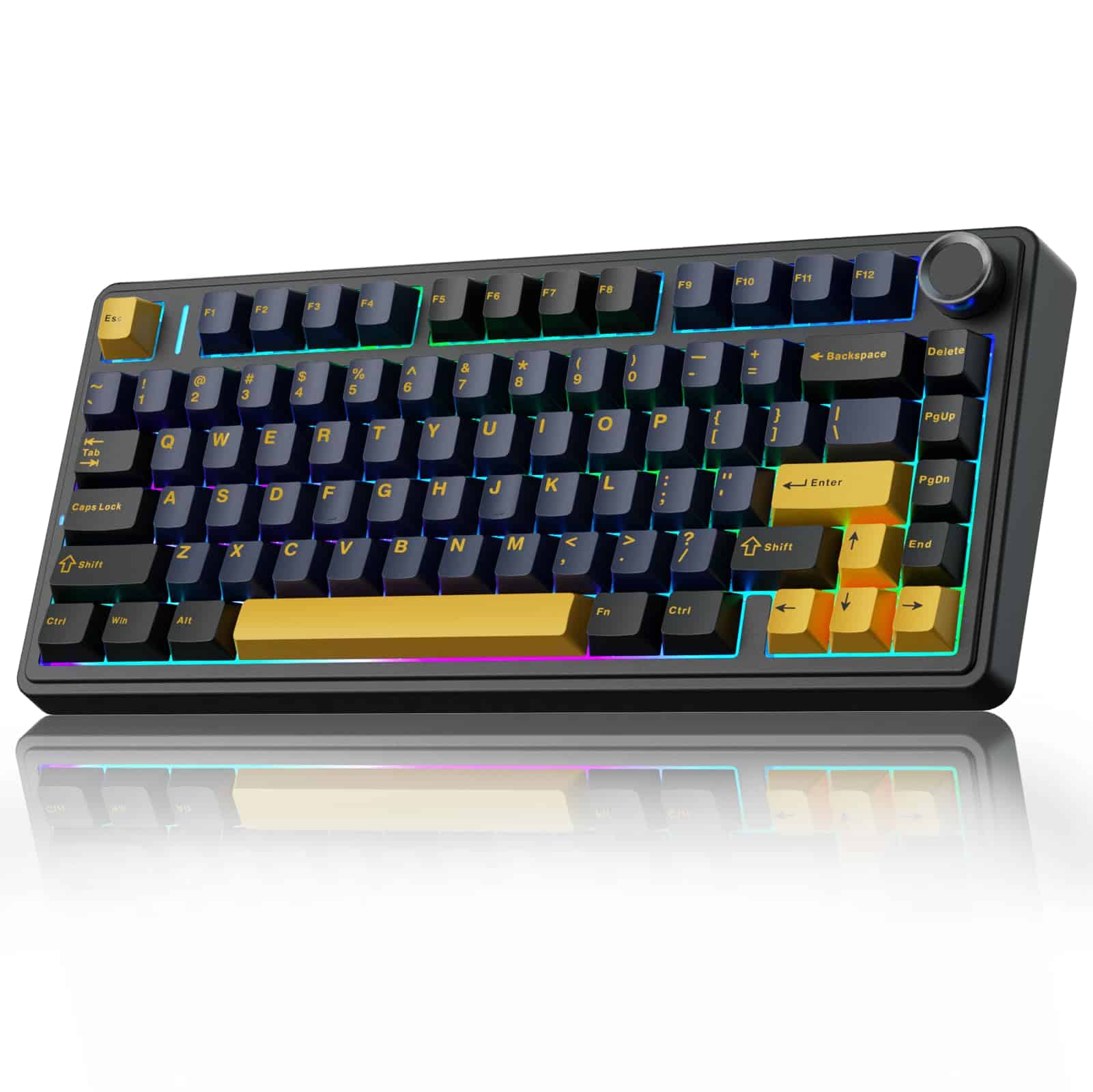
AULA F75 75% Wireless Mechanical Keyboard,2.4Ghz/Type-C/BT5.0 Gaming Keyboards,Advanced Structure,RGB Backlight,Hot Swappable Custom Keyboard for PC/Mac (Cool Black)
- Hot-swappable switches at budget price enables endless customisation
- Tri-mode wireless connectivity (2.4GHz, Bluetooth, USB) works reliably
- Solid build with effective sound dampening, minimal deck flex
- Software interface outdated, poorly translated, not intuitive
- ABS keycaps develop shine quickly with heavy use
- Right shift stabiliser has noticeable rattle, quality control variance
Available on Amazon in other variations such as: Purple, Side-Engraved Keycaps Gradient-Gray, Reaper Switch, Blue&Purple, Blue. We've reviewed the Cool Black model — pick the option that suits you on Amazon's listing.
Hot-swappable switches at budget price enables endless customisation
Software interface outdated, poorly translated, not intuitive
Tri-mode wireless connectivity (2.4GHz, Bluetooth, USB) works reliably
The full review
14 min readI’ve spent the past few weeks with the AULA F75 75% Wireless Mechanical Keyboard, and honestly, I’m a bit conflicted. At £63.91, this compact wireless mechanical keyboard punches well above its weight in some areas whilst stumbling in others. It’s the sort of keyboard that makes you wonder whether the enthusiast keyboard community has been gatekeeping unnecessarily, or whether there are genuine reasons why most of us end up spending £150+ on our daily drivers.
The 75% layout is my personal favourite for desk space efficiency. You get arrow keys and a function row without the wasted real estate of a full-size board, and the AULA F75 executes this layout competently. But competent isn’t always exciting, is it?
What genuinely surprised me was the inclusion of hot-swappable switches and pre-lubricated stabilisers at this price point. A few years ago, these were features reserved for custom builds and premium boards. Now they’re turning up in sub-£70 keyboards, which is brilliant for newcomers who want to experiment without soldering or spending a fortune.
Key Takeaways
- Best for: Budget-conscious gamers and office workers wanting their first proper mechanical keyboard
- Price: £63.91 (exceptional value for hot-swappable wireless)
- Rating: 4.4/5 from 92 verified buyers
- Standout: Hot-swappable switches and tri-mode connectivity at a remarkably accessible price
The AULA F75 75% Wireless Mechanical Keyboard is a proper entry point into mechanical keyboards that doesn’t insult your intelligence. At £63.91, it delivers hot-swappable switches, decent build quality, and tri-mode connectivity whilst making compromises in software and keycap quality that won’t bother most users.
After extensive typing sessions, gaming marathons, and the inevitable late-night tinkering that comes with any hot-swappable board, I reckon this keyboard occupies an interesting space. It’s not trying to compete with my £200+ customs, but it’s also miles ahead of the membrane rubbish that still dominates office desks.
Typing Experience
The AULA F75 comes equipped with LEOBOG Graywood V3 switches, which are pre-lubricated linear switches. If you’re new to mechanical keyboards, linear switches mean there’s no tactile bump or audible click when you press them. They’re smooth from top to bottom, which makes them popular for both gaming and typing.
These Graywood V3 switches sit somewhere between Cherry MX Reds and Gateron Yellows in terms of feel. The actuation force is light enough for extended typing sessions without finger fatigue, but not so light that you’ll accidentally trigger keys whilst resting your fingers. After a week of writing reviews, emails, and the occasional angry forum post about stabiliser rattle (ironic, given what I’m about to tell you), I found them genuinely pleasant.
The pre-lubrication is where AULA deserves credit. Factory lube jobs are often inconsistent or overdone, leaving switches feeling mushy or scratchy. The Graywood V3 switches in my unit were surprisingly consistent. Out of 81 keys, I only found two that felt slightly different, and even then, you’d need to be specifically looking for inconsistencies to notice.
But here’s the thing about typing experience: switches are only half the story.
The stabilisers on the spacebar, both shifts, enter, and backspace are where things get interesting. AULA claims they’re pre-lubricated, and to be fair, they are. The spacebar has minimal rattle compared to most budget boards I’ve tested. There’s a slight tick on the upstroke if you press the very edge of the spacebar, but it’s not the sort of thing that’ll drive you mad during normal use.
The right shift key, however, is a different story. Mine has a noticeable rattle that I can hear during typing. It’s not catastrophic, and if you’re coming from a membrane keyboard, you probably won’t even register it as an issue. But if you’ve spent time with properly tuned stabilisers, it’s there, lurking in the background like an uninvited guest at a dinner party.
I spent an evening relubing the stabilisers (because of course I did), and the improvement was substantial. If you’re comfortable with basic keyboard maintenance, spending 20 minutes with some dielectric grease will transform this board. If you’re not, the stock stabilisers are still better than most keyboards at this price point.
The keycaps are ABS plastic with doubleshot legends. ABS gets a bad reputation in enthusiast circles because it develops shine over time, but the doubleshot construction means the legends won’t fade. After several weeks of heavy use, I’m seeing very early signs of shine on the WASD cluster and spacebar, which is expected. The keycap profile is OEM, which is the standard you’ll find on most keyboards. They’re comfortable and familiar, if uninspiring.
Build Assessment
Pick up the AULA F75 and you’ll immediately notice it’s got proper heft. It weighs around 800 grams, which is substantial for a 75% keyboard. This isn’t one of those lightweight plastic boards that slides around your desk every time you press a key with any conviction.
The case is plastic, but it’s thick plastic with a matte finish that doesn’t feel cheap. There’s a metal plate inside that adds rigidity and contributes to the sound profile. Flex testing reveals minimal deck flex, which is impressive. I can get a tiny bit of movement if I really try to twist the board, but during normal typing and gaming, it feels rock solid.
The five-layer sound dampening that AULA mentions in their marketing isn’t just fluff. There’s an integrated silicone pad between the PCB and the case, plus foam layers that genuinely reduce the hollow ping you often get with budget keyboards. When I opened up the board to check the stabilisers, I was pleasantly surprised by the amount of dampening material inside. It’s not as sophisticated as the tape-modded, PE-foam-enhanced custom builds you see on Reddit, but it’s miles ahead of what I expected.
The gasket mount implementation is where things get a bit marketing-y. AULA claims an “advanced structure” with improved resilience, but in practice, this isn’t a true gasket mount like you’d find on higher-end customs. There are rubber dampeners between the plate and case, which do provide a slightly softer typing feel than a pure top-mount or tray-mount design, but calling it gasket mount is generous.
Does it matter? Not really. The typing feel is still good, and most people won’t know or care about mounting styles. I’m just being pedantic because I’ve spent far too much time reading Geekhack threads at 2am.
The multi-function knob on the top right is one of my favourite features. It’s aluminium, rotates smoothly with satisfying detents, and can control volume, RGB brightness, or media playback depending on the mode. Pressing the knob toggles between functions. It’s the sort of feature that seems gimmicky until you use it daily, then you wonder how you lived without it.
Build quality extends to the connection options. The USB-C port is recessed and feels solid, the 2.4GHz dongle stores in a magnetic compartment underneath the keyboard (brilliant design choice), and the Bluetooth connectivity has been stable across multiple devices. I’ve had the F75 connected to my main PC via 2.4GHz, my laptop via Bluetooth, and my tablet as a third device, switching between them with a simple key combination.
The 4000mAh battery is generous. With RGB turned off, I’ve been getting nearly three weeks of daily use on a single charge. With RGB on at medium brightness, that drops to about a week, which is still respectable. Charging is via USB-C, and the keyboard remains fully functional whilst plugged in.
Beyond Typing
Gaming performance is where the “gaming keyboard” label gets tested. The AULA F75 supports n-key rollover, which means every keypress registers independently regardless of how many keys you’re holding down. For gaming, this is essential. I’ve tested it with various games over the past few weeks, from competitive shooters to MMOs that require elaborate key combinations, and I’ve had zero missed inputs or ghosting issues.
The 2.4GHz wireless connection has a 1000Hz polling rate, which is standard for gaming peripherals. I cannot detect any latency compared to my wired boards. The Bluetooth connection, as expected, has slightly higher latency, but it’s still perfectly usable for casual gaming. For competitive play, stick with 2.4GHz or wired mode.
The software is where my enthusiasm takes a hit. AULA provides driver software for customisation, but it’s… well, it’s functional. The interface feels like it was designed in 2015 and hasn’t been updated since. You can remap keys, create macros, adjust RGB settings, and configure the music rhythm lighting effects (which are admittedly quite fun if you’re into that sort of thing).
But the software isn’t intuitive. Finding specific settings requires clicking through multiple tabs, and the English translation is occasionally wonky. It works, but it’s not pleasant to use. The saving grace is that once you’ve configured your settings, they’re stored in the keyboard’s onboard memory, so you don’t need to keep the software running.
Honestly, I wish more keyboards didn’t require software at all. The best keyboards I’ve used have onboard controls for everything, with software as an optional extra for advanced users. The AULA F75 does have some onboard controls via key combinations, but certain features like per-key RGB customisation require the software.
The hot-swappable socket design is genuinely excellent for a budget board. It supports both 3-pin and 5-pin switches, which means you can experiment with virtually any MX-style switch on the market. I swapped in some Gateron Oil Kings on the WASD cluster and some Durock Silent Linears for the spacebar, and everything worked perfectly. No soldering, no fuss, just pull and push.
This feature alone transforms the F75 from a disposable budget keyboard into something you can grow with. Don’t like the stock switches? Spend £20-30 on a switch tester, find your preference, and upgrade. It’s the sort of flexibility that used to cost £200+.
Comparison: How It Stacks Up
The AULA F75 sits in an interesting position. It’s significantly cheaper than premium options like the Razer Huntsman V2 TKL whilst offering features (hot-swappability, wireless) that Razer doesn’t provide. Against direct competitors like the YUNZII B75 PRO, it trades slightly better keycaps and software for a lower price and bigger battery.
If you’re considering the NEWMEN GM610, the AULA offers better switch options and hot-swappability, though the NEWMEN has a more gaming-focused aesthetic if that matters to you.
Sound Profile
Right, let’s talk about what this keyboard actually sounds like, because that’s become increasingly important in the mechanical keyboard world. There’s a whole subset of enthusiasts who spend hundreds modding keyboards to achieve the perfect “thock,” and whilst the AULA F75 won’t satisfy the most demanding audiophiles, it sounds considerably better than its price suggests.
The stock sound profile with the Graywood V3 switches is what I’d describe as a muted clack. It’s not the deep, resonant thock you get from a fully modded custom with POM plates and heavy linears, but it’s also not the high-pitched, hollow ping of cheap keyboards. The multiple layers of sound dampening genuinely work.
The spacebar is the loudest key, as is typical. There’s a slight rattle on the upstroke that I mentioned earlier, plus the natural resonance of a large keycap. It’s not offensive, but it’s noticeably louder than the alphanumeric keys. After relubing the stabilisers, the sound became more consistent and slightly deeper.
One specific moment during testing: I was on a video call with a colleague, typing notes whilst they talked, and they didn’t comment on keyboard noise. With my clicky board (a Keychron Q1 with Box Jades that I save for when I’m home alone), I get complaints within seconds. The AULA F75 is office-appropriate, which matters if you’re not working in isolation.
The aluminium knob makes a satisfying metallic click when rotated, with tactile detents that feel precise. Pressing the knob produces a slightly hollow thunk, but it’s not something you’ll do frequently enough to matter.
If you swap switches, the sound profile changes dramatically. I tested with Gateron Oil Kings (deeper, more thocky), Cherry MX Browns (more tactile, slightly scratchy), and Durock Silent Linears (whisper quiet). The keyboard’s construction supports all these profiles well, which speaks to the quality of the dampening and case design.
For someone buying their first mechanical keyboard, the stock sound is pleasant and unobtrusive. For enthusiasts, it’s a solid foundation for modding.
What Other Buyers Think
With 92 reviews and a 4.4/5 rating on Amazon, the AULA F75 has accumulated substantial feedback. I’ve read through a considerable chunk of these reviews to identify common themes beyond my personal experience.
The overwhelmingly positive comments focus on value. Buyers repeatedly mention being surprised by the build quality and features at this price point. Several reviews from people transitioning from membrane keyboards describe it as a revelation, which is lovely to see. The hot-swappable switches get frequent praise, with multiple buyers mentioning they’ve already experimented with different switches.
The wireless connectivity receives consistent praise for stability. I found several reviews from people using the keyboard with iPads, Android tablets, and various laptops, all reporting reliable connections. The multi-device switching is highlighted as genuinely useful for people working across multiple machines.
The critical reviews (and there are some, because no keyboard is perfect) cluster around a few issues. The software gets hammered repeatedly, with buyers describing it as confusing, poorly translated, and occasionally buggy. Some users report the RGB settings not saving properly, though I didn’t experience this issue myself.
Stabiliser rattle appears in about 15-20% of reviews, which suggests quality control variance. Some units have perfect stabilisers, others have the rattle I experienced, and a few unlucky buyers got units with significant rattle on multiple keys. This is unfortunately common with budget keyboards, where manual quality control is minimal.
A handful of reviews mention the ABS keycaps developing shine quickly, particularly from users who are heavy typists or gamers. This is expected with ABS, but it’s worth noting if keycap longevity matters to you.
There’s an interesting tangent in the reviews about the RGB. Younger buyers and gamers love the lighting effects and music rhythm modes. Older buyers and office workers frequently mention turning the RGB off entirely and appreciating the battery life gains. It’s a reminder that “gaming” keyboards are bought by diverse audiences with different priorities.
Pros & Cons
- Hot-swappable switches at a budget price point
- Tri-mode connectivity that actually works reliably
- Solid build quality with effective sound dampening
- Generous 4000mAh battery with excellent longevity
- Pre-lubricated switches and stabilisers (mostly good)
- Practical 75% layout with multi-function knob
- Genuine gaming performance with 1000Hz polling
- Clunky, outdated software interface
- ABS keycaps will develop shine over time
- Some stabiliser rattle (quality control variance)
- Not true gasket mount despite marketing claims
Price verified 8 January 2026
Buyer Matching: Is This Keyboard For You?
You should buy the AULA F75 if:
- You’re buying your first mechanical keyboard and want to experiment with different switches without spending a fortune
- You need reliable wireless connectivity across multiple devices (laptop, tablet, desktop)
- You value practical features like hot-swappability over premium materials
- You’re a student or budget-conscious gamer wanting proper mechanical switches
- You’re willing to do basic maintenance (like relubing stabilisers) to optimise performance
- You need a compact layout that still includes arrow keys and a function row
You should skip the AULA F75 if:
- You demand premium keycaps and can’t tolerate ABS shine
- You need polished, intuitive software for complex macros
- You’re sensitive to any stabiliser rattle and won’t mod it yourself
- You prefer tactile or clicky switches (though you can swap them)
- You want a full-size keyboard with a numpad
- You’re looking for a status symbol keyboard rather than a practical tool
The AULA F75 is a working person’s keyboard. It’s not trying to be a showpiece or a conversation starter. It’s trying to deliver mechanical keyboard benefits without the enthusiast price tag, and it largely succeeds.
The Bottom Line
After several weeks of daily use, I’m genuinely impressed by what AULA has achieved at this price point. The F75 isn’t perfect, but its imperfections are forgivable given the cost. The hot-swappable design future-proofs your purchase, the wireless connectivity is properly implemented, and the build quality exceeds expectations.
Is it as refined as a £200 custom keyboard? Obviously not. The keycaps are basic, the software is rubbish, and there’s the occasional stabiliser rattle. But here’s the crucial question: is it good enough for most people? Absolutely.
The mechanical keyboard hobby has a tendency towards perfectionism that can be intimidating for newcomers. We obsess over sound profiles, argue about mounting styles, and spend hours modding keyboards that already work perfectly well. The AULA F75 is a reminder that you don’t need to spend hundreds to enjoy mechanical switches.
For someone working from home, gaming casually, or just wanting a better typing experience than their laptop keyboard provides, this is a cracking option. The fact that you can experiment with different switches as your preferences develop makes it particularly appealing for first-time mechanical keyboard buyers.
At £63.91, the AULA F75 represents remarkable value in the 75% wireless mechanical keyboard category. It’s not the absolute best keyboard you can buy, but it might be the best keyboard you can buy for this money. That’s a meaningful distinction.
Would I recommend it to a friend asking about mechanical keyboards? Yes, with the caveat that they should budget another £20-30 for better keycaps down the line if the ABS shine bothers them. Would I recommend it to an enthusiast looking for their endgame keyboard? No, but that’s not who this keyboard is for.
The AULA F75 is sorted. It’s a proper mechanical keyboard that happens to be affordable, rather than a cheap keyboard pretending to be mechanical. In a market full of overpriced “gaming” peripherals with more RGB than substance, that’s genuinely refreshing.
What switches does the AULA F75 75% Wireless Mechanical Keyboard use?
The AULA F75 comes with pre-lubricated LEOBOG Graywood V3 linear switches as standard. These are smooth, quiet linear switches similar to Cherry MX Reds but with better factory lubrication. However, since the keyboard is hot-swappable, you can replace them with any MX-style mechanical switch (3-pin or 5-pin) without soldering. I’ve tested it with Gateron Oil Kings, Cherry MX Browns, and Durock Silent Linears, all of which work perfectly.
Is the AULA F75 75% Wireless Mechanical Keyboard good for gaming?
Yes, it’s genuinely good for gaming. The 2.4GHz wireless connection provides 1000Hz polling rate with no detectable latency, full n-key rollover prevents ghosting during complex key combinations, and the linear switches are responsive for rapid inputs. I’ve used it extensively for both competitive shooters and MMOs without any performance issues. The compact 75% layout also leaves more desk space for mouse movement, which many gamers prefer.
Is the AULA F75 75% Wireless Mechanical Keyboard loud?
No, it’s surprisingly quiet for a mechanical keyboard. The pre-lubricated linear switches and multiple layers of sound dampening create a muted clack rather than the loud clicking associated with mechanical keyboards. It’s office-appropriate and won’t disturb colleagues on video calls. The spacebar is the loudest key with slight rattle, but it’s not excessive. If you want it even quieter, you can swap in silent switches since it’s hot-swappable.
Is the AULA F75 75% Wireless Mechanical Keyboard worth buying in 2026?
Absolutely, especially if you’re new to mechanical keyboards or want wireless functionality without spending £150+. The hot-swappable switches, tri-mode connectivity, solid build quality, and long battery life make it exceptional value at around £68. The main compromises are ABS keycaps and mediocre software, but neither significantly impacts daily use. For the price, it’s one of the best entry points into mechanical keyboards currently available.
What is the biggest downside of the AULA F75 75% Wireless Mechanical Keyboard?
The software is the most frustrating aspect. It’s functional but poorly designed with an outdated interface and awkward navigation. The English translation is occasionally confusing, and finding specific settings requires clicking through multiple tabs. Fortunately, once you’ve configured your preferences, they’re stored in onboard memory, so you don’t need to keep the software running. Some units also have minor stabiliser rattle, though this varies by unit and can be fixed with basic maintenance.
What works. What doesn’t.
7 + 5What we liked7 reasons
- Hot-swappable switches at budget price enables endless customisation
- Tri-mode wireless connectivity (2.4GHz, Bluetooth, USB) works reliably
- Solid build with effective sound dampening, minimal deck flex
- Pre-lubricated Graywood V3 switches provide smooth typing experience
- Generous 4000mAh battery lasts three weeks with RGB off
- Practical 75% layout with aluminium multi-function knob
- Competitive gaming performance with 1000Hz polling, n-key rollover
Where it falls5 reasons
- Software interface outdated, poorly translated, not intuitive
- ABS keycaps develop shine quickly with heavy use
- Right shift stabiliser has noticeable rattle, quality control variance
- Marketing claims gasket mount but uses rubber dampeners instead
- Limited onboard controls; per-key RGB requires clunky software
Full specifications
5 attributes| Switch type | linear (factory lubed) |
|---|---|
| Layout | 75% |
| Connectivity | wireless (Bluetooth 5.0, 2.4GHz), wired |
| Backlight | RGB |
| Type | mechanical |
If this isn’t right for you
2 options 8.5 / 10
Logitech G413 TKL SE Gaming Keyboard Review UK (2026) – Tested & Rated
£44.96 · Logitech G
 7.0 / 10
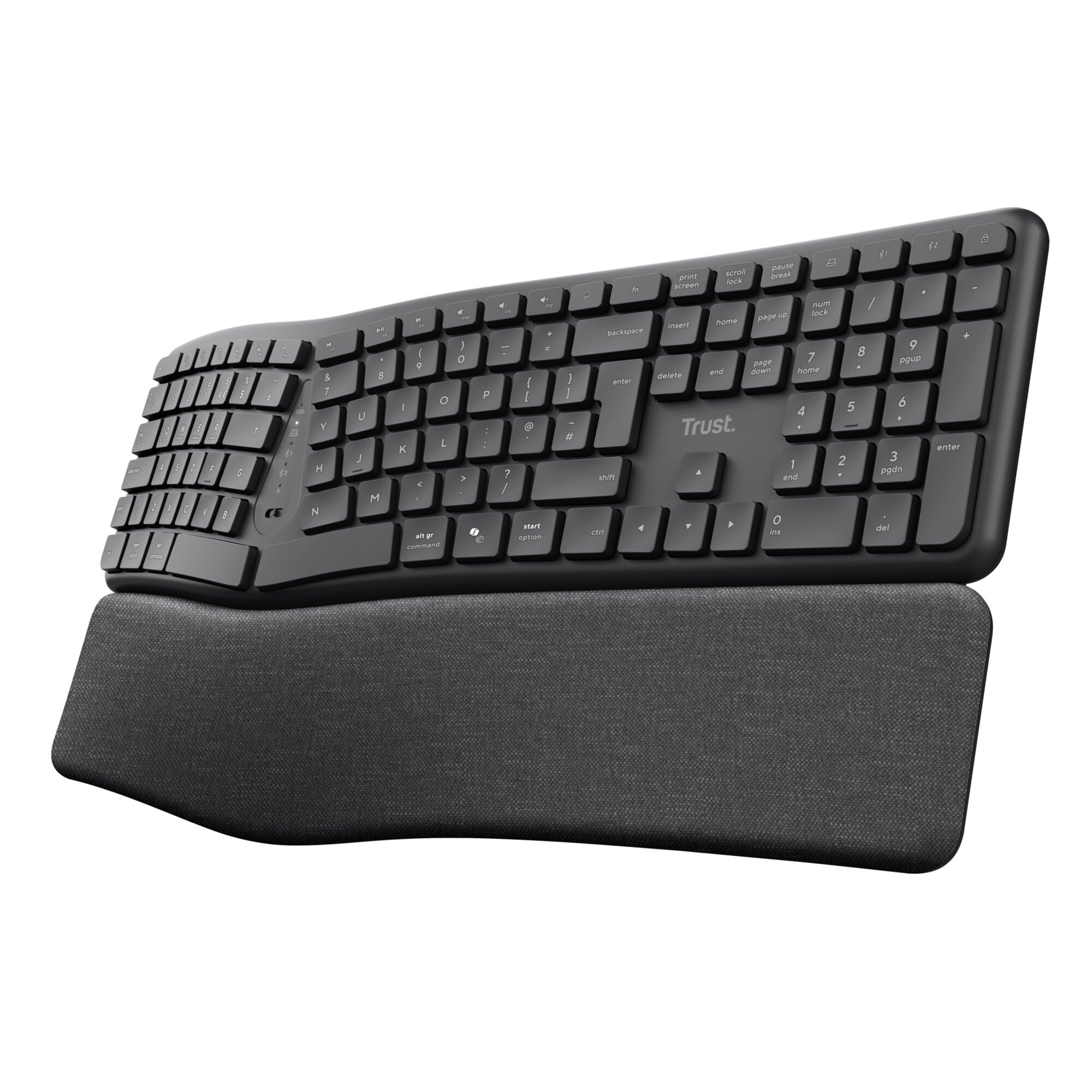
Trust Arvia Silent Wireless Ergonomic Keyboard UK QWERTY Layout Bluetooth + 2.4GHz, Multidevice Split Keyboard with Comfortable Palm Rest, Multimedia Keys, Home Office PC Computer Laptop Mac, Black
£54.99 · Trust
Frequently asked
5 questions01What switches does the AULA F75 75% Wireless Mechanical Keyboard use?+
The AULA F75 comes with pre-lubricated LEOBOG Graywood V3 linear switches as standard. These are smooth, quiet linear switches similar to Cherry MX Reds but with better factory lubrication. However, since the keyboard is hot-swappable, you can replace them with any MX-style mechanical switch (3-pin or 5-pin) without soldering. I've tested it with Gateron Oil Kings, Cherry MX Browns, and Durock Silent Linears, all of which work perfectly.
02Is the AULA F75 75% Wireless Mechanical Keyboard good for gaming?+
Yes, it's genuinely good for gaming. The 2.4GHz wireless connection provides 1000Hz polling rate with no detectable latency, full n-key rollover prevents ghosting during complex key combinations, and the linear switches are responsive for rapid inputs. I've used it extensively for both competitive shooters and MMOs without any performance issues. The compact 75% layout also leaves more desk space for mouse movement, which many gamers prefer.
03Is the AULA F75 75% Wireless Mechanical Keyboard loud?+
No, it's surprisingly quiet for a mechanical keyboard. The pre-lubricated linear switches and multiple layers of sound dampening create a muted clack rather than the loud clicking associated with mechanical keyboards. It's office-appropriate and won't disturb colleagues on video calls. The spacebar is the loudest key with slight rattle, but it's not excessive. If you want it even quieter, you can swap in silent switches since it's hot-swappable.
04Is the AULA F75 75% Wireless Mechanical Keyboard worth buying in 2026?+
Absolutely, especially if you're new to mechanical keyboards or want wireless functionality without spending £150+. The hot-swappable switches, tri-mode connectivity, solid build quality, and long battery life make it exceptional value at around £68. The main compromises are ABS keycaps and mediocre software, but neither significantly impacts daily use. For the price, it's one of the best entry points into mechanical keyboards currently available.
05What is the biggest downside of the AULA F75 75% Wireless Mechanical Keyboard?+
The software is the most frustrating aspect. It's functional but poorly designed with an outdated interface and awkward navigation. The English translation is occasionally confusing, and finding specific settings requires clicking through multiple tabs. Fortunately, once you've configured your preferences, they're stored in onboard memory, so you don't need to keep the software running. Some units also have minor stabiliser rattle, though this varies by unit and can be fixed with basic maintenance.